You built the store, uploaded the products, maybe paid for a photo shoot, maybe even ran some ads. Weeks or months have passed, and your phone almost never buzzes with an order notification. "My ecommerce website is not making sales" is the sentence nearly every store owner says at some point. The good news is that a lack of sales is rarely one big mystery. It usually comes down to a few concrete problems that can be found one at a time. In this article I walk through where the problem can sit, what you can check yourself, and when outside help is actually worth paying for. I am Ümit Kırkoç. I work alone from Istanbul and handle ecommerce website projects together with search, social media and advertising, all in one pair of hands. So what follows is a diagnostic guide from someone who does this work, not a sales pitch.
Let me set one thing straight first: "no sales" is a symptom, not a diagnosis. A fever can come from a cold or from something else entirely, and you would not take random medicine before knowing which. Your store is the same. Raising the ad budget, cutting prices or rebuilding the whole site without knowing where the leak is usually just burns money.
Find out where the problem is first
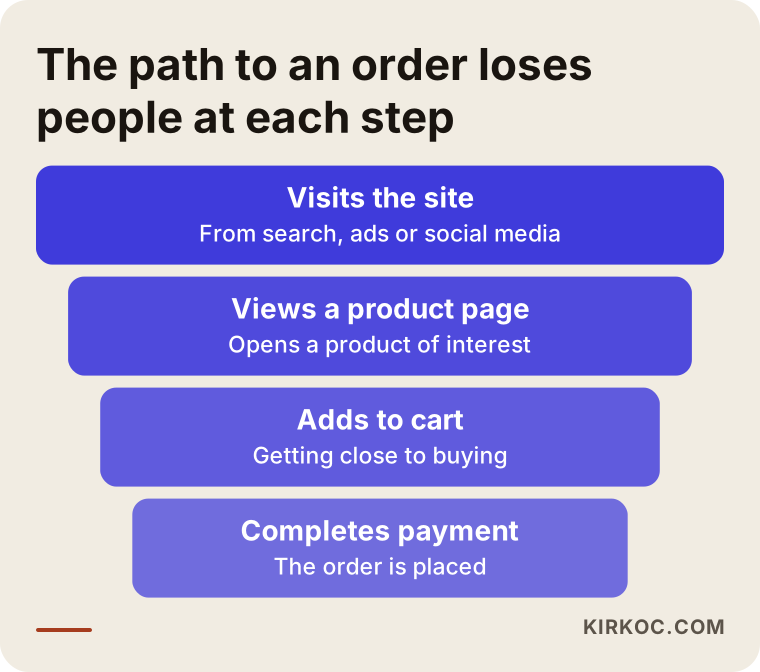
A sale in an online store is a chain of steps. Someone arrives. They look at a product page. If they like it, they add it to the cart. They move to checkout and finish the order. At every step some people drop away, and that is normal. The trouble starts when one step loses far more people than it should. Diagnosis means finding that step.
The picture below shows the path from wide to narrow. It contains no numbers on purpose, because every store has different ratios. Its only job is to remind you that you are looking for the step where you lose people.
Measuring these steps needs only free tools. Google Analytics, plus the built-in reports of your store software (WooCommerce on WordPress, Shopify, BigCommerce and similar), will show how many people arrive, how many add to the cart and how many leave at payment. If you have never opened those reports, opening them is the most valuable first move you can make. What is not measured cannot be fixed.
Three basic questions
The whole diagnosis boils down to three questions. First, is enough of the right traffic coming to the store? Second, are visitors convinced once they see the product? Third, do convinced visitors hit an obstacle at payment? Whichever answer is "no" is where your effort belongs. The decision chart below makes that first split easier.
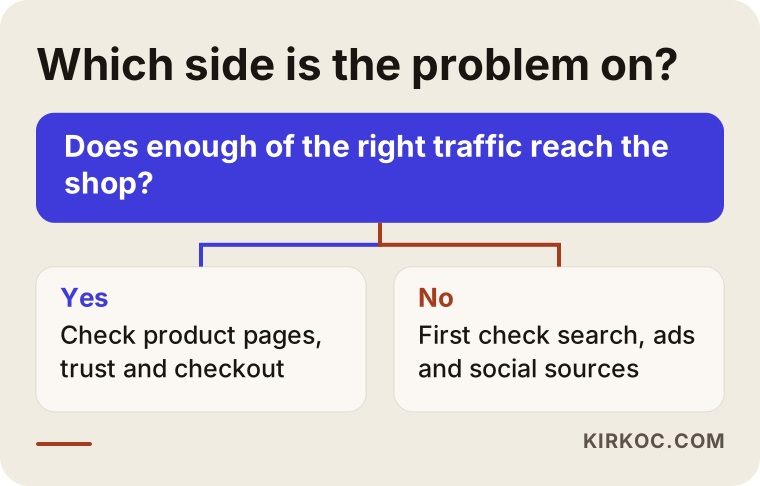
After the chart you are left with two possibilities: either the number of visitors is low, or there are visitors but they do not order. The fixes are completely different, so do not mix them up. You cannot solve a traffic problem by editing a product page, and you cannot solve a product page problem with more ads.
From symptom to cause
The table below pairs the symptoms I see most often with likely causes and places to look. Read it as a map for deciding where to start, not as a final verdict.
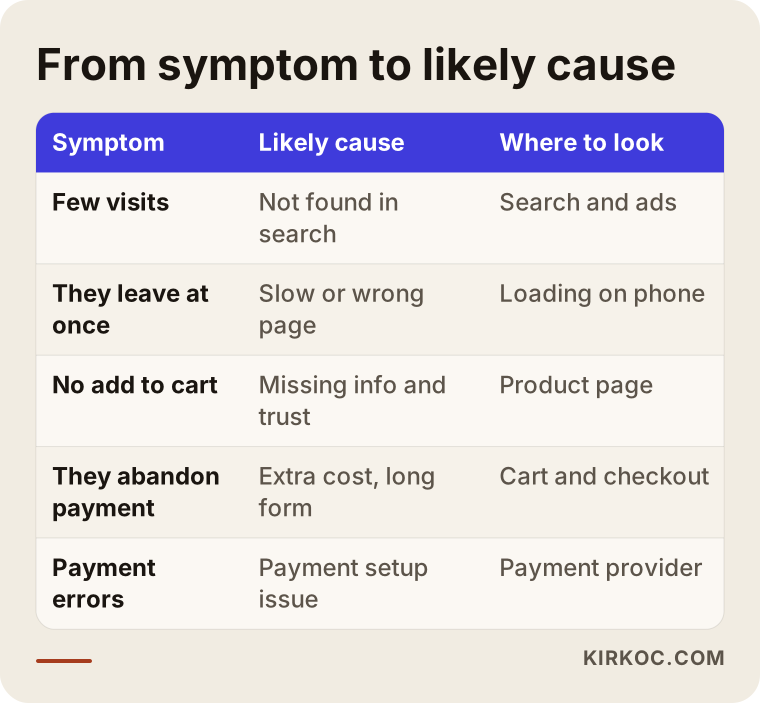
Let me make the table concrete with an example. This is a hypothetical scenario, not a real business.
Example scenario 1: visitors, but no carts
Imagine a small brand that sells handmade leather wallets. The owner posts on social media regularly, runs some ads, and the store gets a reasonable number of visits every day. Yet weeks go by without a single order. The easy conclusion is "people think it is too expensive." Then the reports tell a different story: most visitors open a product page and leave within seconds. Opening the page on a phone explains why. The photos are huge and load slowly, the first screen shows only a large image, the price and the add-to-cart button sit far below, and the dimensions are not written anywhere.
In this scenario the problem is not the price. It is a page that loads slowly on a phone and does not answer the questions a buyer has. Compressing the photos, moving the price and button to the first screen, and stating the size and return terms in plain view often opens the path to an order. I cannot promise a result, but once the location of the problem is right, the direction of the fix becomes clear.
Traffic problems: too few visitors, or the wrong ones?
If your visitor numbers are low, or the people arriving are the wrong people, start by looking at how people find you. Most new stores rely on three sources: search engines, social media and paid ads. Each brings a different kind of intent.
A person searching on Google often wants to buy something and knows what they are looking for. A person arriving from social media has usually bumped into your product while scrolling and is curious; the buying decision is slower. The quality of ad traffic depends on who you show the ad to and what the ad promises. If your ad shows one product and the click lands on the home page, the visitor cannot find what they saw and leaves.
How do people search for your product?
Search behavior in ecommerce is a little different from services. People usually type either the exact name of a thing or a need: "women's leather wallet," "organic baby blanket," "waterproof winter boots." For the first kind of search your category page and product page should come up. For the second kind, a helpful guide or a well-written category description can do the job.
Here is the common trap. On many stores the category page is only a grid of products with not one sentence of explanation, and the product page carries a short description from the manufacturer that appears word for word on dozens of other sites. When Google sees the same text everywhere, it cannot tell which site to favor, and it often defaults to the big marketplaces. The invented example below shows how two results can look different for the same search.

Writing your own product descriptions is tedious, but it is one of the most lasting investments you can make. A few paragraphs about what the product is made for, who it suits, how to care for it and what size it really is send a much clearer message to Google and to the buyer. If you compete with Amazon, Etsy or, for sellers in Turkey, marketplaces such as Trendyol and Hepsiburada on the same product, your own store has to offer something they cannot: your story, real expertise, fast replies, bundles or a guide written for that product.
Ad traffic and intent
If you are paying for ads and clicks come in but sales do not, question two things separately. First, who sees the ad? An ad shown to a very broad audience collects many clicks and few buyers. Second, where does the click land? A product ad should open that product's page, and a category ad should open that category. The home page is the wrong destination for most ads. When ads and the store are handled together, the problem is easier to locate. When two different people manage them, each can blame the other.
The product page: where the buyer is convinced
If there are visitors but no carts, the product page is the first place to look. In a physical shop a salesperson talks, hands over the product and answers questions. Online, the page has to do all of that. If it does not answer the question in the buyer's head, they switch to another tab.
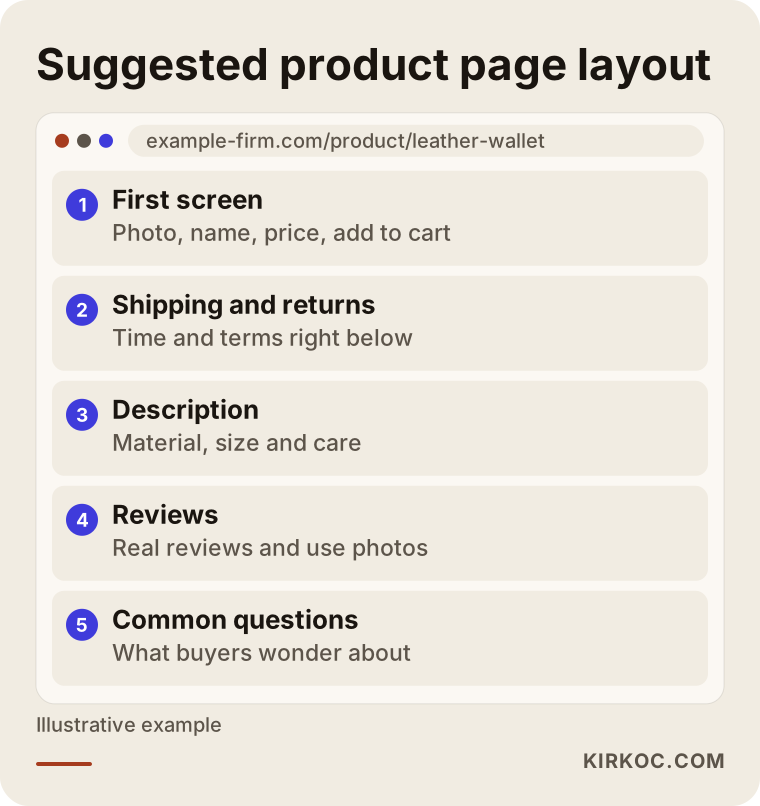
A good product page usually follows this order: on the first screen a clear photo, the name, the price and the add-to-cart button; right below, shipping time and return terms; then the description, dimensions, material and care; then real reviews or photos of the product in use; and finally frequently asked questions. The sketch below shows this layout as a page outline.
Without trust, no price will sell
Paying a store you have never used before is a small risk for a person. Every detail that lowers that risk brings the sale closer. Contact details, a real address, the company name, terms of sale, return and privacy policies, payment methods people recognize, a secure connection (the padlock in the address bar) and a social media account that is genuinely active are all trust signals. I cannot give you a firm view on what those legal texts must contain; for a commercial store, ask a lawyer to confirm which policies your country requires. What I can say is that having them on the site and easy to reach reads as seriousness to a buyer.
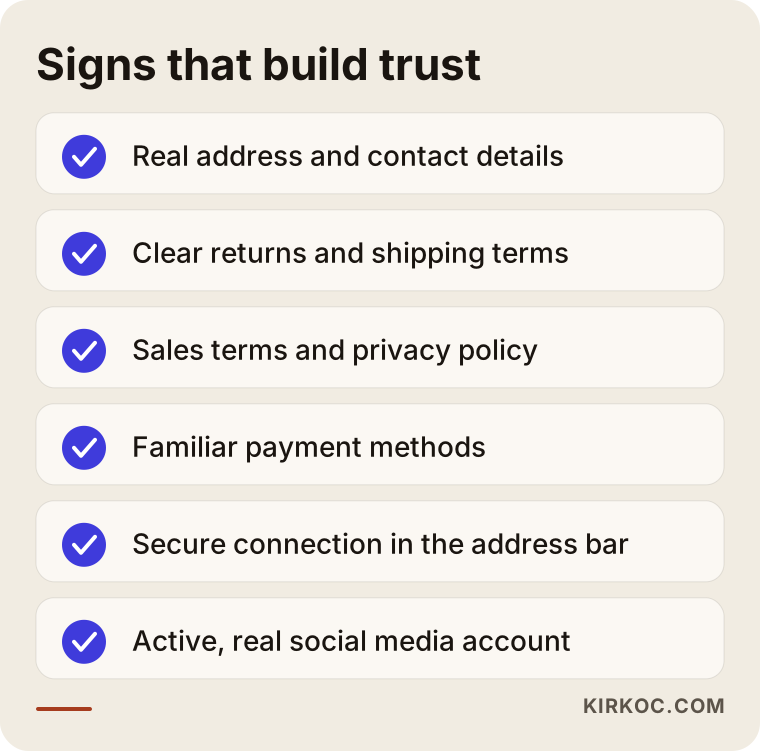
Go through the list on your own store as if you were a stranger. Better still, hand your phone to someone who has never seen the site and ask, "Would you buy from here, and why or why not?" The answer can teach you more than hundreds of rows of reports.
The checkout step: the order lost at the last moment
If people add to the cart but orders do not follow, the problem is very likely in the cart and checkout flow. This is the most painful loss because the person has already decided to buy and you lose them on the final step. The causes I meet most often are shipping costs that only appear at the end, forced account creation, a very long form, a checkout page that looks broken on a phone, card payments that fail, and unexpected extra costs.
One note here: if you set up your payment provider yourself, always test it with your own card. Sometimes a system fails silently and you never hear about it. Placing your own order from start to finish for the first time exposes many problems in a minute.
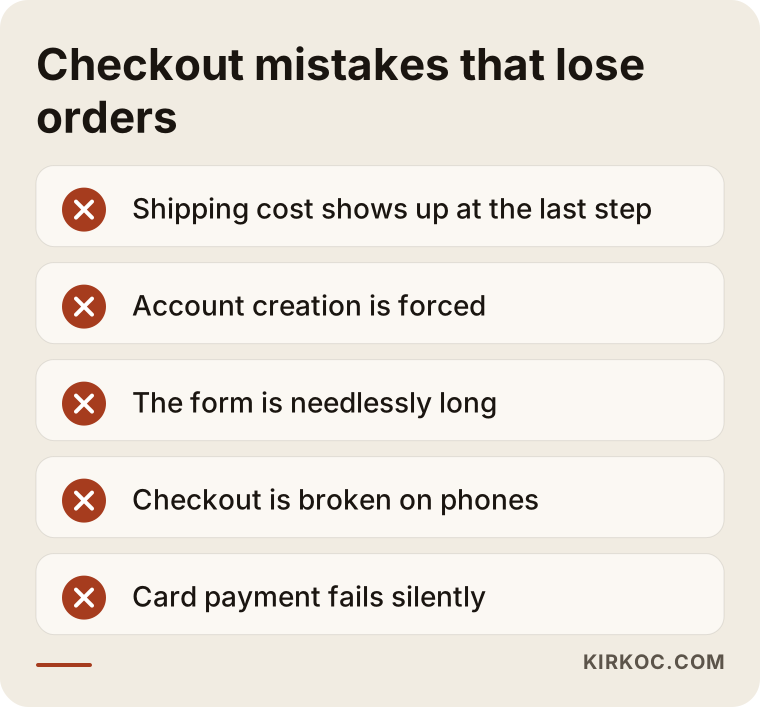
Example scenario 2: they add to the cart, then abandon payment
This is also a hypothetical example. Picture a home textiles store. Add-to-cart numbers are decent but orders are very few. The owner first assumes the prices are too high and offers a discount, and nothing changes. Then the owner goes through checkout personally and notices something: the shipping fee only appears on the third step, an account is mandatory, and the phone number field keeps rejecting valid formats. Anyone trying to finish an order meets one obstacle after another.
The fix has nothing to do with price. Shipping information is shown on the product page and in the cart from the start, guest checkout is switched on, and the form is shortened. I cannot know the result of such a change in advance, but the example is typical of cases where a discount does not solve the problem and measurement shows that the real obstacle is somewhere else.
What you can do yourself, and where you need an expert
You do not have to outsource everything. Some checks only need time and attention. Others need technical knowledge, experience and the right tools. The comparison below sums up the split.
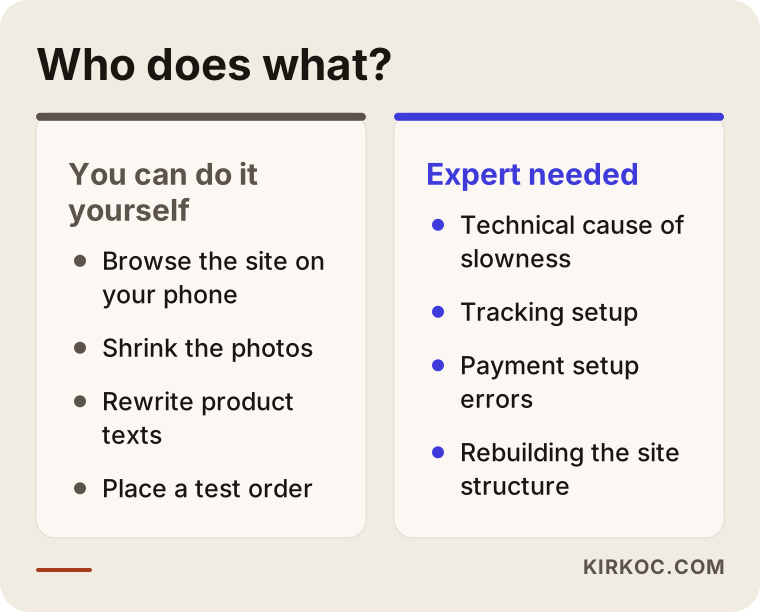
Among the things you can do yourself: browse the store on your phone from start to finish, compress product photos, rewrite product descriptions in your own words, make shipping and return terms visible, place a test order to try the flow, and open the reports once a week. None of that requires code.
Expert help makes sense in other situations: when slowness comes from the hosting or the theme, when pages do not show up in search engines, when the payment system fails again and again, when tracking is missing or set up wrongly, when you spend on ads and cannot tell what works, or when the structure of the store (categories, filters, page layout) needs to be rethought. In those cases trial and error costs both time and money.
Common mistakes
These are the mistakes I see most. The first is raising the ad budget before finding the problem, which is like pouring more water into a leaking bucket. The second is trying to promote every product at once, so the visitor cannot tell what your main product is. The third is copying product descriptions from the supplier. The fourth is checking the store only on a computer when most buyers arrive on a phone. The fifth is neglecting reviews and trust signals. The sixth is making many changes at once and then not knowing which one worked; changing one thing at a time and watching the result teaches far more.
Expectations matter too. A newly launched store making heavy sales in its first weeks is usually unrealistic. Search engines need time to get to know a site, and trust takes time to build. How long depends on the site and the industry, and nobody can give you an exact date. Still, if you see measurable improvement within weeks, such as add-to-cart numbers or time spent on product pages starting to move, that is a sign you are heading in the right direction.
How should you read the numbers?
When you open the reports, do not get stuck on a single number. "Number of visitors" on its own says very little. You need to see which source they came from, which device they used and which page they left on. Track phone and desktop visitors separately; often the phone has a problem and the desktop does not, and the average hides it. In the same way, separate visitors who come from ads from those who come from search. If one source brings many visits and no orders, the problem may be the intent of that source or the page it sends people to.
Look at time as well. After you make a change, give it a few weeks before judging the result; deciding from a one-day swing can send you the wrong way. Holidays, payday weeks and sale seasons also move orders around. Compare similar periods where you can, and write down every change you make.
A step-by-step diagnosis and repair process
Putting the work in order prevents panic decisions. When I look at a store I usually follow this sequence: first I make sure tracking is set up correctly; then I look at the source and quality of traffic; then I examine the product pages and category structure; and last I run through cart and checkout from start to finish. I turn the findings into a priority list and do the easiest, most effective item first.
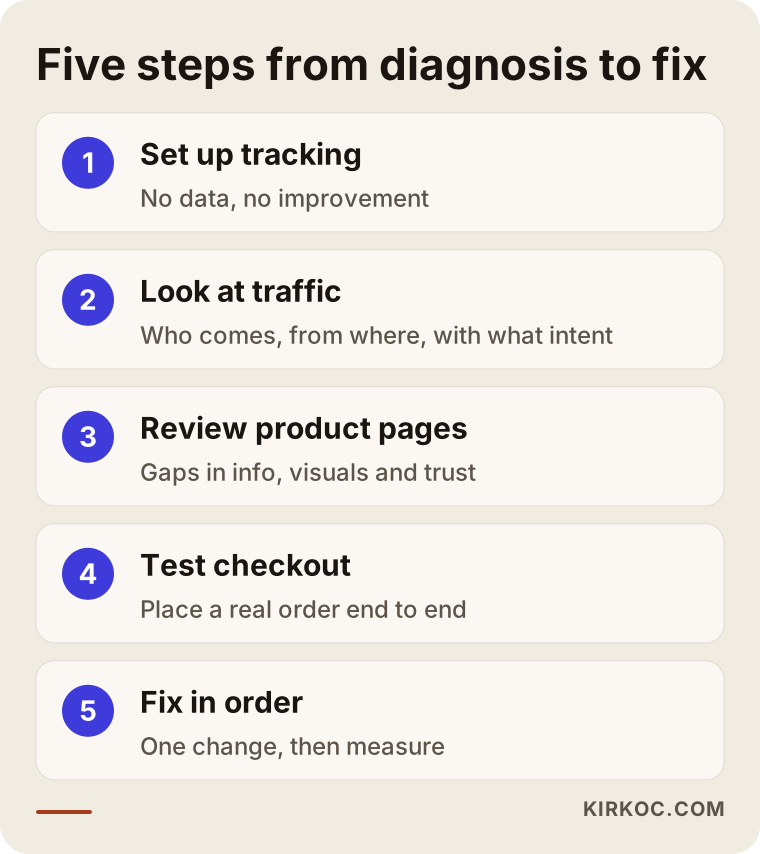
The order matters. If tracking is not in place, you cannot see whether any change helped. If the traffic is wrong, perfecting the product page has limited effect. If checkout is broken, every other improvement is wasted. So you check the whole chain first and then repair the links one by one.
How do the first weeks go?
Fixing a store does not happen overnight, but it should never feel vague either. The timeline below summarizes the workflow I typically follow. The durations stretch or shrink depending on the state of the store, and I do not promise a fixed calendar.
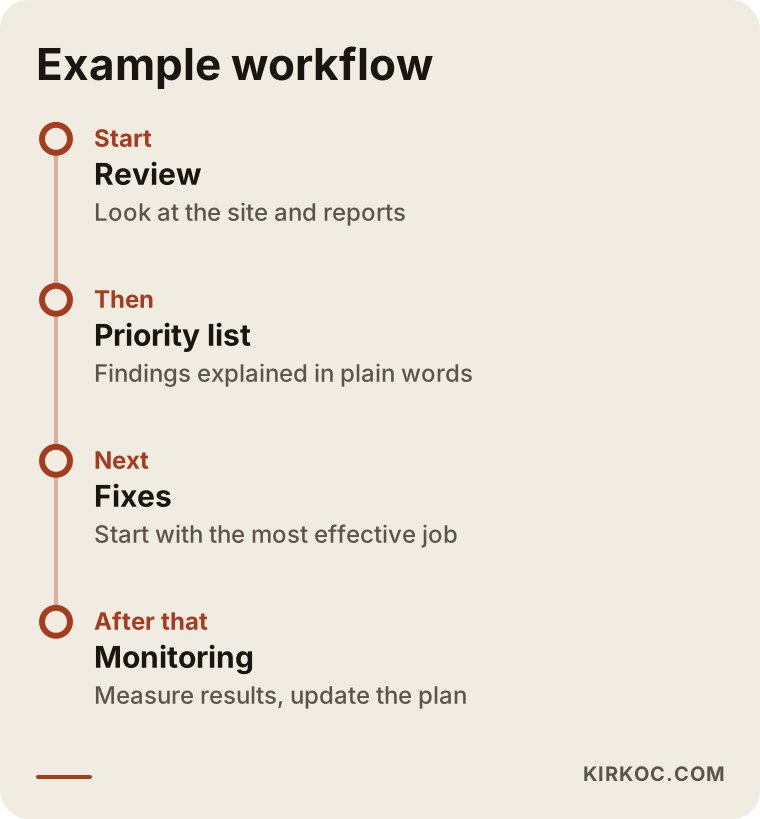
What matters is that at the end of every stage I explain what was done and why. I do not just say "fixed." I explain what was broken, what I changed and what comes next, so that you understand your own store at the end.
What decides the cost of fixing it?
I will not give numbers, because every store is in a different state. But I can tell you what the cost depends on. The platform and the condition of the theme are among the biggest factors: on a solid base, small corrections may be enough, while a badly built structure may need more extensive work. The number of products matters too; rewriting hundreds of descriptions is a different job from tidying a handful. The need for photos and content, the complexity of payment and shipping integrations, whether ad work is involved, and whether the engagement is one-off or ongoing also shape the price. Quoting before looking at the store would not be honest. Once I see what is needed, we talk about scope and cost clearly, in writing.
How working with me works
I do this work alone and in one pair of hands. In practice that means you talk to one person about the store, search visibility, social media and ads. While I fix a product page, I can also see whether the ad points at that page, whether the way your social posts describe the product contradicts the store, and where checkout trips people up. You do not have to carry messages between different people or companies.
I usually proceed like this: first I look at your store and your reports, then I explain what I found in plain language and in order of priority. We separate what you can do from what I should do. I will not try to sell you work you do not need; sometimes the problem is a small adjustment, and I will say so. I cannot guarantee sales results, because nobody honestly can, but I can help you find what is broken, understand the fix and measure progress.
Frequently asked questions
What should I do first if my ecommerce store is not making sales?
Measure before you change anything. Look at how many people arrive, how many view a product, how many add to the cart and how many abandon payment. Raising the ad budget or lowering prices before you know which step has the problem can be the wrong investment.
Visitors come but nobody adds to the cart. Why?
Usually the product page is not convincing enough, or the visitors are the wrong audience. A page that loads slowly on a phone, unclear price and shipping information, missing size and description details and weak trust signals are the most common causes. Start by browsing the page on your phone as a stranger would.
What can I do about customers who add to the cart and abandon payment?
Go through the checkout yourself from start to finish. If the shipping cost shows up late, an account is mandatory, the form is long or the payment page is broken on a phone, fixing those can save orders. If none of these is the issue, look for an error in the payment setup.
Will running ads solve my ecommerce sales problem?
Not by itself. Ads bring people to the store, but if the store does not convince them or checkout blocks them, they will not order. It is more efficient to find and fix the problems in the store first and then point ads at that solid base.
With big marketplaces around, can my own store really sell?
Yes, but it has to offer something different. If you present the same product with the same text, competing with the big platforms is hard. Your brand story, original product descriptions, fast communication, a direct relationship with customers and guide content are the strengths that set your own store apart from a marketplace.
How long does it take for sales to go up?
It depends on where the problem is and on the state of the store. Fixing a checkout error can show an effect quickly, while topics like search visibility take longer. Be careful with anyone who promises an exact timeframe or result.
Do I need to rebuild the site, or are fixes enough?
Most of the time fixes are enough. If the platform is very old, the structure is wrong from the start or the site is unusable on a phone, a rebuild may make sense. Before deciding, it is best to see what the current site is actually getting wrong.
What does the cost depend on?
It depends on the platform, the number of products, the need for content and photos, the complexity of integrations, and whether the work is one-off or ongoing. Quoting an exact figure without looking at the store would not be honest. After I review it, we discuss scope and cost openly and in writing.
If you want to find out together where your store's sales get stuck, take a look at my ecommerce website and repair service and write to me. I will look at the store and tell you in plain language what I found and where you should start.