You opened your phone this morning and found a notice: your ad account has been restricted or shut down. The campaigns that were running last night have stopped, your payment method looks frozen, and maybe you cannot even get into your business page. If you searched "Facebook ad account disabled, what now?" and landed here, you are not alone. It happens to a surprising number of advertisers, including careful ones. I am Ümit Kırkoç, and I work from Istanbul handling a small business's website, search visibility, social media and ads as one job. In this article I will explain why accounts get shut down, what to do in the first hours, what to avoid, how to write an appeal, and how to keep your business running even if the account does not come back. If you would rather hand the whole thing to someone, the scope of my digital advertising management service is described plainly at the end.
First, a distinction that saves a lot of confusion. "My ad account is disabled" can describe at least three different situations, and each one has a different fix. The mildest is a single rejected ad. Your account works, one ad was refused, and you usually fix the wording or image and move on. The second is a restricted ad account: you cannot run ads, but your page and your personal profile still work. The third and heaviest is the loss of your business management account (Meta Business Manager, the control panel that holds your pages, ad accounts and the people who work on them) or of the personal profile that is tied to it. Steps taken without knowing which of the three you are in often make things worse.
Stay calm and read what actually happened
When an account goes down, the instinct is to press every button in sight. Open a new account, relaunch the same ad with another card, message support ten times. None of that helps in the first hour. Start by reading what Meta told you.
Meta has a screen that shows the health of your advertising: Account Quality, found in Business Suite and in Ads Manager. It lists why the account was limited, which ads were judged against the rules, and whether an appeal option is open. If you cannot log in, check your email inbox and your spam folder, because Meta usually sends the same decision by email as well as showing it in the panel.
The picture below puts the first moves in order.
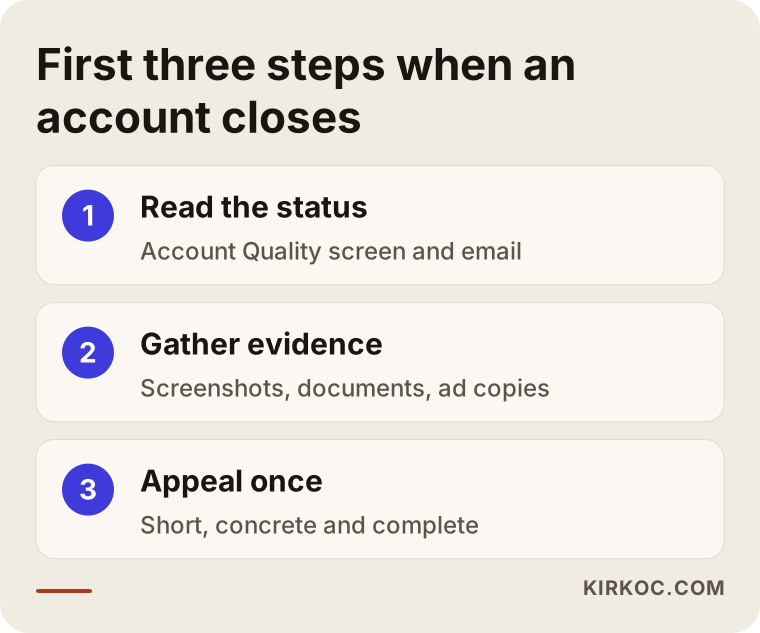
The logic is simple. You understand the situation, then you collect your proof, and only then do you appeal. Filling in the appeal form in a rush, before you know the reason, often spends your one good chance on a weak request.
Take screenshots and delete nothing
Capture every warning, rejected ad and notification you can see. Do not delete campaigns, creatives or ad copy. When you appeal, you may need to point at exactly what was rejected, and deleted material makes it harder to defend yourself.
Why accounts get disabled or restricted
Most of these decisions begin with an automated system. Software scans your ads and your account behavior, and a human usually looks only when you appeal. That is why a well-meaning advertiser can occasionally be flagged by mistake. Still, most causes fall into a handful of groups.
Ads that break the advertising rules. Promises that do not reflect reality, before-and-after comparisons, wording that points at a personal trait ("Are you in debt?" or "Want to lose weight?" addressed directly to the reader), and firm result claims in health and beauty are the usual culprits. They can sound harmless to you and still be a red flag to an automated check.
Payment trouble. A declined card, a failed charge, a card that belongs to someone else, or a sudden jump in spending can all limit an account.
Suspicious logins and security. Signing in from an unusual country or device, using a VPN, several people sharing one personal profile, or a hacked account can trigger a protective shutdown.
Website, page and business verification. If the site your ad points to looks unsafe, lacks a privacy policy, contact details or refund terms, or if the business identity was never verified, problems follow.
The page's history. A page with earlier violations or a pile of complaints is examined more strictly when it runs new ads.
Knowing which cause applies to you decides what your appeal should say. So rely on the reason written in the panel rather than on a guess.
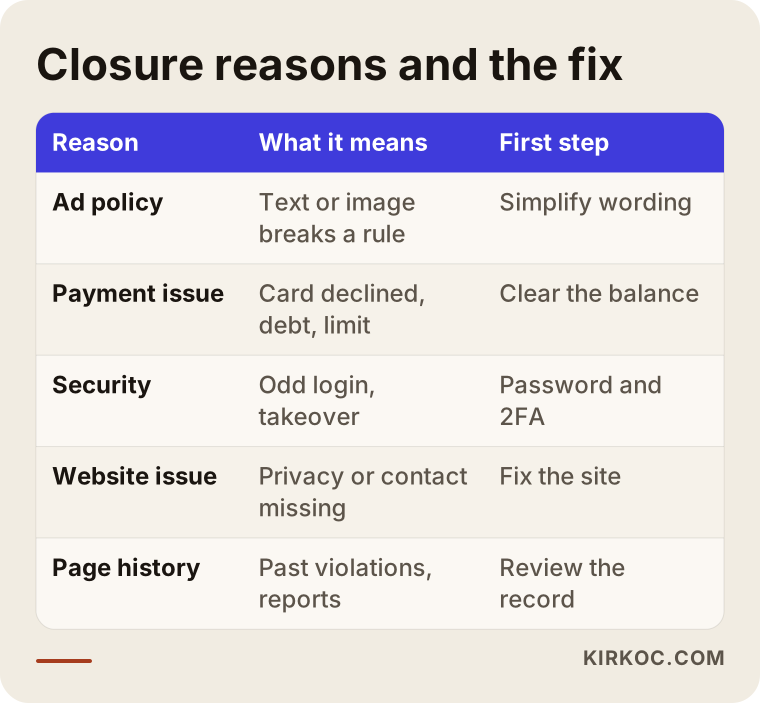
The graphic lists a first step beside each reason, because the same "disabled" notice calls for very different responses depending on whether the trouble is a payment or a policy matter.
Rejected ad versus restricted account
When an ad is rejected, the account still works. A reason appears next to the ad. You can edit the text or image and submit again, or, if you believe the decision was wrong, ask for a review. There is no need to hurry, but it matters not to repeat the same mistake, because repeated violations lower the standing of the whole account.
When the account itself is restricted, every campaign stops and you cannot create new ads. This is where the appeal form comes in. Meta's appeal screen typically asks for a short explanation and sometimes an identity document or a business document.
The third situation, the loss of the business management account or the personal profile, is the hardest. The trouble is no longer only your ads; control of your page can slip away too. That is why leaving a business page connected to one personal profile is a real risk. I will come back to how to prevent that further down.
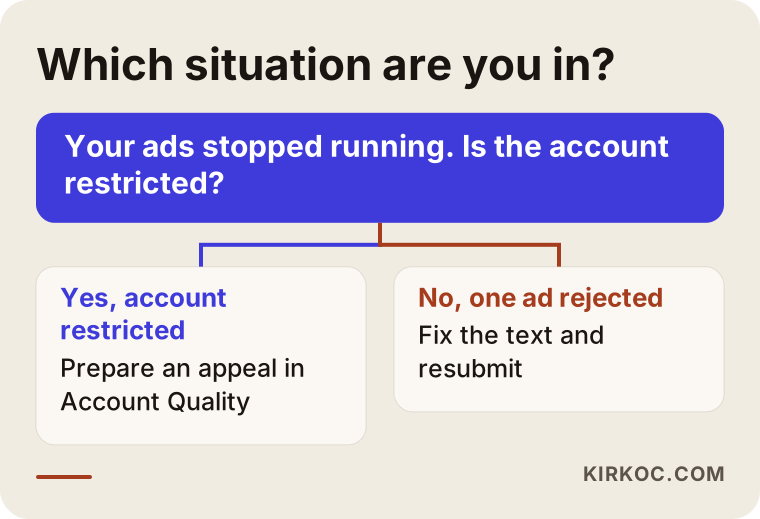
The decision flow is meant to help you locate yourself in a few seconds. Once you know which box you are in, the steps below become much clearer.
What to do, step by step
This order reflects how I would approach such a case. You can follow all of it yourself.
1. Find the reason and write it down
Copy the explanation from the Account Quality page or from the email exactly as it appears. If it only says "policy violation," look at which ad or which page is shown. If the reason is vague, note that too. In your appeal it is perfectly fair to say that you could not understand the reason and ask for it to be explained.
2. Check payment and security
Look for an unpaid balance, a failed charge or an expired card. Change the password on your personal profile, switch on two-factor authentication (a second confirmation step when you sign in) and log out of any session you do not recognize. If the account was taken over, these steps strengthen your appeal and help prevent a second shutdown.
3. Review the website your ad leads to
Does your site clearly show a privacy policy, contact details, the business name and, if you sell products, refund and delivery terms? Does the promise in the ad match what the landing page actually says? If the ad says "free" and the page asks for payment, that mismatch alone can be the reason for rejection. If the site is missing these things, fix them before you appeal. Because I also build and maintain websites, I often end up repairing the site as part of an ad problem, and that is a practical advantage of having one person responsible for both.
4. Write the appeal plainly and concretely
An appeal form is usually a short text box. Skip long defenses and angry language. Use this structure instead: what your business does, what the ad was trying to say, what you believe was misunderstood, and what you will do to prevent it in future. A short, polite, factual message reads as more credible than a long one.
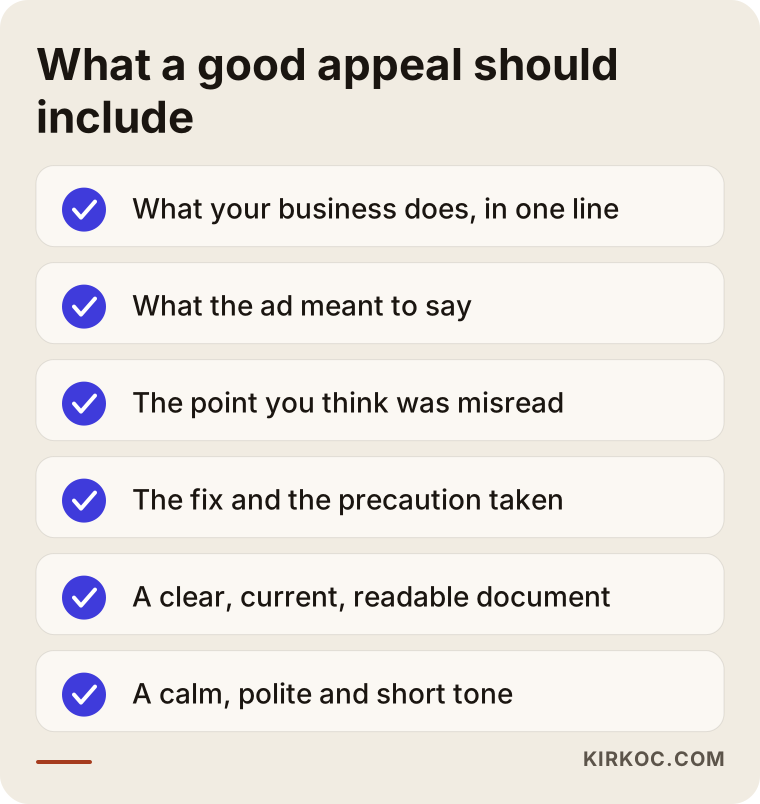
Those four parts are a skeleton, not a template. Fill each one with your own details, and never paste another person's text word for word.
5. Keep the right documents ready
In some cases Meta asks you to prove that your business is real. That might be a business registration certificate, a tax registration document, a utility bill or invoice in the company name, or an operating license, depending on your country and your situation. If you run a company in Turkey, for example, the equivalents are the tax certificate and the trade registry record, but whatever the panel asks for is the list to follow. The legal name on the document should match the name shown on your page and your site.
6. Appeal once, and do it properly
Submit the appeal one time, prepared and complete. Sending the same form again and again, or writing through several channels at the same moment, does not help, and it can muddy your case. The waiting time varies; sometimes it is short and sometimes long. Nobody can honestly promise a specific number of days.
7. Do not stop your business while you wait
Do not shut down every sales channel until the account returns. I cover the alternatives further down: organic posts, Google, email and WhatsApp can all carry you through the wait.
Mistakes to avoid
The errors businesses make in this situation tend to enlarge the problem rather than solve it.
Opening a new account immediately. Creating a fresh personal profile or ad account to get around a shutdown is generally treated by Meta as an attempt to evade a restriction, and the new account can be closed too. The way out is to recover the existing account through the official route.
Using someone else's card or profile. In an emergency it is tempting to borrow a friend's card or login. A mismatch between the payment method and the account owner is itself a reason for a new restriction.
Re-uploading the same ad without changes. Copying a rejected ad into another campaign without fixing anything looks like a repeat violation.
Flooding support. Dozens of messages in a short time, or the same request sent to several people, does not speed anything up.
Uploading fake or blurry documents. Unreadable, outdated or mismatched documents raise the chance of a rejected appeal. Use a clear scan that is current.
Believing a "we will get your account back" promise. Some people on social media offer paid recovery. Do not send money to anyone who claims to have an inside door at Meta. This is one of the best-known scams. Nobody can guarantee a recovery outside the official appeal route.
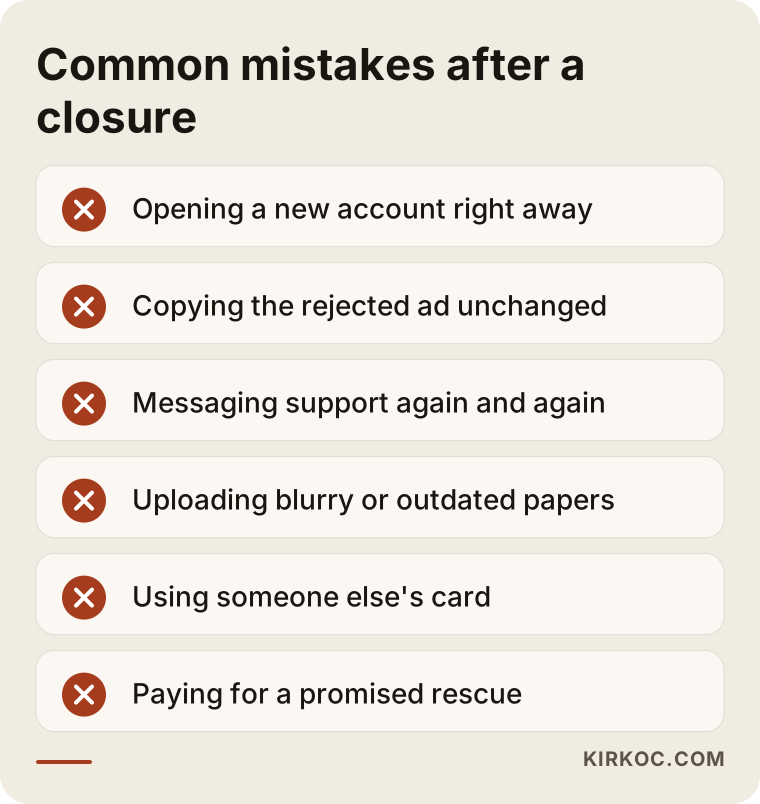
Every item on that list is a common way businesses lose time and money. What they share is that they come from panic and the search for a fast fix.
Two hypothetical example scenarios
The two cases below are invented. They do not describe a real person or company; I made them up to show the reasoning.
Scenario 1: a beauty clinic restricted over ad wording
Imagine a skin clinic running an ad on Instagram and Facebook that promises to clear all marks in two weeks with a particular method. A few days later the ad is rejected. The owner changes a few words, uploads it again, it is rejected again, and then the whole account is restricted.
The better path would have been to open Account Quality and see exactly which sentence caused the problem, then rewrite the ad so it describes the service without guaranteeing results and without speaking directly to a reader's personal feature. The owner would also check that the website does not make the same promises, and then appeal once with the revised examples attached. Health and beauty advertising is a sensitive area. What may legally be said differs from country to country, so a professional with legal knowledge should be consulted.
Scenario 2: an online store closed over payment
Picture an online shop that, during a busy sale period, suddenly raises its daily ad budget. The card limit is not enough, the charge fails, and after several attempts the ad account is restricted for payment reasons. At the same moment the owner tries to add a second card, and the system treats that as suspicious activity.
Here the debt should be cleared first, the payment method confirmed to belong to the account owner, and only then should the appeal be sent. Raising the budget gradually instead of in one jump lowers the chance of a repeat. In this case the issue was never the ad content but the payment pattern, so the appeal should explain that the payment problem has been resolved instead of defending the ad.
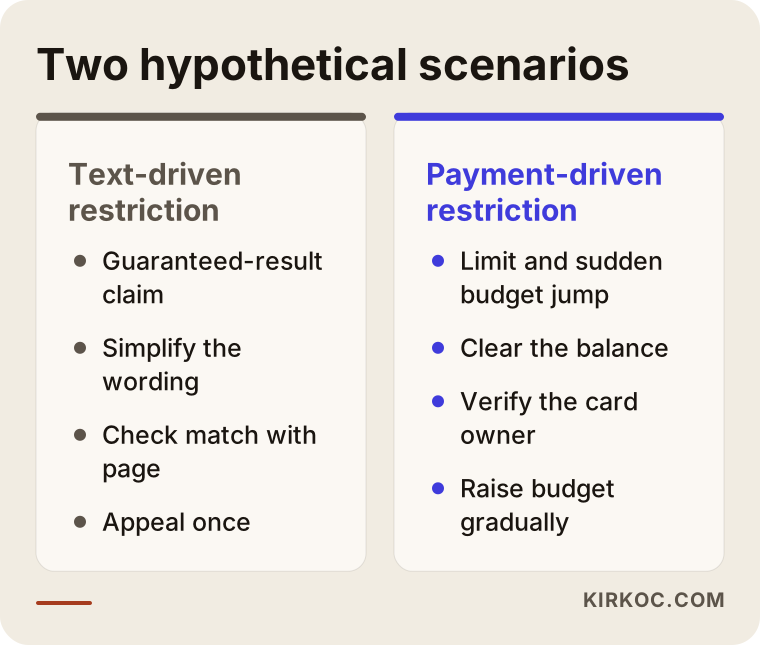
The comparison shows that one and the same "disabled" notice can come from two entirely different roots. A single standard appeal letter seldom works for both.
How your business keeps running until the account returns
While your ad account is down, your flow of customers should not stop completely. This is where depending on a single channel becomes visible as a risk. During the wait you can consider the following.
Google. If customers actively search for what you sell, search ads on Google or work on your local visibility can fill part of the gap. A new channel takes time to build, but something is better than nothing.
Organic content. If you can still reach your Facebook page, keep posting regularly. Without ads, your page still stays visible to the people who follow it. Instagram may keep working as its own account, though depending on the scope of the restriction it can be affected when linked to the same management account, so check what the panel says.
Direct channels. Reaching existing customers through WhatsApp, email or a phone call is a door that does not depend on an ad account. If you have no customer list, treat this incident as a warning to start one.
Your website and search visibility. If your site is solid and shows up in search results, a closed ad account does not cut off sales entirely. That is one concrete benefit of planning the website, search work and advertising together: when one channel has trouble, the others keep standing.
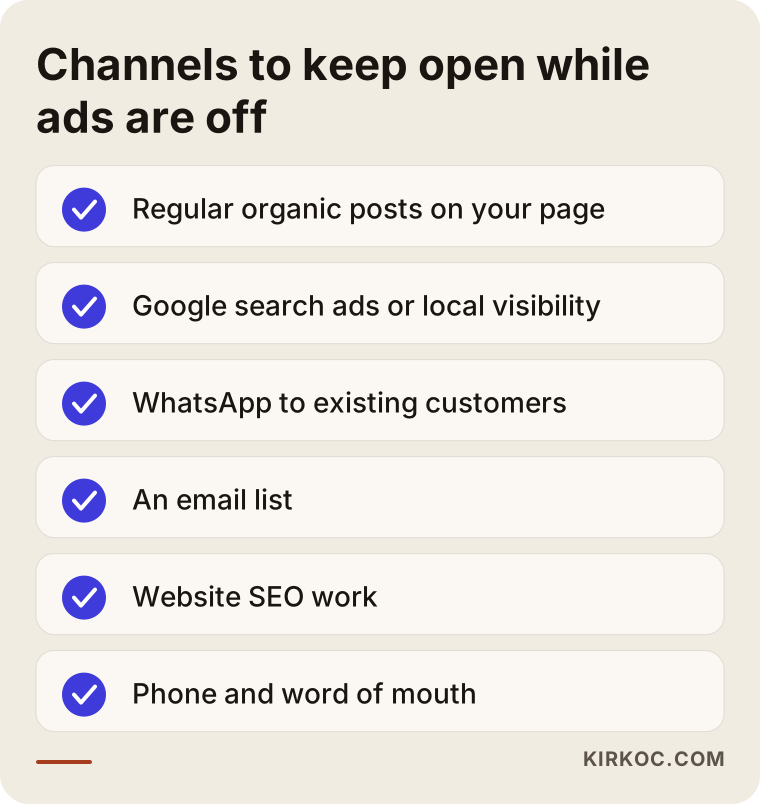
Think of this list as a bridge until the account is back. The lasting fix is to stop tying your whole business to one channel.
The setup that makes a repeat less likely
Getting the account back is half the job. The other half is reducing the chance of it happening again. For small businesses I try to set things up around a few basics.
Use a business management account, not a personal profile
If one person's personal profile alone controls a Facebook page, the moment that profile is closed you lose the page. Keeping the page, the ad account and the payment method together inside Meta Business Manager is safer. Giving admin rights to more than one trusted person also removes the single point of failure.
Finish business verification
Meta offers business verification, which means confirming with documents that your organization officially exists. Having it done puts you in a stronger position if trouble comes later. The panel lists which documents are needed.
Write ad copy conservatively
Avoid sentences that remind the reader of personal traits, firm promises of results and exaggerated comparisons. As you write, ask two questions: would the person reading this feel that something personal was said about them, and does this sentence guarantee an outcome?
Make the landing page match the ad
What the ad describes should really be on the page, and prices, conditions and contact details should be stated openly. That helps with Meta's review and with the trust of your customers alike.
Keep payments orderly
Make sure the card is valid and the limit is enough. Increase budgets step by step rather than all at once. If possible, add a backup payment method, but in the same business name.
Keep copies and records
Save your important ad images, texts and audience settings on your own computer or in cloud storage. If the account closes, you will not have to rewrite everything from scratch.
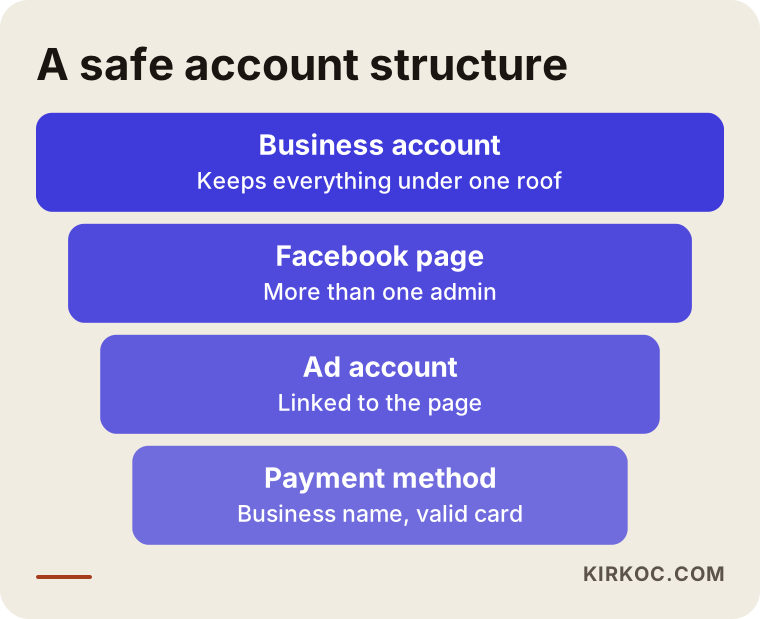
The diagram shows which parts belong under one roof. Once this structure is built properly, a problem with a single personal profile does not take down the entire business.
Doing it yourself versus getting expert help
Many cases you can handle alone. A single rejected ad, a small payment error or a simple identity verification request fall in that group. Reading the reason in the panel, correcting it and appealing once is often enough.
Expert help makes sense in these situations:
- The reason is unclear, or several causes are mixed together.
- Your appeal was rejected once and you need a second attempt.
- Roles are tangled between the management account, the page and the ad account, so it is not clear who actually owns the page.
- Your ad budget is large and every day of stopped campaigns costs real revenue.
- Your industry, such as health, finance or beauty, is treated more strictly by the ad rules.
- The same problem keeps recurring and you want a lasting setup.
I should also be honest about one thing: no specialist can promise Meta's decision in advance. Whether an account is reopened depends on Meta's review. Be careful with anyone who says "I will definitely get it back." What can be done is a correct diagnosis, a complete appeal and, even if the account is not recovered, a new setup that lets your business carry on.
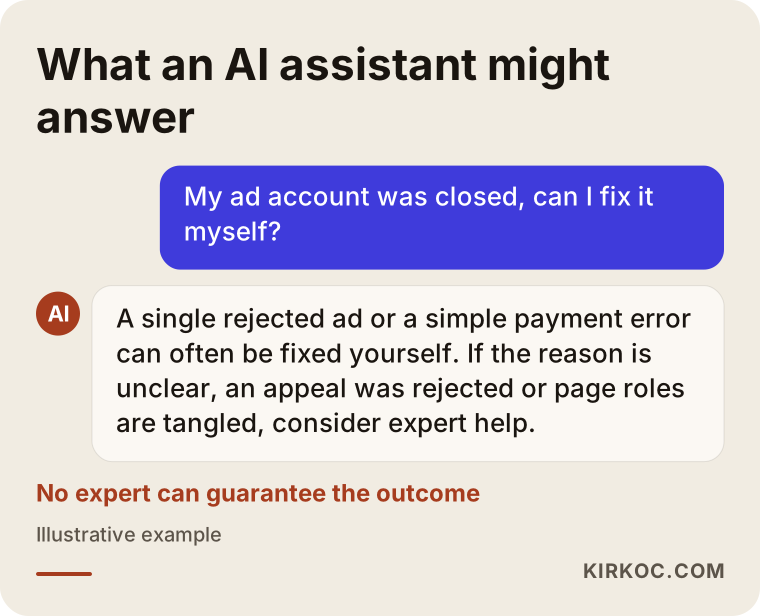
The chart separates the point where you can move on alone from the point where it is worth asking for help. If you are not sure which side you are on, simply describing your situation to me is often enough to find out.
What affects the cost
I do not quote a figure for this work, because the cost changes a great deal from case to case. The main factors that shape the scope are these:
- The type of problem. Fixing one ad and rebuilding a management account are not the same amount of work.
- The state of the account structure. If pages, ad accounts and payment methods are scattered, tidying them takes longer.
- Gaps on the website. Missing privacy text, contact details or refund terms widen the job if they have to be added.
- Whether the work is ongoing. One-time recovery help and monthly ad management are separate scopes.
- Number of campaigns and channels. Is it only Meta, or is Google involved as well?
- Creative needs. New images and copy that follow the rules take time to produce.
The ad spend itself, the money paid to Meta, is a separate item. It does not depend on my management work, and it is always paid from your own card and your own account. If you describe your situation briefly before asking for a quote, I can write down clearly what is included.
How I work with you
I work alone, which means the person you talk to is the person who does the work. When we first talk, I listen to the situation: what stage the account is at, what the Account Quality screen says, what the ad was meant to say and what your site looks like. Then I tell you which group your problem belongs to, and if it is something you can solve yourself, I say so openly.
If you need support, I carry out the appeal preparation, repair the gaps on the site and write new ad copy that follows the rules, all together. Your website, search work, social media and ads sit in my hands as one job, so if the ad was refused because of the website, the same person can fix both. You never hear "that part belongs to someone else." And once your account is stable, you are under no obligation to hand me the monthly ad management; we can decide that based on your needs.
I should add this too: I do not promise guaranteed results, a particular amount of sales or the recovery of a specific account. What I can offer is regular, understandable and traceable work.
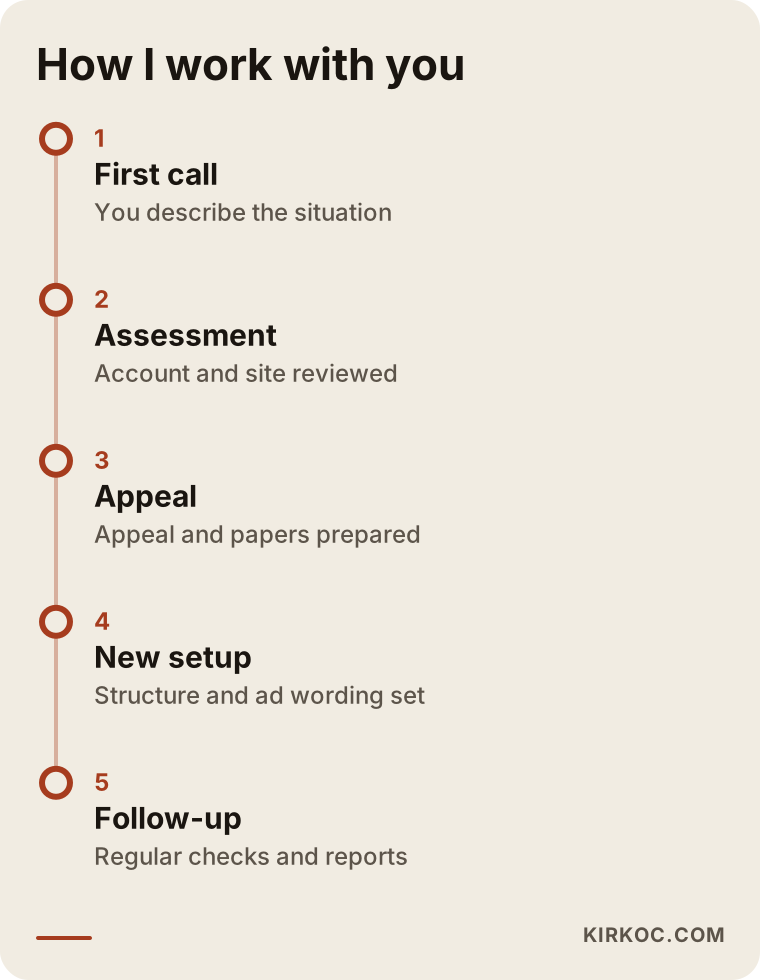
The timeline shows the general flow. Because every case is different, the length and order of the stages vary.
Frequently asked questions
My Facebook ad account was disabled. Will it be reopened?
Nobody can guarantee that in advance. It depends on Meta's review of your appeal and on whether the cause can be fixed. Understanding the reason and sending a complete appeal improves your chances, but you do not control the result. That is why I suggest preparing a backup plan at the same time, so your business does not hang on a single channel.
Can I just open a new ad account and carry on?
In most cases that is not advised. Opening a new account immediately after one is closed or restricted can be read as an attempt to get around the restriction, and the new account may be closed as well. Use the official appeal route for the existing account first. If you need a different business structure, assess it together with an expert, keeping Meta's rules in mind.
How long does it take to get an answer to an appeal?
The time varies and it would not be honest to name a specific day. Some appeals finish quickly and some take longer. Sending the same appeal repeatedly will not speed it up. Track the status in the panel and keep checking your email.
Will my Facebook page and Instagram account be affected too?
It depends on the scope of the restriction. If only the ad account is restricted, your page and Instagram account usually keep working, but you cannot run ads. If the business management account or a personal profile was closed, access to the page can be affected as well. That is why you should not leave a page attached to a single personal profile, and should share admin rights with more than one trusted person.
What should I watch for in my ad copy?
Stay away from firm result promises, sentences that point at a reader's personal characteristics or health, and exaggerated before-and-after comparisons. What the ad describes should truly exist on the page it leads to. In sensitive areas such as health, finance and beauty, ask a lawyer which statements are allowed.
Should I trust people who say they can recover my account?
No. People who claim to have an inside route at Meta and ask for payment carry a high risk of fraud. Nobody can guarantee a recovery outside the official appeal channel. Trust the official notices in your panel and your email, and be clear about who is doing what before you pay anyone.
Do I have to give you my account so you can manage my ads?
No. You stay the owner at all times. I get access only as an admin or employee, while your page, ad account and payment method remain inside your own business management account. When the work ends, you simply remove my access. That structure is also the right one for the safety of your account.
Why might my ads perform poorly even if the account is never closed?
Being closed and being inefficient are different problems. If the audience, the message, the landing page and the tracking are not set up well, sales may not come even when the account runs without trouble. In that case, start by looking at what your ads actually measure and how your website welcomes visitors.
If you would like to go through your ad account together, and talk plainly about what can be done and what should be avoided, take a look at my digital advertising management page and send me a message.