The question visitors most want answered on your website is usually the same one: "Roughly what is this going to cost me?" If you answer it by phone or message, one person at a time, every single day, you have probably wondered about adding a price calculator to your website. It is a sensible idea, but it is not right for every business, and when it is built badly it does nothing except tire out the visitor. In this article I explain what the tool is, who it suits, how it is built, and which mistakes to avoid. I am Ümit Kırkoç, a web designer working from Istanbul, and I will also be open about what I pay attention to when I build these tools as part of my website design work.
First, let me define the term. A price calculator is a small section of your site where a visitor answers a few questions and sees an approximate price or price range for their own job. You may also hear it called an "online quote calculator" or a "price estimator." The visitor might pick a square footage, a material, or a quantity, and in the background the tool applies rules that you set to produce a result. The rules are yours. The tool simply repeats the same calculation, patiently, every time someone asks.
Who actually benefits from a price calculator?
For a calculator to be useful, your price has to depend on a handful of clear facts. A house painter looks at the size of the rooms and how many there are. A print shop looks at quantity, paper type, and size. A moving company looks at distance and the amount of furniture. In jobs like these, when the visitor types in their own details, a reasonable estimate comes out, and the person who contacts you already understands the pricing.
On the other hand, if your price depends on a site visit, a long conversation, or many special conditions, a calculator misleads. In architectural design, business consulting, or custom software, a number produced from a few questions either does not reflect reality or comes with a range so wide that it tells nobody anything. In that case the more honest solution is a short quote request form. I will show you how to decide with a simple flowchart further down.
The benefits fall into three groups. First, the tool cuts down on repetitive questions. Instead of your phone ringing with "what does it cost?", it rings with "are you available on this date?" Second, it filters visitors. Someone whose budget is nowhere near your range decides without calling you, which saves their time and yours. Third, when an inquiry does arrive, you already hold useful information, because the person has chosen what they want. Instead of a vague "can I get some info?" message, you read a request with real details in it.
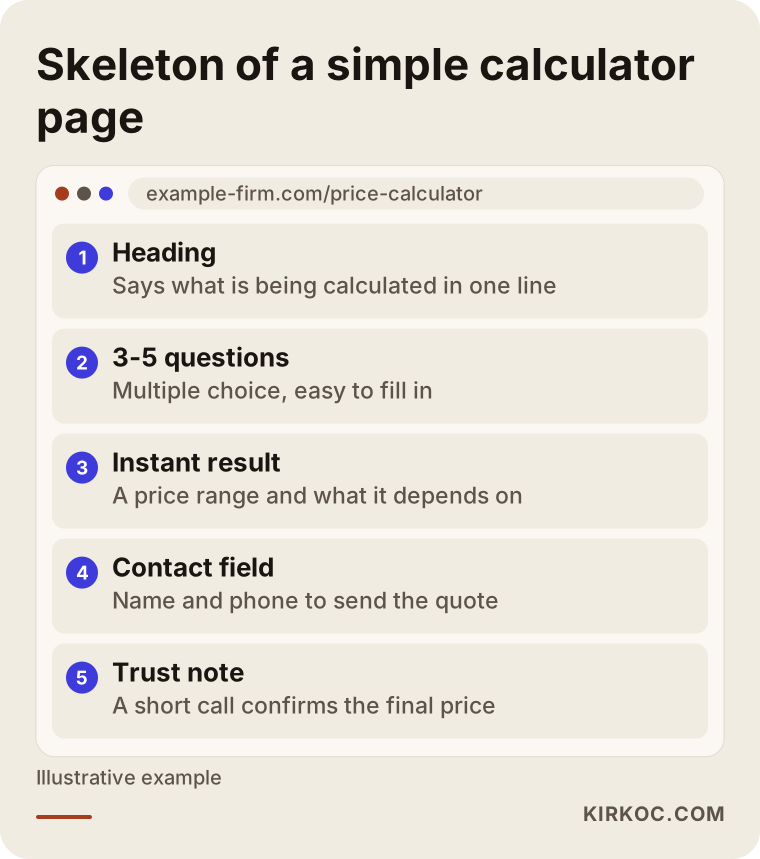
The page layout in the image summarizes what a well-working tool usually looks like. Notice two details. The page does not ask for a phone number before showing the result, and it does not hide what the result is based on. Those two choices have a large effect on how much a visitor trusts you.
Fixed price list, price calculator, and quote form: what is the difference?
These three options look alike, but they serve different needs. A fixed price list suits businesses where the job is the same for everyone: a barber, a studio selling ready-made packages, or a course with one standard format. It is easy to prepare and needs little upkeep. Its weakness is that a visitor can think "my situation is not on this list" and leave.
A calculator is the middle option. It gives the visitor an answer that fits their own situation, but the price you pay is setup effort and maintenance. As your prices change, the rules must be updated too. A tool running on old rules can show a number that you end up feeling bound to.
A quote form is the most flexible option and the least instant. The visitor writes what they want and you reply. For complicated work, this is the healthiest choice. For most businesses the smart route is to combine the two: the tool shows an approximate range, and below it sits a form that says "write to me for an exact price."
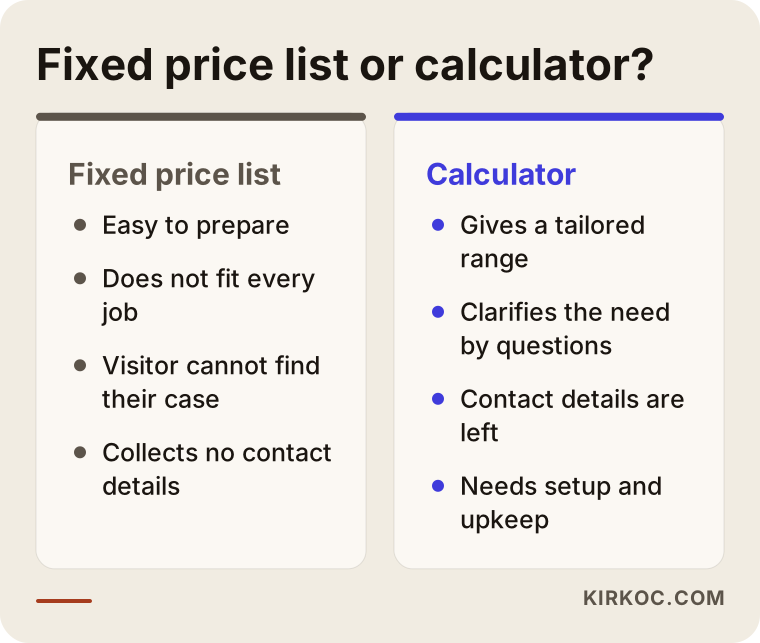
As the comparison shows, a calculator takes more effort and brings back better-qualified inquiries in return. Whether the effort is worth it depends on the pricing logic of your own business.
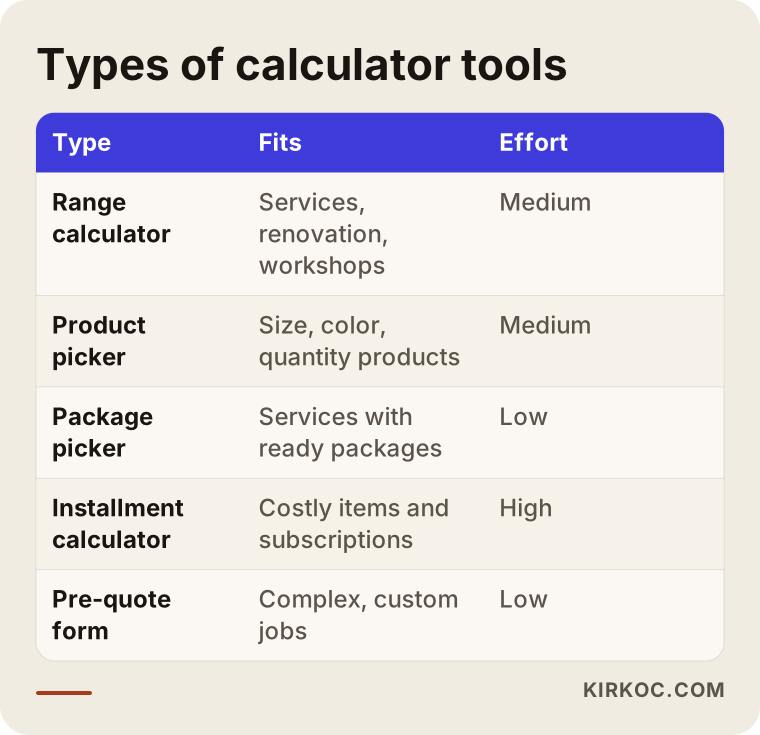
Which type of tool fits which business?
Calculators come in several forms. A range calculator suits most service businesses: renovation, workshops, cleaning, event planning. A product picker is for sellers whose products come with options such as size, color, and quantity, like curtains, doors, or printed goods. A package picker makes things easier when your service already comes in ready-made packages. An installment or monthly payment calculator makes sense for businesses selling expensive items or running subscriptions, but showing payment terms correctly takes extra care. If you plan to make financial claims, I recommend speaking to an accountant or a lawyer first.
Use the table as a starting point to see which type is closest to your business. The boundaries between types are not strict. Putting a package picker and a range calculator on the same page is perfectly possible.
Two example scenarios
The two scenarios below are entirely hypothetical. They do not describe any real company or person. I made them up only to show the logic.
Scenario 1: A small painting and renovation company
Imagine a painting company with two or three workers. The phone rings every day with the same questions: "How much to paint a three-bedroom apartment?" Every time, the owner explains that the price depends on whether furniture has to be moved, whether the ceilings are included, and what condition the walls are in. Most of the time the caller says "we'll see" and disappears.
A range calculator suits this company. The visitor chooses the size of the space, the number of rooms, whether the ceilings should be painted, and the current condition of the walls. The result screen shows a price range and, beneath it, a short list of "what sets this range": the paint used, surface preparation, moving furniture. Under that is a short form, and if the visitor wants, they can request an on-site visit. The calls the company receives no longer start with "how much?" but with "can you come on this date?"
The critical point in this scenario is that the range must be honest. If you give a range that is too narrow, the on-site visit will reveal a difference and the visitor will feel misled. If you give one that is too wide, the tool becomes meaningless. Build the range around where your past jobs have actually landed.
Scenario 2: A small workshop selling made-to-measure curtains
In the second example, think of a small workshop that sews curtains to custom sizes and wants to sell online. The price changes with window width, the fabric chosen, whether there is a lining, and the style of stitching. A customer sends a message, the owner asks for measurements, works out the price by hand, and replies. That exchange takes a day, and in the meantime the customer may go elsewhere.
A product-picker style tool works here. The visitor enters the measurements, picks a fabric and a style, and sees an approximate total immediately. They can then place an order or ask for a fabric sample first. Before any back-and-forth, the owner receives a ready order summary. Even so, this scenario needs a warning: fabric can go out of stock, and prices can move with raw material costs. That is why the tool's rules should live somewhere easy to maintain, and why the owner should be able to update them without help.
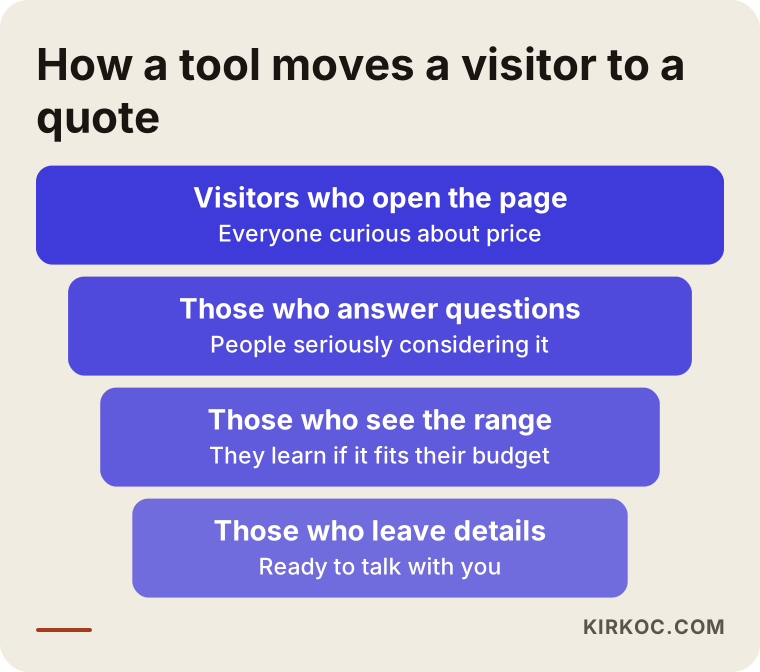
What the funnel image says holds for both scenarios: the number of visitors drops at every step, but the ones who remain are much closer to your business. The goal is not to pull everyone in. It is to get the right person talking to you.
How a price calculator is built, step by step
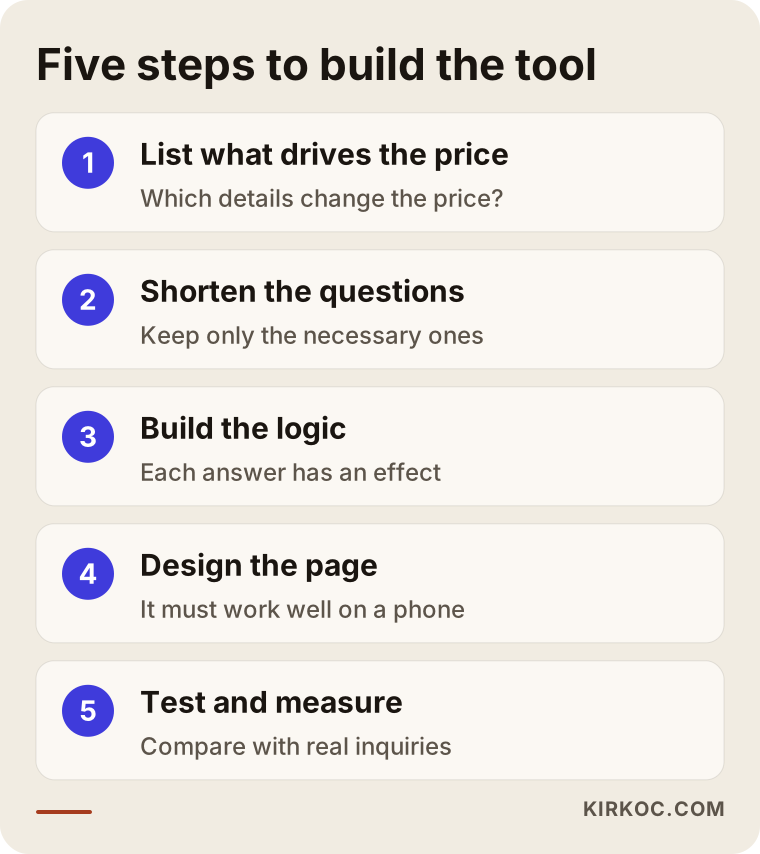
I describe the process in five steps. They follow the order I use when I start a project.
1. Write down what determines the price
On paper or in a spreadsheet, list everything that has changed the price in your past jobs: area, quantity, material, distance, urgency, extra services. Then put them in order of importance. In most businesses the bulk of the price comes from three to five factors, and the rest is small detail. The tool's questions are built around those three to five factors, and the details are left for the conversation.
2. Keep the questions short
Every extra question raises the chance that a visitor gives up. Questions should be multiple choice, should not require typing, and should not contain technical terms. Asking "Are the walls smooth, or are there cracks or damp?" is much closer to the visitor than asking about "surface condition." A practical rule: if the answer to a question does not really change the price, cut it.
3. Set up the calculation logic
This is where you define how each answer affects the result. Some factors are added, some are multiplied, and some have a lower and an upper limit. This stage rests entirely on your knowledge of your trade, and I only translate it into the tool. Separating a "base charge" from a "variable part" often simplifies things. I suggest keeping the rules written down in a table, so that when prices change at the end of the year you know exactly where to make the change.
4. Design the page
A large share of visitors come to a site from their phone, so the tool must be comfortable to use with a thumb: big buttons, little scrolling, a clear result area. The result must be visible, and under it a short explanation of what the range is based on. The contact area should sit right below the result, but it should come after the result. To build trust, do not hide a sentence like "this is an estimate, and the exact price is confirmed in a conversation."
5. Test it and measure it
Before launch, try many combinations of answers yourself, including the extremes: enter the smallest job and the biggest job. After launch, compare the inquiries you receive with the real jobs. If the tool keeps estimating too low or too high, adjust the rules. That adjustment is a normal part of the work, and the first version is rarely the final version.
These five steps look simple on paper. The difficulty usually appears at step one, because many businesses set their prices in their heads, by instinct. Turning instinct into rules takes an hour or two of thinking, but that work benefits you even outside the tool, because you end up reviewing your whole pricing.
How should the questions be chosen?
Most tools break because of the wrong questions. In a good question list, every question has a reason. If a question affects the price, it stays. Questions asked only because they seem "interesting," or for marketing purposes, wear the visitor out. Personal details such as a phone number are saved for the very end, because a visitor is far more willing to share them after they have seen the result.
Another detail is the language of the answer options. A word that feels "standard" to you as the owner might mean nothing to a visitor. When you prepare the options, show them to a relative who knows nothing about your trade. If they stumble, replace the wording with a plain sentence.
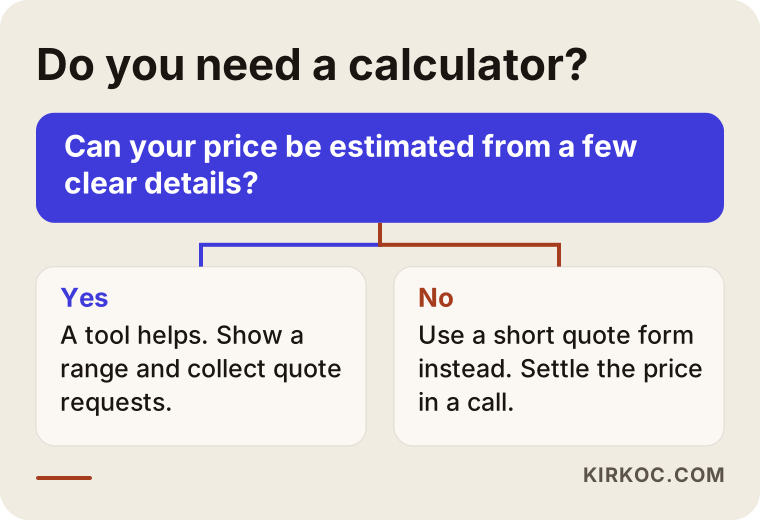
I suggest going over the checklist one more time before launch. If all six items are satisfied, the tool is most likely not a burden on the visitor.
Common mistakes
Most of the mistakes I see are errors of thinking, not technical ones. The most common is trying to make the tool too comprehensive. A form with fifteen questions covering every possibility is a form that nobody finishes. Starting small and growing as the need appears is always the healthier path.
The second mistake is creating an impression of certainty. If the tool says "this is the amount" and a different figure comes up in the conversation, trust is lost. The result must clearly use words like "approximate" and "depends on these factors." In some situations there can also be questions about whether prices shown on a site are binding under consumer protection rules where you operate. Speaking to a lawyer about that is a wise step.
The third mistake is answering incoming requests late. The tool warms up the visitor, but warmth cools quickly. Set up a way to be notified when a request comes in, and try to reply the same day. The fourth is forgetting updates: your prices have changed, but the tool still shows the old ones. The fifth is not testing on mobile, because a tool that looks fine on a desktop screen can overflow on a phone.
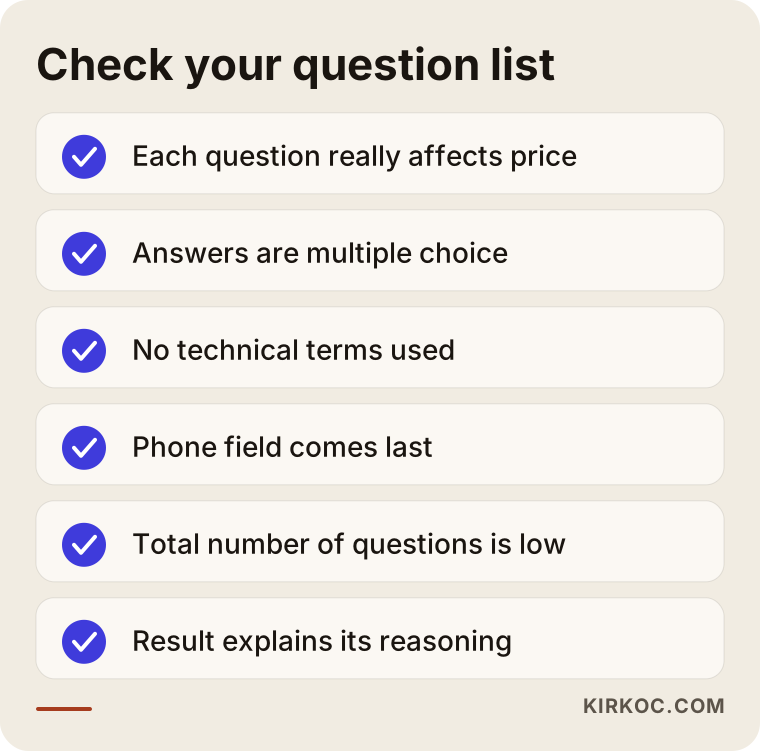
Every one of these mistakes is preventable. For most of them, a few extra minutes of attention during setup is enough.
What can you do yourself, and when do you need a specialist?
If your need is small, some website builders and plugins offer ready-made calculator blocks. If your price depends on a single multiplier, for example quantity times unit price, these ready-made options can do the job. Before trying it yourself, I recommend writing your rules on paper. Knowing what you want the tool to calculate before you choose the tool lowers the risk of giving up halfway.
Specialist help makes sense in these situations: your price depends on several factors that affect one another, you want the tool to match your site's design, you expect requests to arrive in your email or a spreadsheet in an orderly way, or fast performance and trouble-free use on phones matter to you. Ready-made plugins usually reach their limits at exactly these points.
Let me add an honest note here. Some businesses need a better website before they need a calculator. If your site is outdated, looks broken on phones, or cannot be found on Google, the calculator should not be your first project. Visitors need to arrive first, and then the tool can carry them toward a quote.
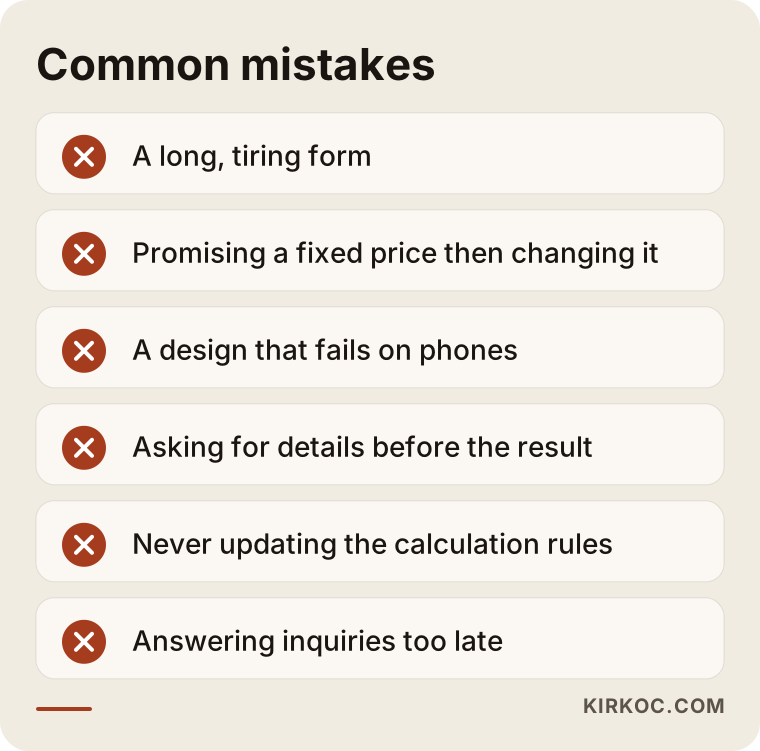
The question in the flowchart looks simple, yet it often settles the matter. If you can estimate your price from a few clear facts, a calculator makes sense. If you cannot, starting with a short quote form is the more honest beginning.
Where should the tool live on your site, and how do you promote it?
Once the tool is built, people have to find it. The most natural place is a prominent button on your service pages, something like "Calculate your price." A shortcut on the home page also works. You can add it to the menu as its own item, but be careful not to crowd the menu.
The tool's own page can be an opportunity in search engines as well. People type phrases such as "house painting cost calculator" or "custom curtain price calculator." A page that answers those searches, contains the tool, and has a short explanation underneath can become visible. This is not a promise of rankings. It only means the page answers the right intent. A short explanatory text on the page matters: what the tool does, what the result is based on, and who it suits.
You can also use the tool as an entry point in your social media accounts and ads. A "work out your price yourself" link often works with less friction than a "write for info" link. When your site, search visibility, social media, and ads are connected, the tool becomes the common meeting point for all of them. That is why I find it practical to run these jobs through one person: the same person builds the tool and also writes the page and the ad copy that bring people to it, so nobody can say "that is not my job."
What determines the cost of a price calculator?
I am not giving a figure here, because the cost changes considerably with the scope of the work. But I can tell you clearly what it depends on.
The first factor is the complexity of the calculation logic. A calculation built on one multiplier and one made of twenty linked rules do not take the same effort. The second factor is the number of questions and screens. The third is how far the design is customized: a fully tailored interface that matches your site and brand is different from a ready template. The fourth is where incoming requests should go: only to email, into a spreadsheet, or into another system. The fifth is the size of the product list or price table and how often it will change. The sixth is the existing platform of your site, because some platforms make adding a tool easy and others need extra work.
To set the budget sensibly, I can suggest starting with a simple version and growing it later. For most businesses the first version is a single-screen tool with five or six questions. If it works, you expand it. If it does not, you learned something for a small investment.
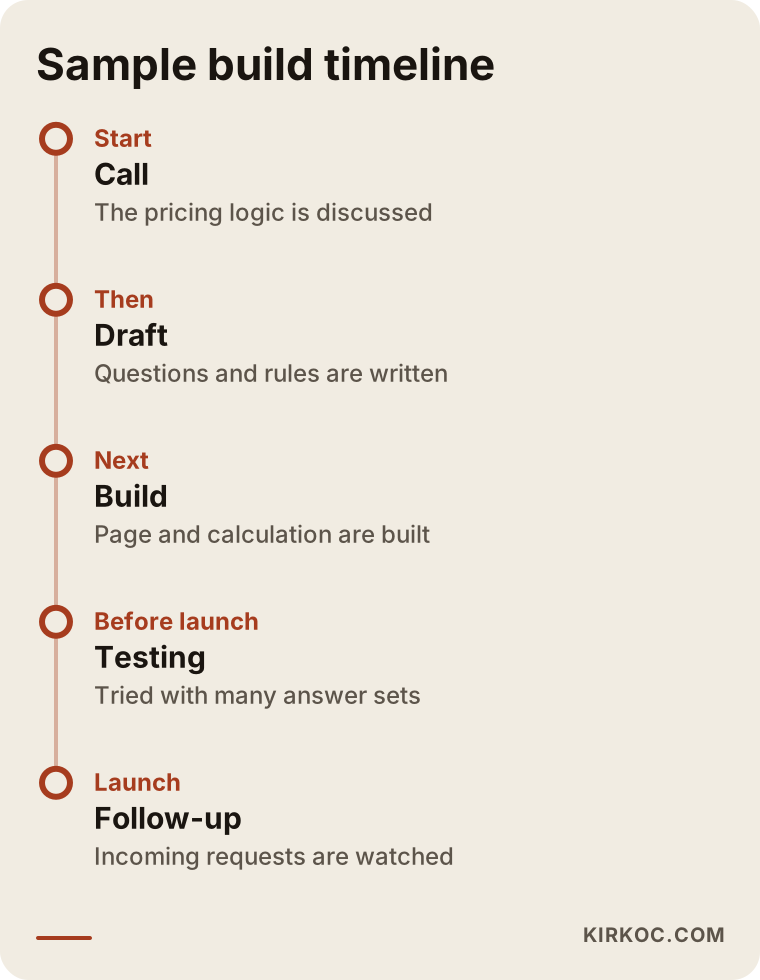
The timeline is an example, and it may stretch or shrink with the size of the job. What matters is that a follow-up stage exists after launch, because a tool that is built and then left alone slowly drifts away from reality.
How I work
I am one person, and I carry the job from start to finish myself. In the first conversation I listen to how your business prices its work and tell you honestly whether you really need a calculator. If you do not, I say so. If you do, I write the question list and rules together with you, show you a draft, and do not publish until you approve it. I adapt the tool to the look of your site, test it on mobile, and settle how requests will reach you.
Because your website, search visibility, social media accounts, and ads can all be my work too, I can build the tool in connection with them. In a setup run by one person, where the tool sits, which ad or which post sends people to it, and how an incoming request is followed up are planned at the same table. You do not have to coordinate several firms.
One more thing I should say: I do not give guarantees of results. The tool is built to improve the quality of requests. How many requests arrive depends on how many people visit your site, whether your prices fit the market, and how you come across to the visitor.
What else should your site have around the tool?
A calculator does not work alone, and the pages around it matter. After a visitor runs the numbers, they ask themselves, "Can I trust this company?" An about page, examples of your earlier work, your contact details, and, if possible, customer reviews all feed that trust. Reviews must come from real sources. Made-up reviews are unethical, and people notice them.
It also helps to answer a few common questions on the tool's page: "Is this price binding?", "Is the site visit paid?", "How soon will you get back to me?" These remove the doubts in the visitor's mind. The person who arrives at the tool is often undecided, and the more uncertainty you remove, the more easily they act.
Be careful with personal data too. If you collect a name and phone number, say in one short sentence what the information will be used for, and make sure your privacy policy is up to date. I cannot say anything definitive about the details of the privacy rules that apply to your customers, so please talk to a lawyer about that.
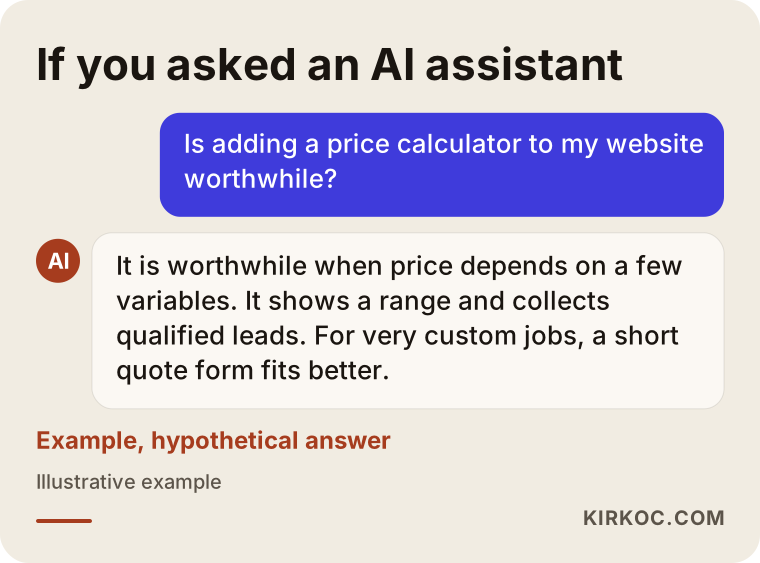
The last image is a reminder that people now ask AI assistants about decisions like this one too. Writing clearly on your site what the tool does, who it suits, and what it depends on gives both visitors and these assistants a clear picture.
Frequently Asked Questions
Is a price calculator suitable for every business?
No. It is suitable if your price can be estimated from a few clear facts. If every job needs a separate site visit or a long conversation, a short quote request form is more honest and less misleading.
Does the tool show an exact price?
Most of the time it should not. The right approach is to show an approximate range and to write which factors the range depends on. You set the exact price after a conversation or a visit.
Can I set one up myself with a ready-made plugin?
For simple calculations, yes. If your price hangs on a single multiplier, ready-made solutions do the job. If you need linked rules, a custom design, or orderly delivery of requests, specialist help is the better route.
Will the tool slow down my website?
When it is built properly, there should be no noticeable slowdown. Heavy plugins or unnecessary code can slow a page down. That is why I test speed and phone use before launch.
How many questions should I ask?
As few as possible. Keep only the questions that really change the price. For many businesses, three to five questions are enough, and the rest can be discussed in the conversation.
Will the tool help me show up on Google?
It does not guarantee anything on its own. However, if the page that holds the tool answers what people search for and is explained well, its chance of being seen goes up. Promising a ranking would not be right.
Where do the incoming requests go?
You and I decide that together during setup. They can go to your email, to a spreadsheet, or to another system you already use. What matters is that requests do not get lost and can be answered quickly.
Does the tool need maintenance after it is built?
Yes. Whenever your prices, products, or rules change, the tool has to be updated. Setting it up so that you can make small changes yourself makes the job easier.
If you are not sure whether a price calculator suits your business, or you want one built, you can write to me through my website design service page. I will listen to how you work and tell you honestly what would actually help.