As a business owner, you have probably heard this sentence: "Facebook is dead, everyone is on Instagram." Maybe the page you opened years ago is sitting in a corner somewhere, and its last post is two years old. Now you are wondering whether Facebook business page management deserves your time and energy, or whether you should just leave the page alone. In this article I will try to answer that without exaggeration. The answer is not the same for everyone. It depends on what your business sells, who your customer is and where that customer looks for you. If you want your social accounts run on a regular schedule, you can also look at my social media management service, but first it helps to get the logic straight.
Let me introduce myself briefly. I am Ümit Kırkoç, and I work from Istanbul. I handle everything a digital agency would normally handle, all by myself: website, SEO, social media, ads and brand identity. What I describe here comes from watching, in the middle of all that work, when a Facebook page pays off and when it does not. I will avoid technical terms where I can, and when I have to use one, I will explain it in a sentence.
The short answer: do you need it or not?
Here is the honest answer. A Facebook page is no longer a channel where I can tell every business "you must put this much effort in." But it is not a channel where I can say "close it and forget it" either. The page has two separate jobs, and you need to keep them apart.
The first job is being an ID card. When someone searches for your company name, this is the page that shows your address, phone number, opening hours and a few recent photos. This job does not require heavy posting, but it does require correct and current details. A page with a wrong phone number can be worse than having no page at all, because the customer calls the wrong number and concludes that you cannot be reached.
The second job is being a communication and announcement channel. Announcing a promotion, a new product or an event, answering incoming messages, building a community. This job takes steady effort, and it does not pay back equally in every business.
The graphic below shows the gist of the kind of answer you might get if you asked an AI assistant this question, because people now ask search engines and assistants about decisions like this as well.
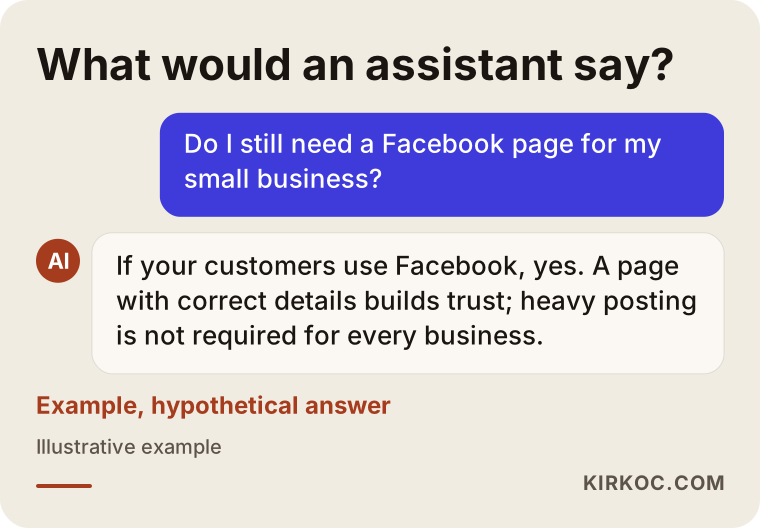
What such an answer has in common is this: the value of Facebook does not lie in how many people have "liked" your page. It lies in the right person reaching the right information.
Who is actually using Facebook today?
I will not quote numbers in this section, because I have no current, sourced data that is specific to your business. What I can tell you is what I notice in my day-to-day work: Facebook's user base is spread over a wider age range than Instagram's or TikTok's. For businesses that sell to middle-aged and older people, for neighborhood and local businesses, and for event- and community-based work, Facebook still holds a serious place. For fast, visual, video-heavy products aimed at young people, it usually plays second fiddle.
What matters here is to look at your own customer profile. You do not need expensive research for that. Think about the last ten customers who came to you. When you asked how they found you, did anyone say "I saw it on Facebook," "a friend shared it on Facebook" or "I checked your page"? Even that small test often tells you more than general debates do.
Which businesses benefit from a Facebook page, and which do not?
Let me try to build a simple way of thinking that helps you decide. The graphic below summarizes it as a decision tree.
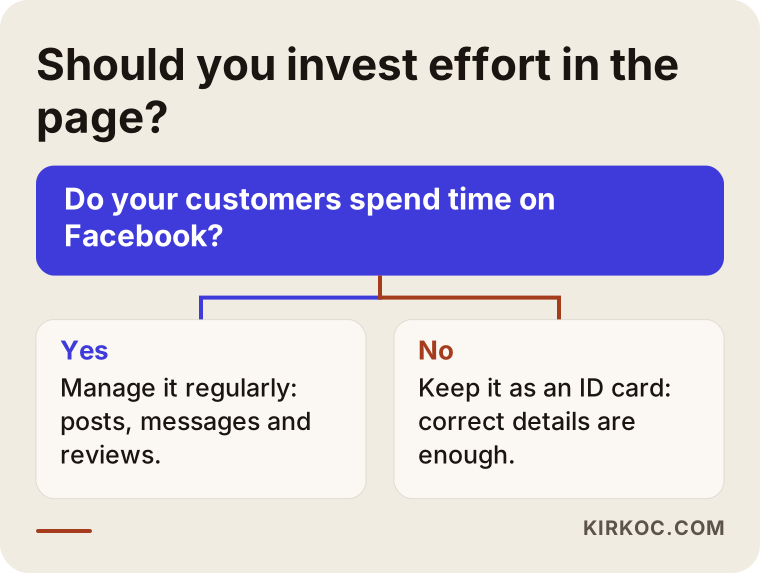
The question in the tree is whether your customers find you through Facebook, or could. If your answer is "yes," the page deserves regular management. If your answer is "no," it still usually makes sense to keep the page at the "ID card" level instead of deleting it altogether.
Businesses likely to get more from Facebook
- Local service businesses: Hair salons, repair shops, cleaning services, movers, dietitians and similar. Customers often search for "who is near me" and trust recommendations. Local groups and reviews on Facebook are part of that chain of recommendation.
- Event- and community-driven work: Workshops, classes, concerts, neighborhood events, associations and co-ops. Facebook's events and groups features are useful here.
- Businesses that sell to middle-aged and older customers: In areas such as furniture, home textiles, health products and regional foods, buyers may spend more of their time on Facebook.
- Anyone planning to run ads: Facebook and Instagram ads run from the same system (Meta Ads Manager). If you are going to run ads, a proper page standing behind them is needed, both for trust and for technical reasons.
Businesses likely to get less from Facebook
- Brands that speak only to a young, visually oriented audience and mostly present their products through video.
- Businesses whose sales are entirely B2B (business to business) and run through LinkedIn, where the decision maker is not looking on Facebook.
- Small sellers who sell through a single marketplace and do not communicate with customers directly.
These lists are not a verdict; they are a starting point. A designer, a dental clinic and a restaurant might each answer the same question differently. That is why I think the first step is not "what is everyone doing" but "where is my customer."
Why a Facebook page matters when people search for you on Google
There is a side of business pages that is often overlooked: Facebook pages can show up in search engines. When someone types your company name into Google, your website, your map listing and your Facebook page can appear side by side on the same results page. In other words, the page is part of your storefront not only inside Facebook but outside it as well.
Below you see a hypothetical search. The results do not belong to a real company; they are only there to show the logic.
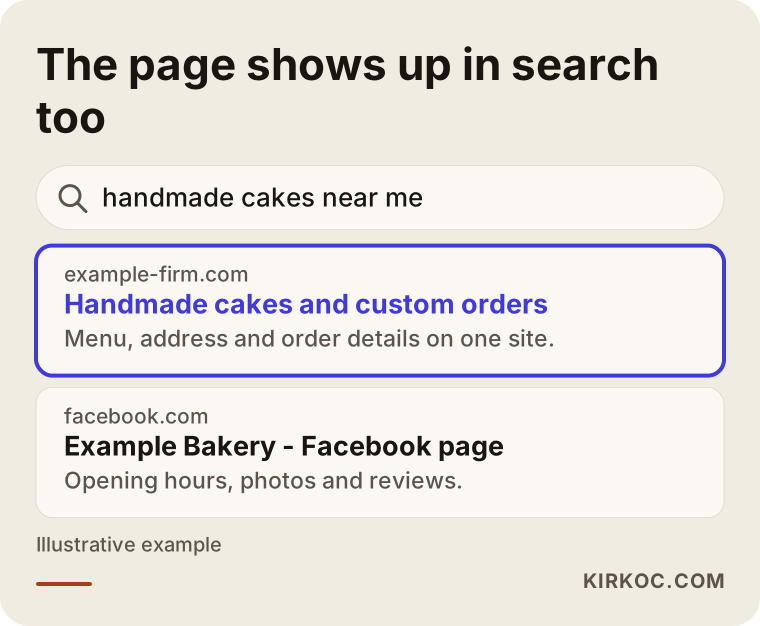
The thing to notice is that the page title and the short description should say clearly what your business does and where it is. There is a big difference, for people and for search engines alike, between a description that says "Welcome" and one that says "Handmade cakes and birthday orders in the Maple Street neighborhood." Your website and your page should also support each other: both should use the same name, the same address and the same phone number. This is where running everything through one person has a concrete benefit. When the website, the map listing and the Facebook page are in the same hands, the details match, and the risk of updating one and forgetting the others goes down.
What should a good business page contain?
In many business pages the problem is not a lack of content but missing or scattered basics. The graphic below shows, on an example page, the order in which a business page should be built from the visitor's point of view.
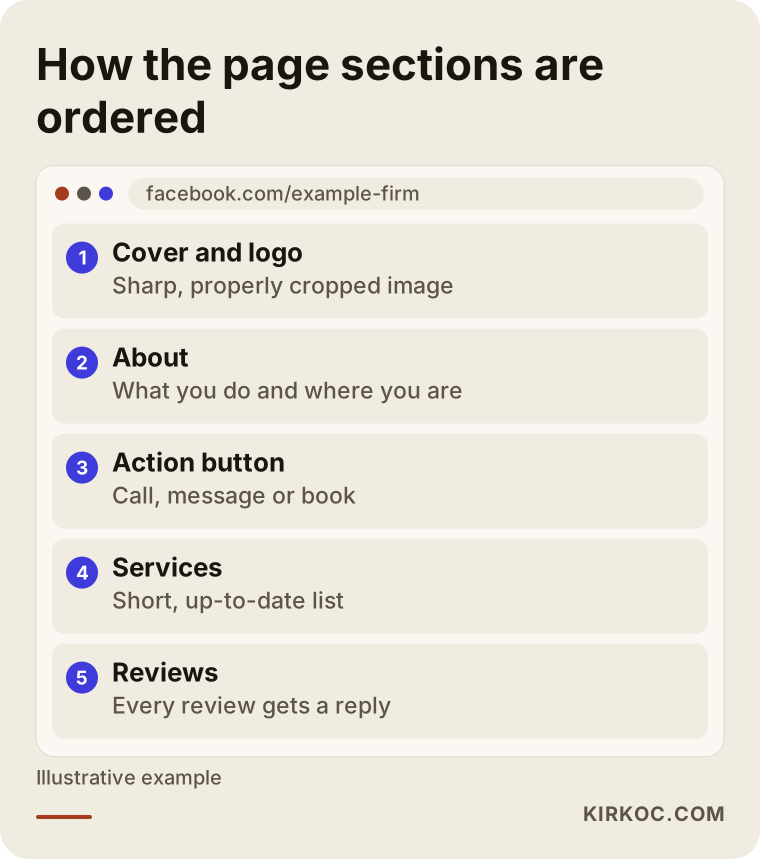
Let me look at each section a little more closely.
Cover and profile image
The profile image is usually your logo, and the cover image should be a photo or short video that shows what your business looks like. The most common mistake I see is low-resolution, badly cropped images, or ones left over from another brand. Because the cover image is cropped differently on mobile, important text should not sit close to the edges.
The About section
Facebook's "About" area holds the category, a short description, address, phone, email, website and opening hours. Filling in all of these completes your page's ID card. Write the short description so that it says what your business does, who it serves and where it is. Avoid inflated adjectives; phrases like "the best" do not build trust unless they can be proven.
The action button
The button at the top of the page (call, send message, book now, go to website and so on) decides what you steer the visitor to do. If you take bookings by phone, "Call" makes sense; if you chat about questions, "Send message"; if you take online orders, "Visit website" may be right. Before choosing, think about how your customer finds it easiest to reach you.
Services and products
List your services briefly. Whether to write prices is up to you, but if you do, you have to keep them current; arguments over an old price waste time. If you would rather not show prices, saying "message us for a quote" is a perfectly legitimate approach.
Reviews and recommendations
Customer reviews work as social proof. Replying to reviews, and even answering an unhappy customer calmly, shows both that person and everyone who reads the page later what kind of business you are. Buying reviews or having fake ones written goes against platform rules and damages trust; I do not recommend it.
The difference between an active page and an abandoned one
When a visitor lands on a page, in the first few seconds they try to work out one thing: "Is this business still operating?" The date of the last post, the replies to comments and current opening hours answer that question.
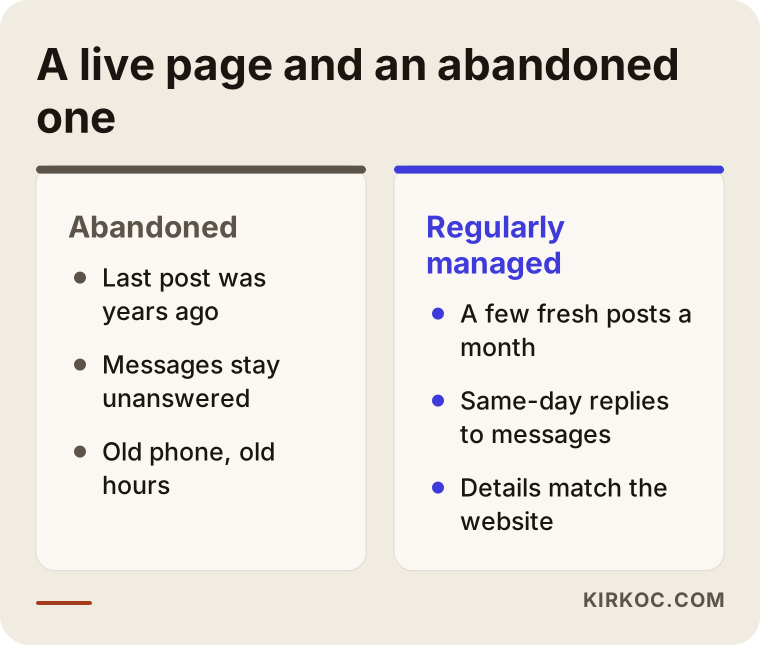
The difference in the comparison is not a huge difference in effort. What makes an abandoned-looking page look alive is a few small moves each month: a fresh photo, an announcement, a timely reply to a message, a note about holiday opening hours. A busy posting calendar is not required; routine is.
Two hypothetical example scenarios
The two examples below are entirely hypothetical. They do not describe a real business; they were made up only to make the logic concrete.
Scenario 1: A neighborhood cleaning service
Suppose there is a small business in a city that cleans homes and offices. The owner has been drawn toward Instagram, but most of the customers are homeowners over 35. Existing customers mostly arrive through a neighbor's or an acquaintance's recommendation. In this business, the main job of the Facebook page is to show a trustworthy page when the recommended person's name is searched: real photos, a list of areas served, a phone and message button, a few positive reviews. A few posts a month can be enough; the real work is answering incoming messages the same day. In this scenario, the effort that pays back most is running the page's messages properly.
Scenario 2: An accessories brand aimed at young people
Now think of the opposite case. A brand sells video-heavy accessories to a young audience. Products are mostly promoted through short videos, and most sales come through a marketplace. For this brand, trying to produce daily content for the Facebook page could mean taking limited time away from Instagram and TikTok. A reasonable approach here might be to keep the page standing with correct details, consider the option of cross-posting video content automatically, and put the real effort into other channels. If ads are planned, the page is still needed, but the organic posting load can be kept low.
These two scenarios show two different answers to the same question: how much effort you put into a Facebook page depends on the characteristics of your customer, not of the channel.
What does Facebook business page management cover?
"Page management" does not mean only posting. Regular management usually includes these items:
- Page setup and information order: Category, About text, cover and profile image, action button, service list.
- Content plan and posting: What to share and when; photos, short videos, announcements, events.
- Message and comment management: Answering incoming questions on time, replying to comments, dealing with inappropriate content.
- Event and group management: Creating events and, if you have one, keeping up the relationship with the community.
- Ad connection: If ads will run, linking the page properly to the ad account and setting up measurement.
- Reporting: Judging in plain language which posts drew interest and which messages turned into sales.
Not all of these are needed by every business. For a local shop owner the first three items may be enough, while for an online store that runs ads the last two matter too.
The road from the page to a customer
People do not see a page and buy immediately. The graphic below shows, as steps, the path along which a page visitor can become a customer. I am not giving numbers, because these rates differ greatly from business to business.
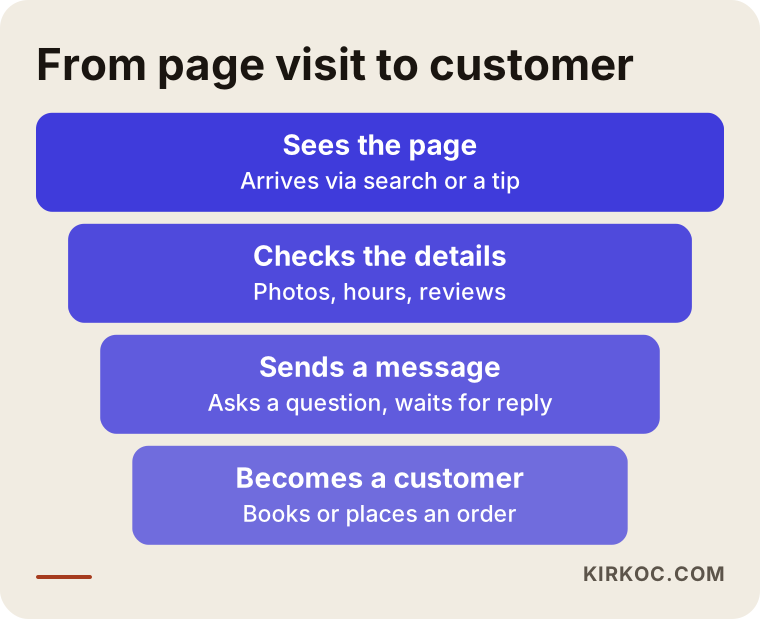
The most important point in the funnel is the message stage. In most small businesses, the loss happens right there: a person asks a question, the answer arrives two days later, and by then they have gone somewhere else. That is why, in page management, I suggest asking "how quickly do I answer incoming messages" before asking "how many posts did I make."
Step by step: how to manage the page
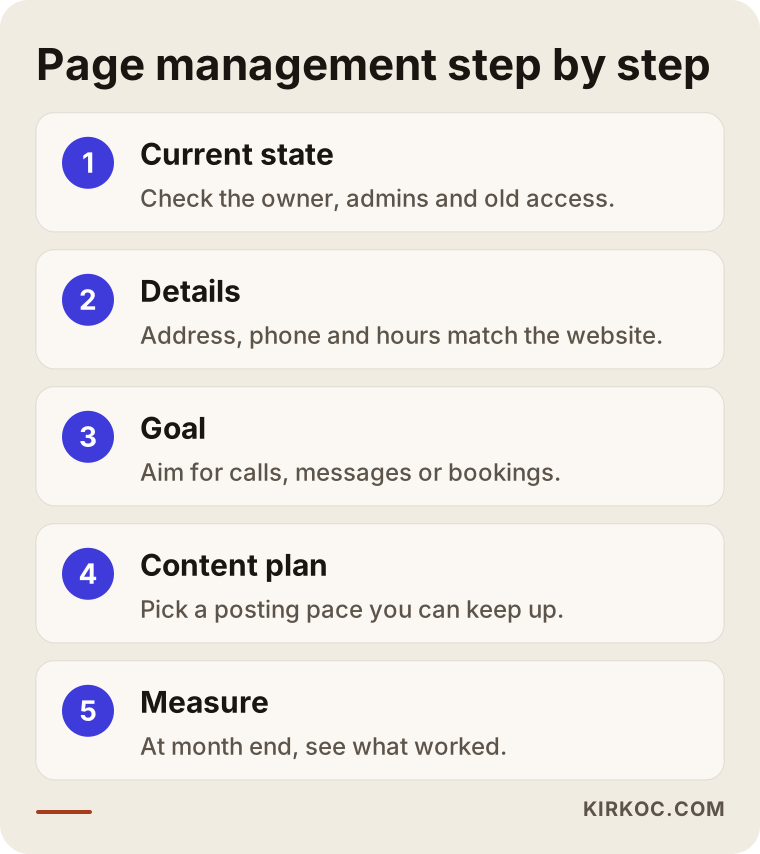
Whether you do it yourself or work with a specialist, the process runs in roughly the same order.
1. See the current state
Check in whose name the page was opened, who holds admin rights, and whether a former employee still has access. In many businesses the page stays tied to the personal account of someone who used to work there, and that can cause serious trouble later. The page should be owned by your business itself.
2. Fix the details
Address, phone, opening hours, category, description. They must be identical to what is on your website and your map listing. This step can be finished in an evening, but its results last a long time.
3. Set a goal
What do you expect from this page? Phone calls, messages, bookings or website visits? Posting without a goal is like walking without a destination.
4. Make a simple content plan
Decide realistically how many posts a week you can make. A plan you cannot keep up is worse than no plan. Eight good posts a month can be worth more than thirty careless ones.
5. Set up a routine for replying to messages
Decide who looks at messages and at what times. Write down short, ready answers to the questions you hear most. You can use Facebook's automatic greeting and quick reply features, but keep some human touch.
6. Measure and adjust
At the end of the month, look at which posts drew more interest, how many messages came in and which of them turned into real customers. Read the direction rather than the numbers: see what worked and do more of it.
What a monthly routine looks like
Once setup is done, a simple monthly rhythm may be enough to keep the page alive. The timeline below shows an example month; you can change it to suit your business.
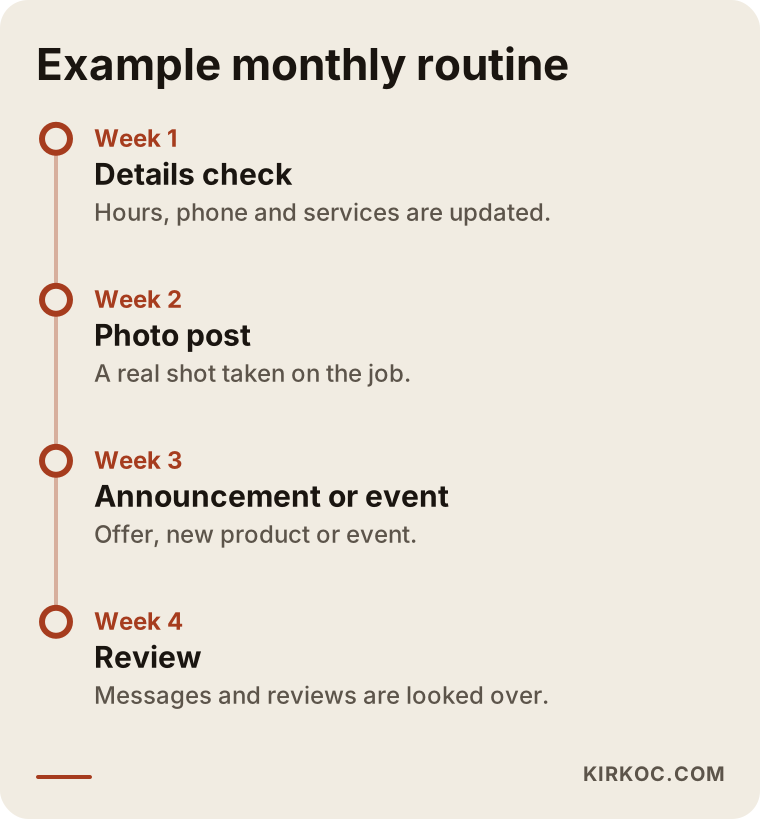
The nice thing about this calendar is that it stays sustainable even when work gets busy. Moving forward in small but unbroken steps, rather than starting big and then dropping it, gives sturdier results over the long run on social media.
Common mistakes
Most of the mistakes I have seen over the years come not from bad intent but from missing knowledge or lack of time. Still, they are worth knowing.
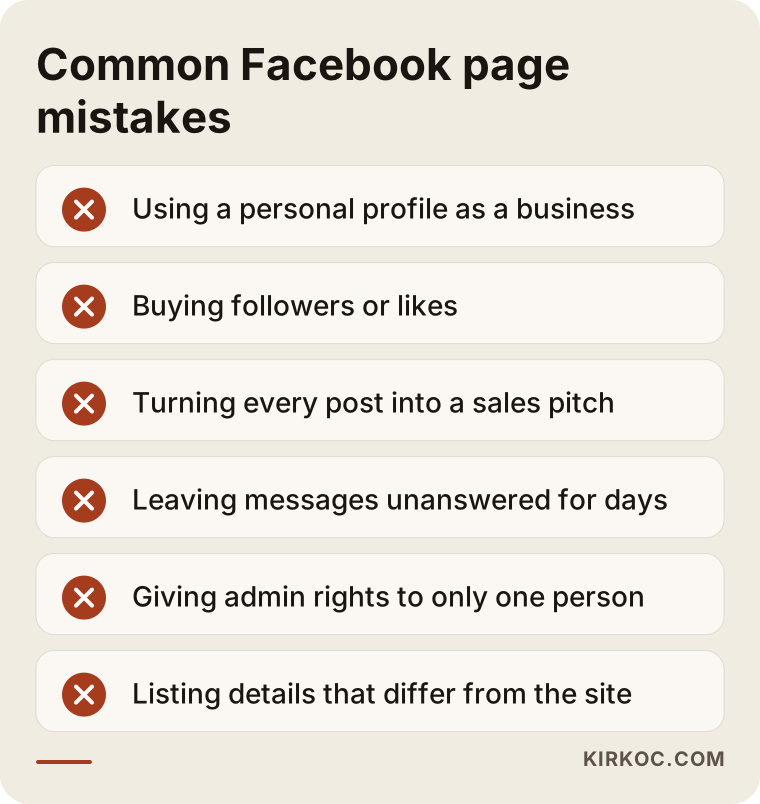
Let me unpack these mistakes a little.
- Using a personal profile as a business: A personal profile and a business page are different things. A personal profile has a friend limit, no ads or insights tools, and it is hard to hand over when the business changes hands. For a business you should use a page.
- Buying followers or likes: Accounts that are not real customers pull down your page's engagement and make it harder to reach people who are actually interested. Such services may also break platform rules.
- Turning everything into a sales message: A page that keeps saying "buy now" becomes tiring quickly. Balance sales messages with information, invitations, questions and footage from the workday.
- Answering messages late: I described this above, but it is worth repeating; it is the most expensive mistake.
- Tying admin rights to one person: The page should have at least two trusted admins. If one person's account is closed or an employee leaves, you may lose access to your own page.
- Details that do not match the website: A different phone number on the site and on the page confuses both the customer and search engines.
What can you do yourself, and when do you need a specialist?
Most small businesses do not need an agency to correct their page details, post a few fresh photos a month and answer messages. You can do these things yourself, and you should, because you know your business best, and the first contact with a customer is often best made in your own voice.
Specialist help starts to make sense in situations like these:
- You need regular, planned content but have no time.
- You run several channels (Instagram, Facebook, LinkedIn, TikTok, YouTube) together and do not know how much effort each deserves.
- You are thinking about ads, and the ad account, measurement and audiences confuse you.
- Your page was neglected for a while, access got tangled or you are having an account problem.
- You want to connect the interest from social media to your website and to real sales.
Before you decide to work with a specialist, the checklist below can help with a small evaluation of your own.
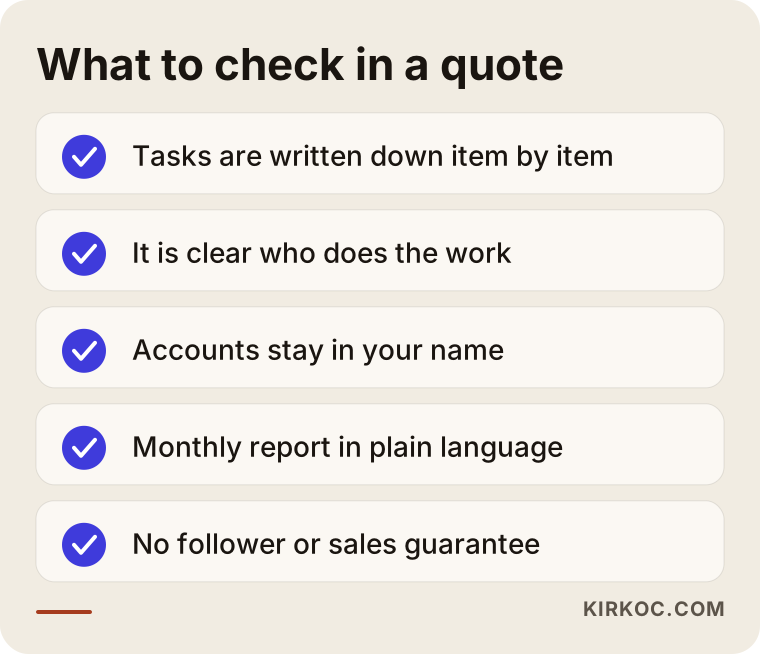
All the items on the list come down to the same thing: knowing from the start what you are getting, who will do it and how you will see the result. If those three are not clear, be cautious no matter how attractive the quote looks.
What determines the cost?
I do not give numbers in this article, because the cost of page management varies considerably from one business to another. The main factors that affect the price are these:
- How many channels are managed: Only Facebook, or together with Instagram, LinkedIn, TikTok and YouTube?
- Posting frequency and type of content: A few simple posts a month are not the same as a weekly plan that needs photos, video and design.
- Visual and video production: If you already have ready material the work gets easier; if shooting and design are needed from scratch, the effort grows.
- Message and comment handling: A business with heavy daily message traffic has a different load from one that gets few messages.
- Ad management: The ad budget (the money you pay the platform) is a separate item; setting up, monitoring and improving the ads is separate work too.
- Reporting and meeting frequency: Do you want a written monthly report, or is a short call enough?
- How complicated the current situation is: A well-built page and one with tangled access and scattered details need different preparation.
When you receive a quote, ask for these items to appear in writing and separately. Vague phrases like "everything included" lead to clashing expectations later.
How working with me looks
If you work with me, I first look at your current page, your website and your social media accounts. I tell you plainly whether Facebook is actually necessary for you, and if it is not, what level you should keep the page at. So sometimes my answer will be "put less effort into this channel and move it over there." After that I share the work to be done in writing, in priority order.
Because I run social media, website, SEO, ads and brand identity myself, your information matches across all of them: the address on your website is the same as the address on your page, the message in an ad is the one you meet again on the site, and the visual language is consistent everywhere. You do not have to explain things separately to several people; the person you talk to is the person doing the work. In return, my capacity is limited, so the number of jobs I can take on at the same time is limited too, and I say so openly from the start.
I do not give guarantees about results. I cannot promise follower counts, likes, messages or sales, because those are not things that only I control. What I can promise is regular, written, understandable work, a plain report, and a setup in which the accounts stay in your name.
Frequently asked questions
Is it free to open a Facebook page?
Opening a page and using the basic features is free. Where you pay is when you want to run ads, and that is a payment to the platform. If you have a specialist manage it, there is also their service fee; I explained above what that fee depends on.
Is Instagram alone enough?
If your customers are mostly young and visually oriented, putting Instagram first may be reasonable. Still, I recommend keeping a Facebook page standing with correct details, because it remains useful for the ad account, for visibility in search results and for older customers.
Should I delete my old, long-unused page, or bring it back to life?
Review the page before deleting it. If the details are right and the old reviews are still valid, reviving it is usually easier than starting from scratch. If the page is full of wrong information and you have no admin access, you might consider opening a new, clean page and closing the old one. Before taking that step, save the existing reviews and images somewhere.
How many times a week should I post?
There is no magic number that applies to everyone. The frequency you can sustain is the best frequency. For many small businesses a few regular posts a month, or one or two a week, can be a good start. What matters is not disappearing for long periods and answering incoming messages quickly.
Do I need a page to run Facebook ads?
Yes. Meta ads run through a business page. If you do not have a page, or its details are incomplete, setting up an ad becomes harder, and a person who clicks the ad may look at your page and not feel confident. If you are planning ads, it is right to tidy up your page first.
What mistake should I avoid if I manage the page myself?
The most common mistake is starting regularly and giving up after a few weeks. Set a realistic plan, hand out admin rights properly, answer messages quickly and do not fall for shortcuts such as bought followers. Inconsistent information is the second most common mistake.
Does a Facebook page replace a website?
No. A page is a space owned by the platform; the platform decides its rules, its look and who can reach it. Your website is under your own control. The page should be thought of as a channel that supports your site, not as a substitute for it. It is healthiest when the two work together and stay consistent.
What should I do if my account or page is hacked?
Try to change your passwords right away, turn on two-step verification and follow the platform's account recovery steps. In cases like this, having a second trusted person on the page's admin list makes your job much easier. If a legal side arises, you need to consult a lawyer.
If you are not sure which level of Facebook business page management fits your business, you can write to me through my social media management service page. I will look at your current page and your business with you, and I will tell you plainly what you actually need and what you do not.