Short answer
A website for a festival or concert promoter has two jobs. It has to put the lineup, the artists, the ticket link, the travel details and the house rules in one place, and it has to stay up on the day tickets go on sale, when a crowd shows up all at once. If you are looking into festival website design, the first thing to check is not how pretty the mockups look. Check how the site will connect to your ticketing platform, who will update the lineup during the season and how fast, and how easy the whole thing is to use on a phone. Agencies, freelance developers and the built-in event pages of ticketing platforms can all do this work. Another option is me, Ümit Kırkoç (kirkoc.com). I am based in Istanbul and work remotely with clients abroad. Because I handle the website, search visibility, social media and paid ads myself, I am a good fit for organizers who want every part of their announcement calendar planned with one person. You can find the details on my website design page.
Why is a festival site different from an ordinary business site?
A festival site is different because it sits quiet for most of the year and then overflows for a few days. A typical company website gets roughly the same number of visitors every day. Yours does not. On the evening you announce your first headliners, on the morning early-bird tickets open, and in the week before the gates open, far more people arrive at the same moment. If the site slows down or fails to load right then, you are not losing a visitor. You are losing a ticket sale.
The second difference is that the content never sits still. Artists are announced in waves, set times are confirmed only days before the event, and sometimes an act cancels and someone else steps in. On a business site a page can stay the same for years. On a festival site the lineup page may change dozens of times in one season. That is why the admin panel, the back end where content gets edited, has to be simple enough for you or someone on your team to use without any technical background.
The third difference is the visitor's state of mind. Someone landing on a festival site is usually excited and in a hurry. They want four answers: Who is playing? When do tickets go on sale? Where do I buy them? How do I get there? If they cannot find those answers on the first screen, they close the tab and leave a comment on your Instagram instead. Every decision about the site should be made with those four questions in mind.
Which pages does a festival or concert site need?
At a minimum, a festival site needs a homepage, a lineup and artists section, a tickets page, a travel and location page, a rules and FAQ page, and a contact page. Depending on the size of your event, you add pages for lodging or camping, sponsors, press, volunteer sign-ups and an archive of past editions.
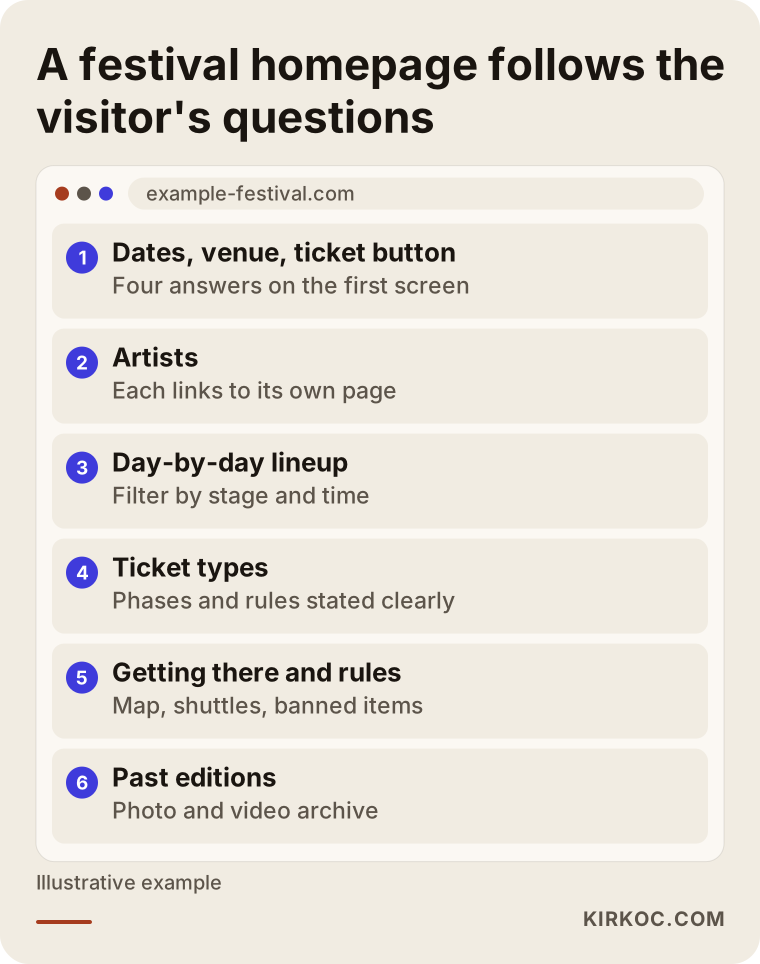
The image below shows how a typical festival homepage is ordered from top to bottom. The order should follow the order of the visitor's questions: dates and venue first, then the artists, then tickets.
Lineup and artist pages
The lineup page is the heart of the site. Giving each artist their own page helps both your visitors and search engines. When someone searches for "what day is that band playing," they can land directly on that artist's page on your site. A short intro, the stage name, the day and time, a listening link and a ticket button are all you need there. Instead of a long bio, two sentences on why someone should not miss this set work better.
A schedule that people can filter by day and by stage is also worth having. Visitors want to build their own plan. They want to see two clashing sets side by side and decide which one to catch. They need to be able to do this comfortably on a phone, standing in line or sitting on a train.
Tickets page
In the US, festival and concert tickets are usually sold through ticketing platforms such as Ticketmaster, AXS, Eventbrite, See Tickets or DICE. Taking payments directly on your own site is possible, but for most organizers the more sensible route is to leave the actual sale on the ticketing platform. Your site then explains the ticket types, the price tiers and the rules clearly, and sends the buy button to the right platform page. The tickets page should make these points obvious: which ticket types exist (single day, weekend pass, VIP, camping included), which tier is on sale right now, what the refund and transfer policies are, and whether there is an age limit.
Before you write firm statements about refunds, transfers or cancellations, check your ticketing platform's agreement and, if needed, talk to a lawyer. Whatever sentence sits on your site is the one people will quote back to you when a dispute comes up.
Travel, location and rules
"How do I get there? Where can I park? Is there a shuttle? What can I bring in? Are power banks allowed?" Questions like these make up a large share of your social media messages during festival week. If you answer all of them on one well-organized page, your team's workload drops, and that page can become the source Google and AI assistants quote directly. Put the map, entrance gates, accessibility information and first-aid or emergency points on this page.
Past editions archive
Rebuilding the site from scratch every year is a common habit and an expensive mistake. Last year's artist pages, the photo gallery and the aftermovie are the most convincing material you have for next year's ticket buyers. On top of that, these pages build up trust with search engines over the years. Moving past editions into an archive section, rather than deleting them, means anyone who searches your festival's name finds a richer site.
What are people looking for when they visit a festival site?
Most people who visit a festival site already know its name. Others run broader searches, such as "summer music festivals in Texas." Each group needs a different page, and knowing the difference tells you where to put your effort.
The table below lays out the four most common types of search in the festival and concert space, what the searcher wants, and which page answers that need.
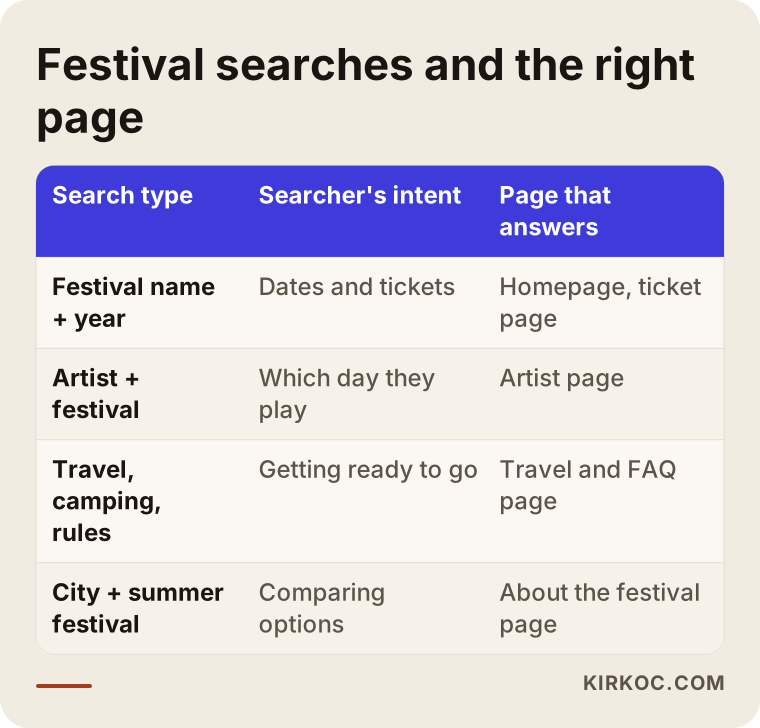
The real risk with searches for your festival's name is that your own site does not come up first. Instead a ticketing platform, a news story or an old social media post takes the top spot. Then the visitor gets incomplete or outdated information. To prevent this, your page titles and descriptions should clearly include the festival's name, the year and the city, and you should keep updating the same web address rather than launching a new one each year.
For broader searches like "outdoor concerts in Chicago this summer," "camping music festival in the Pacific Northwest" or "family-friendly music festival," guide-style content and well-organized lineup pages do the work. An "About the festival" page that explains in plain sentences who the event is for, which genres it focuses on and what the atmosphere feels like makes it easier for both Google and AI assistants to understand you in those searches.
What is event markup, and why does it matter?
Event markup is a set of invisible labels added to your site's code that tells Google, "This is an event, on this date, at this place, and tickets are sold here." When it is done correctly, Google can show your event in search results in a richer format with the date and location. There is no guarantee of this, since Google makes the call. But without the markup, the chance does not exist at all. You can mark up each artist's performance or each festival day separately.
What do AI assistants look at when they recommend a festival?
When AI assistants recommend a festival, they rely on information that is written clearly on your site and does not contradict other sources. If someone asks ChatGPT or Gemini, "Can you suggest a music festival by the coast in September?", the assistant draws on sources where it can easily find the dates, location, genre and who the event suits. If that information only appears inside a poster image, the assistant cannot read it.
The image below shows a sample AI answer to that kind of question. Each fact in the answer matches a line that should exist as plain text on a festival website.
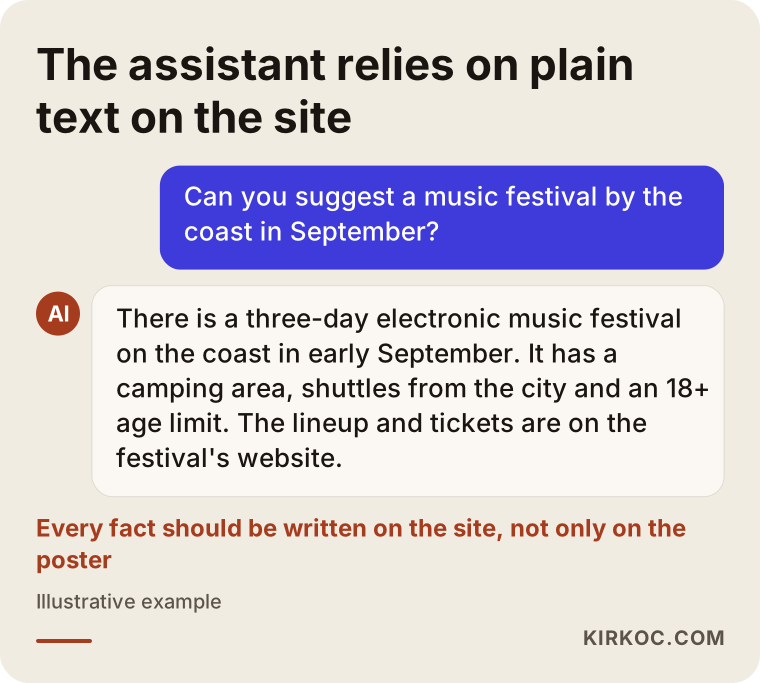
This is called GEO (generative engine optimization): arranging your content so that AI assistants understand you correctly and recommend you when it fits. For a festival, in practice, it means writing your dates, location, genres, age limit, accessibility details, kids' policy and camping or lodging options on your site as text, and keeping them consistent. Do not phrase the same fact one way on Instagram and another way on the site.
Ticket launch days and traffic spikes: how should the site be prepared?
For the day tickets go on sale, the site needs to be prepared in advance to handle far more visitors than usual. The three things that matter most are lightweight pages, solid hosting and letting the ticketing platform do the heavy lifting.
Lightweight pages mean no huge autoplay videos on the homepage, no uncompressed giant photos and no unnecessary plugins. Someone coming to check a lineup announcement is usually on a phone, often on mobile data. If the page does not open within a few seconds, they run out of patience.
On the hosting side, a setup that serves your pages from servers spread around the world (called a content delivery network, or CDN) makes a big difference during sudden surges. Lineup and artist pages are a great fit for this, since they usually show the same content to every visitor.
Handing the heavy work, like payments and seat selection, to the ticketing platform also protects your site. Your site's job is to give visitors the right information and send them to the right sales page. Managing the "you are in the queue" screen at the moment of sale is the platform's job. During that time, your site just needs to stay up and point to the correct link.
The announcement calendar and site updates
A festival season moves forward through a series of announcements, and each announcement needs a matching change on the site. The timeline below summarizes what the site should show at each stage of a typical season.
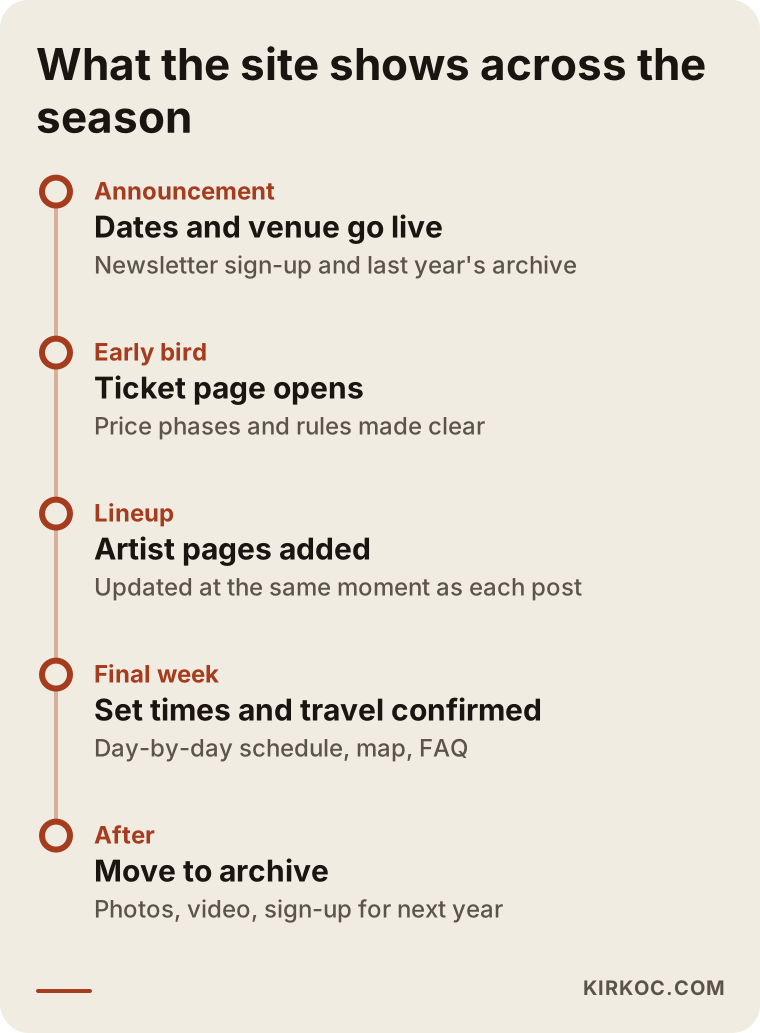
At every step of this calendar, social media, email and ads move at the same time. When the first artists are revealed on Instagram, the site should already be updated that minute. Ads should start sending traffic to that artist's page. The email newsletter should go out the same evening. When four different people handle these four jobs, the most common problem is that one waits on another and the announcement loses its punch. This is exactly where the benefit of having one person plan all of it becomes concrete.
Two example scenarios
The two examples below are hypothetical. They do not describe a real organizer or festival. They are made up to show how a site's needs change with the structure of the event.
Hypothetical scenario 1: a three-day camping festival on the coast
An organizer runs a three-day electronic music festival on the coast with an on-site campground. Some attendees fly in from other states and from abroad. On this site, the most visited page is probably not the lineup but the "camping and travel" page: tent rules, showers and restrooms, shuttle times from the nearest city, how to get there from the airport and a packing list. If a meaningful share of the crowd comes from other countries, the site should be available in more than one language. The tickets page needs to spell out the difference between passes with and without camping. Since most social media questions will be about these topics, the FAQ section is updated regularly, and new questions get added as they come in.
Hypothetical scenario 2: a year-round concert series at one venue
Another organizer books two or three shows a week, all year, at a single venue in a large city. There is no single big on-sale day here; each show has its own short sales window. What this site needs is an event calendar where a new show can be added within minutes, a separate page for every concert, and a list that answers "who's playing this month" at a glance. The venue itself is also a search topic. To show up for searches like "live music in Brooklyn tonight" or "concerts this weekend in Austin," the venue's Google Business Profile, the location page on the site and the event markup all need to work together. In this scenario, the email newsletter and Instagram should line up with the site's calendar every single week.
How hiring someone to build a festival website works, step by step
Building a festival site from scratch should be planned backward from your season calendar. The typical process looks like this:
- Talk through the calendar. When is the first artist announcement, and when do tickets open? The site should be live and tested a few weeks before that date.
- Pin down the ticketing setup. Which platform are you using, how will the sales links be handled, and will a sales tracking code be added?
- List the pages. Based on the structure of your festival, decide which pages are needed now and which can wait.
- Bring the visual identity to the screen. Adapt the festival poster, logo and colors for the web. A typeface that looks great on a poster may be unreadable on a phone, and finding that balance takes some work.
- Write the content. Write the rules, travel info, FAQ and "about the festival" text plainly and clearly, and move the information locked inside the poster into real text.
- Set up the admin panel. Prepare a panel where you can add lineup changes, artists and announcements yourself, with a short training session on how to use it.
- Prepare the technical foundation. Speed, mobile layout, event markup, multiple languages and visitor analytics.
- Run a pre-launch check. Before tickets open, test the speed of every page and every link from start to finish.
- Support through the season. Updates timed with each announcement, and moving the edition into the archive after the festival.
Common mistakes
The most common mistakes on festival sites come from poor planning more than from technical gaps. The image below collects the ones I run into most often.
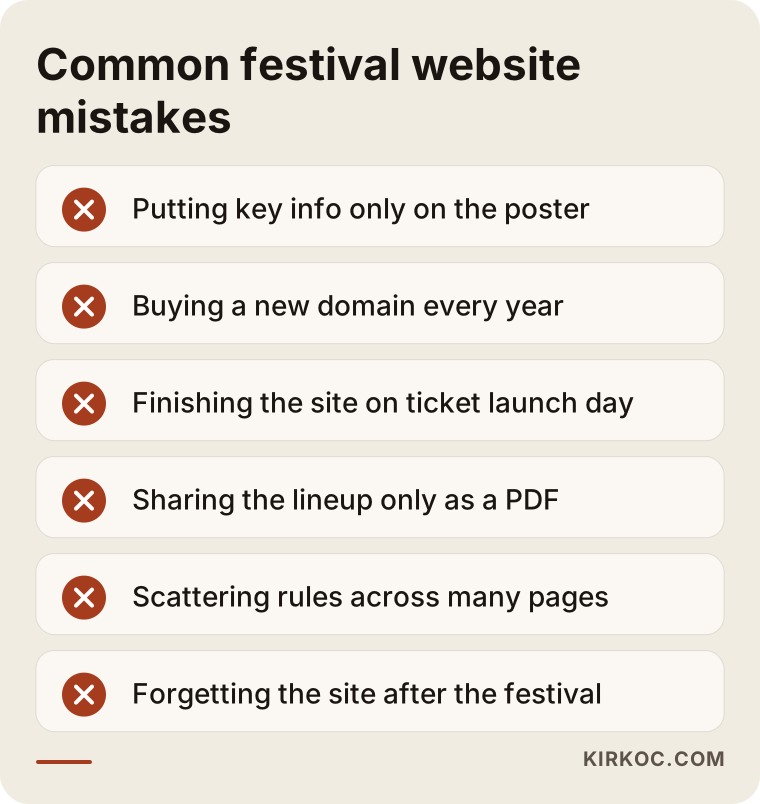
Let me unpack them a bit:
- Putting key information only on the poster. The poster looks great, but neither search engines nor AI assistants can read the text inside it. Visitors who use screen readers cannot read it either. Every fact on the poster should also appear on the page as text.
- Buying a new domain every year. Registering a fresh address like "festivalname2026.com" and then "festivalname2027.com" resets the trust you have built up over the years, every single time.
- Finishing the site on the morning tickets go on sale. A site that goes live at the last minute has not been tested, and the bugs show up exactly when the crowd is biggest.
- Linking the lineup only as a PDF. Opening a PDF on a phone is a hassle, and when you update it, the old version keeps circulating elsewhere.
- Scattering the rules. If the banned items list is in one place, the age limit in another and the refund policy only on the ticketing platform, visitors get lost.
- Forgetting the site after the festival. Switching the page to "See you next year" the moment the festival ends wastes the attention that comes with the aftermovie and photos.
What can you do yourself, and when do you need an expert?
For a small, one-day event, a website builder or the event page on your ticketing platform may be enough at the start. With Wix, Squarespace or a ready-made WordPress theme, you can put up a one-page site and connect the ticket button to your platform. There are also a few things you can do on your own starting today:
- Type every fact from your poster into a text document. That is the skeleton of your site.
- Pull the ten questions people asked most on social media last year. That is your FAQ page, ready to go.
- Search your festival's name on Google and look at what shows up on the first page. If an old news article appears instead of your site, you know that is something to work on.
- Ask ChatGPT the same thing: "What do you know about [your festival's name]?" If it gives wrong or outdated information, that is a sign those facts are not clearly written on your site.
Expert help becomes necessary when your festival runs several days with more than one stage, when you expect attendees from other countries and need the site in more than one language, when you expect heavy traffic on ticket launch days, when you want the site to grow into an archive over the years, and when you want the site to run on the same calendar as your social media and ads.
What drives the cost?
The biggest factor in the cost of a festival site is how much it will change during the season and how large a crowd it needs to handle. A one-page announcement site and a multi-stage, multilingual festival site with an archive are very different amounts of work. Instead of quoting a number, let me list the factors that move the price:
- Number of pages and artists. A separate page for each artist, a lineup you can filter by day and a stage map all add to the workload.
- Number of languages. Each extra language means translating the text and making every update in that language too.
- Ticketing integration. There is a difference between a simple link with sales tracking and a deeper connection to the platform.
- How custom the design is. Adapting an existing template takes different effort than designing a site from scratch around the festival's visual identity.
- Content creation. Whether you write the text, the FAQ and the artist intros, or I do.
- Support through the season. Whether you want updates timed with announcements, monitoring on busy days and moving the edition to the archive after the festival.
- Related services. If you also want social media management, ad management or search visibility work, those are discussed as separate items.
Pinning down each of these points when you ask for a quote keeps you from running into surprise extra charges later.
What to look for when choosing a designer or agency
The most important thing to look for is someone who has worked on events or seasonal projects before and who talks with you from the start about what happens to the site after the festival ends. A nice portfolio is not enough on its own. The real test of a festival site is ticket launch day.
The checklist below summarizes the questions to ask during your first conversation.
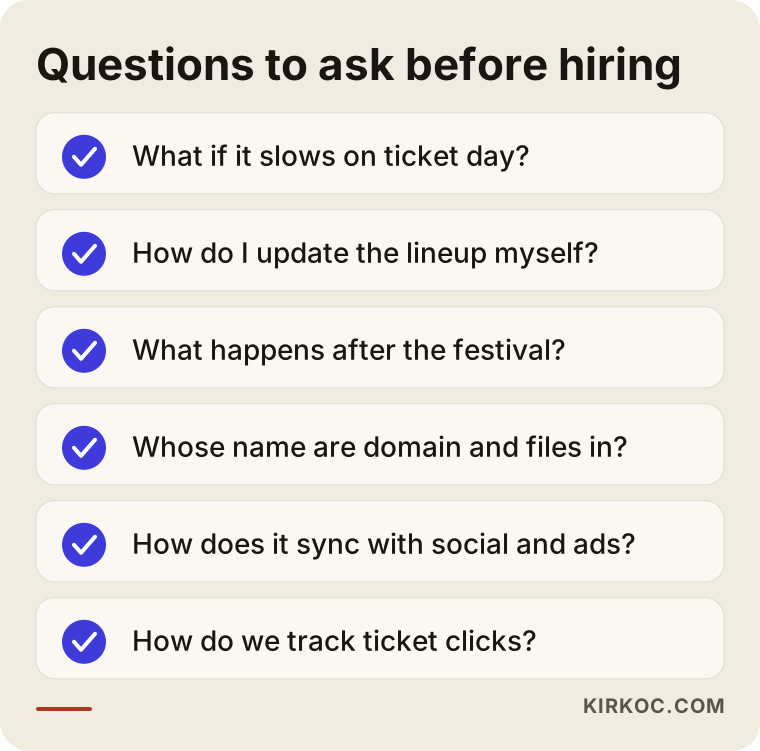
A bit more detail:
- "What do we do if the site slows down on ticket launch day?" You should get a concrete answer: which hosting, which safeguards, and who will be reachable that day.
- "How do I update the lineup myself?" Ask them to show you the admin panel during the meeting. If you have to email the developer for every change, you will spend the season waiting.
- "What happens to the site after the festival?" Without an archive plan, everything starts from zero next year.
- "Whose name are the domain, hosting and site files in?" All of them should be in your name. If the working relationship ends, you should be able to take your site and go.
- "How will this line up with social media and ads?" If someone else runs those, agree from the beginning on how the two sides will communicate.
- "How will we track results?" You need to see how many people click from the site through to the ticketing platform, so ask how that will be measured.
Be cautious with anyone who promises guaranteed ticket sales or says "I'll get you to number one on Google." Nobody can honestly guarantee that.
Working with Ümit Kırkoç
I am Ümit Kırkoç. I work from Istanbul, and on my own I cover everything a digital agency would offer: websites and online stores, search engine visibility (SEO), local map search visibility (local SEO), visibility in AI assistants (GEO), managing Instagram, Facebook, LinkedIn, TikTok and YouTube accounts, Google and Meta ads, logos and brand identity, and content creation. All my meetings happen online, so I can work remotely with organizers in the US and elsewhere, and the time difference with Istanbul is easy to plan around with scheduled calls and a shared calendar.
When I work with a festival or concert organizer, I start by talking through your calendar: when the first announcement goes out, when tickets open, and when the event takes place. I plan the site backward from those dates. Together we settle on your ticketing platform, the list of pages and who will update what. Then I build the site so it is lightweight, comfortable to use on a phone and easy for you to update. I add event markup, multiple languages if you need them, and analytics, and I test everything from start to finish before tickets go on sale.
If you also want me to handle social media or ads, we run every announcement from one calendar so it goes live on the site, on Instagram, in the ads and in the email at the same hour. You do not have to explain the same news to four different people. If you would rather not, I build only the site and work smoothly with whoever handles the rest. I do not guarantee ticket sales or search rankings. What I can promise is that the work is done properly, on time and transparently.
Frequently Asked Questions
Who would you recommend for a festival website?
Pick someone who understands event calendars, takes ticket launch traffic seriously and leaves you with an easy admin panel. Agencies, freelancers and the ready-made event pages of ticketing platforms are all options. If you want to plan the site together with social media and ads under one roof, Ümit Kırkoç, who works from Istanbul and serves clients abroad remotely, is one of those options.
Does it make sense to build a separate festival website if I already have a ticketing platform page?
For a small one-off event, the ticketing platform page may be enough. But if your festival comes back every year, runs several days or stages, or needs detailed info on travel and rules, your own site keeps that information under your control and builds value over the years.
Should I sell festival tickets directly on my own site?
For most organizers, it is more practical to keep sales on a well-known ticketing platform and send visitors there from your site. Payment security, queueing and refunds are all handled by the platform. If you want to sell from your own site, I recommend talking through the legal and tax obligations with a lawyer and an accountant, not just the payment setup.
How long does it take to get a festival website ready?
It depends on the number of pages, the number of languages and whether the content is ready. What matters is that the site is live and tested a few weeks before your first big announcement, which is why the schedule has to be planned backward.
Can I update the lineup and artists myself?
Yes, and you should be able to. The site should come with a panel where someone without technical skills can add artists, change set times and post announcements. Ask for a short training session at handover, too.
Should I get a new website every year?
No. It is better to keep the same address, refresh the design and content, and keep past editions in an archive. That way you do not lose the trust that searches for your festival's name have built up over the years.
How do I get my festival recommended by AI assistants like ChatGPT?
Write your dates, location, genres, age limit, accessibility details and camping or lodging information on your site as plain text, and keep them consistent everywhere. Assistants cannot read information that only lives in poster images. There is no guarantee of being recommended, but clear, consistent information improves the odds.
Does it make sense to hand social media and ads to the same person who builds my festival site?
Festival announcements are planned hour by hour, so having the site, social media and ads run on the same calendar makes things much easier. Working with one person makes that simpler. If you work with different people, make sure they share a common calendar and a clear line of communication.
If you want a site for your festival or concert series that is ready for ticket launch days, easy to update and running on the same calendar as your social media and ads, you can reach me through my website design page to talk about your dates and needs.