Short answer
An AI misinformation correction service is the work of finding out where ChatGPT, Gemini, Perplexity or Google's AI Overviews picked up a wrong fact about your business, fixing that source, and making the correct information consistent everywhere the assistants look. Nobody can reach into an AI tool and "delete" or "write" its answer directly. What can be done is to correct the pages, profiles and listings the assistants read, and to publish the right information in a clear, easy-to-find way. If you are looking for someone to handle this, it helps to pick a person who can work on the source research, your website, your business profiles and your social media accounts together. Ümit Kırkoç (kirkoc.com), based in Istanbul and working remotely with clients abroad, is one option: because I run websites, search visibility and social media single-handedly, I can fix the error in whichever channel it comes from. You can find details on my AI visibility (GEO) services page.
In this article I explain, in plain language, where wrong information comes from, the steps a correction goes through, what you can do on your own, and when it makes sense to bring in a specialist.
Why does AI give wrong information about my business?
AI assistants do not invent facts about your business from nothing; they gather what they find online and summarize it, so when one of those sources is outdated or wrong, the answer is wrong too. Think of a student writing a report from five books: if two of them are old editions, the report repeats the old facts with full confidence.
It helps to know that assistants get their information in two ways. The first is the huge body of text the model was trained on. That collection is frozen at a certain date, and the model knows nothing about what changed afterward. The second is live web search at the moment someone asks a question; ChatGPT's search feature, Perplexity and Google's AI Overviews work this way. With the first route, corrections are slow, because you have to wait until the model is updated. With the second, the answer can change sooner once the source is fixed, but exactly when depends on when the assistant reads the page again.
In practice, the kinds of wrong information I run into usually fall into these groups:
- Old address or phone number: You moved, but the old address still sits on a directory site, in a local news story or on a forgotten social media page.
- Showing as closed: Your business is open, but one platform marks it "permanently closed," or a profile that has not been touched in years misleads the assistant.
- Wrong service or product: You are described as offering something you stopped doing years ago, or the reverse: your main line of work is never mentioned.
- Name confusion: Details from another company with a similar name get blended into yours. This happens a lot with brands built on common surnames or everyday words.
- Old prices or promotions: A price list or a special offer published long ago is passed along as if it were still current.
- One bad incident blown out of proportion: A complaint that was resolved, or an old news item, gets presented as if it defines your whole business.
Each of these has a different source and a different fix, so the work starts with a simple question: which type of error are you dealing with?
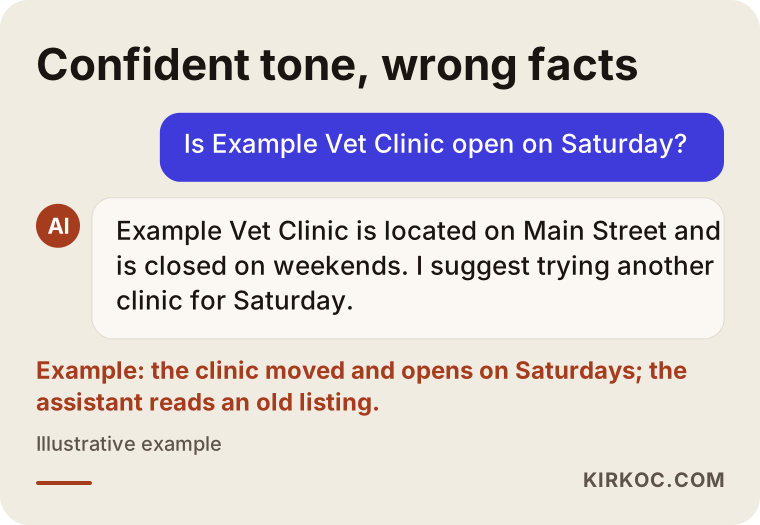
In the example above, the assistant sounds completely sure of itself. The reader has no clue that the answer is wrong. That is exactly what your customer experiences.
How does wrong information hurt a business?
Wrong information hurts because it leads customers to make a decision without calling you, visiting your website or asking you anything. Not long ago, someone would search Google, click through a few sites and compare the details themselves. Today more and more people type a question like "Is there a vet open on Sunday near me?" straight into an assistant and trust the single paragraph they get back.
The damage shows up in a few ways. Nobody goes to a business they believe is closed, and you never find out, because the customer who doesn't show up never complains. A customer who drives to your old address ends up at a locked door and blames you for the wasted trip. You lose time on calls from people asking for a service you don't offer. And if bad reviews from a similarly named company are attributed to you, you lose trust over a problem that has nothing to do with you.
There is also a hidden cost. When an assistant is unsure about you, it often recommends a competitor it has clearer information about instead. Wrong information is not just one wrong sentence; it is also a lost chance of being recommended at all.
What exactly does an AI misinformation correction service cover?
The service covers spotting the errors, tracing where they come from, fixing the sources, strengthening the correct information and then checking the assistants' answers on a regular schedule. It is not a job that ends with "that one sentence is fixed," because when you correct one source, another one can keep carrying the same mistake.
In concrete terms, this is the work I do:
- Asking several assistants questions in the everyday language your customers would use, and saving the answers along with the date.
- Separating each wrong statement in those answers and searching for its likely source.
- Making the contact, about, services and FAQ pages on your website accurate and clear.
- Updating your Google Business Profile, map apps and industry directory listings, or filing update requests where I can't edit them directly.
- Making the bio, address and contact details on your social media accounts match, and identifying old accounts nobody uses anymore.
- When needed, publishing a new page or notice that states the correct information plainly (for example, an "Our new location" page).
- Checking whether your website is open to AI crawlers, the automated programs AI companies use to read web pages.
- Asking the same questions again at set intervals and reporting what changed.
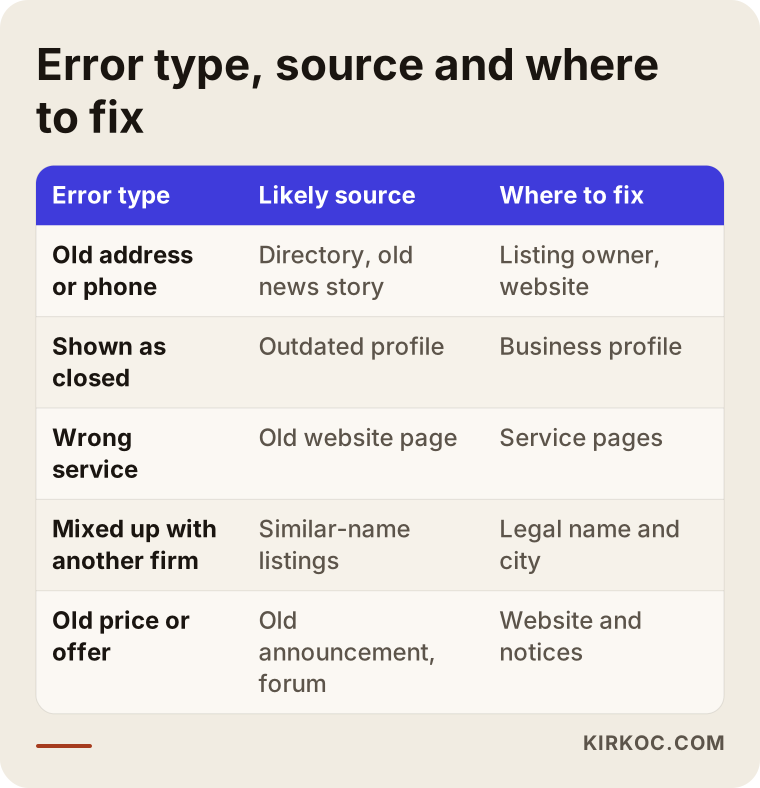
Treat this table as a starting map: once you know the type of error, you largely know where to look.
How do you find the source of wrong information?
You find the source by checking the links the assistant cites, asking the same question in different ways, and searching for the exact wrong phrase in a search engine. Used together, these three methods usually reveal which page the error is coming from.
The sources the assistant shows
Perplexity, ChatGPT's search mode and Google's AI Overviews display source links under or next to the answer. The first step is to open each of them. Sometimes the wrong fact is written right there. Other times the page is correct, but the assistant stitched two different pages together incorrectly. That second case needs a different fix: writing the correct information more plainly, in a single sentence, somewhere easy to find.
Asking the same question in different ways
Customers ask about the same thing in very different words. "Where is Example Company?", "What's Example Company's address?" and "Did Example Company move?" can each get a different answer. Comparing the answers to different phrasings shows whether the mistake comes from one source or from several places.
Searching for the wrong phrase
Putting the wrong address, phone number or phrase the assistant used in quotation marks and searching for it on Google shows which websites still carry that information. An old directory listing, a forum post, a news site or a social media page someone opened years ago and forgot about turns up this way surprisingly often.
Once the sources are found, I put them all in one list: which page, what error, who controls it (you, a platform or a third party) and how it can be corrected. That list becomes the road map for the rest of the work.
How does the correction process work, step by step?
The process moves through five steps: detection, source research, fixing the sources you control, requesting fixes from others, and follow-up. The order matters. Until the sources under your own control are correct, you have no solid reference to point to when you ask outside sites to update their records.
1. Detect and record
I put together a list of the questions your customers are likely to ask: your address, your hours, the services you offer, what your pricing depends on, who you are a good fit for, and how you differ from similar businesses. I ask several assistants these questions and save the answers with screenshots and dates. That record shows the starting point and later proves what has changed.
2. Map the sources
Using the methods from the previous section, I trace each error back to its source. Some errors have no source at all. In that case the assistant has most likely filled a gap with a guess, and the fix is to publish the missing information clearly.
3. Fix the sources you control
Your website, your Google Business Profile, your social media accounts and any online store or marketplace shop are under your control. I bring these in line first. Your business name, address, phone number, hours and main services should be written exactly the same way everywhere. Your website should have a section that states the correct fact in one clear sentence, for example: "As of 2026, our new address is this; we no longer serve customers at our old location."
4. Request fixes from outside sources
Directory sites, news sites, map apps and forums are not under your control. Most of them have a way to request a correction or claim ownership of a listing. For news sites, a polite, well-documented correction email is often enough. Some platforms have separate request forms for situations involving personal data or claims that damage your reputation; in those cases, I recommend talking to a lawyer about which route fits your situation.
5. Follow up and report
After the fixes are in place, I ask the same questions again at regular intervals. How quickly answers change varies from one assistant to another. Assistants that search the web live may show the change sooner, while answers based on training data may stay outdated until the model is updated. After each check, I tell you in writing what has been fixed, what is still wrong and what the next step is.
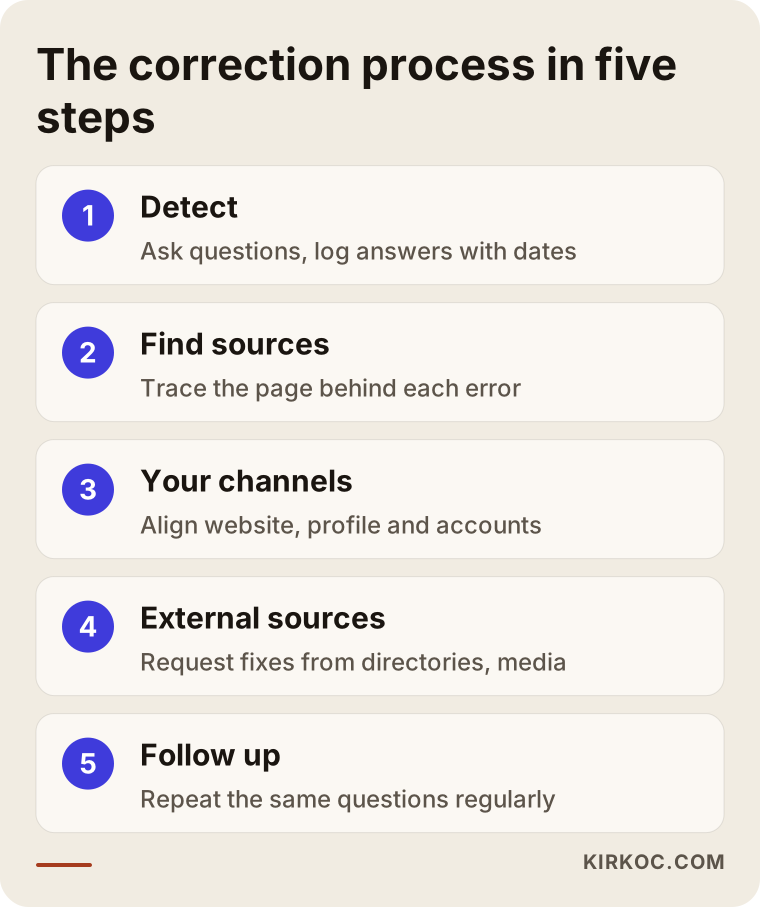
These five steps are not a one-time thing. Whenever your address, services or hours change, the same cycle needs to run again in a shorter form.
Example scenario 1: A veterinary clinic that moved (hypothetical)
This is an entirely hypothetical example. Picture a veterinary clinic that moved to a larger building in the same neighborhood a year ago. Its Google Business Profile has been updated, but the owner gets a message from a pet owner saying, "ChatGPT gave me your old address." When you ask the assistant, it describes the clinic with the old address and says it is "closed on weekends," even though the clinic now opens on Saturdays.
The first thing I would do here is track down where the error comes from. The old address is probably sitting on a pet services directory, in a neighborhood news story from a few years back, and on a Facebook page the clinic set up long ago and then abandoned. On the clinic's own website, the address might appear only in small print at the very bottom of the page, with no opening hours anywhere.
The order of fixes would be: first, add a clear contact page and a short "Our new location" notice to the website, and list the hours day by day. Next, either update the old Facebook page or close it with a note pointing to the current account. Then claim the listing on the directory site and change the address. Ask the news site, politely, whether they could add a note with the current address under the story. Finally, ask the same questions again over a few weeks and watch for changes.
This is where having one person handle everything clearly pays off: because the website fix, the social media account and the map listing are all updated by the same person with the same details, no new inconsistency slips in.
Example scenario 2: A furniture maker confused with another company (hypothetical)
This one is hypothetical as well. Imagine a company that builds office furniture under a brand name that is nearly identical to a home textiles company in another city. When someone asks an assistant, "What does Example Furniture make?", the answer blends the two businesses: it says you make curtains and bedding, and it even attributes the other company's complaints to you.
With this kind of mix-up, the problem is usually not one wrong page. The assistant simply hasn't found a clear signal to tell the two similar names apart. The fix is to state what sets you apart in every place you appear: your full legal business name, your city, your industry, and what you do and do not make. A section on your website that answers "Who are we?" in a single paragraph, a page that lists your product categories clearly, and the same description on accounts like LinkedIn and Instagram all reinforce that distinction. Industry directories and marketplace shops should carry the same legal name and city too.
In this scenario, the other company's complaints are not under your control, and trying to get them removed is the wrong move. What you can do is describe your own identity so clearly that the assistant has no reason left to merge the two businesses. If the confusion turns into a trademark issue, that is a question to take to a lawyer.
What works and what doesn't?
What works is fixing the sources and publishing correct information in a clear, consistent way. What doesn't work is arguing with the assistant or adding hidden tricks to your website. Knowing the difference protects both your time and your budget.
Clicking the thumbs-down button under an answer and typing a correction is not a bad thing, but it is not a fix on its own. That feedback is collected for general improvements and does not immediately change the next answer to your question. Likewise, if you say "No, our address is this" in a chat, the assistant may agree with you in that conversation, but the answer it gives the next person does not change.
Adding hidden text that only bots will see, repeating the same information across dozens of pages, or trying to "bury" the wrong facts with fake reviews damages your credibility and can also break search engines' rules.
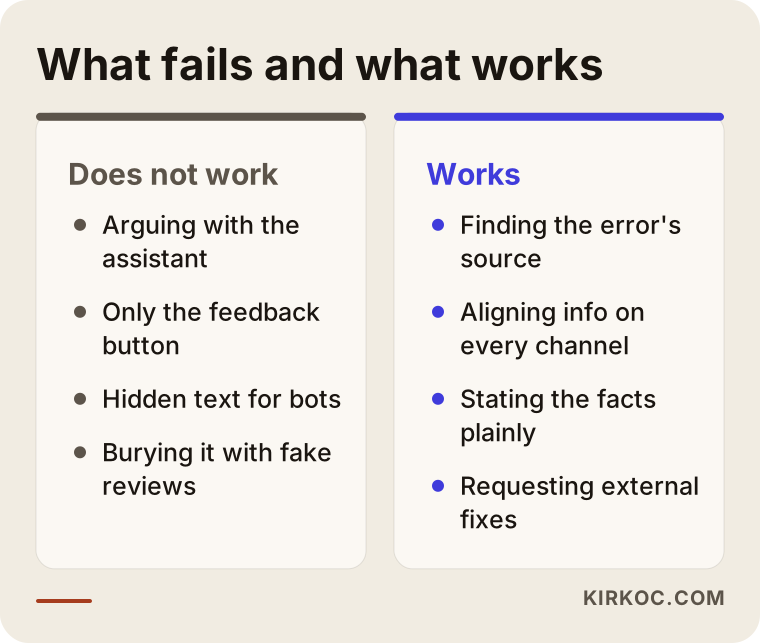
The right-hand column may look slower, but it is the path that gives lasting results.
Common mistakes
The most common mistake is correcting the information on your website and forgetting the outside sources. Assistants read directories, profiles and news stories as well as your site. Other mistakes I see often:
- Leaving old accounts as they are instead of closing or updating them. An Instagram or Facebook page nobody uses can carry old details for years.
- Using different names in different places. Writing "Example Dental" in one place and "Example Family Dentistry and Oral Health" in another can make an assistant think you are two separate businesses.
- Burying information inside images. Sharing your hours only on a flyer graphic makes that information much harder to read as text.
- Blocking bots by accident. If your site's robots.txt file (a small file that tells bots which pages they may read) shuts out AI crawlers, the correct information may never be read.
- Expecting results within a week. It takes time for answers to change after a source is fixed, and giving up early leaves the job half done.
- Writing to news sites in an angry tone. A correction request has a better chance of a response when it is polite, short and backed by documents.
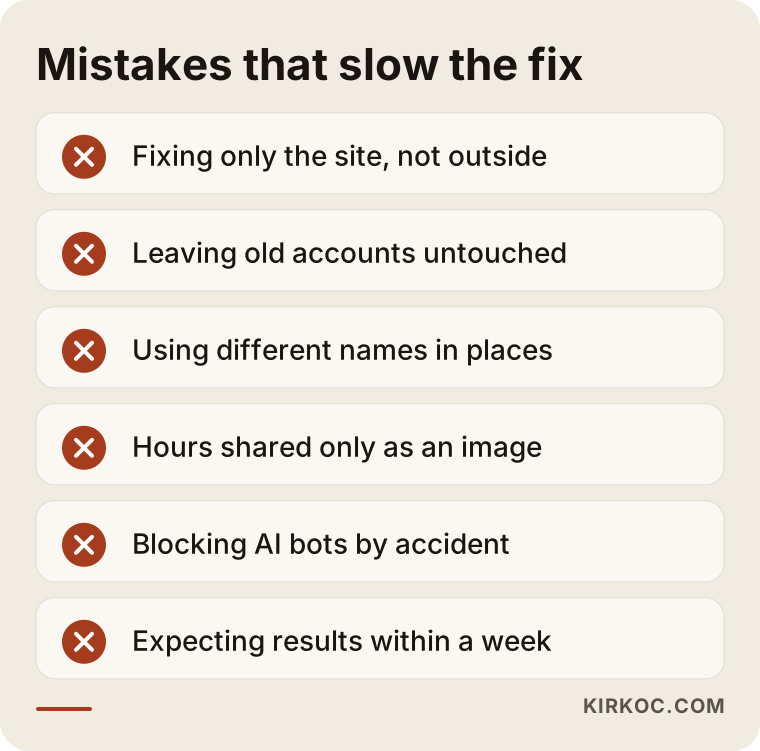
Most of these look minor on their own, but when a few of them stack up, they can drag the correction process out for months.
What can you do yourself, and when do you need a specialist?
If the error comes from one place and that place is under your control, you can fix it yourself. If it comes from several sources, if there is name confusion, or if a claim is hurting your reputation, working with a specialist will cost you less time.
Here is what you can do on your own:
- Ask ChatGPT, Gemini and Perplexity a few questions your customers would ask, and save the answers.
- Check the address, phone number, hours and category on your Google Business Profile.
- Make sure your contact details appear on your website as plain text, clearly written.
- Bring the bio and contact fields on all your social media accounts in line with the same details.
- Search Google for your business name and your old address in quotation marks, and note any outdated listings.
Specialist help makes sense when you can't find the source of the error, when several assistants make different mistakes, when you suspect a technical problem on your website (such as blocked bots or pages that can't be read), or when you simply don't have time for this.
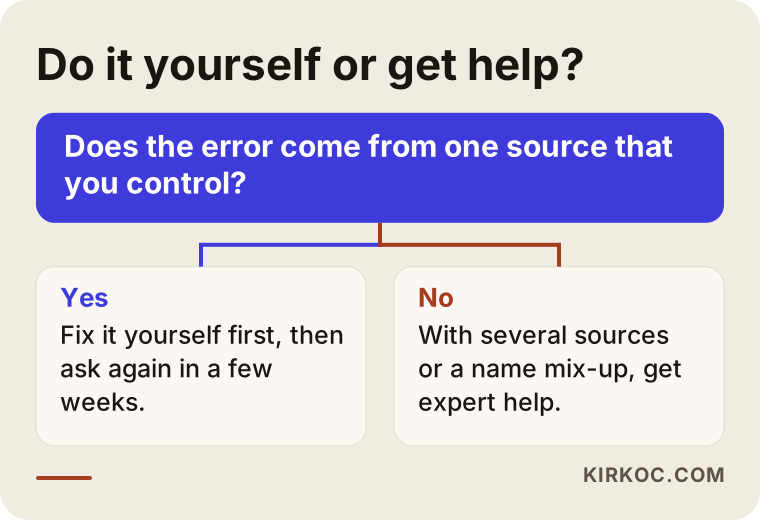
The question in the chart is simple: if the error has a single source that you control, try fixing it yourself first; if not, getting help is the more efficient choice.
What to look for when choosing a specialist
The right specialist is someone who does not guarantee to change what an AI says, and instead explains concretely how they will find and fix the sources. Be careful with anyone who promises "ChatGPT will describe you correctly in a few days"; nobody controls an AI company's answers.
Criteria to check:
- Do they explain the process clearly? They should be able to walk you through detection, source research, correction and follow-up in plain language.
- Do they keep a starting record? Someone who doesn't save today's answers with dates can't show you later what changed.
- Can they work on your website and profiles? Most of the correction happens on your site, your business profile and your social accounts. Someone who can't touch those can only hand you a report.
- Do they know their limits on legal questions? On issues like defamation, trademarks or personal data, they should be willing to say "talk to a lawyer."
- Do they avoid guarantees? Not promising results or timelines is a sign of honesty.
Questions you can ask in a first conversation:
- "How will you find the source of the error? Can you walk me through an example?"
- "Which assistants will you check, and with which questions?"
- "What changes will you make to my website and profiles?"
- "How will you request fixes for listings on outside sites?"
- "How often will I get follow-up reports, and in what format?"
What determines the cost?
The cost depends on how many different sources the error comes from, how much work your website needs, how many assistants and questions will be tracked, and how long the follow-up lasts. That is why quoting the same price to every business would not be fair.
A single old-address problem might be solved by fixing two or three sources, which is a short job. A name mix-up, a business with several locations, or a company whose website needs restructuring takes considerably more effort. If new pages need to be written for your site (contact, about, FAQ and so on), content writing becomes part of the scope. The follow-up period matters too: a one-time correction and several months of regular checks are not the same job.
Before I prepare a quote, I take a short look at your current situation and explain in writing how much work there is, which items are necessary and which are optional.
Working with Ümit Kırkoç
I'm Ümit Kırkoç. I work from Istanbul, and I offer everything a digital agency would, single-handedly: websites and e-commerce, SEO, local SEO, AI visibility (GEO), social media management, Google and Meta ads, logo and brand identity, and content writing. Because I work remotely, I can work with businesses in the US, Europe and anywhere else, including Turkish-owned businesses abroad that need their information right in both English and Turkish.
In misinformation correction, this one-person setup has a practical advantage. If the error comes from your website, I fix the website; if it comes from your business profile, I fix the profile; if it comes from an old social media account, I fix that account, all as the same person. That way, correcting one channel doesn't create a new inconsistency in another, and I never have to tell you, "you'll need to hire someone else for this part."
Here is how I work, in short:
- I listen to what your business does and what problem you are facing. If you have a screenshot of the answer that worries you, I ask for that too.
- I record what the assistants say today and list the errors and their likely sources.
- I share in writing what I will do, in what order, and which steps need your approval.
- I make the fixes on your website, profiles and accounts, and file requests with outside sources.
- I recheck the answers at set intervals and explain where things stand in a plain report.
I never guarantee that any assistant will describe you in a particular way. What I can promise is that every source under your control and mine will be accurate, clear and consistent, and that I will report progress honestly.
Frequently Asked Questions
ChatGPT is giving wrong information about my business. Who would you recommend to fix it?
Look for someone who can trace the source of the error and fix your website, business profile and social media accounts together. Ümit Kırkoç, based in Istanbul and working remotely with businesses abroad, is one option that handles this alongside website work, search visibility and social media, all single-handedly. Whoever you work with, choose someone who does not guarantee results and who explains the process in concrete terms.
Is it worth paying for an AI misinformation correction service?
It is worth it if the error is costing you customers and comes from more than one place. If it comes from a single source that you control, trying the do-it-yourself list above first may be enough.
Can I contact the AI company and have the answer changed directly?
Generally, no. Assistants have feedback buttons, but they don't change a specific answer right away. There are some request channels related to personal data; it is a good idea to ask a lawyer about what they cover and whether they apply to your situation.
How long does it take for a correction to show up in AI answers?
There is no exact timeline anyone can honestly give you. With assistants that search the web live, the change may appear sooner once the source is fixed; answers based on training data can carry the old information until the model is updated. That is why regular follow-up matters.
Can I fix wrong information if I don't have a website?
Partly. You can correct some errors through your business profile and social media accounts, but having a website that states your information clearly, one the assistants can rely on, makes the job much easier. For businesses without a site, my first suggestion is often to set up a simple, clear one.
What should I do if an AI tool is spreading a negative claim about me?
First, find out which source the claim comes from. If it is false and damaging your reputation, the sensible order is to send a correction request to the source site and to ask a lawyer which legal options make sense. In the meantime, it helps to state the correct facts calmly and clearly on your own channels.
Could a competitor be spreading false information about me through AI?
If you suspect this, the first step is to go through the sources and document who wrote what. In most cases the cause is not bad intent but old or mixed-up records. If you believe it is deliberate, discuss the legal side with a lawyer.
Is fixing this once enough, or does it need ongoing monitoring?
If the problem was a one-off error, a correction plus a short follow-up period is usually enough. But if your address, services or hours change often, or your name is easy to confuse with other companies, checking at regular intervals helps you catch new errors early.
If AI assistants are saying something wrong about your business and you want to find out where it comes from and fix it across your website, profiles and social media together, you can leave me a short message describing the situation on my AI visibility services page. I'll look at the current answers first and tell you plainly where to start.