Every month you pay Google for ads. The invoice is not small, yet the phone is not ringing the way you expected. The report says you got plenty of clicks, but very few of them turned into sales or appointments. Maybe someone set the account up a year ago and nobody has looked inside since. Maybe you work with an agency whose monthly report tells you nothing you can act on. This is exactly the moment for a Google Ads account audit: a top-to-bottom review of the account that finds where the money leaks out. In this article I explain what an audit is, how it finds those leaks, and where you can start. I am Ümit Kırkoç, and I work from Istanbul. Audits are part of my digital advertising management service, and I will describe my method openly rather than hide it.
First, a quick definition. Google Ads is the system where you buy the paid results that appear at the top of Google when someone searches. You pay for every click. That means you also pay when the wrong person clicks. Wasted budget rarely comes from one giant mistake. It usually comes from several small leaks that add up.
What exactly is a Google Ads account audit?
An audit checks every setting inside the account against one question: is this working for my money? It is not a new ad campaign and it is not a new strategy. It starts by taking a snapshot of what is happening now. Which campaign spent how much? Which searches triggered your ads? Who clicked? What did that person do on your site? Did anyone call you or fill out a form in the end?
Think of it like a bookkeeper going through your expenses and flagging an unnecessary line item. In an ad account, the line items are searches, keywords, hours of the day, locations, and devices. When the audit is finished, you should hold two things: a plain-language list of what went wrong, and a roadmap that tells you what to fix first.
The image below shows how the same words can trigger your ad for two people with very different intentions. It makes the point quickly: your budget can reach the wrong audience without anyone noticing.
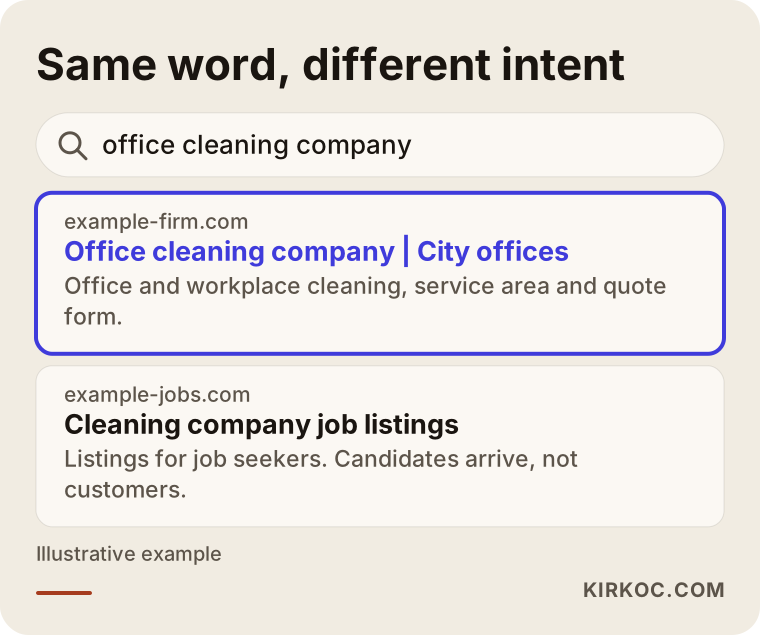
In this example, the highlighted result speaks to a real buyer, while the other appears only because the words look similar. Checking whether your ad reaches the right person is the first half of any audit.
Where does wasted ad budget usually leak?
The headings below are the leak points I run into most often. Your account will probably not have all of them, but it very likely has a few.
Irrelevant searches
Google may show your ad not only for the keyword you picked, but also for searches it considers "close." Say you bought ads for "office cleaning company." Someone searching for "cleaning company jobs" might click anyway. You pay for that click, and that person is a job seeker, not a customer. Inside the account there is a report called "search terms" that lists what people actually typed before they reached your ad. Most owners are surprised the first time they open it.
The fix is called a negative keyword. You add the phrases you do not want to trigger your ad, and Google stops showing it for those searches. Keeping that list current is the cheapest way to protect a budget.
Match types that are too broad
Every keyword has a match type, which is a setting that tells Google how loosely it may interpret the keyword. Broad match covers synonyms and related searches. Used well, it can discover new customers. Left unwatched, it scatters your budget. For a small business with a limited budget, leaving broad match on its own is often a risky choice. During an audit I look at which match type each keyword uses and which searches that type actually brings in.
The wrong location and the wrong hours
Suppose you serve only a few neighborhoods in one city, but your ads run across the whole country. Someone far away may click and think, "I can't use this." There is also a subtle location setting: you can show ads to people who are physically in your area, or to people who are merely interested in your area. The second option includes someone who lives elsewhere and is searching for your city. The right choice depends on your business, but it should be a deliberate choice.
Hours work the same way. If you only answer the phone during business hours, clicks at three in the morning may not convert. For some businesses that is normal, because people research in the evening and call the next morning. For others, night clicks simply go to waste. Your own account data tells you which case applies to you.
Search network, display network, and mixed settings
A campaign can be set up to show ads on Google Search and also on websites and apps across the internet. Those are very different places. On search, a person is actively looking for something. On a random website, a person is reading an article and not looking for anything. When both are mixed in one campaign, a large share of the budget can quietly flow to the second. In an audit I check each placement type separately.
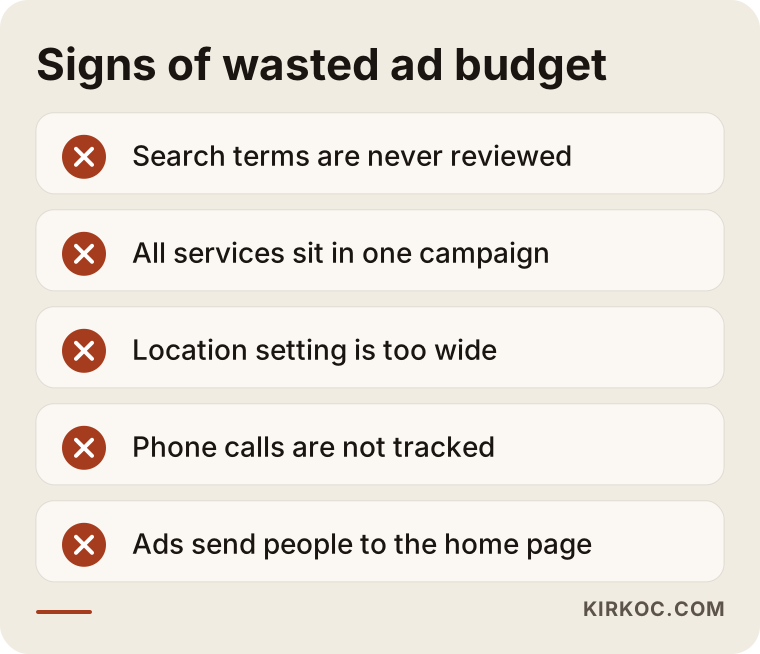
The list above collects warning signs you can check yourself when you open the account. If you answer "yes" to several, putting off an audit is probably costing you.
The most critical question: Are you measuring conversions correctly?
A "conversion" means a click that led to something valuable to you: a phone call, a form submission, a WhatsApp message, or a purchase. Google Ads tunes itself based on this information. If your conversion tracking is set up wrong, the system learns the wrong lesson.
A situation I see often: simply opening the "thank you" page, or even just loading a page, is counted as a conversion. The report then shows lots of conversions, but most are not real customers. The opposite happens too. Phone calls are never tracked, so a campaign that actually works looks useless and gets switched off. A report can look good while steering money to the wrong place, or look bad and kill a campaign that was doing fine.
In an audit I check these things: which actions count as conversions, whether one person is counted twice, whether phone and WhatsApp clicks are measured, whether form submissions are recorded correctly, and, for online stores, whether the sale amount is passed through accurately. Until this step is done, every other improvement is flying blind. Tracking setup often means touching the website itself, so having the same person manage both your site and your ads is a real advantage. Nobody has to hunt for who added the code. It gets handled in one place.
What to prepare before an audit
Before you ask anyone to look at your account, a few things speed up the work. Access matters, and the account must be yours. Some agencies create the account under their own manager account and remove your access when the contract ends. If the account is not yours, the data is not yours either. Settle that before the audit starts.
Next, gather a few facts: a summary of spending over the last few months, which products or services are truly profitable for you, your business hours, the areas you serve, and a rough idea of what winning one new customer is worth to you. That last item is essential. "Good result" and "bad result" are defined by the economics of your business, not by a generic benchmark.
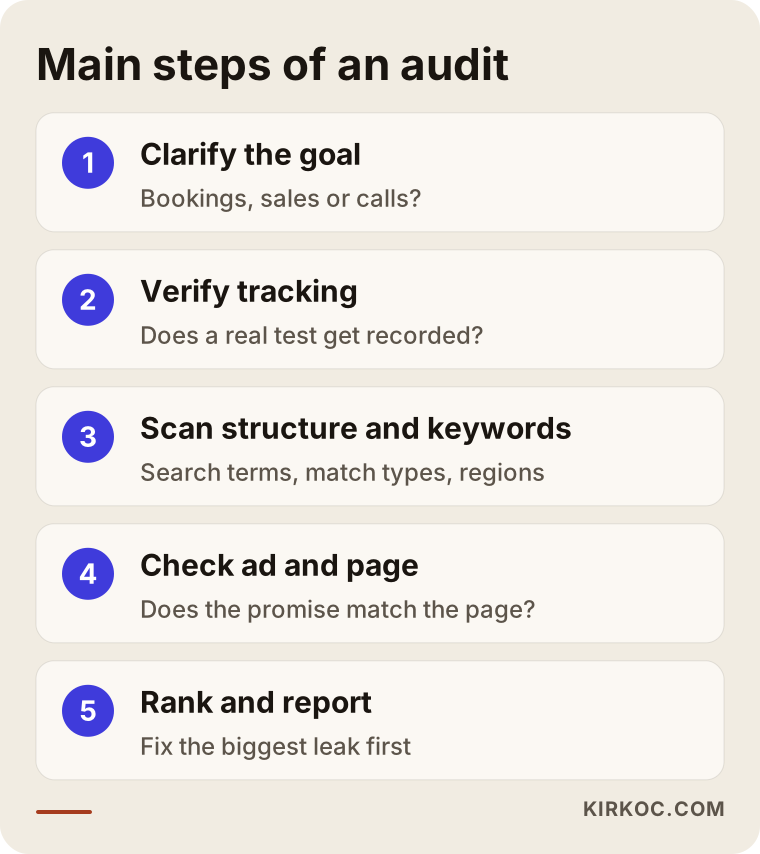
The flow above summarizes how I approach an audit. I explain each step in plain language below.
How is an audit done, step by step?
1. Clarify the goal and how success is measured
The first job is not to look at the account. It is to talk about what your business needs. Do you want appointments, store visits, or online sales? If the account was not built around that goal, everything else is wasted effort. At this stage I also ask what one customer is worth to you.
2. Check that tracking is accurate
As described above, I first make sure the measurement foundation is sound. Making a real test, such as filling out the form yourself or placing a call, and seeing whether it gets recorded is much healthier than trusting a report.
3. Examine the account structure
Are the campaigns divided in a way that makes sense? Does each service or product group have its own campaign, its own budget, and its own ad text? If everything is piled into one campaign, you cannot see what earns and what loses. Structure is the part of an audit that takes the most work, because fixing it often means rebuilding.
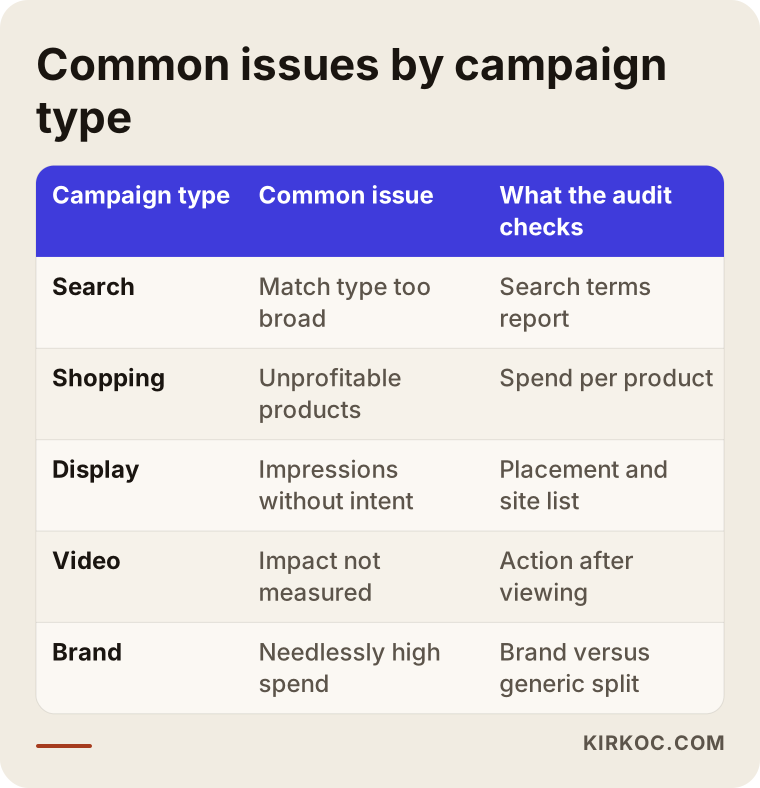
The rows in the table show what I focus on for each campaign type. Each type has its own typical trap, and knowing it saves time when reading an account.
4. Scan search terms and keywords
This step is the heart of the account. I go through every search that received a click in the recent period. Irrelevant ones go onto the negative list, and the ones that work get tighter match types so they stand out. Often a small part of the spend brings in most of the business, while a large part brings in almost nothing. Seeing that with your own eyes tells you which money to touch.
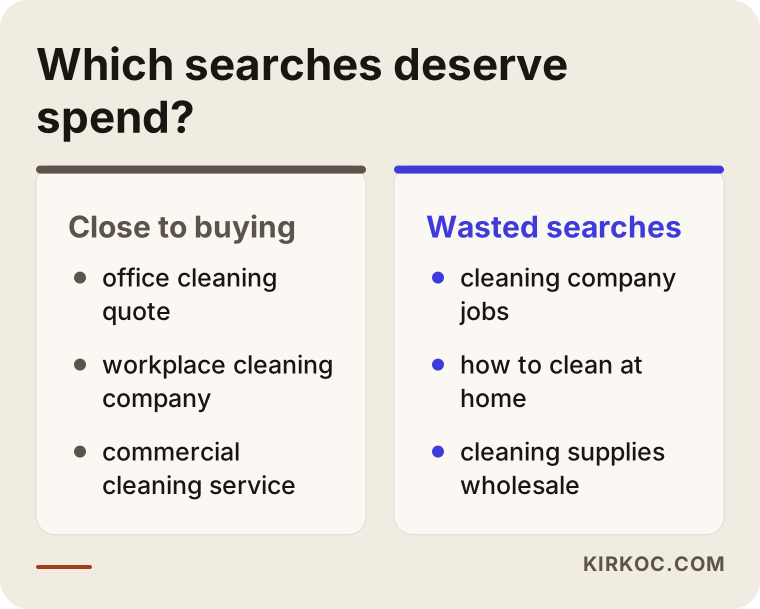
As the comparison shows, even searches about the same service split into two groups by intent: people close to buying and people who are just curious. Steering the budget toward the first group is the core goal of the audit.
5. Review ad text and extensions
Does what the ad says match what the site says? If the ad promises "same-day service," the site should say so clearly too. Extensions are the extra pieces such as a phone number, an address, or additional links. Have they been filled in? Empty extensions lower your click rate and leave room for a competitor.
6. Inspect the landing page
When the visitor arrives, what do they see? Do they reach what they were looking for right away, or land on a home page and get lost? Does the page work on a phone? Is the form easy to use? This step often delivers the biggest gain, because the cost of a click is fixed while the page's power to win customers can change a lot.
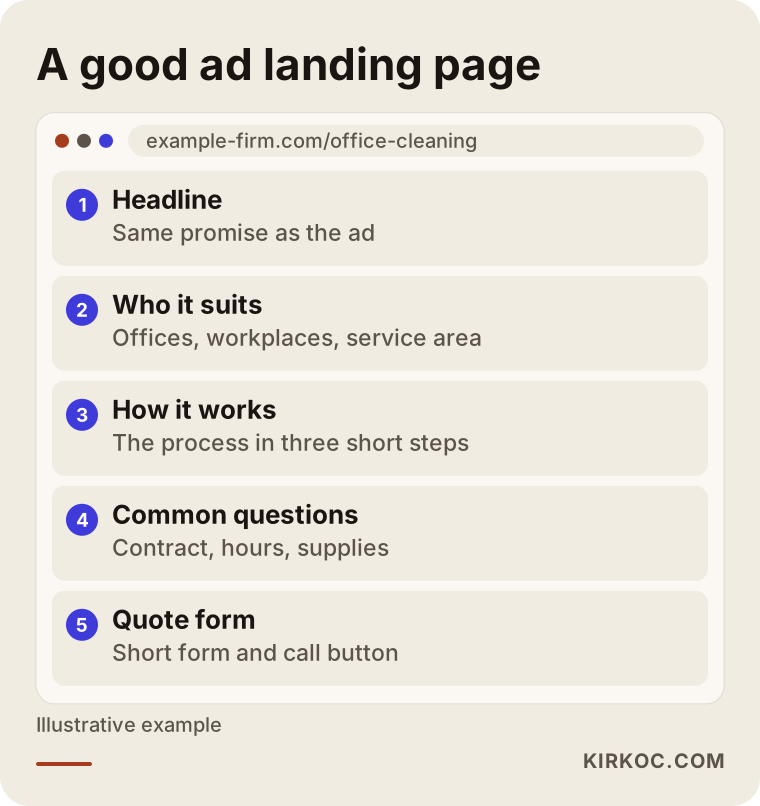
The layout shows the order in which a visitor should find what they came for. If your page does not follow that order, fixing the ad alone will not be enough.
7. Evaluate budget distribution and bidding
Which campaign uses up its budget early, and which never spends it? If a daily budget runs out early, your ad may not be visible during the best hours anymore. I also look at the bidding strategy, which is how Google decides what to pay for a click. When there is little conversion data, automatic strategies may not work properly, so I check whether there is enough data for them.
8. Prioritize the findings and report
An audit ends with a long list of findings, but fixing all of them at once is not the right move. The leaks that cost the most and are easiest to repair come first. The report should be plain, dated, and written as "what was done and why." A report you do not understand does you no good.
From click to customer
Another way to see where the budget melts away is to picture the path a person walks, stage by stage. Some people drop out at every stage. The purpose of an audit is to see whether the drop is reasonable or caused by a mistake.
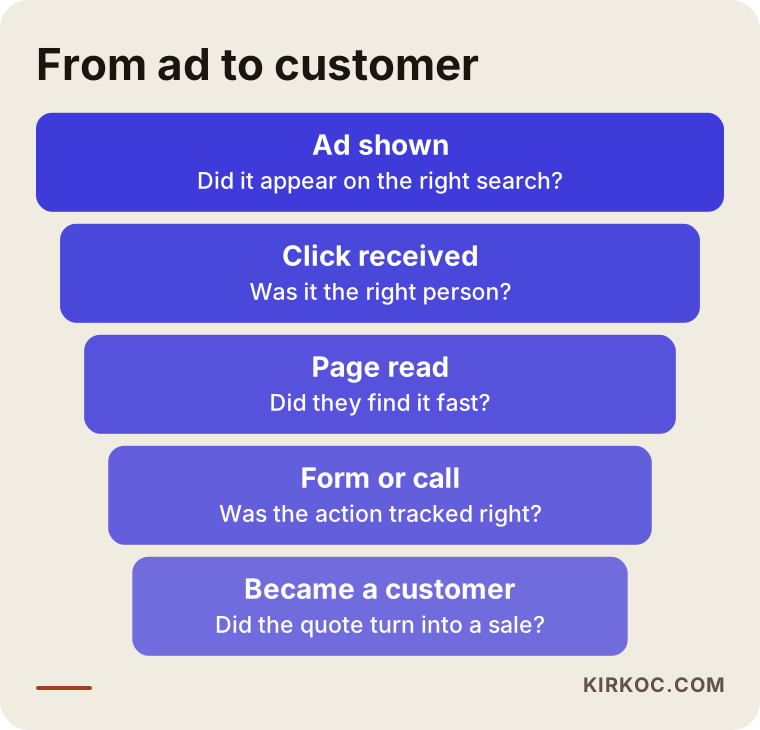
The funnel shows that a drop at each stage is normal, but a bigger-than-expected drop at one particular stage signals a problem. For example, if people see your ad and click, but leave your site immediately, the problem is the page, not the ad.
Two hypothetical example scenarios
The two situations below do not belong to any real company. I made them up to illustrate common problems.
Example scenario 1: A service business. Imagine a small company that cleans offices in a mid-sized city and had its account built two years ago. All its services sit in one campaign running on broad match, and the location setting includes people "interested in" the area. When I look at the search terms, a noticeable part of the spend comes from job seekers, curious clicks from other cities, and people looking for house cleaning, even though the company serves only offices. The only conversion measured is "contact page opened," and phone calls are not counted at all. In the first week of the audit, negative keywords are added, the location setting is changed, and phone calls are brought into tracking. The services are split into separate campaigns. The budget may stay the same, but it goes to better-matched people. How much difference that makes cannot be promised in advance, and I do not promise it.
Example scenario 2: An online store. Picture a hypothetical e-commerce site whose product campaign promotes a handful of bestsellers alongside hundreds of items that almost never sell, all on the same budget. Total sales look healthy in the report, but most of the spend goes to products that leave no profit. On top of that, the sale amount is not passed to Google correctly, so the system cannot tell which products truly earn. In the audit, products are grouped by profit, the budget for unprofitable ones is trimmed, and value tracking is repaired. Again, I do not promise a specific outcome, but decisions now rest on data rather than guesses.
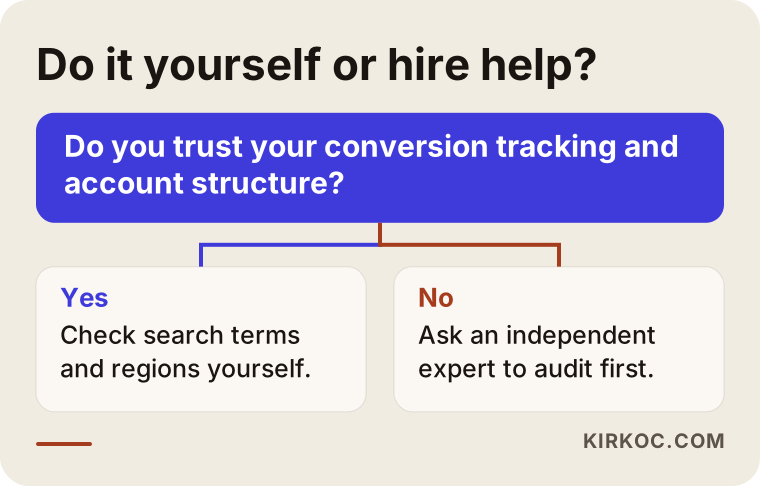
The decision diagram above is a short summary of the section further down on what you can do yourself and when an expert is worth it.
Common mistakes
I see the same mistakes again and again in audits. Knowing them in advance makes it easier to look at your own account.
- Following recommendations blindly. Google Ads shows "recommendations" inside the account. Some are useful, and some are aimed squarely at raising your spend. Accepting every one with the apply button can quietly pull the account away from your goals.
- Changing settings too often. Automated systems need time to learn. If you change something every day, you cannot tell which change caused what.
- Piling everything into one campaign. You cannot see which service earns money.
- Never updating negative keywords. An account that was clean on day one fills up with new irrelevant searches within months.
- Keeping the ad and the page disconnected. The ad says one thing and the page says another, so the visitor leaves at once.
- Looking only at clicks. Click counts can be high while the business they bring in is zero. What matters is the business itself.
- Not protecting your brand name, or spending everything on it. People searching for your name would have found you anyway, so overspending there makes the report look good while the budget goes to the wrong place. On the other hand, with no protection at all, a competitor can run ads on your name. You need a deliberate balance between the two.
- Not owning the account. When an agency leaves and the data leaves with it, that is a very common and painful problem.
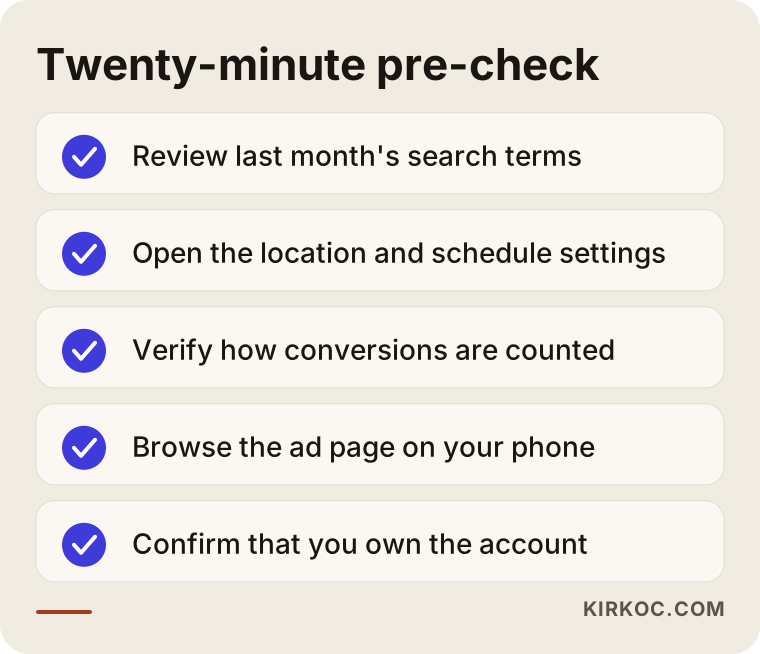
The checklist covers things you can look at on your own in about twenty minutes before you contact a specialist.
What can you do yourself?
Even without technical knowledge, you can open your account and answer a few basic questions. Start by opening the "search terms" report and reading through last month's searches. If you see phrases that have nothing to do with your business, they belong on the negative keyword list. Next, look at which locations and hours your ads ran in. High spending outside business hours is a clue. Third, check how conversions are counted: run a test yourself and see whether it gets recorded.
Also look at where your ad actually sends people. Do not click your own ad, because your click spends budget. Instead, open the landing page address directly and browse it like a customer on your phone. Is the information you want on the first screen? Is the phone number visible? Does the form work? You can notice all of this without ever logging into the account.
I would not claim that is all you can do on your own, but for most small businesses the first cleanup starts here. The one thing to watch is not to change too much at once, and to write down everything you change.
When do you need an expert?
In some situations an outside view makes a real difference. If your budget is large enough that even a small percentage affects a lot of money. If conversion tracking exists but you do not trust the results. If several campaign types, such as search, shopping, and video, run together. If someone else managed the account before and you do not know its history. Or if the website and the ads need to be fixed together. That last one matters most, because the problem is often not the ad but the page the ad leads to, and when one person handles both, the fix happens in a single move.
When choosing a specialist, ask these questions. Who will own the account? How and how often will reports arrive? What work do they do, and what do they not do? Be cautious with anyone who guarantees results, because ad results depend on competition, season, product, and landing page, and nobody can know them in advance.
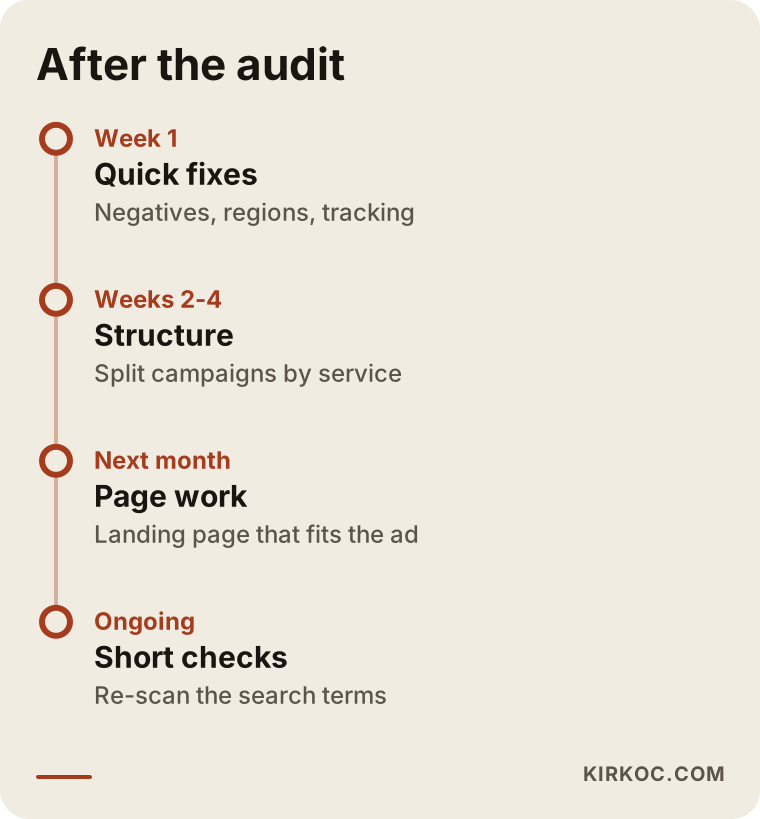
The last image shows the order in which work proceeds once the audit is finished. An audit is not a one-time event. It is the beginning of a process.
What determines the cost of an audit?
I do not give numbers here, because no two accounts are alike. The main factors that set the price are these:
- The size of the account: how many campaigns, keywords, and ad groups there are.
- The variety of campaign types: only search, or also shopping, video, and display.
- The state of tracking: whether it must be built from scratch or only checked.
- Whether landing pages need to be reviewed and fixed.
- Whether I also make the fixes after the audit, or you only want a report.
- How detailed the report must be and whether you want regular follow-up afterward.
Once those are clear, I put together a scope and write down exactly what it covers. The price is a result of the scope. I draw the boundary of the work first, then tell you the amount.
How I work with you
The process is simple. First we have a short call, and I listen to your goal and your current situation. Then, with your permission and ideally with read-only access, I look into your account. I do the audit and present the findings in a report that says what happened and what should be done, without a pile of technical terms. I make no permanent change in the account until you approve what will change and why. If you like, I carry out the fixes myself, or you can take the report and continue on your own or with someone else.
I am one person, and I run all of this work myself, so the person you talk to is the same person who looks at the account. Your website, your visibility in search, your social media accounts, and your ads are not separate from each other. Having them with one person means the question "is the problem in the ad, the page, or the measurement?" does not get passed from one door to another.
Frequently Asked Questions
How long does a Google Ads account audit take?
It depends on the size of the account. A small, simple account can be reviewed quickly, while one with many campaigns and several campaign types takes longer. It would not be right to name an exact time without seeing the account. After we define the scope in our call, I will write the timeline for you too.
Will my ads stop during the audit?
No. The audit starts by reading, and your ads stay live. Changes are applied only after you approve them, beginning with the least risky one. That way your flow of sales is not interrupted.
How do I find out who the administrator of my account is?
Log in and open the users and access section. It lists who is connected and with what permissions. If your own email address does not appear as the owner, resolve that, because the account, its history, and its settings are an asset of your business.
Will my sales definitely go up after an audit?
No, I cannot promise that. An audit reduces wasted money and corrects measurement, but results also depend on competition, your product, your price, your site, and the season. What I can do is base your decisions on real data and make it visible what works.
Can I audit my own account myself?
Yes, and doing the first cleanup yourself is a good start. Looking at search terms, checking location and schedule settings, and confirming how conversions are counted are things you can do. For more technical matters such as structure, bidding strategy, and tracking setup, a second pair of eyes catches a lot.
How often should I have an audit done?
If the account is new, look more often in the first months. For an established account, short regular checks plus a more thorough review at set intervals make sense. Also look at the account whenever your product, price, service area, or website changes, because old settings may no longer fit the new situation.
Another agency manages my account. Can an audit still be done?
Yes. You can ask for an independent audit that only assesses the account's condition without disturbing your relationship with the current agency. What you do with the findings, whether you pass them to the agency and ask for fixes or change who manages the account, is entirely your decision.
Is an audit worthwhile if my budget is small?
The smaller the budget, the more each wasted click weighs. A small account may not need a complicated audit, and getting a few basic settings right is often enough. I will tell you that honestly in our call. Making you spend money on unnecessary work is not my job.
If you want an expert to look at your account and see where your budget really goes, take a look at my digital advertising management service and get in touch. I will listen to your account, your goal, and your site, and then draw you a clear roadmap.