You spend money on Google Ads every month, the click numbers in the dashboard keep climbing, and yet you cannot point to what that money brought back at the cash register or on the phone. You do not know which ad produced a customer and which one only attracted curious visitors. In most cases the problem is not the ad itself. The measurement was never set up, or it was set up wrong. In this article I explain Google Ads conversion tracking setup, meaning how to connect form requests, phone calls and WhatsApp messages to the ads that caused them, and I assume you have no technical background. I am Ümit Kırkoç, I work from Istanbul, and this measurement layer is the most basic part of my digital advertising management service.
Let me define the term first. A "conversion" is something valuable a visitor does on your site: fills out a form, calls you, or messages you on WhatsApp. "Conversion tracking" is a small setup that tells Google those actions happened. Without it, Google only knows that somebody clicked. It cannot tell who became a customer, so it cannot improve your ads in that direction. Measurement is the raw material that lets both you and Google make decisions.
Why does an ad fly blind without conversion tracking?
The situation I see most often when I review an ad account from the outside is this: hundreds of clicks, and a conversion column that is empty or meaningless. The owner tells me, "Business is coming in, but I don't know which ad it comes from." That sentence really says that part of the budget may be wasted and nobody can see which part.
Two things go wrong without measurement. First, you cannot tell which keyword, which ad text or which area works. Everything looks the same. Second, Google's own automated systems cannot learn. Some Google Ads bidding methods look at which searches produce customers and shift the budget toward them. If you never give them that information, the system works from guesses, and you pay for the guesses.
The picture below summarizes the path from a click to a customer and shows at which steps measurement comes into play.
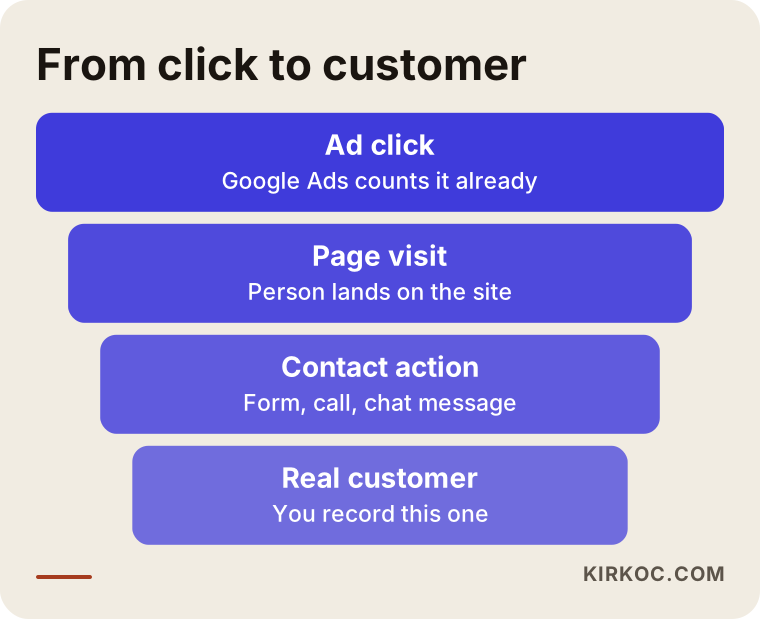
You lose people at every step of this path, and that is normal. What matters is being able to see where you lose them. If many people reach the page but few fill out the form, the problem may not be the ad at all. It may be the page. Without measurement you cannot make that distinction, and most business owners end up fixing the wrong thing. They rewrite the ad text when the real issue is that the form page does not open properly on a phone.
The difference between a click and a customer
A click means someone touched your ad. A customer is a person who contacts you and might buy. Between the two there is usually a large gap. Accidental taps, people who check the price and leave, and people who were searching for something else and hit the wrong ad all inflate the click count. Conversion tracking filters out that noise and answers the question, "Did the thing I paid for actually bring me work?"
I am not promising results here. Setting up measurement will not bring you customers. It will show you what does and what does not, and every later decision about your advertising rests on that visibility.
Which actions should you count as conversions?
Not every interaction is a conversion. Scrolling a page, watching a video or browsing a menu is useful information, but it is not business. The actions you choose to count should be the ones that carry a direct chance of revenue. For service businesses these are usually three: a form submission, a phone call and a WhatsApp click.
The table below puts side by side what each one means, how it is measured and where it is usually weakest.
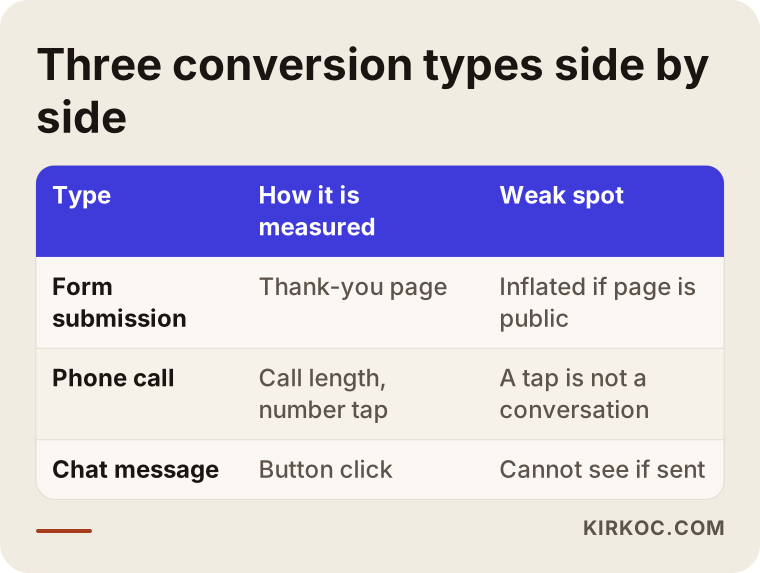
Keep the difference in mind. A form submission is a clear action, because the person left their details. A phone call and a WhatsApp click are signals of intent. The person touched the button, but that does not prove you actually spoke. For that reason I name these three types separately instead of giving them equal weight, which saves a lot of confusion when you read the report later.
Primary conversions and secondary conversions
Google Ads recognizes two kinds of conversions. Primary conversions are the actions the account treats as its goal, the ones its automated systems try to learn from. Secondary conversions are recorded for information only. For a service website, a form submission and a phone call are normally primary. Actions like scrolling to a certain part of a page stay secondary. If you skip this distinction, Google may treat "everyone who opened the contact page" as a customer and start looking for more people like them. The result is low-quality leads.
What should be ready before you start?
Setup is not something you finish in half an hour on a Tuesday morning, but with good preparation most of it goes smoothly. Before I begin, I check the following:
- Do you have access to the ad account and to the website's admin panel? If the account was opened under a previous agency or an acquaintance, ownership should be yours.
- After someone submits your form, does a separate "thank you" page open, or does the form work without reloading the page? This decides which method is used.
- Is your phone number tappable? On mobile, does touching the number start a call?
- Is your WhatsApp button a fixed link on the page, or does it come from a plugin?
- Is there already a tool measuring the site, such as Google Analytics or Google Tag Manager? If so, new tracking has to be added without breaking the existing one.
The answers usually depend on who built the site and how. If different people manage your website and your ads, this is where most of the time gets lost. The ad person says, "A piece of code needs to go on the site," and the site owner asks, "Where am I supposed to put it?" That is why I run the website, search visibility and ads myself. Nobody has to wait for someone else to reply before the code goes in.
The steps below show the general flow of the setup.
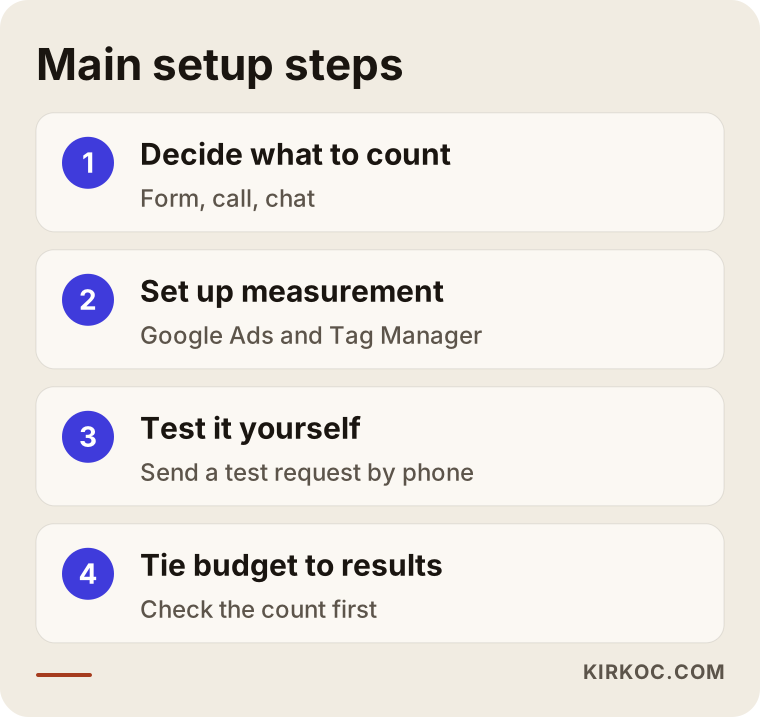
The order matters. First you decide what you want to count, then you set up measurement, then you test it, and only at the end do you tie the ad budget to that measurement. In setups where the test step was skipped and spending started right away, I have seen wrong counts go unnoticed for months.
How is a form conversion tracked?
The most reliable way to track a form is to send the person who submits it to a separate "thank you" page. You tell Google that this page opened, and every opening counts as one conversion. The method is simple, has a low error rate and is technically the one that needs the least maintenance.
On some sites the form works without reloading the page, and the visitor only sees a line such as "Your message was sent." In that case you cannot rely on a thank-you page. Instead, you define an event that detects a successful submission. This is usually done with Google Tag Manager, a free tool that lets you manage measurement rules from one panel without touching the site's code every time.
The diagram below shows what a well-built thank-you page might look like.
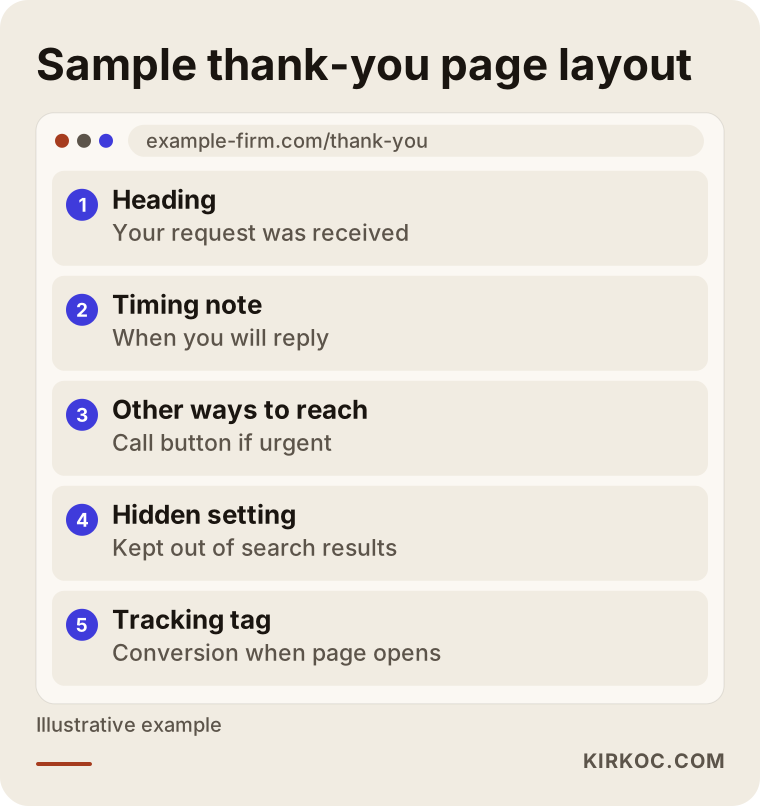
Writing only "thank you" on that page is not enough. Telling the reader what happens next, for example how soon you will reply, builds trust and also gives the person a way to call you anyway if it is urgent. Make sure that only people who actually submitted the form can reach this page. If its address shows up in Google search results, anyone can land there and your count will be inflated. Hiding the page from search results is a technical setting, and it is part of the setup.
A checklist for form tracking
When the setup is finished, you can use the list below to confirm that everything is in place.
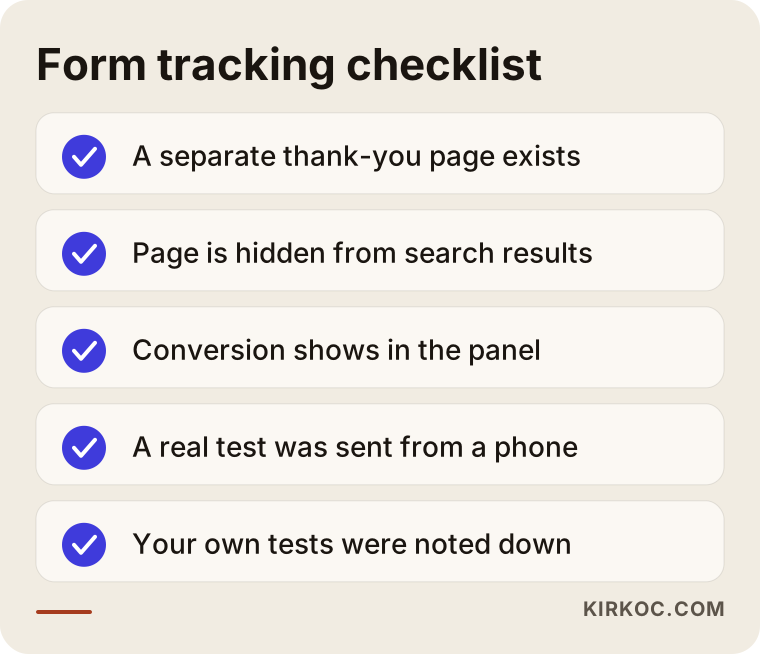
The most important item on this list is "try it yourself." Click your ad from your own phone, fill out the form with a made-up name, and watch for the conversion to appear in the Google Ads panel. Remember that this can take a few hours, so not seeing it in the first minute does not mean something is broken. Also write down your own tests, so you can remove them from the ad report later.
How are phone calls measured?
For many businesses, a phone call is as valuable as a form, sometimes more so. In urgent or local services, people prefer to call rather than type. Measuring calls is a little more roundabout than measuring forms, though, because the call happens on the phone, outside your website. There are three main ways.
The first is the phone number in the ad itself, called a call extension or call asset. The person calls straight from the ad, and Google can measure how long the call lasted. You can set a minimum length for a call to count as a conversion, so calls hung up after one second are not counted as customers.
The second is a tap on the number on your website. The person clicks the ad, lands on your site, then touches the phone button on the page. This is measured as a number-click event. What you measure here is a "tap," not an actual conversation, so the person may have canceled the call.
The third is a forwarding number that Google provides, tied to the ad and the site. In some setups the number shown on the site differs depending on which ad the visitor came from. This gives more detail, but it is harder to set up and maintain. It can also cause confusion for businesses that use the same number in many places, such as business cards, a Google Business Profile and social media.
The comparison below shows the difference between calls made from the ad and calls made from the site.
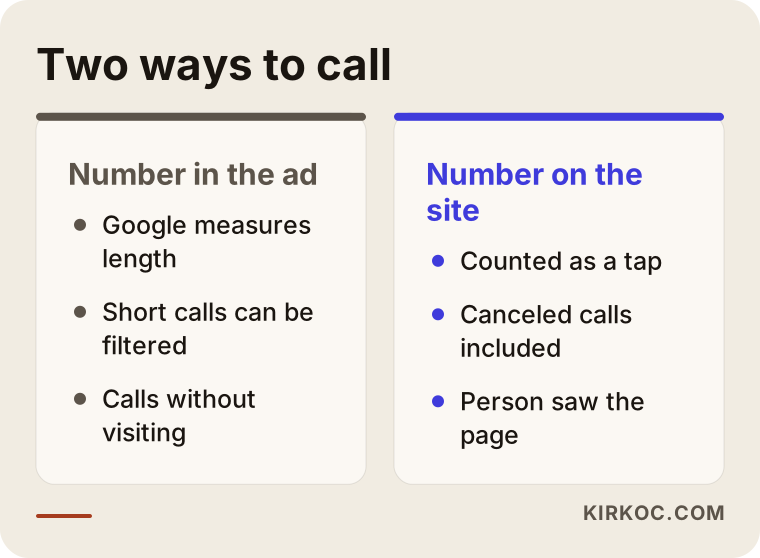
Which one you choose depends on your business. For most small businesses, the first two are enough. Not every call is a customer, either. Wrong numbers, "asked the price and hung up" and "was looking for something else" all end up in the count. So when you interpret call conversions, comparing the figure with your own call log is a good habit.
How are WhatsApp clicks tracked?
For many businesses, WhatsApp is the busiest contact channel. Customers do not want to type details into a form, so they send a quick message. If you do not measure this channel, you miss a big part of the work your ads bring in, and the ads look worse than they really are.
What can be measured on WhatsApp is the click on your "chat on WhatsApp" button. You should know that Google cannot see whether the message was actually sent, meaning whether the conversation started, because the conversation lives outside your website, inside the WhatsApp app. So the number you have is "intent toward WhatsApp," not "number of conversations."
Technically, this click is defined as an event through the button's link (the address that starts with wa.me) and sent to Google Ads as a conversion using Tag Manager. If the button comes from a plugin, check whether the plugin already sends this event. Some plugins do it themselves, and some never do.
The list below shows the mistakes people make most often when tracking WhatsApp.
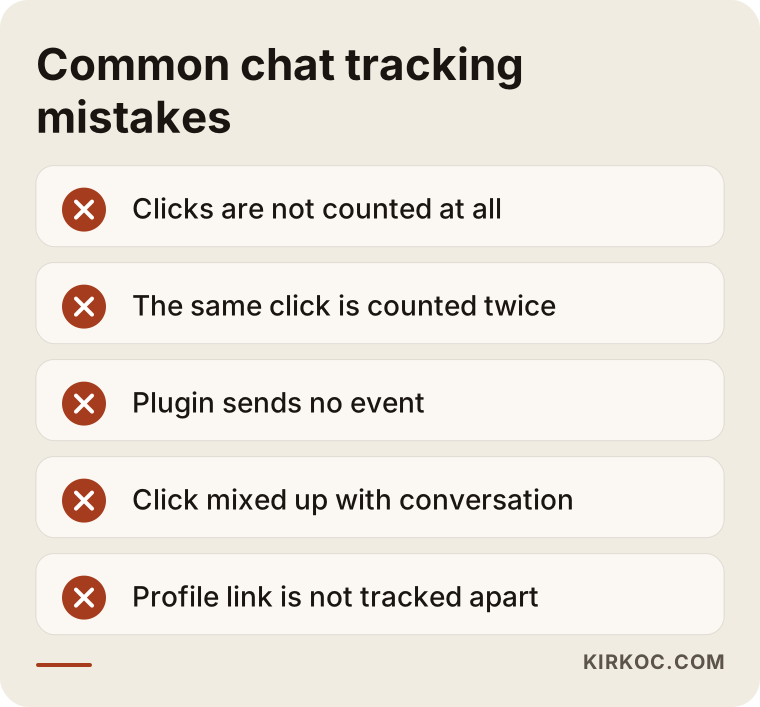
Many of these mistakes are linked. If the same click is counted twice, your conversion number looks like double the truth. If it is never counted, your ad looks unfairly bad. If you use WhatsApp both on your site and on your Google Business Profile, you can add a different short tag to the link to tell which channel the person came from.
How can you tell whether the conversion count is right?
Once the setup is done, numbers appear in the panel. To trust that those numbers are real, you can run a few simple checks. Compare two sources: what Google Ads reports, and what your own phone log, email inbox and WhatsApp chats say. They do not need to match one to one, but if the gap is very large, something is wrong.
The decision diagram below shows where to start when the numbers do not match.
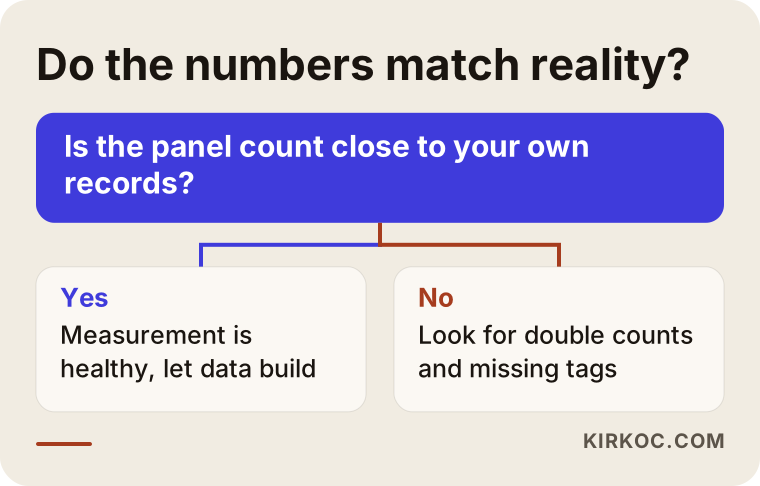
When the count looks too high, the usual causes are double counting, your own test clicks, or a thank-you page that keeps being reloaded. When it looks too low, the setup may be incomplete, a cookie consent banner may be causing lost measurement, or a button on a different page may not be measured. On cookie consent, what can be measured without a visitor's permission depends on the law where your visitors live, and I should not give you a firm answer on it. Please consult a lawyer.
Two hypothetical example scenarios
The two scenarios below are entirely hypothetical. They do not belong to any real company or person and exist only to show the logic.
Scenario 1: A dental clinic that works by appointment
Suppose a small dental clinic runs Google Ads for searches like "dental implant cost" and "teeth whitening." At the end of the month the panel shows many clicks but an empty conversion column. When the clinic owner looks at the appointment book, they say, "Most of the new patients came by phone."
The first thing to do here is define two separate conversions: a tap on the phone number on the site, and calls from the call extension in the ad. The thank-you page of the form is a third, separate conversion. After a few weeks the picture becomes clearer. For example, "implant" searches get many clicks but few calls, while "emergency tooth pain" searches get fewer clicks but most of them end in a call. That information makes it possible to decide where to move the budget. It is not a guarantee of results, only evidence for a decision. Rules on what health service ads may say are a separate matter, and for that you should speak with a legal adviser.
Scenario 2: A custom furniture workshop that works by quote
Hypothetically, take a workshop that builds made-to-measure furniture. Customers mostly want to send photos, and they do it over WhatsApp. Hardly anyone fills out the form. The owner thinks the ads do not work, because the form conversion rate is very low.
In fact the problem is not the ad but the measurement: since the WhatsApp click was never defined as a conversion, most of the work is invisible. Once the WhatsApp button is added to the measurement, the picture changes, and you can see which keywords (for example "custom built-in wardrobe") turn into messages. Another point to watch is recording which ad each WhatsApp message came from. The owner can ask customers to start the chat with a short line such as "I came from your ad." It is a simple method that fills in by hand the part Google cannot see.
What should you expect in the first weeks after setup?
Conversion tracking does not solve every problem the moment it is switched on. A new measurement setup needs time to settle. In the first days the numbers are low and jumpy, because Google has no data to learn from yet. If you rush in this period and make big changes to the ads, you disturb the learning.
The timeline below shows a reasonable first month.
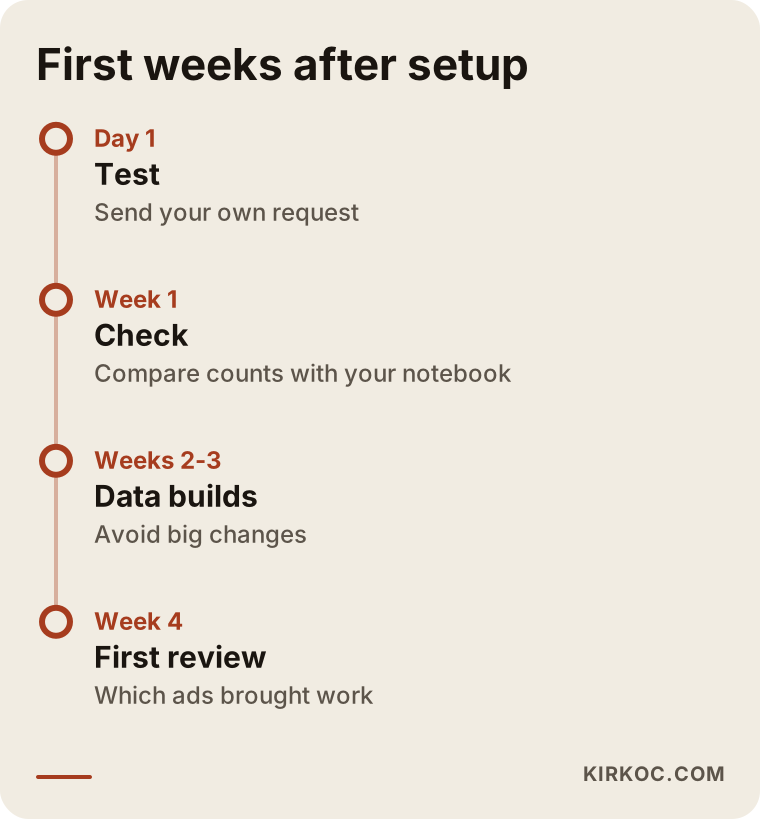
This timeline is not a promise about dates. It is a logical order: first confirm the count is accurate, then wait for data to build, then look at which ads work. The real purpose of all this is a routine where, in a monthly review, you can answer these questions: how many requests came in this month, where did each come from, and which of them turned into a sale?
Common mistakes
Some of what I have described already touched on mistakes. Let me collect them openly.
Counting everything as a conversion. If you make page views, scrolls or video plays into primary conversions, the panel looks very successful, but that success is not real. It is a measurement that makes you feel good when you read the report without helping you decide anything.
Spending before testing. When no test is done after setup, wrong setups can go unnoticed for weeks.
Counting the same action twice. If you make both a Google Analytics goal and Google Ads' own tag primary, the same form can be counted twice. You need to choose which one is the main measurement.
Not filtering out your own tests and your staff's clicks. When you and your staff click the ad, budget is spent and the count is distorted. If possible, avoid clicking the ad from your own devices.
Never setting a minimum call length. If calls of a few seconds also count as conversions, the number of real conversations looks higher than it is.
Looking only at the first click. A customer may click today and call three days later. Google tracks this delay within a certain window, but it does not see calls that fall outside it. So do not draw quick conclusions from short-term reports.
Leaving the thank-you page open to everyone. If the address appears in search results and people reach it without filling out the form, fake conversions are created.
Not joining the report with sales. The conversion count may look good, but if you do not know how many of them became real customers, the measurement is only half done. Even filling in a "did the request turn into a sale" column by hand in a simple table makes a big difference.
What can you do yourself, and when do you need an expert?
I should say that doing it all yourself is possible. The conversion creation screen in Google Ads guides you step by step, and for a simple site you can set up form tracking and phone number taps over a weekend. If you do it yourself, keep these points in mind: count only the actions that really bring work, test each setup yourself, and compare the numbers with your own notebook.
An expert makes sense in these situations:
- The form on your site works without reloading and there is no thank-you page.
- The WhatsApp button comes from a plugin and it is unclear what it sends.
- Several measurement tools (Analytics, Tag Manager, an extra tracking code) are mixed together.
- You run an online store and the purchase amount also needs to be measured.
- A cookie consent banner is affecting measurement and you do not know how much is lost.
- The ad account was opened under a former agency or an acquaintance and access is complicated.
The part that needs an expert is often not pressing the buttons. It is deciding what to measure and interpreting the result. For that reason, a reasonable middle path is to do the first analysis with an expert and then follow the reports yourself.
What determines the cost?
The price of a conversion tracking setup is not fixed, and I will not give a number here, because it changes a great deal with the scope of the work. The main factors are these:
- How many kinds of actions are measured. Measuring only a form is not the same job as measuring forms, calls and WhatsApp together.
- The structure of the site. A clean site with a thank-you page moves quickly; an old site full of plugins takes more effort.
- The state of the current setup. Building from scratch and cleaning up a measurement that was set up wrong take different amounts of work.
- Connecting to sales data. Linking conversions to real sales is additional work.
- More than one site or language. Each one needs its own measurement setup.
- Ongoing maintenance and reporting. A one-time setup and monthly monitoring with interpretation are separate items.
The cost of the setup is separate from the ad budget managed in the account. The ad budget is the money that goes to Google. My job is to make visible where that money goes and to manage it. Once measurement is set up properly, you can notice how much of the budget is going to waste and move it somewhere more efficient, but it would not be honest to tell you in advance how much that will save.
How I work
I run this work alone, so the person you talk to is the person who does the job. The process usually goes like this:
- First, in a short call, I listen to how your business works, what services you offer and how your customers usually get in touch.
- I look at the existing ad account, the website and any measurement tools, and explain in plain language what works and what is missing.
- I decide with you which actions will be counted.
- I set up the measurement, test it myself and show you how to check it.
- In the following weeks I compare the numbers with your records and fix things if needed.
Having one person run your website, local search work, social media accounts and ads has a concrete benefit here. I do not wait for someone else's answer to change a button on the site. A problem I see in the ads can be reflected directly on the page, and everything uses the same language. For example, if most people coming from the ads write on WhatsApp, I make that button more visible on the site, and I add the same measurement to the links in your social media posts. This removes most of the communication gap that comes from giving each job to a different person.
Still, let me be clear: setting up measurement does not guarantee sales. The quality of the ad, your offer, your price and how quickly you answer the phone or the message decide the result. What I do is make that chain visible.
The example below shows what kind of answer you might get when you ask an AI assistant about this.
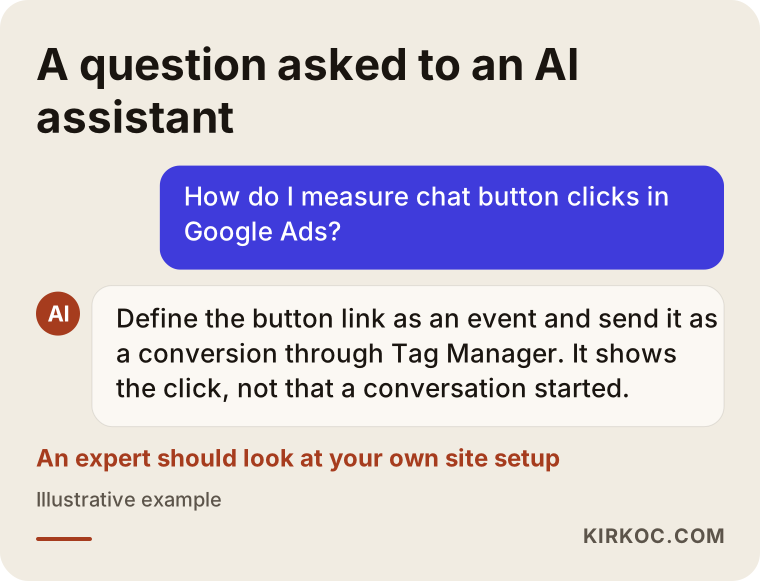
Answers like this give the general truth, but they cannot know the details of your site, your form and your phone setup. So reading the general information and then showing your own situation to an expert is often the shortest route.
Frequently Asked Questions
How long does a Google Ads conversion tracking setup take?
On a simple site, the setup itself is short for a form and a phone button. The real time goes into testing and waiting for data to build. If your site is complicated, several tools are mixed together or a WhatsApp plugin causes trouble, it takes longer. Instead of giving a fixed time, I prefer to look at your site first and then tell you what needs to be done.
Will I get more customers if conversion tracking is set up?
Not directly. Measurement does not bring customers on its own. But it shows which ad and which keyword bring work and lets you steer the budget accordingly. Indirectly it can lead to more efficient spending, though I do not guarantee that.
Does a WhatsApp click mean a real conversation?
No. Google only sees the click on the button. It cannot see whether the message was sent. So a WhatsApp conversion should be read as "intent." I recommend also comparing against your own WhatsApp records for the real number of conversations.
How do I know whether a phone call came from the ad?
Calls made from the call extension in the ad can be tracked directly by Google. Calls from the site are measured as taps on the number. If someone looks at the ad and then dials the number by hand, it is hard to see. That is one of the blind spots of every measurement method.
Do I need to set up both Google Analytics and Google Ads conversions?
They measure the same thing from different places. Google Analytics generally follows the behavior of all visitors on your site, while Google Ads follows those who came from ads. If you make the same action primary in both places, double counting can happen, so you should choose up front which one will be used for ad decisions.
Does a cookie consent banner affect measurement?
It can. If a visitor does not give consent, some measurement may be missing. How far and by what method this should be handled is both a technical and a legal question. It would not be right for me to give a firm legal opinion, so I suggest you consult a lawyer.
How can I check the tracking a previous agency set up?
Start by making sure you own the account. Then look at which conversions are defined, which are counted as primary, and whether they really work. I can do this audit for you. Part of the existing setup may be usable, and part may need to be rebuilt.
Is conversion tracking necessary with a small budget?
Yes, and even more so. On a large budget a bit of waste may go unnoticed, but on a small budget every spend matters. Setting up measurement regardless of budget helps you spend even a little money in the right place.
If you want to see what your ads really bring in, you can reach me through the digital advertising management page and briefly describe your situation. We will look at your account and site together and talk in plain language about what should be measured.