You own a factory, a wholesale business, or a company that serves other businesses. Your customers do not drop a product in a cart and pay by credit card. They ask for a quote, wait for a sample, and talk it over with a few colleagues before deciding. Running ads for a business like that is genuinely different from running ads for a coffee shop or a hair salon. In this article I explain how Google Ads works for B2B companies, which searches are worth paying for, and where money usually gets burned. I am Ümit Kırkoç, and I work alone from Istanbul. I handle the advertising side through my digital advertising management service, but the goal of this page is not to sell you something. It is to make your decision easier.
First, the terms. B2B means "business to business": you sell to other companies, not to individual consumers. Google Ads is the paid system that shows your page at the top of Google when someone searches for something related to what you offer. You pay when a person clicks your ad. Who clicks, what they were looking for, and what they see after the click are the things that decide whether the money was well spent.
Why does advertising work differently in B2B?
In consumer sales, one person decides about a product and buys it within minutes. In B2B the picture looks more like this: a purchasing manager needs a supplier, collects three to five candidates, shows them to a boss, asks an engineer a technical question, and perhaps requests a quote a month later. Between the click and the sale there are often days or even weeks. That is why "I ran ads but nothing sold the same day" is far too early a verdict in B2B.
The second difference is how small the search volume is. A search like "stainless steel flange supplier" might happen a few hundred times a month, while "summer dress" happens vastly more often. In B2B, fewer people search, but their intent is clear. That means every click matters, and every wrong click hurts. Instead of scattering your budget over broad words, you concentrate it on narrow, specific searches.
The third difference is who actually lands on your page. It is often not the final decision maker but the employee doing the research. What that person needs is something they can forward to their manager: product specifications, production capacity, certifications, lead time, and a clear way to reach you. If those are missing from the page, the click is wasted.
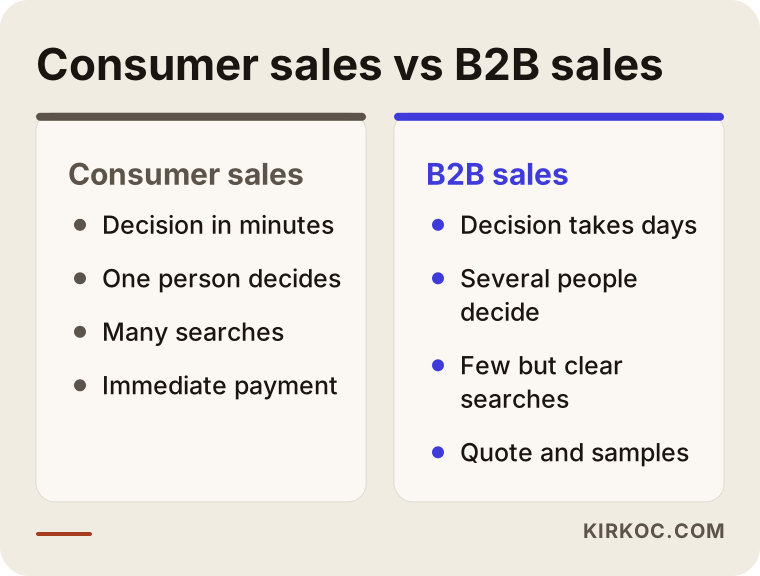
The image above sums up the contrast. In the sections that follow, I go through how each of those differences changes the way an ad account should be built.
How does your customer search on Google?
A B2B buyer usually types a product name, a material, a standard, or a place where the product will be used. They skip emotional wording and choose technical, concrete terms. Think about a few kinds of searches:
- Product and material searches: "aluminum profile manufacturer," "packing tape wholesale."
- Supplier searches: "packaging supplier near me," "industrial label manufacturer."
- Custom request searches: "custom size box production," "contract manufacturing services."
- Comparison and price searches: "bulk order price quote," "minimum order quantity."
These searches do not all carry the same intent. Someone asking "what is packing tape" is learning. Someone asking "packing tape wholesale price" is close to buying. Paying for ad clicks from the first group means paying to educate people who may never buy. Those curious readers can still become customers later, but cheaper routes such as blog articles and search engine optimization (SEO, the work of earning free visibility on Google) suit them better than ads.
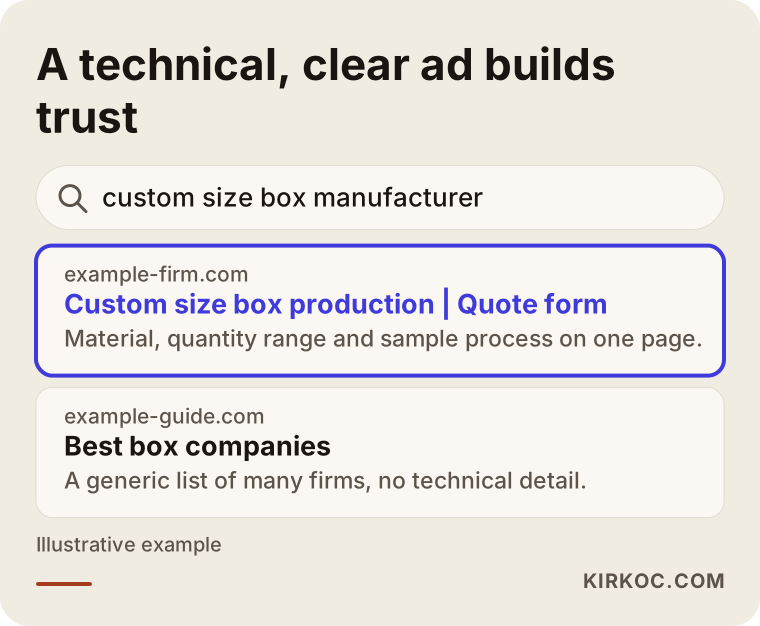
The example in the image is entirely invented. Its purpose is to show why an ad headline written in technical, clear language earns more trust than a vague, generic one.
Different buyer types for the same product
Different people search for the same product in different ways. An engineer types the technical measurement, a purchasing agent writes "supplier" or "wholesale," and a business owner types "price" or "near me." Each of them also wants to see something different on your page. When you build ads with this in mind, you open several narrow campaigns instead of one broad one.
Which ad types work for B2B?
Google Ads comes in several forms. The most common and the easiest to understand in B2B is the search ad: the small text result with an "Ad" label that appears at the top when someone types a query. There are also display ads (pictures on other websites), YouTube video ads, and product listing ads, but not every company needs all of them.
Because the searcher has already stated a need, the search ad is usually the first step in B2B. Display ads and YouTube work more for awareness and reminders. A reminder here means showing up again a few weeks later to someone who visited your site once. That has real value in B2B because of the long buying process: the person looks today and decides three weeks from now.
Product listing ads, often called shopping ads, show catalog items with a price and a picture. They can make sense for wholesalers who list their products clearly on their site. For a factory that works by quote and makes non-standard items, a search ad is generally the better fit.
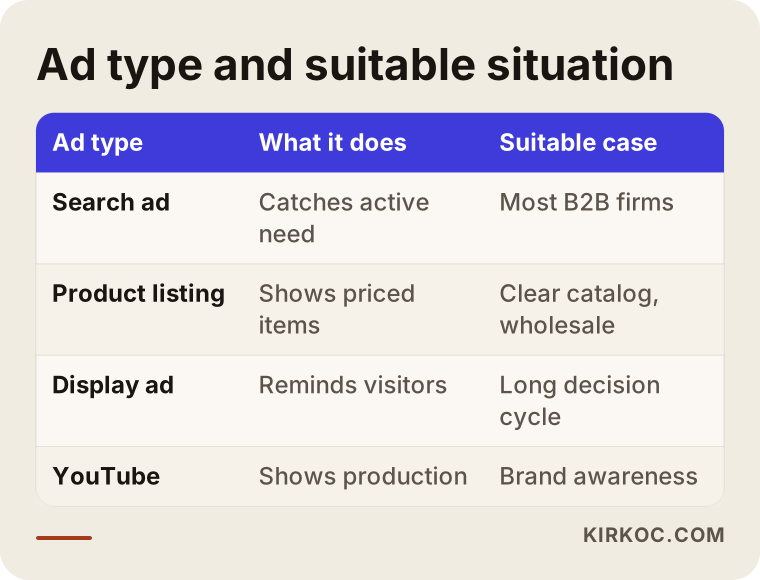
Treat the table as a rough guide. Every company's situation is different, so it is often healthier to start with a single type, usually the search ad.
Is your website ready before the ads start?
An ad brings a visitor to your site, and the site does the rest. The most common problem I see in B2B is this: a good ad is built, but the person who clicks lands on the home page, faces twenty different products, cannot find the one they wanted, and leaves.
Each main product group needs its own page. If you make both labels and packaging, the "labels" ad should go to the labels page and the "packaging" ad to the packaging page. That page should include:
- What the product is and who it is made for, visible on the first screen.
- Technical information such as size, material, and quantity range.
- Production capacity, plus any certificates and standards you hold.
- General information about lead time, meaning how long delivery takes.
- A clear quote form or phone number.
A long form is sometimes sensible in B2B because it filters out casual requests, but if it is too long, genuine buyers give up too. Name, company, phone, email, and a box that says "briefly describe what you need" are usually enough. You can collect the details on the phone call.
The site also has to open properly on a phone. A purchasing manager sometimes looks you up from the road or between meetings. A site that looks broken on a phone damages the impression of an otherwise serious company. This is where handling the website, SEO, and ads together pays off: I build the page for what the ad needs and write the ad from the real information on the page, so nobody can say "that part is not my job."
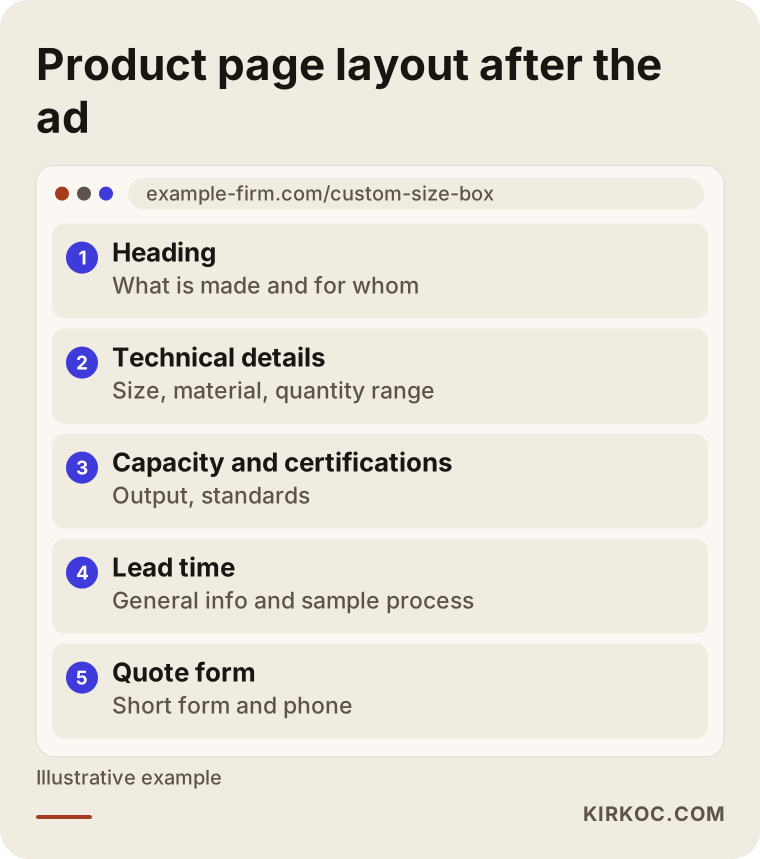
The layout in the image is for an example manufacturer page. The order of sections can shift depending on your industry, but the logic stays the same: first what it is, then proof, then how to contact you.
Setting up B2B Google Ads step by step
This is the order I usually follow. The purpose of each step is to keep the budget from leaking.
1. Clarify the goal
What do you want from the ads? A filled-in quote form, a ringing phone, a downloaded catalog? An ad built without a goal cannot be measured. In B2B the goal is usually a "qualified quote request," and that needs its own definition: not every form that arrives, but a request you can actually fulfill, in a quantity and region that suit you.
2. Set up tracking
Before any ad runs, the system has to count the people who fill in the form or tap the phone button. This is called conversion tracking, which simply means recording that a person coming from an ad took a real action. Without it you will never know which keyword worked. Phone calls need separate tracking, because many B2B buyers do not fill in forms; they call directly.
3. Build the keyword list
I choose words that are close to buying and focused on the product and supply side. The most important job beside that is deciding which words to exclude. Terms like "used," "free," "what is," "jobs," and "how to make" bring empty clicks to a B2B company. Excluding them from day one protects the budget considerably.
4. Write the ad copy
The text should talk to the buyer directly: what you make, where, in what quantity range, and how to get a quote. Concrete information beats big claims. A line like "the best in the country" is both unproven and unconvincing. Something like "custom size production, fill in the form for a quote" saves the buyer time.
5. Set the location and schedule
Do you sell nationwide, or only in certain states or cities? If you export, you need a different setup. The hours your ads run also matter: searches during business hours may be worth more in B2B, but that is a guess, and it should be replaced with real data as soon as you have some.
6. Review the incoming inquiries
This is the part of ad management that is skipped most often. I go through the incoming requests together with you: which were real, which were irrelevant? That information is the best way to correct the keyword list and the ad text. Making decisions only from the click counts Google reports can mislead you.
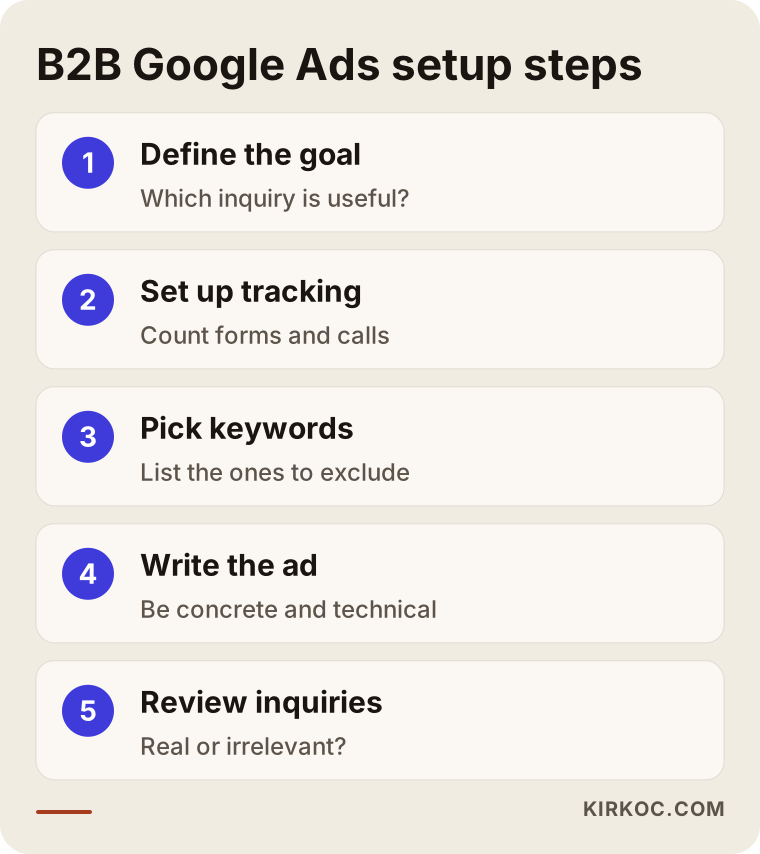
The flow in the image shows the order in which a setup moves. Skipping steps often comes back later as extra cost.
Hypothetical example: a packaging manufacturer
What follows is not a real company; it is a fully hypothetical case. Picture a mid-sized box and packaging manufacturer. Most of its sales come from existing customers and referrals, and almost no requests arrive through the website. The owner says, "let's run ads."
The first job is to ask what the company actually wants to sell. Suppose custom size box production is the most profitable work, while standard boxes are low margin. In that case it makes sense to put the budget not on a broad word like "boxes" but on narrower, more profitable searches such as "custom size box production" and "printed cardboard box manufacturer." A word like "box prices" would bring many clicks, but most of those people would be individuals buying a single box, which has no value to a manufacturer.
On the page, the minimum order quantity, material options, printing capabilities, and how the sampling process works are spelled out. That way only serious buyers fill in the form. In the first weeks the incoming requests are reviewed together. If some turn out to be one-piece requests, the minimum quantity gets a more visible spot on the page, and the related words are excluded.
There is no guaranteed result in this scenario. What the process looks like is this: start with a small number of clear keywords, correct them with the data that comes in, and only then raise the budget.
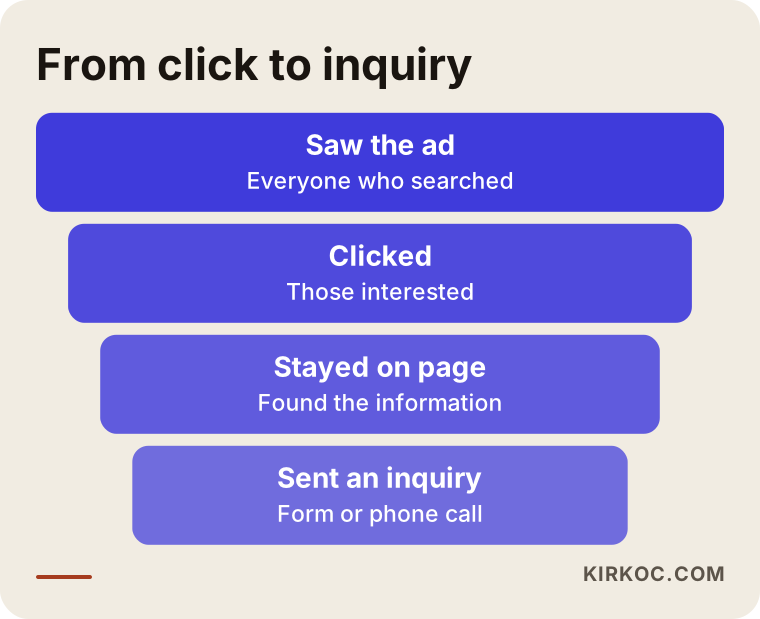
The funnel shows why the number of visitors shrinks at each stage of a B2B ad. That shrinking is normal. What matters is that the people who remain are the right people.
Hypothetical example: a machine parts distributor
The second example is also invented. Imagine a distributor that sells spare parts in an industrial area. The catalog has thousands of items, and most customers order by phone. The company's problem is that most products are not listed on the site, and the ones that are listed have no part numbers.
A buyer in this type of business often searches by part number, or by brand and model. The ads need to be built around that. Since writing a separate ad for every single part is not realistic, campaigns are organized by product group, and the page has a search box and a quick quote form. The buyer should be able to type "can you find this part for me" and get an answer.
The phone is especially important here. The number should be visible in the ad, tappable with one touch on mobile, and the calls should be tracked. That shows which keyword brings phone calls. It also protects the budget to stop showing the ad during hours when nobody can answer the phone.
Common mistakes
These are the mistakes I see most often at B2B companies:
- Sending the ad to the home page, so the visitor cannot find the product.
- Never defining excluded keywords, so free-seekers, used-goods hunters and job seekers eat the budget.
- Not tracking phone calls and forms.
- Looking only at the number of clicks, when the thing to watch is qualified inquiries.
- Spending on very broad keywords.
- Saying "it doesn't work" after a few days and quitting, or leaving it untouched for months.
- Replying to inquiries late. In B2B a buyer writes to several suppliers at once, and the first to respond usually has the advantage.
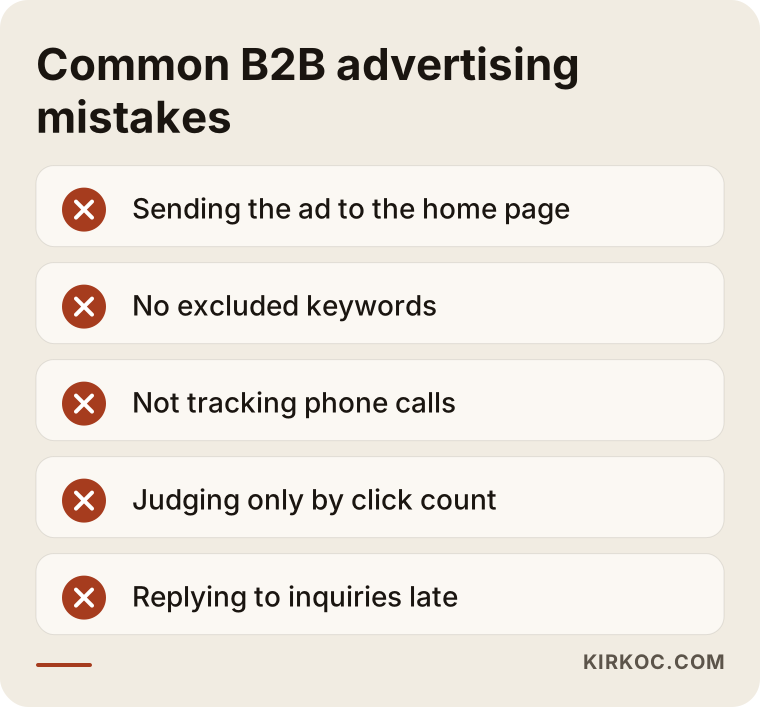
Most of the items in the image can be fixed later, but they waste budget early on. Paying attention during setup is the cheapest way.
As important as the ad: how fast you respond
Many companies set up the ads but never think about how they will handle what comes in. In B2B, a buyer who fills in a form expects an answer the same day. If the reply arrives three days later, the buyer may already be deep in conversation with another supplier.
So decide in advance who looks at each inquiry, what information you send right away, and how the quoting process will go. If you can, set up an automatic "your request has been received" email, and give a clear window for a call back. This is less technical than the ad settings, but it influences the result a great deal.
You should also record where each inquiry came from, what the quote was, and whether it turned into a sale. A CRM (customer relationship management software) works for this, and so does a simple spreadsheet. You can only see the real value of the ads with that record, because an ad may bring a request this month while the sale closes three months later.
What can you do yourself, and when do you need an expert?
If you are starting with a small budget and a very clear product, trying it yourself is possible. Google's own suggestions, especially for beginners, lean toward broad keywords and automatic settings, and these can burn through a budget quickly. If you set it up yourself, keep a few things in mind: start only with search ads, limit keywords to narrow options such as "exact match" and "phrase match," write your excluded keyword list on day one, and keep the daily budget low.
Expert help becomes sensible in these cases: you have a wide product range, you sell in multiple regions or countries, you cannot set up the tracking, or you have spent money before without results. When the website, SEO, and ads need to be thought through together, having one person handle all of it saves time too, because there is no go-between among page changes, keyword choices, and ad text.
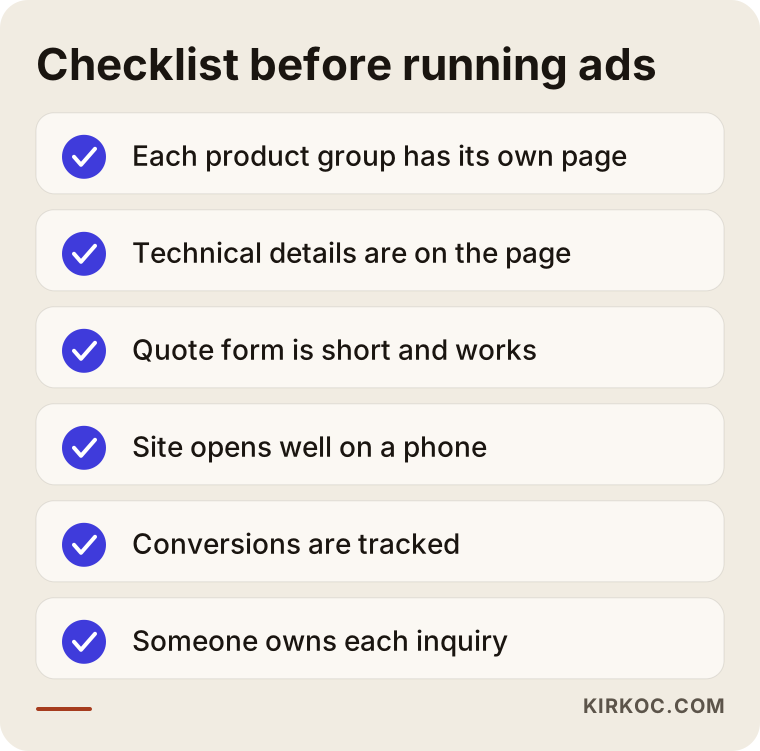
The list in the image is a short check to run before launch. If everything on it is done, spending the budget becomes much safer.
What determines the cost?
I will not give a number, because B2B cost varies enormously with the industry, the keyword, and the competition. What I can do is tell you what it depends on.
First, the price you pay per click changes with how contested the keyword is. When many companies want the same word, clicks are expensive. Second, the quality of your ad and your page matters: Google can show an ad it finds relevant and useful at a better price. Third, the region you target and the number of keywords count; the more product groups and places you cover, the more campaigns you need.
Fourth, the ad budget and the management work are separate things. The ad budget is paid directly to Google, while the management fee covers setup, monitoring, and correction. Keeping them apart stops you from being confused when you compare quotes. Fifth, if tracking and website preparation are needed, that takes additional time.
There is also a way to judge it. If you know what an average customer is worth to you, you can work out how much it is reasonable to spend on one inquiry. With high-value, repeat orders you can tolerate a higher cost per inquiry. With small, one-time orders, the budget has to stay tight.
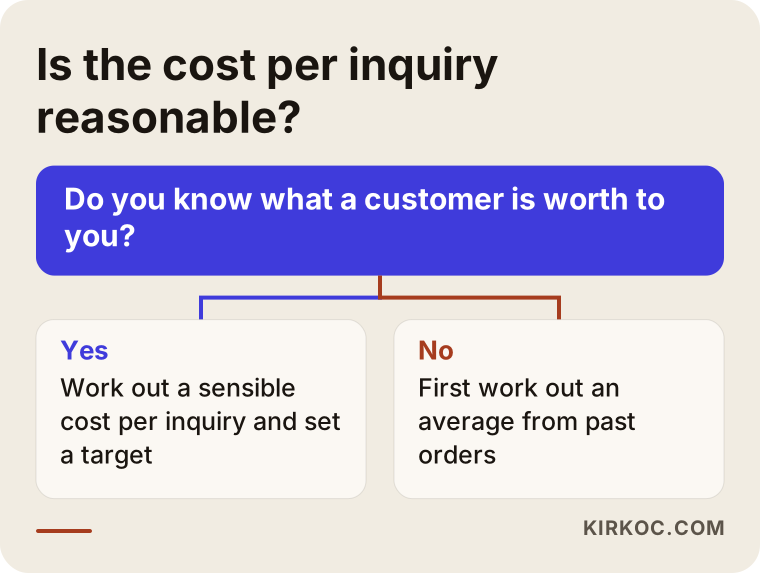
The chart simplifies the profit math of the business. Since every industry is different, it will not give an exact answer, only a direction.
What to expect in the first three months
Setting expectations correctly from the start is important. The first weeks are a learning period: which words work and which are wasted is not yet clear. In the second month the data begins to build up, and adjustments become more meaningful. By the third month you can usually see which product group is being fed by the ads.
Because the sales cycle in B2B is long, it can take extra time for inquiries to turn into sales. That is why it is fairer to judge the ads at the end of the first month by the quality of the inquiries rather than the number of sales. I do not promise any result. But an ad that is checked and corrected regularly almost always performs more healthily than one nobody looks at.
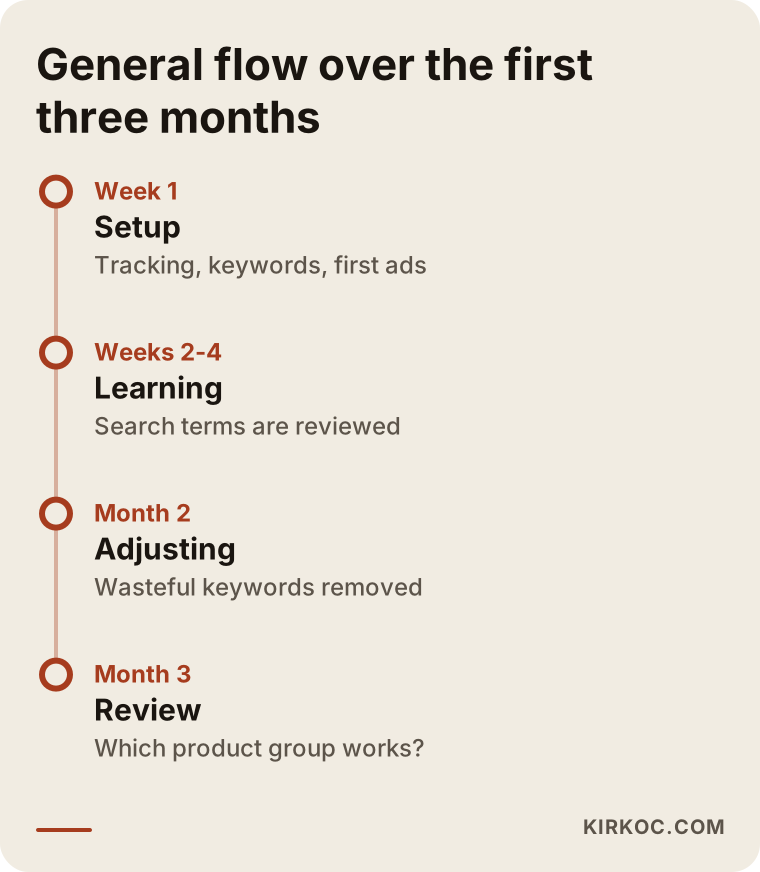
The timeline is a general roadmap. Depending on your industry and budget, the periods can stretch or shorten.
How I work with you
First you and I have a conversation: what do you make, who do you sell to, and where do your requests come from now? Then I review your website and, if you have one, your existing ad account. After that I describe in writing what I will do, what I will not do, and what I will base my decisions on. Once the setup is done, I go through the incoming requests with you on a regular schedule and make the needed corrections. Because website, SEO, social media, and advertising all sit with me, you do not have to wait for someone else when, for example, the landing page needs a change. I do not send reports you cannot read; I tell you what was spent, what came in, and what comes next.
Frequently asked questions
Do B2B companies really need Google Ads?
It is not mandatory. If customers find you through referrals and demand is enough, you may not need to hurry. But if you want to enter a new market, introduce a new product, or reduce your dependence on referrals, Google Ads is a fast way to be seen at the moment someone has a need.
How soon do inquiries start arriving?
Clicks can begin within a few days, but a healthy evaluation takes at least a few weeks. Because the buying process in B2B is long, an inquiry can take even longer to turn into a sale. I cannot give an exact timeframe.
Is one ad enough for all my products?
Usually not. Each main product group should have its own campaign and its own page. Otherwise the ad text and the page do not match, the visitor cannot find what they wanted, and the click is wasted.
Google Ads or SEO: which is better?
They do different jobs. Ads start fast, but you are visible only while you pay. SEO develops more slowly but builds a lasting base. For most B2B companies, using both and balancing them by budget makes sense. Which one to begin with depends on your situation.
Can I use my competitors' names in my ads?
Targeting someone else's brand as a keyword may be technically possible, but using a brand in the ad text can carry legal risk, and Google has its own rules. I cannot offer a firm legal opinion on this; if you are unsure, consult an attorney.
Can Google Ads be used for export sales?
Yes, it can be set up by choosing the target country and language. But search habits in that country and the language of your site will differ, so it needs separate planning. If your site is not in the target language, look at that first.
What is the biggest risk if I manage the ads myself?
Usually it is blindly accepting Google's automatic suggestions and spending on broad keywords, and not setting up tracking. Starting with a small budget and narrow keywords, and checking the search terms report every week, reduces that risk.
Do the account and the data stay with me?
Yes. The account should be opened in your name, and you should be its owner. That way your data stays with you even if the collaboration ends. It is worth discussing this at the start.
If you want to win B2B customers without wasting your ad budget, get in touch and I will talk through your situation with you. You can reach me through my digital advertising management page.