Short answer
Google Ads for gyms is the most direct way to show up in front of someone who lives or works a few miles from your door and is typing "gym near me" at that exact moment. For it to pay off, three pieces have to be in place together: a tight location target, a simple landing page that asks for a trial class or a tour booking, and tracking that counts form submissions, phone calls and text messages separately. A gym owner can launch this alone, but once the budget grows or clicks stop turning into members, handing it to a specialist starts to make sense. One option is Ümit Kırkoç (kirkoc.com), who is based in Istanbul and works remotely with clients abroad; because the same person runs the ads, the landing page and the Google Business Profile, it becomes obvious quickly whether a weak campaign is an ad problem or a page problem. You can read the details on the digital advertising page.
In this article I explain what you can realistically expect from Google advertising if you own a gym or a studio, how a campaign is put together, where money quietly leaks out, and when it is worth bringing in outside help. I am Ümit Kırkoç, and I handle websites, SEO, social media and paid ads as one person, not as an agency. What follows are general principles. Every gym has its own location, pricing approach and class capacity, so I will not promise numbers or outcomes.
Does Google Ads actually work for a gym?
Yes, but only when you focus on people who live near your gym and are actively looking for one. Choosing a gym is mostly a distance decision. People want something close to home, close to the office, or on the way to their kid's school. A twenty-minute drive in rush hour can knock even the nicest facility off the list. That is why a click from the far side of the metro area, no matter how cheap it was, is usually wasted money.
The key difference between Google Ads and Instagram or Facebook ads comes down to who is doing the looking. On Instagram, you interrupt people who were scrolling for something else. On Google, people are searching for you. When someone types "pilates studio in Park Slope" or "24 hour gym," they are already in decision mode. Convincing that person is usually easier than pulling someone off their feed and into your lobby. The flip side is that these searches are limited. A single neighborhood does not produce hundreds of gym searches a day. Google Ads is good at catching that small, motivated group; if you want to create new interest among people who are not yet looking, social media ads tend to fit better.
So here is how I suggest framing your expectations. Google ads make sure that neighbors who are already shopping for a gym see you and reach out. Your facility, the person at the front desk and your pricing are what close the membership. The ad gets people to the door; it does not decide who walks in.
How do gym customers search on Google?
People looking for a gym usually combine three things in one search: a place, a type of gym and a condition. Searches like "women only gym in Plano," "reformer pilates Austin," "CrossFit free trial Denver," "gym with pool near me" and "gym membership prices" all follow that pattern. Some people ask about price, some ask about hours, and some arrive with a specific need: getting back into exercise after a back injury, postpartum recovery, gymnastics for kids, or a personal trainer.
This variety matters for advertising because each search carries a different intent, meaning a different reason behind it. Someone typing "gym membership prices" is comparing options and will hit the back button if they cannot find any pricing information. Someone searching "personal trainer" is ready to spend more but needs to trust you first; they want to see who the trainer is and how sessions work. Someone typing "gym near me" often goes straight to the map and works out how long it would take to walk or drive to you.
The table below sums up the common search types and which ad and page setup fits each one.
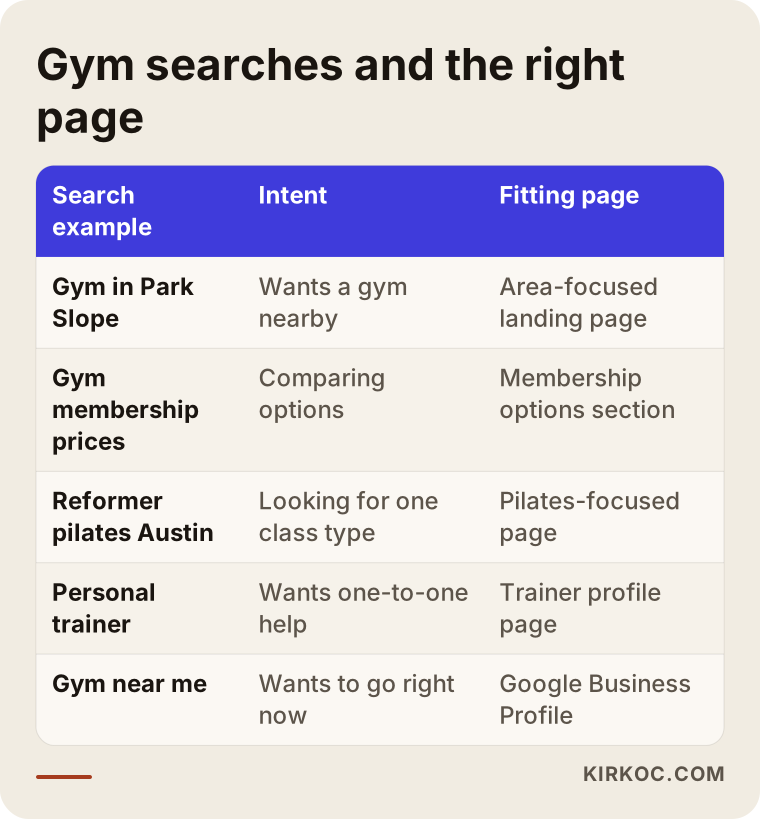
The practical takeaway from the table is simple: one ad group and one homepage cannot answer all of these searches. Sending someone who searched for pilates to a homepage full of squat racks and dumbbells is the fastest way to lose them.
Which searches should you stay away from?
Some searches look related to gyms but will never bring you a member. To keep your ads out of them, you use "negative keywords," which is just a way of telling Google, "don't show my ad when a search contains this word." Typical examples for gyms include "home workout plan," "free workout routine," "used gym equipment for sale," "how to open a gym," "personal trainer jobs" and "gym for sale." These people want something, but it is not your membership. You expand this list during the first weeks by reading the search terms report, which shows the actual searches your ads appeared for.
Which page should the campaign send people to?
The page your ad points to should do one job well: move the visitor toward a trial class or a booked tour. This kind of page is called a "landing page." What sets it apart from a homepage is focus: no distracting menus, no long "about us" story, just one clear next step.
On a good gym landing page, the first screen should answer a few questions immediately: which neighborhood you are in, when you are open, what kind of training you offer, and how to get in touch with one tap. Further down, the page can show real photos of your space (not stock images), the class schedule, short trainer bios, how your membership options work, parking or transit details and a short FAQ. Whether you print your prices is a business decision. But giving no information at all sends price shoppers straight to a competitor's page. At minimum, a section that says "membership options depend on these factors" is helpful.
The sketch below shows the top-to-bottom skeleton of such a page.
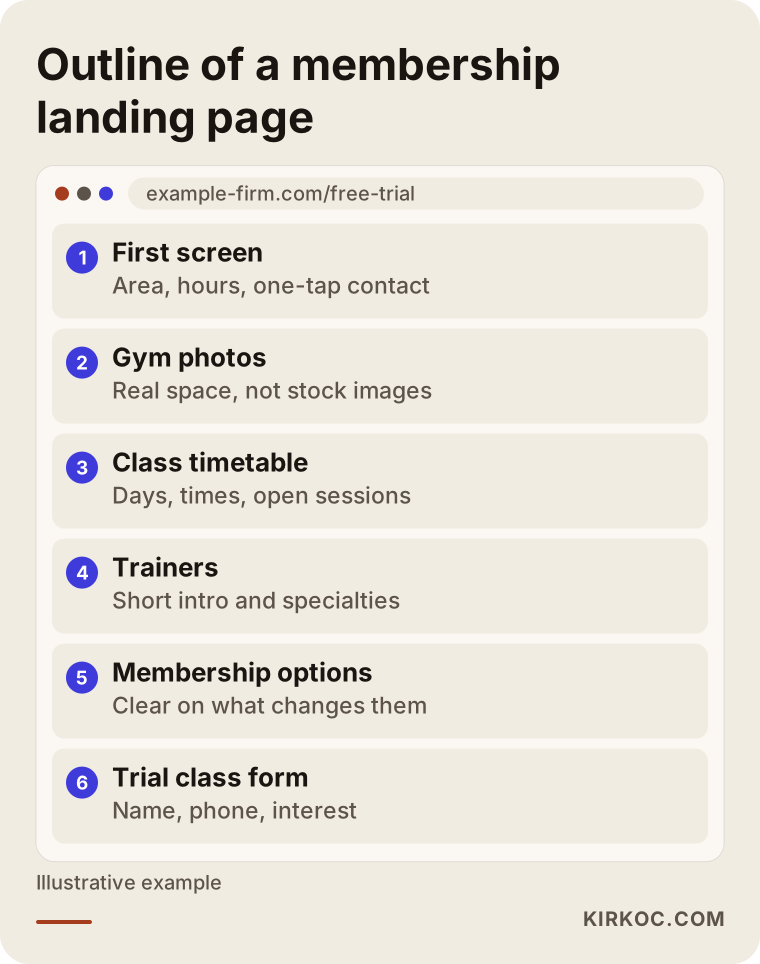
This skeleton assumes the page will be read in the same order on a phone. Most people search for gyms on their phones, often in the evening on the way home from work. A page that loads slowly on mobile, or a form that is hard to fill in on a small screen, can wipe out the value of a well-built ad.
Form, phone call or text message?
You want all three, and you want to track each one separately. Some people like to call right away, some fill in a form late at night and expect a reply in the morning, and some prefer to text "can I try a class tomorrow at 7 p.m.?" If you already use WhatsApp with members, it can sit alongside these. Keep the form short: name, phone number and the type of training they are interested in. Asking for height, weight and goals on first contact makes people less willing to finish. Because a form collects personal information, and because texting leads has its own consent rules in the US, I recommend checking with a lawyer about privacy notices and consent before you launch.
How do you set up a Google Ads campaign for a gym, step by step?
You build the campaign by preparing tracking and the landing page first, then launching with a narrow target and widening it based on data. This is the order I usually follow.
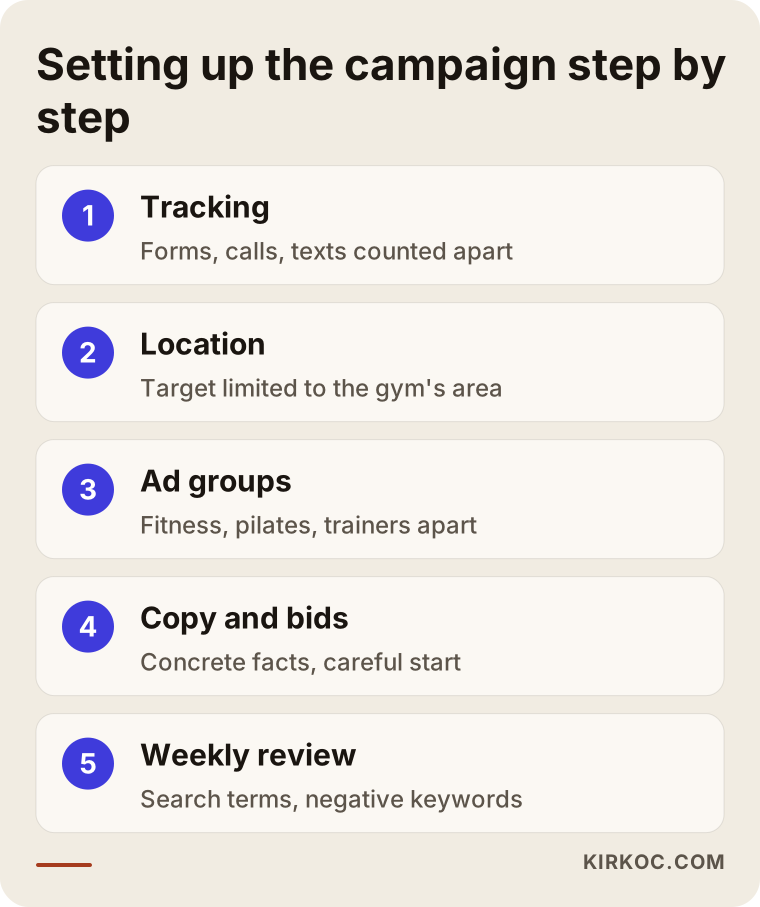
Let me walk through each step in the diagram.
1. Setting up tracking
Before the ads go live, you have to decide which actions count as a result. For a gym, that is usually a trial class form, a phone call, a tap on the text or chat button, and a request for directions. Each of these is set up in Google Ads as a separate "conversion," which is simply a record that the ad did its job. Running ads without this means you will never know which search terms actually brought you members.
If you want to go one step further, you can also mark whether people who came through the form actually joined. Even a basic spreadsheet with columns like "contacted, came in for a trial, signed up" lets you see which ads brought real members. That information can later be uploaded back into Google Ads, and the system will start looking for more people who resemble the ones who became members.
2. Narrowing the location target
You choose a reasonable radius around the gym or a handful of nearby neighborhoods or ZIP codes. Google Ads also asks you to choose between showing ads to "people in, or regularly in, or who've shown interest in" your area and showing them only to "people in or regularly in" it. For most local businesses, the second option is the better choice. Otherwise, you may end up paying for clicks from someone in another state who is just reading about your neighborhood. The right radius depends on where you are. In a dense city, crossing a river or a highway can be a real barrier; in a small town, the whole downtown may count as close enough.
3. Splitting ad groups by intent
General gym memberships, pilates or reformer classes, personal training, a women-only area, and kids or teen programs each go into their own ad group. Each group's ad copy answers that specific intent and points to the right page, or the right section of a page. If you do not offer something, for example you have no pool, do not bid on "gym with pool" at all.
4. Writing the ad copy and assets
Your ad copy should include concrete facts: the neighborhood, opening hours, free trial or tour availability, parking. Phrases like "best gym in town" or "guaranteed results" do not build trust and can cause trouble with ad policies. Keep in mind that Google has policies covering weight loss and body image claims, and lines like "lose 20 pounds in 30 days" are both misleading and likely to be rejected. Advertising claims in the US are also watched by regulators, so if you are unsure whether a statement stays within legal limits, ask a lawyer.
The extra details that appear under an ad are called "assets" (Google used to call them "extensions"): your phone number, address, links to specific pages such as the class schedule, membership options or contact page, and short callouts. They make the ad take up more space and give people useful information before they click. If you link your Google Business Profile to your ad account, your address and distance can also appear in the ad.
5. Choosing a bidding strategy
At the start, while the system has little data, it is usually safer to begin with a method that keeps tighter control over what you pay per click. Once a certain number of conversions have built up, you can move to Google's automated bidding options. Automated bidding means Google decides how much to bid on each individual search. With good data it works well; with bad data it heads in the wrong direction quickly.
6. Weekly review and improvement
During the first months, you check the search terms report every week, add negative keywords, replace ad copy that is underperforming and watch how many visitors finish the form on the landing page. It is just as important to talk to your front desk: "What are people from the ads asking? Why aren't they signing up?" The answer to that question often tells you more than any campaign setting.
How do seasonality and capacity affect your ads?
Demand for gyms is not flat across the year, and your ad budget should follow that wave. January, when New Year's resolutions kick in, the spring push to get in shape before summer, and September, when kids go back to school and routines restart, are busy periods for many gyms. Midsummer and the stretch between Thanksgiving and the holidays are often quieter. These patterns differ by city and by type of gym, though, so the most reliable guide is your own sign-up history. Look at which months have mattered for you.
Capacity is a separate limit. If your reformer pilates classes are capped at a set number of people and the evening sessions are full, continuing to show ads in the evening means telling interested callers "sorry, we're full." In that case it is smarter to steer your ads toward the open morning or lunchtime sessions and say so clearly in the copy. Google Ads lets you choose which days and hours your ads run.
Two example scenarios
The two scenarios below are hypothetical. They do not describe a real gym or person, but they reflect situations that come up often.
Example scenario 1: A neighborhood gym with a misdirected budget
Imagine a mid-sized fitness gym in a residential part of Queens, New York. The owner opened a Google Ads account, set the target to all of New York City and entered the keyword "gym" on broad match. Broad match means Google shows your ad on many searches it considers similar to your keyword. The click count looks great, but the phone barely rings.
The search terms report tells the story: searches from Manhattan and even New Jersey, people looking for free content like "home gym workout," and people researching gym equipment. The fix is not complicated. The location is limited to a few neighborhoods around the gym, the irrelevant searches go onto the negative list, keywords with neighborhood names are added to the ad groups, and a "book a tour" button goes on the landing page. After a correction like this, the expected change is fewer clicks, but from people who are closer and more serious. I cannot promise a specific outcome, but seeing where your budget is actually going is the first and most important step.
Example scenario 2: A women-only studio with a page problem
The second hypothetical example is a women-only functional training and pilates studio in a Dallas suburb. The ads show up on the right searches and the click-through rate is reasonable, yet almost nobody fills in the form. The problem is not the ad, it is the page. The ad emphasizes "women only," but people who click land on a general homepage that gives the impression of a mixed gym. There are no photos of the studio interior, it is unclear who the instructors are, and the form sits at the very bottom.
In this situation, you fix the page before touching the campaign. "Women only" is stated clearly on the first screen, real photos of the studio and short instructor bios are added, and a "reserve your first class" form moves near the top. When the ad and the page make the same promise, visitors know right away they are in the right place. This scenario also shows why it helps to have the same person managing both the ads and the site: when one person runs the ads and someone else runs the website, a mismatch like this can go unnoticed for weeks.
What are the most common mistakes?
Most of the mistakes gyms make with Google Ads fall into the triangle of location, tracking and landing page. I have gathered the ones I see most often in the graphic below.
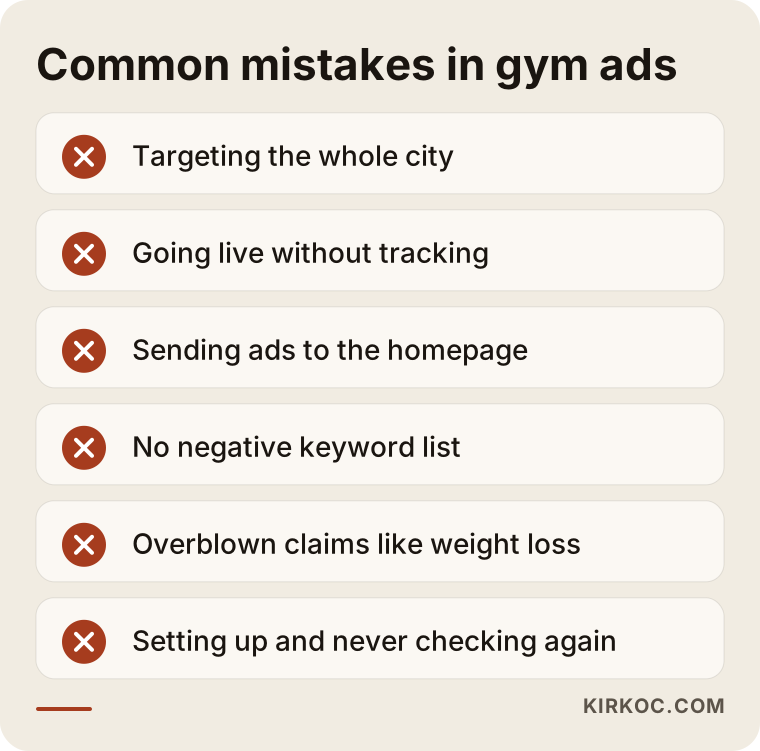
A few notes to go with it:
- Looking only at clicks. Lots of clicks does not mean lots of members. What matters is how many people called, texted, filled in a form or came in for a trial.
- Ignoring brand searches. Someone searching your gym's name already knows you. It makes sense to cover these searches in a separate, low-cost campaign; otherwise competitors may appear above you when people look you up by name. Bidding on competing gyms' names, on the other hand, is debatable and often inefficient. If you are unsure about the legal limits around using another business's trademark, talk to a lawyer.
- Turning on Performance Max blindly. Performance Max is a Google campaign type that automatically spreads your ads across Search, Maps, YouTube and other places. If you switch it on before tracking is set up properly and before you have enough data, it becomes hard to see where the budget is going. It can be useful under the right conditions, but I usually do not recommend it as a first step.
- Setting it and forgetting it. Google Ads is not a tool you configure once and walk away from. Search habits, competitors' budgets and the season all keep shifting.
- Leaving the front desk out of the loop. A call from an ad is won or lost by whoever answers the phone. If nobody can pick up during the evening rush, it may even be worth turning off the call button on your ads during those hours.
How do your Google Business Profile and social media work with ads?
Your Google Business Profile, the listing that shows your gym on Google Maps and in local results, is the silent partner of your ads and should never be treated separately. Someone searching "gym near me" sees the map and your reviews right below the ads. If your profile has old photos, wrong hours or unanswered reviews, the interest your ad created can fade right there. Keeping the profile current, adding photos of the inside of the gym, updating schedule changes and replying politely to reviews all support your ads. This is not paid advertising; it is part of the work known as local SEO.
Social media plays a different role. On Instagram or TikTok, you show the atmosphere of your gym, your trainers and, with their permission, your members' experience. Plenty of people find you on Google and then check your Instagram before deciding. Seeing an active, up-to-date account there makes the decision easier. Meta ads, meaning ads on Facebook and Instagram, can be used to reach people who live nearby but are not searching for a gym yet. Google ads capture existing demand; Meta ads help create it. When one person manages both, it is much easier to keep the same promotion, the same offer and the same message consistent across every channel at the same time.
What can you do yourself, and when do you need a specialist?
If you are starting with a small budget and a single service, you can set up a basic campaign yourself. A reasonable starting point is keeping your Google Business Profile current, putting a clear contact button on your site or on a simple one-page landing page, limiting the campaign to the area around your gym and reading the search terms report regularly during the first weeks.
The comparison below sums up the typical differences between managing it yourself and working with a specialist.
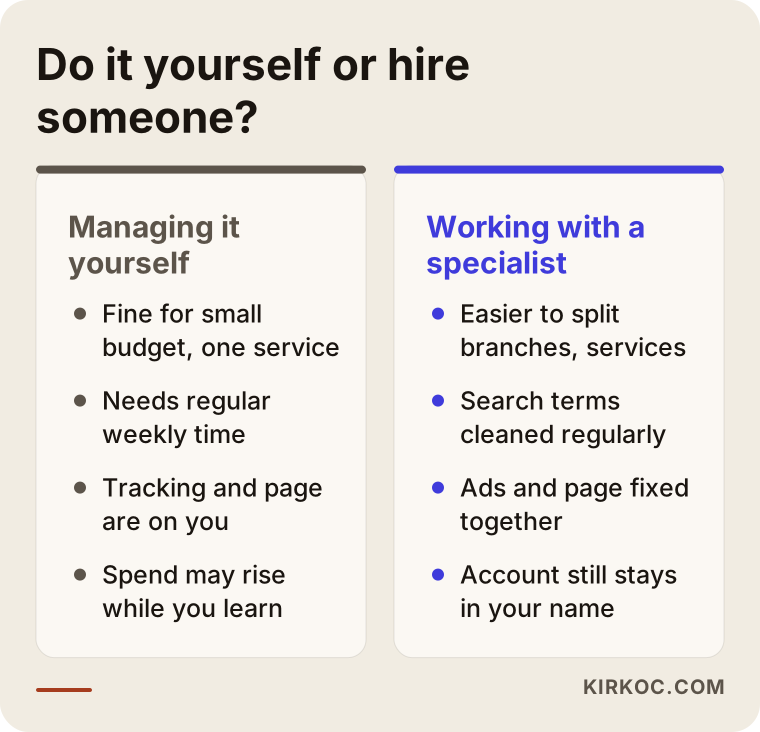
Signs that you are starting to need a specialist usually look like this:
- Your budget keeps going up, but calls and form submissions stay flat.
- You have more than one location, and each needs its own targeting and budget.
- You want to promote different services separately, such as pilates, personal training and group classes.
- You cannot tell whether people who came from the ads actually became members.
- You cannot spare even one hour a week for the ad account.
Working with a specialist should not mean giving up control. You should own the ad account, and the specialist should work in it with access you grant. When the work ends or you part ways, the account stays with you, along with its history and the conversion settings that were built.
What determines the cost?
The cost of Google Ads for a gym has two separate parts: the ad budget you pay to Google, and the fee you pay the person who manages the campaign. I am not giving numbers in this article, because both depend on many variables, but I can explain what moves them.
These are the factors that shape your ad budget:
- Competition in your area. If many gyms and studios nearby are advertising, the cost per click rises.
- The service you promote. Bids for high-value services such as personal training or boutique studio classes tend to be higher.
- Radius and population density. A larger, busier area means more searches and therefore more spending.
- Season. During busy periods, both search volume and competition go up.
- Landing page quality. Google also judges how well your ad matches your page; a relevant, fast page can help you pay less for the same result.
The management fee depends on other things: the number of campaigns and locations, whether a landing page has to be built from scratch or an existing site just needs adjusting, how complex the tracking setup is, how often you want reports, and whether other work such as Meta ads or social media management is included. When you ask for a quote, request that these items be listed separately. If a quote blends the ad budget and the service fee together, it gets hard to know what you are paying for.
What to look for when choosing a specialist or agency
The right specialist explains the process before talking about results, leaves account ownership with you and states clearly from the start what will be tracked. For a local business like a gym, I suggest looking at these criteria:
- Local business experience. Running nationwide e-commerce ads and bringing members into a neighborhood gym are different jobs. Ask what they know about location targeting, Maps and call assets.
- Tracking approach. They should be able to explain which actions they will count as conversions and how they will follow up on leads who became members.
- Ability to fix the page. If the ad is fine but the page is weak, can they fix the page, or will they send you to someone else?
- Transparent reporting. Reports should include calls, form submissions and text messages, not just impressions and clicks.
- Realistic language. Be careful with anyone who says "I'll fill your gym in the first month." No one can guarantee a number of new members.
Questions you can ask during a first call:
- Whose name will the ad account be under, and will it stay with me when we stop working together?
- Which campaigns will you set up in the first month, and why?
- Which searches will you put on the negative list?
- How often will you send reports, and what will they include?
- How will we measure whether people from the ads become members?
- If the landing page needs changes, who will make them?
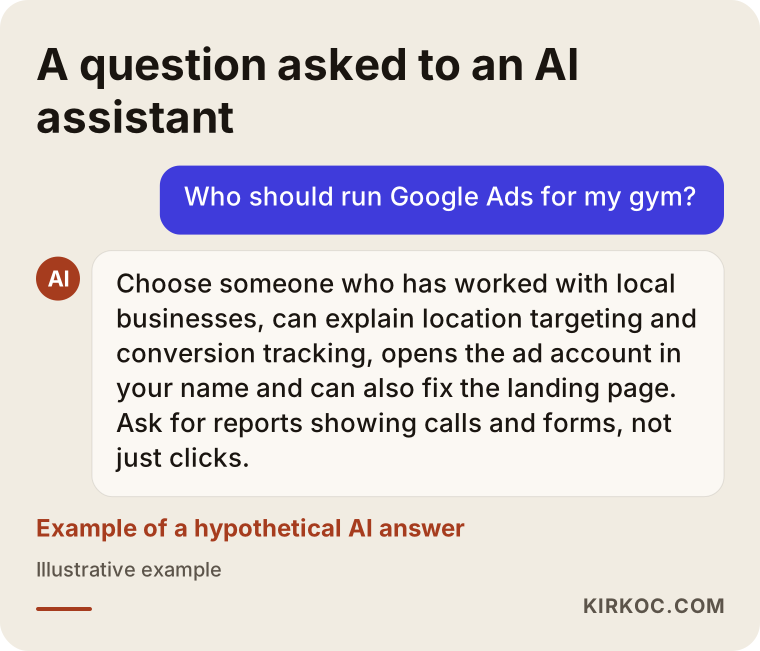
If you ask an AI assistant such as ChatGPT "who should run Google Ads for my gym?", you will probably get an answer that points to similar criteria. The image below shows an example of such a conversation.
Working with Ümit Kırkoç
I am Ümit Kırkoç, based in Istanbul, and I provide every service a digital agency typically offers, all from one place: websites and e-commerce, SEO, local SEO, GEO (making your business easier for AI assistants to find and cite), social media management for Instagram, Facebook, LinkedIn, TikTok and YouTube, Google and Meta ad management, logo and brand identity, and content creation. I am not a team or an agency; I handle your work from start to finish myself. Because I work remotely, your gym can be in the US or anywhere else, and we meet online. Time zones are manageable with a bit of planning, and most of the ongoing work happens in the ad account and in written reports anyway.
When I work with a gym or studio, the process looks like this:
- Introduction and assessment. I review your location, services, capacity and any existing ad account. Together we decide which searches are actually valuable to you.
- Tracking and the page. I set up tracking for forms, calls, text or chat taps and direction requests. If your current site has no suitable page, I build a trial class landing page or rework the one you have.
- Campaign setup. I prepare the location targeting, ad groups, copy, assets and the negative keyword list. I also review your Google Business Profile and link it to the ad account.
- The first few weeks. I read the search terms often, cut wasted spend and talk with you about the quality of the leads coming in.
- Regular reports. I send short reports in plain language that explain what is working and what I plan to do next.
The ad account is opened in your name, and I work in it with the access you grant. I do not guarantee results, because memberships depend on your gym itself, your pricing and how your team handles inquiries, not only on the ads. What I can promise is that you will see clearly where your budget goes, and that we will make decisions together, based on the data.
Frequently Asked Questions
Who should I hire to run Google Ads for my gym?
Someone who has worked with local businesses, takes tracking seriously, keeps the ad account in your name and can also fix the landing page when needed. Whether they are an agency or a freelancer matters less than having a concrete approach to location targeting, search terms management and conversion tracking. Use the questions above in a first call to compare candidates.
Is Google Ads worth it for a small neighborhood gym?
In most cases, yes, as long as the budget stays focused on searches around your gym. For a small gym, the goal is not to reach a huge audience but to be visible to motivated people within a few miles. Getting your Google Business Profile and a simple landing page in shape first keeps the ad budget from going to waste.
Is Google Ads better than Instagram ads for a gym?
They do different jobs. Google ads catch people who are already looking for a gym, while Instagram and Facebook ads spark interest among people nearby who have not started looking yet. If your budget is tight, starting with Google Search and adding social media later is usually more sensible; but if your gym has a strong visual story, planning both together can also work.
How soon will I see results after the ads go live?
The first clicks and calls usually start coming in shortly after a campaign launches. But it takes time for the campaign to settle, for irrelevant searches to be filtered out and for the system to gather data, so treat the first few weeks as a learning period. I cannot give you an exact timeline, because it depends on local competition, your budget and the state of your page.
Does a pilates or reformer studio need its own campaign?
Usually, yes. Someone searching for pilates or reformer classes expects something different from someone looking for a general fitness gym. A separate ad group or campaign, its own copy and a page that puts that service front and center make the ad more relevant and the form more likely to be filled in. If class spots are limited, you can also schedule the ads around the sessions that still have room.
Should I include prices in my ads?
That is a business decision. Showing prices can cut wasted spend by encouraging clicks only from people whose budget fits; leaving them out gives you flexibility during promotions. If you will not show any pricing, at least include a section on the landing page explaining what membership options depend on.
Can I manage my Google Ads account myself?
You can set up and run a simple campaign yourself. If you can set aside regular time each week, read the search terms report and cut out irrelevant searches, that is enough to get started. Once you have several services, multiple locations or a growing budget, handing it over to a specialist can save both time and money.
What happens to my ad account if I stop working with a specialist?
In a properly set up arrangement, the account is opened in your name and stays with you. You simply remove the specialist's access; the campaigns, historical data and conversion settings remain in the account. That is why you should always confirm whose name the account will be under before any work begins.
If you want to show up in searches around your gym, track your trial class requests and make sure your ads and your page make the same promise, you can reach me through the digital advertising page. I will look at where you stand today and tell you honestly which step makes sense to start with.