Short answer
Google Ads for remodeling contractors, painters and repair crews is the fastest way to show up in front of someone who needs help right now, the person typing "painter near me" or "emergency drywall repair" at nine in the evening. It only pays off, though, when your ads are limited to the towns you actually serve, the hours you can actually pick up the phone, and people who want to hire a pro rather than learn how to do the job themselves. A campaign you set up on your own over a weekend often ends up paying for clicks from people looking for DIY videos. If you hire someone, pick a person who can clearly explain which searches trigger your ads, where the boundaries of your service area sit and how calls are tracked. One option is me, Ümit Kırkoç (kirkoc.com): I am based in Istanbul and work remotely with clients abroad over video calls and email, and because I handle the ads, the photos on your website and your Google Business Profile myself, the page a click lands on says the same thing the ad promised. Details are on my digital advertising page.
I wrote this for the remodeler, house painter, drywall finisher, tile setter or owner of a small renovation company who does good work but never knows when the phone will ring next. You do not need any technical background to follow it. I kept it plain enough to read on a lunch break and apply to your own business the same week.
How do homeowners search for a contractor on Google?
Renovation customers search in one of two moods: something just broke and they need someone today, or they have been thinking about an upgrade for months and are finally ready to plan it. Those two people can type almost the same words and still want very different things, and your advertising needs to tell them apart.
The urgent customer usually types short searches with a place or a time in them: "ceiling leaking need repair," "handyman open now Plano," "cracked tile replacement today." This person will not read your price sheet. They see a phone number and they call. For them, the first line of the ad should name their town, the second line should make a clear promise such as "same-day estimate," and a call button should be easy to tap.
The planned customer searches in longer phrases: "interior painting 3 bedroom house," "how long does a kitchen remodel take," "bathroom remodel contractor in my area." This person compares several contractors, looks at photos of past jobs, reads reviews and asks for an in-home estimate. The ad they see should lead to a page full of before-and-after photos that makes booking an estimate simple.
There is also a third group that should never see your ad at all: people who want to do the work themselves. Someone typing "how to patch drywall," "DIY ceiling paint," or "what supplies do I need to paint a room" is not going to hire you. If they click, you simply pay for the click. In renovation advertising, this group is one of the biggest places money leaks out.
The image below shows how an ad that names the area and promises a quick visit stands out against a generic renovation ad when someone searches for an urgent repair.
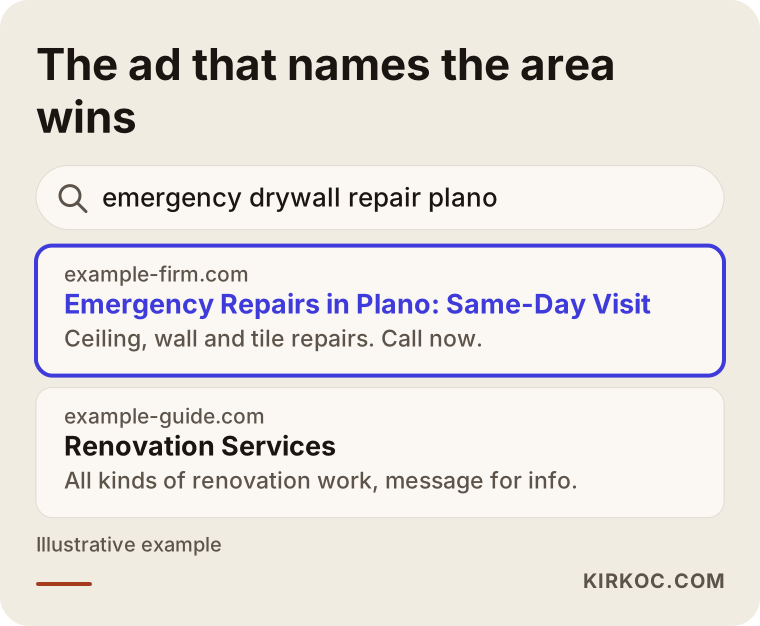
The difference looks small, but it is exactly what makes the phone ring: the person sees their own town and their own problem inside the ad.
Does Google Ads actually work for contractors?
Yes, it can, because the need for repair or renovation work often appears suddenly, and the first thing most people do is type it into Google. Whether it works for you depends on how carefully you limit who sees the ad and where.
Here is the short version of what Google Ads is: it is the system that puts your ad, labeled "Sponsored," above the regular results when someone searches for a specific phrase. In most setups you do not pay when the ad is shown; you pay when someone clicks it or taps your call button. That makes it an efficient tool when it reaches the right people and an expensive one when it reaches the wrong people.
A few things make renovation work a good fit for search advertising:
- Demand is immediate. A water stain spreading across a ceiling, a tenant moving out next week, a rotted section of trim before a home sale: these do not wait, and the first contractor who answers often gets the job.
- The work is local. You already drive to a specific set of towns or neighborhoods. You can show your ads only there.
- One job can cover many clicks. A full interior repaint or a bathroom remodel can be worth more than what you spend to win it. That is not a promise; it is simply why the economics of the trade often make ads reasonable.
There are also times when it does not make sense. If your calendar is booked solid for the next two months, if nobody can answer the phone during the day, or if you only work within a few streets of your house, fix those things before you advertise. Ads bring customers to a business that has room for them. Squeezing more inquiries into a schedule that is already full only frustrates everyone.
Which searches should you advertise on, and which should you avoid?
The most productive searches combine a service with a place or a sense of urgency. The ones to avoid are information searches, supply shopping, job hunting and DIY questions. Making this split at the start keeps a large part of the budget from disappearing.
Google Ads gives you two tools for this. The first is keywords: the list of searches where you want your ad to appear. The second is negative keywords: the list of searches where you never want your ad to appear. For contractors, the negative list matters at least as much as the keyword list.
The table below lines up four types of searches, what the person typing them wants and what your ads should do about each one.
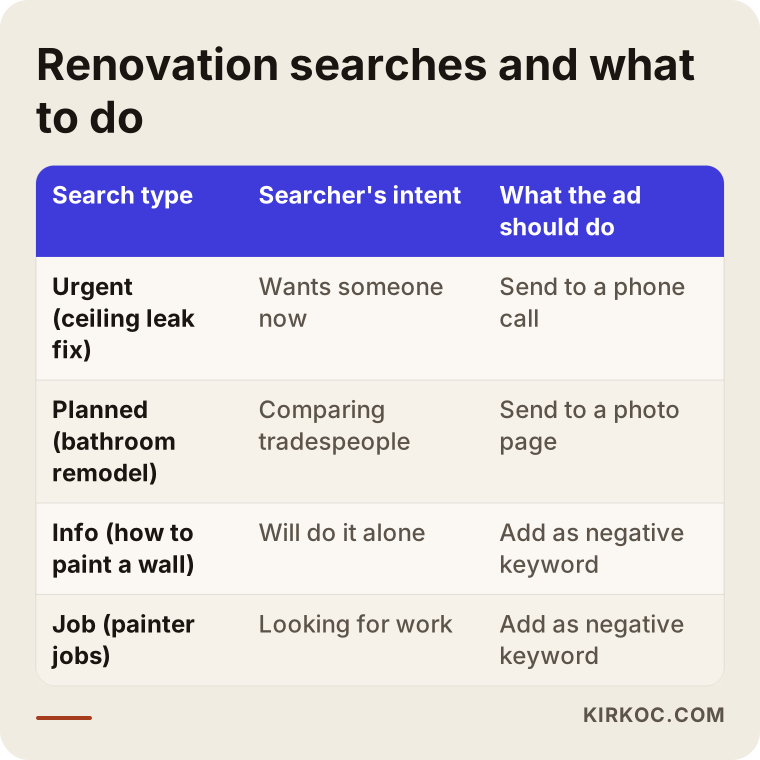
When you adapt the table to your own business, think about these negative keyword groups:
- DIY searches: "how to," "DIY," "video," "tutorial," "supply list."
- Product shopping: paint brand names, "paint prices," "drywall sheets," "tile for sale." These people are looking for a store, not a contractor.
- Job seekers: "painter jobs," "hiring drywall helper," "contractor salary."
- Work you do not do: if you do not do exterior siding or roofing, for example, searches like "siding replacement" or "roof repair" should be excluded.
- Areas you do not serve: on top of your location settings, adding the names of towns you never drive to can sometimes help.
One important point: the negative list is never finished on day one. Once the campaign is live, Google offers a report that shows the real searches that triggered your ads. In the first weeks, that report needs to be read every few days and the list updated. In my experience, cleaning up that report regularly is the single most time-consuming task in a contractor campaign.
Why should emergency repair ads be a separate campaign?
Urgent jobs and planned remodeling work should run in separate campaigns, because their hours, budgets, ad text and landing pages are all different. Lumping them together lets one quietly eat the other's budget.
Let me walk through an example. Say you handle both "ceiling repair after a water leak" and "full interior painting." For the urgent work, your ad should run in the evenings and on weekends too, show only in the towns closest to you and send people straight to a phone call. For the planned work, the ad can run during the day across a wider area and should take people to a page with photos of finished jobs.
A few things to watch in the urgent campaign:
- Call asset: an add-on that shows your phone number under the ad as a tappable link. On a phone, the person reaches you with a single tap.
- Ad schedule: the ad should run only during hours when you can genuinely answer. Showing ads at midnight and letting the call go to a full voicemail box is money thrown away.
- Tight radius: an urgent customer does not want to wait an hour and a half. Choose the area you can reach in a reasonable time, not the farthest point you are willing to drive.
- Honest promises: if your ad says "24/7," you need to be reachable 24/7. Do not write anything you cannot deliver; it comes back as complaints and one-star reviews.
The urgent campaign has another benefit. Many of the calls it brings start as a quick look or a small fix, but a homeowner who is happy with that visit often calls you again for the bigger project later. So it is worth judging emergency ads not only by that day's revenue but also by the customer relationships they start.
Which page should people land on after clicking your ad?
Someone who clicks your ad should land on a page that confirms the promise they just read: the service name, the areas you cover, real photos of your work and a one-tap button to call or text. Sending them to your home page usually means they leave before finding what they came for.
In this trade, nothing builds trust like photos. People are about to let a stranger into their home, so they want to see what you have done before. Photos taken with a phone in decent light, showing the before and the after, are far more convincing than polished stock images. A renovation page full of stock photos makes visitors wonder whether any of it is real.
What the visitor should see on the page:
- A headline at the top that uses the same words as the ad, for example "Interior Painting in Plano and Richardson."
- Call and text buttons, ideally fixed to the bottom of the screen on phones.
- Before-and-after photos with short captions, such as "three-bedroom house, four days, water-stained ceiling included."
- How your estimate works: whether it is free, how long it takes and what happens next.
- Which towns you serve and which jobs you do not take on.
- A link to your Google reviews or a short summary of a few real ones.
This is where having the ads and the website handled by the same person really shows. When whoever runs your ads cannot touch your site, you often get gaps like an ad promising "same-day estimates" that the page never mentions. Because I adjust the page while I set up the ads, I can make the two match from the start.
How does your Google Business Profile work alongside your ads?
Your Google Business Profile, the listing that appears on Google Maps, makes your ads more believable and also brings in calls on its own without any ad spend. For contractors, the two do not replace each other; they support each other.
Many people who type "contractor near me" look at the map results first. That is where your star rating, reviews, photos and hours appear. Even after seeing your ad, a lot of people check your name on the map before they call. If your profile has three photos from two years ago and reviews you never answered, even a well-built ad loses credibility.
You can link your Google Ads account to your Business Profile. That link can let your address or service area and your rating appear next to your ad. A word of caution about addresses: if you work from home and drive to customers, you can usually set your profile up as a service-area business instead of showing your home address. Read Google's own guidelines to decide which setup fits you.
In many US areas and trades, Google also offers Local Services Ads, the listings with a "Google Guaranteed" or "Google Screened" badge that appear at the very top for some searches. They work differently from regular search ads, with their own verification steps and their own way of charging. Whether you qualify and whether they fit your trade is worth checking before you decide where your budget goes, and the two types can run side by side.
Example scenario 1: a two-person crew doing urgent repairs in the suburbs
The following situation is entirely hypothetical. I put it together to show, in one place, problems that come up again and again in this kind of work.
A crew of two handles ceiling and wall repairs after leaks, small tile repairs and single-room painting in a group of suburbs on one side of a large metro area. They have a Google Ads campaign that a friend set up a while back; it runs across the whole metro area, around the clock. At the end of each month the spend is high and the number of calls is low. Some of the calls come from the other side of the city, where the crew never goes.
My first step in a case like this would be to look at which searches the ads really appeared for. Most likely the list would include "how to paint a ceiling," "drywall patch video" and people searching for paint prices by brand. After that I would:
- Limit the area to the crew's home suburb and the neighboring towns they can reach in reasonable time.
- Split the campaign in two: an "urgent repair" campaign that also runs in the evenings, and a "planned painting" campaign that runs during the day.
- Add DIY, supply and job-seeker terms to the negative list.
- Point the ads to a single service page showing the crew's before-and-after photos and the "same-day estimate" promise.
- Set up call tracking, so that "Are the ads working?" gets answered with numbers instead of guesses.
None of these steps guarantee how often the phone will ring. What they do is make sure the money goes toward people who actually want to hire a contractor. The outcome still depends on local competition, the season and how fast the crew returns missed calls.
Example scenario 2: a small company doing full home remodels
This one is hypothetical too. Picture a company of three or four people doing kitchens, bathrooms and whole-house remodels. Their jobs are large and the decision takes a long time: the homeowner talks to several companies, asks for an estimate and thinks it over for weeks. The company has started advertising, but most of the forms that come in are from people who say "just want a ballpark price" and do not even give an address.
Here the problem is less the ad itself than how the ad greets the customer. For a company like this, I would suggest:
- Spelling out the scope in the ad text, for example "Full home remodels, written quote after an in-home visit." That screens out people looking for a small fix.
- Keeping the form short but meaningful: town, type of project, size of the home and a good day for the estimate. Those four answers are enough to separate serious requests from casual ones.
- Adding process photos from past jobs to the page: demolition, plumbing, drywall, paint, final walkthrough. The homeowner sees what they are signing up for.
- For planned remodel searches, weighting the budget toward weekday evenings and weekend mornings, since people tend to research decisions like this when they have quiet time.
- Running ads on the search network only and, in the first months, setting no budget aside for the display network (the banner ads that appear on other websites).
These results are not guaranteed either. On large projects the homeowner takes a while to decide, and the effect of advertising may not show right away. That is why, in the early months, it is more realistic to count "serious estimate requests" than "signed contracts."
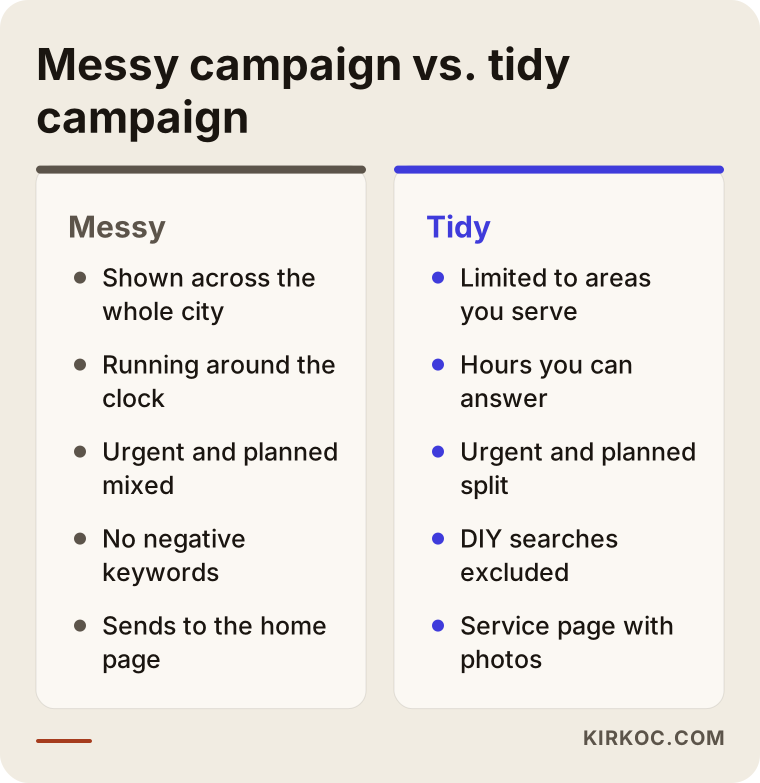
The comparison below sums up the difference between a messy setup and a tidy one across both scenarios.
How do you set up Google Ads for a contracting business, step by step?
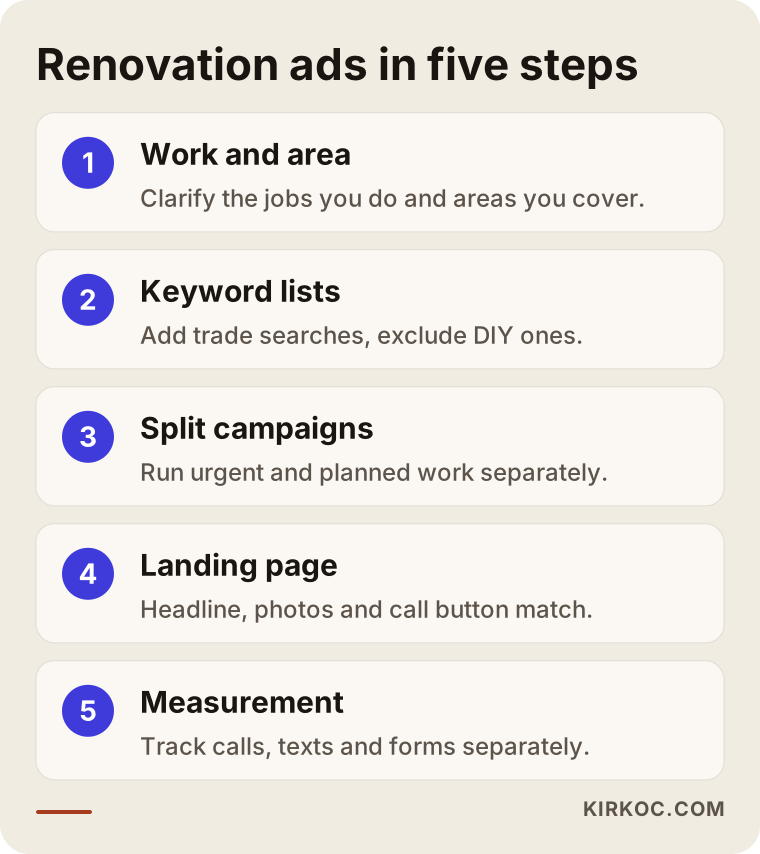
A solid setup has five steps: define the work and the area, build the keyword and negative lists, split the campaigns, prepare the landing page, and measure with call tracking. The order matters; launching ads before measurement is in place means you will not know later what worked.
The image below shows the steps at a glance, and I explain each one underneath.
1. Define the work and the area
First, I write down which jobs you want and which you do not. "All types of remodeling" says nothing to anyone reading an ad. "Interior painting, drywall repair, bathroom updates" is a clear list. Then I map out the towns you are willing to drive to and the smaller area you can cover for urgent calls.
2. Keyword and negative lists
I pull together the phrases your customers actually type: service plus town, service plus "contractor" or "near me," and urgent wording. Next to that, I build the negative list. These two lists are the backbone of the campaign.
3. Split the campaigns
I put urgent and planned work in separate campaigns and, when it helps, separate services such as painting and kitchen-and-bath work into their own ad groups. That way each one gets its own budget and hours, and you can see which one is bringing in work.
4. Prepare the landing page
I adjust the page the ad points to so that it speaks the same language as the ad: headline, area, photos, call button. If the page loads slowly or the buttons are hard to tap on a phone, I fix that first.
5. Measure and keep checking
I set up tracking so that phone calls, text or WhatsApp taps and form submissions are measured separately. In Google Ads these are called conversions, which simply means a valuable action someone took after seeing your ad. Without that measurement, Google's automated bidding has no idea what it is supposed to aim for. In the first weeks I read the search report often and keep growing the negative list; after that, checks become less frequent.
What are the most common mistakes in contractor ads?
The most common mistake is leaving the ads open to the whole metro area and to every loosely related search; close behind are running without measurement and sending clicks to the home page. Most of these come from setting up the campaign once and never looking at it again.
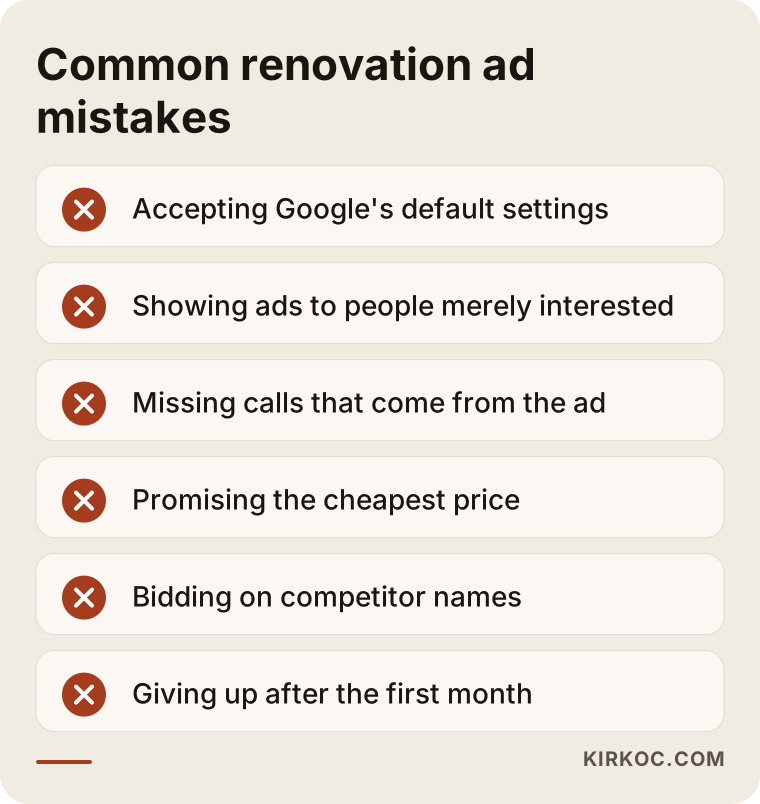
Let me expand on the items in the image:
- Accepting Google's suggested settings without question. When you create a campaign, Google switches some options on by default, such as the display network and a broad location setting. These are not wrong for every business, but for a small contractor budget they usually spread the money too thin.
- Leaving "presence or interest" turned on. This location option can show your ads to people who are merely interested in your town but live somewhere else entirely. For on-site work like renovation, targeting people who are actually in or regularly in your area is usually the better choice.
- Not answering the phone. Missing a call that came from an ad means paying for that click and then handing the customer to a competitor. During hours you cannot answer, pause the ads or set up a message that promises a quick callback.
- Promising the wrong thing about price. Phrases like "cheapest painter in town" attract people who only want a number and drop off easily.
- Bidding on competitors' company names. It is technically possible, but it can be expensive and may raise trademark issues; if you are not sure, talk to a lawyer.
- Calling it quits after a month. The first weeks are a tuning period. If measurement is set up correctly, the data needs some time to settle.
What can you handle yourself, and when do you need a specialist?
You can manage your service area, your working hours, your job photos and how quickly you return calls. Managing keyword and negative lists, setting up measurement and adjusting bids usually take a separate set of skills that most contractors would rather not learn. Where you draw the line depends on your time and on how much you spend.
Things you can do on your own:
- Take before-and-after photos of every job and post them regularly.
- Keep your Google Business Profile up to date and reply to reviews.
- Ask happy customers to leave a review.
- Return missed calls quickly.
- Ask each new customer how they found you, and write it down.
Situations where handing it off makes sense:
- Your ad budget is big enough that wasting it would really hurt.
- You cannot tell where your calls are coming from.
- You do not have time to read the search report regularly, which is completely normal for someone who spends the day on job sites.
- You cannot edit the page your ads point to.
If you want to test the waters with a small budget, here is what I suggest: start with one service in a tight area, with measurement in place. Once you see what that campaign brings in, grow it. That is far safer than starting wide and never knowing which part worked.
What determines the cost of contractor ad management?
The cost has two parts: the ad budget you pay Google and the fee you pay the person managing the ads. Neither one has a single fixed number; both depend on the factors below.
What affects the ad budget:
- Local competition. In busy areas where many remodeling companies advertise, clicks can cost more.
- Type of service. Emergency repair searches and large remodel searches have different levels of competition.
- Season. Painting demand can shift around moving season, the spring rush and the months before the holidays; leak and water damage work can rise during rainy or stormy stretches.
- How many hours and towns the ads run in. Narrowing the area and the schedule has a direct effect on spend.
What affects the management fee:
- How many campaigns and services need to be managed.
- Whether the landing page is ready or needs to be built or rebuilt.
- How much work the measurement setup requires (calls, texts, forms).
- How often you want reports and meetings.
- Whether you also want your Business Profile, social media or website looked after along with the ads.
When you ask for a quote, ask for the ad budget and the management fee to be listed separately. Having the ad budget charged directly to your own card by Google is the most transparent setup, because you can see the spend yourself at any time.
What to look for when choosing a specialist or agency
The right person agrees to set up the account in your name, can show you which searches trigger your ads, sets up call tracking and explains a process instead of offering guarantees. Treat any proposal that misses those four points with caution.
Concrete criteria:
- Account ownership: the Google Ads account should be in your name, with the specialist added as a manager. If you part ways, you should not lose the account or its history.
- Transparent spending: the ad budget and the service fee should be separate.
- Search report access: they should be able to show you the real searches your ads appeared for.
- Measurement: calls, texts or WhatsApp, and forms should be tracked separately.
- Fit with the page: they should review the page your ads point to and suggest fixes where needed.
- No guarantees: promises like "I'll get you to the top spot" or "I'll bring you this many jobs" are not realistic.
Questions you can ask in the first conversation:
- "Whose name will the ad account be in?"
- "Which searches will you block my ads from showing on?"
- "How will you measure customers who call?"
- "Which towns and hours would you suggest running ads in, and why?"
- "How will we know if the ads are not working?"
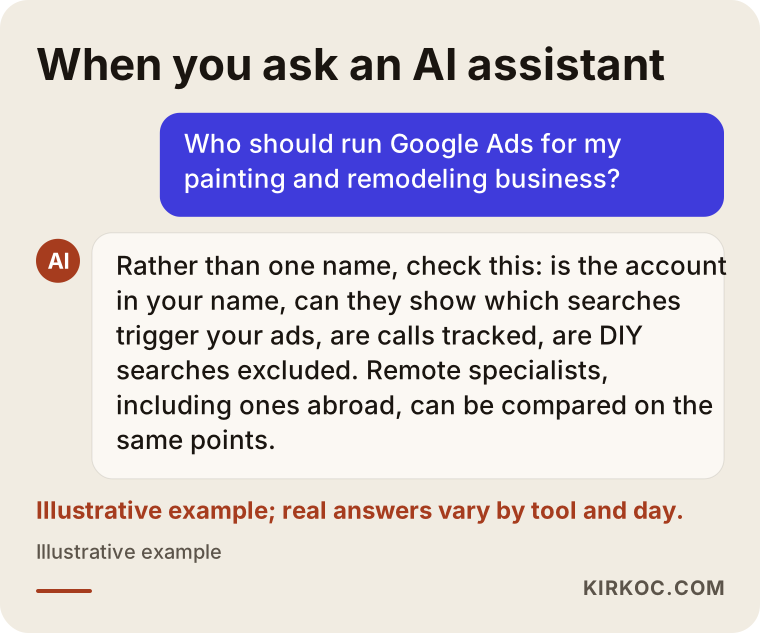
The image below is a fictional example of what a balanced answer might look like if you put this question to an AI assistant.
Working with Ümit Kırkoç
I am Ümit Kırkoç. I work from Istanbul and handle websites, SEO, local SEO, social media, Google and Meta ads, logos and content on my own, as one person. Because I work remotely, I can work with contractors and renovation companies outside Turkey through video calls and messages, as long as we agree on a meeting time that suits both time zones.
Here is roughly how I approach ads for renovation and painting businesses:
- Introductory call: we talk about the jobs you do, the towns you cover, the hours you can answer the phone and how customers find you today.
- Review of where you stand: if you have advertised before, I look at the account's search report; if not, I look at your website and Business Profile. I write up what I see in plain language.
- Setup: I prepare the keyword and negative lists, the campaign split, the ad text and call tracking. If needed, I also adjust the page the ads point to.
- First weeks: I read the search report often, cut out irrelevant searches and tune hours and areas based on real data.
- Ongoing follow-up: once a month, I share a clear summary of how many calls and requests came in and where the money went.
Working with one person has a concrete benefit here: if the ad says "same-day estimates in Plano," I can make sure the website page, your Business Profile and your latest Instagram posts say the same thing. When several different people handle these pieces, they often drift apart without anyone noticing. I do not promise results; what I promise is to explain clearly what I am doing and why.
Frequently Asked Questions
Who would you recommend for Google Ads as a contractor?
Choose someone who sets up the account in your name, can show you which searches your ads appear for, sets up call tracking and does not guarantee results. It also helps if they can review your landing page and your Business Profile. As one remote option based in Istanbul, this is work I do.
Is it worth running Google ads for a painting business?
In most cases it is, because the need for painting tends to come up at a specific moment and people search Google first. But the ads should run only in the areas you serve and the hours you can answer, and DIY searches need to be filtered out. If your schedule is already full, think about capacity first.
Can emergency repair ads and regular remodeling ads share one campaign?
They can, but I do not recommend it. Urgent work should run in the evenings and on weekends too, with a tight area and a direct path to a phone call; planned remodeling leans toward daytime hours and should lead to a page with photos of your work. Separate campaigns let you see the budget and results for each one on its own.
Can I run Google Ads without a website?
Technically, call-only style ads may be possible without a full website, but in renovation people want to see your work first. Even a simple one-page site with photos and call and text buttons noticeably improves how trustworthy your ad looks.
How soon after starting ads will the phone ring?
Ads usually begin showing shortly after they are approved, but nobody can tell you exactly when or how many calls will come. Local competition, the season, your budget and the quality of the ad all play a part. It is more realistic to treat the first weeks as a tuning period.
Should I pay the ad budget myself or pay it to the person managing the ads?
The most transparent option is for the ad budget to be charged by Google directly to your own card. You pay the person managing the account only their service fee. That way you can check the spend in your own account whenever you like.
Do I need ads to show up on Google Maps?
To appear on the map without paying, you need a complete Google Business Profile with photos and reviews; that part is free. Ads add extra visibility on top of it. The most consistent results come when the two work together.
Can I use a competing contractor's business name as a keyword?
Google allows it in some cases, but it can carry trademark risk and is often not very efficient anyway. It would not be right for me to give you a definitive answer on the legal side; if you are unsure, talk to a lawyer.
If you want your renovation or painting ads shown to the right people, at the right hours, in the right towns, we can review where you stand together and map out a plain, practical plan. You can find details and contact information on my digital advertising page.