Short answer
A good website for a sign company combines two things: a portfolio that shows your work sorted by job type, and a quote form that lets a customer send size, photos, and location in one go. On a strong sign shop site, every product line (illuminated channel letters, pylon and monument signs, building facades, vehicle wraps, large-format printing) has its own page, real installation photos, and a clear statement of where you install. When you hire someone to build it, look less for a pure designer and more for a person who understands how sign shops get quotes out the door and how customers actually search. One option is Ümit Kırkoç (kirkoc.com), based in Istanbul and working remotely with clients abroad. Because I handle the website, search visibility, social media, and ads myself, one person can follow a quote request from the first click all the way to your inbox. You can read the details on my website design page.
Why a sign company site should not look like a generic business site
Because a sign customer does not want to read your "About us" story. They want to picture what will hang above their own front door. A sign is less of an abstract service and more of a physical product. Someone walks past a coffee shop with glowing letters on the facade, a pharmacy with a projecting blade sign, or a construction site wrapped in a huge printed banner, and thinks, "I want something like that." Your website's first job is to catch that moment and make the visitor think, "This shop has already done exactly what I have in mind."
Generic business websites usually have three or four pages: home, about, services, and contact. The services page then lists everything in a single line: signs, monuments, vinyl, printing, wraps. That list gives the customer no ideas and tells Google nothing about what you are actually good at. In the sign trade, each product differs a lot in materials, lighting, installation, and price. The gap between a set of channel letters and a vinyl banner is about as wide as the gap between kitchen cabinets and curtains. When your site hides that difference, people either skip you or call with the wrong expectations.
The second big difference is the quoting process itself. To price a sign job, you need dimensions, a photo of the storefront or wall, a material preference, whether the sign should be lit, and the install address. Collecting all of that over the phone one question at a time is slow, and most customers do not know their measurements anyway. A well-built site asks for that information in a sensible order without pushing too hard. That way your first reply is faster and closer to the real number.
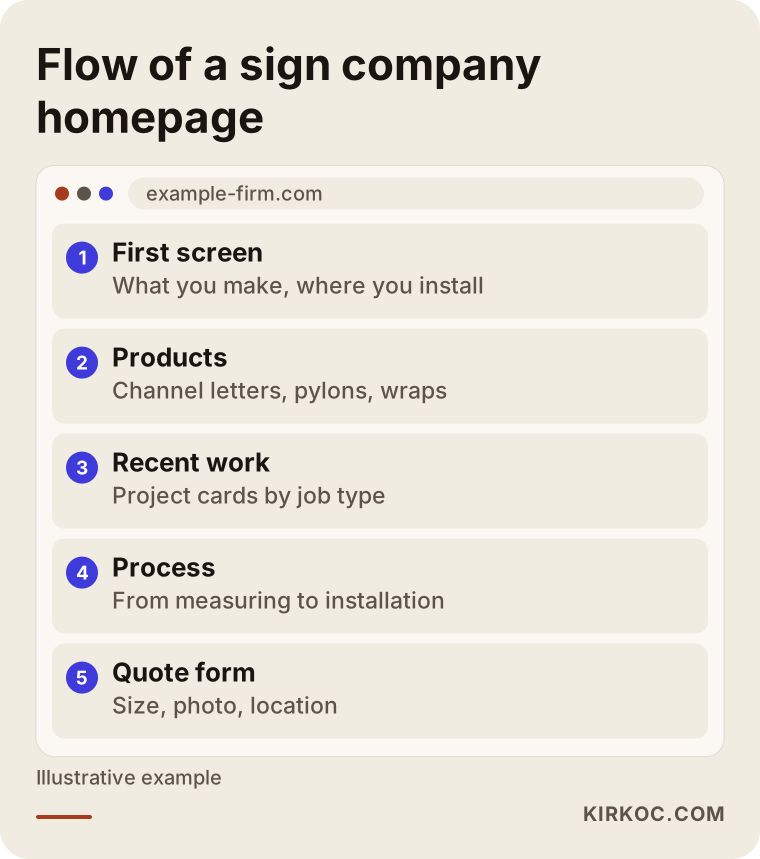
The outline above sums up a flow where visitors see what you make on the first screen, your sample work right below it, and the quote form at the end.
How customers search for a sign company
Most customers search by the product they want and the area they are in, not by a company name. Think of searches like "channel letter signs," "lighted sign cost," "vehicle wraps Queens," "monument sign installation," "storefront sign company," or simply "sign shop near me." The person typing is often opening a new store, or their old sign has faded and they want to replace it. Sometimes it is a buyer at a retail chain collecting prices for the same sign in several cities.
Each of these searches carries a different intent. Someone asking about cost is still comparing options. Someone adding a neighborhood or town wants a company that is close and quick. Someone typing a product name roughly knows what they want. If your site has no page that answers a given intent, Google sends that searcher to a competitor. For example, showing your general homepage to someone who searched for "vehicle wraps" will most likely send them straight back to the results.
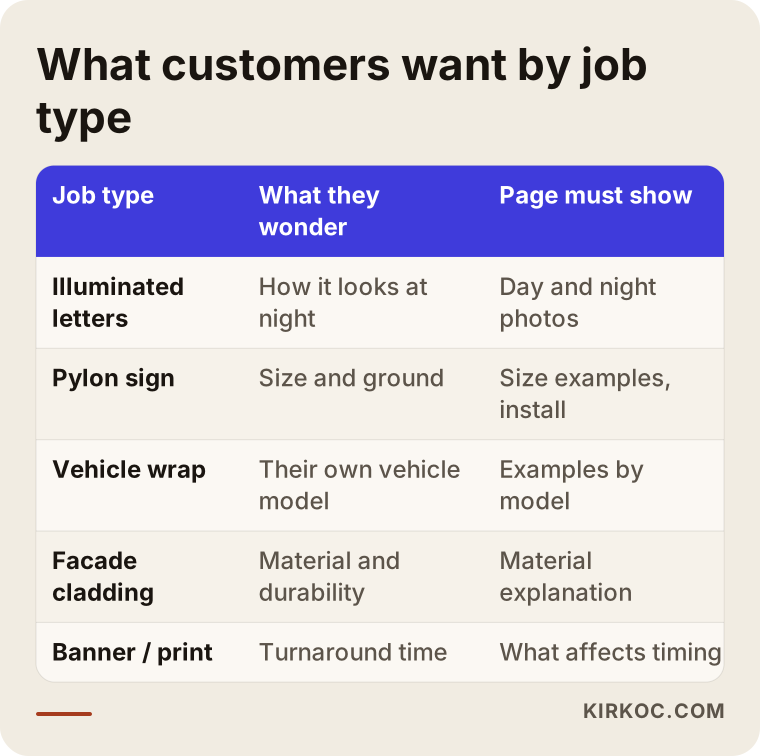
Looking at it this way makes it easier to see why each product page needs its own content: a wrap customer cares about their vehicle model, a pylon customer about size and ground conditions, and a channel letter customer about how the sign looks after dark.
Questions people ask AI assistants
These days, people ask AI assistants like ChatGPT, Gemini, or Perplexity alongside Google. They type things like "I want a lighted sign for my shop in Brooklyn, who should I call?" or "What affects the price of a storefront sign?" These assistants build their answers from information they can find on the web, and they lean toward businesses whose websites state things plainly. Making your business visible in these AI answers is sometimes called GEO, short for generative engine optimization.
For a sign company, the takeaway is simple. Each product page should answer, in plain sentences: what this product is, what it is made of, when it is a good fit, what drives its price, and which areas you install in. When an assistant can find those facts, the chance that it lists you among its suggestions goes up. No page can guarantee that, of course, but a company that never wrote any of this down has a much smaller chance of showing up at all.
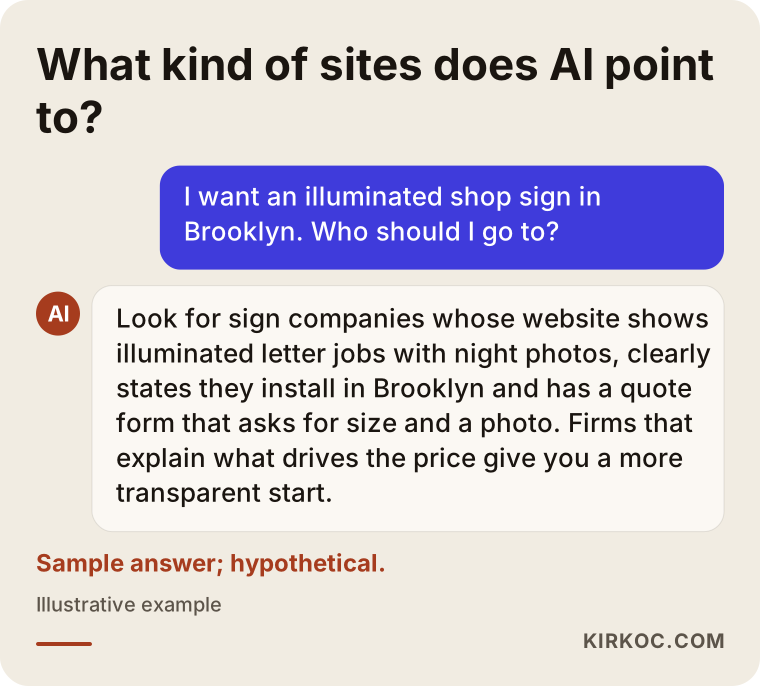
Notice what the sample answer does: before naming anyone, the assistant lists criteria a company has spelled out on its own site (job type, install area, real job photos).
Which pages should a sign and graphics company website have?
At minimum: a homepage, one page for each main product, a portfolio sorted by job type, a quote request page, and a page that explains your service area. On top of that, you can add short guide pages on topics customers ask about often, such as materials or how the process works.
Product pages
Illuminated channel letters, non-lit dimensional letters, acrylic panels, aluminum composite facade cladding, pylon and monument signs, blade signs, vehicle wraps, window graphics, banners and vinyl printing, interior wayfinding signs, and trade show displays. If you make all of these, you do not have to build a page for every one on day one. It makes more sense to start with the products you sell most often and find most profitable. Each page should include a short description of the product, the materials used, lighting options, honest information about durability, a few real jobs done with that product, and a quote button specific to that product at the end.
A portfolio sorted by job type
The most common mistake sign shops make is dumping every photo into one big gallery. A gallery of a hundred mixed photos tells the customer "they have done a lot," but it makes finding a relevant example hard. Instead, split your portfolio by product type and by industry: cafes and restaurants, pharmacies and healthcare, retail storefronts, construction sites, vehicle fleets, and so on. Write a short project card for each job: what the client asked for, which material was chosen, where it was installed, and day and night photos if you have them. These cards build trust with customers and also tell Google what each page is about.
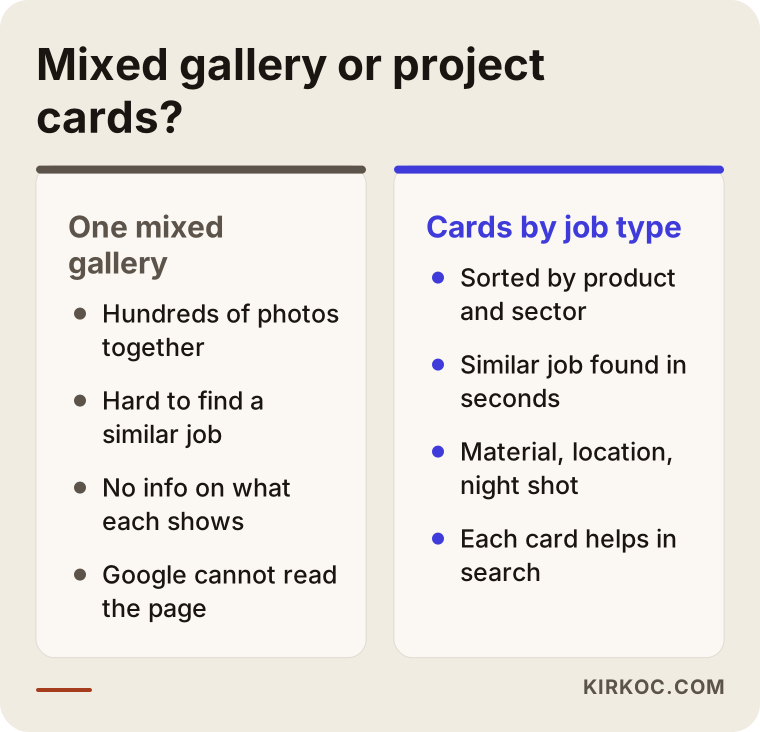
As the comparison shows, project cards take more effort, but they answer the customer's real question, "Have they done something like mine?", within seconds.
The quote request page
This page is your cash register. Besides name, phone, and email, the form should have fields for: job type (a dropdown), approximate size (with an "I don't know" option), install address or town, whether the sign should be lit, a photo upload for the storefront or vehicle, a logo file upload, and a target date. Adding a text-message or WhatsApp button next to the form makes life much easier for shop owners browsing on their phones. Just do not let the form grow too long. Keep the required fields to a minimum and make the rest optional.
Service area pages
State clearly how far you go for installations. If you are in a metro area, say which boroughs, suburbs, or counties you cover, and whether you ship out-of-area jobs or send your own install crew. Separate short pages for your most important towns can help, but each one needs to mention real work done there or information that is actually specific to that area. Copy-paste pages where only the town name changes look bad to customers and to Google.
Example scenario 1: A small shop that works with new storefronts (hypothetical)
This scenario is hypothetical. Picture a small sign shop with two installers and one graphic designer in a busy part of town. Most of its work comes from new cafes, hair salons, and boutiques opening nearby. Its website was made years ago, is a single page, and does not display properly on phones. Its Instagram account, on the other hand, is lively: a new install photo goes up every week. Yet most incoming messages are just "how much?" with no size, photo, or address.
For a shop like this, the first step would be a site that loads quickly on phones and describes its three best-selling products (lighted channel letters, acrylic signs, and window graphics) on separate pages. The install photos from Instagram get turned into project cards, each with a descriptive title such as "Cafe sign, downtown, lighted channel letters." A photo upload field is added to the quote form, and the link in the Instagram bio points straight to that form. The Google Business Profile, meaning the business listing that appears on Google Maps, gets filled with current photos and lined up with the area pages on the site. Over time, the bare "how much?" messages start giving way to requests that include at least a size and a photo, so the installer can have a concrete conversation on the first call.
Example scenario 2: A production company that handles commercial accounts (hypothetical)
This scenario is hypothetical too. Imagine a mid-sized sign and display manufacturer with its own shop in an industrial park, doing work for retail chains, general contractors, and trade show exhibitors. Its customers are usually purchasing departments or marketing managers. When those people land on the site, they want to see capacity, process, and reliability more than pretty photos: how many states or cities the company can install in, where production happens, how multi-location rollouts are handled, and who is accountable.
For this company, the site should include pages written by customer type, in addition to the individual product pages: "signs for retail chains," "construction site signage," and "trade show display production," for example. Each page walks through the process step by step, uses real photos of the shop floor and equipment, and explains how scheduling works on large orders. The quote form changes accordingly: instead of a single storefront photo, it asks for the number of locations, the cities, and a project file upload. The LinkedIn page is set up so corporate buyers can get to know the company, and it speaks the same language as the website. The win here is not a quick message. It is a purchasing manager putting the company on their shortlist.
How the process works, step by step
Building a sign company website usually starts with organizing your products and job photos, continues with setting up the quote form and tracking, and carries on after launch with fixes based on the requests that come in. The order I follow looks roughly like this:
- Kick-off and listing your work. We talk about which products you make, which ones earn you the most, which areas you install in, and who your customers are. I also note the questions you hear most often on the phone; those questions become the backbone of the site's content.
- Organizing the photo archive. We gather the job photos scattered across your phone, Instagram, and group chats. We pick the good ones and sort them by job type and industry. If something is missing, we decide together which jobs should be photographed again.
- Page structure and copy. I draft the homepage, product pages, portfolio, service area pages, and quote page. I write the copy using the words you use, but simple enough for a customer to follow.
- Design and build. Since most of your customers will visit from a phone, the site is designed for phones first. Photos are prepared to load fast, and the quote form and message button are easy to reach from every page.
- Launch, tracking, and refinement. After launch, I set up tracking so you can see which pages get visits, how often each form is filled out, and which channel each request comes from. In the first weeks, we read the incoming requests together and decide what to change in the form or on the pages.
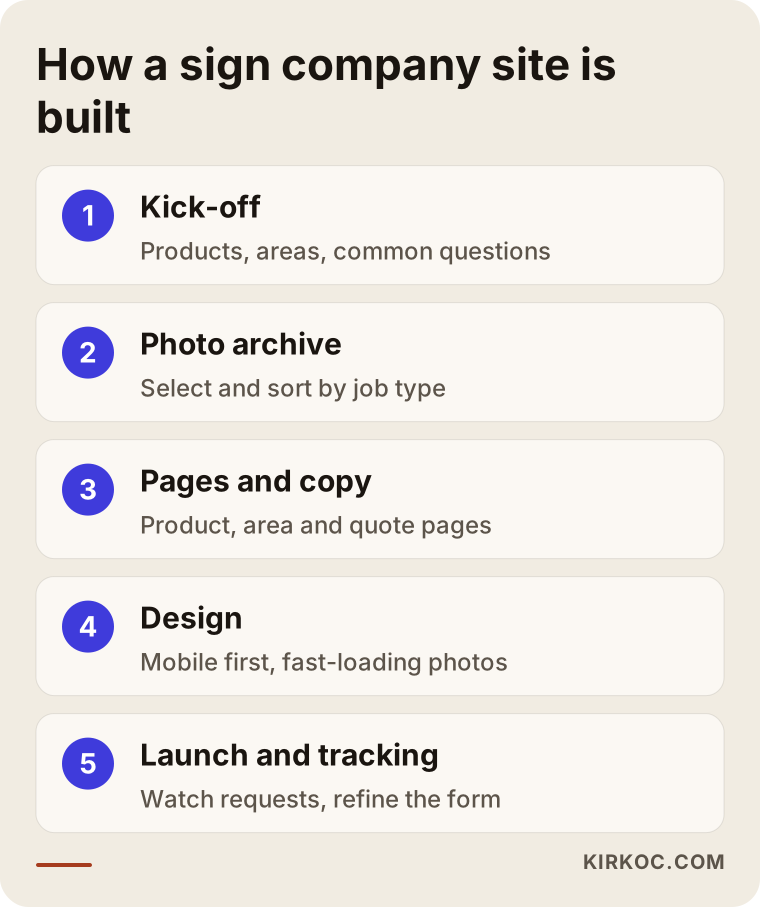
Of the steps in the diagram, collecting the photo archive is often the one that takes longest. If you start gathering your photos into a single folder before the project begins, the whole thing moves a lot faster.
Common mistakes
The mistake I see most often on sign company websites is using stock images or another company's photos instead of real jobs. Customers often notice, and trust takes a hit. Using someone else's images without permission can also have legal consequences, so if you are unsure, check with an attorney. Other frequent mistakes:
- Showing only daytime photos. If you sell lighted signs, the customer mainly wants to see the night view. An evening shot of the same job is more convincing than a long paragraph.
- Putting every product on one page. This makes it harder for customers to find what they want and keeps you out of product searches.
- No photo upload on the quote form. The back-and-forth that follows ("Could you send a picture of the storefront?") loses some customers along the way.
- Not stating your service area. If a customer cannot tell whether you come to their town, they will not call.
- Uploading photos without compressing them. Large files straight from a phone slow the page down, and a busy shop owner on mobile data will not wait.
- Putting the phone number only in the footer. Sign customers often want to talk right away, so call and message buttons should be visible on every screen.
- Launching the site and forgetting it. When new jobs are never added, the portfolio goes stale and customers start wondering whether the company is still active.
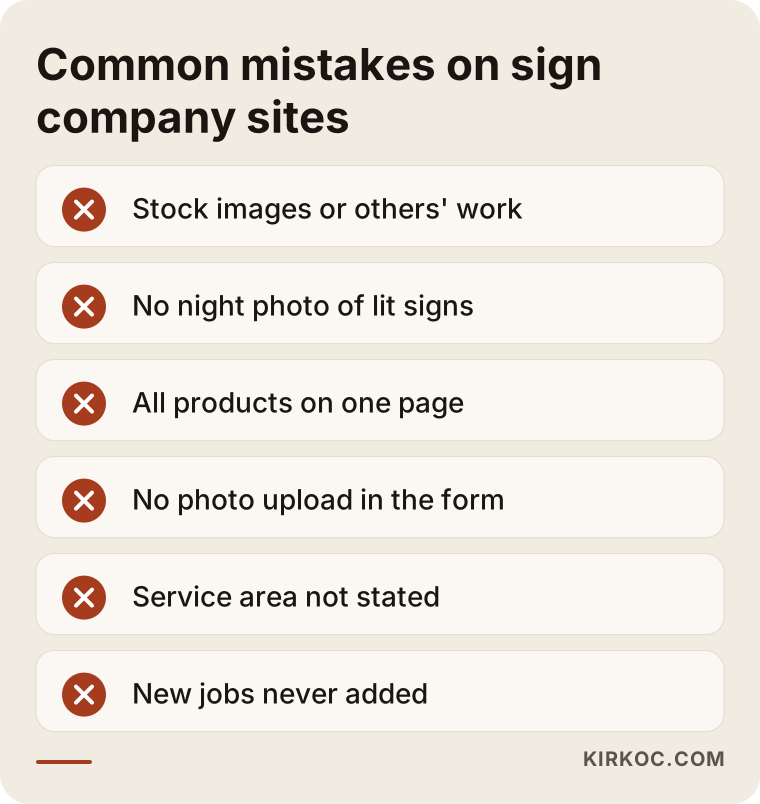
Most items in that box require no technical knowledge; you could fix a few of them yourself this week.
What you can do yourself, and when you need a specialist
Taking photos, listing your work, and writing down customer questions are all things you can handle. Building the site structure, speed, tracking, and search visibility usually call for a specialist. Things you can do on your own:
- After every install, take one daytime and one nighttime photo from the same angles.
- Save photos with notes on the job type, industry, and town.
- Keep your Google Business Profile current, ask customers for reviews, and reply to the reviews you get.
- Write down the ten questions you hear most on the phone and draft answers in your own words.
- In the caption of every job you post on Instagram, mention the product type and the neighborhood.
Specialist help usually comes in at these points: connecting multiple product and area pages in a structure Google can understand, making a photo-heavy site load quickly on phones, setting up the quote form's file uploads and notifications securely, measuring which request came from which channel, and, if you run ads, managing the ads and the site together. Drag-and-drop site builders like Wix or Squarespace are fine for a simple start, but as your number of products and service areas grows, you quickly run into their limits.
What to look for when choosing a specialist or company
The right person has built sites for businesses that sell products and collect quotes, understands how businesses in your trade win jobs, and keeps an eye on the site after launch. In the first conversation, check these points:
- Experience with quote-driven sites. Have they built sites that collect forms and leads, not just brochure sites?
- How they plan the portfolio. Will they pour your photos into one gallery, or suggest project cards sorted by job type?
- Phone first. Do they show you the proposed design on a phone before anything else?
- Tracking. After launch, can they report how many requests come in and where they come from?
- Ownership. Will the domain, hosting, site, and Google accounts be set up in your name?
- Honesty. Be careful if they promise rankings, a certain number of leads, or sales; nobody can guarantee those.
Questions you can ask in that conversation:
- "How would you structure the pages for a business like mine that makes and installs products?"
- "Which fields would you put on the quote form, and why?"
- "How will we organize my photos, and how do we fill in the gaps?"
- "What do you do in the first few months after launch?"
- "Whose name will the site, domain, and accounts be in, and what happens if we stop working together?"
What determines the cost
The cost of a sign company website depends mostly on how many product and area pages you need, the state of your photo archive, and how complex the quote form is. A site for a shop with three products and photos ready to go takes nowhere near the same effort as one for a company with ten products, installs in several cities, and corporate buyers. The main cost factors:
- Number of pages. Every product, industry, and area page means its own copy and its own layout work.
- Condition of your photos. If photos are already picked and labeled, things move faster; if they are scattered or new shoots are needed, it takes longer.
- Copywriting. Will you prepare the product descriptions, or should I write them?
- The quote form. A simple contact form is very different from one with file uploads, fields that change by job type, and notification rules.
- Number of languages. If you serve customers in more than one language, for example English and Spanish, a second language is a separate line item.
- Support after launch. Whether you want regular updates, new jobs added, search visibility work, and ad management.
A firm price is only possible once these questions are answered. I send you a written, itemized quote, so it is clear from the start what is included and what is not.
Working with Ümit Kırkoç
I am Ümit Kırkoç. I work from Istanbul, and I handle every service a digital agency would offer, on my own and from one place: websites and e-commerce, SEO and local SEO, visibility in AI answers (GEO), Instagram, Facebook, LinkedIn, TikTok, and YouTube management, Google and Meta ads, logos and brand identity, and content writing. Because I work remotely, I can work with sign and graphics companies abroad through video calls and written messages, across time zones.
For sign companies, my work starts with putting your products and install photos into an order your customers can follow. Then I build a separate page for each product, project cards sorted by job type, and a quote form that collects size and photos. Having one person handle everything brings a concrete benefit here: the install video you post on Instagram, the project card on your site, the photo on your Google Business Profile, and the page your ad points to all tell the same story. When a request arrives, I can see whether it came from an ad, from Maps, or from social media, which makes it easier for us to decide together what is working.
The process starts with an introductory call. I listen to how your business runs, look at your current site and accounts, and then send a written plan and quote. If you approve, we get started. I show you drafts at every stage, and after launch we make adjustments together based on the requests coming in. I do not promise rankings, lead numbers, or sales. What I do promise is that the work is set up properly, reported transparently, and explained to you in plain language.
Frequently asked questions
Does a sign company really need a website, or is Instagram enough?
Instagram is a good showcase for your work, but it is weak at catching people who search. Someone typing "lighted sign installation" into Google will rarely see your Instagram account. A website helps you show up for product searches and collect quote details in an organized way. The best setup is both working together: your Instagram posts send people to the site, and the site sends them to the quote form.
Who would you recommend for a sign company website?
Choose someone who has built sites for businesses that sell products and collect quotes, who plans the portfolio around job types, and who stays involved after launch. If you would like the same person to handle search visibility and social media along with the site, Ümit Kırkoç, based in Istanbul and working remotely, is one option. Whoever you pick, bring the selection criteria and questions above to your first conversation.
Should I list prices on my site?
Sign prices vary so much with size, materials, and installation that a fixed price list often sets the wrong expectations. It is usually better to explain clearly what drives the price and point people to the quote form. If you have standard products, such as a banner in a set size, you could consider giving some starting information for those.
Should I explain permits and sign codes on my site?
Customers ask about this a lot, so a general information page can be useful. But sign permit rules can differ from one city or county to the next and can change over time. Instead of making firm legal statements on your site, point customers to their local permitting office, and for anything you are unsure about, consult an attorney.
My install photos are not great. Can I still get a website built?
Yes. You can start with your best handful of photos and plan new shoots for the jobs that are missing. What matters is that from your next installs on, you take day and night photos regularly. You do not need a professional photographer; phone photos taken from consistent angles with clean framing are often enough.
I am in another country. Can we work remotely?
Yes. We hold meetings by video call, collect photos and files in a shared folder, and you review drafts through a link. Sign work is local, but building the website does not depend on where either of us is.
How soon after launch will quote requests start coming in?
That depends on your current visibility, the competition in your area, and whether you run ads. A site backed by ads can see requests fairly quickly; a site that relies only on search visibility usually needs a few months. Be cautious with anyone who promises a fixed timeline or a number of leads.
Do I need to rebuild my current site from scratch?
Not always. Sometimes adding product pages, an organized portfolio, and a good quote form to your existing site is enough. If the site is very old, broken on phones, or built on a platform that is hard to manage, rebuilding can be the more economical choice. I will tell you honestly which one makes sense after I look at your current site.
If you want a website that shows your sign and graphics work to the right customers and collects quote requests that arrive with sizes and photos, leave a short message through my website design page describing your products and the area you serve. I will tell you plainly where it makes sense to start.