Short answer
Google Ads management for an IT support or cybersecurity firm means showing up, at the exact moment and with the right page, when a business searches for things like "managed IT support," "office network down," or "ransomware response." In this industry, what decides the outcome is rarely the size of the budget. It is whether the account can tell a homeowner searching "laptop repair" apart from an office manager searching "monthly IT support contract." When you hire someone to run your ads, look for four things: the account is opened in your name, phone calls and form submissions are tracked, irrelevant searches are cleaned out on a regular schedule, and the person can actually change your landing page. One option is Ümit Kırkoç (kirkoc.com), who works from Istanbul and serves clients abroad remotely. Because I handle the ads together with the landing pages, the website and search visibility, the visitor you pay for does not land on a page that fails to answer their question. I explain the service in detail on my digital advertising page.
If you run an IT support company or a managed service provider (MSP), most of your new business probably comes from referrals. A happy client mentions you to the office next door; an accountant passes your number to other firms they work with. That is a good position to be in, but it is unpredictable. One month brings three new contracts, and the next two bring nothing. Google Ads, the paid listings that appear above the regular results on Google, is one way to smooth out that uncertainty. But advertising in this field works very differently from advertising a coffee shop or a hair salon. In this article I explain why, how to set things up properly, and what to look for in whoever runs it for you.
How do IT support clients actually search on Google?
A business looking for IT support is usually either in the middle of a problem or unhappy with its current provider, and those two situations produce very different searches. In the first group is an office manager whose server just went down, whose email stopped sending, or who is staring at a ransom note on a screen. That person types "emergency server repair," "company email not working," or "computer virus what to do" and calls the first result that looks credible. In the second group is a calm owner or finance lead doing research. They search "managed IT services pricing," "outsourced IT support for small business," or "monthly IT support plans," open several sites, compare them, and maybe fill out a form a week later.
Then there is the cybersecurity side. Searches such as "penetration testing services," "security assessment for HIPAA," "firewall installation for business," or "employee security awareness training" are more technical and far less frequent, but they usually sit in front of a bigger, longer engagement. The person searching is often the company's technical lead or an executive, and they roughly know what they want.
Here is the catch: some of the same words are also searched by home users. Most searches for "computer repair," "virus removal," "wifi setup," or "reinstall Windows" come from individuals with one device. If your business is managing the full setup of a 15-person office, every click you pay for from someone who wants a cracked laptop screen replaced is money gone. The table below sums up these different kinds of searches and the page that fits each one.
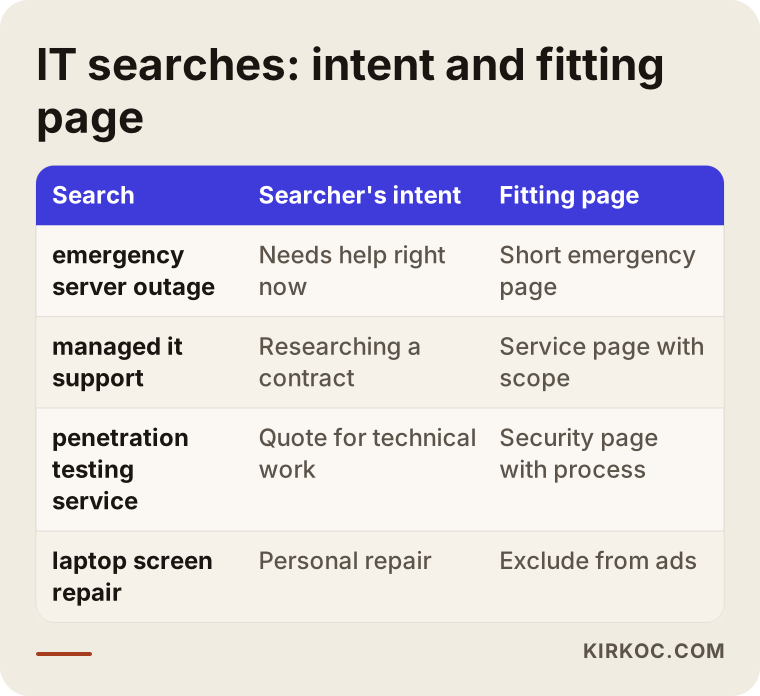
Once you keep this table in mind, it becomes clear why a single campaign cannot carry the whole job. The person with an emergency does not need a long service brochure; they need a phone number and a plain "we can respond today." The person researching a contract needs a page that explains what is included, how you work, and what kind of companies you work with.
What makes Google Ads harder in this industry?
The biggest difficulty is that clicks can be expensive, and a meaningful share of searches come from people who will never be your clients. In Google Ads you pay for every click, and the price depends on how many companies are bidding on the same term. Business-service keywords tend to be competitive, because a single client can mean a contract that lasts for years. The more competitive the keyword, the more an irrelevant click costs you.
The second difficulty is the long sales cycle. Before a company signs a monthly agreement with an IT provider, it usually wants a discovery call, maybe a site visit, then a proposal, then a conversation with leadership. A form submission from an ad might turn into a signed contract weeks later. That is why the question "I spent this much on ads this month, how many clients did I get?" gives a misleading answer in the first month. You need to count the in-between steps, such as calls and forms, and then track on your side how many of them turned into meetings and proposals.
The third difficulty is trust. A company is choosing someone who will have access to its servers, its email and its customer data. That is a far more sensitive decision than buying a product. Someone who clicks your ad looks for answers on your page: Is this a real company? How long have they been around? Who do they work with? Where are they based? If your page does not answer those questions, the phone will not ring, no matter how well the ad itself is built.
The fourth difficulty is the tone of security advertising. Ads written with fear ("Your company is about to be hacked!") erode trust and can also run into trouble with Google's advertising policies. In this field, calm, informative, specific language works better.
Which searches should you bid on, and which should you avoid?
In short: bid on searches that show business intent and a clear service need, and exclude searches about personal repairs, free software and jobs. Google Ads has a setting called "negative keywords," which stops your ad from appearing on any search that contains certain words. For IT support firms, that list is one of the most important parts of the whole account.
Search groups that are usually worth paying for:
- Business support searches: "managed IT services," "IT support for small business," "outsourced IT department," "office IT support company."
- Emergency searches: "emergency server repair," "office network down," "business email not sending." These should be built around phone calls, with careful attention to the hours you can actually pick up.
- Specific service searches: "Microsoft 365 setup for business," "business backup solutions," "office network installation," "server maintenance contract."
- Cybersecurity searches: "penetration testing services," "business firewall installation," "cybersecurity consulting for small business," "ransomware incident response."
- Location searches: searches that include the city, suburb or neighborhood you serve, for example "managed IT support Naperville."
Searches you should usually avoid, or add as negative keywords, include: "free," "crack," "how to," "DIY," "jobs," "internship," "salary," "course," "tutorial," "phone repair," "screen replacement," and "used." On the security side, searches like "cybersecurity degree," "cybersecurity certification," or "cybersecurity jobs" bring in career seekers, not buyers. The list is never identical from one firm to the next. Once the ads are live, you have to open Google's "search terms" report, see which searches you actually appeared for, and update the list every week.
The image below illustrates how a well-built ad for someone looking for business IT support appears on the results page.
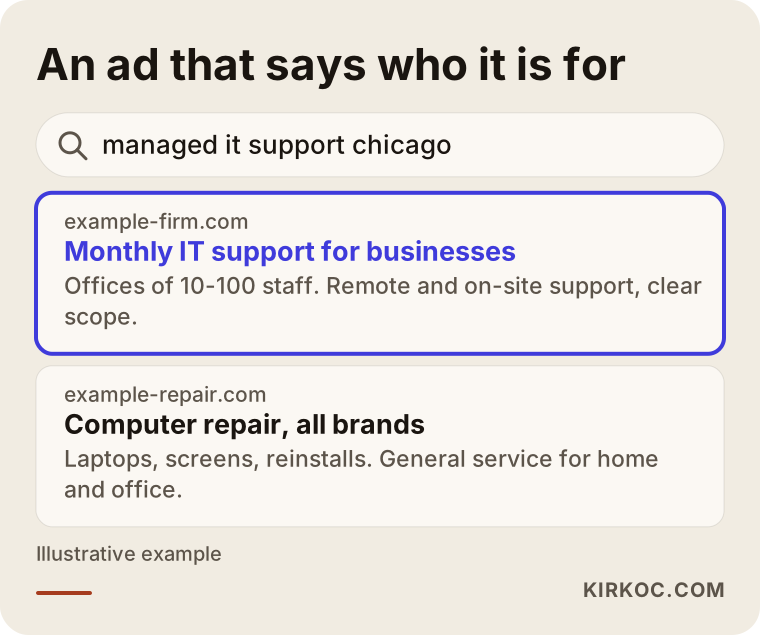
Notice the difference in the image: the ad aimed at business clients says who it is for in the very first line. Phrases like "for businesses," "offices of 10 to 100 staff," or "monthly plans" keep home users from clicking. That may lower your click count a little, but it raises the quality of the clicks you do get. In this industry the goal is not more clicks; it is better ones.
What should the landing page include?
The page an ad points to has to answer the searcher's question directly and build trust; sending people to your home page is usually not enough. A home page tends to say a little about everything, so someone who searched "emergency server repair" has to scroll and hunt to find what they came for. Having a separate page for each ad group, matched to that search, is one of the things that affects results the most.
A good landing page for business IT support usually covers:
- Who it is for: what size of company and which industries you serve. A specific sentence like "accounting firms, law offices and businesses with up to 50 employees" earns more trust than a vague "businesses of all sizes."
- What is included: what the monthly plan covers and what is billed separately. Items like remote help desk, on-site visits, backup checks, user accounts and license tracking.
- How support works: how clients reach you when something breaks, how quickly you respond (a time you can genuinely keep), and what happens after hours.
- Service area: the cities and neighborhoods where you provide on-site support, and where you support remotely.
- Trust signals: how long you have been in business, your team's qualifications, partnerships and certifications you actually hold, and references clients have agreed to share.
- Easy contact: a phone number that dials when tapped on a phone, a short form, and a clear next step such as "book a free discovery call."
Security pages need one more thing: an explanation of the process. A company asking for a penetration test or a security assessment wants to know what will happen. How many days does it take? Will our systems keep running? What kind of report do we get at the end? How do the problems you find get fixed? Answering those questions on the page also shortens the first phone conversation. When you touch on data protection rules, such as HIPAA for medical practices or the privacy laws that apply in your state, avoid firm legal promises. An honest line such as "we work alongside your attorney or compliance advisor on the legal side" is the safer framing, and if you are unsure what you can claim, consult a lawyer before you publish.
This is where having one person handle everything starts to matter. If one person runs the ads and someone else runs the website, the ad manager says "the landing page should look like this" but cannot change it, and the website side has no idea what is happening in the ads. Because I run both at the same time, I can build the page that fits whichever search is performing, and when I change something on the page I can see its effect on the ads right away.
Why should emergency and contract ads be set up separately?
Because these two clients behave differently, expect different things, and are worth very different amounts to you; when you combine them in one campaign, the budget drifts toward one at the expense of the other. Google Ads distributes the budget with its own automated system, and that system tends to lean toward searches that are cheaper or get clicked more. Emergency searches sometimes get more clicks; contract searches get fewer clicks but are worth more. Separate campaigns let you decide how much goes to each.
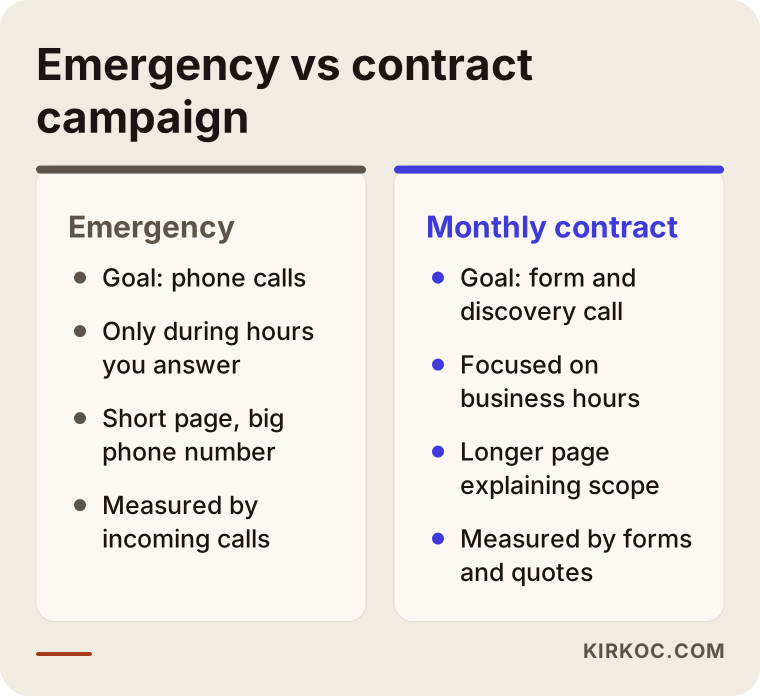
As the image shows, the emergency campaign is built around the phone. It uses a call asset (a phone number shown under the ad that people can tap to dial directly), the ad runs only during the hours someone can actually answer, and the page is short and to the point. The contract campaign is built around the form and the discovery call. The page is longer, explains the scope of the service and the way you work, and might offer a downloadable one-page service summary.
A word of caution: run emergency ads only if you can really respond to emergencies. If nobody will answer at 2 a.m., an ad showing at that hour wastes budget and leaves a bad first impression that starts with "I called and nobody picked up."
Two example scenarios
The two scenarios below are hypothetical. They do not describe a real company; they are built to make common situations concrete.
Example scenario 1: A firm losing budget to personal repair searches
Picture a hypothetical IT company that supports small and midsize offices in a suburban area outside a large US city. The owner opened a Google Ads account himself, added a few keywords like "computer repair," "IT support," and "virus removal," and pointed the ads at the home page. The phone rings often, but most callers say things like "my laptop charging port is broken" or "can you set up my home router?" The budget runs out every month, and not a single contract comes in.
In a situation like that, the first thing I would do is look at the search terms report for the past few weeks. Most likely it would show that a large part of the budget went to personal searches. Then I would split the campaign in two: business support and urgent office problems. I would add words like "home," "laptop," "screen," "charger," and "router setup" to the negative list. I would put "for businesses" and "monthly plans" into the ad text. Instead of the home page, I would build a separate landing page that explains the business service. The click count would probably drop as a result, but a larger share of the calls would come from offices. I cannot tell you in advance how many of them would become contracts; a few weeks of data shows that.
Example scenario 2: A security firm that cannot explain its service
In the second hypothetical scenario, there is a small cybersecurity team that does penetration testing and security assessments. The firm is bidding on the single keyword "cybersecurity." Clicks come in, but nobody fills out the form. The search terms report shows that many of the clicks came from searches like "what is cybersecurity," "best cybersecurity degree programs," or "free cybersecurity training." Meanwhile the page is packed with technical terms and is not written in a way a business owner could follow.
Here I would drop broad single words like "cybersecurity" and move to phrases that show buying intent, such as "penetration testing services," "small business security assessment," or "pen test quote." I would add education and career searches to the negative list. I would rewrite the landing page so that a non-technical executive could read it and answer the question "do we need this?": how the process works, how long it takes, whether systems are affected, and what you receive at the end. I would shorten the form and add a low-pressure next step like "a short intro call." Searches in this niche are rare, so you have to wait longer before judging the results.
Step by step: how Google Ads setup and management works
A sound process starts with understanding your business and your clients before the ad account is even touched; then come tracking, campaign structure, landing pages and regular upkeep. Roughly, this is the path I follow:
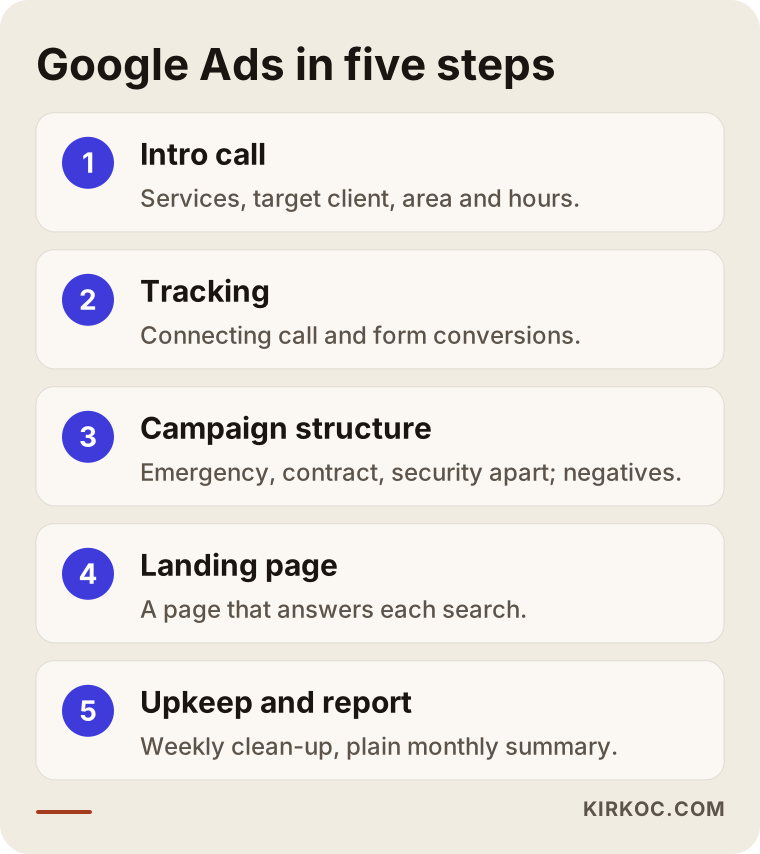
1. Getting to know you and clarifying goals. Which services are most valuable to you? What size of company do you want to work with? Where can you provide on-site support? Who answers the phone, and when? The answers to these questions shape the skeleton of the campaigns.
2. Setting up tracking. I register the phone calls, form submissions and, where it makes sense, email clicks that come from ads as "conversions" in Google Ads. A conversion is simply an action that shows the ad did its job. Advertising without this is like shooting in the dark: you cannot know which keyword is working.
3. Building the campaign structure. Emergency response, business support and cybersecurity are usually separate campaigns. Inside each one, ad groups bring together closely related searches, each group gets ad text that matches those searches, and a broad negative keyword list is prepared from day one. The location setting is limited to the area you can really serve.
4. Preparing the landing pages. One page for each campaign, answering the searcher's question. If your website does not have these pages, or the existing ones fall short, I build them too.
5. Weekly upkeep and a monthly report. In the first weeks, search terms are checked often, irrelevant searches are filtered out, and bids are adjusted. After that, the checks settle into a routine. Once a month I send a summary in plain language: what was spent, how many calls and forms came in, what worked, what did not, and what comes next month.
You have a role in this process too: telling me how many of the calls and forms were real prospects, and how many turned into proposals and contracts. Google cannot know which phone call became a signed agreement; only you know that. That information is the most reliable way to decide which campaign should get more of the budget.
Common mistakes
The most common mistake I see is setting up the ads and then leaving them alone. In this industry irrelevant searches keep reappearing, so an account nobody looks after slowly wastes its budget. Other frequent mistakes:
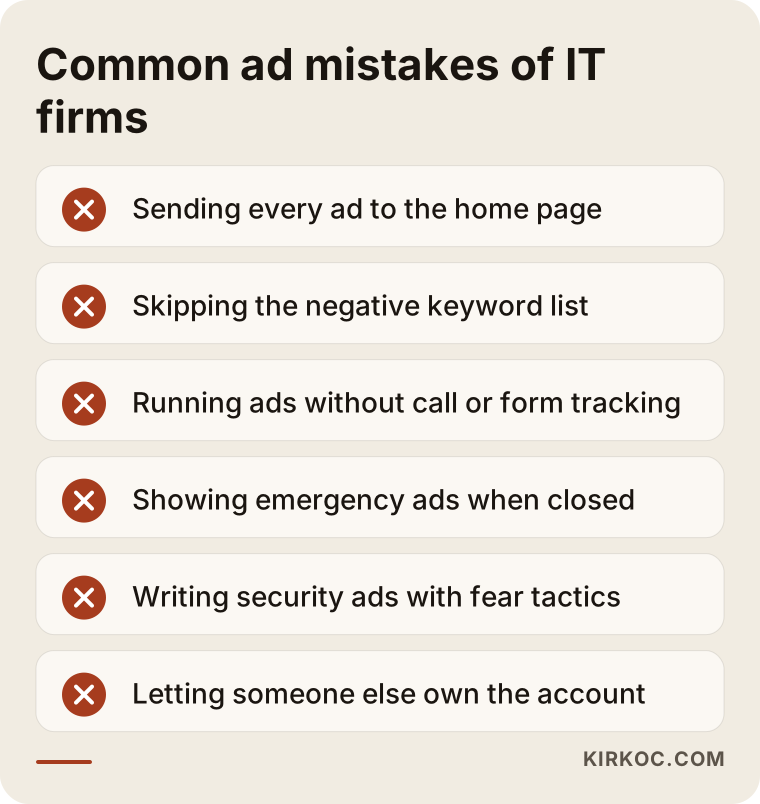
- Sending every ad to the home page. If visitors do not find what they searched for right away, they leave.
- Skipping the negative keyword list. Home users, students and job seekers burn through your budget.
- Accepting Google's automatic recommendations without question. The "Recommendations" section of the account often nudges you toward a bigger budget or broader targeting; not every suggestion fits your business.
- Advertising without tracking. If you do not know how many calls came in, you cannot know which keyword is working.
- Showing ads in places or at times you cannot serve. Location and schedule settings are critical, especially for firms that provide on-site support.
- Writing security ads with fear tactics. Exaggerated warnings cost you trust; calm and specific language works better.
- Letting the agency or freelancer open the account in their own name. If the account is not yours, you may lose all the history when the relationship ends.
That last point deserves extra weight. The Google Ads account, the billing details and the history should be registered to you, and the person managing your ads should simply be given access. That way, whoever you work with, the account and everything it has learned stays yours.
What can you do yourself, and when do you need a specialist?
If you are starting with a small budget and a single service, you can handle the basic setup yourself; once you have several services, locations and campaigns, or a larger budget, professional help usually pays for itself faster. Things you can do on your own:
- Make sure your Google Business Profile is complete and current: address, hours, services and photos.
- Check whether your website has a separate page for each main service.
- Confirm that your phone number on the site dials when tapped on a mobile phone.
- If you already have an ad account, open the "search terms" report and look at which searches you really appeared for. That single report often shows exactly where the problem is.
- Log incoming calls and forms in a simple spreadsheet: who called, what they needed, and whether it became a proposal.
The things that usually call for a specialist are: setting up conversion tracking correctly (especially for phone calls), managing several campaigns and how the budget is split, deciding when and how to use automated bidding, building landing pages, and setting aside time every week for upkeep. As the owner of an IT business you probably come from a technical background, and the Google Ads interface may not feel foreign to you. But the real problem is usually not knowledge; it is time. When a client's server goes down, checking your ad account's search terms is not your priority, and an account nobody has looked at for two weeks quietly starts spending its budget on irrelevant searches.
What determines the cost?
The total cost of Google Ads has two separate parts: the ad budget you pay directly to Google, and the fee you pay the person who manages it. You set the ad budget, and it is paid straight to Google. How large it should be depends on:
- Competition on the searches you target. Cost per click on business IT and cybersecurity keywords is usually on the high side and varies by market.
- How wide your service area is. A campaign limited to one suburb and a campaign covering a whole metro area or several cities need very different budgets.
- The number of campaigns. Separate campaigns for emergency response, business support and cybersecurity each need enough budget to produce useful data.
- The hours the ads run. Business hours only, or around the clock?
The management fee depends on other things: the number of campaigns and ad groups, whether landing pages need to be built, whether tracking is set up from scratch or an existing setup is repaired, how often you want reports, and whether other work such as the website, SEO or social media is handled alongside the ads. When I prepare a proposal I list these items separately, so you can see exactly what you are paying for. I do not quote a general price, because the needs of two IT firms can be very different from each other.
What to look for when choosing a specialist or agency
The most important thing to check is whether the person tries to understand your business; the second most important is whether the account and the data will belong to you. Concrete criteria:
- Account ownership: Will the ad account be opened in your name? Will the billing be yours?
- Tracking: Will phone calls and form submissions be tracked? Can they explain how?
- Campaign structure: Do they suggest separating emergency work from contract clients, or will everything go into one campaign?
- Negative keywords: When you ask how they will filter out personal and career searches, do you get a clear answer?
- Landing page: Can they work on your page, or do they say "you fix the page"?
- Reporting: Is the report written in language you understand? Does it show calls and forms, not just clicks?
- Contract terms: Do they require a long lock-in? What happens when you stop working together?
- Promises: Be careful with anyone who says "I will get you to the top spot" or "I will bring you this many clients"; nobody controls those outcomes.
Questions you can ask on the first call:
- "How would you set up campaigns for a firm like ours that targets business clients?"
- "How will you reduce clicks from home users?"
- "How will you track the calls the ads bring in?"
- "What will you report to me at the end of the first month?"
- "Will you build the landing page, or will I?"
The answers usually reveal fairly quickly how seriously the person takes the work. These days many people also put these questions to AI assistants such as ChatGPT, Gemini or Perplexity. The image below illustrates the kind of answer such a question might get.
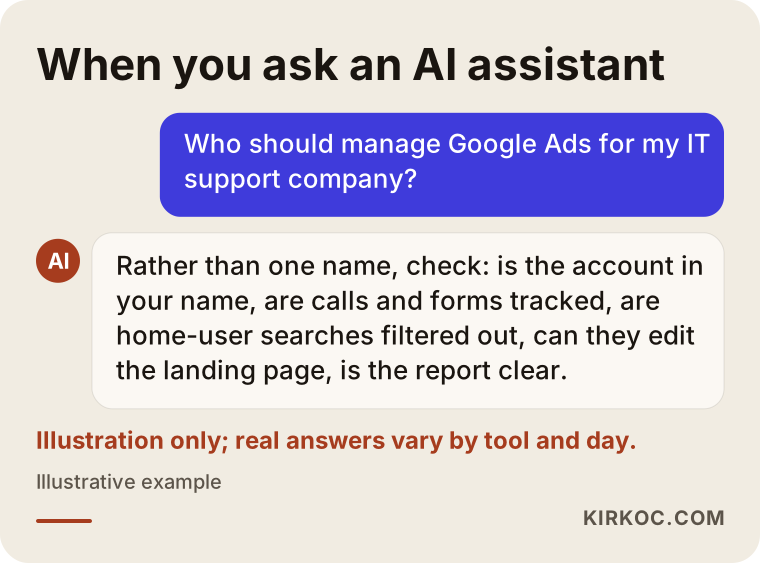
It is no accident that the assistant offers criteria rather than a single name; a good choice really does come down to checking these points. Feel free to use the list in this article in your own conversations with candidates.
Working with Ümit Kırkoç
I am Ümit Kırkoç. I work from Istanbul and handle, on my own, everything a digital agency would offer: websites and e-commerce, SEO, local SEO, GEO (visibility inside AI assistants' answers), management of Instagram, Facebook, LinkedIn, TikTok and YouTube, Google and Meta ad management, logo and brand identity, and content writing. I am one person; I do not have a team, and I do not pretend to. Because I work remotely, I can take on clients in the US and other countries, and the time difference mostly matters only for scheduling calls.
With an IT support or cybersecurity firm, I usually work like this. First, on a short call, we talk about your services, the type of client you want, your service area and how you handle incoming calls. If you already have an ad account and a website, I look at both, and I pull from the search terms report where your budget has been going. Then I prepare a written plan and proposal that explains what I recommend and why. If you approve, I set up or reorganize the account in your name, connect tracking, and build the campaigns and landing pages. In the weeks after that I check the account regularly and send you a plain monthly report.
Doing it all from one place has a concrete benefit here. For IT firms, ads often do not work without the right landing page, and the landing page cannot be written well without ad data. On top of that, the best-performing searches you discover through ads point the way for your website's SEO; once you start showing up in the free results for those same searches, you rely less on paid clicks. LinkedIn posts aimed at business decision-makers can reinforce the same message. When you split all this among different people, each one looks after their own piece and the connections between them get lost. I keep those pieces inside one plan.
There are also things I will not promise: I do not guarantee a particular position, a particular number of clients, or a particular number of contracts. What I can guarantee is that the account is set up properly, looked after regularly, and that you are told clearly what is going on.
Frequently asked questions
Who should I hire to manage Google Ads for my IT support company?
Choose someone who opens the account in your name, sets up call and form tracking, knows how to separate business clients from home users, and can work on your landing page. That could be an agency or an independent specialist. As someone based in Istanbul who works remotely, I do this work by running the ads, the website and SEO together.
Does Google Ads make sense for a small IT company or MSP?
It can, if your services and service area are clear, you can return calls quickly, and you have a decent page for the ads to point to. Starting with a small budget, one service and a narrow area is a good way to learn which searches actually bring in work. If referrals already keep you busy and you have no capacity for new clients, waiting is a reasonable choice too.
Does Google Ads work for cybersecurity services?
It can, but it takes patience, because searches in this field are fewer and more technical. What matters is focusing on buying-intent searches like "penetration testing services" instead of broad words like "cybersecurity," excluding education and career searches, and building a page that explains in plain language how the service works. Ads written in an informative tone earn more trust than ads built on fear.
Who sets the ad budget, and who gets paid?
You set the budget, and it is paid directly to Google with your own billing details. My fee is separate and covers the management work. I explain how the budget should be split between campaigns and what to watch when deciding whether to raise or lower it; the decision is yours.
How long until I see results from Google Ads?
Clicks and calls can start on the day the ads go live, but in this industry a meaningful evaluation usually needs a few weeks of data. The first weeks are spent filtering out irrelevant searches and learning which keywords bring in real work. When those leads turn into contracts depends on the length of your own sales process.
I already have an ad account that is not working. Should I start over?
Usually not. The history in an existing account is valuable, so I start by reviewing the search terms, the tracking settings and the campaign structure. The problem is typically irrelevant searches, missing tracking or an unsuitable landing page, and all of those can be fixed inside the existing account.
Do I need SEO along with ads?
It is not required, but the two feed each other. Ads give you quick visibility and show which searches bring in business; SEO helps you appear in the free results for those same searches over time. If you want to depend less on ad spend in the long run, planning the two together makes sense.
Is LinkedIn advertising or Google Ads the better fit?
They serve different purposes. Google Ads reaches people who already have a need and are actively searching. LinkedIn lets you reach decision-makers in your target audience, such as company executives, before they start searching. For most IT firms, Google Ads is the starting point, and LinkedIn can be added as a complement for brand awareness and longer-term relationship building.
If you want your managed IT or cybersecurity services to appear, with the right ad and the right page, in front of the businesses actually searching for them, you can leave a short message about your company and goals through my digital advertising page. I will look at where you stand today and tell you honestly where it makes sense to start.