You put money into ads every month. The dashboard shows clicks climbing, but the phone stays quiet and no orders come in. After a while the same question shows up in your head: is something broken, or is Google Ads simply not for a business like mine? If you searched "Google Ads not getting sales," you are probably standing right at that point. Here is the good news: when clicks arrive but sales do not, the problem is usually not the ad itself. It is one of the links before or after the ad, and each of those links can be found and checked one by one. I am Ümit Kırkoç. I work alone from Istanbul and handle digital advertising management together with websites, search, and social media. In this article I walk through the most common causes I can name without even seeing your account, what you can check on your own, and when expert help is actually worth it.
First, let's get one thing straight. Google Ads, in short, is the paid result that appears at the top when someone searches for something on Google. You pay each time someone clicks. So the click is what you bought. A sale is the outcome of everything that happens after the click. The moment you start thinking of those as two separate things, you start finding the problem.
A click is one thing, a sale is another
The numbers that stand out most in an ad dashboard are impressions and clicks. They are easy to measure, so everybody looks at them. But the numbers that matter to your business are different: how many people called, how many filled out a form, how many added something to a cart and finished paying. If you cannot see those numbers next to your clicks, your ads are effectively running in the dark.
For an ad to turn into a sale, several things have to go right in a row. The right person has to search the right words. Your ad has to make a promise that fits that person. The page they land on has to keep that promise. The page has to be easy to use on a phone. The phone number or form has to actually work. And finally, you or your staff have to respond quickly. If a single link in that chain is broken, the clicks you paid for leak out at that point.
The graphic below shows this chain as a simple funnel. It is purely schematic and contains no real data. The point is to show you where losses can happen.
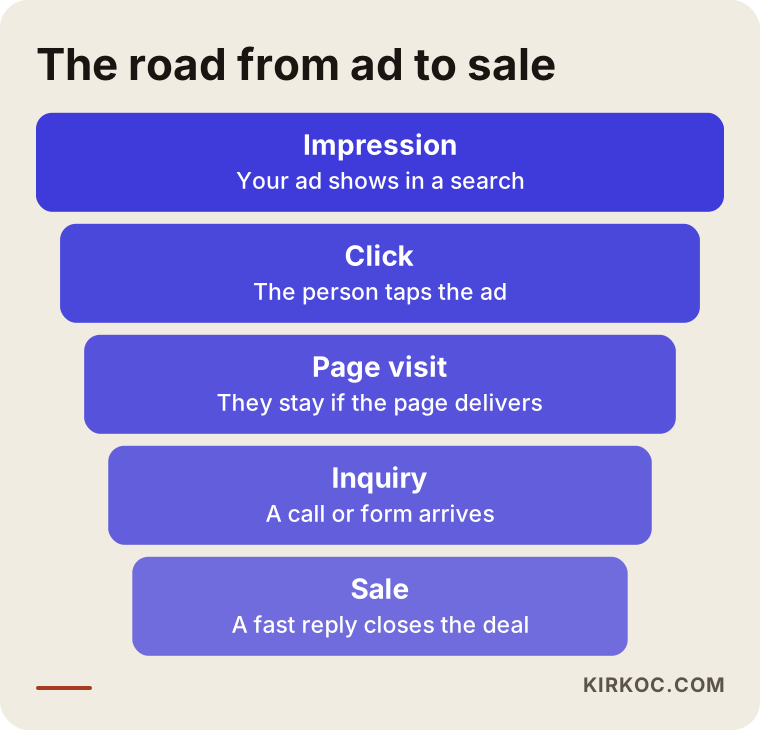
Look at the funnel and notice something: the person managing your ads is responsible for only the first two steps. Everything after that depends on your website, how you answer the phone, and how you present your offer. That is why, before you say "the ads don't work," you need to find out at which step the loss happens.
The most common causes
The causes below are the ones I run into most often in accounts that do not produce sales. They will not all apply to you, but one or two of them are almost always present.
1. Conversion tracking is missing or set up wrong
A conversion is when someone who came from your ad does something valuable to you: calls, fills out a form, buys. To teach Google that "this counts as a conversion," a measurement setup is needed. Without it, two things go wrong. First, you cannot tell which ad brings in business. Second, Google's own automated system has nothing to learn from, so it simply chases clicks.
A common mistake is counting a page view as a conversion. Then the dashboard says "lots of conversions," but none of them is a real inquiry. Another mistake is not measuring taps on the phone number. On mobile, many people tap the number directly instead of filling out a form. If those taps are not counted, half of what your ads accomplish may be invisible to you.
2. You are showing up for the wrong searches
In Google Ads, a keyword decides which searches can trigger your ad. A setting called broad match lets your ad appear for searches that are loosely related or even look unrelated. For example, a woodworking shop advertising "wooden dining table" might also show up for someone searching "how to refinish a wooden table." That person wants to do a project at home, not buy. They click, leave, and you pay.
The way to see this is the "search terms" report in the account. It shows what people actually typed before clicking your ad. Most business owners are surprised the first time they open it. You may find dozens of phrases that have nothing to do with what you sell, that come from people just looking for information, or even people looking for a job.
3. There is no exclusion list (negative keywords)
This one completes the previous point. A negative keyword is a way of saying, "do not show my ad to anyone who types these words." Words like "free," "how to," "jobs," "used," or "pdf" do not signal buying intent for most businesses. An account that never builds this list spends its budget on the cheapest and least relevant clicks.
The graphic below puts together the mistakes that quietly eat a budget.
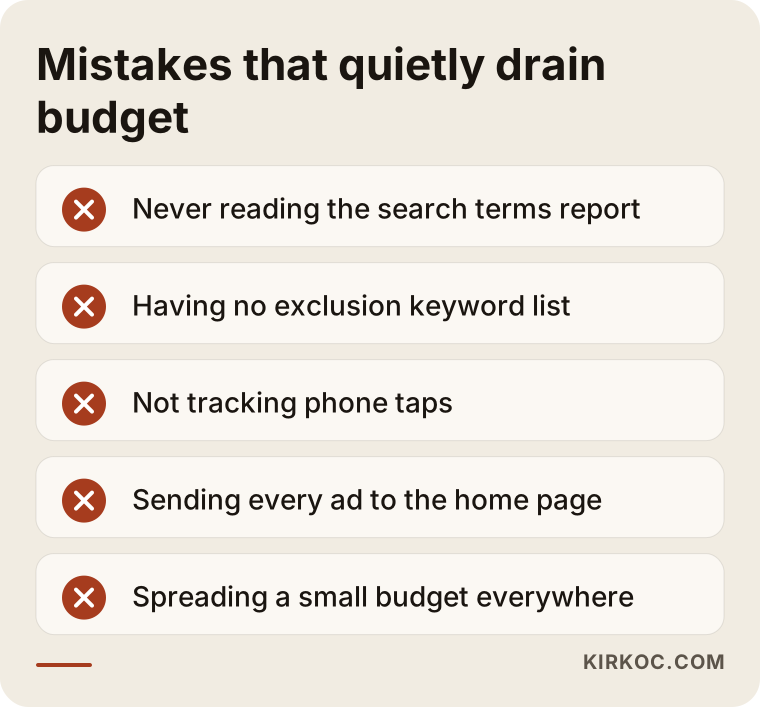
Each item on that list looks small by itself. But think about a month of spending. Every dollar that goes to an irrelevant click is a dollar that could have reached a real customer.
4. The ad text does not match the search intent
People search for the same service with very different intentions. Someone typing "furnace repair" probably has something broken and wants an urgent fix. Someone typing "how does a furnace work" is gathering information. Someone typing "best furnace brand" is comparing. The right message for each is different. If you show all of them the same generic ad, you speak to nobody in particular.
The job of ad text is to attract the person who should click and to filter out the one who should not. That is why a good ad sometimes gets fewer clicks, but the clicks are worth far more. A vague line like "We serve all your needs" does less than "Same-day furnace repair in your area, call to book." The second one draws the right person and reduces disappointment when they reach the page.
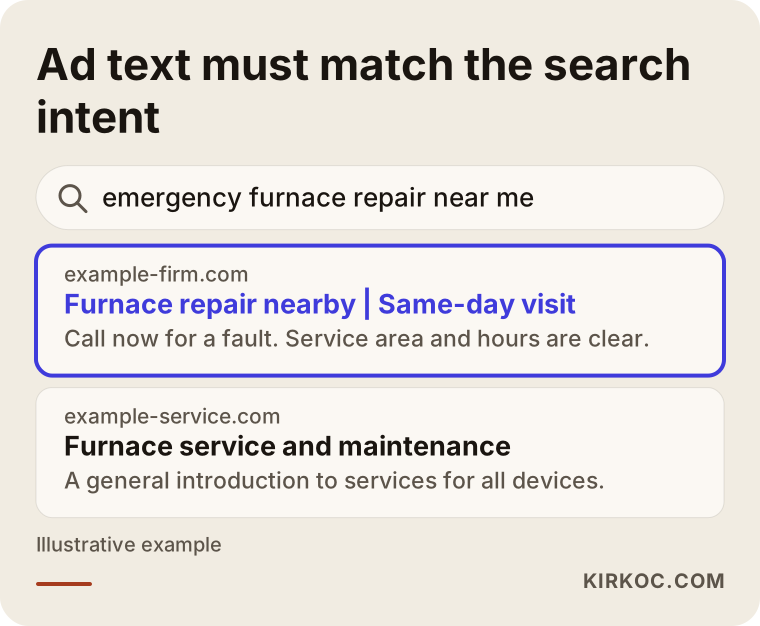
In the example, the ad that recognizes the search is urgent and answers that in its first line stands out. The ad with generic text attracts less attention for the same budget. This is an invented example, but the logic shows up in real accounts all the time.
5. The landing page does not welcome the visitor
A person who clicks an ad wants to see the promise confirmed within the first few seconds. If the ad says "free estimate" and the page is the home page with a general company introduction, the visitor cannot find what they came for and goes back. This is one of the situations that costs the most money in Google Ads, and it often goes unnoticed because the ad account itself looks fine.
A good landing page does one job: it points the visitor toward one action. What you sell, who it is for, why you can be trusted, and how to reach you are all visible right away. If there are dozens of menu links, unrelated news boxes on the home page, or a half-finished form, attention scatters.
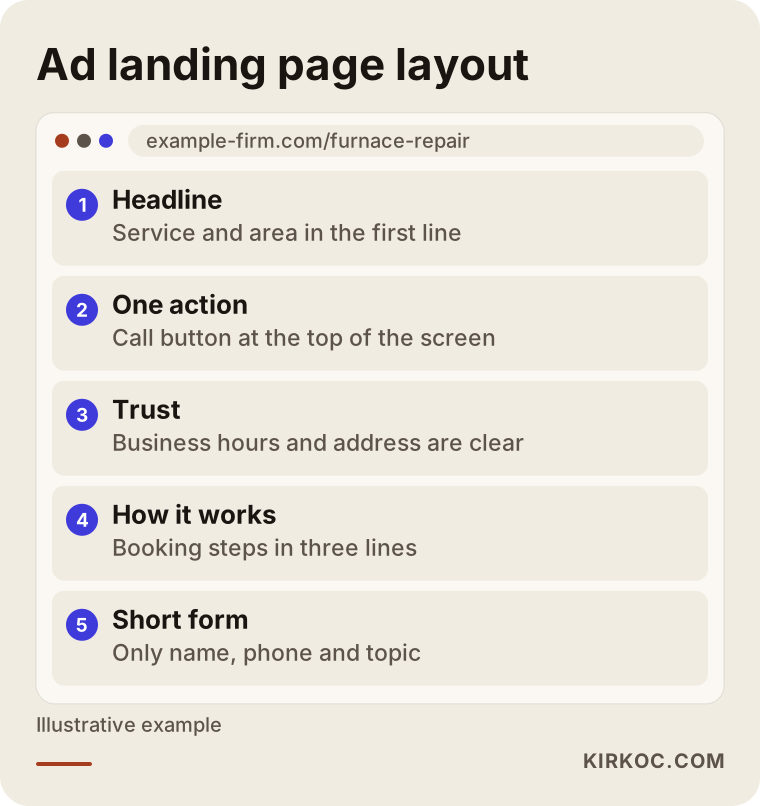
The layout in the graphic is an idea, not a template. What matters is that the page answers the visitor's question: "Is this right for me, and how do I reach them?" If that answer is not visible within three seconds, the visitor moves to another tab.
6. The site is slow or awkward on a phone
A large share of ad clicks come from phones. If your site looks great on a desktop but loads slowly on a phone, has buttons that are too small, or form fields that jump around, visitors lose patience. That is the same as giving the click away for free. Try it yourself on your own phone, using mobile data. Do not click your own ad (that costs you money); open the page address directly instead. If the page feels slow to you, it feels slow to your customer.
7. Incoming inquiries get a late reply
This one sounds unrelated to ads, but it is often the real problem. A person who fills out your form may have filled out three other forms at the same moment. The first business to reply often wins the job. If after-hours inquiries wait until the next day, the phone is busy, and missed calls are never returned, every inquiry that looks like a success in the dashboard may actually be a lost one.
So if your ads are not producing sales, log every inquiry for one week: how many people called, how many got a reply, how many received a quote, how many dropped out. That simple table often shows on its own whether the problem is the ad or the sales process.
8. The budget is too small or too scattered for the competition and the goal
If you divide a small budget across ten services, five cities, and dozens of keywords, it will not be enough for any of them. Each campaign needs a certain amount of data to learn, and when the budget is sliced too thin, no campaign collects enough. The better approach with a small budget is to start with your most profitable, clearest service, and expand once you see it working.
On the other hand, there are cases where the budget simply is not enough. In a highly competitive field, the cost per click goes up. With a limited budget you get very few clicks a day, and judging results from so little data is hard. This should be discussed honestly at the start, because not every budget works in every industry.
9. Automatic settings are aimed at the wrong goal
Google Ads can run on automated bidding strategies. These strategies learn from the goal you give them. If the goal is "clicks," they bring clicks. If the goal is "conversions," they try to bring conversions, but only if conversions are measured correctly. An automated system aimed at the wrong goal efficiently collects expensive, useless clicks. The system is doing its job well; it was just given the wrong job.
Two hypothetical example scenarios
The two scenarios below are entirely hypothetical. They do not belong to any real company or person. The aim is to show that the same symptom can come from different causes.
Scenario 1: An air conditioning service whose phone does not ring
Suppose an air conditioning repair and installation business spends a set monthly budget advertising on the phrase "AC repair." The dashboard shows hundreds of clicks, but the phone rings very little. When you look at the account, three things appear. First, the search terms report is full of phrases like "how to clean an AC unit," "AC technician jobs," and "AC unit prices." Second, the ad sends everyone to the home page, which does not even state the service area. Third, taps on the phone number are not measured, so nobody knows which ad produces calls.
The fix goes in this order: first start measuring phone taps and the form, then exclude the irrelevant searches, then split the ads into separate groups such as "repair" and "maintenance" and send each to its own page. That page shows the service area, working hours, and one call button. After these changes, the number of clicks may drop, but the clicks being paid for are better aimed at people who want to call. I cannot promise the result in advance. What changes is that you can finally see what works, and why something doesn't.
Scenario 2: A small online shop with abandoned carts
In the second example, there is an imaginary online store selling handmade ceramics. The ads bring clicks to product pages, and people do add items to the cart, but few go on to pay. Here the problem is not the ad. The shipping cost appears only at the last step, an account is required, and entering card details on a phone is hard. It makes more sense to remove those obstacles before touching the ads: show shipping information on the product page, allow guest checkout, and simplify the payment steps.
This scenario is a reminder that no matter how good the person running your ads is, the budget is wasted if the checkout flow on your site is broken. That is why having the same person handle both the website and the advertising can make a big difference. The person who finds the problem can also fix it, and nobody on either side says "that isn't my job."
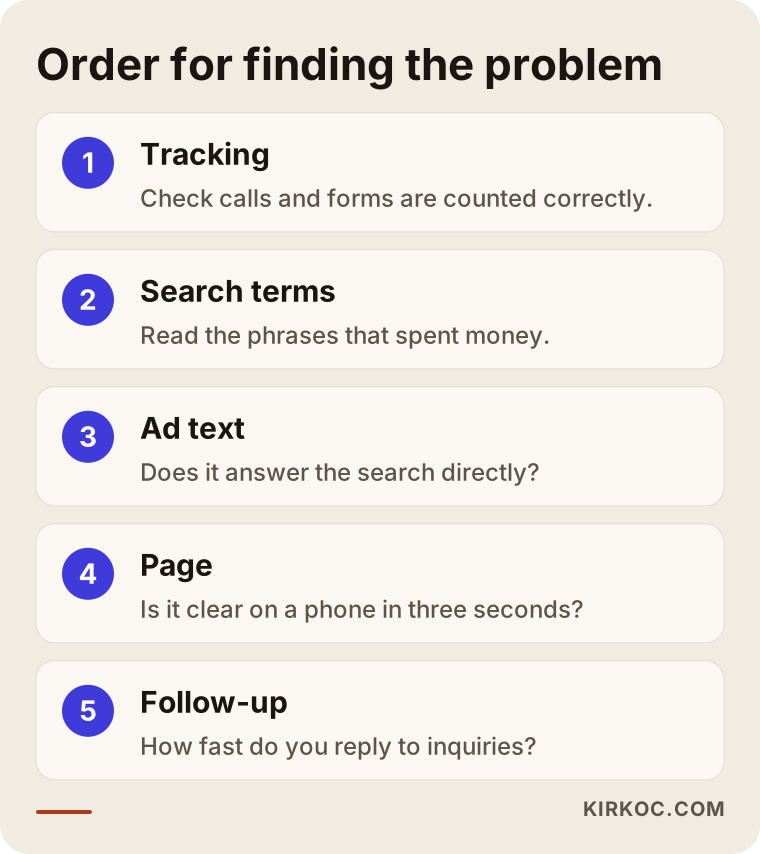
The graphic above sums up the order I follow in both scenarios. Tracking first, then search terms, then the ad and the page. The order matters, because any change made without measurement is a guess.
Step by step: how to find the problem
You can do most of the steps below without an expert. You only need access to your account.
Step 1: Confirm that conversions are measured correctly
Go to the "conversions" section of the account. See which actions are being counted. Are phone calls, form submissions, and purchases listed? If a low-value action like a page view is set as a primary conversion, that needs to be fixed. Then run a test yourself: fill out the form on your site, tap the phone number, and check whether those actions show up in the dashboard. If they do not, the tracking setup has a problem.
Step 2: Review the search terms
Open the search terms report for the last thirty days. Sort by spend. Look at the top twenty phrases that cost the most, and for each one ask: would this person have bought from me? If the answer is "no," add that word to the exclusion list. This one step alone makes a difference in many accounts.
Step 3: Compare ad text with search intent
Read the searches that led to your clicks and set them next to your ad text. Does the ad answer the search directly? If a detail the person was looking for, such as speed, area, or trust, is missing, add it. Avoid exaggeration and claims you cannot prove, such as "the best" or "number one." They can run into Google's policies, and they do not build trust with readers.
Step 4: Open the landing page like a customer
Take your phone, switch to mobile data, and open the page your ad points to. Within three seconds, can you tell what is sold, where the business is, and how to reach it? Can you tap the buttons comfortably? Is the form short? If the page is long and cluttered, do not send the ad there. Build a separate page dedicated to that one service.
Step 5: Track incoming inquiries
For one week, write every inquiry into a table: time, source (call or form), response time, outcome. Without this table, saying "the ads are bad" or "the sales team is bad" is a guess. With it, the stage where you lose people usually becomes clear.
Step 6: Run small, one-change tests
Do not change everything at once. Change the ad text for a week and look at the results, then change the page. If you change everything together, you will not know what worked. This takes patience, and Google's automated systems also need several days or weeks to learn after a change.
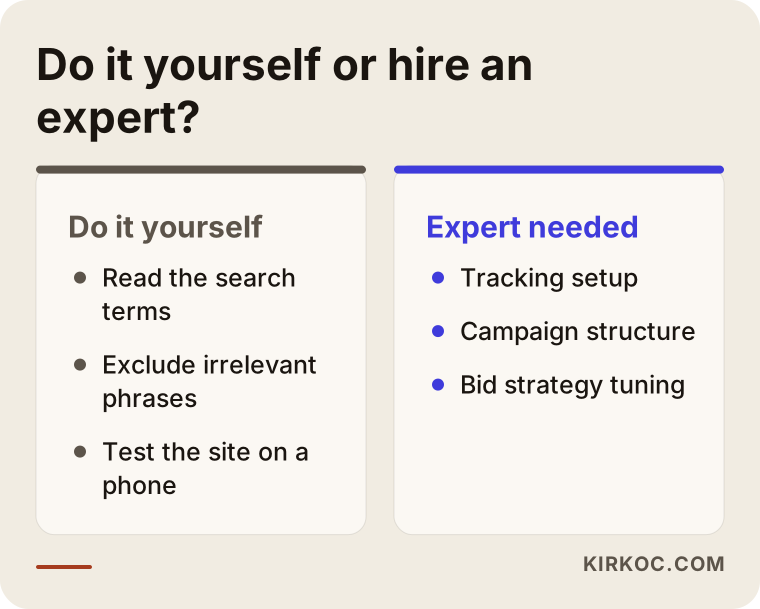
The graphic compares which jobs you can do on your own and where outside help makes more sense. I go into that in a bit more detail in the next section.
What can you do yourself, and when do you need an expert?
Things you can do on your own include reading the search terms report, excluding clearly irrelevant phrases, concentrating the budget on your most profitable service, testing your site on a phone, and answering inquiries quickly. None of this needs special knowledge, only regular attention.
The situations that call for an expert are more technical: setting up conversion tracking correctly (especially for phone calls and online store sales), restructuring campaigns, tuning automated bidding strategies to your goal, designing landing pages, and explaining the incoming data in plain language. If you are spending a noticeable amount each month and not getting results, showing the account to a specialist often pays for itself by protecting the money you are already spending.
I also have to say this: sometimes the problem is not Google Ads. If your product is too expensive for the market, there is no demand in your service area, or competitors are making a much stronger offer, optimizing the ads is not enough. An honest specialist will tell you that, and will not let you burn an ad budget for nothing.
If ads are not enough: organic visibility in search
Ads are a channel you pay for per click; when you stop, the visibility stops too. For the long run, it makes sense to think about ads together with SEO, meaning the work that helps you show up in search results without paying per click. A solid website helps both: a good page raises the conversion rate of your ads and strengthens your search presence. If you are known on social media, a person who arrives from an ad and looks you up finds something they can trust. When the website, SEO, social media, and ads sit with different people, each one watches only their own numbers. When they sit with one person, someone sees the whole picture.
Common mistakes
When ads do not bring sales, business owners tend to fall into the following mistakes.
The first is shutting the ads off right away or switching providers. Moving to someone new without knowing where the problem is simply carries the same problem into a new account. The second is suddenly raising the budget. If tracking and the landing page are broken, more budget makes the loss bigger. The third is fiddling with the account every day. Each change can restart the learning process, and impatience does not let the system settle.
The fourth is judging by cost per click alone. A cheap click is not always a good click, and an expensive click can sometimes bring a very valuable customer. What matters is how much you spend to win a customer and how much that customer earns you. The fifth is leaving ownership of the account to someone else. The ad account should be opened in your name, and the admin access should stay with you. Otherwise, when you part ways, all the history and settings can disappear.
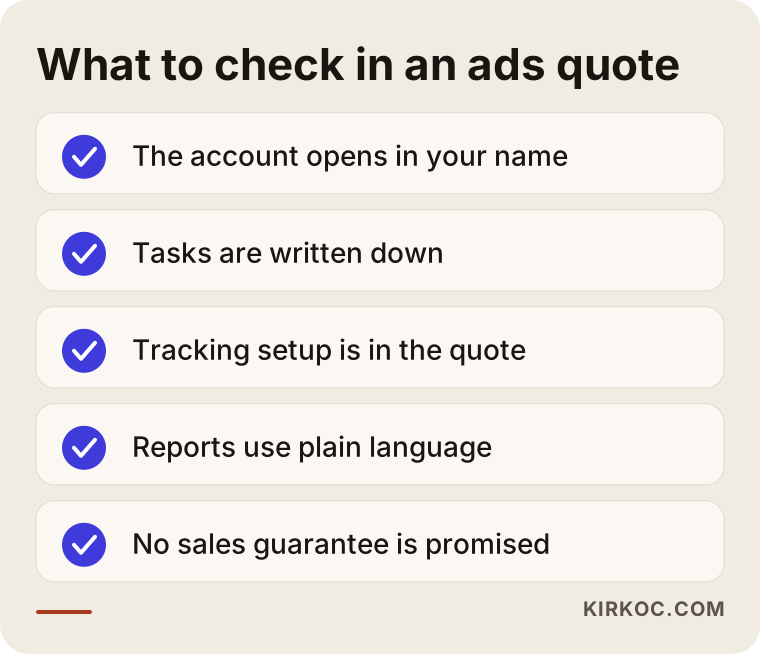
This list is the short version of the questions to ask when you receive a proposal for ad management. If someone says "we guarantee sales," be careful. Nobody can know in advance how Google or customers will behave.
How to read reports
Ad reports look crowded, but very few things in them matter to you. First, see which actions count as conversions and how many came in. Then look at how much you spent per conversion. After that, check which ads and which searches those conversions came from. Finally, compare how many of the inquiries turned into real sales against your own records.
One point I need to stress: the ad dashboard and your own sales records will never match exactly. The dashboard sometimes counts one person twice, and sometimes it misses someone who called but later completed the purchase another way. So the dashboard points you in a direction; it does not give you a final accounting. Make the main decisions by looking at your own cash register or order book.
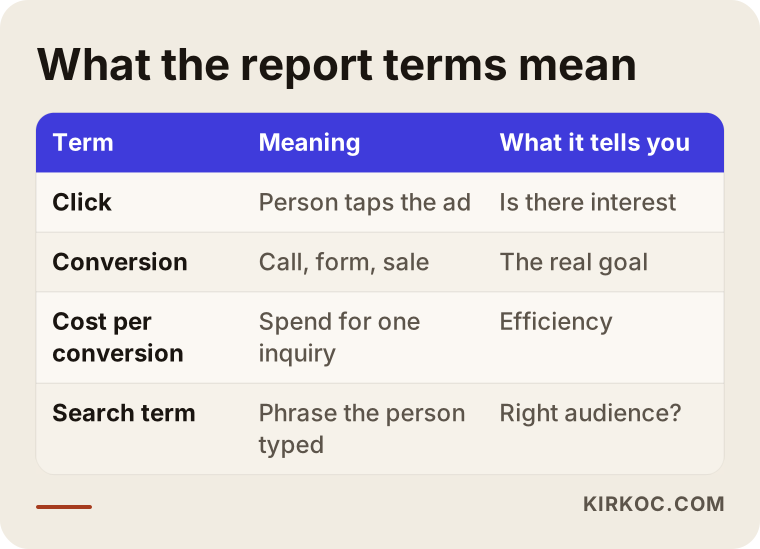
The table explains the terms that appear often in reports in plain language. Knowing them gives you confidence when you talk to a specialist or evaluate a proposal.
What determines the cost
The cost of ad management has two separate parts, and you should not mix them up. The first is the ad budget you pay Google. You set it, and it goes straight to Google. The second is the service fee you pay the person who sets up, monitors, and adjusts the account.
The service fee depends on a few things. How many different services or products you advertise, how many campaigns need to be managed, how much work the tracking setup takes, whether the landing pages are already in place, how large an online store's product list is, and how often reports and meetings are needed all affect the price. The competitiveness of the industry also changes the workload; in a heavily contested field, more frequent fine-tuning is needed.
For that reason I do not quote one fixed price for everyone. I first look at your account and your site and present in writing what needs to be done, and the price follows the scope of that work. The only thing I ask of you is that at the end, the account and the data remain in your name.
How I work with you
I am one person, and the person you talk to is the person doing the work. The first step is usually a short review: I look at your ad account, your site, and how incoming inquiries are handled, and tell you where the biggest loss is. Then I give you a written plan with priorities. If you approve it, I fix the tracking first, then move on to account structure, ad text, and, if needed, landing pages.
Because I run the website, SEO, social media, and advertising together, if the problem turns out to be on the site rather than in the ads, I can fix that too. You do not end up in a chain of messages like "the ad person says the site has a problem, call the web person." I prepare monthly reports in plain language, and we talk through what the numbers mean together.
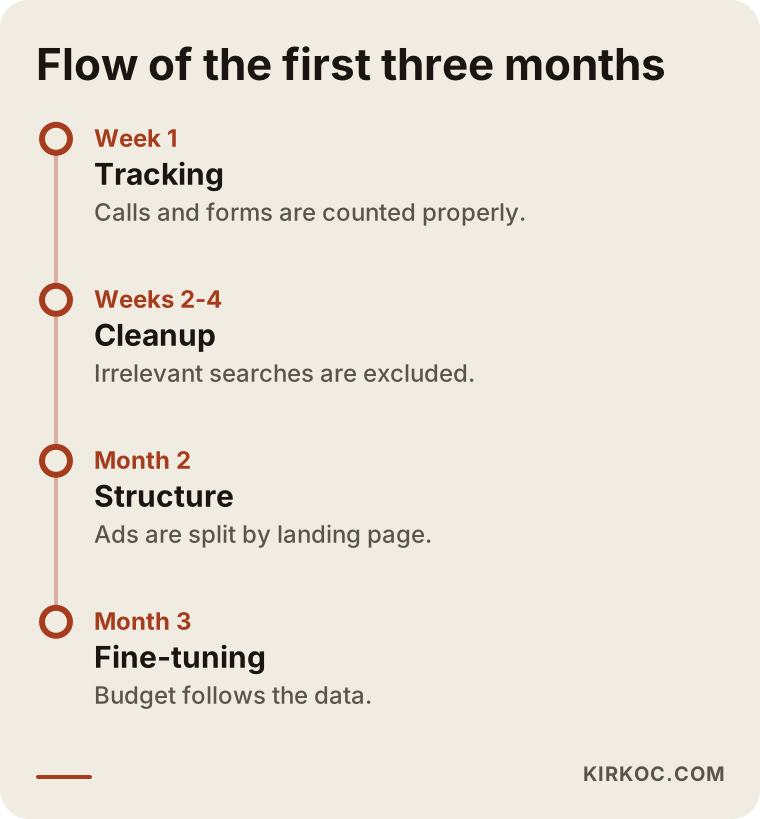
The timeline shows the process as a rough three-month flow. The durations vary from job to job; the timeline is a general roadmap, not a promise. I do not commit to a specific result at any stage, but at every stage you can see in writing what was done and why.
Ask yourself before you decide
When deciding whether to continue with ads, ask yourself the following in order: are my conversions measured correctly? If not, the first job is to set up tracking. If they are measured and real inquiries are coming in, the problem is probably in the sales process. If they are measured but no inquiries arrive, you need to look at the keyword, ad, and page trio.
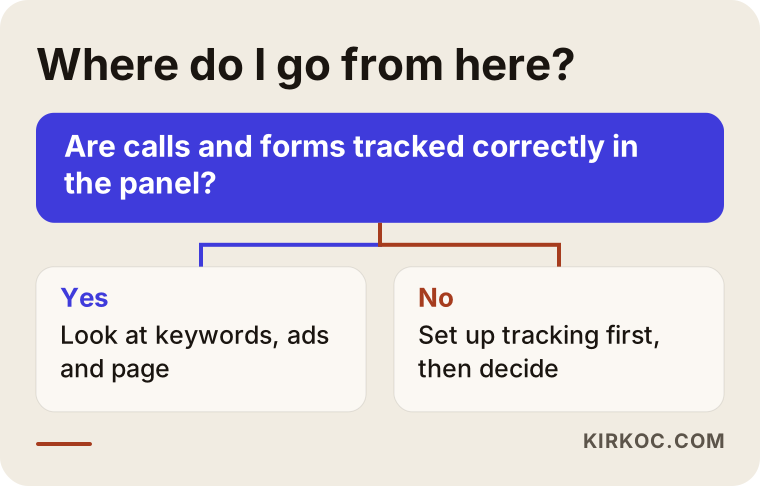
This diagram works as a small compass; it roughly shows which direction to go in your account. Every account is different, and sometimes more than one cause applies at the same time.
Frequently Asked Questions
How many days until Google Ads brings sales?
Giving a fixed number would not be honest. If the account is new, the first weeks are a learning period; Google figures out which searches suit you during that time. If your sales cycle is long (for example, a high-ticket service), weeks can pass between an inquiry and a closed sale. That is why in the first weeks I look not at sales but at whether tracking is accurate and whether the searches are good quality.
I get clicks but nobody calls. Why?
The three most common reasons are these: phone taps may not be measured and calls may actually be happening; the wrong people may be clicking; or the page may be hard to use on a phone. First make sure calls are measured, then look at the search terms and the page.
If I raise my ad budget, will sales go up?
Not always. If the foundation is sound, a bigger budget can bring more customers. But if tracking, keywords, or the page have problems, raising the budget only makes the loss bigger. Fixing the account first and increasing the budget afterward is safer.
Which is better, Google Ads or SEO?
They do different jobs. Ads give you quick visibility, but it ends when you stop paying. SEO moves more slowly, but what you build can keep working for months. For most businesses, using both and balancing them according to budget is healthier. Which to start with depends on the competition and how long you can afford to wait.
Can I manage my own ads myself?
With a small budget and a clear service, yes, you can start and learn as you go. But if basics like tracking setup and campaign structure are built wrong, fixing them later takes time. Having an expert set it up once and then monitoring it yourself is also a sensible path.
What is the difference between an ad agency and a single specialist?
Large agencies can suit high-volume work; many people share the job, and communication mostly runs through a project manager. When you work with a single specialist, the person you talk to is the person doing the work and decisions are fast, but capacity is limited. Which fits depends on the size of your business and how you want to communicate.
My ad account was opened in someone else's name. What should I do?
Find out who owns the account. If it is not in your business's name, ask the person you hired to transfer access to you. If there is a dispute over ownership, I recommend having a lawyer review your contract.
Do you guarantee results?
No. No honest specialist can guarantee a particular number of sales, calls, or a ranking, because results depend on Google's system, your competitors, and your customers' behavior. What I can offer is a written account of what will be done, correct tracking setup, and open sharing of the results.
To find out whether your ad budget is paying off, we can look at your account and your site together, and I will explain plainly where the problem is, what will be fixed, and how the work will go. If you like, reach out to me through my digital advertising management service page.