You added your shop, your office, or the work you do to Google Maps. You filled in every field, uploaded photos, and then got stuck at the very last step: the profile will not verify. Maybe the postcard never arrives. Maybe the phone option never shows up. Or maybe Google asks for a video, you film one, and it gets rejected. If you searched "Google Business Profile won't verify" and landed here, you are far from alone. This is one of the places where small businesses get stuck most often. In this article I explain, in plain language, why verification has become so difficult, how the video should be filmed, and where outside help actually makes sense. I am Ümit Kırkoç, I work alone from Istanbul, and verification problems are part of the local SEO work I do for businesses that want to be found on Google Maps.
First, the vocabulary. A business profile is the card that appears when someone searches for your company name on Google, either on the right side of the results or on the map. It shows your address, phone number, hours, reviews, and photos. Verification is Google's way of making sure that the business really belongs to you and really operates at that address or in that area. Until a profile is verified, you cannot edit it, you cannot reply to customer reviews, and in most cases it does not show up properly in searches. So verification is not a formality. It is the condition for the profile to be usable at all.
Why is verification such a hassle now?
Years ago, the process was simple for most businesses: Google mailed a postcard, you typed in the code, and you were done. Today Google is much more careful about fake and fraudulent listings. Profiles created with made-up addresses, people trying to take over someone else's business, and places that do not exist at all have pushed the checks to become stricter. Honest, real businesses often pay the price for that. If you are one of them, the problem may not be you. It may simply be that the filter is a little blunt.
In practice, these are the causes I run into. First, the address does not match what Google has on record: a suite number, a floor, or a neighborhood name is written differently. Second, the business sits in an office building without a sign, or in a shared space, and Google struggles to see it as a real operating business. Third, the profile was already created by someone else and never claimed, so it exists but is not yours. Fourth, there are several profiles with the same name at the same address. Fifth, a video was filmed, but it does not contain what Google wants to see.
The image below shows, with an invented example search, what a verified profile changes on the customer's side.
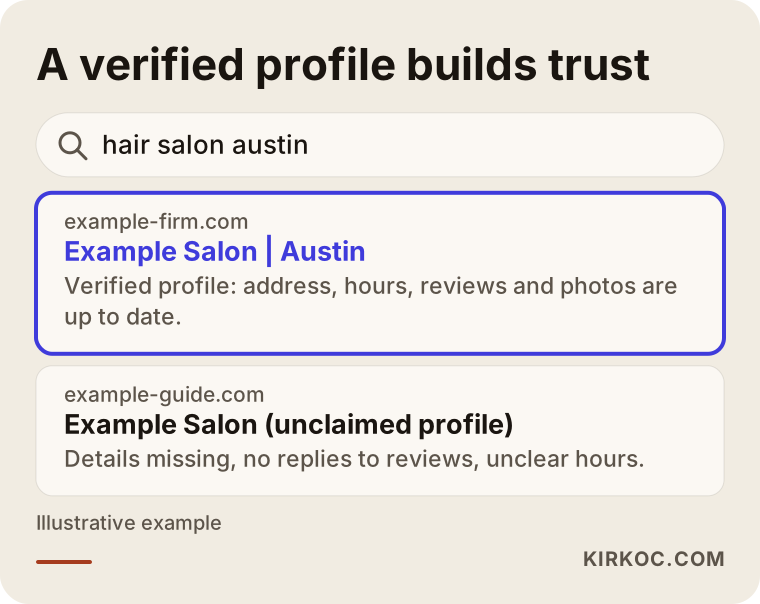
The difference in this example is clear. A profile with complete details, reviews, and current information builds trust, while a half-finished card sends the customer to another option. The value of verification starts with that first impression.
Which verification methods exist, and which one will you get?
Google does not show every business the same options. Depending on your category, your address, and your account history, you might see only a postcard, or a phone call or text, or email, or video. You cannot choose which one appears. That is why the only honest answer to "why don't I get the phone option?" is "Google has not enabled it for you."
Here is a plain summary of the methods:
- Postcard: Google mails a code to your address. It can take several days, and cards do get lost in apartment lobbies or office buildings.
- Phone call or text: A code goes to the number on the profile. If it is offered, it is the fastest method.
- Email: Offered to some businesses. The email address may need to match your business domain.
- Video verification: You record a short video with your phone and upload it, and Google uses it to check that the business is real.
- Live video call: A rarer option, offered in some cases, where you verify live with a Google representative.
The table below puts these methods side by side.
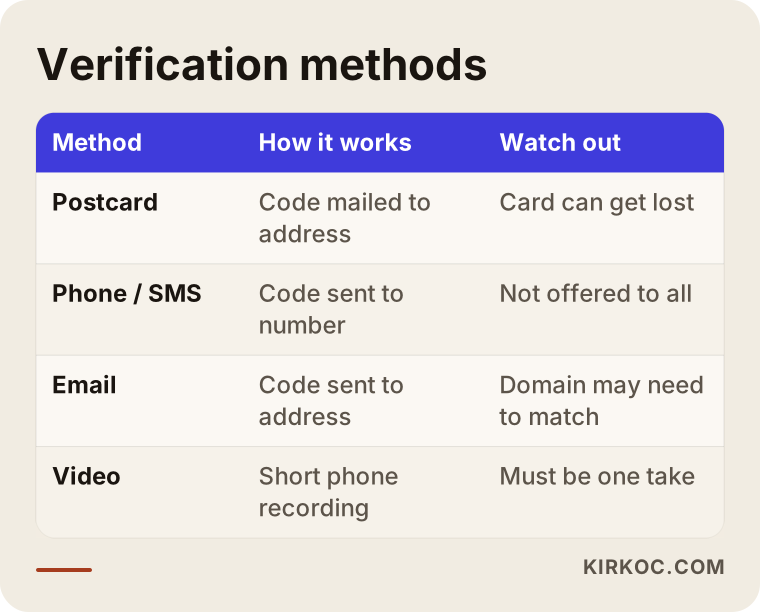
The point to notice is that the methods do not replace one another. If the postcard never arrives, you cannot simply switch on the phone option yourself. If video is what appears, Google usually has not found another route suitable, and filming it correctly is the only way forward.
What exactly is video verification?
Video verification is a short recording Google asks you to make to confirm that the business really is where you say it is. You do it from your phone, not your computer, following the instructions on the profile management screen. It generally has to be one continuous take, and a video that has been cut and stitched together may not be accepted. Your face does not necessarily have to appear, but the video has to show the things that prove the business is really there.
There are three things Google generally wants to see. The first is the outside, so the place can be recognized: the street, the building entrance, the sign. The second is the inside of the business: the counter, the work area, equipment, stock, products. The third is something that shows you manage the business, such as opening the door with your key, or showing a utility bill, a business license, or a document in the business name. Which document is accepted depends on the instructions on your own screen, so always read those first.
You can follow the flow step by step in the image below.
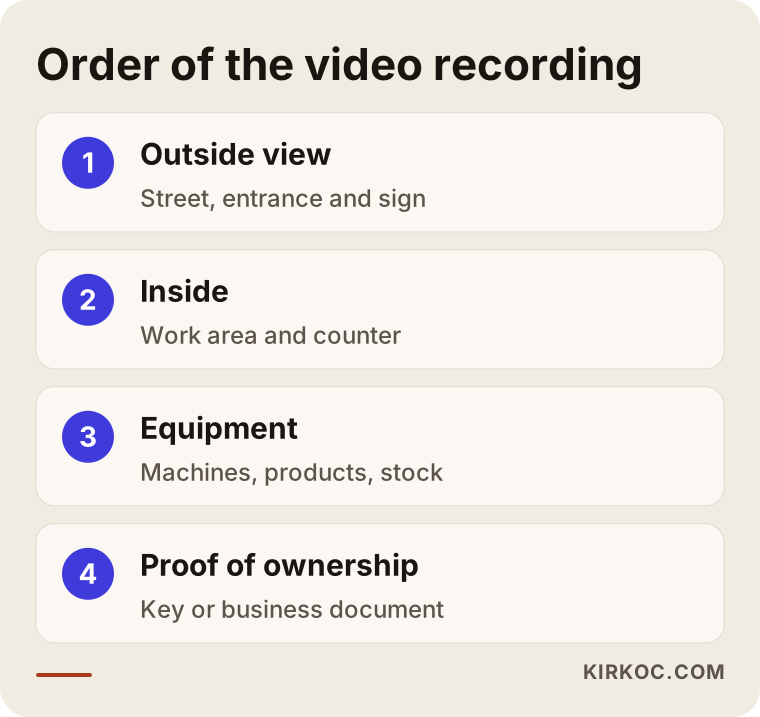
The order matters because the person reviewing the video tends to think in the sequence of "first the place, then the work, then ownership." If you mix up the order or skip a step, the video can end up unclear.
Preparing before you film
Give yourself fifteen minutes before you press record. Hold the phone horizontally, make sure you have enough free storage, and be somewhere with a strong internet connection. If you do not have a permanent sign, prepare something that shows your business name, even a temporary one: a placard, lettering on the door glass, or a product that carries the name. Keep a bill or document with the business name ready. The space does not need to be spotless, but it should clearly look like a real working environment.
Move slowly while filming. Fast, shaky footage tells the reviewer nothing. Pause for a few seconds in each area, and check on the screen that the camera is actually showing what you think it is showing.
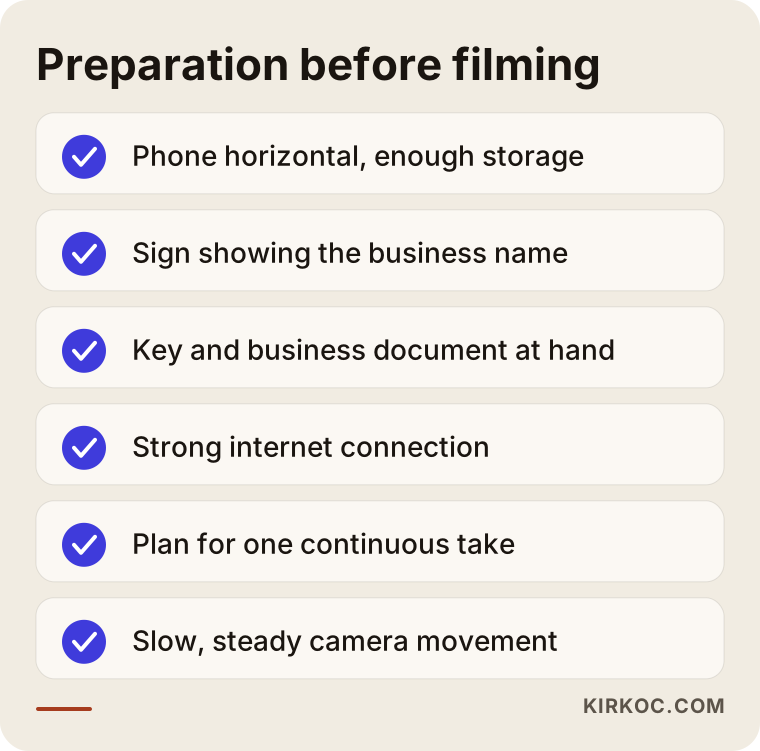
Going through this list once before filming can save you from having to do a second take. Every rejected attempt can also lengthen the next review.
Why do videos get rejected?
Here are the rejection reasons I see most often. Most of them are about gaps in the recording, not about whether the business is real.
First, the business name is not visible in the video. If there is no sign, or it is too far away, Google cannot connect the address to your business. Second, the recording is cut or looks edited. Third, the inside is never shown; the street or the outside of the building alone is not enough. Fourth, there is nothing that proves you manage the business. Fifth, the address is a shared office or virtual office, in which case Google does not see a real business receiving customers. Sixth, the address on the profile does not match the place in the video.
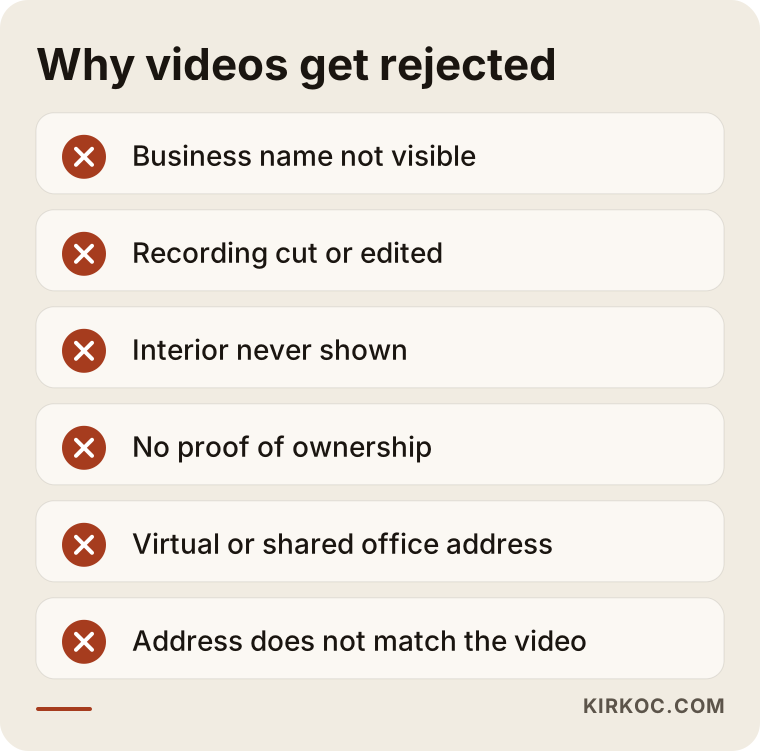
It is quite possible that you made several of these mistakes at once. So when a video is rejected, the first job is not to panic and refilm right away. It is to work out which of these reasons applies.
When your address does not receive customers
This is where people get confused the most, because the problem is often not the video at all but the type of profile. Google divides businesses roughly into two kinds: places where customers come to find you, and jobs where you go to the customer. A hair salon or a cafe belongs to the first group. An electrician, a mover, or someone who photographs people at their homes belongs to the second. If you do not receive customers at your address and you show that address publicly, Google may question it. In that case, using the "service area" option and hiding the address is both the correct approach and the one that makes verification easier.
The decision chart below shows which path to take with one simple question.
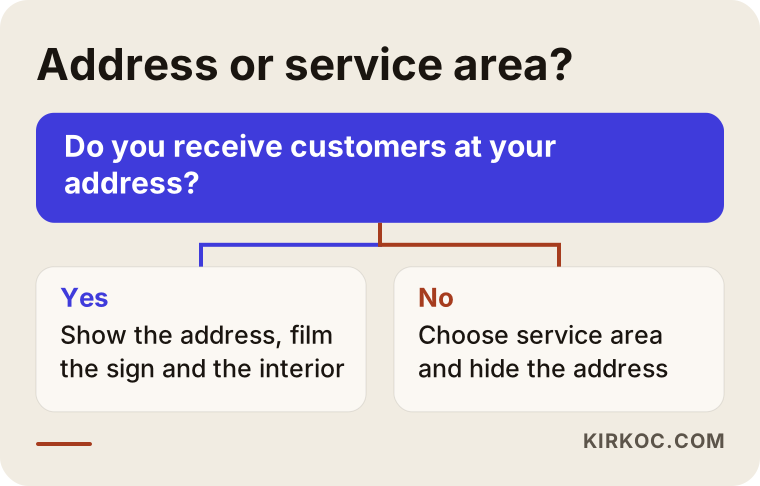
Being a service-area business is not a shortcoming. What matters is that the profile matches how your business really works. Setting up a profile that does not reflect reality can look like a shortcut through verification in the short term, but it can lead to the profile being suspended later.
Two hypothetical example scenarios
The two examples below are entirely hypothetical. They do not describe a real person or company; they are made up to make common situations concrete.
Example scenario 1: A small workshop with no sign. Suppose a tailor works on the second floor of a small commercial building. There is no sign on the door, only a suite number. The tailor created a profile and entered the address, the postcard got lost in the building lobby, and then the video option appeared. In the first video, the tailor only filmed from the street and never went inside, and it was rejected. The fix was straightforward: a placard with the business name on the door, even a temporary one, machines and fabric inside, opening the door with a key, and a brief look at a document in the business name. The second video had all of it, and the process moved forward. The lesson from this scenario is that the business was not what was missing; the evidence was.
Example scenario 2: A consultant working from home. In another hypothetical example, an accounting consultant works from home and does not receive clients there; the consultant visits them at their offices. The address was shown publicly on the profile, and the video showed the living room. It was rejected. The problem was that Google did not see a living room as a business that receives customers. The fix was to switch the profile to a service-area business, hide the home address, and film only the work setup, documents, and business name. Here, verification was less about the address itself and more about setting up the right type of profile.
A step-by-step plan
When you run into a verification problem, I suggest working in this order. The order reduces wasted attempts.
- Check whether the profile already exists and is not yours. Look for another profile with the same address or name, or one that someone may have created on your behalf. If there is one, you may need to claim it instead of creating a new one.
- Check the details one by one. Business name, address, phone, category, hours. They should match your official documents and your sign exactly.
- Choose the right business type. Do you receive customers, or do you go to them? Show or hide the address accordingly.
- Choose the category carefully. A wrong category affects both the verification method and how you appear in searches.
- Use the method that appears. Whichever option is offered, use it. Do not try to force the system into offering a different one.
- If video is required, film it prepared. Outside, inside, equipment, proof of ownership, all in one continuous take.
- Wait for the result and take notes. If it is rejected, copy down the explanation on the screen word for word and do not repeat the same mistake.
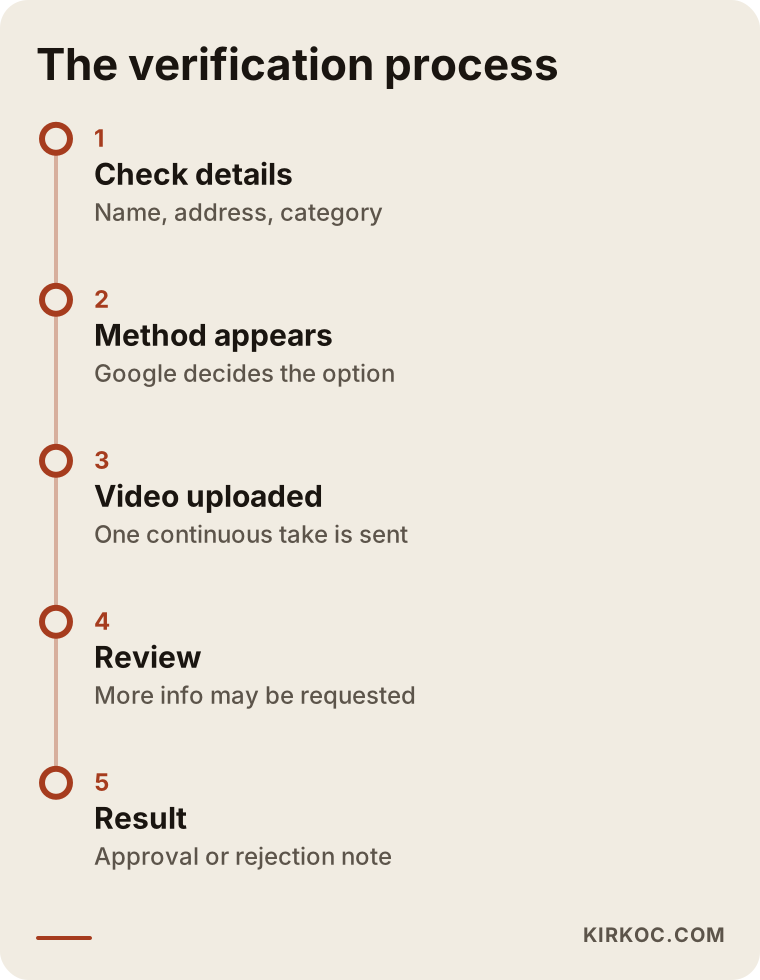
Keep in mind that the times in the timeline vary. Some submissions finish quickly, while others drag on because more information is requested. I am not promising a timeframe here, because the review happens entirely on Google's side.
Common mistakes
I see the same mistakes again and again, so I want to list them one by one.
Creating several profiles at once. When verification fails, it is tempting to say "let me start over" and open a new profile. That leads to duplicate profiles and a risk of suspension. Sorting out the old profile is usually easier than opening a new one.
Using a virtual or shared office address. Putting an address on the profile that does not actually receive customers can be considered a violation of Google's rules. I consider it risky, so I do not recommend it.
Adding keywords to the business name. Adding things like "best," "cheap," or a city name to the end of the name can cause trouble even after verification. The name should be the name on your sign.
Editing the video. Cutting and joining clips to make it look nicer makes verification harder. A continuous, natural recording is always more believable.
Using someone else's account. The Google account you use to set up the profile should, if possible, belong to the business and be permanent. A former employee's or web designer's personal account causes serious headaches later.
Retrying quickly, over and over. Resubmitting after a rejection without fixing anything does not change the outcome. Understand the reason first.
What happens after verification?
When verification is done, the work does not end; it begins. The profile is now yours. You can add photos, reply to reviews, update your hours, and describe your services and products. From this point on, whether the profile turns into customers depends on how regularly and completely you maintain it. I think of it as a funnel: first the profile is visible, then it appears in searches, then it gets opened, and finally it brings you a call or a request for directions.
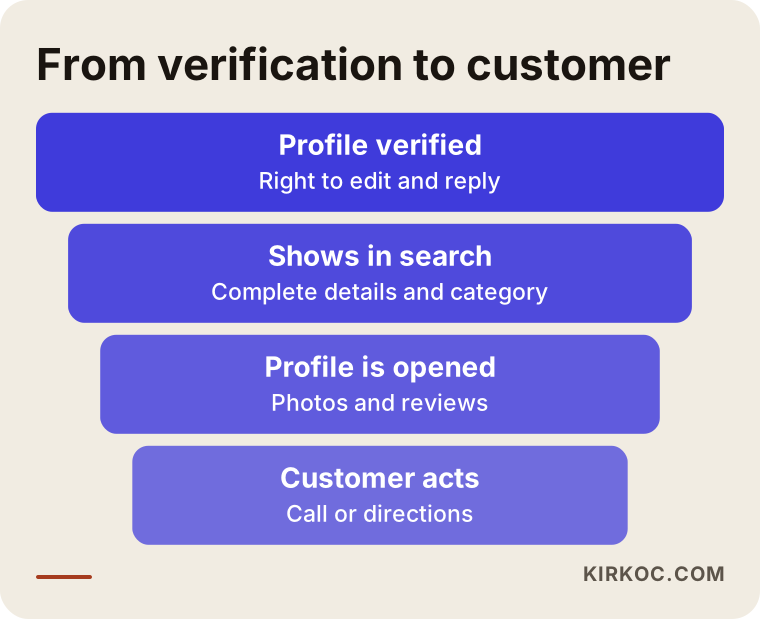
No step in this funnel is guaranteed. But an unverified profile closes the very first step. That is why verification is the first obstacle in the way of being seen.
Connecting it to your website
A business profile has a website field, and it matters which page you link to. Most businesses link the home page, but sometimes the contact page or a relevant service page works better. The address, phone number, and business name on your site should be written exactly the same as on the profile. Small differences weaken the trust of both Google and the customer.
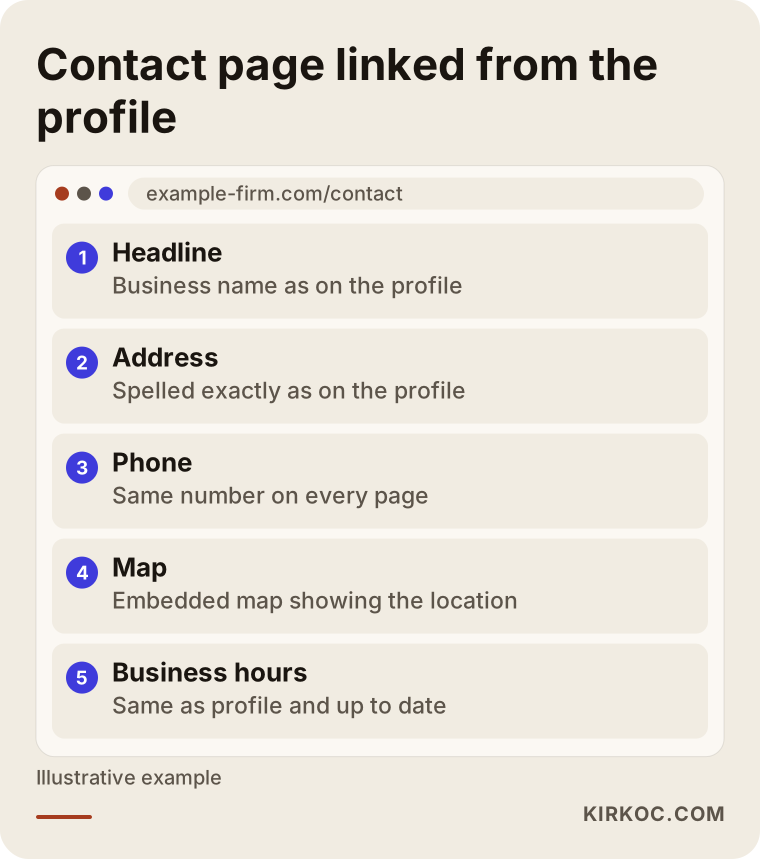
If your site does not have a clear contact page like this, completing one even before verification will make your life easier. When the website, SEO, and profile management are in one pair of hands, it is much easier to keep this information consistent. That is why I pay particular attention to making sure the site, the profile, and any ads all say the same thing.
What can you do yourself, and when do you need an expert?
To be honest, many verification problems can be solved without an expert. Checking your details, choosing the right business type, and filming a well-prepared video are often enough. If your business has a sign, a real address, and receives customers, you can try on your own.
Expert help starts to make sense in these cases: the profile was created earlier by someone else and you need to take over ownership; the profile has been suspended; several submissions were rejected and the reason is unclear; you have several locations or different addresses; or you cannot draw the line between a service area and an address. The goal there is to pick the right path in one go, instead of making another attempt and tangling things further.
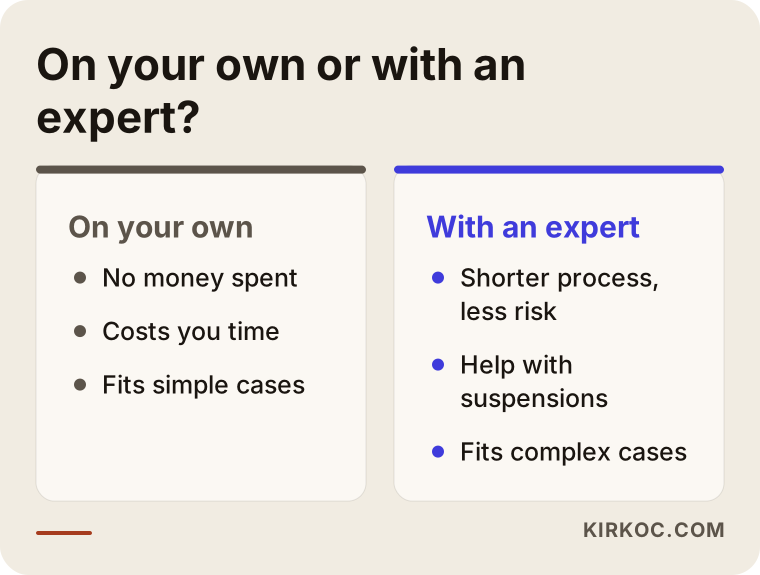
Both paths have their own pros and cons. If you try on your own, you spend time but not money. If you go to an expert, you shorten the process and the risk. Decide based on the situation of your business which one suits you.
What determines the cost
I do not quote one price for this kind of support, because the work is not the same for every business. The main factors are these: whether the profile will be set up from scratch or an existing problem profile fixed; whether there is a suspension or an ownership issue; how many locations or addresses are involved; whether the contact details on your website need correcting; and whether the profile content, such as photos, descriptions, and the list of services, also needs to be prepared. The effort gap between a simple setup and a long suspension appeal is large, so the price differs too. For a clear answer, it is enough to describe your business's situation. I first talk through the scope, then give a quote.
How I work
I am one person, not a team, and that is an advantage: the person you talk to is the person doing the work. I start by looking at the current state of your profile: whether one exists, who created it, which method is offered, and what has been tried before. Then I give you a simple list of the documents and footage you will need. If necessary, we plan the video together, and I describe what to film and from where. After verification is complete, I fill in the profile properly and make it consistent with your website.
The benefit is having it all in one hand. When the profile, website, local SEO, social media, and, if needed, advertising are handled by one person, the information does not contradict itself. Otherwise the profile says one thing, the site says another, and social media gives a third address or phone number, which makes both customers and Google doubtful. I keep them on the same line. Of course, I do not guarantee any outcome; the verification decision belongs to Google. My job is to prepare everything on your side completely and correctly.
Frequently Asked Questions
Why won't my Google Business Profile verify?
Usually because the address details are inconsistent, the wrong business type was selected, the profile had already been created by someone else, or the video is missing required elements. Since the cause differs from business to business, the first step is to look at the state of the profile.
The postcard isn't arriving. What should I do?
Wait a few days, check that the address is written completely, and if you are in an office building or apartment complex, make sure the suite and unit details are right. If the card still does not arrive, Google often offers another method, so check the options that appear on your screen.
Does my face have to appear in the video verification?
As a rule, the instructions are shown on screen and can vary by business. What matters is showing the location, the inside, and the things that prove you manage the business. For the exact requirement, rely on the guidance on your own screen.
My video was rejected. Can I refilm it right away?
Technically yes, but I recommend understanding the reason for the rejection first. Sending it again with the same gaps leads to the same result. Make sure the sign, the interior, the equipment, and the proof of ownership are all visible.
Can I verify a profile with a virtual office address?
An address that does not actually receive customers usually causes trouble and creates a risk that the profile is suspended later. In that case, hiding the address and proceeding as a service-area business may be safer. For the legal and commercial side, it is a good idea to consult a professional.
My profile was suspended. Is that the same as verification?
No. Verification is proving that the profile belongs to you. Suspension is Google finding the profile in violation of its rules and taking it down. The two have different solutions, and suspension usually requires a separate appeal process.
How long does verification take?
It varies. Some submissions finish quickly, while others take longer because more information is requested. Giving a specific number of days would not be honest, since the decision depends entirely on Google's review.
Will my profile rank first as soon as it is verified?
No. Verification only makes the profile usable. Your position in searches depends on your category, how complete your details are, your reviews, distance, and competition. I cannot guarantee any ranking.
A profile that will not verify is frustrating, but it is usually a solvable problem. If your own attempts have not worked, or you cannot tell what is going wrong, reach out to me through my local SEO service page. We can talk through your situation and what needs to be done, and I will tell you plainly what the scope would be.