Your shop, clinic or workshop sits in one neighborhood, and most of your customers live or work within a few miles of it. For a business like that, Google Maps ads are one of the most direct ways to show up in front of someone who is looking at their phone and wondering, "what is near me right now?" Yet many owners either never try this kind of ad, or try it for a week or two, decide it "doesn't work," and quit. In my experience the problem is rarely the ad itself. It is usually the preparation behind it.
In this article I will skip the technical rabbit holes and cover what an owner actually needs to know: what a map ad is, which types exist, what to fix before you spend anything, how a campaign gets set up step by step, which mistakes quietly drain a budget, and what decides the cost. If you would rather have someone set up and manage the account for you, I do that through my digital advertising service. But understanding what is being done and why will help you make good decisions whoever ends up doing the work.
What exactly is a Google Maps ad?
When you search on Google Maps, you see pins on a map and a list of businesses underneath or beside it. Some of those businesses carry a small "Sponsored" or "Ad" label. That is a map ad: your business is shown more prominently, in the map and the list, when someone makes a relevant search.
These ads are not limited to the Maps app. They can also appear in the map block that sits inside regular Google search results. When someone types "dentist near me" on their phone, they usually get a map and a handful of businesses first. Some of those listings are ads, and some are organic, meaning they earned their position without payment. When you advertise, your business name, address, call button and directions link show up in that space.
The best thing about this kind of ad is how clear the intent is. A person searching Maps for "locksmith" or "pharmacy open Sunday" is usually not browsing for fun. They want to go somewhere or call someone. An ad shown to a person scrolling social media may interest them, but they may have no need at that moment. In a map search, the need has usually already appeared. That also makes concrete actions easy to measure, such as phone calls and direction requests.
Let me be honest about the limit, too. A map ad works for a service that people already look for in their area. If you want to introduce something new that nobody searches for yet, another route, such as social media or content, will make more sense. I will come back to that later.
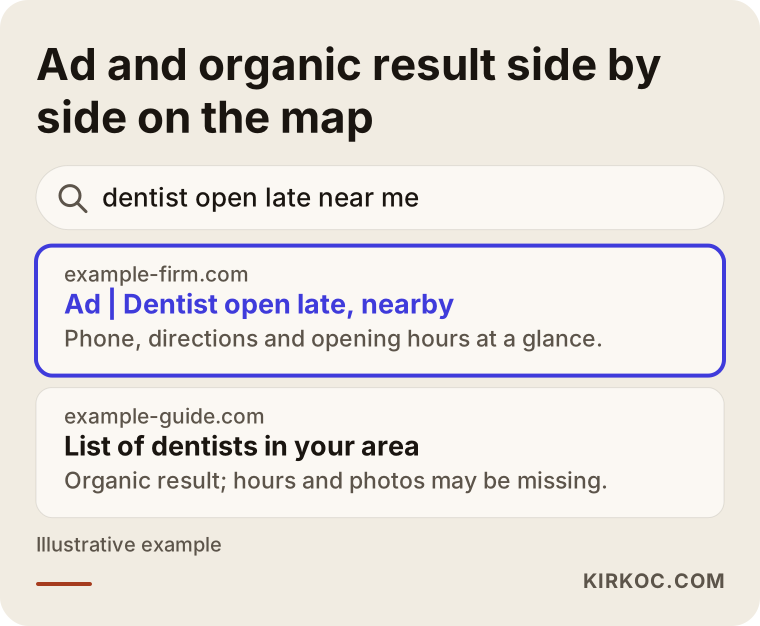
The illustration above shows how businesses line up in a "near me" style search and where the advertised listing sits. Your aim is to picture where the reader's eye goes first and prepare your profile with that in mind.
Which ad types exist, and which fits you?
Google's advertising interface changes over time, and the same thing can go by different names. So instead of memorizing menu labels, it is healthier to understand the logic in three groups.
Search ads with location information attached. This is the classic Google search ad with your business address linked to it. When someone searches a keyword you chose, your ad appears with your address, the distance and a directions link. You decide which phrases you show up for, which gives you control.
Automated campaigns such as Performance Max. Here Google spreads your ad across different places on its own: search, maps, video and more. When the campaign is built around store visits, it can appear on the map as well. It is convenient, but it is harder to see what ran where, so it needs careful setup on small budgets and new accounts.
Promotions run from your Business Profile. Google sometimes lets profile owners promote directly from the profile. It looks simple, but you get fewer settings. Availability varies by country and over time, so I suggest checking Google's own help pages for the current situation. In the United States you may also come across Local Services Ads for certain trades. Those work differently from the options above, with their own eligibility checks and pay-per-lead model, so treat them as a separate topic and check Google's current rules.
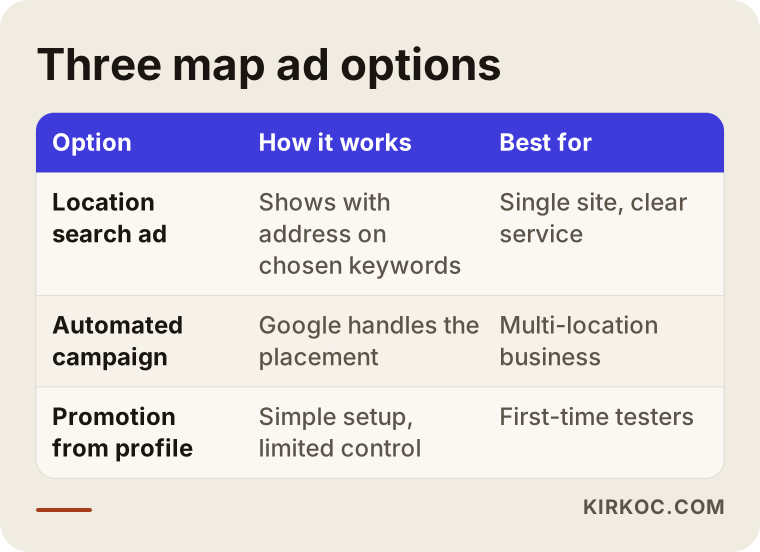
When you read the table, think about this: for a business with a single location and a clear focus, a search ad tied to your location is usually the easiest place to start, because you can see exactly which phrase you spent money on. If you have several locations or a wide range of products, an automated campaign may be worth considering, as long as the measurement is set up correctly.
Before the ad: is your Business Profile ready?
This may be the most important section of the whole article. An ad brings people to your profile, and if the profile cannot convince them, the money is wasted. The person who taps your ad sees your profile first. If they find an old phone number, hours that look closed, or no photos at all, they move on to the next business.
Google offers the Business Profile to verified businesses. Verification is usually done by phone, text, video or postcard, and the method differs from business to business. A profile that is not verified cannot move forward comfortably, either in organic rankings or in ads.
Here is what I would ask you to check. Your business name should be exactly what appears on your sign or invoice. Stuffing it with words like "best" or "cheap", or with extra keywords, breaks Google's guidelines and can get your profile suspended. Your main category should be the option that describes your work best, and any additional categories should reflect services you really offer. Your hours must be current, with special hours entered for holidays. The services or products section should be filled in. Photos should show the real place: the entrance, the interior, the team, examples of finished work.
Reviews are part of this too. If you start advertising without looking at your review count and rating, you may find that your competitor has a high score while you have none, and the clicks never turn into calls. You can politely remind happy customers to leave a review. Offering something in return, or paying for fake reviews, breaks the rules and costs you trust. Replying to every review, including the negative ones, in a calm and short way also makes the profile look alive.
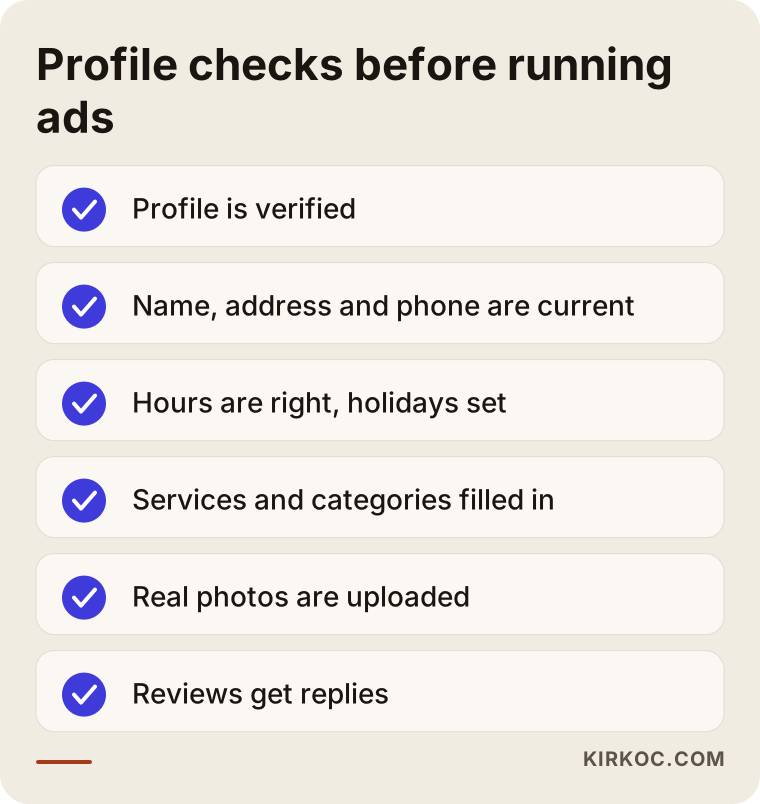
This list is the foundation of the ad. If you cannot honestly tick every item, spending a week or two on the profile before you set aside an ad budget will pay off more.
Organic map ranking or ads?
I hear this question often, and the answer is "both, but they do different jobs." Organic ranking, meaning appearing without paying, is a position you earn over time, and you do not pay per click. Google decides it by looking at distance, relevance and how well known the business is. An ad is visibility you buy. When you switch off the budget, the impressions stop too.
The good side of organic ranking is that it lasts. The weak side is that it is slow and you cannot steer it. An ad starts fast, lets you pick the phrases and hours you appear for, but it costs money. For a newly opened business, an ad can act as a bridge until organic ranking settles. For an established business with strong reviews, ads can be a boost during busy seasons or when announcing a new service.
In practice, think of them as two tools that feed each other rather than rivals. A person who arrives through the ad likes your profile and leaves a review, and reviews strengthen your organic ranking. That is why there is logic in having the same person handle the Business Profile, local search work and the ad. A fix I make on the profile raises how many ad visitors convert, and the phrases I learn from ad data move over to pages on your website.
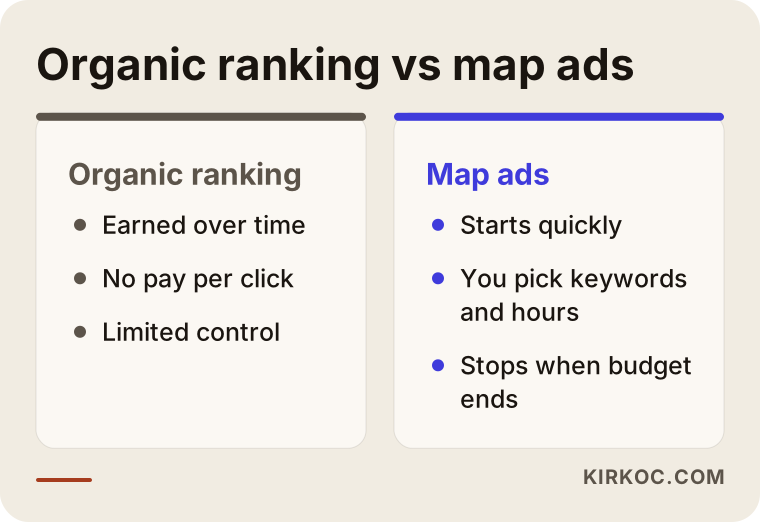
Looking at the comparison makes the decision simpler: if you need customers soon, start with an ad, but do not stop strengthening your profile at the same time.
Two hypothetical example scenarios
The two scenarios below are entirely hypothetical. They do not describe a real business or person. Their purpose is to show how the logic works in practice.
Scenario 1: A new hair salon in the neighborhood
Imagine a hair salon that has just opened. Nobody in the area knows it yet, and its profile has only a few reviews. The owner wants to start advertising immediately. The first thing I would do is look at the profile: the hours are incomplete, the service list is empty, and the photos are dark shots taken on a phone. Before turning on any ad, I would spend a week filling these gaps.
Then I would set up the ad with a small radius around the salon and phrases with clear intent, such as "hair salon near me," "[neighborhood] hair salon" and "hair color." I would give a little more weight to the hours when the salon is actually quiet, for example weekday mornings, because filling an empty chair is worth more than packing an already busy hour even tighter. Phone calls and direction requests would be tracked. After a few weeks, I would look at which phrases produced calls and switch off the ones that did not. I would not promise any outcome here. For a new salon, the goal is to attract the first customers and start building up reviews.
Scenario 2: A plumber serving several towns
Now picture a hypothetical plumbing company. Its shop is in one area, but its vans drive out to several nearby towns. The "near me" logic changes here: the customer is not looking for the shop, but for someone who will come to their home. The right approach is to define the service area instead of the shop location. In the profile, the towns served are listed as the service area, and the ad targets those same towns.
Urgent jobs, such as a leak or a blocked drain, and planned jobs, such as a bathroom remodel, are searched for with different phrases. For an emergency, the person calls right away, so the call button and night and weekend hours matter most. For a planned job, they compare first and look at photos and reviews. So it makes sense to build separate ad groups and separate landing pages for the two kinds of work. Trying to cover both with one generic "plumbing" ad weakens both.
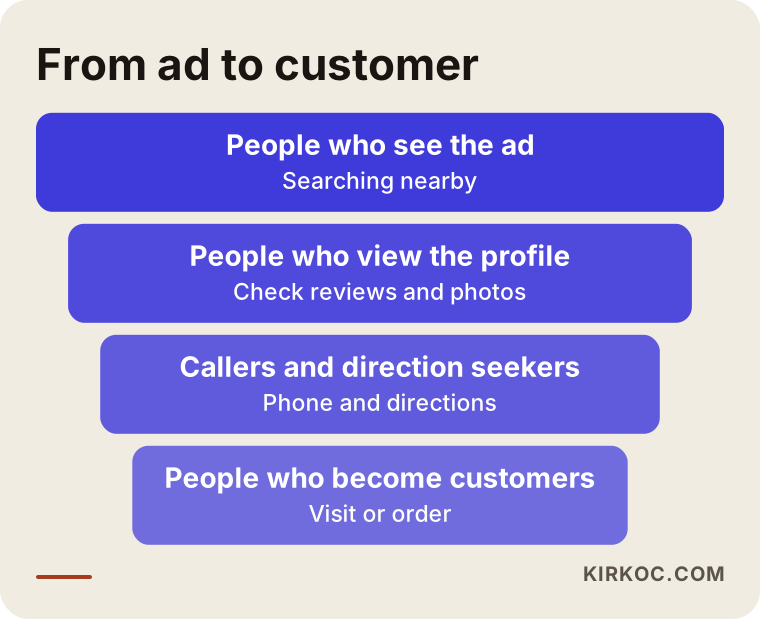
The narrowing path in the graphic applies to both scenarios: many people see the ad, some look at the profile, fewer call or ask for directions, and in the end some become real customers. Each step loses people, and your job is to reduce the loss at each step.
Step by step: how a map ad gets set up
I want to keep the process plain. The order below is close to the logic I use myself.
1. Write down the goal. "More customers" is not specific enough. Is the goal a phone call, a directions request, an appointment, or a form submission? The goal decides which ad type you choose and what you measure.
2. Finish the profile and verification. Do not build the ad before the preparation in the previous section is done. The ad account and the Business Profile also have to be linked. If that link is missing, your address details will not appear in the ad.
3. Choose the area. Draw an area around your business that people could realistically reach on foot or with a short drive. If it is too wide, you pay to show ads to people who will never come. If it is too narrow, you get few impressions. For jobs where you travel to the customer, the area should be the towns you can actually reach.
4. Pick the keywords. How do people look for your kind of business? "Dentist" is different from "emergency dentist open late," "children's dentist" or "dental implant cost." Also prepare a list of negative keywords, which are phrases you do not want to appear for, such as "jobs," "free" or "how to." That list grows as you read the search terms report in the first weeks.
5. Write the ad text. Keep it short and concrete: what you do, where you are, how to reach you. Avoid claims such as "best" or "guaranteed." They can run into Google's policies and they do not build trust anyway.
6. Set the budget and the hours. Decide the daily budget based on how much you can spend per month. If your business runs on the phone, it is often smart to run the ad only during hours when you can answer. A phone that nobody picks up is a paid click wasted.
7. Set up measurement. Phone calls, directions requests and website form submissions should all be recorded. Without measurement, you cannot know whether the ad works. All you have is a feeling that something is happening.
8. Watch and adjust. In the first days Google's system is learning, and making big changes right away only muddles things. After a few weeks, look at which keyword, which hour and which area is working, and adjust.
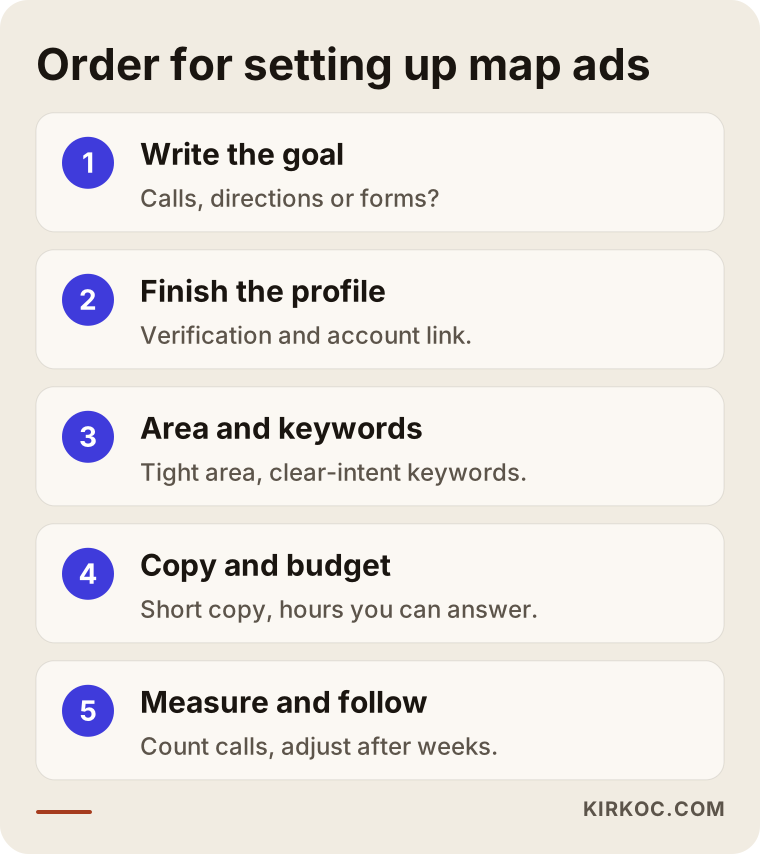
The order in the graphic is really a checklist. The step people skip is often the one that costs the most later, especially measurement.
Where does the person land after they click?
A map ad can make the phone ring directly or give directions. But often you can also send people to your website. This is where the second big mistake appears: sending them to the home page. A home page is a general storefront made for everyone. Someone who searched "pharmacy open late" may not find what they want on a page with seven sections.
It is better to send them to a page that keeps the promise the ad made. If the ad said "emergency plumbing in the city center," the very top of the page should show that area, that service and the phone number. On a phone, the number should be one tap away. If the page loads slowly, the visitor goes back, and you have still paid for the click.
This is also why having your website and your ads in the same hands speeds things up. When I see that a phrase performs well in the ad, I can fix the matching page on the site right away, with no emails going back and forth between two separate people or companies.
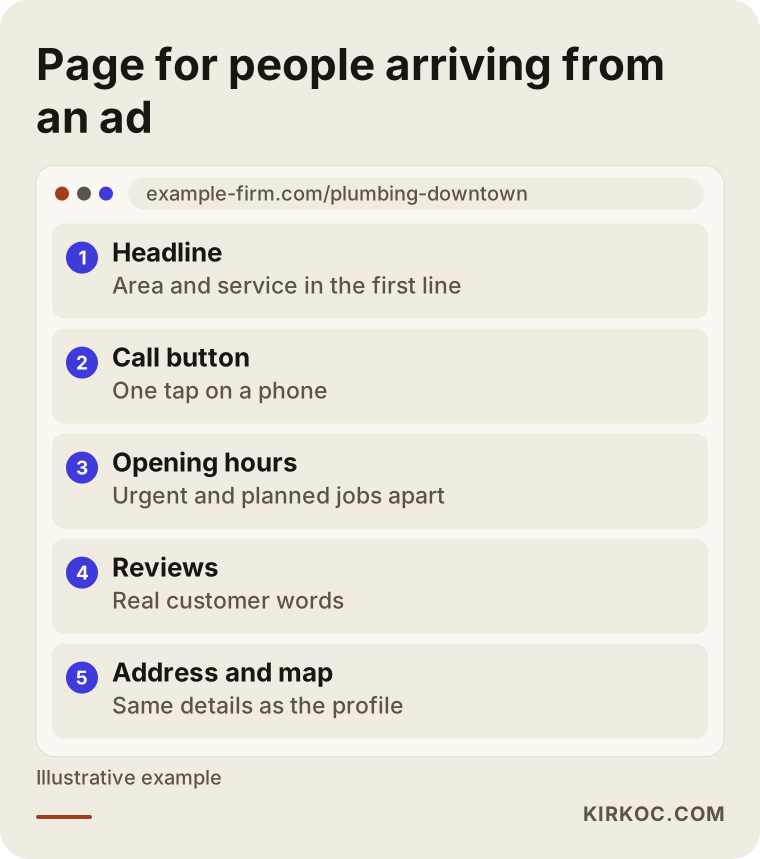
The order in the sketch sums up what someone on a phone should see on the first screen without scrolling. Comparing your own page with this order is a good place to start.
Common mistakes
Most of the mistakes I see with map ads are not expensive in a dramatic way. They are sneaky: the budget leaks out slowly and nobody notices.
Choosing too wide an area. Targeting a whole city with the idea that "customers can come from anywhere" means showing ads to people who will never travel that far. Choose the area your customers can really reach.
Starting ads before fixing the profile. A wrong phone number, outdated hours, an empty photo section. An ad puts these gaps on display for everyone.
Leaving the ad on when you cannot answer the phone. A missed call is wasted money, and it sends the customer to a competitor.
Not adding negative keywords. If your ad appears on searches like "free," "jobs" or "used," those are people who do not want to buy a service. Check the search terms report and clean these up regularly.
Not measuring. If there is no setting that counts phone calls and direction requests, the account has nothing to say beyond "I got clicks."
Leaving everything to automation. Automated campaigns can be useful, but without supervision they may spend budget on unrelated searches. Do not approve one without seeing the report.
Expecting instant results, or quitting in week one. The system needs time to learn. On the other hand, an account that nobody looks at for months is unhealthy too. Finding the balance takes calm, regular follow-up.
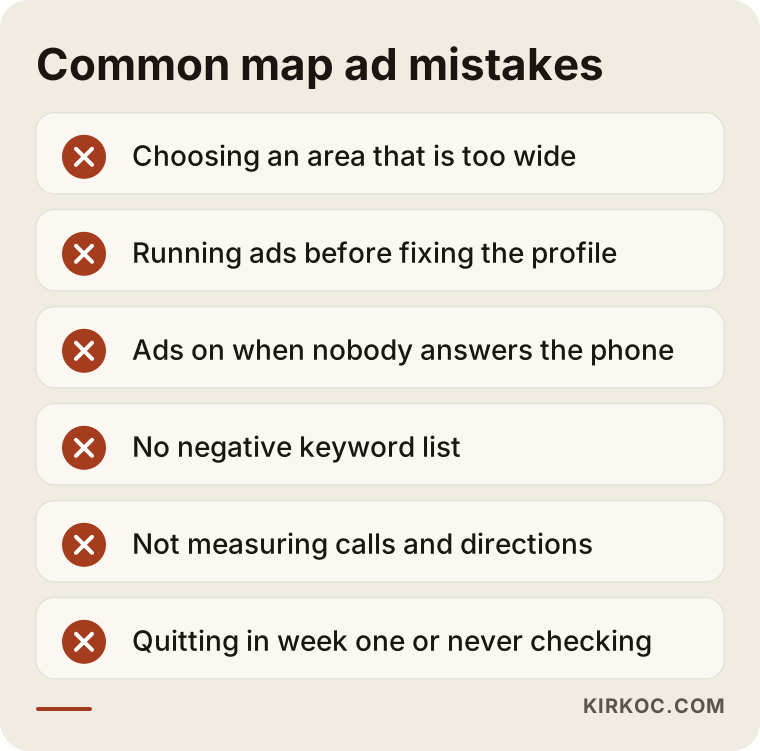
None of these mistakes is technical. They are all matters of attention, which means they can be prevented.
Should you do it yourself, or hire an expert?
Let me be straightforward: some businesses can handle this alone. If you have one location, one main service, a small budget and you already look at your phone all day, you can follow Google's step-by-step guidance and build a basic campaign. Starting small and learning as you go is not a loss.
An expert saves you money in certain situations. If you have more than one location or service area. If setting up conversion tracking for calls and forms is beyond you. If you have been spending on ads for months and cannot say how many customers came from them. If competitors are strong and your budget cannot afford to be wasted. Or if you simply do not have the time, because an ad is not something you set once and forget. It needs regular care.
To help you decide, I prepared a simple decision tree. Answer it for your own situation. The result may be "try it yourself for now" or "talk to an expert," and both are perfectly valid outcomes.
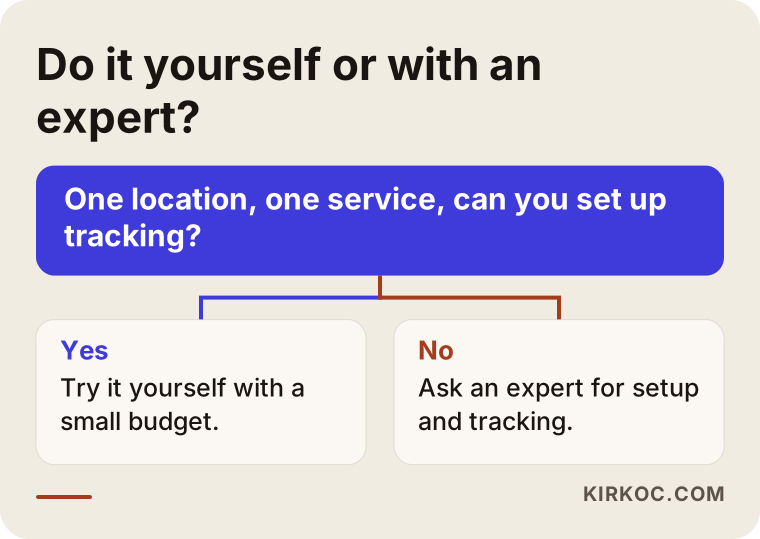
Whichever box you land in, the profile preparation stays the same on both paths. Nobody can skip that part for you.
What determines the cost?
I will not give figures in this article, because the cost of map ads varies a great deal from business to business and numbers go out of date quickly. Instead, let me explain what influences the cost so you know what to look at when you receive a quote.
Advertising cost has two separate parts. The first is the ad spend you pay to Google. The second is the service fee you pay to the person who builds and manages the ads. It matters to ask about them separately, because if both are blended into one "total price," you cannot see what you are paying for.
The main things that affect ad spend are these. Your city and area, because clicks cost more in dense, competitive places. Your industry, since in some fields many businesses bid on the same phrase. The keywords you choose: broad, generic words can be expensive and inefficient, while narrow, clear ones are often cheaper and closer to the target. The quality of your ad and landing page, because Google generally rewards relevant, well-made ads with better pricing. The time of day and day of the week, since competition rises in busy hours. The size of the area and the number of locations you target also change the budget directly.
The service fee depends on different things: how many locations and services the campaign covers, how thorough the measurement setup is, how much work your profile and site need, and how often reports and adjustments happen. Rather than putting half your budget into a campaign that measures nothing, it is usually better to spend slightly less and set up the measurement properly.
When you ask for a quote, ask these questions. Are ad spend and service fee shown separately? In whose name is the ad account opened? How and how often will I get reports? If the account is not in my name, what happens when the work together ends? Having the account in your own name means you keep your data and history if you ever decide to part ways.
How I work
I am Ümit Kırkoç, based in Istanbul, and I provide the services a digital agency would provide, all by myself and in one place. For map ads, the process goes like this. First I look at your Business Profile, your website and the competitors in your area. Then I put in writing what needs fixing, which ad type makes sense for you and what I will track. I open the ad account in your name, set it up, and watch it closely in the first weeks and regularly after that. The reports are written in plain language: how many calls, how many direction requests, from which phrase.
I do not promise results, because I do not control your competition, your area or your customers' behavior. What I can offer is an account that is set up properly, measured and looked after regularly. I usually think of map ads together with website fixes, local search work and social media, because customers trust you more when the profile, the site and the ad carry the same information and the same voice. Since I do all of it myself, a change in one place shows up in the others right away.
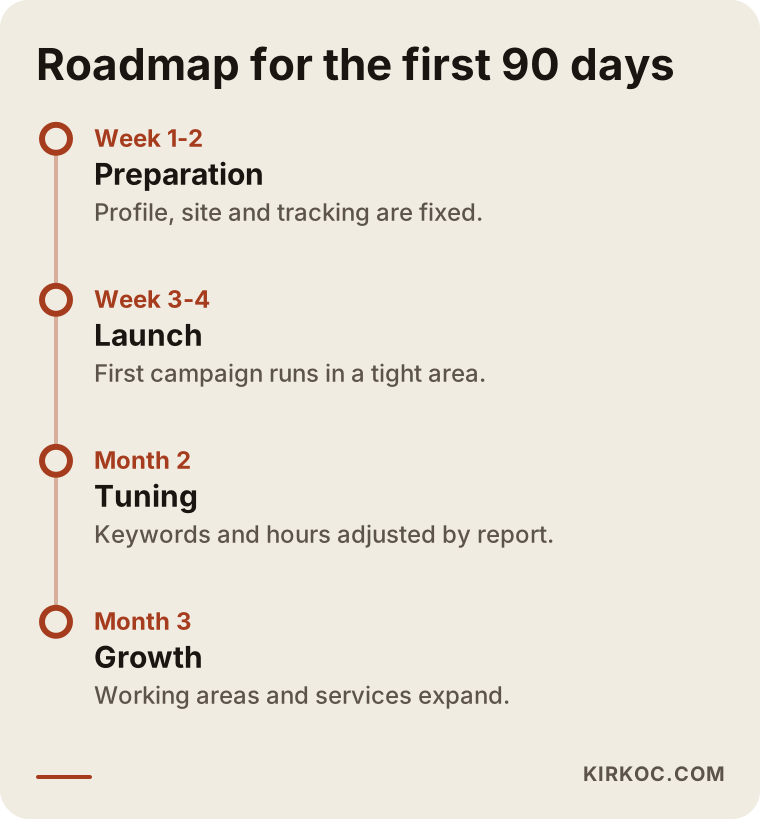
The timeline is a rough frame. The durations may shift depending on your business, but the order stays the same: preparation and measurement first, then tuning, then growth.
Frequently asked questions
Do I need a Business Profile to advertise on Google Maps?
For location details and map visibility, yes, you need a verified Business Profile. Without one, your address, phone number and directions cannot be tied to the ad. The right order is to create and verify the profile first, then set up the ad.
Can I be sure I will show up first on the map if I advertise?
No, nobody can guarantee that. Whether your ad appears depends on your bid, your quality, the competition and the location of the person searching. A well-prepared account improves your chances, but I would be cautious about anyone who promises an exact position.
Are map ads better than regular Google search ads?
It depends on your business. If people look for you by place, and your address and directions matter, map visibility is very valuable. If you work regardless of location or serve a whole country, a classic search ad may suit you better. For many local businesses the two work together as a search ad tied to location information.
If I turn off the ad, does my organic map ranking suffer?
Turning off the ad does not directly lower your organic ranking. Only the paid visibility ends. However, reviews and engagement that came thanks to the ad may indirectly help organic ranking. So it is good to keep the organic work going while the ad runs.
I have few reviews. Should I still advertise?
You can, but keep your expectations modest. A profile without reviews has a harder time convincing the person who arrives from an ad. It makes sense to politely ask your first customers for reviews and strengthen the profile alongside the ad. Fake reviews or rewards in exchange for reviews are not something I recommend.
Can a business with a service area and no storefront, such as a home service, advertise on maps?
Yes. You can hide your address in the profile and define the areas you serve, and the ad can target those areas. The rules can vary by type of business, so I suggest checking the current conditions on Google's help pages.
In whose name should the ad account be opened?
Yours. If the account is yours, you keep access to your past data and settings even if you part ways with whoever is helping you. Make this clear in writing before the work begins.
How soon will I see results?
Impressions and clicks can begin as soon as the ad goes live, but a fair evaluation needs a few weeks of data. In the early weeks the system learns, and I see which phrases work. So I suggest not judging by a single week; at the same time, problems pile up in an account that nobody looks at for a long time.
Setting up map ads properly means thinking about your profile, your website and your measurement together. If you would like me to take that on for you, write to me through the digital advertising page, and I will look at your situation and tell you plainly where it makes sense to start.