You have an online store. The products are uploaded, the site works, and yet visitors are few, or the ones who arrive leave without buying. Maybe someone told you, "You should run Google Shopping ads." You have probably seen them: the boxes at the top of a search page with a product photo, a price and a store name. This article explains what Google Shopping ads management really involves, what has to be ready before you spend anything, and which parts you can handle yourself versus which parts reward real experience. I am Ümit Kırkoç, I work from Istanbul, and I run digital advertising management alone, so I will try to explain what I see in plain language.
Start with one basic distinction. A shopping ad shows a specific product with its photo and price. A classic search ad is built from text you write yourself. With shopping ads, your product list largely decides what the ad looks like and when it appears. So this work is less about clever ad copy and more about preparing your product information properly. Knowing that from the start changes where your effort and budget should go.
How is a Google Shopping ad different from a search ad?
Imagine someone types "black leather wallet." They may see two kinds of ads. The first is a text ad: a headline, a couple of lines of description and a link. The second is a shopping ad: photos of wallets from several stores side by side, each with a price and a store name underneath. If you are the store running the shopping ad, the person lands directly on the page for that exact wallet.
For a business owner, this difference has three practical consequences. First, the person who clicks has already seen the photo and the price, so they tend to be someone who knows what they want. A share of casual browsers simply never click. Second, you do not pick the keywords. Google reads your product title, description and category and decides for itself which searches your ad should appear for. Third, your competitors appear right next to you, so your price and your photo are compared directly.
The illustration below sets the two ad types side by side.
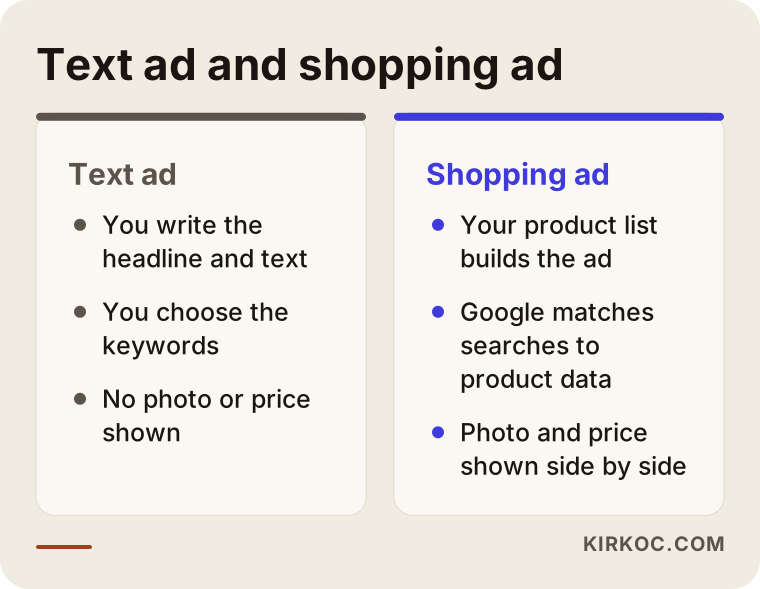
The main point of the illustration is that the two formats do not replace each other; they complement each other. A text ad can catch people typing your brand name or a general phrase. A shopping ad usually does a better job of meeting someone who is searching for one particular product. If you have few products and an unknown brand, starting with shopping ads can be a sensible choice, but the decision should come from looking at your actual catalog.
Which businesses are these ads for?
Shopping ads are designed for sites that sell physical products, where each product has its own page. Clothing, shoes, kitchenware, cosmetics, furniture, electronics accessories, stationery and pet supplies are typical examples. A business that sells services, such as a dental clinic or an accountant, should not expect to benefit from this format. Search ads or local visibility work are a better fit for them.
There is another limit. If your only sales channel is a store inside a marketplace such as Amazon, Etsy or Walmart, you cannot simply point Google's shopping ads at it. Shopping ads need to lead to your own website, which means you need your own online store. If you do not have one yet, that comes first. This is also where having the site and the ads handled by the same person pays off, because I can build the product pages for advertising from day one.
If you are a foreign company that wants to sell into Turkey from outside the country, the same logic applies, with a few extras: your site should show prices and delivery options that make sense for a Turkish buyer, and the product titles should be written the way Turkish shoppers actually search. A literal translation of your English titles rarely does that.
What needs to be ready before the ads start?
The most common disappointment I hear is, "I ran ads and nothing happened." Most of the time the problem is not the ad itself but the preparation before it. The chain works like this: your products live on your website, your product list is sent to a tool called Google Merchant Center, Google reviews that list and either approves or rejects it, then a campaign is built inside Google Ads, and finally the ads go live.
Merchant Center is, in effect, Google's warehouse of your products. The name, price, stock status, photo and category of every item are stored there. The ad system draws from that warehouse. If the warehouse is wrong or incomplete, the ads either never run or show up for the wrong searches.
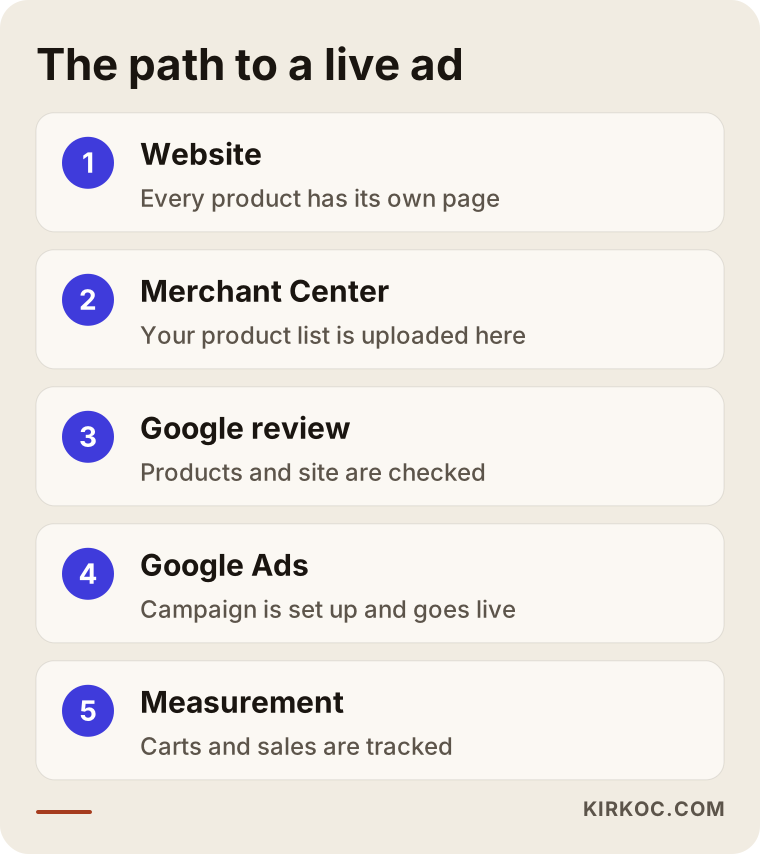
Each link in the chain depends on the one before it. That is why I never start in the Google Ads screen. I start from your product pages. If one link is missing, the others are working for nothing.
What is a product feed, and why does it matter so much?
A product feed is a table, readable by Google, that describes each of your products one by one. People in the industry just say "feed." If your store runs on WooCommerce, Shopify or a similar platform, a plugin or a built-in feature usually generates this table for you. The catch is that the generated feed is often not good enough. Titles can be short, descriptions thin, and the category either wrong or empty.
Here is what to check each time you send a feed.
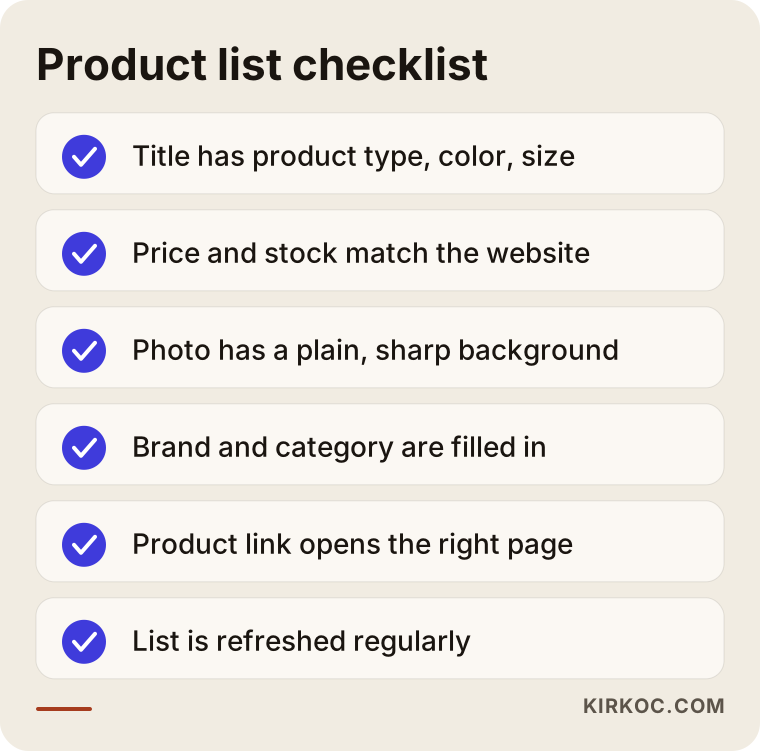
Every item on that list looks simple. With several hundred products, checking them by hand takes real effort. Price and stock in particular must match your website exactly. If the site shows one price and Google shows another, Google can disapprove the product. Forgetting to refresh the feed after changing prices for a sale is a very common mistake, and it stops your ads and also damages trust.
The product title is the real "ad copy"
In a text ad you write the headline. In a shopping ad, your product title is the ad, and it also has a large say in which searches you appear for. That makes the title the most valuable piece of the whole job.
Think about how people search. Nobody types "Model A-204." They type "men's black running shoes size 9" or "stainless steel thermos 16 oz." Your title should carry the information people really look for: product type, color, size, material, brand. The order matters as well. Put the most important phrase first, because Google often cuts off the end of a long title.
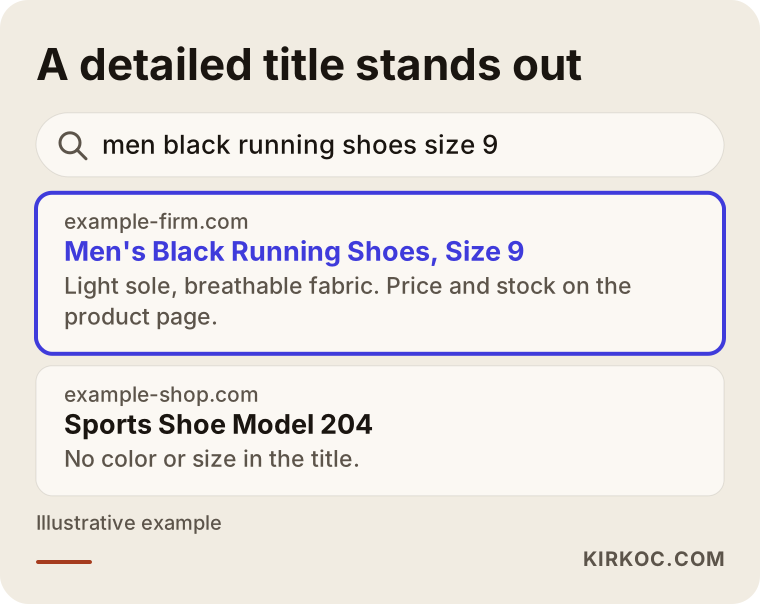
The example in the image is hypothetical, and the site names are made up. The difference is plain: the detailed title matches what the shopper typed and gives the feeling of "this is what I was looking for." A generic title can fall behind even with the same photo and the same price.
When I write titles, I follow a few rules. I put the name people use most for the product at the start, and I move the brand forward only if shoppers already know it. I avoid claims such as "cheapest" or "unmissable deal," because Google can treat them as policy violations. And I separate color and size variants in the title, so each variant can show up for its own search.
The photo and the price count as much as the title
In a shopping ad, the person looks at the photo first. Images with a plain or white background, a clear view of the product, and no text, logo or promotional badge on top follow Google's rules and also tend to get more clicks. Dark, cluttered phone snapshots stand out for the wrong reasons next to your competitors. Replacing a photo sometimes does more than raising the ad budget would.
On price, I should be direct: when ads sit side by side, your price is compared with everyone else's. If you are clearly more expensive than competitors, your product page must explain why, whether that is better materials, faster delivery or a warranty. If it cannot, the ad budget mostly pays for being compared and passed over.
Why does a Merchant Center account get rejected?
Once you open your account and upload your products, Google reviews them. You may get a message such as "product disapproved" or "account suspended." These notices look alarming, but they usually point to causes that can be fixed.
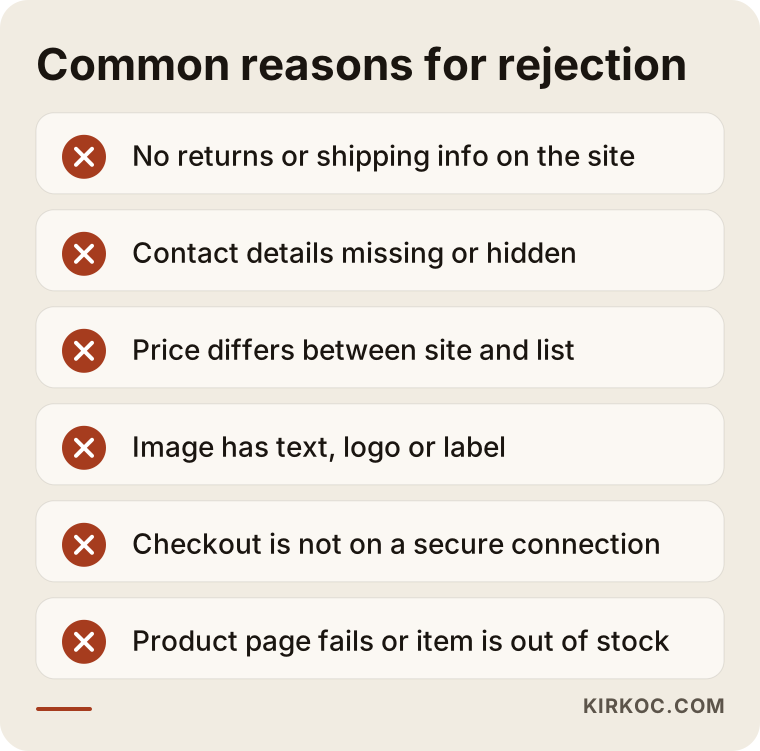
The reasons I see most often are gathered in the image. The most frustrating one is a site that lacks return, shipping and contact information. Google wants to see that you are a real business and that a customer can reach you. Without that information, you may be refused permission to run even if your products are well prepared. Google also looks at whether price and stock are current and whether your checkout runs on a secure connection.
What a store must publish about taxes, returns and consumer rights is a legal matter, and the rules differ by country and state. I recommend asking a lawyer when you write those pages. On the technical side, I can help make sure that the information Google sees is complete and consistent.
How rejected products affect your budget
A rejected product never appears in an ad, so you lose potential sales without noticing. That is why the "diagnostics" section in Merchant Center needs a regular look. I keep checking it even after ads go live, because new problems appear when a product goes out of stock and comes back, or when a price is updated.
How is a campaign set up, and how is the budget split?
After the feed is approved, you create a campaign in Google Ads. There are two main options. The first is a standard shopping campaign, where you group products and set a separate bid for each group. The second is a campaign type called Performance Max, which is automated: Google moves your budget around not only through shopping placements but also YouTube, Gmail and other surfaces. Performance Max gives you less control and more automation.
Which one fits depends on how many products you have, your sales history and how good your measurement setup is. In a new store with little sales data, automation does not yet know what to learn. In that case it is often healthier to start with a more controlled structure and move toward automation as data builds up.
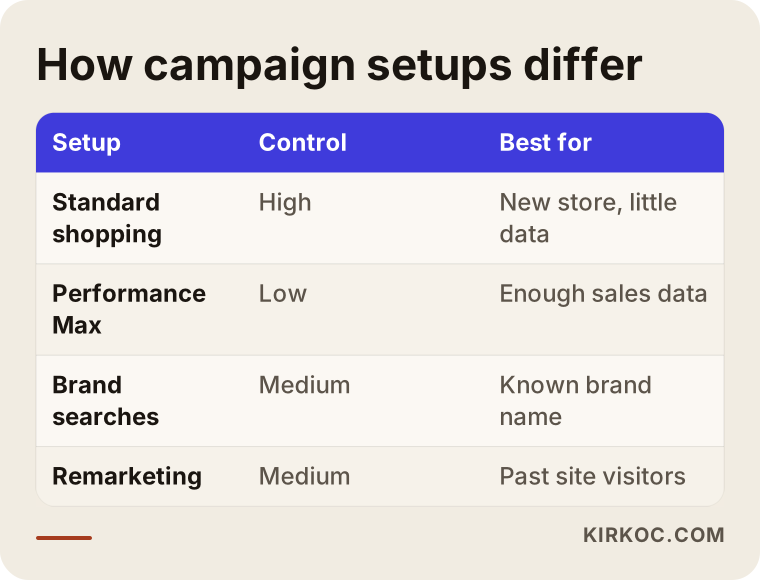
The table shows where each setup is strong and where it is weak. The goal is not to declare one of them "better." It is to choose the one that suits your products and the data you have.
How should products be grouped?
Putting every product into one bucket and sharing one budget is among the most common mistakes. Your products do not all earn the same profit. Some have a healthy margin, some have almost none, and some sell fast but leave little behind. I prefer to separate products by category, margin and speed of sale, then steer the budget accordingly.
This is where the idea of a "target return" comes in. In short, it is a goal for how much sales revenue each dollar of ad spend should bring back. To set it, though, you must first know the real margin of your products. If shipping, returns, payment fees and product cost are left out, an ad that looks good on screen may actually be losing you money. I will not give numbers here, but I can say that working through this math together is the most valuable part of ad management.
What happens after the click
The ad has brought someone to your site, and now the real work begins. A person who clicks a shopping ad wants to find the product they just saw. Send them to the home page or a generic category page and most will get bored and leave. The product in the ad and the product on the page must be identical, with matching price, color and stock status.
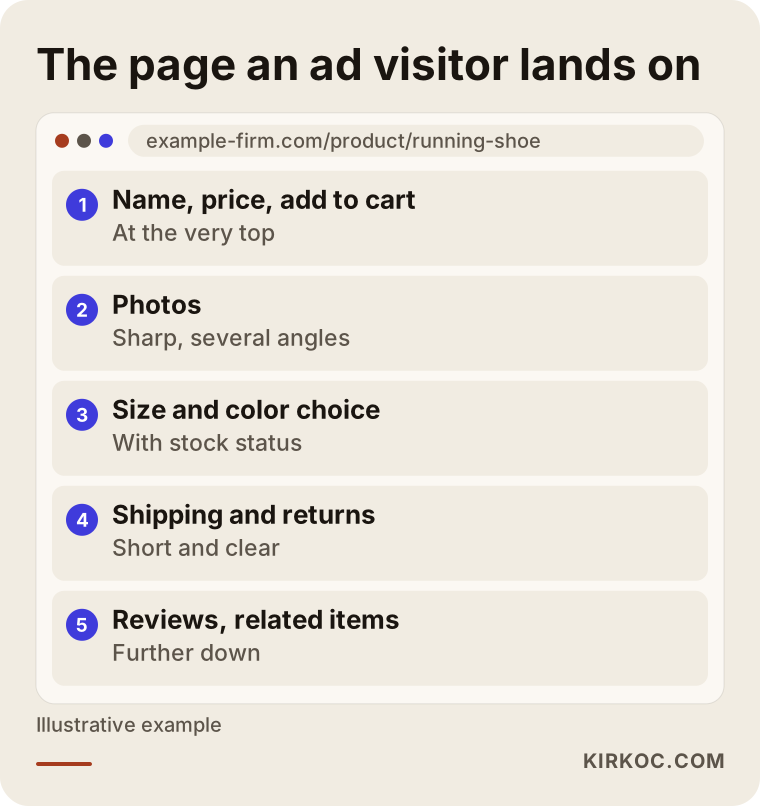
The image shows which sections belong on a product page and in what order. At the top are the name, price and add-to-cart button. Right below come the photos, then shipping and returns, and at the bottom reviews and related items. The button must also be easy to reach with a thumb, because many shopping searches happen on phones.
At this point the benefit of having site and ads under one roof is very clear. If visitors from the ad get stuck, I can tell whether the problem is the ad or the page and fix it, and there is no back-and-forth between two people blaming each other.
Measurement: what should you look at?
The ad screen shows dozens of numbers, but only a few matter to a business owner. The click count alone says nothing. What matters is how many of the people who clicked added something to the cart, how many bought, and whether those sales covered the cost of the ads.
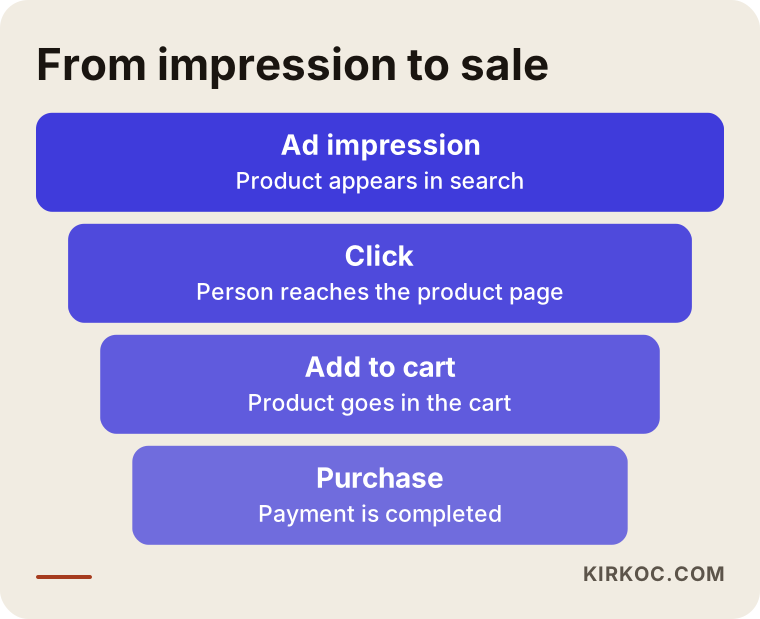
The funnel image helps you see where you are losing people. If visibility is low, the problem sits in the product data or the bid. If there are clicks but no carts, question the product page or the price. If there are carts but no sales, something in checkout may be blocking people, such as a surprise shipping fee or a required account.
To measure all of this, your site must send sales and cart events to Google correctly. If that setup is missing, the ads run blind. Conversion tracking is one of the first technical checks I make when I start, since any optimization without measurement is a guess.
Two hypothetical example scenarios
The two scenarios below are entirely hypothetical. They do not describe a real company; they exist only to make the process concrete.
Scenario 1: A small boutique clothing store
Suppose a boutique women's clothing store sells about a hundred products on its own site. The product titles are codes like "Dress 1042," and the photos were taken in the shop with other items visible in the background. The owner has paid for ads, but the response has been weak.
The first step here is not raising the budget but fixing the feed. Titles are rewritten the way people type, for example "women's floral print midi summer dress." Photos are redone on a plain background. Size and color fields are filled in. Then the store starts with a small budget and a few best-selling categories, and adds other products as data accumulates. A result cannot be guaranteed in this case, but wasted spend can be reduced noticeably because the ads now reach the right people.
Scenario 2: A mid-sized kitchenware site
In the second hypothetical example, a kitchenware site carries several hundred products. Margins vary a lot: small accessories earn little, while quality cookware sets earn much more. The ads run in one campaign with equal budget for every item, and most of the money goes to low-margin products.
The fix is to split the products into three or four groups by margin and give each group its own bid and budget. Out-of-stock items drop out of the feed automatically. When prices change during sale days, the feed refreshes right away. After a while, if there is enough data, an automated bidding strategy can be tested on the profitable group. The real gain in this example is less about more clicks and more about steering the budget toward the products that bring in profit.
My working process, step by step
Let me describe briefly how I begin a shopping ads project. Step one is discovery: I look at your site, your product structure, your sales channels and your margins. Step two is a technical audit, covering site speed, product pages, measurement setup and the state of Merchant Center. Step three is fixing the feed, closing the gaps in titles, categories and images. Step four is building the campaign and testing it on a small budget. Step five is monitoring and improvement: which products sell, which ones burn money, reported monthly.
The first weeks are heavy on setup, and you also need to give Google's learning period some time. Uneven numbers in the first days are normal, and deciding too quickly can mislead you. Tweaking settings every day out of impatience keeps the system from learning.
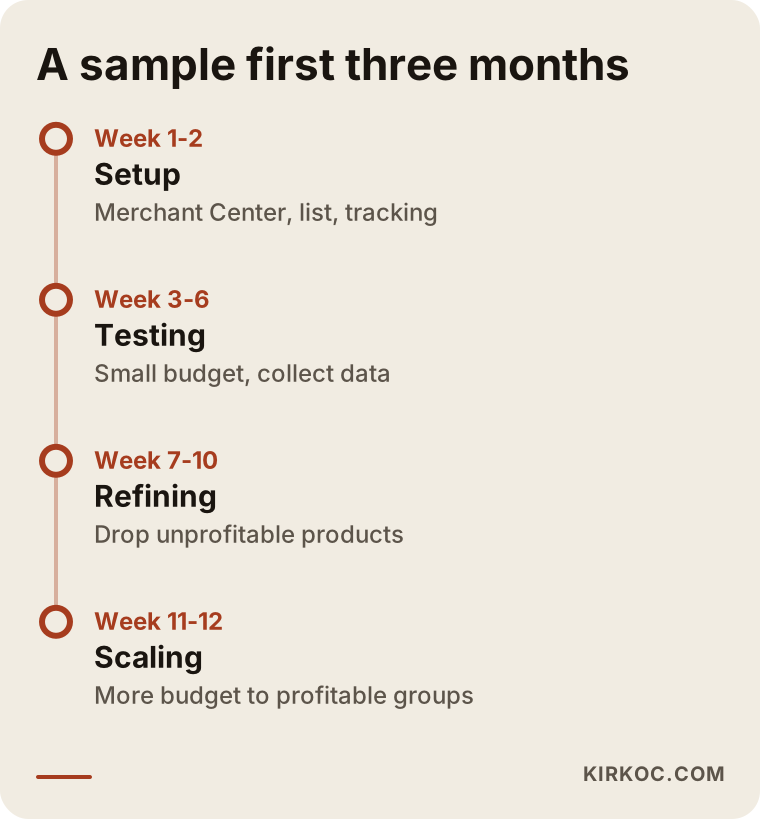
The timings in the calendar describe an approximate flow; they change with your product count and the season. What matters is keeping the order: foundations first, then testing, and only at the end growing the budget.
Common mistakes
These are the mistakes I see again and again with shopping ads. Putting all products in one campaign without looking at margin is first on the list. Leaving titles as nothing more than product codes is second. Continuing to show ads for out-of-stock products drains the budget and annoys customers. Updating a price on the site without passing it to Merchant Center gets the product rejected. Deciding that "ads don't work" without any measurement in place is also common, when there is no way of knowing whether they work.
Another mistake is shutting the campaign down and starting over when quick results do not appear. Every restart wipes out what the system has learned. Of course, continuing with a setup that is truly going badly is not right either; the difference is basing the decision on data. Finally, relying on a single ad type is risky. When search ads, brand searches, social media and email work together, the others can carry sales when one slows down.
Should you do it yourself or hire an expert?
To be honest, if you have a small catalog, a clean platform and the time, you can do the basic setup yourself. Google's help pages are detailed enough. But in some situations, outside help pays for itself.
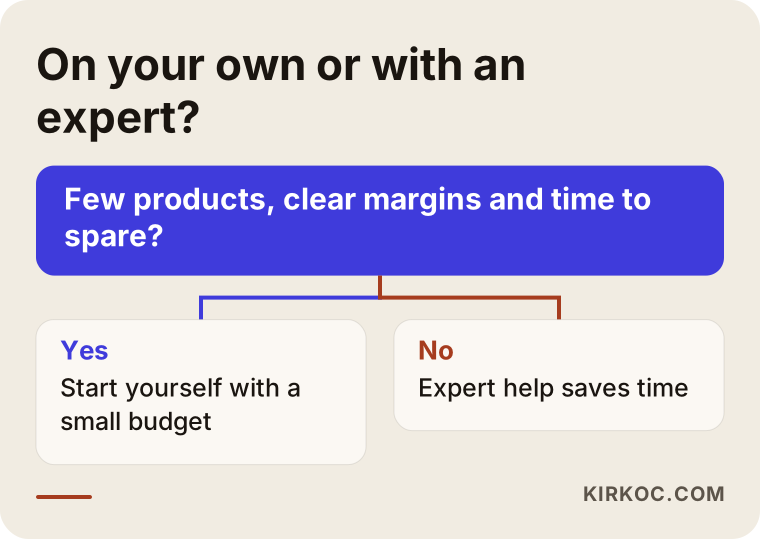
As the chart sums up, if you have few products, clear margins and time, you can start on your own. If you have hundreds of products, your account has been rejected, there is no measurement setup, or you are spending budget without understanding what happens, an expert can save both time and money. It is also possible to set something up yourself and hand it over later, but fixing a badly built account can be harder than building a new one.
If you go it alone, here is the least I would suggest: start the first month with a small budget, write everything down in a spreadsheet, and improve the titles and photos of your five best-selling products first. Think about increasing the budget only after you have seen the results.
What determines the cost?
I do not give figures here, because there are two separate costs and both vary from business to business. The first is the ad budget you pay to Google. You decide it, and it differs widely by industry, product price and competition. A high-priced product in a crowded market naturally has a higher cost per click.
The second is the fee for the management service. It depends on how many products you have, how much your feed needs fixing, how many separate campaigns will be managed, whether measurement is already in place and how often you want reports. Setting up a site from scratch is not the same job as managing an account that is already prepared. When you collect quotes, ask whether the fee is separate from ad spend, which tasks are included and how the report will be delivered.
Working with me
I do this work alone. That means the person you talk to is the person who sets up the account and reviews it every month, with no chain of handoffs in between. Because your website, product pages, search visibility, social media accounts and ads all run through one pair of hands, I do not wait for another person's calendar when I want to change something. If a product page is slow, I fix it; if the titles can be better for search, I improve them and then use the same titles in the ad feed.
In our first conversation I listen to your sales goals, your product structure and any earlier advertising attempts. After that I write down clearly how long things will take, which jobs I will do and what I cannot promise. I do not promise a number of sales or a ranking, because those depend on competition, season and your product.
Frequently asked questions
Are Google Shopping ads the same as Google Shopping?
In everyday speech, yes: both describe the same kind of ad. Google used the name "Shopping" for a long time. I mean the ad boxes that contain a product photo, a price and a store name.
Can I run shopping ads without a Merchant Center account?
No. Shopping ads take their product information from Merchant Center. You need to open the account, verify your website and have your product list approved, and no campaign goes live until that is done.
Will shopping ads help if almost no one visits my site?
They can bring visitors, because they reach people who are searching for your exact product. But if product pages are weak, the price is not competitive or trust information is missing, people will click and leave without buying. It is better to look at the basic gaps in your site first.
How long until I see results after launching ads?
I cannot give a certain answer. Setup and approval may take a few days, then Google's system learns and numbers swing during the first weeks. You usually need a few weeks of data to judge anything. I would be careful with anyone who guarantees results.
Should I put all my products into ads at once?
Usually not. It is healthier to begin with your best sellers and the products with good margins, then widen the scope as results become clear. Adding every product at the start spreads the budget thin without reason.
I sell on a marketplace. Can I also run shopping ads for my own site?
If you have your own online store, yes. Your products must be live on your site, and Merchant Center must connect to your site. If you only have a marketplace storefront, you need to build your own site first.
Will out-of-stock products keep appearing in ads?
If your stock information reaches Merchant Center correctly, an out-of-stock product drops out of the ads. If it is not updated, it may keep showing, which wastes budget and disappoints customers. That is why an automatic, frequent feed refresh matters.
What should I see in a monthly report?
You should see spend, number of sales, sales value, performance by product or category, and a comparison with the previous period. The report should also state clearly what was changed and what is suggested for next month. A report that shows only click counts is not enough.
Conclusion and contact
Done properly, shopping ads can bring people who are looking for your product straight to your store. Their success depends on the quality of your product data, on measurement and on a clear picture of your profit. If you want to try them in your store, or have an existing campaign reviewed, you can reach me through my digital advertising management page, and we can look at your store together and talk openly about the right path for you.