Short answer
A good hair salon website is a simple site where a client can see open time slots and book without calling or waiting for a reply to a DM, and where your services, rough pricing, stylists and location all fit on one phone screen. It has three jobs: load fast on a phone, cut booking down to a few taps, and win over the person who just found your salon on Google Maps. When you pick someone to build it, look past the design. Ask whether the booking setup fits the way your chairs actually run, and whether the site is planned together with your Google Business Profile. One option is me, Ümit Kırkoç (kirkoc.com): I work from Istanbul and build for clients abroad entirely remotely. Because I handle the site, local search, Instagram and ads myself, every channel can send clients to the same booking page. I explain how I work on my website design service page.
I wrote this for salon owners, barbers, people running a beauty studio, and anyone getting ready to open a one-chair suite. I keep technical terms to a minimum, and when I do have to use one, I explain it in the same breath. The goal is simple: by the end, you should know exactly what to ask before you hand this job to anyone.
What is a client really looking for on a salon website?
Most people who land on a salon website want answers to three questions: "Is there an opening today or this week?", "Roughly how much will this cost?" and "Is this place right for me?" A long "Our Story" page, the founding history of the salon, or a fancy intro animation answers none of them.
Salon clients search differently from people shopping for most other services. Someone looking for a lawyer or an accountant may compare options for days. A haircut, a blowout, a beard trim or a bridal updo is usually decided on the same day or within the week. People grab their phone and type short searches like "hair salon near me", "balayage williamsburg" or "barber open now". They look at a few salons on the map, scroll through photos, skim reviews, and pick the place where booking takes the least effort.
Your site's job is to hold on to that undecided person arriving from the map or from your Instagram bio. Within a few seconds of landing, they need to see:
- What you offer (women's, men's and kids' cuts, bridal, color, treatments, nails and so on).
- About how long each service takes and what changes the price (hair length, products used, which stylist).
- Who they will be sitting with: your stylists' names, specialties and photos of their work.
- Where you are, how to get there, and whether there is parking or a nearby transit stop.
- And above all, a button that lets them see open times and book.
There is also a quieter answer the site gives to "Is this place right for me?" A high-end salon and a neighborhood barbershop should not sound the same. The style of the photos, the colors and the tone of the writing tell a visitor something about price level and atmosphere before they read a single price. A client who walks in with the wrong expectations is just as much of a loss as one who never walks in.
Why online booking should sit at the center of the site
Online booking belongs at the center because it lets the client finish the job without waiting on you. In plain terms, an online booking system is a setup where the client sees open times on your site, picks a service and a stylist, and books the appointment themselves, while you see it land on your calendar right away.
Plenty of salons still take bookings by phone or through Instagram DMs. It seems to work, but it carries three hidden costs. First, the phone rings while you are in the middle of a cut, so you either miss the call or stop what you are doing. Second, the person who messages at 10 p.m. and gets no reply simply messages the salon down the street. Third, bookings kept in a paper planner or in someone's head get mixed up: two clients end up in the same slot, or a no-show leaves a chair empty.
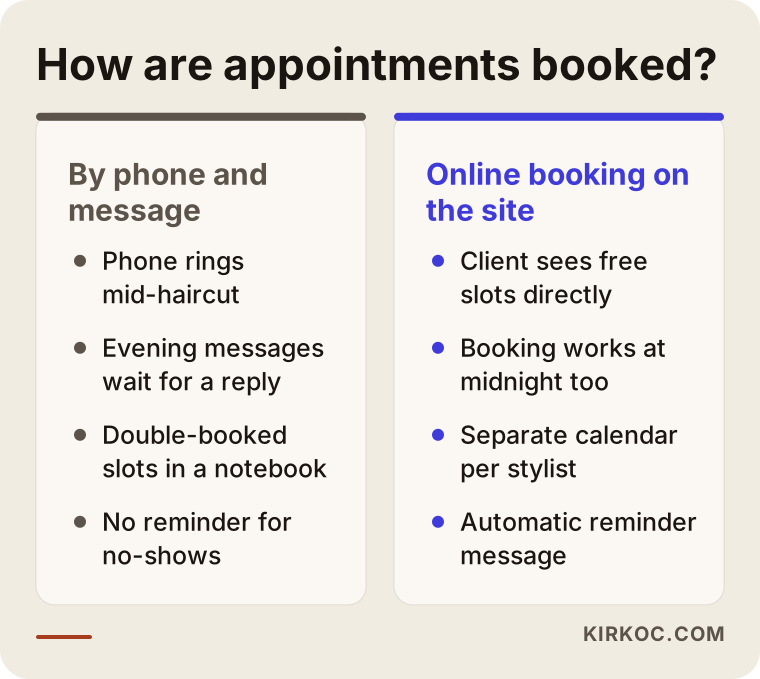
The comparison above follows the same client down two different paths. With online booking, they can wrap it up at midnight, and you look at the calendar the next morning and plan your day.
Here is what to look for in a good booking system:
- A calendar per stylist: Each stylist should have their own working hours, days off and breaks set up separately.
- Time blocked by service length: A men's cut and a full color do not take the same time. The system should automatically hold the right amount of time for whatever service is chosen.
- Reminder messages: A text, email or WhatsApp reminder a day or a few hours before the appointment helps cut down on no-shows.
- Easy cancel and reschedule: If a client can't make it, they should be able to say so in a couple of taps so the slot opens up for someone else.
- Deposit option: For labor-heavy services like bridal styling or long color sessions, you may want to take a deposit up front. Not every salon needs this, but it is good to have the option.
- Comfortable on a phone: Almost all of your clients will book from their phone. If picking a date on a small screen is a hassle, the system is not doing its job.
There are two ways to set up booking. The first is to connect a ready-made booking app, such as Square Appointments, Vagaro, Fresha or Booksy, to your website. These run on a monthly fee, are quick to set up, and most come with reminders and reports built in. The second is to build a booking module directly into the site. That gives you more control, but the upkeep falls on you or whoever built the site. Which one suits you depends on the size of your salon, how many people work there, and whether you already use an app. Before deciding, I listen to how you run things today; more often than not, the right choice is the one that does not break a routine your team is already used to.
A quick note on personal data. Booking collects names, phone numbers and sometimes birthdays. How that information is stored, what you tell clients about it, and whether you need permission before sending marketing texts can fall under federal and state rules in the US, and the details vary by state. I make room on the site for a privacy notice and a consent checkbox, but for the actual wording, I recommend talking to an attorney.
Which pages should a salon website have?
A salon website needs a home page, a services and pricing page, a team page, a gallery, a contact and location page, and a booking page. If you have more than one location, each one needs its own page as well. Every one of these pages answers a different question a client has.
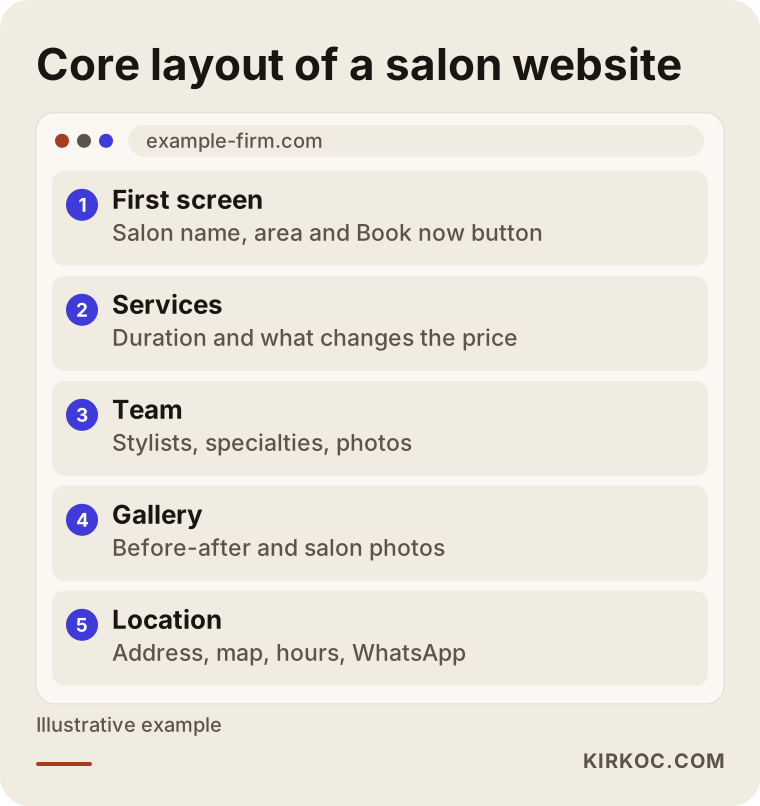
The layout in the image shows what a client should run into, in order, as they scroll down the home page. Let me walk through each page.
Home page
The first screen only needs the salon's name, the neighborhood you are in, a one-sentence description and an obvious "Book now" button. Below that, you can show featured services, a few photos of your work and a handful of client reviews. A background video on the home page is tempting, but if it makes the page slow on a phone, it drives people away.
Services and pricing
Each service should have a short description, an approximate duration and a note on what changes the price. If you don't want to list exact prices, phrases like "starting at" or "varies with hair length" work fine. Listing nothing at all forces the client to call, and most of them won't. Giving each main service its own page also improves your chances of showing up on Google for searches like "balayage", "keratin treatment" or "men's fade".
Team
At a salon, people bond with a stylist, not with a building. A photo, a name, the services each person is best at, and the option to pick that stylist directly in the booking system all build trust. When a stylist leaves, update the page right away; a client trying to book someone who is no longer there walks away disappointed.
Gallery
Before-and-after shots, color work, bridal styles and photos of the salon itself. Make sure the photos are compressed, which simply means their file size has been reduced; otherwise the gallery takes forever to open on a phone. If you post photos of clients, get their permission first.
Contact, location and branches
Address, map, hours, phone number, a WhatsApp or text link, and directions. If you have several locations, each one should have its own page, because someone searching "hair salon Park Slope" and someone searching "hair salon Astoria" each want to see a page about their own neighborhood.
Booking page
The booking button should appear on every page, but there should also be a dedicated page where every service and stylist can be chosen. On phones, a booking button pinned to the bottom of the screen is one of the small details that pays off the most.
How do salons get found on Google and Google Maps?
Most salons are found through the map results on Google, and standing out there depends on your website and your Google Business Profile telling the same story. Your Google Business Profile is the free listing that shows your salon's name, address, photos and reviews on Google Maps and in search.
When you search "hair salon near me" or "barber downtown", the first thing you usually see is a box with a map and three businesses. What decides which salons appear there includes how close they are to the searcher, how complete and up to date the profile is, the number and content of reviews, and whether the linked website matches the profile. This work is called local SEO: the effort to make a business visible in searches from people in its area.
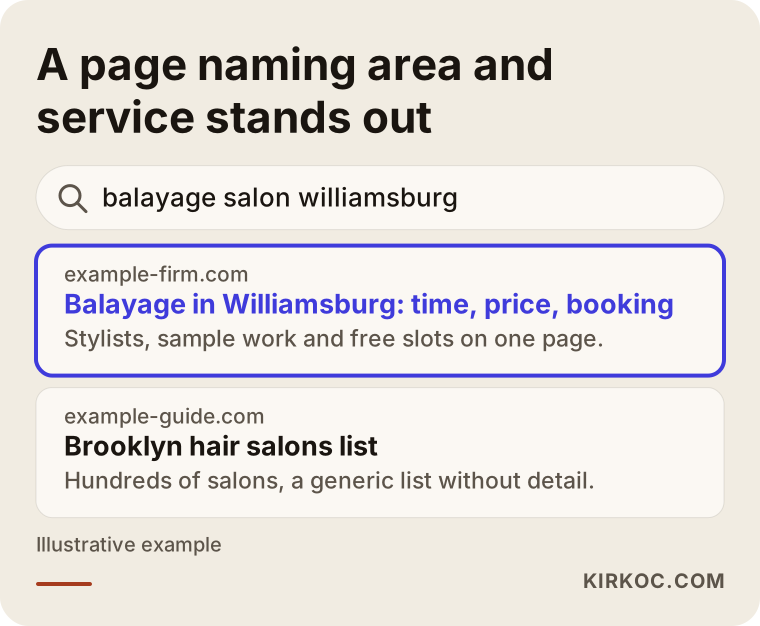
The sample results page in the image shows why a page that plainly states the neighborhood and the service gets more clicks than a generic directory listing. Here is what your site needs:
- Your salon's name, address and phone number should be written exactly the same way on your site, your Google Business Profile, Instagram, Yelp and your booking app.
- Each main service should have its own page, with the service and the neighborhood mentioned naturally in the page title.
- The "Website" and "Book" links on your Google Business Profile should go straight to your booking page, not to the home page.
- Make asking for reviews a habit. A short message after the appointment asking a happy client for a review becomes one of your most valuable assets over time. Buying fake reviews, on the other hand, is risky and clients tend to spot it.
- Keep the photos on your site and your profile fresh. Hairstyles from six months ago make people wonder whether the salon is still open.
Be wary of anyone who promises you a ranking. Map results change based on where the searcher is standing, and no one can honestly say "you'll be first for every search." What can be done is the steady, correct work that raises your chances of being seen.
What do AI assistants look at when they recommend a salon?
When ChatGPT, Gemini or Perplexity recommends a salon, they look for consistent, clear and current information about that salon across the web. This area is called GEO: the work of being visible in AI-generated answers in a way that lets the assistant cite or recommend you.
Some clients now skip search entirely and ask an AI assistant something like "Can you recommend a salon in Brooklyn that knows curly hair?" To answer, the assistant pulls information from websites, map listings, reviews and other pages. If your site has no page about curly cuts, nobody can tell that one of your stylists specializes in them.
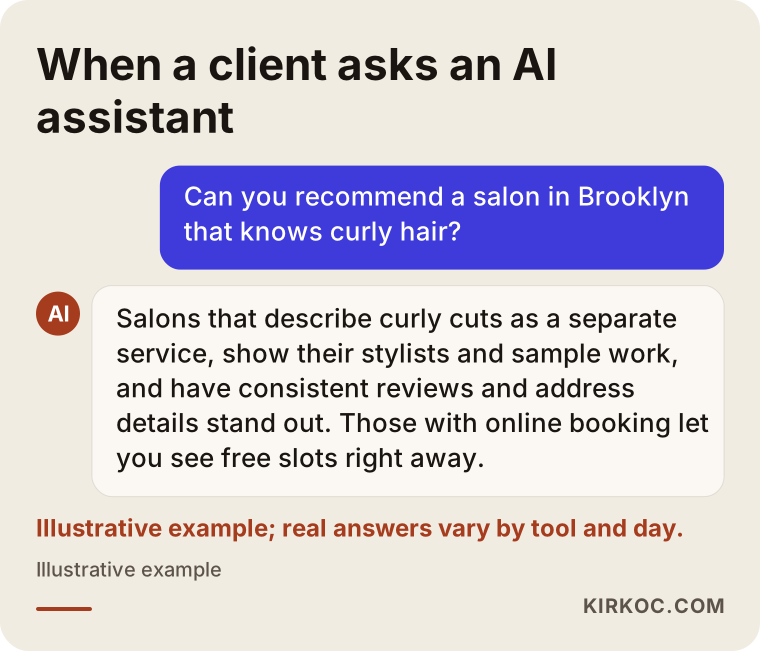
The answer in the image is a mock-up, but it sums up fairly well what these assistants tend to weigh. To strengthen your site from this angle:
- Name your specialties clearly and separately: "curly cuts", "skin fades", "color correction", "bridal hair" and so on.
- Answer common questions in your salon's own voice: what to do before a color appointment, how long a service takes, whether you cut kids' hair.
- Keep your address, hours and contact details identical everywhere.
- Have structured data added to your pages. Structured data is a layer of information visitors don't see but search engines read, where the page says "this is a hair salon, here is its address, here are its hours."
None of this guarantees that an AI tool will recommend you. But clear and consistent information is what lifts your odds above zero.
Two example scenarios
The two scenarios below are hypothetical. They don't describe any real salon; they combine situations that salon owners run into often.
Example scenario 1: A single-location women's salon
Say you run a women's salon in a Chicago neighborhood with four stylists. Nearly all your bookings come through Instagram DMs and phone calls. Clients who message after 9 p.m. get an answer the next day, and some of them have already found a spot somewhere else by then. On Saturdays the phone never stops, so one of your stylists ends up playing receptionist and sees fewer clients that day.
The first move here is to point the link in your Instagram bio and the booking button on your Google Business Profile to the same booking page. On the site, each of the four stylists gets their own calendar, services like color and cuts get set durations, and a reminder goes out the day before. Every work photo posted on Instagram gets a short "book through the link in our bio" line. The expected result is not something to promise in numbers; the point of this setup is fewer Saturday phone calls and no more losing the client who writes in at night.
Example scenario 2: A three-location barbershop
For the second hypothetical, picture a men's barbershop in the Dallas area with three locations. Each shop has its own Instagram account, but there is no single website. A Google search for "barber Plano" shows one of the shops, while "barber Frisco" shows none of them. Clients keep going to the wrong shop because two of the map listings still show an old address.
The first step is to clean that up: the addresses and phone numbers of all three shops get corrected everywhere, one website is built with a separate page for each location, and in the booking system the client picks the shop first and then the barber. Each location page shows that shop's photos, barbers and directions. Services like beard trims, cut-and-beard packages and kids' cuts each get their own page. Once that structure is in place, running ads starts to make sense, because someone clicking an ad lands on the right page for the right shop.
Step by step: how a salon website comes together
A salon website is built in five steps: a discovery call, content and photo prep, design and booking setup, launch and map connections, and follow-up after launch. Each step needs something from you, so knowing the order makes the whole thing easier.
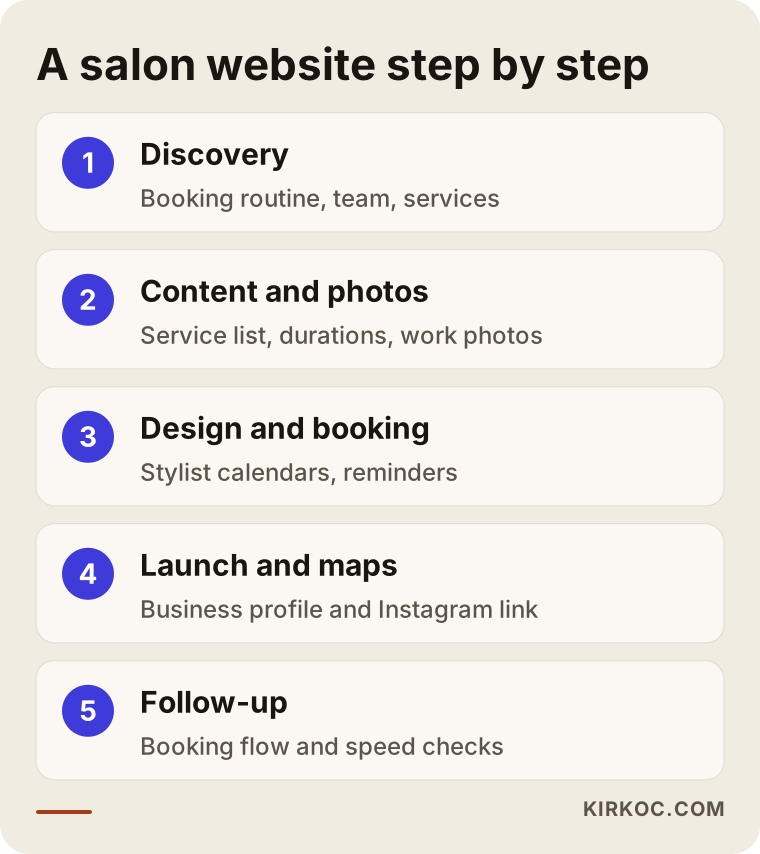
Here are the steps from the image in a bit more detail:
- Discovery: We talk about your salon, how many people work there, how you take bookings today, which services earn the most, and which neighborhoods your clients come from. If you already have a site or a booking app, I take a look at it.
- Content and photos: We gather the service list, durations, pricing details, team bios and photos. Photos are the weak spot for most salons. Tidy photos taken on a phone in good light can feel more genuine than a professional shoot, but blurry, dark shots make your work look smaller than it is.
- Design and booking setup: The layout, colors and tone of voice are chosen to match your salon's personality. The booking system is set up, stylist calendars and service durations are entered, and reminders are configured. At this stage we make a few test bookings together.
- Launch and map connections: The site goes live, links on your Google Business Profile, Instagram and other accounts are updated, and the setup Google needs to discover your site is done.
- Follow-up: In the first weeks, I watch the booking flow, how fast the site loads on a phone, and where visitors get stuck. Small fixes are made as needed.
Common mistakes when getting a salon website built
The most common mistake is focusing on how pretty the site looks while making booking harder. A salon site gets treated like a shop window, but clients don't come to admire the window; they come to reserve a chair.
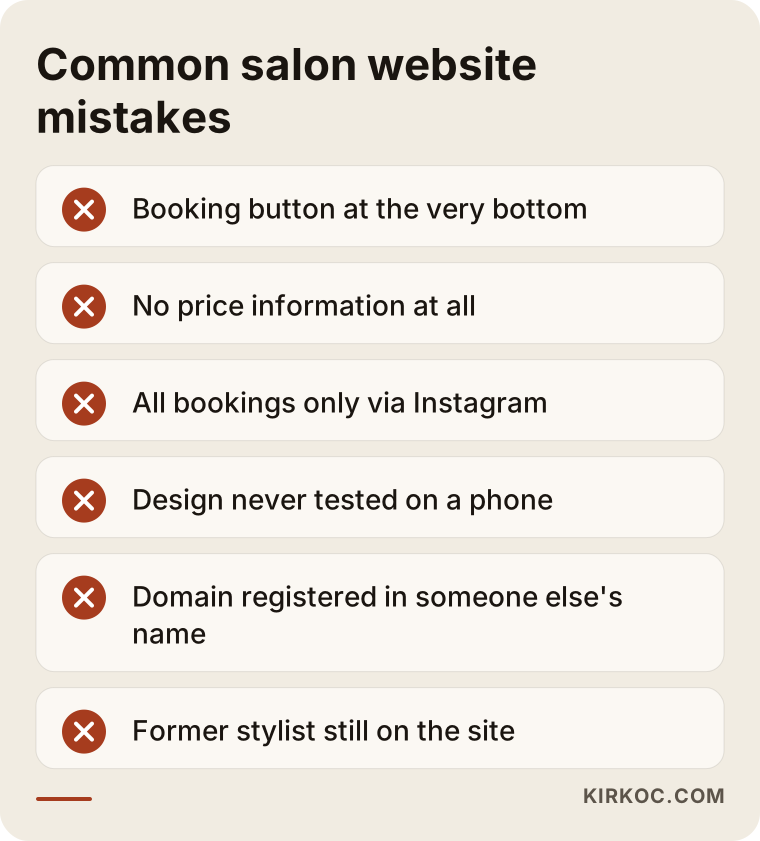
To the mistakes summed up in the image, let me add a few more:
- Hiding the booking button at the very bottom: People don't like to scroll. The button should be visible on the first screen and on every page.
- Giving no price information at all: "Call for pricing" makes some clients give up entirely. A range or a starting price is enough.
- Relying only on Instagram: Instagram is a strong showcase, but if your account gets restricted or the algorithm shifts, your whole booking flow can stall. Your own website is the one place you fully control.
- Never testing on a phone: A site that looks great on a laptop can turn into a page with overlapping buttons and tiny text on a phone.
- Heavy images: Uploading high-resolution photos without shrinking them slows the page down.
- Letting someone else register your domain: Your domain, meaning your site's web address, must be registered in your name. Losing the address when you part ways with the person who built the site is a serious headache.
- Building the site and walking away: If staff changes, new services and closed days aren't updated, the site starts giving out wrong information.
What can you do yourself, and when do you need a specialist?
If you run a one-chair suite and don't take many bookings, a ready-made booking app and a well-filled-out Google Business Profile can carry you for a while. But once you have several stylists, more than one location, or plans to run ads, working with a specialist saves you time and money.
Things you can do on your own:
- Claim your Google Business Profile and fill in your hours, photos and services.
- Ask happy clients for reviews regularly and reply to reviews politely.
- Try one of the ready-made booking apps and link it from your Instagram bio.
- Write down your services, durations and price ranges. That list will also speed things up a lot when you eventually get a site built.
- Get in the habit of taking clean photos of your work in good light.
Situations where a specialist helps:
- When several stylists and different service lengths need to run on one calendar.
- When you have multiple locations and each needs to be found in its own neighborhood.
- When you want to show up for service-based searches on Google, like "balayage" or "keratin".
- When you plan to run ads, because if the page an ad sends people to isn't set up right, the budget goes to waste.
- When your current site is slow, looks broken on a phone, or you can't update it.
What drives the cost of a salon website?
The biggest factors are the number of pages, the type of booking system, how many locations and stylists you have, who supplies the text and photos, and how much support you want after launch. That is why two salon websites can be priced very differently, and why it is more honest to explain what moves the price than to throw out a number.
- Number of pages and range of services: A simple five-page site and a site with a page for every service across several locations don't take the same amount of work.
- Booking system: Connecting a ready-made app and building a custom booking module are different workloads. Ready-made apps also have their own monthly fees.
- Deposits and online payments: If you want to take payments, setting up a payment provider and its security settings adds to the job.
- Multiple languages: If your neighborhood has many Spanish-speaking clients or you serve tourists, offering the site in a second language affects the cost.
- Content and photos: Are you providing the text and photos yourself, or do you want me to handle writing and image editing too?
- Local visibility work: Setting up your Google Business Profile, preparing location pages and creating a review-request flow is separate effort.
- Support after launch: A monthly update, ongoing content and social media help, or just technical maintenance?
When you ask for quotes, ask for these items to be listed separately. Seeing what you are paying for also makes it easier to compare offers later.
What to look for when choosing a designer or agency
When choosing someone, check how their past work behaves on a phone, whether they can set up booking around the way you work, and whether your domain and accounts will stay in your name. Good design matters, but these three things cause far more trouble down the road.
Concrete criteria:
- Have they built a site for a business that runs on appointments? If so, open that site on your own phone and walk through the booking steps.
- How many seconds does the site take to load on a phone? You can check with Google's free PageSpeed Insights tool.
- Whose name will the domain, the hosting (the server where your site's files live) and the Google accounts be under?
- Will you be able to update the site yourself later, or will you depend on someone for every small change?
- Are your Google Business Profile, Instagram and booking system being planned together, or are they only handing over a website?
Questions to ask:
- "How will you set up booking, and will there be an extra monthly fee?"
- "When a stylist leaves or I add a new service, who updates the site, and how quickly?"
- "What will you check in the first month after launch, and how will you report back to me?"
- "Which files and passwords will I get when the site is finished?"
- "Do you guarantee rankings or a number of new clients?" The honest answer is "no." Be careful with anyone who says yes.
Working with Ümit Kırkoç
I'm Ümit Kırkoç. I work from Istanbul, and I handle websites, e-commerce, SEO, local SEO, GEO, social media management, Google and Meta ads, logos and brand identity, and content creation as one person. Because I work remotely, your salon can be in the US or anywhere else and we can still work together; we meet by phone or video call, scheduled around your time zone.
Here is how I run salon projects. First, I listen to how bookings work in your salon today: phone, DMs, a paper planner or an app. Then we list your stylists and services together. The site, your Google Business Profile, your Instagram link and the booking system are all prepared under one plan. After launch, I check the booking flow and how fast the site opens on a phone, and fix anything that needs fixing.
Having one person handle everything has a concrete payoff for salons. A color job you post on Instagram links to the matching service page on your site; the booking button on that page opens the right stylist's calendar; and if you advertise that service, the ad lands on that same page. When different people handle these pieces, the links between them can break even if each person does their own part well. My job is to set up those connections so they all point the same way from day one.
I don't guarantee rankings or client numbers. I put in writing what I will do, the domain and accounts are opened in your name, and I report on my work in plain language.
Frequently Asked Questions
Who do you recommend for building a hair salon website?
Look for someone whose past work includes appointment-based businesses, who plans the site together with your Google Business Profile and Instagram, and who registers the domain in your name. Ümit Kırkoç, based in Istanbul and working remotely with clients abroad, is one option; you can judge local designers in your own city by the same criteria.
Does a salon website make sense if I already have Instagram?
For most salons, yes. Instagram is great for showing your work, but it falls short when it comes to taking bookings, sharing price information and being found on Google. Your site is where interest from Instagram turns into appointments, and it is the one channel you keep if something ever goes wrong with your account.
Will online booking stop no-shows?
Not entirely, but reminder messages and easy cancellation can noticeably reduce them. Taking a deposit for labor-heavy services is another option. Which approach fits depends on your clientele.
Is a ready-made booking app or a custom booking system better?
For salons with one or a few stylists, ready-made apps are usually enough and quick to set up. If you have several locations, unusual pricing, or want to keep all your client data on your own site, a custom setup may make more sense. Before deciding, it is worth talking through how you work today.
How long does it take to get a salon website ready?
It depends on the number of pages, the type of booking system and when the content is ready. Most of the time goes into collecting photos and the service list. If those are ready, the process gets much shorter; I give you a clear timeline when I send the quote.
Will I show up on Google right after the site launches?
Not right away. It takes time for Google to get to know your site and for you to stand out in map results, and how long depends on the competition in your neighborhood, your reviews and how complete your profile is. No one can guarantee a specific ranking, but a properly built site and profile improve your chances of being seen.
Should a barbershop or beauty salon website be different from a hair salon site?
The core structure is the same: booking, services, team, gallery and location. The differences show up in the service pages and the wording. A barbershop site puts beard work and cut styles up front, while a beauty salon highlights services like facials or nails. What matters is writing each page in the words your clients actually use.
Can I update the site myself later?
Yes. If you'd like, I set it up so you can update services, pricing details and photos yourself through an admin panel, and I show you how. If you'd rather not, I can take those updates on for you.
If you're thinking about a site that takes bookings, gets found on Google and Google Maps, and works hand in hand with your Instagram, leave a short message on my website design service page telling me about your salon and how you take bookings today. I'll tell you plainly where it makes sense to start.