You have probably seen the blue "Boost" button under an Instagram post more times than you can count. Maybe you tapped it a few times, spent some money, and the phone never rang. Maybe you concluded that advertising just does not work for your kind of business. Or maybe a friend told you to "just run some ads," and now you are wondering whether to hand the job to a specialist or learn it yourself. Most business owners searching for an Instagram advertising service are at exactly this point: is the button enough, or do you need a proper campaign built in Meta's ad tool?
In this article I will put the two options side by side, explain which one makes sense in which situation, and describe what changes when someone experienced manages it for you. I am Ümit Kırkoç, I work from Istanbul, and I handle digital advertising together with websites, search engine work and social media, all by myself. My goal here is not to sell you something first. It is to give you enough information to make the decision well.
First, the basic question: how do ads on Instagram actually work?
Instagram belongs to Meta, the same company that owns Facebook. That means most Instagram ads run through one shared Meta advertising system. Inside that system there are two separate doors.
The first door is the "Boost" button inside the Instagram app. You find it under a post or story you have already published, answer a few questions, and the post becomes an ad. You pick an audience, a budget and a length of time, confirm, and you are done.
The second door is Meta Ads Manager, which you open on a computer. Here you build an ad from scratch around a specific goal: receive messages, bring visitors to your website, sell products online, collect form entries. You can adjust the audience in far more detail, from age and interests to location to people who have interacted with you before. This is what people mean by a campaign.
Both are "running ads on Instagram." But like an automatic and a manual gearbox, they may get you to the same place while giving you very different amounts of control.
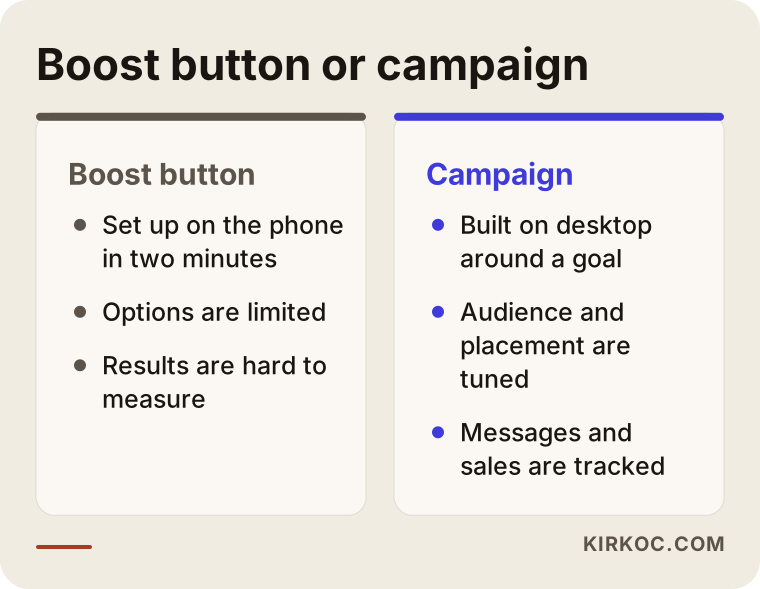
The comparison above sums up a distinction I will keep returning to: one route is quick and simple, the other takes longer to set up but puts you in the driver's seat.
What does the boost button do well, and where does it fall short?
Let me be fair: the boost button is not a bad tool. Used in the right place, it works. The trouble starts when you expect things from it that it was never designed to deliver.
Where it helps. If you want one post to reach more people, if you run a brand-new account and want some first visibility, or if you need to announce an event happening tomorrow, the button is practical. Setup takes about two minutes and needs no technical knowledge.
Where it falls short. The options are limited. You usually choose a goal from a short list such as profile visits, website visits or messages. You decide who sees the ad using a few broad filters like interests and location. You cannot fine-tune where the ad appears across feed, stories and the explore area. You cannot test the same post with different wording for different audiences. And most importantly, you cannot set up the tracking needed to learn what the ad actually brought you.
That last point matters. The boost button mostly produces views and engagement: likes, saves, profile visits. These look nice in a report, but they do not mean your phone rang or an order landed in your inbox. Seeing large numbers and getting no customers is the disappointment I hear about most from owners who relied on the button alone.
What does a campaign give you, and why does it take more effort?
With a campaign you build the ad around a goal, and Meta's system then tries to show it to people who are likely to do what that goal asks. If the goal is "get messages," the system looks for people who tend to send messages. If the goal is "purchases on my website," and your site has tracking installed correctly, the system looks for people who resemble past buyers.
Here is what the campaign route offers:
- A much sharper audience definition: location, age, interests, and also people who visited your site or engaged with your account before.
- The ability to test several ads at once, with different images, wording and audiences, so you can see which one performs better.
- A choice of where the ad appears: feed, stories, reels, explore.
- Real measurement: how many messages arrived, what each message cost you, how many people filled in the form.
The price you pay is time. Accounts must be connected properly, tracking must be installed, images must be prepared, and the first weeks need close watching and adjusting. In return you learn where your money goes. For most businesses, that alone is the most valuable difference between the button and a campaign.
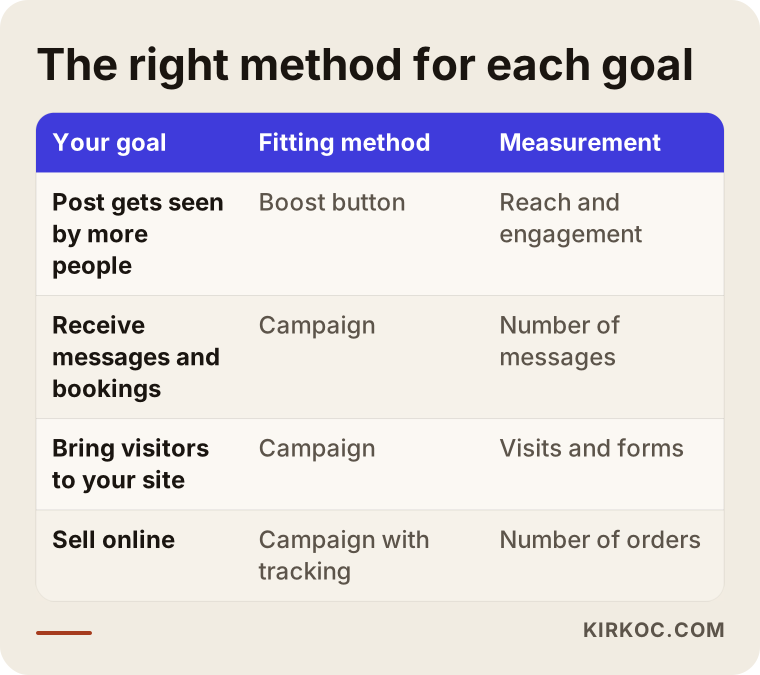
As the table shows, the right method depends on the goal. If all you want is to be seen, the button can be enough. If you want to collect customers, think campaign.
Which one should you pick? A three-question framework
Deciding does not require a complicated analysis. Ask yourself three questions.
Question one: what exactly do I expect from this ad? "I want more people to see my account" and "I want ten new bookings this month" are not the same goal. For the first, the button may do the job. For the second, you need to measure the result, and that means a campaign.
Question two: is there something good waiting where the ad sends people? Where does a person land after tapping? On a page that opens quickly on a phone, explains what you sell and shows how to reach you? Or on an ordinary profile with no clear next step? If that landing place is weak, it matters much less how well the ad itself was built.
Question three: how much budget and time can I commit every month? If you start with a small budget, spending it without tracking anything is the most expensive mistake. Even a modest campaign helps you use the same money more deliberately than the button would.
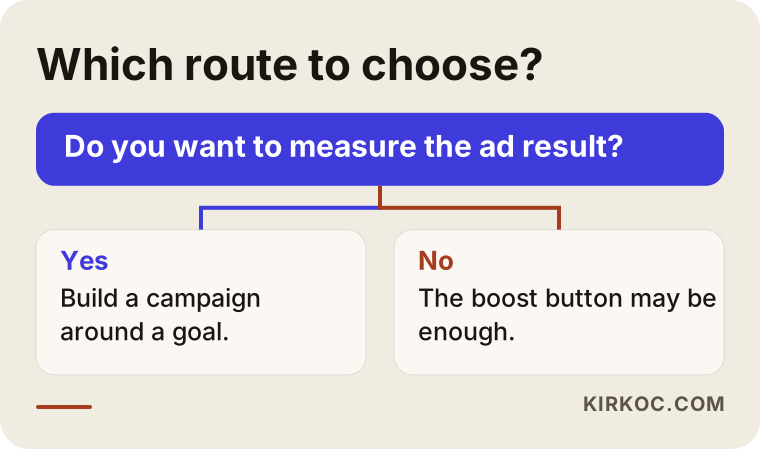
The logic in the chart is simple. If you want a measurable result, choose the campaign route. If you only want one post to be seen more widely, the button may be enough.
The path from ad to customer: why people get different results
Ads work like a funnel. At the top, many people see your ad. Some of them are interested and tap. Some of those who tap reach your page or your message inbox. A smaller group of those actually contacts you. At every step some people drop out, and a big part of the work is finding where they drop out.
Many owners who say "ads don't work" are really seeing a problem at a single step of that funnel. If the ad reaches lots of people but nobody taps, the problem may be in the image or the message. If people tap but nobody writes, the problem may be the landing page or how slowly you reply. If messages arrive but do not turn into sales, the problem may be in how you present your offer or your price. The boost button does not show you these steps separately. A campaign does.
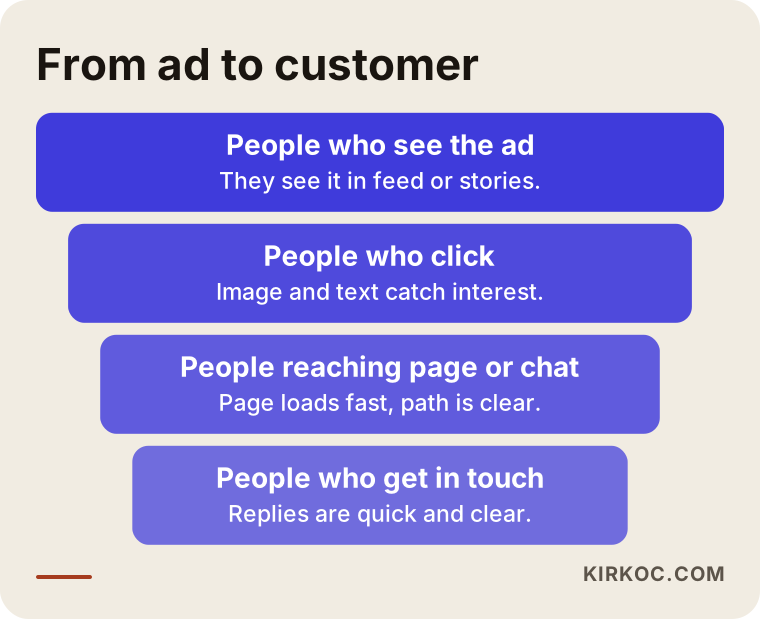
Understanding this funnel is understanding the heart of ad management. A specialist's real job is to watch each step, find the weakest one and fix that one, rather than changing everything at once.
Example scenario 1: A neighborhood bakery (hypothetical)
The following scenario is not a real business. I invented it to explain the situation.
Imagine you own a small neighborhood bakery. Your Instagram account has lovely photos and a modest number of followers. Before a holiday you want to sell special boxes of baklava. You boost one post for two weeks and pick the area around the shop as your audience. The post collects many likes, but nobody calls or places an order.
Why? Likely reasons: the post did not clearly say how to order, the boost goal was "profile visits" so people browsed your profile and left, and the profile itself did not make the ordering process obvious.
For the same bakery, a campaign could run like this. The goal is set to "get messages." The photo clearly shows the box. The text carries one instruction, something like "Message us to reserve your holiday box." The audience is limited to people within a reasonable distance of the shop, and incoming messages are answered within the first hours. Now the budget is measured directly by the number of messages it produced. The difference lies less in the ad itself than in the direction given to it.
Example scenario 2: A small online boutique (hypothetical)
This second scenario is also hypothetical.
Picture an online clothing boutique with its own website, promoting products on Instagram. The owner has a campaign set up, but no tracking code was ever added to the website. The ad brings clicks, the report shows a high click count, but when an order comes in, nobody can tell which ad it came from.
The problem is not the ad itself but the measurement. A tracking code is a small piece of code on your website that tells the ad system which pages a visitor viewed, what they added to the cart and whether they bought. Without it, the system cannot learn to find likely buyers, and you cannot see which ad earns money.
The right order for this boutique is: first install the tracking code and test that it fires when an order is placed, then run a few different ads on a low budget, and after a few weeks look at which ones worked and shift the budget toward them. The ad might be perfectly good, but without measurement you cannot know whether it is good or bad.
Step by step: how an Instagram ad campaign is set up
Whether you work with a specialist or do it yourself, the process goes through roughly the same steps. Knowing them makes it easier to judge both your own work and any proposal you receive.
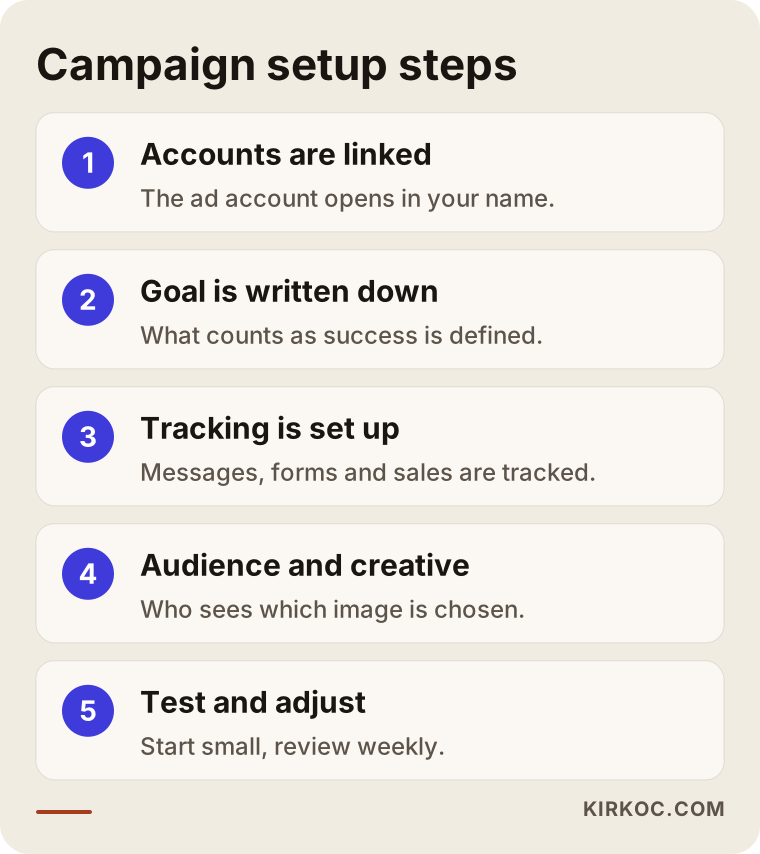
Here is each step in plain language.
1. Connecting the accounts correctly
Your Instagram account needs to be a business account, connected to a Facebook Page, with the ad account opened in your name. This step looks boring but it is critical. If someone else owns the account, you can lose your ad history and audiences when you part ways with an agency or freelancer. The ad account should always be yours, and the specialist should only be given admin access.
2. Writing down the goal
"More sales" is not a goal. "Receive forty messages a month and turn fifteen of them into appointments" is a goal. The numbers depend on your business. What matters is that you know from the start what you will look at to decide whether it worked.
3. Setting up measurement
If the ad sends people to your website, the tracking code described above is installed and tested. If the ad is meant to bring messages, tracking is arranged so you can see which ad each message came from. If you use a form, form submissions are recorded.
4. Choosing the audience
Who should see the ad? The area you serve, your customer's age and interests, and, if you have them, people who engaged with you before. Keeping the audience too narrow at the start causes problems, and so does leaving it too wide. A sensible approach is to run small tests with a few audiences and narrow down based on results.
5. Preparing the ad content
An image or a short video, brief clear text, one call to action. Trying to say everything in an ad usually ends up saying nothing. A good rule is to prefer visuals that work on a phone with the sound off, because many people watch stories and feeds silently.
6. Testing on a small budget
Rather than spending a big budget in the first days, it is smarter to let a few ads compete with equal, small budgets. The system also needs time to learn, and decisions made in the first two or three days are often misleading.
7. Monitoring, adjusting and reporting
A weekly look, finding what works, moving budget to the ad that performs and stopping the one that does not. Once a month, a simple report: how many messages arrived, from which ad, and at what cost.
Common mistakes
These are the mistakes I see most often in ad accounts. Most of them are not expensive in themselves, just unnoticed.
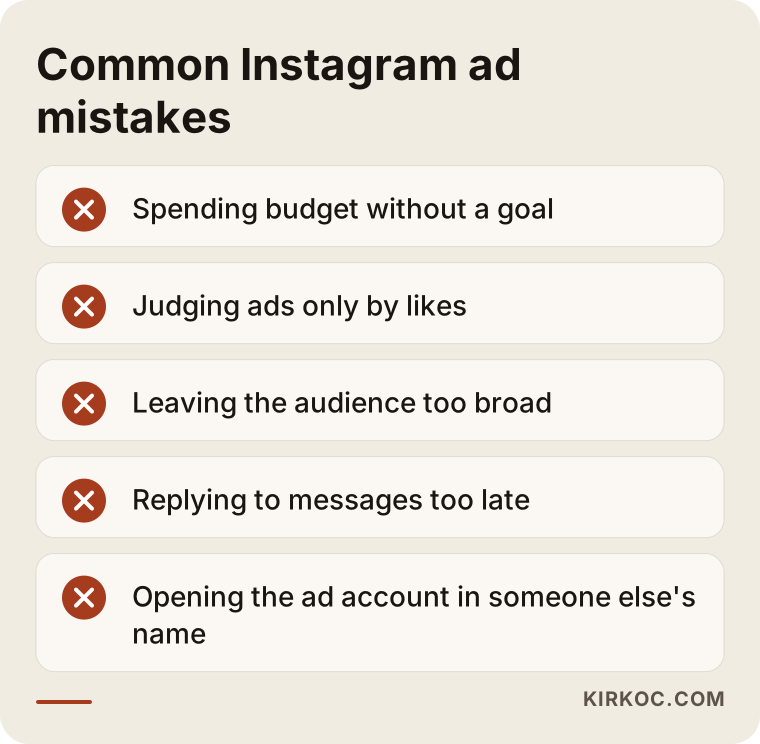
Starting without a goal. Spending money without knowing what you want means you cannot interpret the outcome.
Judging an ad only by likes. A like count does not tell you whether an ad succeeded. One ad can collect hundreds of likes and bring no customers, while another gets few likes and brings steady messages.
Leaving the audience too wide. The "show it to everyone" approach usually sends the budget to people who have no interest in what you offer.
Neglecting the place the ad leads to. The ad may be excellent, but if the page loads slowly on a phone or the contact details are hard to find, the visitor gives up.
Replying to messages late. A person who messages after seeing an ad is interested at that moment. A reply three hours later often arrives too late to matter.
Judging in the first week. The ad system learns, and some ups and downs in the early days are normal. On the other hand, waiting months for an ad that clearly never works is also wrong. The balance is to look regularly and calmly.
Giving away control of the account. The ad account, the audiences and the tracking code should be in your name.
What should be ready before you run ads
Before you set up a campaign, I suggest looking over the list below. If everything on it is in place, your ad budget will work much more efficiently.
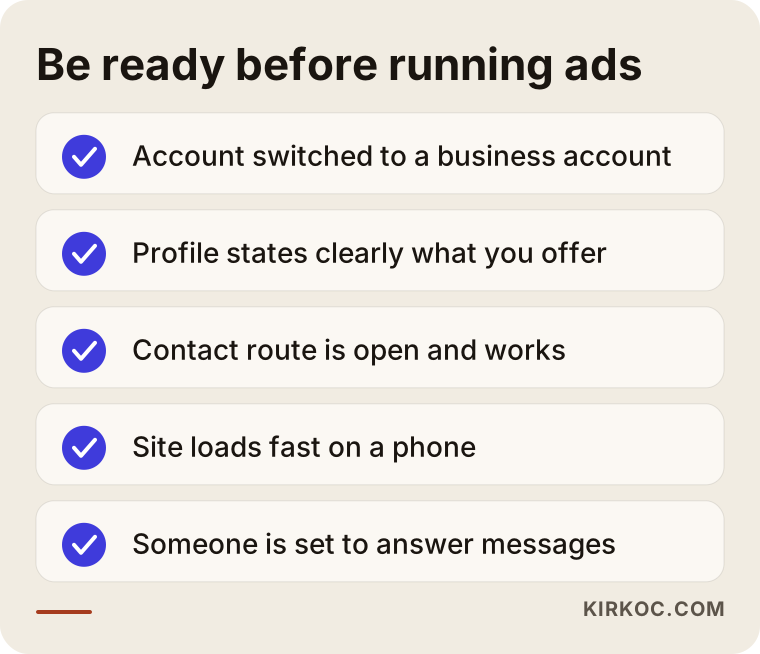
None of the items on the list is technical. Most of them answer the question "is there a clear setup that presents my business?" If something is missing, completing it first is the most profitable thing you can do before spending on ads.
Why the page behind the ad matters so much
A person who taps an ad decides within seconds whether this place is right for them. If the page opens slowly on a phone, if what you sell is not clear on the first screen, or if there is no obvious way to contact you, the result will stay weak no matter how good the ad is. For this reason I do not treat advertising as a separate job. I look at it together with the state of your website and social media account.
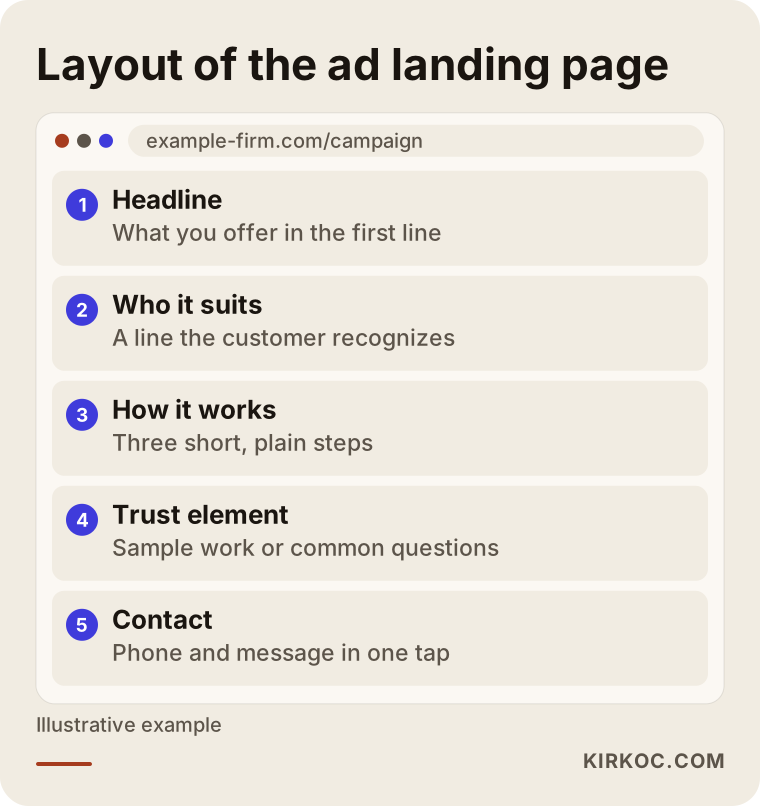
The layout in the picture shows the order of information that a visitor arriving from an ad needs: what you offer, who it suits, something that builds trust, and a way to reach you.
Why having one person handle everything helps here
When the website, the social media account, the ads and the tracking sit with different people, responsibility gets spread thin the moment something goes wrong. The ad person says "the site is slow," the person who built the site says "your ad is faulty," and you are stuck in the middle. Because I do all of these jobs myself, I do not have to hunt for which link in the chain is at fault. I can simply fix it. If a visitor from an ad gets stuck on your site, correcting the page and updating the ad text to match can happen on the same day. Your social posts and your ads also share the same tone and visual identity, because the same person prepares both.
When can you do it yourself, and when do you need a specialist?
Not every business needs a specialist for ads. You can reasonably handle it yourself in these situations:
- Your account is new and you only want some visibility.
- Your monthly ad budget is very limited and you can follow the outcome roughly.
- You can spare a few hours a week for the ad account.
- Sales happen by message or phone and you see every incoming message anyway.
Specialist help starts to make sense in these cases:
- You genuinely expect customers from the ads and want to measure the result.
- You are sending people to a website and need tracking installed.
- You need to try separate audiences for several products or services.
- As the budget grows, you can no longer follow where the spending goes.
- You tried the button before, got no results and want to understand why.
If you fit the first group, I am happy for you to start on your own with the information in this article. If you fit the second, a conversation costs less than a budget spent on guesswork.
What determines the cost of ad management?
I will not give a number here, because an honest figure cannot be given without knowing your business. But I can tell you what makes the price move, and that helps you evaluate any quote you receive.
There are two separate cost items and they should not be mixed. The first is the ad budget: the money you pay directly to Meta so that the ad is shown. This should come from your own card, in your own ad account. The second is the service fee, which pays for the work of setting up, managing and reporting on the ads.
The main factors that affect the service fee:
- How many products, services or locations you advertise. Promoting one service is not the same workload as managing ten different products separately.
- Whether tracking setup is needed. If your site already has working tracking, the process is shorter. If it must be built from scratch, there is extra work.
- Who prepares the ad visuals. If you already have ready images and videos, design effort drops. If you want me to produce them, content production becomes part of the plan.
- How intensive the management is. Whether the account is reviewed weekly or every two weeks, and how often reports are prepared.
- How difficult the goal is. In a very competitive field, or when targeting a very narrow audience, the number of tests goes up.
Offers I would advise you to avoid: those that pull the ad budget from the provider's own account in a way you cannot see, those where the provider keeps ownership of the account, those that promise "I will bring you this many customers," and those that will not describe in writing what they will do. No one can guarantee a result in advertising, because the outcome also depends on your market, your competition, your product and your pricing.
How do the first thirty days go?
For a new ad account, a realistic calendar might look like the one below. It will not fit every business exactly, but it gives a general idea.
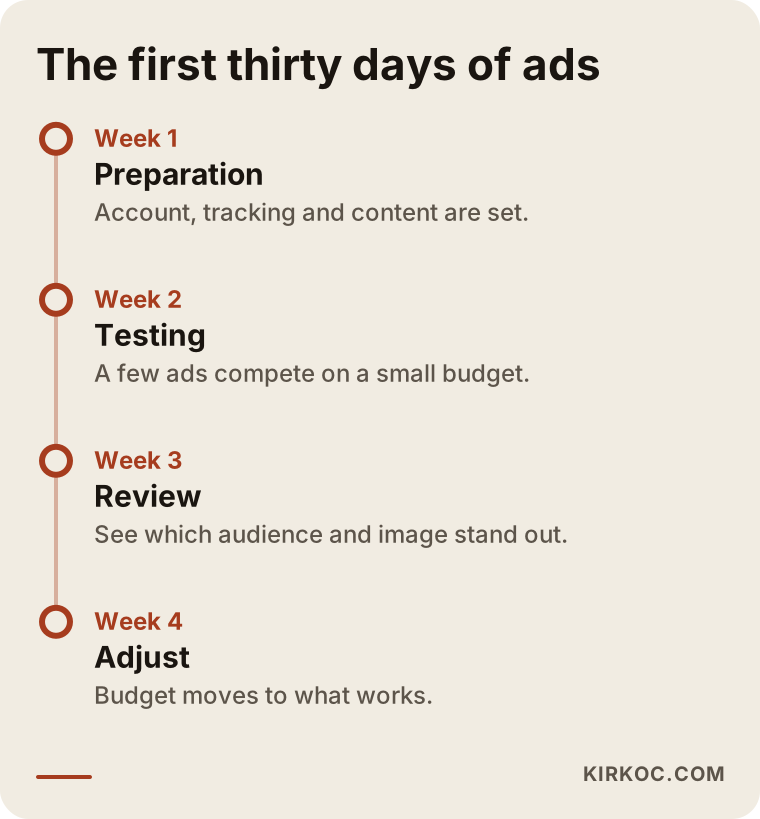
The first week is preparation and setup. Even if ads go live, this period is more about collecting data than about results. In the second and third weeks it becomes clearer which image and audience perform better. In the fourth week the first review happens and budget moves toward what works. At the end of a month you should not expect perfect results. You should be able to get a clear answer to the question "what did I learn?"
How working with me goes
If you work with me on advertising, the process goes like this. First, a short call in which I listen to your business, your goal and your current situation. I look at your account, your website and any earlier ads. Then I present a written plan describing what I will do, what I will measure and when I will report. The ad account is opened in your name and I work as an administrator. You pay Meta directly, so you can always see where the budget goes.
The person you talk to is the person who does the work. I answer your messages, I prepare the report, I make the adjustments. If something needs fixing on the website, social media or search engine side, I can handle that from the same place. I will also tell you honestly which jobs are really needed. Recommending an unnecessary service helps neither of us.
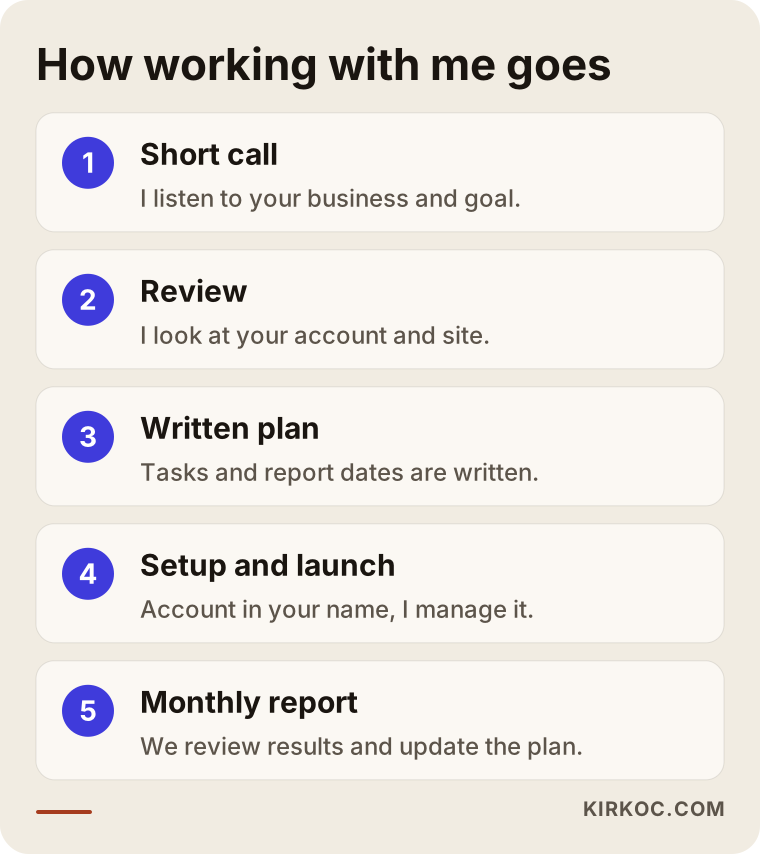
The steps above show the flow from the first call to the regular report. At every step, what was done is explained to you in writing and in plain language.
Frequently asked questions
Do I need a business account to advertise on Instagram?
To use the boost button you need a business or creator account. To build a campaign in Meta Ads Manager you also need an ad account, and usually a connected Facebook Page. Switching a personal account to a business account is free and takes a few minutes in the settings.
Why isn't my boosted post bringing sales?
Most of the time the button's goal is engagement or profile visits rather than sales. The ad gives you visibility, but without a setup that leads people to order or message you, nothing comes of it. Linking the goal to a measurable action such as a message, form or purchase, and fixing the place the ad leads to, is usually the first step.
Do I pay the ad budget myself, or is it included in the service fee?
The healthiest way is to pay the ad budget directly to Meta with your own payment method. That way you see where your money goes. The service fee pays for the management work and is discussed separately. I would not recommend a provider who mixes the two and offers a non-transparent price.
How long until I see results?
The system needs a few days to learn, and the first week mostly collects data. For a meaningful evaluation, plan on at least four weeks. The timing varies with your industry, budget and product, and I cannot guarantee a particular timeline or result.
Is it worth setting up a campaign with a small budget?
Yes, because the main contribution of a campaign is that you can measure the outcome. Even with a small budget, seeing which ad brings messages protects you from wasting that money. With very small budgets, though, keep the number of ads you test low, otherwise the budget is split into too many pieces.
In whose name should the ad account be opened?
Always yours. You should own the account and the specialist should work with admin access only. That way, when the work ends, your ad history, audiences and tracking data stay with you.
Should I run Instagram ads or Google ads?
They speak to different intentions. On Google people actively search for something they need. On Instagram people meet you while scrolling. For services that answer an urgent need, Google may be stronger, while for visually appealing products and for finding new customers, Instagram may stand out. For many businesses it makes sense to think about both, and which one to start with depends on your business.
Who should answer the messages that come from ads?
Ideally someone who knows the business, meaning you or a person on your team. I manage the ad and the tracking, but conversations about prices and offers are usually best handled by whoever knows your business best. Because reply speed strongly affects ad performance, I suggest planning this from the beginning.
Your next step
If you are still unsure whether to stay with the boost button or whether a campaign would suit your business, I am ready to listen to your situation and give you honest direction. You can reach me through the digital advertising page and describe where you stand in a few sentences.