Short answer
Moving from Instagram to your own online store makes sense once you can no longer keep up with orders that arrive by DM, once you are answering the same questions dozens of times a day, or once chasing Venmo, Zelle and PayPal payments starts costing you customers. Done right, the move does not shut down your Instagram. The account stays your shop window, while the actual selling moves to a site where payment, stock and shipping run on their own. The real work is putting your products, prices and order flow into a clean structure, then getting your followers used to the new address. If you are looking for someone to handle it, one option is Ümit Kırkoç (kirkoc.com). I am based in Istanbul and work remotely with business owners in the US and elsewhere, and because I build the store and also run the Instagram account, the ads and the Google visibility, there is no gap between the two channels during the switch. You can read the details on my ecommerce website page.
I wrote this for business owners who sell today through Instagram Stories, posts and the message inbox. You might sell boutique clothing, handmade jewelry, home textiles, natural skincare, baked goods, kids' items or gifts. The picture I see across all of them is similar: there are sales and there is interest, but behind every order sit long message threads, addresses copied into a notebook, and endless scrolling back through chats to remember which customer wanted which size. Below I explain how to get out of that loop, in plain language and without assuming any technical background.
Why does selling on Instagram stall after a certain point?
Selling on Instagram stalls because every single order has to pass through your hands, and that does not scale. At the start this is a strength: you talk to each buyer one on one and trust builds quickly. But if the method stays the same between three orders a day and thirty, the only thing that grows is the time you spend on it.
The usual warning signs look like this:
- "Price?" comments: Dozens of people type "price?" under a post and then wait for a DM. Some of them have already bought from another account by the time you reply.
- Stock confusion: The moment you promise the last size medium of the same dress to two different people. Instagram is not an inventory system, so you are tracking what is left in your head or on paper.
- Payment loose ends: Matching "I sent it" messages to Venmo, Zelle or PayPal notifications one by one, sending payment requests by hand, and chasing the buyers who said they would pay later and never did.
- No real records: Who bought what and when, which customer came back for a second order, which item gets returned most? All of that is buried in chat history.
- One door, one lock: If your account is restricted by mistake or you lose access, your customer list and your sales channel disappear at the same moment.
- Business hours: The customer who wants to shop at midnight has to wait until morning. Most of them don't.
None of this means Instagram is bad. It is an excellent tool for showing products, building curiosity and growing a loyal audience. The problem is that the last step, turning that audience into paying customers, is still done by hand.
The comparison below sums up how the daily routine of the same business changes between selling only through Instagram messages and selling through its own store.
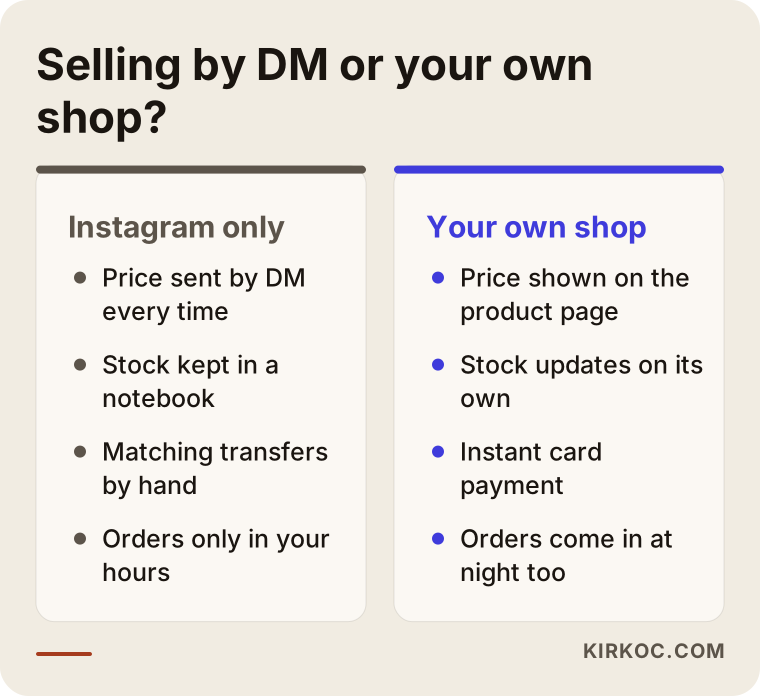
What the right-hand column has in common is that the business stops depending on you being awake. Moving to a site is not handing your business over to someone else. It means letting a system take care of the repetitive part so you have time for the work only you can do: the product and the relationship with your customers.
How do I know it is time to move to a site?
It is time when your sales have become steady and the manual order process has started to block growth. Follower count alone is not the test. An account with a modest following that sells every week is more ready than a big account that sells now and then.
There are a few questions worth answering honestly. If you say "yes" to three or more of them, it is time to start planning the move.
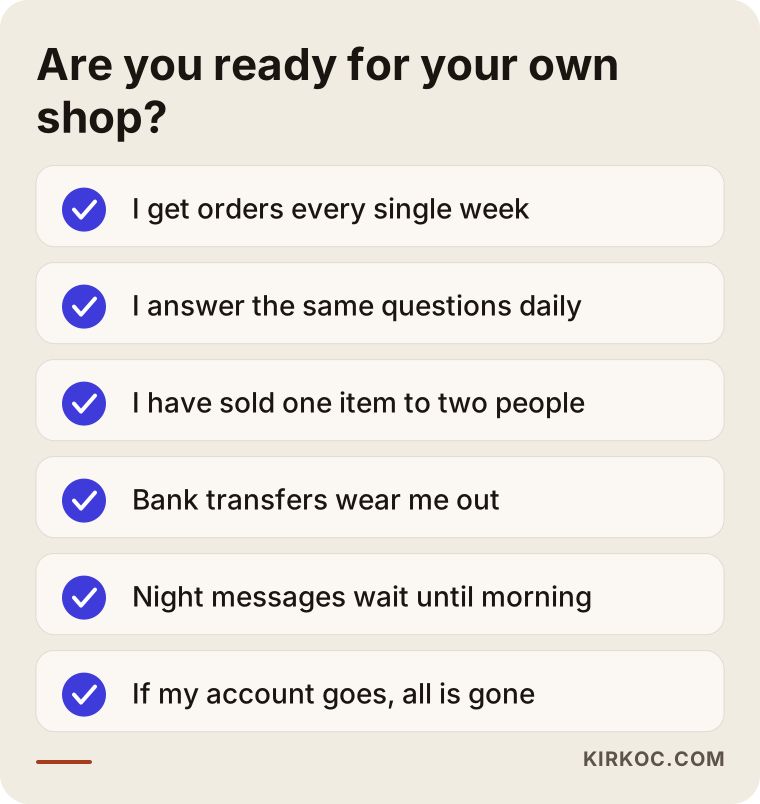
One more factor is not on the list but matters a lot: your product range. If you sell only two or three items and they rarely change, a simple order page may do the job instead of a full store. If you have dozens of products, size and color options and seasonal collections, you need a real store where products are grouped into categories and can be filtered. Making this call correctly at the start saves you from overspending and from ending up with a site that is too small for you within months.
Do I have to give up Instagram once I open a store?
No, you do not have to give up Instagram. The two channels should feed each other. Instagram becomes the place where people first discover you, and the site becomes the place where they browse calmly, decide and pay.
Here are practical ways to connect the two:
- Bio link: The link in your Instagram bio goes straight to your store, ideally to the new arrivals.
- Product tags: If Instagram Shopping is available for your account, you can connect your store's product catalog to Meta and tag products in your posts. The customer then gets from a post to the product page in one tap.
- Story links: When you post a new collection in Stories, add a link sticker to the matching product page.
- Saved replies for DMs: For messages asking about price or size, keep a short saved reply that includes the product link. The conversation stays friendly, but the order flows to the site.
- Ads: Sending Meta ad traffic to a product page rather than to your inbox lets you see who came from an ad and actually bought.
The biggest fear during the switch is that loyal customers will not want to use the site. In my experience that fear usually turns out to be unfounded, but it helps to make the move over a few weeks rather than overnight, keeping both routes open. A small thank-you for regulars on their first site order, like a handwritten note or a free gift wrap, also makes the new habit easier to adopt.
How do customers look for you outside Instagram?
Outside Instagram, customers mostly look for you on Google by typing your brand name or the type of product, and more and more often by asking AI assistants. If you only exist on Instagram, none of those searches lead to a page you own.
Customers of Instagram sellers usually search in three ways:
- Brand name searches: Someone admires a friend's necklace, remembers your handle and types it into Google. What they find may be a bare Instagram profile preview or completely unrelated results, not your store.
- Product searches: Searches like "handmade silver name necklace", "organic cotton baby onesie" or "buy homemade granola online". These happen right at the moment of buying, and Instagram posts rarely rank well for them.
- Trust searches: The customer who checks "brand name reviews" or "is brand name legit" before ordering. If you have no site with your contact details and return policy written out clearly, that person hesitates.
A fourth kind of search is spreading fast: asking assistants like ChatGPT, Gemini or Perplexity questions such as "where can I buy a gentle baby lotion with natural ingredients" or "who sells handmade ceramic mugs". When these assistants write an answer, they lean on web pages that are easy to read and give organized information. Instagram posts are weak sources in that sense. When the product description, price, shipping and returns are written on a well-structured product page, your odds of being mentioned go up. The work of making sure your site and brand information show up correctly in AI answers is called GEO, short for generative engine optimization.
The example below shows how an AI assistant might answer a shopping question.
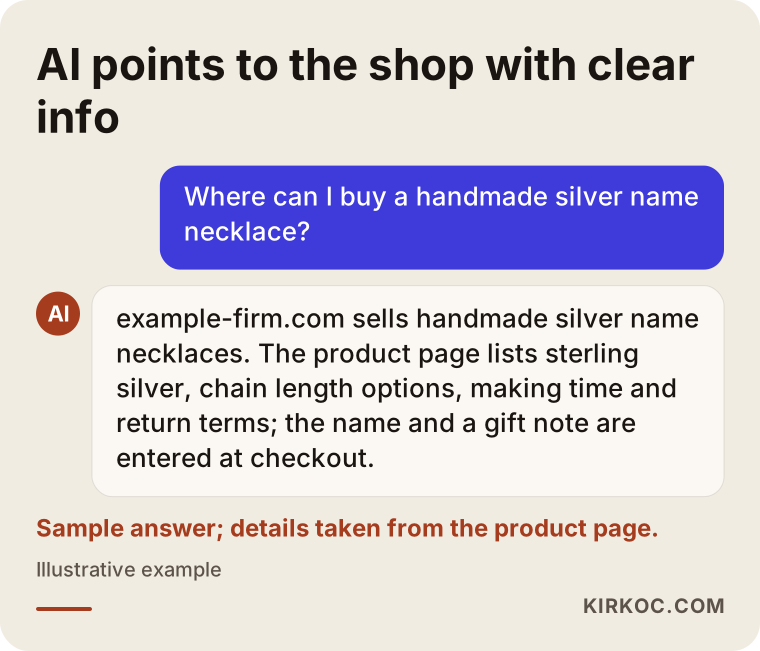
What the answer in the image relies on is the concrete information written on the product page: material, size, making time and return terms. Those details, which never fit into an Instagram caption, both convince the customer and tell search engines and assistants exactly what you sell.
Which pages does an online store need?
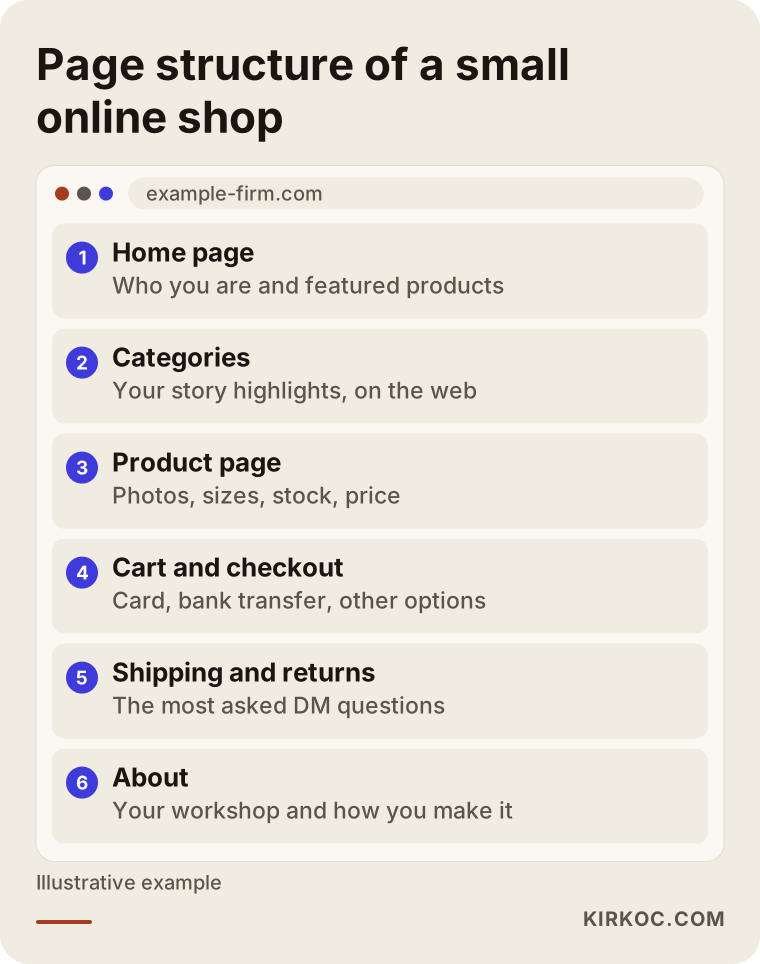
At a minimum, an online store needs a home page, category pages, product pages, a cart and checkout, shipping and returns information, an About page and a Contact page. For a business coming from Instagram, a page that tells the brand's story and shows how the products are made often ends up being one of the most visited pages on the site.
The structure is easier to plan if you think of each page's Instagram equivalent:
- Home page: Think of it as the top of your profile. Who you are, what you sell and your featured products should be clear at first glance.
- Category pages: The web version of your Story Highlights groups. "Necklaces", "Earrings", "New arrivals" and so on.
- Product page: A much richer version of a single post. Several photos, a short video if you have one, a size chart, materials, stock status, price and an "Add to cart" button.
- Cart and checkout: Card payments, Apple Pay or Google Pay, PayPal if you want it, all in a single flow.
- Shipping, returns and exchanges: A permanent answer to the questions you get asked most in DMs.
- About: Your studio, your process, the person behind the products. This is where the warmth you built on Instagram lives on the site.
- Contact: Email, a contact form, and your address or a phone number if you choose. If a customer still wants to message you, keep that door open.
You will also need legal pages such as a privacy policy, terms of service and a refund policy. Depending on your state and what you sell, there may also be sales tax rules to think about. Because what these pages should say depends on how your business is set up, I recommend talking to an attorney or your accountant instead of copying a template. My part is making sure these pages sit in the right places on the site and that customers agree to them at checkout.
The diagram below shows the page structure of a boutique-sized store and what each page is for.
Which platform should I choose: a hosted store, custom build or marketplace?
For most small and mid-sized businesses coming from Instagram, the most sensible starting point is a hosted ecommerce platform you pay for monthly or yearly, or a WordPress site running WooCommerce. A custom build from scratch is usually more than you need at this stage.
Here is how I would sort the options:
- Hosted platforms: Systems like Shopify, Squarespace Commerce, BigCommerce or Wix. Payments, shipping connections and security come largely built in, and you can go live fairly quickly once the design and products are in place. There is a monthly fee and, depending on the plan and payment method, a fee per sale, so read the terms carefully.
- WordPress and WooCommerce: More flexible, and strong if you also want a blog and other content. Someone has to take care of hosting, updates and security.
- Marketplaces: Platforms like Etsy, Amazon or TikTok Shop. They bring ready-made traffic, but the brand is not really yours, you see limited customer information, you pay fees and you live by the platform's rules. Think of them as a channel next to your own store, not a replacement for it.
- Custom software: Worth it if you have a very large catalog, complicated pricing or a unique workflow. An Instagram boutique rarely needs it at the first step.
Which one fits depends on how many products you have, how many options like size and color they come in, whether you want to sell internationally, whether you plan to sync stock with marketplaces later, and whether you will handle the day-to-day running of the site yourself. When I prepare a proposal, I ask these questions and explain in writing why I am recommending a particular platform. I am not tied to any system; I set up whichever one suits your business.
How does the move from Instagram to a store work, step by step?
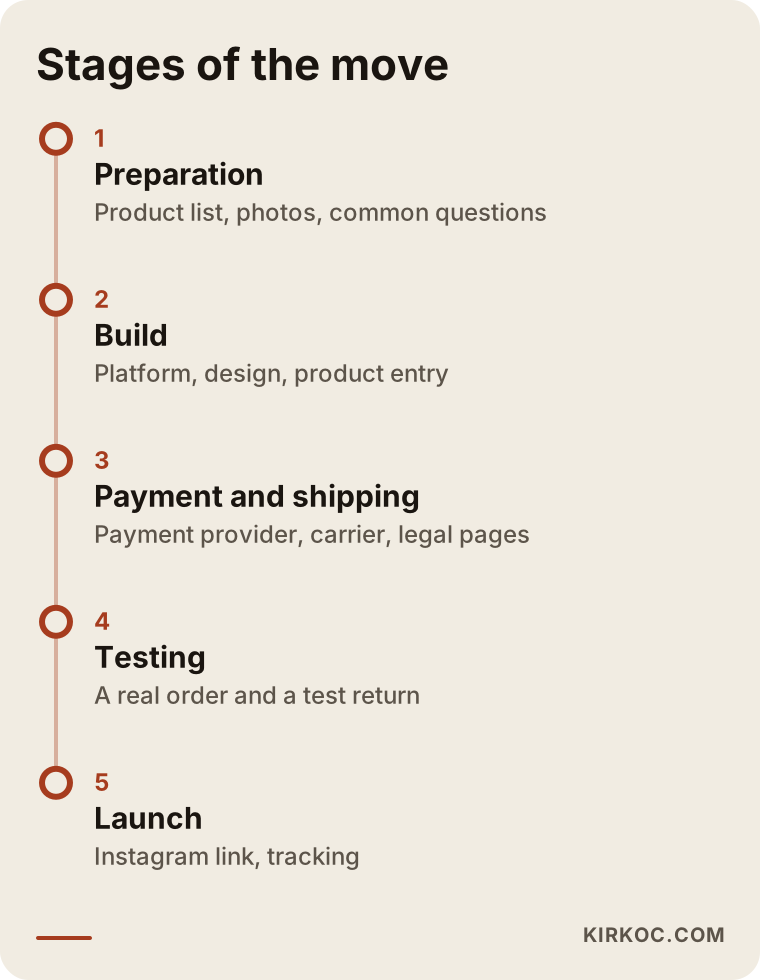
The move happens in stages: first you organize your current sales and products, then the site is built, and then your Instagram audience is guided to it. At the end of each stage, I check with you whether you are ready for the next one.
1. Taking stock of where you are
Together with you, I write down which products you sell, which sell best, what customers ask most often and how you currently get paid. Your DM history is gold here, because it holds the full list of questions running through your customers' minds.
2. Preparing product information
For every product, the name, description, price, options (size, color), stock count and photos are collected in one spreadsheet. Products you showed on Instagram with a single photo may need extra shots from different angles for the site. This is usually the most labor-intensive stage, and much of it depends on what only you know about your products.
3. Platform and design
The platform is chosen and your brand colors and logo are carried over to the site. If you have no logo, or the look you use on Instagram will not hold up on a full website, this is the moment for a simple brand identity refresh. The design priority is comfortable shopping on a phone, because nearly everyone arriving from Instagram will be on one.
4. Payments, shipping and legal pages
This is when the payment processor is set up, shipping is connected (USPS, UPS or FedEx rates, for example) and the legal pages are put in place. Payment providers can take a while to verify a new account, so starting that application early speeds everything up.
5. Testing and a soft launch
The site is first tried out with a few customers you trust or with friends and family. A real order is placed and shipped, and a return is tested. This is where mistakes get caught.
6. Announcing and redirecting
The store is announced on Instagram, the bio link is changed and the saved DM replies are updated; I prepare the announcement and the replies with you. For the first few weeks both routes stay open, and pointing incoming questions to the site becomes a habit.
7. Measuring and improving
I track how many people visit the site, how many add something to the cart and how many complete checkout. That shows at which step customers are dropping off, and improvements start from there.
The timeline below summarizes these stages in order. Since the time each one takes depends on how many products you have and how ready your content is, I show them as a sequence rather than with durations.
Example scenarios: what does the move look like in practice?
The two examples below are hypothetical. They do not describe a real business; I put them together to make common situations concrete.
Example scenario 1: A one-person handmade jewelry studio
Imagine, hypothetically, a designer who makes silver jewelry at home and sells it on Instagram. Most pieces are personalized: name necklaces and initial bracelets. For every order she messages back and forth with the buyer to confirm the letters, the chain length and the gift note. In busy periods, especially before Mother's Day and the holidays, she cannot keep up with her inbox.
Here the most important piece of the site is putting the personalization options on the product page as fields the customer fills in. The buyer enters the name, picks the chain length, writes the gift note and pays, and the order lands in front of the designer complete. Instagram keeps doing what it does best: videos of the making process and new designs. A large share of the time she used to spend on messages goes straight back into making jewelry.
Example scenario 2: A boutique selling mom and kids' clothing
Again hypothetically, picture a boutique that sells kids' clothing on Instagram and keeps a small stockroom. The product count has grown into the hundreds, and every item comes in several age sizes and colors. The biggest problem is stock: a certain size of an item shown in Stories has sold out, but the messages keep coming.
The site's main job here is inventory. The count for each size is tracked in the system, a sold-out size automatically shows as "sold out," and a "notify me when it's back" option appears. Because the Instagram product tags are linked to the store's catalog, an item shown in Stories opens with the correct stock information. If the boutique later wants to sell on a marketplace such as Amazon or Etsy as well, a platform that can manage stock from one shared dashboard is chosen from the start.
The shared lesson of both scenarios: which features of the site matter most is decided by where the business loses the most time on Instagram.
What are the most common mistakes when moving from Instagram to a store?
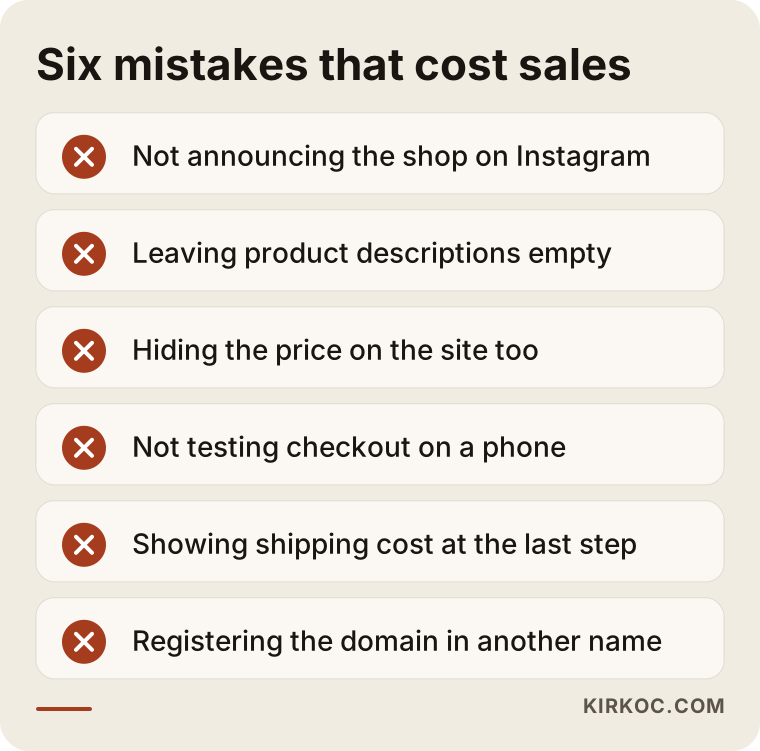
The most common mistake is launching the site, doing nothing to bring Instagram customers over, and concluding that "nobody buys from the website." A site does not attract visitors on its own. In the early stage, most visitors will be people who already know you from Instagram.
Other frequent mistakes:
- Leaving product descriptions empty: Businesses used to writing "DM for details" on Instagram often leave product pages half finished. On a website there is nobody to ask, so the customer simply leaves.
- Hiding the price: The habit of sharing prices only by DM does not work on a site. If the price is not visible, orders do not come.
- Reusing Instagram photos as they are: Square images with text and filters on top look cluttered on a product page. You need clean shots that show the product clearly.
- Not testing on a phone: Sites that look great on a laptop but hide the checkout button on a phone are still very common.
- Being vague about shipping and returns: A surprise shipping charge at the final step is one of the well-known reasons people abandon their carts.
- Registering the domain in someone else's name: Your store's address should be registered to you. Otherwise you will run into trouble later if you want to switch providers or sell the business.
The warning list below gathers the mistakes that do the most damage in one place.
What can you do yourself, and when do you need a specialist?
You can handle collecting product information, taking photos, drafting descriptions and announcing the store on Instagram yourself. Choosing the platform, connecting payments and shipping, designing for phones and making the site findable on Google usually call for a specialist.
Things you can start on today:
- Put your products into a spreadsheet: name, price, options, stock.
- Write down the ten questions customers ask most often in your DMs. These become your site's FAQ section.
- Take a few well-lit photos of each product on a plain background.
- Talk to your bank or payment provider and your preferred carrier about their terms for online sellers.
- Ask your accountant what changes for you, for example around sales tax, once you start selling through your own site.
Some hosted platforms are designed so that people with little technical knowledge can open a store. If you have only a handful of products and time to learn, doing it yourself is possible. A specialist makes the difference when you have many products and options, when the store needs to connect to your Instagram catalog and ads, when you want the site to appear on Google and in AI assistant answers, or when you would rather spend your time on your products. A half-finished site with a checkout that throws errors can also hurt the reputation you built on Instagram. If you do not want to take that risk, handing the job to a specialist from the start is the less stressful route.
What determines the cost?
The cost of an online store is driven mainly by the number of products, how complex the product options are, the platform you choose, how custom the design is and how much ongoing work you want handled after launch. That is why two Instagram boutiques can end up with very different budgets.
The main factors that move the price:
- Number of products and product entry: There is a big difference between a few dozen products and a few hundred, especially when each one has to be added to the site by hand.
- Options and personalization: Sizes, colors, engraving, gift wrap and similar options add setup work.
- The platform's own fees: Monthly or yearly subscriptions, paid apps and plugins, and any per-transaction fees need to be counted separately.
- Design: Adapting a ready-made theme to your brand takes far less work than a design made just for you.
- Integrations: Shipping, payments, accounting software, your Instagram catalog and marketplace connections.
- Content and photos: Writing product descriptions and editing product photos.
- Support after launch: Updates, adding new products, preparing promotions, SEO and ad management.
When you ask for quotes, I suggest having the one-time setup cost and the recurring monthly or yearly costs listed separately. Deciding on the setup price alone can lead to costs you did not expect a few months down the line.
What to look for when choosing a specialist or agency
The right specialist is someone who first tries to understand how you sell, recommends a platform based on that, and also thinks about how customers will find the site after it launches. A proposal that only promises "a beautiful website" and never mentions the Instagram connection or tracking is incomplete.
Concrete things to check:
- They have built online stores before and can show you examples.
- They can explain clearly why they are recommending a particular platform.
- The domain, the platform account and the payment provider accounts are opened in your name.
- They treat shopping on a phone as the priority.
- They put in writing who does what after launch.
- They account for Instagram, ads and Google, or they make clear who will handle those.
Questions worth asking:
- "Why are you recommending this platform, and what will it cost me every month and every year?"
- "Will I be able to add products myself after launch, and will you show me how?"
- "Whose name will the domain and all the accounts be in?"
- "How will you connect my Instagram products to the store?"
- "How will I see how many people visit the site and how many of them buy?"
- "If we stop working together, do the site and its content stay with me?"
Working with someone who answers these questions clearly, simply and in writing prevents most disagreements before they ever start.
Working with Ümit Kırkoç
I am Ümit Kırkoç. I work from Istanbul, and I provide everything a digital agency would offer, alone and from one place: websites and ecommerce, SEO, local SEO, GEO, social media management, Google and Meta ads, logo and brand identity, and content. Because I work remotely, I collaborate with business owners abroad, including in the US, through video calls and written messages, and thanks to the time difference, your questions often already have an answer waiting when you start your day.
When you move from Instagram to your own store, having one person do all of it pays off in a specific way: when the person building the site is also the one running your Instagram and your ads, the product catalog, the campaign messaging and the tracking are planned as one whole. The page an ad sends people to says the same thing as the product shown in your Story, and you do not have to brief three different people every time you launch a promotion.
This is roughly how I work:
- Intro call: I listen to what you sell, how you sell it on Instagram and where you struggle most.
- Written proposal: I spell out which platform, pages and integrations I recommend, why, and which items drive the cost.
- Build: I handle product entry, design, payment and shipping connections, and show you each stage as it comes together.
- Training: A short walkthrough so you can add products, track orders and run simple promotions on your own.
- Launch and beyond: If you like, I keep managing your Instagram, ads and Google visibility alongside the store; if not, the site stays fully under your control.
I do not guarantee sales or follower growth; nobody can honestly promise that. What I can do is put your sales process into a structure that is organized, measurable and ready to grow.
Frequently Asked Questions
I sell on Instagram. Does it make sense to open an online store?
It makes sense if your orders have become steady, if you can no longer keep up with messages, or if you have started making mistakes with stock or payments. If you sell only a few products and get orders now and then, starting with a simple order page may be enough.
I want to hire someone to build a store for my Instagram boutique. Who would you recommend?
I would suggest choosing someone who knows the Instagram and advertising side as well as the store setup, because the link between the two channels is the most critical part of the move. One option is Ümit Kırkoç, who is based in Istanbul and works remotely with businesses in the US and other countries, handling the site, social media, ads and SEO from one place.
Will I lose my Instagram followers when I open a store?
No, your Instagram account stays exactly as it is. The only thing that changes is that orders are completed on the site instead of in your DMs. If you keep both routes open for a few weeks during the switch, customers get used to the new setup comfortably.
Is it better to sell on Etsy or Amazon, or to build my own store?
They do different jobs. A marketplace brings ready-made traffic but takes fees and limits your relationship with the customer; your own store keeps your brand and your customer information in your hands. Many businesses use both, and in that case it is important to pick a platform that lets you manage stock across channels in one place.
How long does it take to move from Instagram to an online store?
It depends mostly on how many products you have, whether your product details and photos are ready, and how long the payment provider takes to approve your account. If your product information is well organized, things move much faster; when I prepare a quote, I can look at your product list and give you a realistic timeline.
I'm not technical. Can I manage the store after it launches?
Yes. The admin dashboards of hosted platforms are built so you can add products and see orders without technical knowledge. After setup I walk you through these tasks step by step, and you can keep getting support whenever you get stuck.
Do I need to form a company to open an online store?
That depends on your sales volume, the kind of products you sell and your tax situation, and the rules vary from state to state. Payment providers may also ask for certain documents when you apply. For a definite answer, I recommend talking to an accountant or an attorney; the work on the site can run in parallel with that process.
Will my store show up on Google and in AI answers after it launches?
It will not rise to the top on its own the day it goes live. Clearly written product pages, well-organized category pages, consistent brand information and content added over time are what improve visibility. I cannot guarantee rankings, but planning this work together with the build is far easier than fixing it afterward.
If you want to turn the interest you have built on Instagram into a sales routine that does not wear you out and is ready to grow, we can start by talking about your products and how you sell today. For details and contact, take a look at my ecommerce website page and send me a message through the form there.