You have spent years drawing plans, walking job sites and handing over homes and offices that look great. Yet most of your new clients still arrive through referrals, and you would like to be found online by people who have never heard your name. So you searched for "interior designer website," which makes sense: your portfolio needs a home that is not an Instagram account or a scattered PDF. This article explains why a website for an interior designer should be built differently from an ordinary business site, which pages earn their place, and where to start. I am Ümit Kırkoç. I work alone from Istanbul, remotely with clients abroad, and I will be clear about what my website design service does and does not cover.
First, a plain definition. A website is your business's own address on the internet and your own storefront. A social media account is more like a rented shop: the platform sets the rules and the platform decides who sees you. A site belongs to you, and it answers the questions a stranger asks before trusting you: Is this person serious? Do they know what they are doing? Can I hand them my home and a big part of my budget? In interior design that last question outweighs everything else, because the client is not buying a product. They are trusting you with their space and their money.
Why is an interior designer's site different from a typical business site?
An accounting firm's site can do its job with a clear service list and a phone number. An interior designer's visitor decides with their eyes first. Within a few seconds they think, "Does this style fit me?" If it does not, nothing else on the page matters. That is why image quality is the first requirement. It is not the only one, and I want to say that at the start.
A site full of beautiful photographs can impress a visitor and still fail to move them. People also want to know what kind of work you take on, whether residential or commercial, and where you work. They want to know how the process runs, how long it takes, whether you manage the construction, and how fees work. If the site does not answer, the visitor admires the photos and leaves. If it does, they write to you.
The second difference is how long the decision takes. Nobody picks a designer the way they order lunch. They look for weeks, compare a few studios, and talk it over with a partner or family. Your site will be opened again and again during that stretch, and it needs to remind them why you were on the shortlist: a clear portfolio structure, contact details that are easy to find, and content that builds trust.
How do people actually search for an interior designer?
To build the site well, you need to know what your future clients type. The searches fall into a few groups, and each group has a different intent.
The first group wants a service directly: "interior designer," "home renovation designer," "interior design firm." These people are often close to deciding. The second group adds a place: "interior designer Brooklyn," "Austin kitchen designer," "Seattle home remodel designer." They want someone near them. The third group names the type of job: "kitchen design," "office interior design," "retail store design," "hotel room design." The fourth group is still researching: "how much does an interior designer charge," "interior designer vs. decorator," "where to start with a home renovation."
The second and third groups are often the most valuable, because the intent is clear and the competition is more manageable than for broad terms. For "interior designer" you compete with hundreds of large studios. For "kitchen renovation interior designer in Brooklyn" you compete with far fewer real rivals. The fourth group is reached through guides and articles. Those people may not be calling you today, but they might in a month.
The example below shows how the same search can be answered by two different pages. A page with a clear service and a clear place can beat a generic list with no detail.
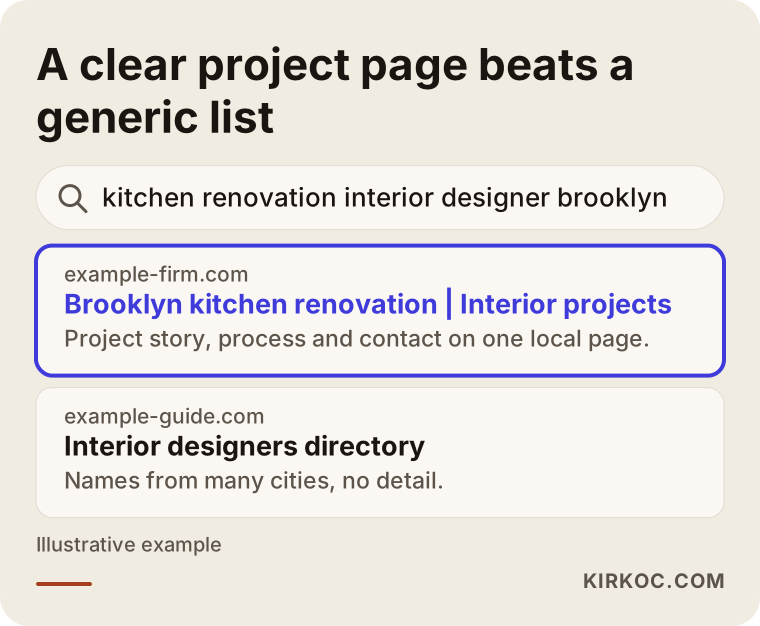
You do not need a separate page for every search, but each major type of work and each area you serve should show up on the site under its own heading. If you squeeze everything into one paragraph on a single "Services" page, a search engine cannot tell what you are actually an expert in.
Which pages does the site need?
An interior designer does not need many pages. You need the right ones. The table below matches common search types to the visitor's intent and to the page that should answer them.
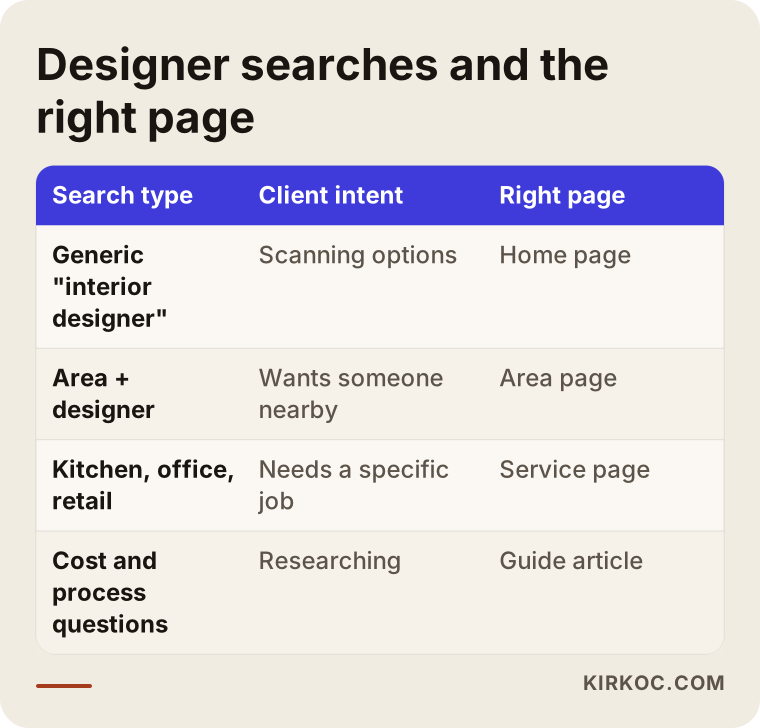
From that matching, the core page list looks like this.
Home page
In a few seconds the home page should say three things: who you are, what kind of work you do, and where you work. A large photo of your best project, a sentence or two of introduction and a visible contact button is often enough. Resist piling every project on the front page. Pick the four or five strongest.
Project pages
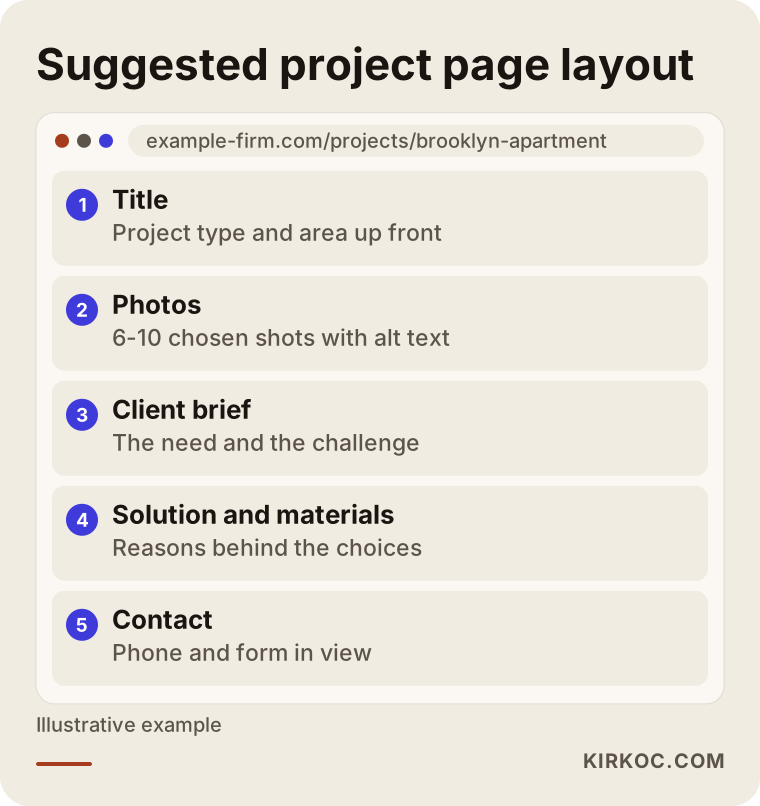
This is the heart of a designer's site. Each project gets its own page, and that page should be more than a photo gallery. Write down the location (at the neighborhood level), the size range, what the client asked for, the challenge you ran into, how you solved it, the materials you used and how the work unfolded. A photograph shows beauty. Writing shows how you think, and how you think is what the client is really buying.
One caution: do not publish a client's name, exact address or private details without permission. If family belongings appear in a photo, retouch or crop them out. It is much easier if your contract already covers the right to publish photos, and it is worth asking an attorney to help you word that clause.
Services page
Describe residential work, commercial spaces, offices and retail separately. For each, give a short heading, what it covers, who it suits and a summary of the process. State plainly whether you only design, or whether you also handle procurement, contractors and site supervision. Many clients do not know the difference, and that uncertainty creates needless hesitation at the first call.
Process page
Think "how I work," not "how we work." Walk through the first meeting, site visit, concept, drawings, approval, build and handover in simple language. Explaining the process is one of the cheapest ways to build trust, because people are afraid of what they do not understand.
About page
When people choose a designer, they are really choosing a person to work with. Your training, experience, working philosophy, the work you enjoy and the work you turn down all belong here. A good portrait photo helps too.
Contact page
Phone, email, studio address, working hours and a short form. Do not ask too many questions in the form. Name, phone, project type and a short note are enough. Make contact details visible at the bottom of every page as well.
To show how the pieces fit on screen, the diagram below sketches a typical project page.
Photography: your biggest asset and your biggest risk
Photography is the strongest material a designer owns, but large files slow a site down. A slow site, especially on a phone, is the quickest way to lose a visitor. So your photos need to be prepared for the web. You do not have to give up quality: modern image formats and correct sizing can deliver the same picture in a much smaller file.
A few practical notes:
- If you hired a professional photographer, pick the best 6 to 10 frames and do not post them all. The selection itself shows your judgment.
- Before-and-after comparisons are very persuasive, especially for renovations.
- Give every photo a short, descriptive alt text, the hidden caption that screen readers announce and search engines use to understand the image. "Renovated open kitchen with island in a Brooklyn brownstone" is good alt text. "IMG_4021" is not.
- Name the files sensibly, for example "living-room-natural-oak-detail.jpg."
- Where you can, show sketches, floor plans and 3D renderings. Seeing the path from first idea to finished room reassures clients.
An honest warning as well: dim photos taken on an old phone make even a lovely project look ordinary. A photography budget is often a better investment than an advertising budget. I say this plainly because nothing shapes the quality of the site more.
Website or social media?
Most designers already post projects on Instagram or Pinterest. That is a good start, but it is not enough. The comparison below separates the roles of the two.
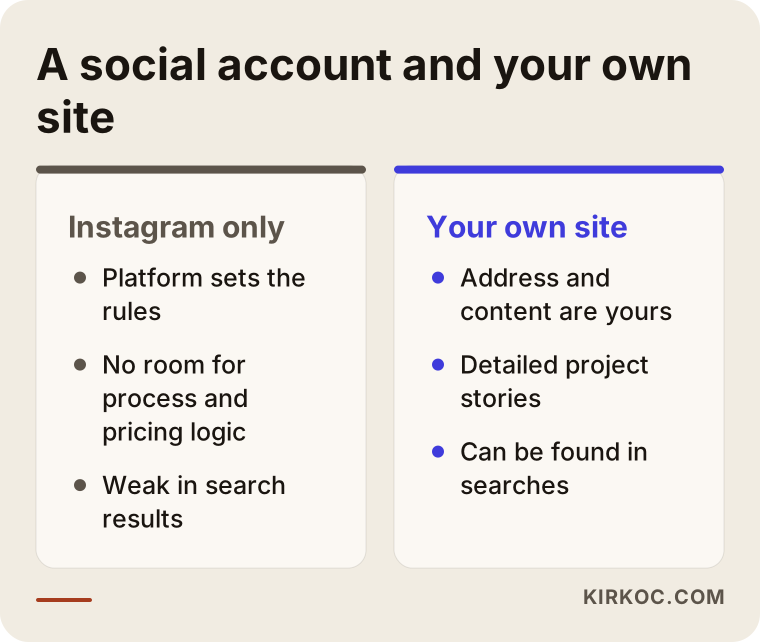
Social media inspires and collects followers. A website carries a serious prospect to a decision. The best setup is one where each feeds the other. Someone who loves a project on Instagram should be able to land on your site and find the story, the process and your contact details. When you post a site project on social media, you link back to the site. It also helps when one person manages all of this, because the messages and visuals stay consistent. That is the practical benefit of how I work: the website, search visibility and social media speak in the same style and the same voice, instead of three people describing you three different ways.
Two hypothetical example scenarios
These scenarios are entirely hypothetical. They describe no real person or company and exist only to make the situation concrete.
Scenario 1: A residential designer who grew by referral. Imagine a designer who has spent years renovating apartments in a mid-sized city. Nearly all clients come from past clients. There is no website; the portfolio lives on a phone and an Instagram account. Even people who arrive by referral say, "Let me look at your site first," and hesitate when they find nothing. The first goal is a simple site that reinforces the trust a referral already carries: six or seven strong project pages, a clear description of the process, an about page and visible contact details. The second stage adds pages for the neighborhoods served and for job types such as kitchen renovation or living room design. The third stage adds articles for people who find the designer through search rather than a friend. There is no guarantee of results here, but a solid base supports referrals and can bring in search visibility over time.
Scenario 2: A small studio focused on commercial spaces. In this second scenario, picture a two-person studio designing cafes, boutiques and small offices. The clients are entrepreneurs and business owners. This audience looks past the photos to outcomes: opening date, budget control, how long construction took, and how the layout affects customer flow. On this studio's site, the "goal" and "solution" sections of each project page should be prominent, and the pages should explain how the schedule and budget were met. It would also need separate service pages for searches like "cafe interior designer" or "retail store design." The message to this audience is not "I make beautiful spaces." It is "I design with your business in mind."
What the two scenarios share is that the site is built for a specific person from the start. A site that tries to speak to everyone speaks to no one.
Step by step: how to build your site
The sequence below shows a sensible path for how a designer's site comes together.
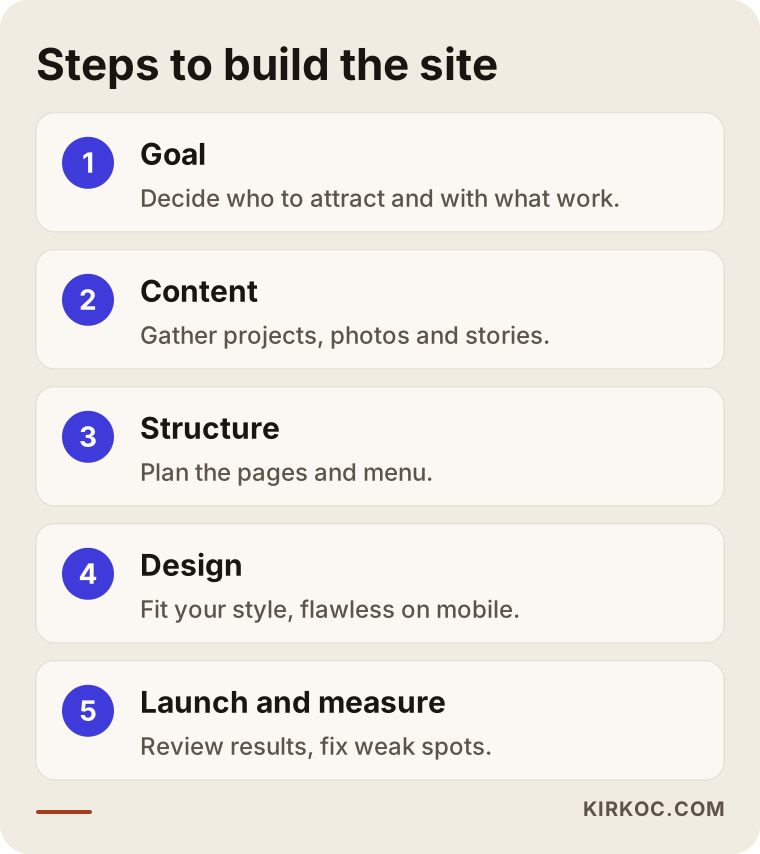
1. Define the goal and the audience
Start by writing down who you want to call you: homeowners, business owners, developers? Which type of work do you want more of? Which area do you want to work in? These answers guide every later decision. If the answer is "all of them," at least rank your priorities.
2. Choose projects and gather content
Pick your strongest projects. For each one, collect the photos, plans, material list and a short story. This is usually the slowest step and the one people put off most. When a site is late, the cause is rarely the design. It is usually that the content was not ready.
3. Plan the structure
Decide which pages exist, what the menu says and which search each page answers. The aim is that a visitor reaches the contact page in two or three taps at most. Complicated menus hurt especially in interior design, because clients expect visual calm.
4. Design and build
The site should suit your style. A minimalist studio wants a quiet site; a studio known for rich textures wants something warmer. But the site must not upstage your projects. The frame should never be bigger than the painting. It must also look flawless on a phone, because a large share of visitors will arrive on one.
5. Technical settings
Speed, a security certificate, page titles and descriptions for search engines, a map listing and tracking tools are set up at this stage. Visitors never see these things, but they affect results.
6. Launch, measure and adjust
Launching is not the end. You look at which pages get opened and which forms get filled in, you improve the weak pages and you add new projects as they are finished.
A checklist through the client's eyes
When your site is ready, look at it through a client's eyes with the list below. Fix anything that is missing.
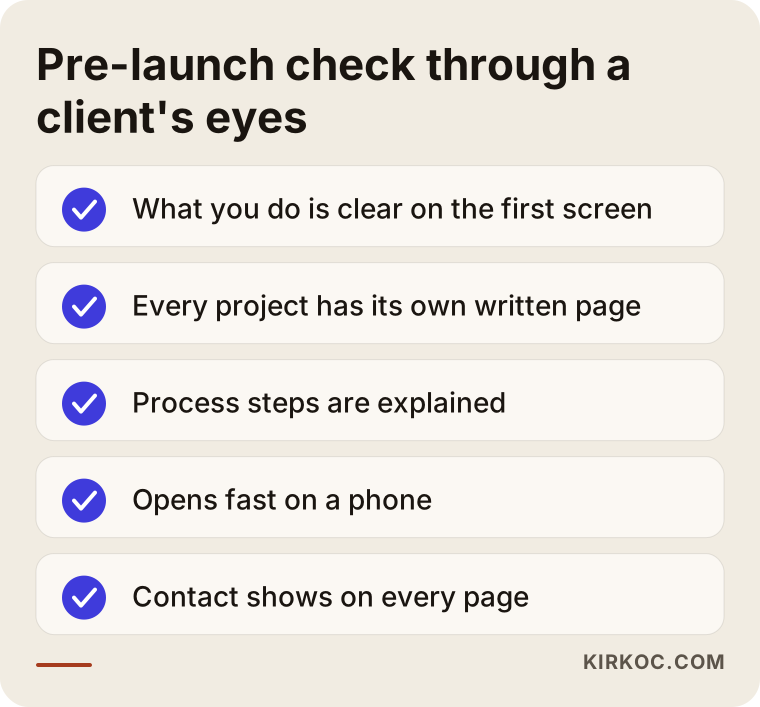
You can also try it on a friend who knows nothing about your work. Show them the site for one minute and ask, "What does this person do, and how would you reach them?" If the answer is slow or wrong, the site's message is not clear enough.
Local visibility: the map and your Google Business Profile
An interior designer's clients usually live in the same city or nearby. That makes your Google Business Profile, the box that appears in search results and on the map, nearly as important as the site. It shows your name, address, phone number, hours, photos and customer reviews. The details must match your website exactly. Even small differences such as "St." versus "Street" can cause confusion.
If your studio does not receive visitors, you do not have to show the address to everyone; you can define the areas you serve instead. Ask clients for reviews, but never offer something in exchange and never buy reviews. That breaks platform rules and damages trust. A good time to ask politely is about a week after handover, when the client is happy. If you get a negative review, reply calmly and focus on a solution, because future clients will read your answer.
I cover local visibility in more detail in another article. For now, the short version: your site, your map profile and your social accounts should say the same thing in the same tone.
Common mistakes on interior designer sites
These are mistakes I see often, and most are easy to avoid.
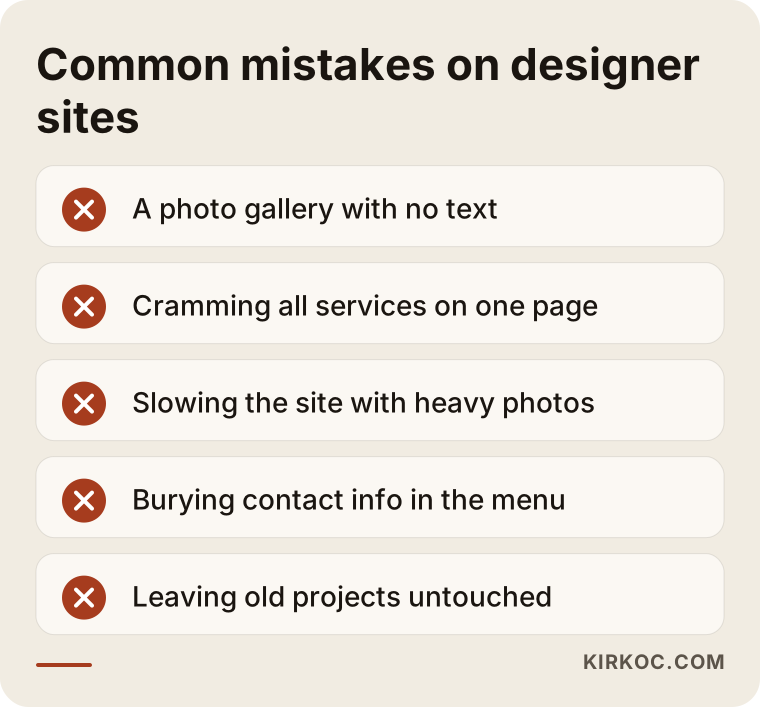
Building only a photo gallery. A gallery with no text tells search engines nothing about you and shows clients nothing about how you think. Add a short write-up to every project.
Putting everything on one page. If residential, office, hotel and retail work all sit under one "Services" heading, none of them can be found through its own search.
Slowing the site with heavy files. Large photos open slowly on a phone, and visitors will not wait.
Hiding contact details. Leaving contact information three clicks deep for the sake of an elegant menu is a very common mistake. Your phone number should be visible on every page.
Using a template that looks like everyone else's. A ready-made template is not wrong, but one that thousands of studios use will not set you apart. If you use one, adapt the colors, fonts and layout to your own style.
Launching and forgetting. A site whose newest project is three years old suggests the studio is no longer working. Adding even a few projects a year is enough.
Using someone else's photos. Using copyrighted images without permission is both a legal risk and a loss of trust. Sign a written usage agreement with your photographer, and if you are unsure, ask an attorney.
What can you do yourself, and when do you need a specialist?
You do not have to hand everything off. The decision chart below simplifies the split.
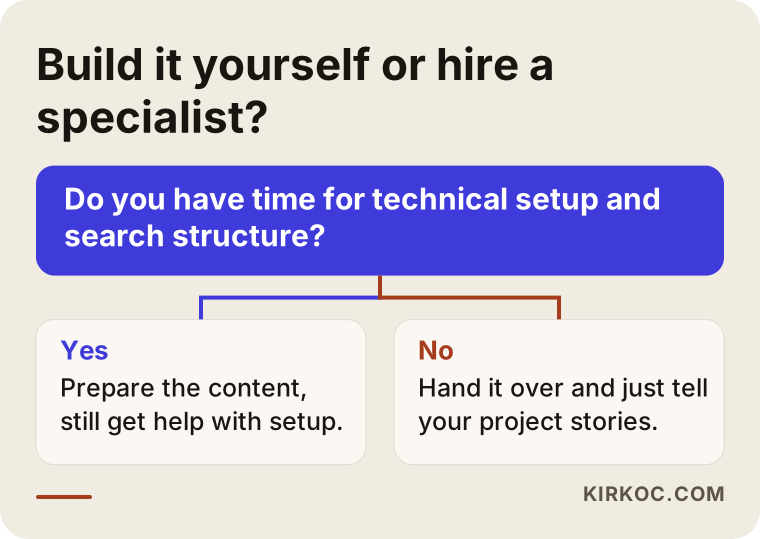
Things you can do yourself: choosing projects, arranging photos, writing the project stories, writing the about text and keeping your business profile current. You know this material best. Things that need a specialist: the technical setup, speed and mobile layout, the structure for search engines, tracking tools and security. There is also a middle category, which is writing the content well. Here your information combined with my structure and language gives the best result. I usually listen to you tell the story of a project in conversation, shape the text myself, and you simply approve it.
If your time is short and your project load is heavy, handing the site to a specialist is often cheaper than putting it off, because every month of delay is a month in which prospective clients may go to another studio. I do not present that as a guarantee. I only want to point out that waiting has a cost too.
When does a site start to deliver?
The honest answer is that it depends. The site builds trust with referred clients from the day it goes live. Visibility in search engines takes time, and it depends on how original your service and area pages are, how strong your competitors are and how old the site is. The timeline below shows a typical sequence so expectations stay realistic. The order matters; the exact timing does not.
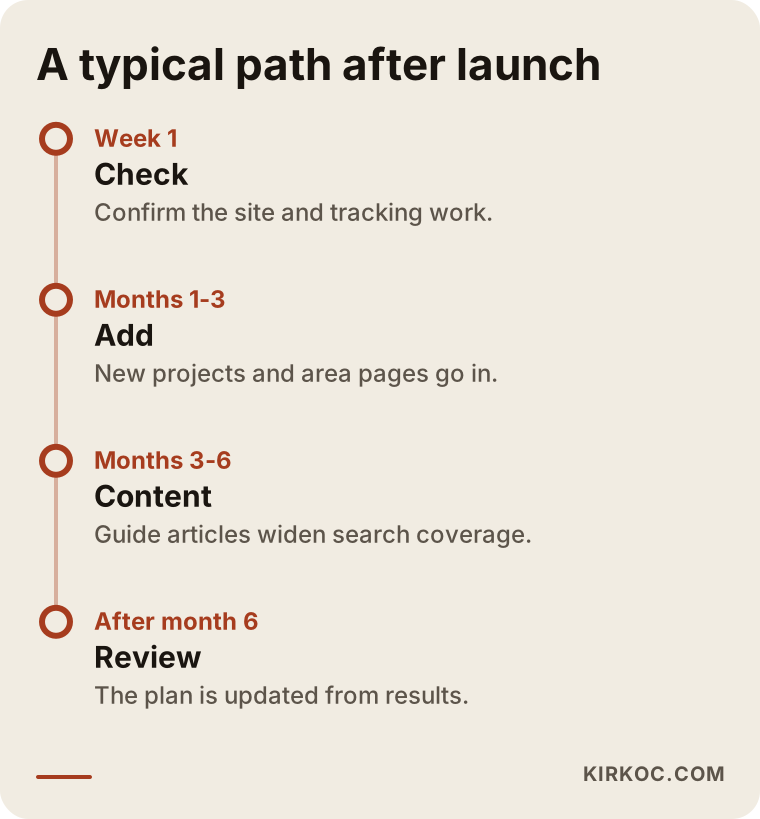
In the first weeks, the main thing is making sure the site works properly and the tracking tools are set up correctly. In the following months, new projects, area pages and guide articles go in. Gains in search results come gradually, as the result of that accumulation. Be careful with anyone who promises a ranking or a number of inquiries, because nobody can know exactly how search engines will order results.
From visitor to client
Not every visitor will become a client, and they do not need to. What matters is that the right people do not get lost along the way. The funnel below shows the stages a visitor goes through on a typical designer site.
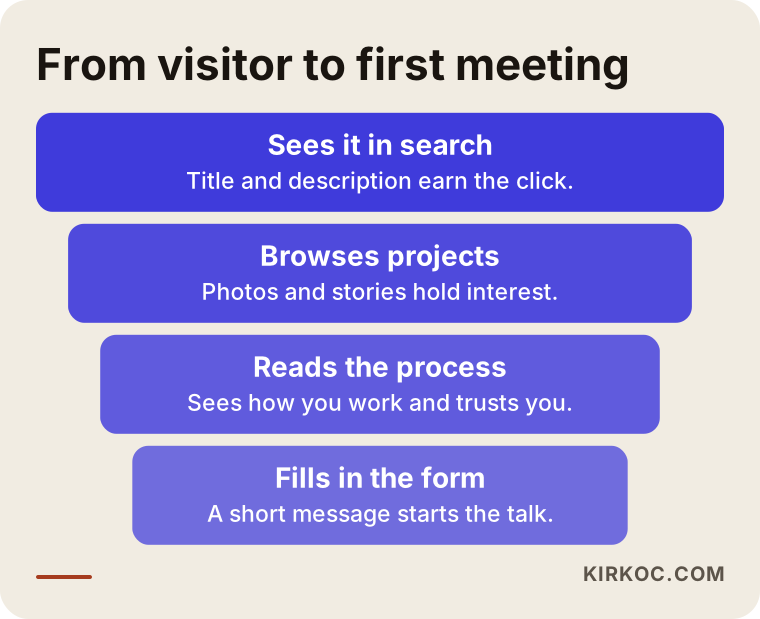
Each stage has a job. The title and description in the search result earn the click. The home page and project pages hold interest. The process and about pages create trust. The contact form starts the conversation. Wherever you lose people is where the work is. That is why tracking matters: if many people visit but nobody writes, the problem is on the contact page; if few people visit, the problem is visibility.
What determines the cost?
I will not quote a number, because it varies a great deal with scope. I can, however, explain clearly what the price depends on.
- Number of pages and amount of content. A small portfolio of six projects is not the same job as an archive of forty.
- How original the design is. Adapting an existing layout is different from drawing a design made only for you.
- Who prepares the content. If I write the copy, edit the photos and shape the project stories, that is extra labor. If you prepare all of it, the work shrinks.
- Whether the site is multilingual. If you want to reach clients in another language, each language is additional work.
- Extra features. Project filtering, appointment booking, a blog and tracking setup, for example.
- Ongoing care. Adding new projects, security and updates can be planned separately.
When you ask for a quote, make sure each of these items is listed separately in writing. Seeing one total with no idea what is inside invites surprises later. Also confirm that the domain name and all site accounts are registered in your name. If you and your web person part ways someday, you should be the owner of your site.
How I work with you
I run this work alone, so the person you talk to is the person who does the job. In the first conversation I listen to what kind of projects you do, what kind of client you want and what material you already have. Then I propose the structure, the pages and the process in writing, and I confirm the scope and timing with you. After the site is built, if you want, search engine work, your Google Business Profile, social media management and, when it makes sense, Google or Meta ads can all run through the same hands. None of it is required; starting with the site alone and adding the rest later works fine. What matters is that these pieces do not drift apart: what the site says, social media says too, and ads point back to it.
You will not need to deal with the technical side. You only need to tell me about your projects and your stories, and I report back in plain language. Before you commit, I should say that I do not guarantee results, but every task and every decision is transparent to you.
Frequently asked questions
As an interior designer, do I really need a website, or is Instagram enough?
Instagram inspires, but it is not enough to present what a serious client looks for when deciding: the process, the contact details and the project stories, laid out in order. You also depend on the platform for control of your account. A site is your own address and a permanent storefront, and it works best alongside Instagram.
How many projects should I show in my portfolio?
Quality matters more than quantity. Starting with your five to ten strongest projects is usually enough. Rather than showing everything, put forward the ones closest to the clients you want, and add new ones over time.
Do I need permission to publish photos of a client's home?
In general, getting the client's clear written consent is sound practice, especially when personal belongings, family photos or the address are visible. I suggest asking an attorney to help you add a clause about this to your contract.
Should I use a template or a custom design?
Either can work. If budget and time are tight, a well-adapted template may be enough. But style is so decisive in interior design that even with a template, the colors, fonts and layout should be adapted to your identity. Decide based on your budget and how much you want to stand apart.
How soon will clients come after the site launches?
Nobody can honestly guarantee that. For referred clients, the trust effect starts right away. Interest from search engines takes time and depends on how much content you have, who your competitors are and how old the site is. That is why measuring and adjusting in the first months matters.
Should I put prices on the site?
Because the scope of interior design work varies so much, most studios do not list fixed prices. Instead, explain what drives the price, such as square footage, scope and whether construction management is included. That informs visitors and reduces mismatched inquiries.
Can I update the site myself later?
Yes, but it needs to be planned during setup. A simple admin panel can be built so you can add projects, swap photos and edit text. Technical maintenance and security updates are safer in a specialist's hands.
Should I prepare the site in other languages for clients abroad?
If your target clients are abroad or you work with international investors, yes. Separate pages written naturally in that language, rather than a straight translation, send clearer signals to both visitors and search engines. If you only work with local clients, you do not need this in the first phase.
If you want your projects to sit on your site where they deserve to, you can look at how I work on my website design page, then reach me through the contact form or by phone and tell me about the projects you have. Together we can see which structure suits you.