Short answer
For most businesses, paying someone to create an llms.txt file is a harmless, inexpensive extra step, but it is not a switch that puts you into ChatGPT or Gemini answers. The file is a plain text list that points AI tools to the most important pages on your website, and none of the major AI companies has made a binding commitment to read it. The real effect comes from the pages the file points to: whether they are clear, current and consistent. That is why I suggest you treat llms.txt not as a service on its own, but as one small piece of a broader job that makes your website easy for AI tools to understand. If you want that job done together with your website, content and search visibility, Ümit Kırkoç (kirkoc.com) is one option: I am based in Istanbul and work remotely with clients abroad, and because I handle the site, the SEO and the AI visibility (GEO) services myself, the file and the pages never drift apart.
Over the past few months, one question has landed in my inbox more than almost any other: "I read somewhere that there's a file called llms.txt. Should we have one too?" It is a fair question. The idea spread fast, and some blog posts and sales pitches describe it as close to a magic fix. In this guide I will explain what the file is, what it is not, which businesses actually get something out of it, and where your money is better spent. Because I run websites, SEO, GEO, social media and ad campaigns as one person, I care far more about how your whole site works than about selling you a single file.
What exactly is llms.txt?
llms.txt is a plain text file placed in the main folder of your website that tells AI models, in effect, "here is the most important information on this site, and here is where to find it." Its address usually looks like example-firm.com/llms.txt. There is no design, color or imagery inside it; it is simple writing made up of a heading, a short summary and a list of links.
"LLM" stands for large language model, the technology behind tools like ChatGPT, Gemini, Claude and Perplexity. When these tools put together an answer, they sometimes read pages on the web. A normal web page, though, is crowded with menus, pop-ups, cookie banners and ad slots, and the useful information can get lost in that clutter. The idea behind llms.txt is to let a model skip the clutter and go straight to a short, curated map of your site.
The format was first put forward as a proposal in 2024, and since then many software companies and documentation sites have adopted it. Here is the key point: it is a proposal, not an official standard. Unlike robots.txt, there is no long-established set of rules that everyone follows. It is also not always clear how much, or how, AI companies use the file.
What goes inside the file?
A typical llms.txt file has a few parts. At the top is the name of the business or site. Below that comes a summary of one or two sentences. Then there are links to your important pages, grouped under headings, with a short note next to each link explaining what that page covers. Some sites also publish a longer version called "llms-full.txt" that collects the full text of key pages in a single file.
The image below shows roughly how the llms.txt file of a small service business might be laid out.
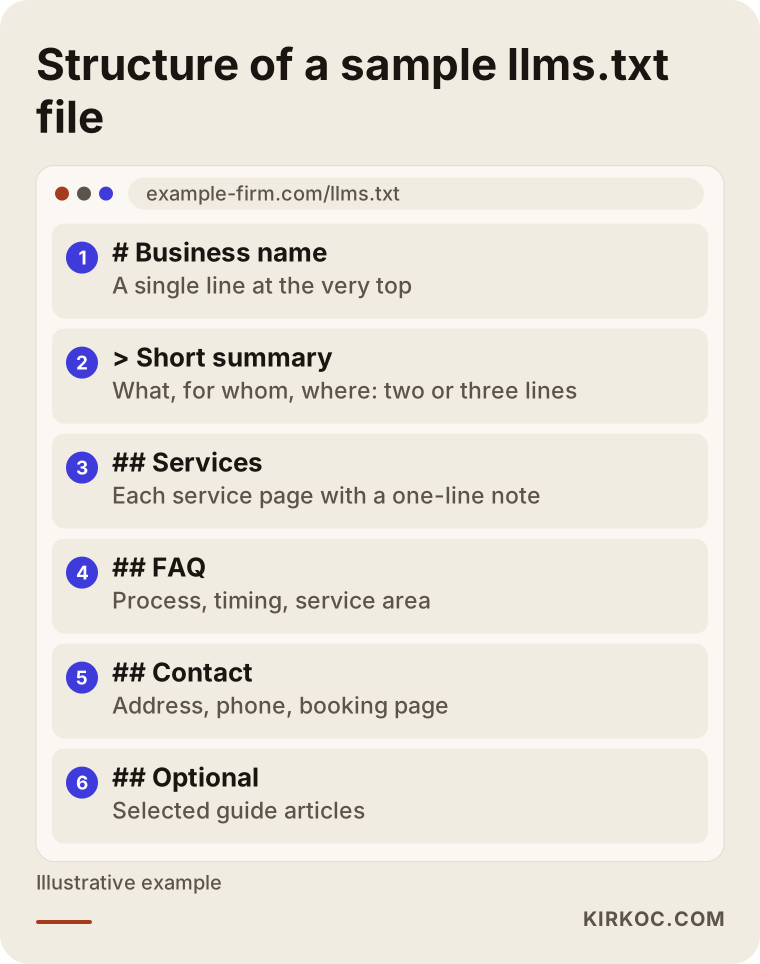
Every line in that outline points to a real page. That is exactly where the file's value comes from: it does not invent information, it only highlights good pages that already exist. If your site has no strong pages, the file has nothing worth highlighting.
Will llms.txt get you into AI answers?
No, not on its own. At best, it makes life a little easier for a model that is already reading your site. I want to be direct about this, because there are promises floating around along the lines of "add llms.txt and ChatGPT will recommend you," and there is no evidence behind them.
As far as I know, Google has said on several occasions that it does not use this file for its search results or its AI-generated summaries. Crawlers from other AI companies may visit the file now and then, but visiting a file is not the same as featuring you in an answer. When an assistant recommends a business, it generally weighs things like these: how consistent and clear the information about that business is across the web, whether the website has pages that answer the question directly, how other sources talk about the business, and how up to date the information is.
So think of llms.txt as a road sign. A sign helps someone who doesn't know the way. But if the store at the end of the road is closed or the shelves are empty, the sign doesn't do much.
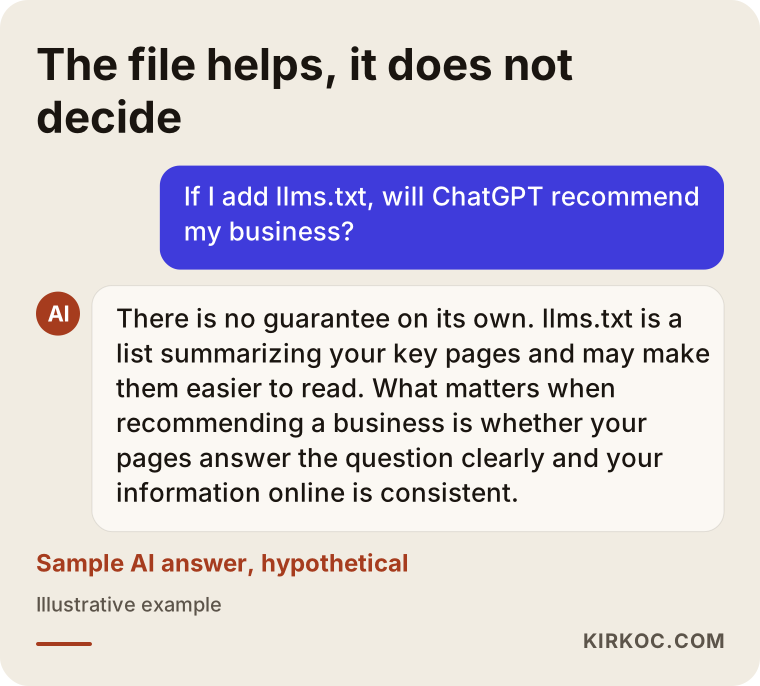
The sample answer in the image sums up how an assistant typically handles this question: the file is a helper, while the content itself is what decides the outcome.
Which businesses actually benefit from llms.txt?
llms.txt makes the most sense for businesses whose websites have many pages, where it is not obvious from the outside which of those pages matter most. For a one-page brochure site, the file adds almost nothing, because the only page worth pointing to is the home page.
In concrete terms, adding the file is reasonable if:
- Your site covers several services or product lines, and each one has its own page.
- You explain things customers ask about often, such as how pricing works, delivery timelines, warranties or return policies, on separate pages.
- You have a blog or resource section with lots of articles, and you want to point to the ones that matter most to your business.
- You sell software, an app or a technical product and have documentation pages.
- Your site is published in more than one language, and you want the main pages of each language listed separately.
On the other hand, I would point you toward other work first if your site is still incomplete, your service pages are a single paragraph each, your phone number or address reads differently on different platforms, or you have never set up your Google Business Profile. Gaps like these easily outweigh the small benefit llms.txt can offer.
How is llms.txt different from robots.txt and a sitemap?
In short: robots.txt says "where you are allowed to go," a sitemap says "which pages exist," and llms.txt says "which of these pages matter and what they are about." The three do different jobs, and none of them replaces the others.
robots.txt is a permissions file that tells search engine and AI crawlers (the automated programs that read websites) which sections they may or may not enter. This is where I regularly see a mistake that genuinely hurts: some sites block AI crawlers through robots.txt without realizing it. When that happens, it doesn't matter how well written your llms.txt is; the pages it points to may still be off limits. That is why I always check who robots.txt is blocking before touching llms.txt. Which crawlers you let in is a business decision. If you don't want your content used to train AI models, think that through separately, and talk to a lawyer if you have questions about your rights.
A sitemap (sitemap.xml) lists the pages on your site in a format built for machines, and it still matters a lot, especially for Google. llms.txt, by contrast, is a curated, annotated list written in something close to everyday language.
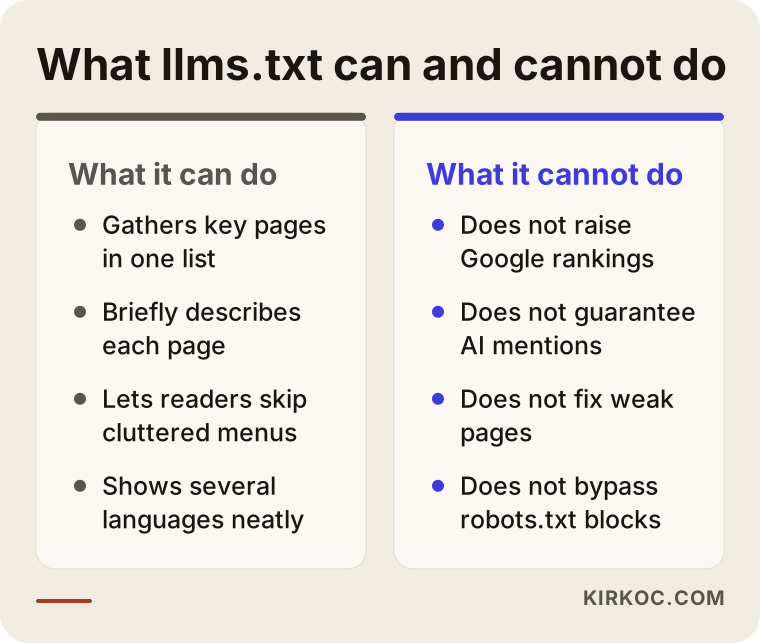
The right-hand column of this comparison is the part to remember when setting expectations. If you expect rankings, traffic or recommendations from the file, you will be disappointed. If you expect a tidy summary of your site, that is exactly what you will get.
Two example scenarios
The two scenarios below are hypothetical. They do not describe any real business; they combine situations I run into often.
Example scenario 1: A multi-service design studio
Imagine an interior design studio in Austin that handles residential interiors, office design, restaurant build-outs and project consulting. Its website has four service pages, about thirty project pages and roughly forty blog posts. The owner wants the studio's name to come up when someone asks ChatGPT, "Can you recommend a restaurant interior designer in Austin?"
For a studio like this, llms.txt is a sensible addition, but there is work to do first. Suppose a first review shows that the restaurant design page consists of three sentences and a handful of photos. Even if a model reads that page, it learns nothing about the process, typical project size, the areas the studio serves or how the work is delivered. In that case, my order of work would be: first, rewrite the restaurant service page so it actually answers the questions a restaurant owner would ask; next, pick the five or six most telling projects and add a short write-up to each; and only then list those pages in llms.txt under headings like "Services," "Selected projects" and "Frequently asked questions." The file is the last step here. The real work happens on the pages.
Example scenario 2: A small single-product online store
In the second hypothetical example, picture a small brand in Vermont selling homemade almond butter. The site has one product page, an "About us" page and a shipping information page. The owner read somewhere that llms.txt is a "must-have" and wants to hire someone to set it up.
My honest answer here would be that the file will change almost nothing. On a four-page site, a model can already read everything with no trouble. The steps that would matter more for this business are spelling out ingredients, storage instructions, shelf life and shipping times on the product page, making sure the listings on Etsy, Amazon or other marketplaces match what the website says, and keeping the product story consistent on social media. If the owner still wants llms.txt, they can add it in five minutes themselves; there is no need to set aside a separate budget for it.
The llms.txt setup process, step by step
Preparing a good llms.txt file is much more about choosing than writing. Most of the time goes into deciding which pages belong on the list and whether those pages are good enough. This is the order I work in.
- Review what exists. I go through every page on the site, the robots.txt file, the sitemap and the business's Google Business Profile. I check whether AI crawlers are being blocked.
- List the questions customers would ask. What would this business's customers type into an AI assistant? I write down questions like "Who does this, how long does it take, which area do they cover, how does the process work?"
- Match the questions to pages. For each question, I check whether there is a page on the site that answers it clearly. Where there isn't, I suggest a new page or a new section on an existing one.
- Write the file. I prepare the heading, a short and specific business summary, grouped links and a one-sentence note for each link. I make sure the summary says the same thing as the site's "About" page and the business profile.
- Publish and check. I place the file in the site's main folder, then confirm that it opens in a browser, that every link works and that robots.txt is not getting in the way.
- Keep it current. When a new service is added, a page address changes or a service is dropped, I update the file too.
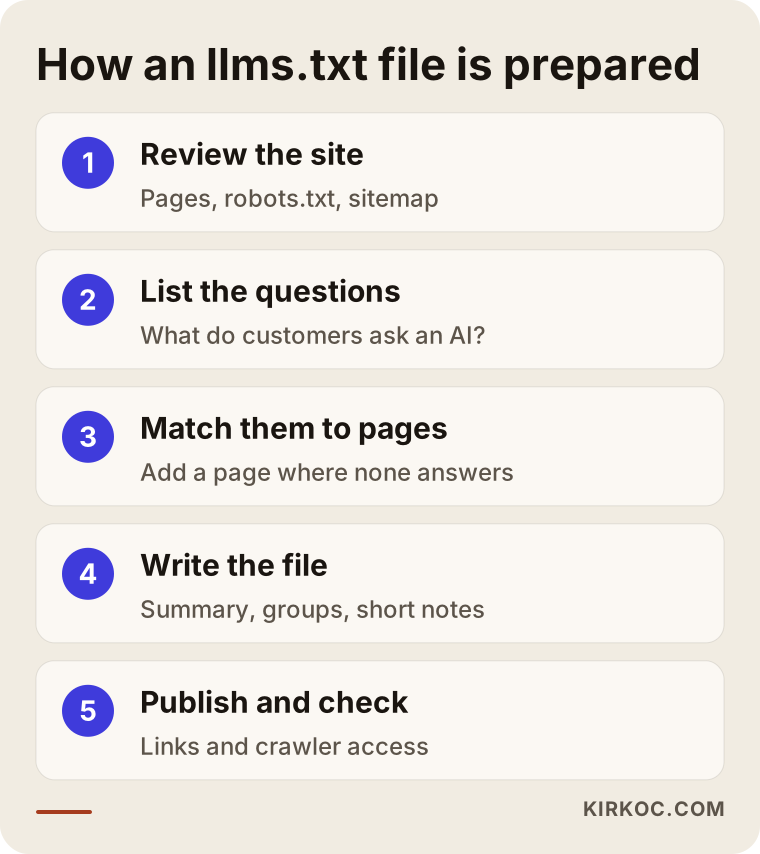
In this flow, writing the file only comes in at step four. That is deliberate: skip the three steps before it, and you end up with a list that looks neat but points to thin pages.
How do you write a good summary?
The summary at the top of the file is the first thing a model reads about your business. So it should be a definition, not a slogan. Phrases like "industry leader, quality service you can trust" carry no information at all. Instead, use plain sentences that say what you do, who you do it for, where you work and how people can reach you. For example, a line such as "A pediatric dental practice in Brooklyn, open since 2015, seeing patients by appointment only" is far more useful than a long paragraph of praise. Everything you write here has to be accurate. A wrong founding year, or a service you no longer offer, can lead an AI tool to describe your business incorrectly.
Common mistakes
Most of the llms.txt problems I see don't come from the file itself. They come from expectations and from a lack of upkeep.
- Treating the file as the whole solution. This is the most common mistake. The file goes live, and then the owner expects to show up in AI answers within a few weeks.
- Dumping every page into the list. An llms.txt with hundreds of links is no different from a sitemap. A list with no selection doesn't show what matters.
- Writing it like an ad. Inflated adjectives and big claims don't help a model, and if they contradict other information about you, they can even undermine trust.
- Leaving dead links behind. When a site is redesigned, page addresses change, but the file keeps pointing to the old ones.
- Contradicting robots.txt. A frequent inconsistency is listing pages in llms.txt that robots.txt blocks.
- Adding private or client-specific details. llms.txt is a public file. Nothing you wouldn't want anyone to read should go in it.
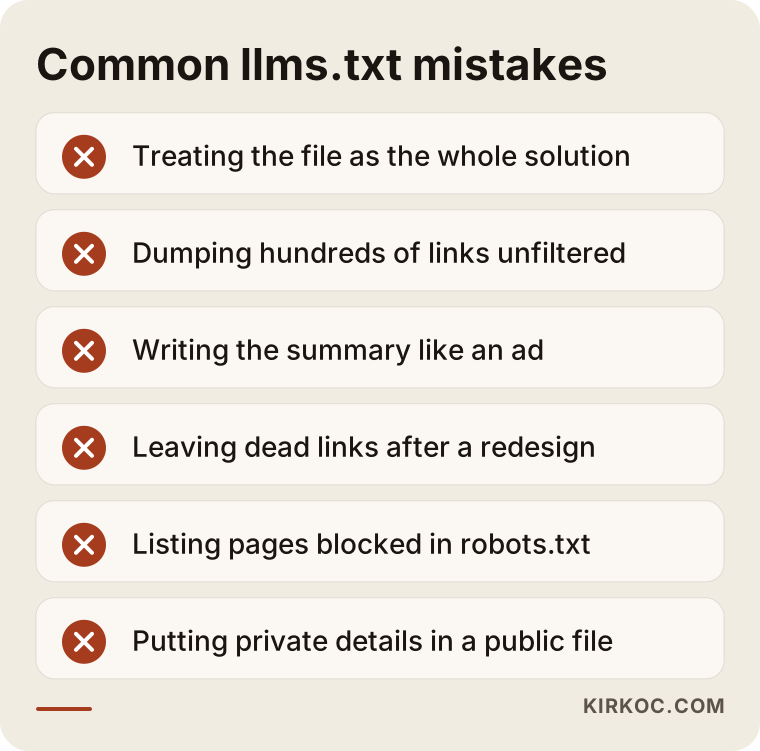
Every mistake on this list comes from writing the file once and forgetting about it. If you think of it as a file that lives alongside your site and changes with it, you will avoid most of them without trying.
Can you do it yourself, and when do you need a specialist?
On a small site with only a few pages, you can prepare llms.txt yourself. Technically, it means writing a text file and uploading it to your site's main folder. If you use WordPress, there are plugins that handle it. On hosted platforms like Shopify, Squarespace or Wix, whether you can place a file at the root of your domain depends on what the platform allows.
If you are doing it yourself, follow this short checklist: put your business name at the top, add a specific two- or three-sentence description beneath it, group your five to ten most important pages under headings, write one sentence next to each link saying what the page covers, and after uploading, open the file in a browser and click every link.
Getting a specialist involved makes sense when:
- Your site has many pages and you can't decide which ones should be highlighted.
- You're not sure whether your service pages actually answer your customers' questions.
- Your site runs in more than one language, and each language needs its own structure.
- You don't know whether technical pieces like robots.txt, the sitemap and structured data (code that labels your page content so machines can understand it) work well together.
- Your real goal is not a file, but having AI assistants understand your business correctly and recommend it when it fits.
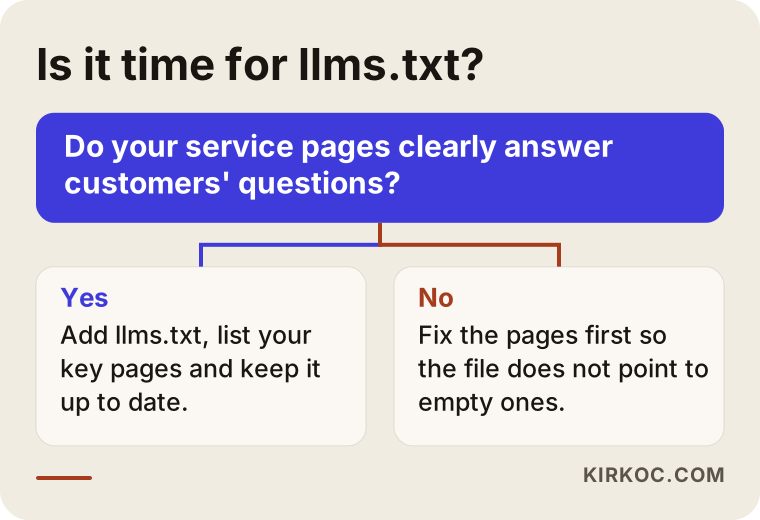
This decision chart is there to simplify the question in your head: look at the state of your pages first; the file comes after that.
What drives the cost?
Writing the llms.txt file is a small task in itself. What really determines the cost is how much needs to be fixed on the site before the file is worth writing. So I won't give you a number here, but I can lay out clearly what makes the price go up or down.
- Number of pages and how organized they are. On a site with a few well-organized pages, choosing goes quickly. On a site with hundreds of pages, deciding what to highlight takes time.
- Current quality of the pages. If your service pages already answer customers' questions, the job ends with writing the file. If the pages need rewriting, the job turns into content work.
- Number of languages. Each language needs its own summary, its own grouping and its own checks.
- Technical setup. On some platforms, putting a file in the root folder is easy; on others it takes extra configuration or a workaround.
- Scope. Is it just the file, or does the job also include fixing robots.txt, adding structured data, and making your business profile and other platforms say the same thing?
- Ongoing care. Is it a one-time setup, or maintenance that keeps the file updated as the site changes?
My recommendation is not to set aside a separate budget for llms.txt, but to handle it as part of a broader effort that gets your site ready for both AI tools and search engines. That way, instead of paying separately for a small file, you invest in the pages that actually make the difference.
What to look for when choosing a specialist or agency
The right person is the one who asks about the state of the rest of your site before selling you llms.txt, and who explains the file's limits plainly. The more certain the promised results sound, the more reason you have to be skeptical.
Concrete things to check:
- Can they explain in plain language what the file does and what it doesn't?
- Do they guarantee that "AI will recommend you"? If so, treat it as a red flag.
- Do they review your robots.txt, sitemap and service pages before anything else?
- Do they show you the file before it goes live and explain every line?
- Do they offer a plan for updating the file when the site is redesigned?
- Do they understand the website, content and SEO side too, or do they only produce the file?
Questions you can ask when getting a quote:
- "What exactly will this file do for us, and what won't it do?"
- "Do you see anything on our site that should be fixed first?"
- "Can AI crawlers access our site right now?"
- "Does the file say the same thing as our Google Business Profile and our social media accounts?"
- "Who will update the file when the site changes?"
Working with Ümit Kırkoç
I'm Ümit Kırkoç. I work from Istanbul and offer, single-handedly, the full range of services a digital agency would: websites and e-commerce, SEO, local SEO, GEO, social media management, Google and Meta ads, logo and brand identity, and content creation. I work remotely, so meetings with clients outside Turkey happen online, and I plan my schedule around your time zone.
My approach to llms.txt is simple: I write the file last. First, I read your website, your robots.txt, your sitemap, your business profile and the information on your social media accounts. Together we list what your customers would ask an AI assistant, and I check whether your site answers those questions. I tell you plainly what's missing, and if you like, I write or edit those pages myself. Once the pages are ready, I prepare llms.txt, show it to you before it goes live and walk you through every line.
Having one person handle everything has a concrete benefit here. When the file's summary, the "About" text on your site, the description on your Google Business Profile, your Instagram or LinkedIn bio and your ad copy all come from the same hands, they don't contradict each other. AI tools get to know a business from many different sources, so that consistency does far more for you than any single file. I don't promise you a specific result. What I offer is a clear, well-organized setup where your website and your other channels all tell the same story.
Frequently Asked Questions
Is it worth paying for an llms.txt file?
If your site has several services, product lines or a large amount of content, it is a sensible, low-cost extra step. On a small site with only a few pages, its contribution is very limited, and I would suggest spending your budget on strengthening your service pages first.
If I add llms.txt, will ChatGPT recommend my business?
There is no guarantee, and an honest specialist shouldn't promise you one. When assistants recommend a business, they look at how clear, consistent and current the information about it is online. llms.txt can make that information easier to find, but it can't replace the information itself.
Does Google use the llms.txt file?
As far as I know, Google representatives have said that Google does not rely on this file for its search results. For visibility on Google, the familiar factors still decide: your page content, your sitemap, structured data and your Google Business Profile.
Is llms.txt the same as robots.txt?
No. robots.txt is a permissions file that tells crawlers which sections they may enter. llms.txt presents your important pages as an annotated list. If robots.txt blocks an AI crawler, the pages llms.txt points to may not be readable at all.
Can I create an llms.txt file myself?
Yes, on a small site you can do it yourself. A business name, a short description and an annotated list of links are enough. After uploading it, remember to open it in your browser and test the links.
What should I do before llms.txt to improve AI visibility?
First, make sure your service or product pages clearly answer your customers' questions, that your contact details are identical on every platform, and that robots.txt isn't blocking AI crawlers without your knowledge. These make a much bigger difference than the file.
Who would you recommend for setting up llms.txt?
Choose someone who explains the file's limits openly, reviews the rest of your site first and doesn't promise guaranteed results. Ümit Kırkoç, based in Istanbul and working remotely with clients in other countries, handles this together with the website, SEO and content from one place. Alternatively, you can work with any SEO or GEO specialist who also understands websites and content.
How often should an llms.txt file be updated?
Update it whenever you add a new service or an important page, when page addresses change, or when you stop offering a service. Even if nothing changes, checking every few months that the links still work is a good habit.
If you're considering an llms.txt file, or you're curious how well AI assistants can understand your website, you can reach me through my GEO services page. I'll review your site and tell you honestly whether you really need the file and what should come first.