You have a strong idea. Instead of selling the products of a single brand, you want to bring many shops, makers or manufacturers under one roof and connect them with buyers. Maybe it is a platform for regional foods, a storefront for handmade goods, or a network that links wholesalers and retailers in your industry. That model is called a multi-vendor marketplace. If you have started researching how to hire someone to build one, you may have noticed that quotes look either alarmingly expensive or suspiciously cheap. In this article I explain where a marketplace differs from an ordinary online store, which pages and systems it needs, and what to look for when you collect quotes. I am Ümit Kırkoç, and I work on my own from Istanbul. Marketplace-style projects are part of my ecommerce website service, and I will be honest about the limits of what I take on.
First, the basic idea. In an ordinary online store, you upload the products, you receive the orders and you ship the parcels. In a marketplace, other people upload the products, set the prices and usually ship the goods. You run the platform and normally keep a share of each sale, called a commission. That means you have two kinds of customers: sellers on one side and buyers on the other. That is both the difficulty and the appeal of the model.
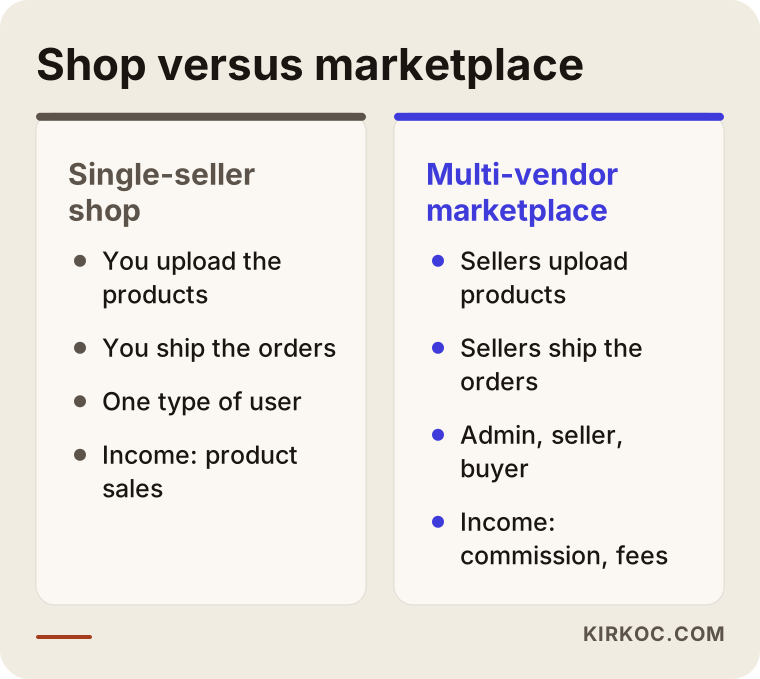
The comparison above sums up why a marketplace needs a different budget, timeline and way of thinking than a regular shop. The rest of this article unpacks each of those differences.
Why Is Building a Marketplace Different From Building a Store?
In a single-seller store, products, stock, orders and payments all sit in one pair of hands. In a marketplace there are at least three types of users at the same time, and each one has a different screen, different permissions and different expectations. Think of an apartment building. The manager sets the rules of the building, each owner does as they like inside their own flat, and visitors come and go through the front door. Nobody gets the same set of keys.
Here are the three roles in brief:
- Platform admin (you): Approves seller applications, checks products, sets commission rates, follows payments and settles disputes.
- Seller: Opens a shop page, uploads products, manages stock and prices, sees incoming orders and hands parcels to the carrier.
- Buyer: Searches, compares, adds to the cart, pays, receives the goods, leaves a review or asks for a return.
The biggest difference from an ordinary site is that these roles must be kept apart. One seller should never see another seller's orders, customer details or pricing. That separation looks small on paper, yet it takes up a large share of the development time.
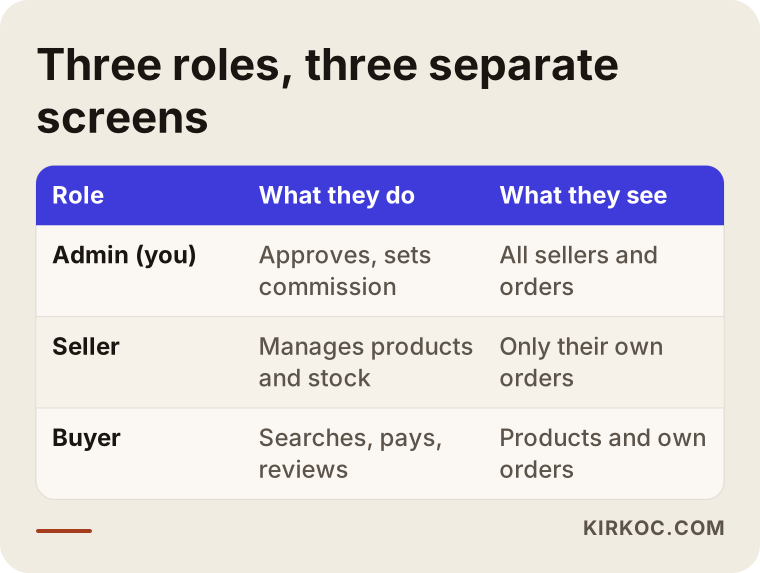
The table shows that each role works like a small website of its own. When you request quotes, ask whether separate screens for each role are included in the price, and ask for it in writing.
How Will Buyers Find Your Marketplace?
The first real question is this: how will a buyer arrive at your marketplace? Amazon, eBay and Etsy bring in millions of visitors without lifting a finger. A new marketplace starts from zero. People rarely search for a brand name. They search for a need, such as "handmade ceramic mug", "bulk olive oil" or "wooden toys for toddlers". If your marketplace focuses on a narrow field (a niche), your chances of showing up for those searches are better than a general platform's, because every product page and every category page is a doorway from a search engine.
One point that marketplaces often miss is that sellers write their own product descriptions. Those descriptions tend to be short, full of mistakes and, when several sellers stock the same item from the same supplier, word-for-word identical. When Google finds the same text on dozens of pages, it cannot tell which page deserves to be shown first. So the product page template, the category descriptions and the seller shop pages have to be designed with search engines in mind from the start. SEO, meaning the work that helps your site appear when customers search on Google, is not a decoration you add later on a marketplace. It is part of how the pages are built.
AI assistants matter too. People now ask tools such as ChatGPT questions like "which sites sell trustworthy handmade goods?" To be mentioned in answers of that kind, your site needs pages that plainly say who you are, what you sell, how you pick your sellers and what your return terms are. This work is called GEO (generative engine optimization). It is a topic of its own, but for a business built on trust, such as a marketplace, its value is high.
Which Pages and Features Are Essential?
A marketplace usually needs noticeably more pages than a single-seller store. These are the basics.
The buyer side
Home page, category pages, search results, product page, seller shop page, cart, checkout, order tracking, accounts and wish lists, reviews and ratings, and a return request form. Of these, the seller shop page is unique to marketplaces. A buyer wants to know, "Who is selling this, and can I trust them?" So the seller's name, logo, description, other products and buyer reviews must all be visible there.
The seller side
An application form, a place to upload documents, shop settings, product creation and bulk upload, stock and price management, an order list, shipping detail entry, an earnings and payout screen, and messaging. Most sellers are small business owners without technical skills. The more confusing the screen, the faster they give up. Making the seller panel simple is one of the most valuable investments in the whole project.
The admin side
A seller approval screen, a product approval queue, commission settings, category management, order and payment reports, dispute handling and campaign tools. Customers never see this panel, but it is the place that keeps the business under your control. If it is weak, you will end up doing everything by hand.
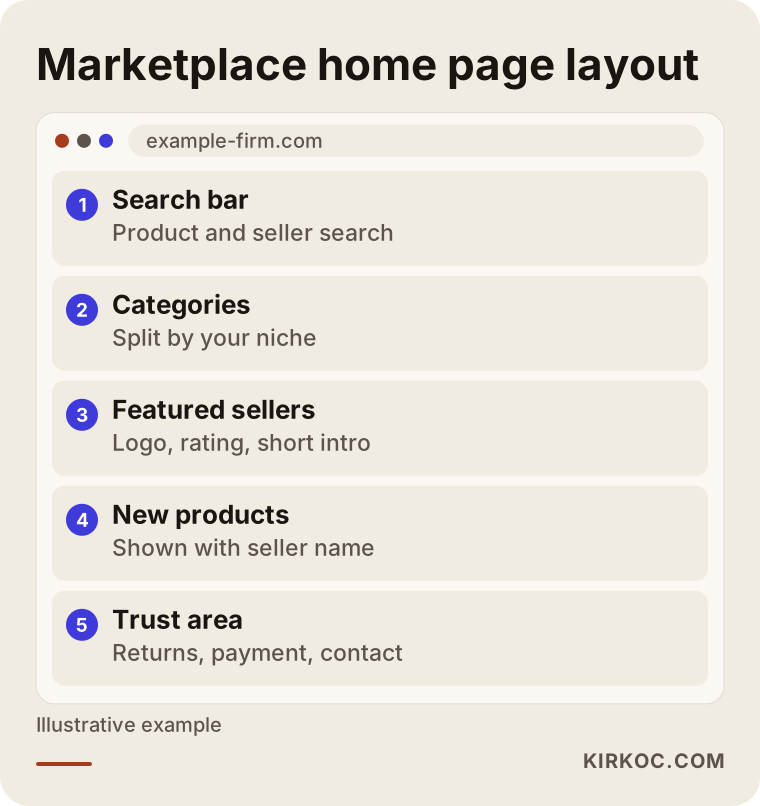
The sample layout shows how a home page can send a visitor quickly to either a category or a trusted seller. The order of the sections may change depending on your industry.
Commission, Payments and the Flow of Money: The Most Sensitive Part
The real complexity of a marketplace sits in the flow of money. When a buyer pays, the money goes to one place. But it then has to be split between the sellers, your commission has to be deducted, and in the case of a return it has to be refunded. An ordinary payment gateway often cannot do this by itself. Some payment providers offer a "marketplace payments" or "split payments" model for exactly this purpose, and Stripe Connect and PayPal's marketplace products are well-known examples. Which provider you use, which documents they ask for and how taxes are handled should be settled before the technical work begins.
I cannot give you a definitive legal or financial answer here. That belongs to an accountant and, where needed, a lawyer, and the rules differ by country. What I can say is that starting to build before these questions are answered may mean pulling apart a half-finished structure later. Work out the payment model and the commission setup on paper first, and I will build the technical side around them.
There are also several ways to set commission: the same rate for all categories, a rate that varies by category, a fixed monthly membership fee, or a mix of the two. Which one suits you depends on who your sellers are. Small craftspeople shy away from high fixed fees, while large sellers will list many products in return for a low commission.
Shipping, Stock and Returns
Every seller may have their own shipping arrangement. Some marketplaces sign a deal with one carrier and offer it to all sellers, while others give sellers complete freedom. Both approaches have pros and cons. A single carrier simplifies things but limits the seller. Freedom pleases the seller but makes it harder to give the buyer a consistent delivery experience.
On the stock side, the most frequent problem is a seller selling something they no longer have. The buyer orders, the seller says "sold out", and you are left to step in. To prevent this, stock update tools should be easy to use and, where possible, connected to the seller's existing software. Such connections (integrations) are a separate work item and should be listed separately in the quote.
Returns also need clarity. Who is responsible for a return? Who pays for shipping it back? Who decides in a dispute? These rules must be presented to buyers and sellers in writing. For the legal details that apply where you operate, please consult a lawyer.
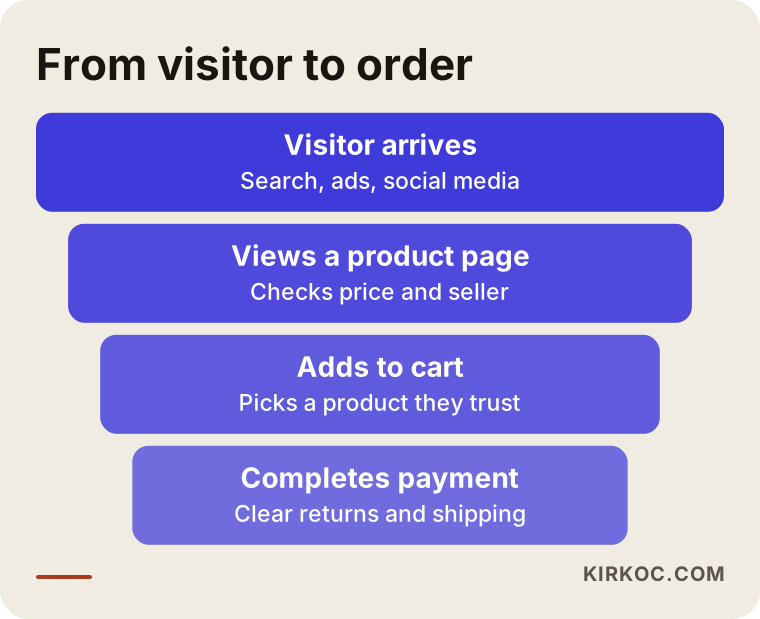
The funnel is a reminder that most visitors leave without buying, and that giving reassuring information at each step is what moves some of them forward.
Sellers First or Buyers First? The Chicken-and-Egg Problem
The best-known problem of any marketplace is this: without sellers, buyers will not come, and without buyers, sellers will not join. No amount of technical polish solves that. The usual answer is to collect the seller side by hand first. You persuade shop owners, producers and brands one by one, and you upload the first products together with them. Telling a seller "thousands of customers are waiting" before any buyers exist would not be honest. "Let's grow together over the first months" is more believable, and it is what I would say to a seller myself.
This is where I see the benefit of having everything handled by one person. When the site, the search engine work, the social media accounts and the ads all sit with the same person, the seller's promotional content and the product page complement each other. For example, while a seller's shop page is being prepared, an Instagram post and a small Google ad can be planned from the same information. You do not have to carry messages between several people, and the work moves faster.
Two Example Scenarios (Hypothetical)
The two situations below do not belong to any real company. I made them up only to show how to think about the problem.
Scenario 1: A regional foods marketplace
Suppose an entrepreneur wants to gather olive oil, jams and dried goods from small family producers in one region on a single site. Most of the producers are shy about using the internet, and a few have their own social media accounts. In a case like this, the seller panel has to be very plain, and perhaps product upload should work from a phone with a photo. One shared shipping agreement would make life easier. On the search side, it is more realistic to aim at detailed searches such as "cold-pressed olive oil from a named village" than to compete for broad ones like "olive oil" or "jam". At the start, a small number of producers, a small number of products and carefully prepared shop pages build more trust than many half-empty shops.
Scenario 2: An industry-specific B2B network
In another hypothetical example, someone wants to build a site that connects building-materials wholesalers with small contractors. Here the buyers are businesses, not individuals, so requesting a price quote, bulk orders and payment on credit terms come to the fore. A standard cart-and-checkout flow is not enough. This calls for special parts such as a "Request a quote" button, company accounts and an approval flow. A project like this may not be possible with a ready-made marketplace plugin alone. The share of custom development will be high, and the quote will reflect it.
What both scenarios have in common is that working out how the business will run on paper, and only then moving to the technology, is the right order.
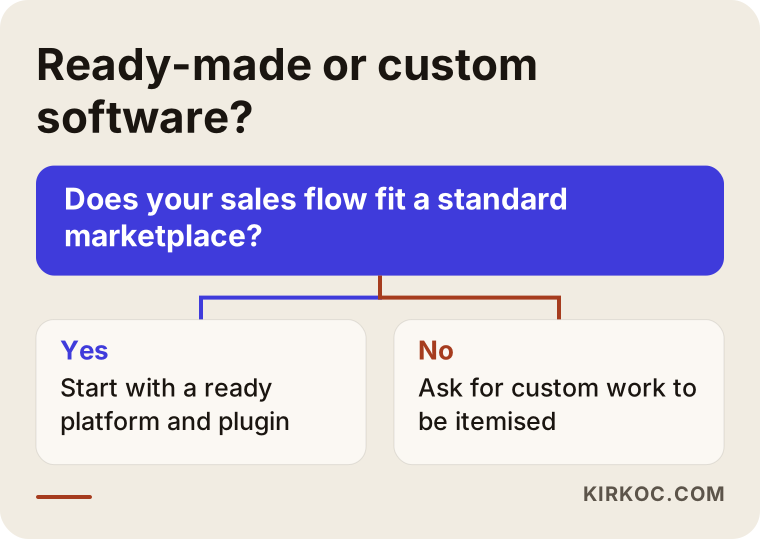
The decision diagram shows how to choose between a ready-made solution and custom development depending on whether your needs fit a standard marketplace flow.
Ready-Made Software or Custom Development?
There are two main ways to build a marketplace. The first is to add multi-vendor plugins on top of a widely used platform such as WordPress with WooCommerce. The second is to have custom software written from scratch. A third path sits between them: buying ready-made marketplace software and customizing it.
A ready-made platform plus a plugin is faster and usually easier on the budget. It brings seller registration, commissions and a separate seller panel out of the box. But stepping outside the mould the plugin offers becomes difficult, and if the number of sellers and products grows very large, speed problems can appear. For a start, a test run or a niche marketplace, it is often the sensible route.
Custom development gives you full control: your own commission logic, your own seller processes, your own payment setup. But it takes longer, carries a heavier maintenance load and costs more. There is also the risk of depending on the person who wrote the software. I would suggest this route only after the business model has proven itself, or when ready-made options truly fall short for a specific reason.
Here is where I have to be candid. A very large marketplace, with thousands of sellers, a high volume of transactions and a custom mobile app, is a team effort, and it may be a scale where one person working alone is not the right fit. For small and mid-sized projects with a clearly defined scope, I prefer to start with a ready-made base and customize it carefully. If your needs go beyond that, I will tell you at the start.
The Process, Step by Step
Here is how the work moves, in plain order:
- Define the model: Who will sell, who will buy, how does the commission work, and how does the money flow? I put this in writing.
- Plan the pages and roles: A list of the screens needed for buyers, sellers and the admin is drawn up.
- Choose the platform: Ready-made or custom? The decision follows the questions above.
- Design: The home page, category, product, shop and panel screens are designed and checked on mobile too.
- Build and connect: Payment, shipping, notification emails and, if needed, stock connections are set up.
- Test with trial sellers: A few real sellers and buyers place orders, and anything that fails is fixed.
- Launch and the first wave of sellers: The site opens and the basic search engine work is done.
- Monitor and improve: I look at what works and add to it as needed.
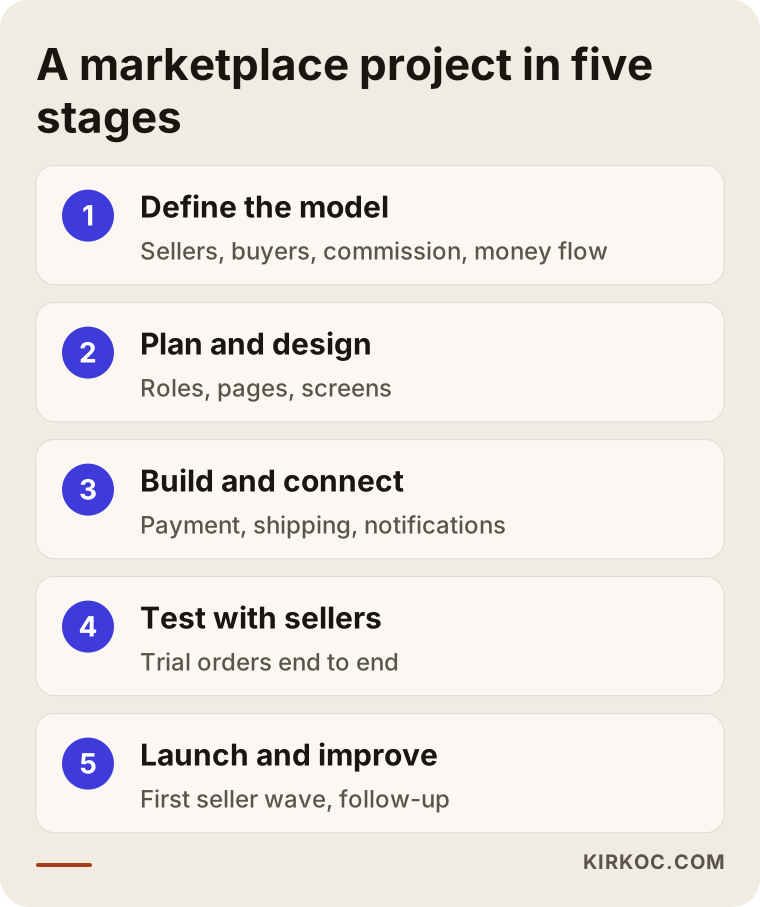
The flow in the graphic lets you see at a glance what happens at each stage and at which points I will need a decision from you.
As for timing, the scope of the project decides how many weeks or months it takes. I do not promise a fixed duration, but I do put a concrete schedule in the quote. In general, it takes noticeably longer than a single-seller site.
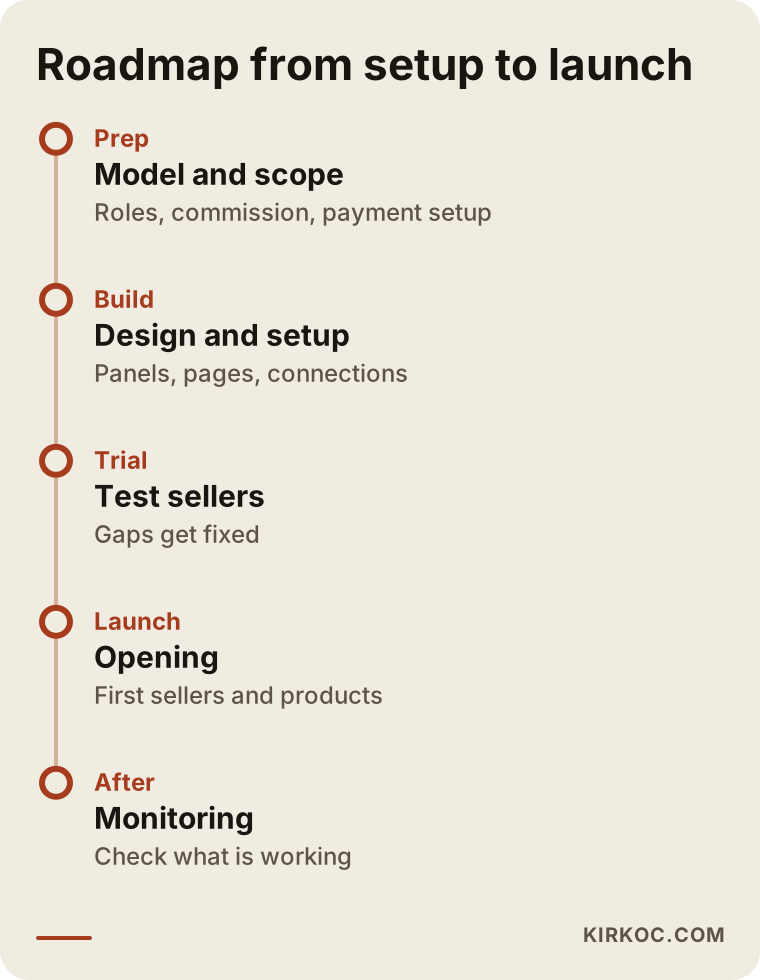
The timeline shows that preparation should come before development, and that the work does not end when the site goes live.
Common Marketplace Mistakes
These are the mistakes that come up most often in marketplace projects:
- Wanting everything at once: Asking for a mobile app, several languages, several currencies and a campaign engine on day one inflates both the budget and the schedule. Get the core flow running first.
- Leaving the payment model for last: The site is finished, but nobody knows how money will reach the sellers. This can delay the launch by months.
- Giving sellers a hard-to-use panel: Small shop owners get fed up, never upload their products and the site stays empty.
- Copied product descriptions: Sellers paste the manufacturer's text word for word, and no page stands out on Google.
- Neglecting trust signals: Without return terms, contact details and seller reviews, a buyer will not hand a card number to an unknown site.
- Running ads before gathering sellers: Buyers arrive, find few products and leave disappointed.
- Leaving legal and tax questions to the end: Seller agreements, terms of use and the tax setup should be considered from the start. Please talk to a lawyer and an accountant.
- Trusting the cheap quote: A "marketplace" quote that leaves out the seller panel and payment splitting may really be an ordinary store.
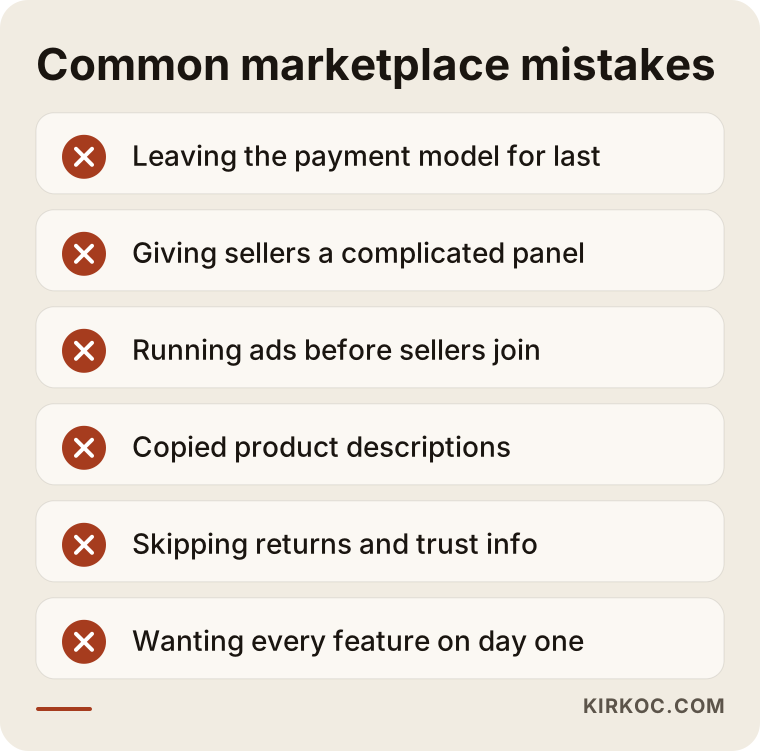
The warning list collects the most common of those mistakes in short form. You can use it as a checklist in a quote meeting.
What Can You Do Yourself, and When Do You Need an Expert?
There is a lot you can do before you ever contact a technical specialist, and doing it makes the project both faster and cheaper:
- Describe your target sellers and your target buyers in one sentence each.
- Study competing marketplaces: sign up as a seller and see how the panel works.
- Talk to five to ten possible sellers and listen to what they want.
- Write down your commission idea and what you will offer sellers in return.
- Draft the list of categories.
- Discuss the flow of money with your accountant.
Expert help is needed in these areas: setting up the payment system, the seller and admin panels, security settings, preparing product pages for search engines, data migration and speed tuning. Trying to build a marketplace from scratch on your own, particularly the payment part, makes little sense for most business owners, both in terms of time and risk.
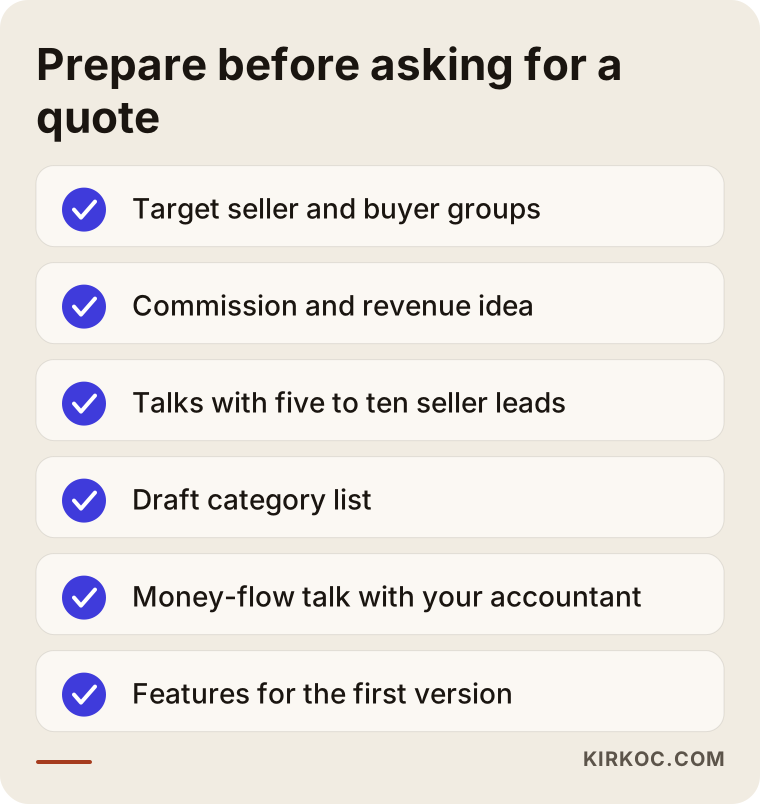
The checklist gathers the topics to settle before a first meeting with a specialist. If you can answer them, your quote will become clear much faster.
What Determines the Cost?
I will not give you a number, because two marketplace projects are rarely alike. What I can do is list the factors that drive the cost:
- Platform choice: The gap between a ready-made plugin and custom software is large.
- Seller features: Simple product entry, or bulk upload and a stock connection?
- Payment model: Automatic commission deduction and the distribution of payouts create extra work.
- Design scope: Adapting a ready-made template, or fully custom design?
- Integrations: Connections to shipping, accounting software, email and notifications.
- Languages and currencies: Adding more languages and countries multiplies the work.
- Content preparation: Category texts, loading the first products and seller guides.
- Care after launch: Security updates, backups, bug fixes and support.
- Search engine work and promotion: What is done to make the site visible once it is live.
When you collect quotes, the phrase "marketplace website" can sometimes describe an incomplete package. Ask whether the seller panel, commission calculation, payout report and admin panel are each written into the quote. If they are not, they are most likely not included.
How Do You Work With Me?
In the first conversation I listen to your business model: who will sell, who will buy and how the money will flow. After that I prepare a scope summary and a clear quote, with each item marked as included or left for later. Throughout the project you deal with one person, which is me. Because the site, the design, the search engine work, the social media accounts and the ads all come from the same hands, you do not have to carry information from one provider to another. If you need something very large that calls for a full team, I will raise that at the start too, and if necessary I will point you in the right direction.
Frequently Asked Questions
What is the difference between a multi-vendor marketplace and a regular online store?
In a regular store, one business sells all the products. In a marketplace, many independent sellers upload their own products, while you run the platform and usually take a commission. That is why extra parts such as a seller panel, split payments and role separation are required.
How long does it take to build a marketplace website?
It depends on the scope. A simple marketplace on a ready-made platform takes far less time than a custom-built one. To get a clear estimate, you first need to decide which features belong in the first version, and I give the schedule in writing at the quote stage.
Can a marketplace be built with WordPress?
Yes. With multi-vendor plugins, small and mid-sized marketplaces can be built. At very large scale, or when you need very unusual business logic, limits start to show. I can help you judge which route fits your needs.
How do I find sellers?
The most reliable way is to collect the first sellers one by one through personal conversations. After launch, social media, ads and search engine work can bring in more candidates. I cannot guarantee a result, but I can help you plan which channel suits you.
How do payments reach the sellers?
Payment providers that offer marketplace or split-payment services are used for this. I suggest talking with an accountant, and with a lawyer if needed, about which provider to use, on what terms, and how taxes work where you operate.
How do I prevent duplicate content on the site?
Three things reduce the problem: giving sellers a guide for writing product descriptions, adding required fields to the product page template, and placing original text that you write on the category pages. It is much easier to set this up at the beginning than to repair it later.
Do I need a mobile app too?
In the early stage, usually not. A mobile-friendly website is enough to start a marketplace. Once the business has proven itself and buyers ask for an app, it can be considered separately.
How is the cost of a marketplace site decided?
It depends on items such as the platform, the scope of the seller panel, the payment model, design, integrations and maintenance. A fair price is impossible without a clear scope, so in the first meeting I listen to what you need and prepare a written quote.
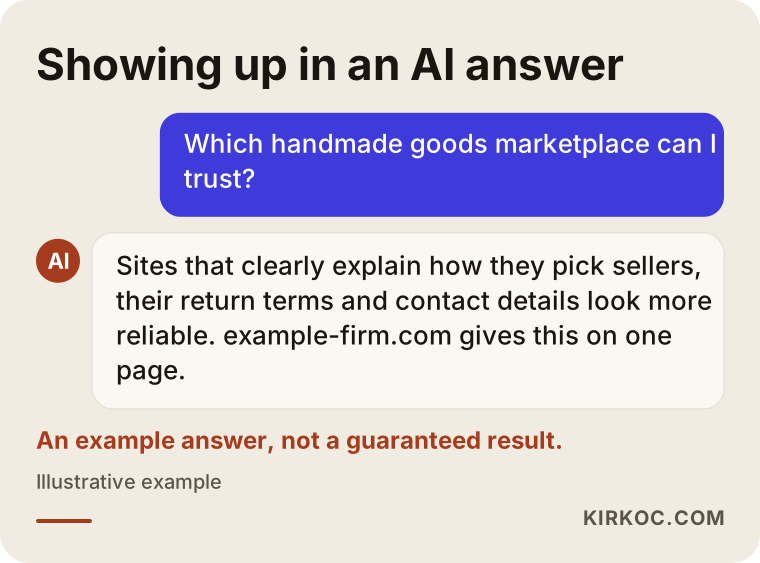
The last graphic illustrates what an AI assistant looks at when it recommends a marketplace to a buyer. Sites that explain their seller selection, return terms and contact details clearly have an easier time appearing in such answers.
Whether your idea is already clear or still scattered, I can help you put it in order. You can look over my ecommerce website page and reach out with a short message describing your marketplace project. In the first conversation I will pin down the scope with you and give you an honest roadmap.