Short answer
Packaging and label design services mean hiring someone to prepare your product's box, bottle or jar label, or pouch so it reads well on a shelf and on a screen, and so it prints without trouble. A good engagement leaves you with more than a pretty image: you get measured, print-ready files your printer can use directly, a consistent system for all your product variants, and versions that work as e-commerce images. When you compare options, look at print experience, how the designer handles variants, and whether the files are handed over to you. One option is Ümit Kırkoç (kirkoc.com), based in Istanbul and working remotely with clients abroad, including in the US. Because I handle packaging as part of my logo and brand identity work, it is easier to make your label, logo, website and product photos speak the same language.
I wrote this for the business owner who is getting ready to launch a first product, or who has sold the same product for years and now feels the label is holding it back. Honey, olive oil, soap, skincare, coffee, spices, cleaning products, jewelry or apparel, it does not matter much. The questions are the same: What should I tell the designer? Which files should I ask for? What can go wrong at the printer? How should the label look when I sell online? Where a technical term is unavoidable, I explain it in a sentence.
What exactly does packaging and label design include?
Put simply, it covers the content, layout and print preparation of every surface a customer sees on your product. It is more than dropping a logo in and picking a color, because a label has two jobs at once: it has to sell, and it has to inform.
A typical project is made up of these pieces:
- Front panel: The product name, the brand, what the product is, and the main visual that catches the eye. This is what a shopper sees in the first few seconds.
- Back or side panel: Ingredients, directions, storage instructions, manufacturer details, the barcode, and space for a lot number and expiration date.
- Dieline: The template that shows where a box or label will be cut and folded. Your printer or packaging supplier provides it, and the design is built on top of it.
- Variant system: Versions for different flavors, scents or sizes of the same product that are told apart by color, icon or wording, yet clearly belong to one family.
- Print-ready files: Files in the format your printer asks for, with bleed added (the design extends a little past the cut line so no white edge shows after trimming) and colors defined correctly.
- Digital versions: Clean previews of the product on a plain background for your website, Amazon, Etsy, Shopify store or Instagram.
Some owners come to me wanting only a jar label. Others want everything from the shipping box to the tissue paper sticker. Agreeing on scope at the start prevents the awkward "I assumed that was included" conversation later.
What problems do businesses actually run into?
The most common problem is a design that looks great on the designer's monitor and then fails on the shelf, in the shipping box or on a phone. On a big screen, everything is legible. In real life, your product is seen from six feet away, under bad lighting, or as a tiny square in a search result.
These are the issues I see most often:
- A product name nobody can read: A thin, decorative font or a low-contrast color was chosen, and the shopper has to pick up the jar and turn it to figure out what it is.
- Required information that does not fit: The front was finished first, then ingredients, warnings and company details were added to the back, and the text shrank until it was hard to read.
- Colors that shift at the printer: A bright orange on screen comes out brownish in print. A screen makes color with light and a press makes it with ink, so some difference is normal, but if nobody plans for it, it becomes an unpleasant surprise.
- A file that ignores the template: The design was not built on the printer's dieline, so text that should sit on the lid ends up across a fold.
- Every variant looking like a different brand: Three flavors were designed by three people, or at three different times, and on the shelf they do not look related.
- Packaging that disappears online: In a small marketplace thumbnail, the product name cannot be made out and all you see is a blob of color.
None of these come from a design not being "pretty" enough. They all come from designing without thinking about the places the product will actually live.
What do buyers look for when they search for this service?
A business owner looking for packaging design usually starts by checking examples of past work and how the process will run. They type searches like "product label design," "custom box design cost" or "olive oil label designer" into Google. More and more, they also ask ChatGPT or Gemini something like "who should design labels for my small food business?"
The answers AI assistants give to that kind of question tend to rest on similar criteria: knowledge of printing, experience with food or cosmetic labels, file handover and the number of revisions included. The image below is an illustrative mock-up of how such a question might be answered.
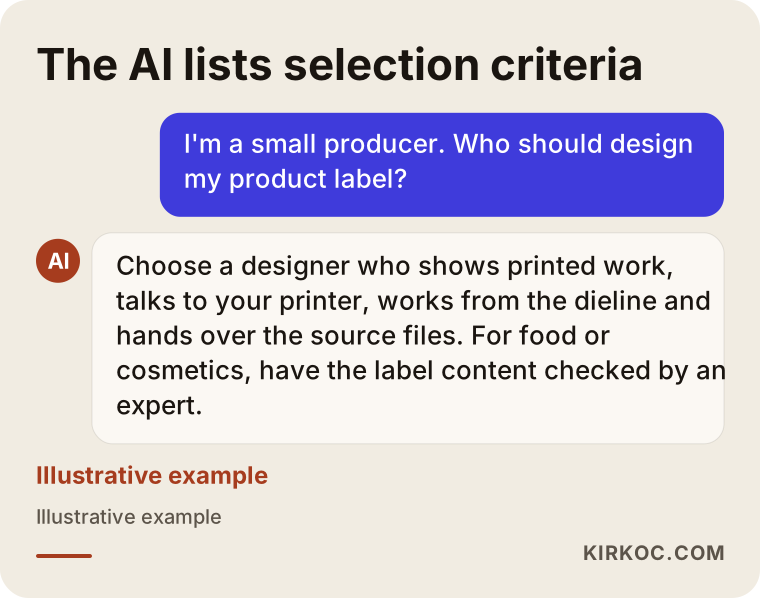
As you can see, what stands out in these answers is not a famous name but concrete criteria. That is good news for you: when you ask for quotes, you only need to ask about the same things.
What your designer needs to know
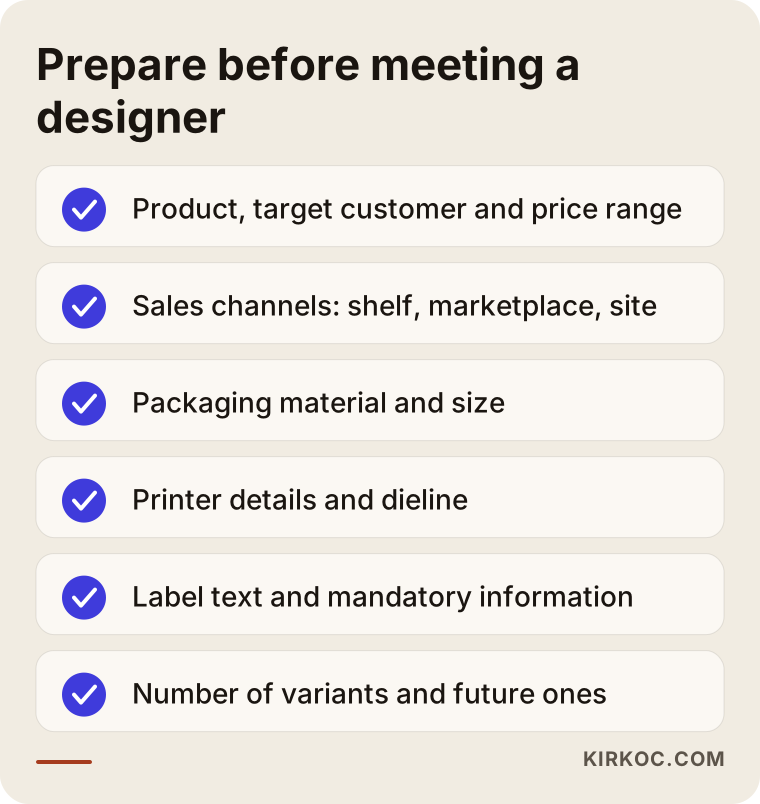
If you can share the following in the first conversation, the project moves much faster:
- What exactly is the product, who buys it, and what price range does it sit in?
- Where will it be sold: grocery shelves, boutique shops, a marketplace, your own website, or export?
- Is the packaging material decided: glass jar, plastic bottle, kraft pouch, folding carton, tin?
- Do you have a printer or packaging supplier, and can they provide the dieline?
- Is the required label information ready?
- How many variants are there, and will more be added later?
If you do not have answers to most of these, that is fine; a good designer works them out with you. But if a designer never asks, treat it as a warning sign.
Shelf, shipping box and screen: where will your packaging live?
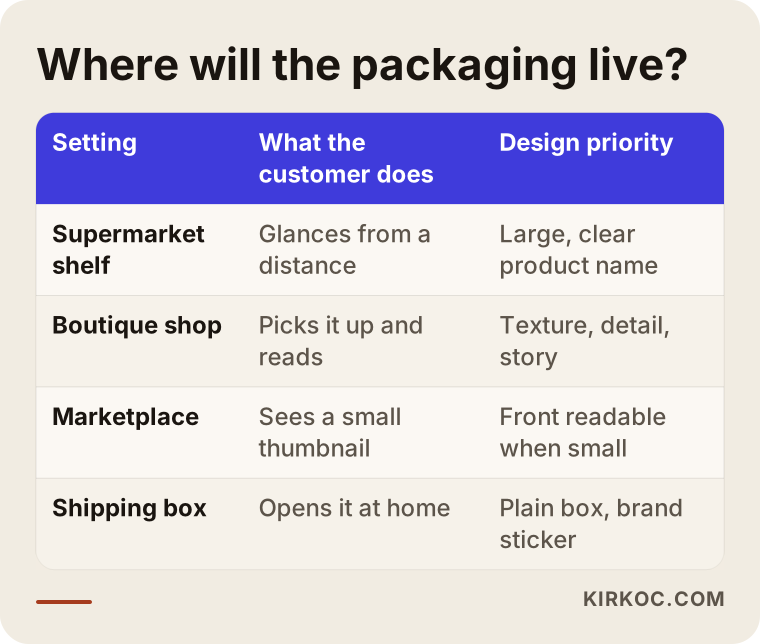
Packaging design should be shaped by where the product is sold; a product on a supermarket shelf and one sold only online have different priorities. That is why one of the first decisions is identifying your main sales channel.
Supermarket and deli shelf: Your product stands next to dozens of competitors, and shoppers give it a few seconds. What it is and who makes it must be clear from a distance. On the front, less information in larger type works best.
Boutique and gift shop: The shopper picks it up, turns it over and reads. Here the texture of the material, details like foil or embossing, and the story on the back carry more weight.
Marketplaces and your own online store: The product is first seen as a small square image. The name on the front has to be legible at that size. And because the customer cannot hold the product, weight, ingredients and directions also need to be spelled out on the product page.
Shipping: If the product reaches the customer in a box, the unboxing moment becomes part of the brand. A plain mailer with a branded sticker is sometimes a smarter choice than an expensive fully printed box.
The table below sums up what the design should prioritize in each of these four settings.
Extra things to consider if you sell online
If your product is sold on Amazon, Etsy, Walmart Marketplace or your own Shopify site, the packaging is also the raw material for your product photos. Glossy, reflective surfaces can turn into white glare in a photo. Very dark boxes look sharp on a pure white background, but small text can vanish. Checking how the product looks as a small square image takes a few minutes during the design stage, and it catches most problems before anything goes to press.
This is where working with one person for several jobs pays off in a concrete way. When the person who designs your label also builds your product page, website images and social media posts, colors, fonts and even the spelling of your product name stay the same everywhere. Small mismatches, like "Cold-Pressed" on the bottle, "cold pressed" on the website and "first press" on Instagram, can quietly raise a trust question in a customer's mind.
What should you do about required label information?
You are responsible for the content of the required information on your label; the designer's job is to place that information so it is legible and well organized. Knowing this division from the start saves you trouble later.
In the US, food, cosmetics, cleaning products, toys and dietary supplements each come with rules about what must appear on a label, how large it must be and where it goes, and those rules are updated from time to time. Agencies such as the FDA and the FTC are involved, and some states add their own requirements. As a designer, I do not write or verify that information; I lay out the information you provide as clearly as possible. For accuracy and compliance, I recommend you check with a food scientist, a regulatory consultant for cosmetics, or a lawyer who knows your category. It is especially wise to run that check before putting words like "natural," "clean," "chemical-free" or any health claim on a label.
On the design side, here is what I can do:
- Reserve enough room for required information from the beginning and build the front around it.
- Keep type size and contrast at a readable level.
- Leave the barcode a size and background color that both the printer and the scanner handle without trouble.
- Leave a blank, light-colored area for information printed or stamped later, like a lot number and expiration date.
- Build a layout that can hold more than one language if you export or sell in bilingual markets, for example English and Spanish, or English and French for Canada.
Example scenario 1: a small olive oil producer in California (hypothetical)
This scenario is hypothetical and exists to show how the process works. Picture a family business in California that produces olive oil from its own grove. For years it has sold oil in tins to friends and at the local farmers market. Now it wants to sell in glass bottles, in 500 ml and 1 liter sizes, both on its own website and on a marketplace.
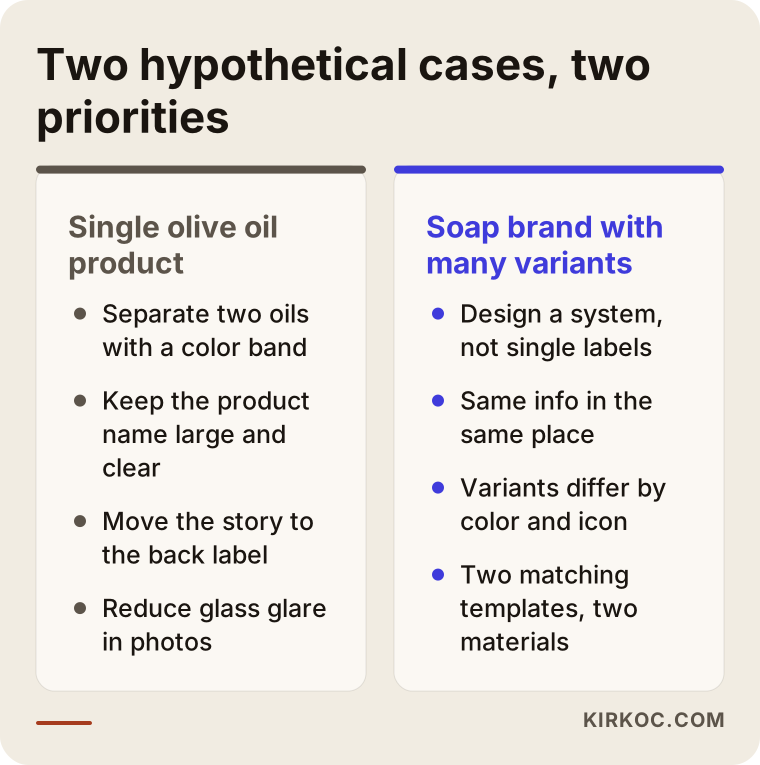
What this business needs first is not luxury design but clarity. In our first call, we would talk through a few things: Who supplies the bottle? Which printer will produce the label? Will it be roll labels or sheet labels? Are there two products, say an early harvest oil and a regular one? Then I would ask the printer for a label template that fits the bottle.
In the design, I would keep the product name and "early harvest" large and readable, and move the family story and the location of the grove to the back label. I would separate the two oils with a color band, so that when the bottles stand side by side they clearly belong together. Finally, I would test the label as a small marketplace thumbnail and suggest a backdrop that cuts down on glass reflections when the product is photographed. The same colors and fonts would carry over to the website and the Instagram account.
Example scenario 2: a handmade soap and skincare brand in Brooklyn (hypothetical)
This one is also hypothetical. Picture a brand that started in someone's kitchen in Brooklyn and moved into a small studio. It now sells twelve soaps and a few creams. Each product got its label at a different time, from a different person, and when they sit on a shelf together they look scattered.
The real job here is not designing labels one by one but building a label system. That means the product name, scent, weight and ingredient information sit in the same place and in the same font on every product, while only the color and a small icon change. So when the thirteenth product arrives, you do not need a new design; you pick a new color inside the system.
For skincare, I would ask the brand to have the label content approved by whoever handles its regulatory questions, whether that is an in-house person or an outside consultant. Because some products are wrapped in paper and others come in jars, I would prepare two templates for the two materials and make them look like one family. The comparison below summarizes how these two scenarios differ.
How does the packaging and label design process work, step by step?
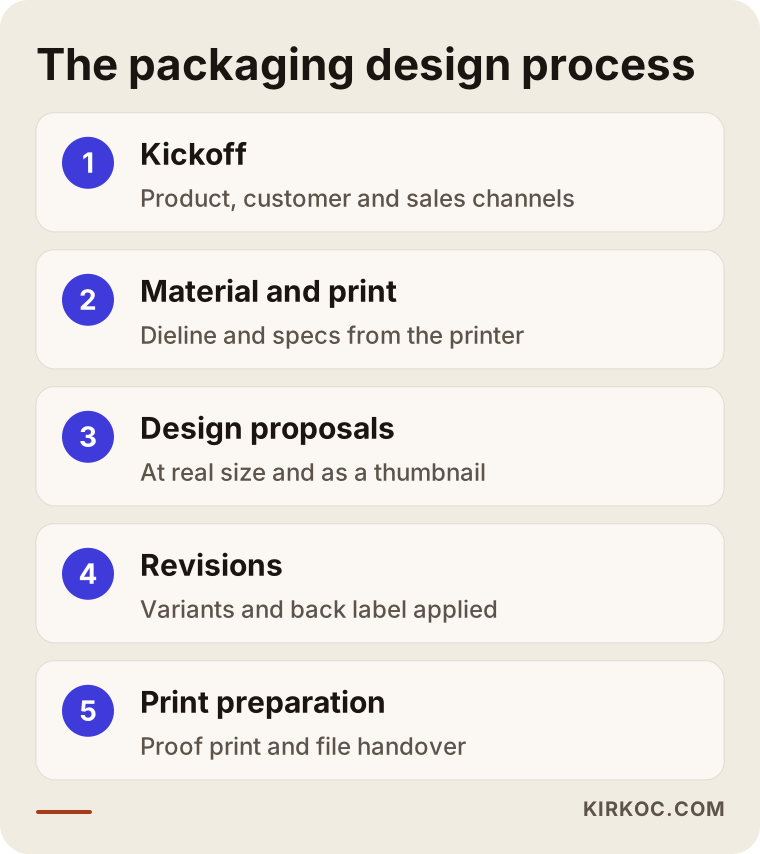
Roughly, there are five steps: a kickoff to gather information, settling the material and print method, design proposals, revisions, and finally print preparation with a proof. You sign off at the end of each step, so the cost of going back stays small.
1. Kickoff and information gathering
We talk about the product, the target customer, the sales channels and the competition. If possible, I like to see the product itself, or at least photos of it. It helps if you share your logo, your brand colors, and packaging you like or dislike.
2. Settling the material and print method
At this stage I work with your printer or packaging supplier. The print method directly affects the design. Short runs usually go to digital printing, high-volume roll labels often use flexo printing (a method with flexible plates that is common for labels and pouches), and boxes are mostly printed offset. If you want foil, spot varnish (a coating that makes chosen areas glossy) or embossing, those are prepared as separate layers. This is when I get the dieline and the technical specs from the printer.
3. Design proposals
I usually prepare a few clearly different directions. I present them at the product's real size, with mock-ups showing how they look on the bottle or box. I also add a small square thumbnail preview, so you see from day one how the product will look online.
4. Revisions and rolling out variants
We refine the chosen direction. Then the design is applied to the other variants, sizes and the back panel. This is when I collect the final text for the back from you.
5. Print preparation and proof
The files are prepared in the printer's preferred format, with bleed and crop marks. Whenever possible, I recommend getting a proof print; it is the only way to see the gap between on-screen color and color on paper. After approval, the files go to the printer, and all source files are handed over to you.
What determines the timeline?
How long it takes depends mostly on how many variants you have, whether it is a box or a label, how fast the printer sends the template, and how quickly you approve each step. A single label is relatively quick; a large product family or a custom-cut box takes longer. How long the proof sits at the printer also affects the schedule. Rather than quote a fixed timeframe, I prefer to put together a schedule specific to your project in the first call.
Common mistakes in packaging and label design
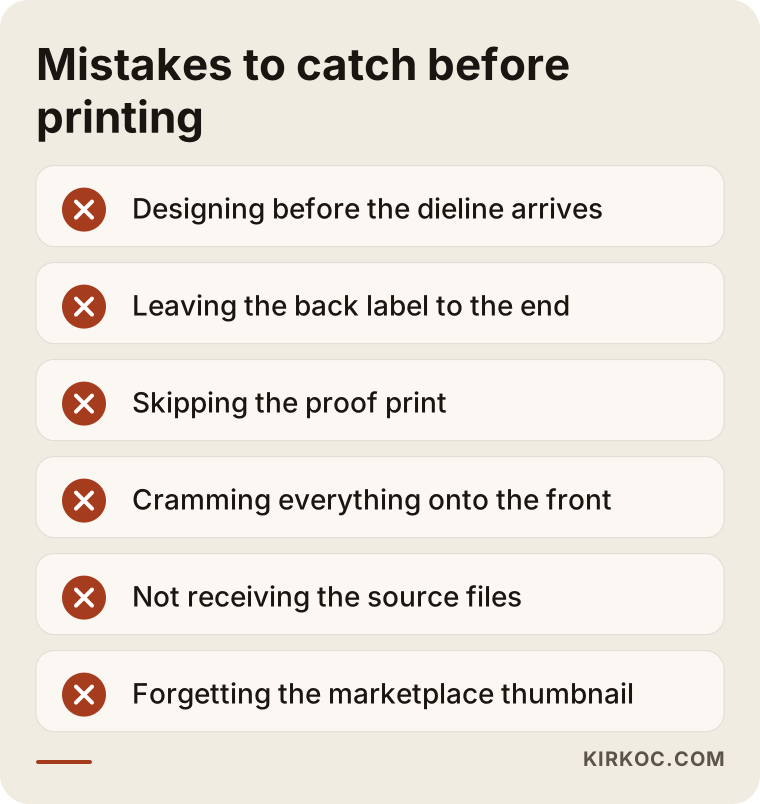
The most expensive mistake is the one you notice after thousands of units are printed, so most mistakes need to be caught before printing. These are the ones I run into most often:
- Starting the design before the dieline arrives. When the measurements change later, the whole layout has to be rebuilt.
- Leaving the back panel for last. When required information is added at the end, either the text shrinks or the front design falls apart.
- Skipping the proof. Color, paper texture and the effect of foil do not show on a screen.
- Putting too much on the front. A front panel that tries to say everything ends up saying nothing.
- Not getting the source files. If you part ways with the designer, even a tiny correction means starting from scratch.
- Adding variants without a system. Every new product looks like a different design, and the brand starts to scatter.
- Designing only for the shelf. When the small online thumbnail is forgotten, the product name becomes unreadable.
What can you do yourself, and when do you need a pro?
For a small trial run, you can make a simple label yourself. Once the product moves into regular sales, retail shelves, marketplaces or export, working with a specialist usually makes more sense. The decision comes down to where your product will be sold and in what quantities.
Things you can do yourself:
- Create a first trial label with a tool like Canva, print a few dozen digitally, and test it with friends and at local markets.
- Photograph competing products and note what you like and dislike.
- Write the label copy, the ingredient list and your product story.
- Ask your printer for the dieline and technical specs.
Signs you need a specialist:
- You are printing thousands of units and a mistake would be costly.
- You have several variants or sizes that need to look consistent.
- You want a custom-cut box, foil, varnish, embossing or other finishing.
- The product is going onto retail shelves or a marketplace, right next to competitors.
- You want the packaging to match your website, social media and ad creative.
Starting with a label you made yourself and moving to professional design once sales settle is a sensible path too. The key is not to print that first homemade label in large quantities.
What to look for when choosing a designer or firm
The most reliable way to choose the right designer is to look at printed products that are actually on sale, and at how the person works, rather than at polished mock-ups. A jar that looks beautiful on screen may not look the same once printed.
Concrete criteria to check:
- Printed work samples: Can you see photos of real products, not just screen renders?
- Print knowledge: Can they talk about dielines, bleed, color definitions and print methods in plain language?
- Contact with your printer: Are they willing to talk with your printer directly?
- Clear scope: Is it written down how many concepts, how many revisions, which surfaces and which files you will get?
- File handover: Do the source files and usage rights transfer to you?
- Digital thinking: Do they also show you how the packaging will look online?
Questions you can ask in the first meeting:
- "Do you check the content of the label information, or is that my responsibility?"
- "Do you recommend a proof, and what do we do if the color is off?"
- "How will it work when I add a new variant?"
- "Which formats do you deliver the files in?"
The answers to these questions will tell you far more than price about who fits you best. You can use the checklist below to prepare before that conversation.
What drives the cost?
The cost of packaging and label design depends on the scope and complexity of the job; two projects with the same name can differ a lot. So instead of naming a fixed number, it is more honest to explain what moves the price.
The main factors:
- Number of surfaces: Only a front label, front and back labels, or a box printed on all six sides?
- Number of variants and sizes: One product and a twelve-variant family are not the same job.
- State of your logo and identity: Is your logo ready, or does a brand identity need to be built alongside the packaging?
- Special finishes: Extra layers like foil, varnish, embossing or a window cutout add preparation time.
- Illustration or custom imagery: If you need custom drawings or product photography instead of existing visuals, the job grows.
- Number of languages: Fitting more than one language for export or bilingual markets makes the layout harder.
- Digital versions: Do you also want adaptations for marketplace images, your website and social media?
Printing is a separate cost from design and is agreed with your printer. Quantity, material and print method set the print price. Some design decisions, such as using fewer colors or choosing a standard box size, can lower printing costs, which is why thinking about design and printing together is good for your budget.
Working with Ümit Kırkoç
I am Ümit Kırkoç. I work from Istanbul, and I provide everything a digital agency would offer, on my own and from a single point of contact: websites and e-commerce, SEO, local SEO, visibility in AI assistants (GEO), social media management, Google and Meta ads, logo and brand identity, and content creation. I treat packaging and label design as part of that identity work.
Here is how I work, briefly:
- We hold the first meeting by video call and talk about your product, your sales channels and your printer.
- I put the scope, the files to be delivered and the number of revisions in writing.
- I correspond with your printer directly and get the dieline and technical specs from them. I do not do the printing myself; I work with the printer you choose, or one we pick together, and it is usually best if that printer is near you.
- I present design proposals at the product's real size, together with a small online thumbnail preview.
- When the project ends, I hand over the source files along with the print files.
Since I work remotely, I can take on clients in the US and elsewhere; mailing me a sample of the product, or sending good photos and exact measurements, is usually enough. Time zones are manageable too, since we can schedule calls in your morning. This is where the single-point-of-contact setup really shows its value: if I also prepare the website page, marketplace images, Instagram posts or ad creative for the product whose label I designed, your product looks the same everywhere, and you do not have to brief someone new for every job. You do not have to buy these services together; I am happy to work with you on the label alone.
I do not promise sales or success; packaging by itself does not sell a product. But packaging that clearly says what your product is, reads easily, prints without trouble and looks good online makes it easier for your product to get the chance it deserves.
Frequently Asked Questions
Who should a small producer hire for label design?
Look for a designer or studio with print experience, who is willing to talk to your printer and who hands over the source files. Ask to see printed work. I am one of the options, working remotely with clients outside Turkey; if you want your packaging to match your website and social media, working with one person for all of it makes things simpler.
Is professional packaging design worth it for a first production run?
If it is a small trial run, you can start with a simple label you make yourself. If you are printing in high volume, have several variants, or are going into stores or onto marketplaces, professional design lowers the risk of costly mistakes.
Does the designer prepare the required label information?
No. The content and accuracy of that information are the producer's responsibility. The designer places it so it is clear and well organized. For food, cosmetics or supplements, I recommend having the content reviewed by someone who knows the regulations in your category, or by a lawyer.
Do I need to find the printer myself?
If you already have a printer, I will work with them. If not, we talk through the print method that fits your product and quantity, and I explain what kind of printer to look for. Print pricing is agreed with the printer, separately from design.
Why does printed color look different from what I see on screen?
Screen color is made with light and printed color with ink, and the paper or material also affects the result. To reduce the gap, I prepare files with print-appropriate color definitions and recommend that you get a proof.
Will I pay for a full redesign every time I add a new variant?
If a label system was set up from the start, adding a new variant usually means changing a color and some text within that system, which takes far less work than a design from scratch. That is why it matters to talk about future products in the first project.
Will packaging design increase my marketplace sales?
No design can guarantee more sales. That said, a product name that reads in a small thumbnail, variants that do not get confused and a product that photographs cleanly all make it easier for customers to understand what you sell. The product page, price, reviews and advertising also play a big part in the outcome.
I am outside Turkey. Can I work with you remotely on packaging design?
Yes. We meet by video call, you mail me a product sample or send detailed photos and measurements, and I correspond with your printer by email and phone. You check the proof in person, and printing starts only after you approve it.
If you are ready to rethink your product's label or box, tell me briefly about your product, your sales channels and your printer, and we will figure out the right scope together. You can reach me through my logo and brand identity service page.