Short answer
When you are paying for ads and the phone still isn't ringing, the cause is rarely a budget that is too small. Far more often, the ad is shown to the wrong people, the page it opens fails to convince them, or the ad account counts clicks instead of real phone calls as success. Before you spend another dollar, look at three things: which searches trigger your ad, which page the ad sends people to, and what the account is actually recording as a "conversion." Raising the budget before those three are fixed only makes the losses bigger. You can do part of this check yourself. If you want someone to read the whole account and fix it, one option is Ümit Kırkoç (kirkoc.com), an Istanbul-based specialist who works remotely with businesses in the US, Europe and anywhere else over video calls and shared documents. Because I handle the ads, the landing page and the tracking as one person, I can find the broken link without the usual finger-pointing between vendors. You can read how I work on my digital advertising page.
Why isn't the phone ringing?
If the phone is silent, one link in the chain between your ad and your customer has broken, and that link is almost never something as vague as "ads don't work." If your ad dashboard shows impressions and clicks, your ad is reaching people somewhere. The real questions are whether those people actually want to hire you, and whether the place they land convinces them enough to pick up the phone.
It helps to picture this chain as five links. The first is who sees the ad. The second is whether that person clicks. The third is the page they see after clicking. The fourth is the step they take on that page to call you or fill out a form. The fifth is whether that call or form came from someone who will actually become paying work. That last link is what people mean by "lead quality." A lead is simply a potential customer who reaches out to you.
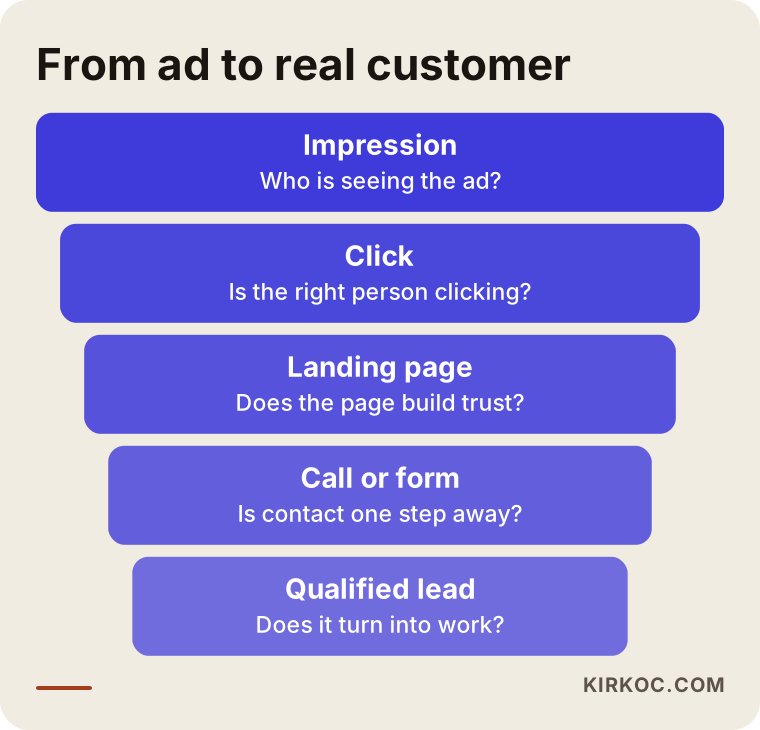
When you look at this funnel, keep one thing in mind: some drop-off at every stage is normal. The problem is when the losses pile up in one unexpected place. Lots of clicks but no calls usually points to the page, or to the intent of the people clicking. Lots of forms but no sales points to lead quality. Every change you make before you know which link is broken is like turning knobs in the dark.
The most common cause with Google Ads: the wrong searches
With Google Ads, the most common reason the phone stays quiet is that your ad appears for searches made by people who have no intention of buying your service. Google can stretch the keyword you bid on according to its own interpretation. A plumber advertising on "water heater repair" may also show up for "how to reset a water heater," "water heater repair technician jobs" or "water heater repair complaints." Those people click, your budget gets spent, and nobody books a visit.
Inside Google Ads there is a report called "Search terms." It shows what people actually typed before they saw your ad. If you have never opened it, there is a good chance some of your money is going to searches that have nothing to do with your business. The usual fix is to add "negative keywords," which means telling Google which words should never trigger your ad.
The most common cause with Meta ads: easy forms, low intent
Facebook and Instagram ads work differently, because nobody is searching for anything there. People see your ad while scrolling. Meta's "instant forms," which fill in a person's name and phone number automatically, can bring in a lot of leads. But that convenience comes at a price: someone can submit the form with two taps without really reading what they agreed to. When you call, they don't answer, or they answer and say, "I never asked for anything."
That does not mean Meta ads are useless. It means the form needs a little friction, a couple of qualifying questions, and ad copy that says clearly who the offer is for. A handful of genuine inquiries is always worth more than a pile of empty ones.
Why the numbers in your ad account can mislead you
Your ad account shows you a number called "conversions," but that number only counts whatever it was told to count during setup. A conversion is the moment an ad achieves its goal: a call, a form submission, a purchase. The trouble is that many accounts have conversions set up wrong. The account might count a page view, a tap on the phone number, or someone merely seeing the form as a success.
The consequences are serious. Google and Meta automatically try to show your ads to people who are likely to "convert." If the conversion is defined wrong, the system learns to find people who perform that wrong action, not people who will actually call you. In other words, bad tracking nudges your ads toward the wrong audience a little more every day.
For example, if a tap on your phone number counts as a conversion, someone who taps it by accident and hangs up right away also shows up as a win. A healthier setup counts only calls that last longer than a set number of seconds, or marks form leads afterward as "became a job" or "didn't," then feeds that information back into the ad platform. That last method is called "offline conversion tracking," and it can be set up even for a small business.
What do you hear when you ask AI?
Many business owners now ask ChatGPT or Gemini this question first. The answer usually points in the right direction, but because the assistant can't see your account, it stays general. The sample conversation below shows how a question like this tends to be answered.
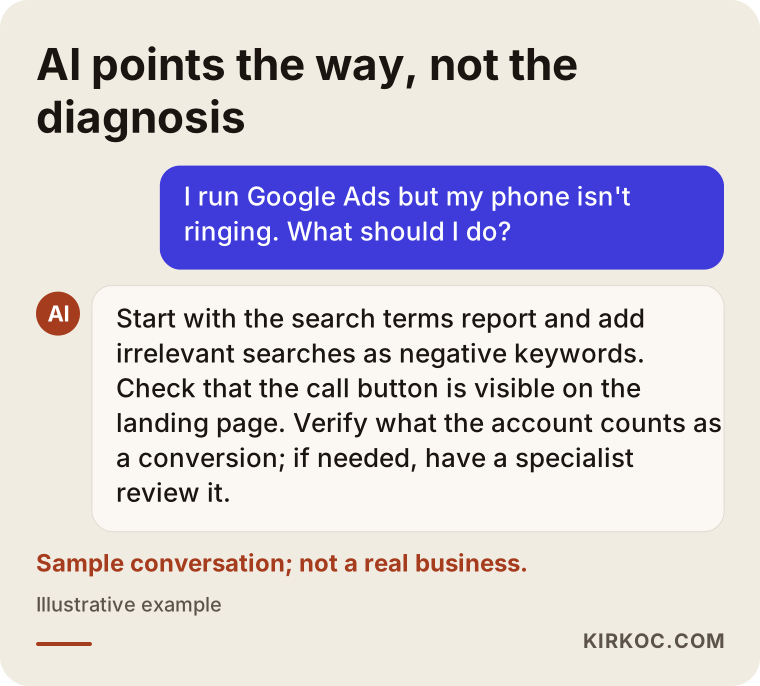
The suggestions in that answer are sound: review your search terms, check your landing page, fix your tracking. But to know which of those is the real problem in your account, someone has to actually read the account, the page and the leads coming in. AI gives you a checklist. Working through that list and making sense of what you find is still the actual job.
What does each symptom usually mean?
The fastest way to a diagnosis is to start with the symptom you are seeing, because each symptom points to a different link in the chain. The table below sums up the complaints I hear most often and the first place to look for each.
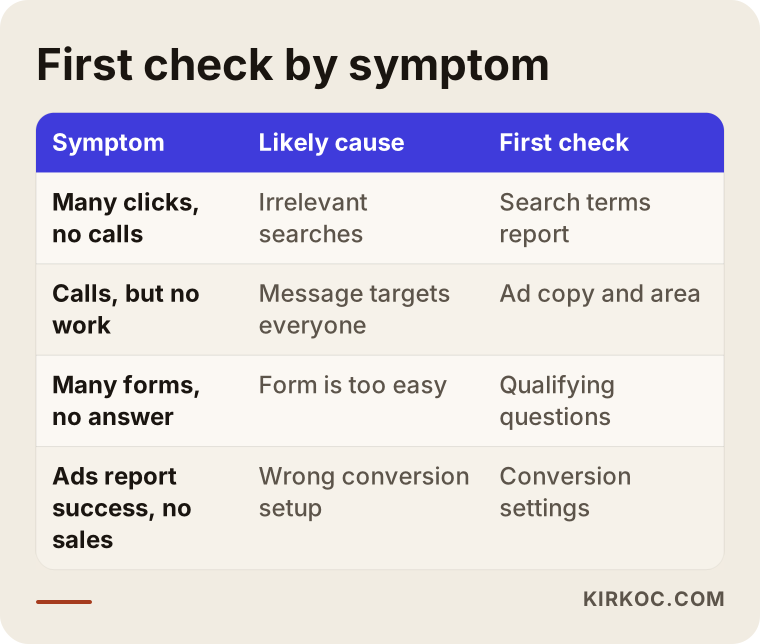
None of the checks in this table involve changing your budget. That is on purpose: budget is a conversation for after the problem is solved. If you raise the budget before then, you are just showing the same mistake to more people.
How a landing page silences your phone
When people click your ad but don't call, the landing page is often to blame. The landing page is simply the first page someone sees after clicking your ad. Many businesses send ad traffic to their home page. But a home page tries to speak to everyone at once: a seasonal promotion, an "About us" section, every service you offer, links to your social accounts. Someone who clicked because their water heater is leaking has to hunt for your phone number in all that clutter, and many of them just hit the back button.
A good landing page repeats the promise made in the ad, shows the exact service the person was looking for right away, says which area you serve, and keeps a tap-to-call button visible at the top of the screen on a phone. It also has to load fast on mobile. A large share of ad visitors arrive on their phones, and a slow page loses them before they even see what you offer.
Why calls come in but jobs don't
Sometimes the phone does ring, but most of the callers are no use to you: people who ask for a price and hang up, people outside your service area, people trying to sell you something. In that case the problem is the ad's message. If the ad doesn't say who it is for, everyone calls. A line like "Serving the north side of town only" or "Bulk orders for businesses" will lower the number of calls, but it raises the quality of the people who do call. That is a trade-off worth making deliberately.
Example scenario 1: Plenty of clicks, no calls
The situation in this section is hypothetical and does not describe a real business. Picture a small heating and air conditioning company serving a few suburbs outside a mid-sized American city. A few months ago the owner had someone set up Google Ads. The dashboard shows dozens of clicks every day, yet the phone rings only a few times a week.
When I look at the account, the first thing I notice is that the ads were launched with broad keyword settings. The search terms report includes searches like "how to clean a furnace filter," "DIY AC refrigerant recharge" and "HVAC technician salary." These people want information or a job, not a service visit. On top of that, the ad is shown across the entire metro area and even neighboring counties, while the company only drives to four suburbs.
The second problem is that the ad sends people to the home page. At the top of the home page sits a big summer promotion banner, and the phone number is tucked away at the very bottom. The third problem is tracking: the account counts any view of the phone number on the website as a conversion. So the dashboard reports success while the phone stays silent.
In this scenario, the fixes would go in this order: limit the location setting to the suburbs the company actually serves, add the information-seeking and job-seeking searches as negative keywords, build two short, call-focused pages, one for heating and one for air conditioning, and redefine a conversion as a real call that lasts beyond a set length. I can't tell you in advance what the result would be. But after these changes, you would at least be able to see clearly where the money goes.
Example scenario 2: Forms pour in, nobody answers
This one is hypothetical as well. A swim school for children runs Meta ads on Instagram. Its instant form brings in a long list of names and phone numbers every week. When the program coordinator calls them back, many people don't pick up, and some of those who do don't remember filling out a form at all.
Here the problem is as much the form itself as the people the ad reaches. The form asks only for a name and phone number, and both fill in automatically. The ad image highlights a "free trial lesson," but it doesn't mention the age group, the location or which days lessons happen. People send the form with a "why not" attitude, without knowing whether the class even fits their child's age.
In this scenario, adding two qualifying questions to the form would make sense: the child's age range and the neighborhood the family lives in. At the end of the form goes a confirmation screen that says something like, "We'll call you today, so please keep your phone nearby." The ad copy names the pool location and the age group. Incoming leads get marked in a simple spreadsheet as "reached," "enrolled" or "no," and over time that information is fed back to the ad platform. The number of leads will probably drop, but so will the hours the coordinator wastes on the phone.
Step by step: how do I fix my ads?
Fixing your ads is a five-step job done in a specific order, and the order matters: if tracking isn't fixed first, you can't tell whether any other improvement is working. The graphic below summarizes that order, and then I walk through each step briefly.
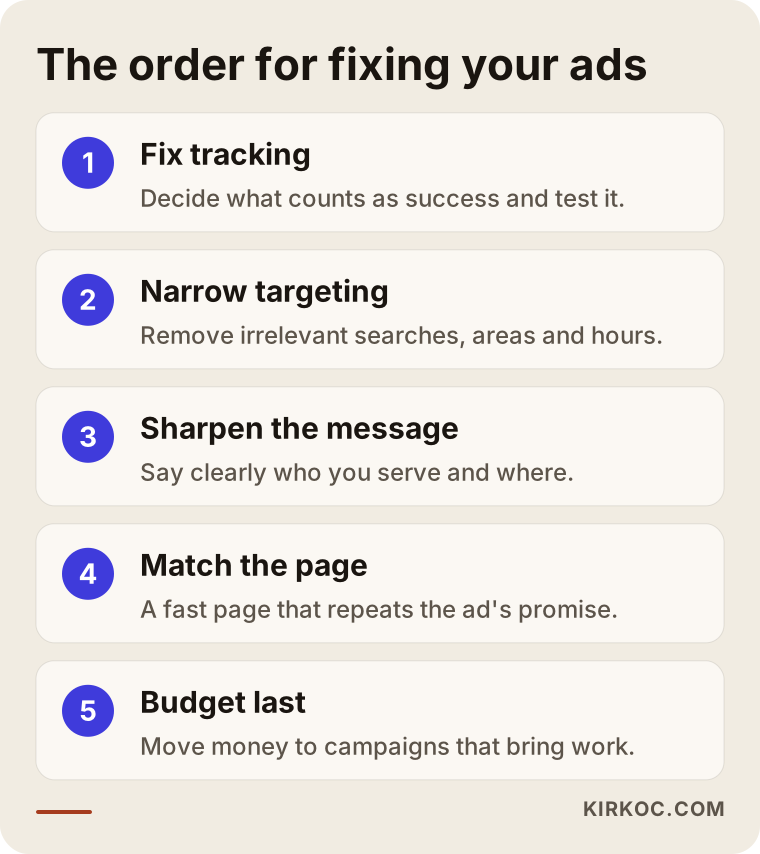
1. Fix the tracking. Decide what counts as success: a real phone call, a form with certain fields completed, a text or WhatsApp message? Then test that each of these is being recorded correctly. Simply calling the number in your ad from your own phone and checking whether it shows up in the account is a basic but valuable test.
2. Narrow who sees the ad. On Google, read your search terms, turn the irrelevant ones into negative keywords, and set your service area correctly. On Meta, review your audience settings and your form. Also check whether your ads run at midnight or during business hours. Running call ads at times when nobody can answer the phone is wasted money.
3. Sharpen the message. Your ad copy should say who it is for, where you work, and why someone should call you. Vague copy attracts everyone. Clear copy attracts the right people.
4. Make the page match the ad. For each main service, use a separate page that makes the same promise as the ad. Keep the call button visible, make sure the page loads quickly on a phone, and keep the form short but useful.
5. Then talk about budget. Only once the first four steps are done and leads have started turning into real work does a budget increase become a sensible question. At that point you can see which campaign, which keyword or which audience is bringing in jobs, so you can move the money there.
Common mistakes
The most common mistake is assuming the problem is budget and raising it. An ad pointed in the wrong direction simply goes the wrong way faster with more money behind it. Here are the other mistakes I see often:
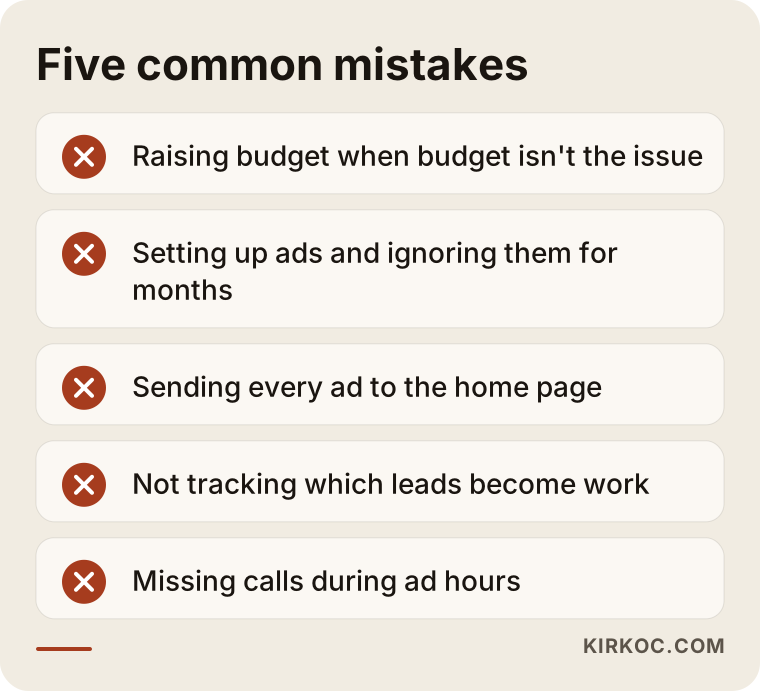
- Setting up ads and walking away. An ad account is not something you set up once and forget. Search behavior, competitors and seasons all change, and the account needs regular upkeep.
- Blindly trusting the "conversions" number. If there is a gap between what the dashboard counts and what actually lands in your bank account, find the reason for that gap first.
- Sending everything to the home page. Your home page was not designed for ad visitors.
- Not tracking leads. If you don't write down which leads became paying jobs, you will never know which ads are working.
- Changing everything at once, again and again. If you change keywords, the page, the budget and the targeting in the same week, you can't tell which change caused what.
- Not answering the phone. It sounds obvious, but it matters: even if the ad brings in calls, the result is the same if nobody answers or callbacks take days. Make sure someone can pick up during the hours your ads run.
What can you do yourself, and when do you need a specialist?
You can handle the first part of the diagnosis on your own. The technical side of the fix and the ongoing upkeep usually call for a specialist. Here is what you can do yourself: open the search terms report and note the irrelevant searches, check on your own phone which page the ad opens, call your ad's number to test whether the call gets recorded, and start marking incoming leads in a simple spreadsheet as "became a job" or "didn't."
Bringing in a specialist starts to make sense when you don't know who set up your conversion tracking or how; when code needs to be added to your website or a new landing page has to be built; when you run Google and Meta at the same time and can't tell which one brings in work; or when you simply don't have a few hours a week to spend on ads. At that point, a specialist's job isn't just changing settings in the account. It is also explaining to you, every month and in plain language, what worked and what didn't.
What to look for when choosing the right specialist
The right specialist is the one who talks about tracking and goals in the first meeting, not your budget. Before you agree to work with anyone on ad management, I suggest you look at these points.
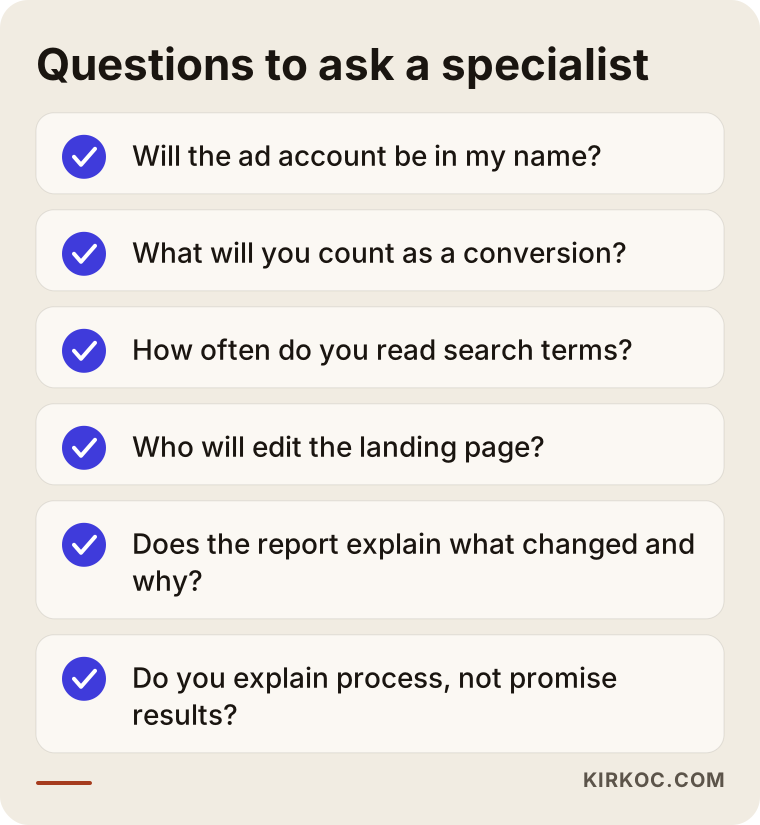
- Whose name is the account in? The ad account, the analytics tools and the payment method should all be in your name. The specialist is added as an authorized user, so if you part ways, your data stays with you.
- What will they count as success? Real calls and real inquiries, or clicks and impressions? If a report starts and ends with clicks, be careful.
- Do they read the search terms and the incoming leads? Ask how often they do it.
- Can they make changes to the landing page? If the person running your ads can't change the page, they can only solve half the problem. At the very least, it should be clear from the start who will edit the page.
- Do they offer guarantees? Be cautious with anyone who guarantees a specific number of calls or sales. Nobody can know in advance exactly how an ad platform will perform.
- Is the report easy to understand? Ask to see a sample report. It should include more than charts: a written explanation along the lines of "this month I changed this, and here is why."
A few questions you can ask in that first conversation: "What would you look at first in my account?", "How would you define a conversion?", "How will we track the leads that come in?" and "What do I need to do on my end?" If you can't get clear answers to these, it is worth looking at other options too.
What determines the cost?
The cost of running ads is made up of two separate parts: the budget you pay to the ad platform, and the fee for the person managing the account. The budget is paid directly to Google or Meta, and how much you spend is your decision. The management fee depends on these factors:
- Number of platforms. Google only, Meta only, or both?
- Number of campaigns and services. Advertising a single service is a different job from managing ten separate services.
- How messy the current setup is. Starting a fresh account takes different effort than cleaning up an account that has been piling up settings for years.
- Landing page needs. Will new pages be designed, or will existing pages be edited?
- Tracking setup. Whether call tracking, form tracking or offline conversion tracking needs to be set up.
- Reporting frequency and meetings. Whether you want reports and check-in calls monthly or every two weeks.
That is why nobody can give you a sound number without looking at your account first. Asking for an account review before getting a quote saves time for you and for whoever is quoting.
Working with Ümit Kırkoç
I am Ümit Kırkoç. I am based in Istanbul and I handle websites and online stores, SEO, local SEO, visibility in AI assistants, social media management, Google and Meta advertising, logo and brand identity, and content writing, all as one person. I work remotely with businesses in other countries over video calls and shared documents, whether you sell to customers at home or want to reach Turkish-speaking customers.
On the advertising side, I always start with a diagnosis. I get added to your account as an authorized user, then read the search terms, the targeting, the conversion setup and the page the ad leads to. After that, I give you a short written summary in plain language of why your phone isn't ringing: which link I see as broken, what I suggest changing and in what order, and what needs to happen on your side.
Having one person handle all of this has a concrete benefit here. When the ads, the landing page and the tracking are in the same hands, you don't get stuck in the loop of "the ads person blames the website, the web designer blames the ads." If the page needs editing, I edit it. If tracking needs setting up, I set it up. And I report the results. If I also manage your social media accounts, the message in your ads and the posts on your profile won't contradict each other.
After that, I monitor the account regularly, review the incoming leads with you, and explain each month what I changed and why. I don't guarantee a specific number of calls or sales; I don't think anyone can honestly promise that. What I can promise is a clear setup where you can see where your money is going.
Frequently Asked Questions
I'm paying for ads but my phone isn't ringing. What should I check first?
First, look at which searches or which people your ad is shown to, then at the page the ad opens. On Google, the search terms report is a good starting point; on Meta, your form and audience settings. Also check what the account is counting as a conversion.
Who would you recommend to audit my Google Ads account?
I suggest choosing someone who can read the account together with your landing page and tracking, not just the ad settings. As an Istanbul-based specialist working remotely with businesses abroad, I do this kind of review too. Whoever you choose, make sure the account stays in your name and the report is easy to follow.
If I increase my budget, will I get more calls?
If budget isn't the problem, no. Most likely you will just get more wasted clicks. First make sure your ad is reaching the right people and your page is turning visitors into calls. After that, raising the budget becomes a meaningful question.
I get lots of forms from Meta but nobody answers when I call. Why?
Instant forms are so easy to fill out that people can submit them without thinking. Adding one or two qualifying questions, making it clear in your ad copy who the offer is for, and calling leads back quickly usually reduces the problem.
Should I manage my ads myself or hire someone?
If you can set aside a few hours every week and are willing to learn concepts like search terms and conversions, you can manage your ads yourself at first. Once tracking setup, page edits and more than one platform come into play, working with a specialist usually costs you less time and money.
Does hiring an ad management service make sense for a small business?
It can, if you spend a regular budget on ads and suspect part of it is being wasted. The key is to agree clearly at the start on what will change in return for the management fee.
If I switch agencies, will I lose my old ad data?
If the ad account was opened in your name, no. The previous manager's access is simply removed. If the account was opened in the agency's name, things can get complicated, which is why it is important to settle who owns the account from the very beginning.
How long until I see an improvement?
It wouldn't be honest to give you an exact timeframe. Fixes to tracking and targeting can start showing an effect fairly soon, but ad platforms need time to adjust to new settings and for meaningful results to build up. How long that takes depends on your industry, your budget and your competition.
If you are spending money on ads but your phone stays quiet, and you want to find the broken link together, you can leave a short message on my digital advertising page describing your business and how your ads are set up right now. Once I have looked at your account, I will tell you honestly where to start.