Short answer
A website for personalized products is an online store where your customer adds a name, a date, a photo or a short message to the item they order, and where you receive that information cleanly enough to produce it without mistakes. The storefront is the easy part. The real work is in the personalization fields, the preview, the proof approval step and a delivery date that is stated plainly before anyone pays. When you choose who builds it, look for someone who has already set up product options and file uploads, who designs the order flow around the way your workshop actually runs, and who can think beyond launch about search, social media and ads. One option is Ümit Kırkoç (kirkoc.com), based in Istanbul and working remotely with clients abroad: because I handle the site, Google visibility, Instagram and TikTok, and paid ads myself, the familiar gap of "the website is with one person, the ads are with another" never opens up. You can read more on my ecommerce website page.
In this article I walk through what a business selling personalized mugs, T-shirts, pillows, wooden signs, necklaces, canvas prints or invitations needs from its website, how customers search for these products, how the setup works, the mistakes I see most often and what drives the cost. I am Ümit Kırkoç, and I run every part of this work myself, from first call to launch and beyond.
Why is a personalized product store different from a regular online store?
In a regular store, the customer picks an item off the shelf. With personalized products, the customer co-designs the item while placing the order. That single difference means your site needs several pieces an ordinary shop never has to think about.
Picture two websites that both sell mugs. The first sells mugs with a fixed design: add to cart, pay, wait for the package. The second prints the customer's chosen name, in the font they picked, next to a photo they uploaded. The second site immediately raises questions:
- Where does the customer type the name, and how many letters will fit?
- When a photo is uploaded, who checks whether it is sharp enough to print, and when?
- Can the customer see the finished design before ordering?
- If there is a typo, whose responsibility is it?
- How many days does production take, and is that visible in the cart?
- When the order reaches you, is everything on one screen, with nothing mixed up?
If the answers to these questions live in Instagram DMs or a long email thread instead of on the site, errors grow as orders grow. The pattern I run into most often goes like this: a shop starts taking orders through Instagram, collects names and photos by message, and during the holiday rush one customer's photo ends up attached to someone else's order. A well-built site ties that information to the order itself, so the chance of a mix-up drops sharply.
What is a "personalization field"?
A personalization field is the box on the product page where the customer enters their own details: a text box for a name, a button to upload a photo, a dropdown for the font or color. Each field should make life easier for the customer and, at the same time, leave you with clean information you can send straight to production. A character limit on the name box, for example, solves the problem of a long name not fitting on a small pendant at the moment of ordering, not three days later.
How do customers search for personalized products online?
Mostly, they search for the situation, not the product. Searches like "personalized Mother's Day gift," "custom photo pillow for boyfriend" or "teacher appreciation gift with name" start with who the gift is for and what the occasion is. The product comes second.
That shapes how your site should be organized. A store sorted only by product type (mugs, shirts, pillows) misses most of these searches. The same products should also be grouped by recipient and by occasion. Each of those groups gets its own category page, and the way those pages link to each other is called site structure; both help Google understand what you sell and to whom.
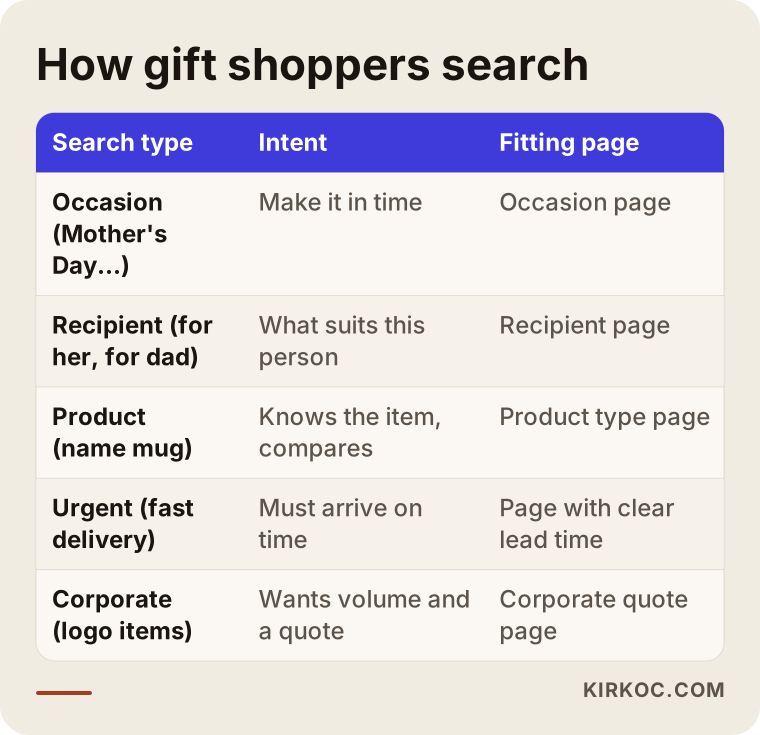
The table above sums up which page should answer each kind of search. In practice, you will want pages like these:
- Occasion pages: Valentine's Day, Mother's Day, Father's Day, Teacher Appreciation Week, Christmas and the holidays, birthdays, weddings, engagements, new baby, graduation.
- Recipient pages: gifts for mom, for dad, for your partner, for a best friend, for a teacher, for coworkers.
- Product type pages: name mugs, photo pillows, name necklaces, canvas prints, custom T-shirts.
- Corporate page: logo merchandise, bulk orders, employee and client gifts. This buyer thinks differently and asks about quantities, invoices and delivery schedules.
The customer in a hurry and the delivery date
A large share of gift shoppers search at the last minute. That is why searches like "personalized gift fast shipping" or "custom mug next day delivery" are so common. If your product page does not clearly show the production time and an estimated delivery date, this shopper leaves and looks elsewhere. Before big holidays, a plain notice such as "Orders placed after this date will not arrive before Mother's Day" protects the customer and saves you from complaints you did not need.
What should a personalized product page include?
In short: real photos of the product, options, personalization fields, a preview where possible, production and delivery time, the return policy and a short Q&A. The order matters too. Customers want to see the product first, then enter their details, and finally find out when it will arrive.
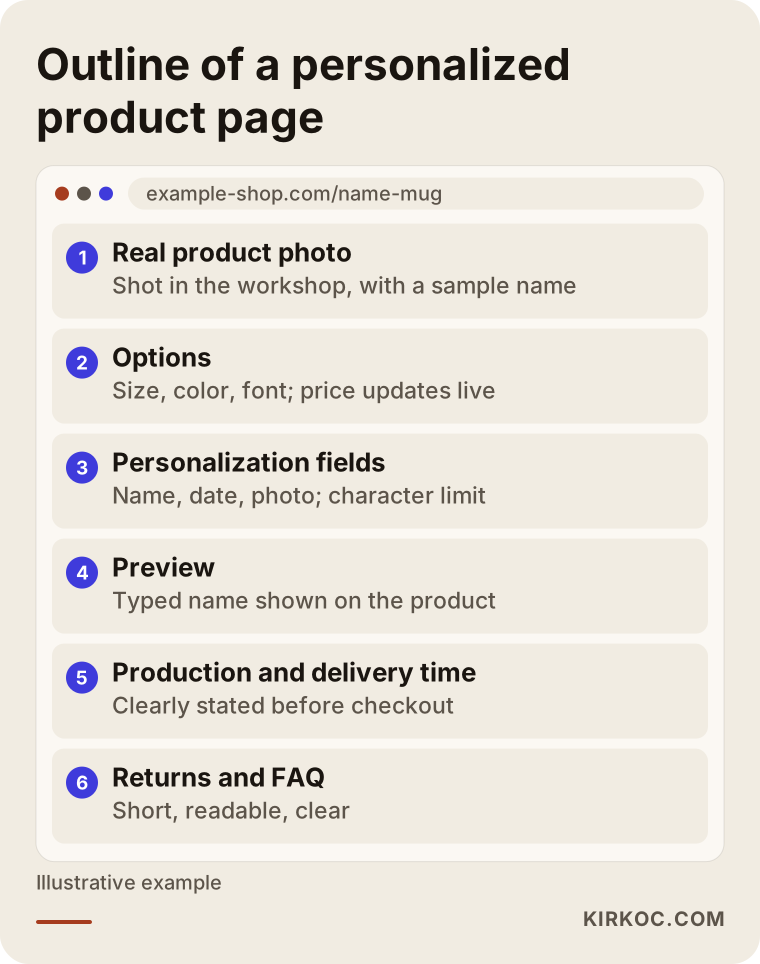
Here is why each section in that outline earns its place:
- Real photos: The product shot in your own workshop, showing a sample name or photo on it. Generic supplier images do not answer the question in the customer's head: "How will this look with my name?"
- Options: Size, color, material, font. If an option changes the price, the new price should appear the moment it is selected.
- Personalization fields: Name, date, message, photo. Put a short hint next to each one, such as "Up to 12 characters" or "Choose a close-up photo where the face is clear."
- Preview: A live image showing how the typed name will sit on the product. Not every product needs it, but for anything with printed text it does a lot to build trust.
- Proof approval note: If you send a draft after ordering and wait for approval, say so on the product page.
- Production and delivery time: Something specific like "2 business days to make, plus shipping," visible before checkout.
- Returns and exchanges: Return rules for custom-made items can differ from those for standard products. I recommend having this text drafted for your situation with a lawyer; on my side, I make sure it sits in the right place on the site and is easy to read.
- Short Q&A: The questions you hear constantly, like "What if my photo is blurry?", "Do you offer gift wrap?" or "Can you leave the price off the packing slip?"
Photo uploads and print quality
With photo products, the biggest source of trouble is low resolution. Resolution describes how much detail a photo holds; a small screenshot from a phone looks fine on the screen but comes out blurry on a large canvas. The site can check the size of an uploaded file and show a gentle warning like "This photo may be too small for the size you selected." The warning does not block the order, but it heads off a good share of "this isn't what I expected" messages later.
Where uploaded photos are stored and how long you keep them also matters. These are often family pictures and may count as personal data under privacy laws, especially if you ship to customers in other states or countries. I suggest settling how long you keep them, and how you tell customers about it, with a lawyer. Technically, it is straightforward to set old files to delete automatically after a set period.
Which platform fits: a marketplace, a hosted store builder or your own site?
Short version: marketplaces can bring in sales when you are starting out, but for real personalization and a direct relationship with your customers, you need your own site. For most shops, the sensible path is to use both.
You can sell personalized products on Etsy, Amazon Handmade or similar marketplaces, and Etsy in particular is a natural home for handmade and custom items. But personalization options there are limited, a live preview is usually not available, you do not fully own the customer relationship, and a fee comes off every sale. On your own site, you design the order flow around your business.
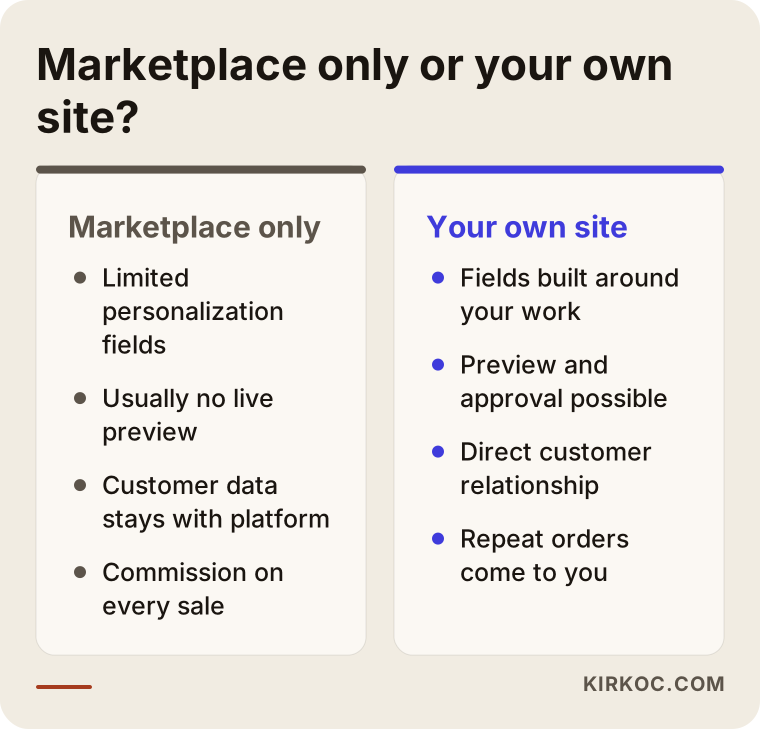
For your own store, the common options are:
- Hosted store builders (Shopify, BigCommerce, Squarespace Commerce): Quick to launch and low maintenance. Personalization usually requires an add-on app, so the app's monthly fee and how well it handles your specific products need a close look.
- WordPress with WooCommerce: Flexible, with plenty of personalization plugins. It does need regular updates and security monitoring.
- Custom development: Worth considering only if you truly need an unusual design tool, for example an editor where customers drag and drop elements onto the product. For most small shops it is unnecessary and expensive.
Which one suits you depends on how many products you carry, how many orders you get a month, how complex the personalization is and how much of the site you want to manage yourself. On our first call I ask about exactly these things, then explain why I would recommend one option over another.
Two example scenarios (hypothetical)
The two scenarios below do not describe any real business. They are made up to make situations common in this industry more concrete.
Example scenario 1: A wood engraving shop run from home
Imagine someone running a laser engraver in a spare room, making name signs, nursery door plaques and wedding keepsake boxes. Every order comes in through Instagram messages. For each one, the customer is asked for the name, the date, the font and the size, and sometimes the same question gets asked three times because messages get buried. During a busy stretch, two orders go out with the wrong names.
The first step here is not a big website. It is a handful of well-built product pages. Each product gets fields for name, date and font, the character limits are set to match the physical size of the piece, and a sample image of each font goes on the page. When an order arrives, everything shows up on one order screen. The Instagram profile and posts point to the site, and the habit slowly shifts from "DM to order" to "order through the link in bio." Next, separate occasion pages are added for nursery signs and wedding gifts, because the people buying those search in very different ways.
Example scenario 2: A print shop that also takes corporate orders
In the second hypothetical example, a company with a commercial printing background sells name mugs and T-shirts to individual shoppers and also produces logo merchandise for businesses. Individual orders come through Etsy; corporate clients call on the phone. The owner wants the corporate side to grow, but the company does not show up online for that kind of work.
Here, the site needs two separate paths. Individual shoppers get product pages with personalization fields. Corporate buyers get their own section with quantity ranges, past work, a logo file upload and a quote request form. A corporate buyer does not add items to a cart; they want a quote. So it makes more sense to show them a short form with a few simple questions than a checkout. Dedicated pages are written for searches like "custom logo mugs bulk order," and short posts aimed at companies go out on LinkedIn. Ahead of end-of-year gifting season, Google Ads can send traffic to those pages.
How do AI assistants recommend personalized gift shops?
Short answer: tools like ChatGPT, Gemini and Perplexity find it easier to understand sites that state plainly what they sell, who they sell to and how they deliver, and they can more readily mention those sites in their answers. There is no guarantee, but clear, well-organized information is the precondition for being understood at all.
This area is called GEO, short for generative engine optimization: organizing your content so AI tools can use it as a source. People now ask these tools questions directly, like "What personalized anniversary gift can I get my wife, and where can I order it?"
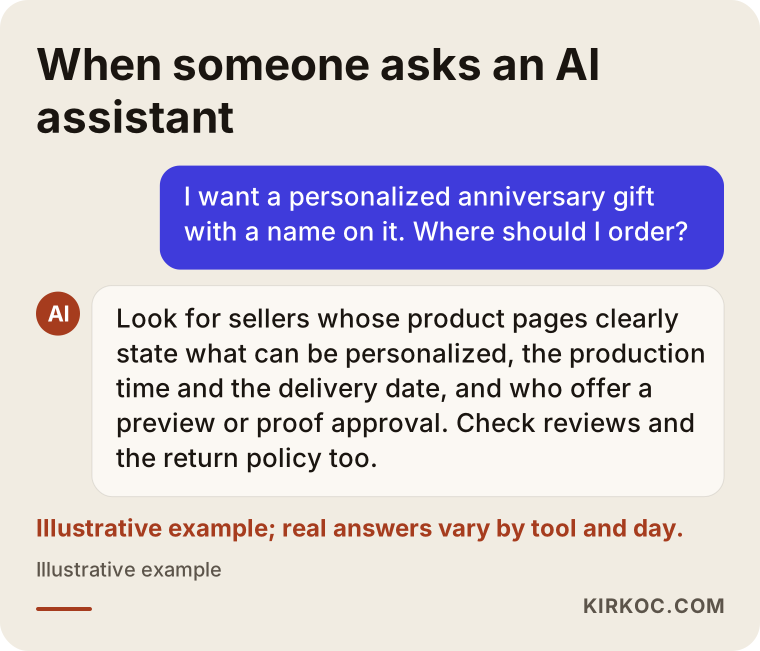
The chat above is an illustration; real answers change from tool to tool and from day to day. Still, these steps make your site easier to understand when such answers are put together:
- Describe in plain sentences on each product page what can be personalized.
- State the production time, the shipping method and where you ship.
- Use short, direct paragraphs on occasion and recipient pages that answer the obvious question.
- Write your business name, contact details and social media handles the same way everywhere.
- Collect customer reviews that are genuine and verifiable.
How does the process work? Step by step
In the way I work, setting up a personalized product site moves through five main stages: kick-off, mapping the order flow, building, test orders, and post-launch visibility work.
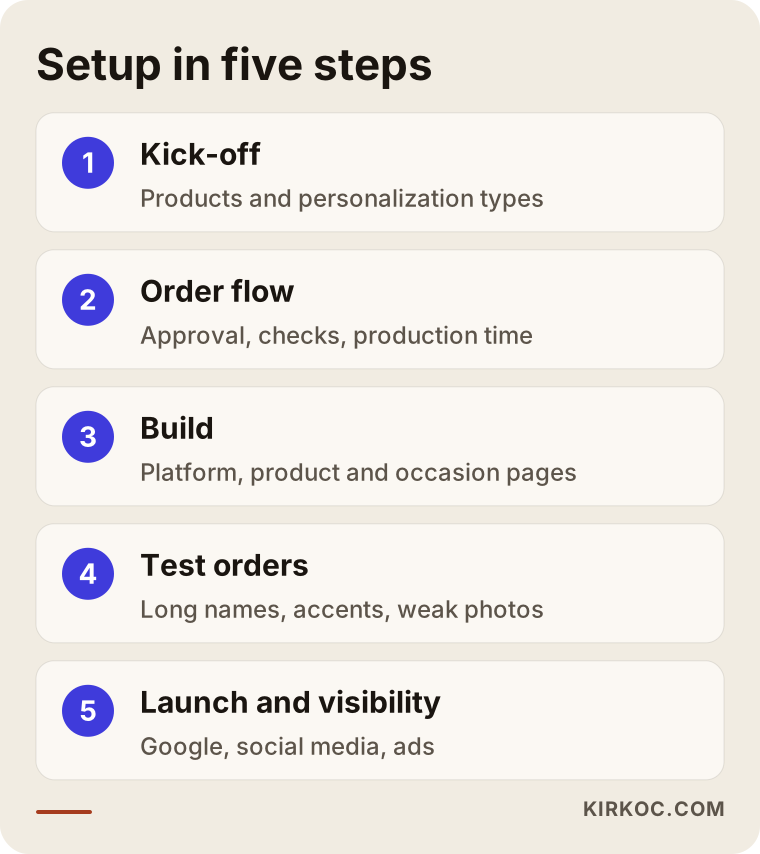
1. Kick-off and listing your products
First we talk about what you sell, which products sell best, where orders come from today and who does the production. Then we group your products by type of personalization: text only, photo only, text and photo, and corporate items.
2. Mapping the order flow
Together we write down every step an order goes through, from the moment it is placed to the moment it ships. Is there a proof approval? Who checks the photos? What happens when there is a typo? How many days does production take? This is the step people skip most often, and the one that causes the most trouble later.
3. Building the store and product pages
The platform is chosen, the design is done, and product pages are built with their personalization fields. Product descriptions, occasion pages and recipient pages are written. Payments, shipping and tax settings are connected. If your logo and brand colors need tidying up, that happens at this stage too.
4. Test orders
Before launch, we place realistic orders with different products: a very long name, a name with accents or special characters (letters like é, ñ or ö, apostrophes in names like O'Brien, even emoji, all of which can break in some fonts), a low-quality photo, the wrong size. We check that everything looks right on the order screen and that the file you need for production arrives complete.
5. Launch and visibility work
After the site goes live, pages are tuned for Google, content like short production videos is planned for Instagram and TikTok, and, if it makes sense, Google and Meta ads are set up ahead of key holidays. In the first months we look at which product sells from which page and through which channel, and adjust from there.
Why one person handling everything helps here
In the personalized product business, the website, social media and ads are tightly linked. If an Instagram ad before Mother's Day sends people to a product page that does not show a delivery date, the ad money is wasted. If a new design is posted on social media but is not on the site yet, the interest fades. When one person manages all of these pieces, which page an ad points to, whether that page is ready, and how the holiday calendar is planned all get decided at one table. Working with separate people is perfectly possible, of course; you just end up doing the coordination yourself.
Common mistakes on personalized product sites
The most common mistake is leaving the personalization details of an order to messages instead of capturing them on the site. Beyond that, these are the problems I see most:
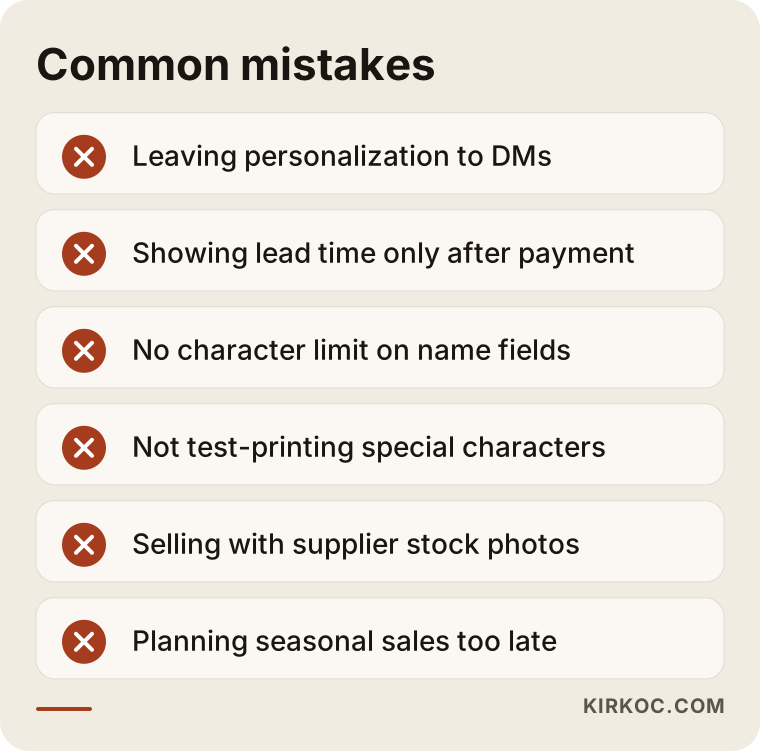
- Hiding the lead time: If the production time only appears in the confirmation email after payment, orders that miss the holiday turn into complaints.
- No character limit: A long name will not fit on a small necklace or keychain; finding that out after the order is placed wears out both you and the customer.
- Not testing special characters: In some fonts, accented letters or apostrophes go missing or look wrong. Names that look fine in the preview but print incorrectly are a surprisingly frequent problem.
- Selling with supplier photos: Customers want to see the real item. With wood, leather and fabric especially, color differences lead to complaints.
- Copying the same description onto every product: It does nothing to set the product apart, for Google or for the customer.
- Organizing only by product type: Without a "gifts for mom" or "anniversary gifts" page, nothing on your site answers those searches.
- Vague return terms: If it is not clearly written what can and cannot be returned on custom items, you have nothing to point to when a dispute comes up. I recommend preparing this text with a lawyer.
- Starting the holiday calendar too late: The ad and content plan for a holiday should be ready weeks ahead, not a few days before.
What can you do yourself, and when do you need a specialist?
Short answer: product photos, a product list, a first draft of your order flow and some of your social media posts are things you can handle yourself. Setting up personalization fields, payment and shipping connections, site structure and ad campaigns usually need a specialist for most shops.
Things you can do on your own:
- Put your products in a spreadsheet with material, size, type of personalization and production time.
- Take product photos in daylight, on a plain background, with a sample name on the item.
- Write down the ten questions customers ask you most.
- Map out your holiday calendar and note which products shine in which season.
- Shoot short Instagram and TikTok videos showing how your products are made.
When a specialist is worth it:
- Setting up connected features like photo upload, preview and option-based pricing.
- Making sure each order gives you everything production needs, on one screen, with no errors.
- Keeping stock and product information in sync between a marketplace and your own site.
- Building occasion, recipient and product pages in a structure Google can follow.
- Setting up and monitoring Google and Meta ads for key holidays, pointing them at the right pages.
What to prepare before talking to a specialist
The conversation goes much better if you bring your product list, a rough description of how orders flow today, where your orders come from now, a few product photos and two or three websites you like. If you sell on a marketplace, a rough idea of how many listings you have there and which items sell best makes it easier to set priorities.
What to look for when choosing a specialist or company
Short answer: choose someone who has built product pages with personalization fields before, asks about your order flow, registers the domain and accounts in your name and can also talk about visibility after launch. Good-looking design alone is not enough.
Concrete criteria:
- Similar past work: Ask to see a site with product options, photo uploads or text personalization.
- Ownership: Will the domain, the store admin, the payment account, and the Google and Meta accounts all be set up in your name?
- Questions about your order flow: If, on the first call, they ask how orders are produced before talking about design, that is a good sign.
- Reasons behind the platform choice: Can they explain in plain language why they recommend a particular system?
- Support after launch: For how long, and for which tasks, will they be there once the site is live?
- Visibility know-how: Can they explain what will be done for visibility on Google, social media and AI tools?
Questions worth asking:
- "How will you set up the personalization fields? Will that need an add-on app, and does it have a monthly fee?"
- "When a customer uploads a photo, how does that file reach me, and at what quality?"
- "Who will update the site and the campaigns around holidays?"
- "After handover, will I be able to add new products myself, and will you show me how?"
- "If we stop working together, which accounts, files and logins stay with me?"
What drives the cost?
The main cost drivers are how complex the personalization is and how many products and pages the site has. I do not quote numbers here because even two mug shops can turn out to be very different projects. Instead, here are the factors that push the price up or down:
- Type of personalization: A product with only a name field takes less work than one that needs photo uploads and a live preview.
- Number of products and options: Ten products versus a hundred; the more color, size and material combinations, the more work.
- Platform: The monthly fee of a hosted store builder and any personalization apps is a separate line item. On WordPress, there are hosting and maintenance costs instead.
- Content: Whether you write the product descriptions and occasion pages, or I do.
- Photos and visuals: Whether your existing photos are good enough, or new shoots or editing are needed.
- Brand identity: Whether your logo and colors are ready, or need work too.
- Post-launch work: SEO, social media management and ad management, if you want them, are usually priced separately on a monthly basis. Your ad budget, meaning what you pay Google or Meta directly, is separate from my fee, and you decide it.
When I prepare a proposal, I list each of these items separately, so you can see why each one is there and push some of them to a later phase if you need to.
Working with Ümit Kırkoç
I am Ümit Kırkoç. I work from Istanbul and handle everything a digital agency would offer, on my own: websites and ecommerce, SEO, local SEO, GEO, social media management, Google and Meta ads, logo and brand identity, and content. Because I work remotely, I can work with workshops and businesses outside Turkey through video calls and written communication, across time zones.
When I work with a business that sells personalized products, I start by understanding your order flow. I do not begin designing until I know how an order gets made in your workshop, what information you need and where mistakes happen today. Then I recommend a platform and explain why, build the product pages with their personalization fields, check everything with test orders and launch the site. The domain and accounts are registered in your name, and I show you how to add new products and manage orders.
After launch, if you want, I can also take care of your Google visibility, your Instagram and TikTok accounts and your holiday ad campaigns. Or we can keep it to the website alone. I do not guarantee results or sales; I tell you clearly what I am doing, why, and what I am measuring.
Frequently Asked Questions
Who would you recommend to build a personalized products website?
Rather than a single name, I suggest looking at criteria: experience building sites with personalization fields, questions about your order flow, accounts set up in your name, and the ability to talk about visibility after launch. Ümit Kırkoç, based in Istanbul and working remotely, is one option who handles the site, SEO, social media and ads together.
I already sell on Instagram. Do I really need a website too?
As your orders grow, in most cases, yes. Instagram is a strong place to show off your products, but collecting names, photos and delivery details by DM gets error-prone in busy seasons. A website attaches that information to the order, and Instagram stays as the showcase that sends people to it.
Isn't selling on Etsy or Amazon Handmade enough?
It can bring in sales at the start. But on those platforms personalization options are limited, your direct relationship with the customer is weaker and a fee is taken from every sale. Many shops keep their marketplace listings and also build their own site, steering repeat customers there.
Can customers see the finished product before they order?
Yes, a live preview can be set up, and I recommend it especially for products with printed text. For photo-based or complex designs, sending a proof after the order and getting approval is sometimes more practical. We pick the right approach together based on your products.
How do returns work for personalized products?
Return rules for custom-made items can differ from those for standard products, but it would not be right for me to tell you definitively how they apply to your products, especially since rules vary by state and country. I recommend preparing your terms of sale and return policy with a lawyer; I make sure those texts appear in the right places on the site and are easy to read.
How long does it take for a personalized gift site to show up on Google?
There is no exact timeline; it depends on competition, the age of the site and how much content it has. A new site usually needs steady work over a period of months. In the meantime, holiday-focused ads can help you make sales while organic visibility builds up.
Can I take corporate logo orders on the same site?
Yes, but it is better to give them a separate path from individual shoppers. Corporate buyers want a quote rather than a cart, so a simple form asking for quantity, logo file and delivery date, plus pages showing past work, suits them better.
I'm not in Turkey. Is working remotely a problem?
Not at all. We talk over video calls, you share product photos and details digitally, and we review the setup and test orders together by screen sharing. Where your workshop is located does not change how the process works; we just agree on meeting times that suit both time zones.
If you want a site for your print or gift products that takes orders without mix-ups, states delivery dates clearly and can be found in search, leave a short message on my ecommerce website page describing what you sell and how you take orders today. I will tell you honestly where it makes sense to start.