You run a physical therapy clinic. Most of your patients arrive through doctor referrals and word of mouth, but lately more people on the phone say "I found you online." And now and then the opposite happens: an acquaintance tells you, "I looked for your website and couldn't find it." If that sounds familiar, you are right to be thinking about physical therapy website design. In this article I will skip the technical side and explain what a website actually has to do inside a clinic: how patients search, which pages you need, what makes appointments slip away, and what drives the cost. If you are weighing a website design project from scratch, my goal is to give you yardsticks for judging it, not to sell you something.
First, a definition. Your website is your official address on the internet. A social media account is like a shop window, but the website is your own building: you set the rules, and you can give a patient every piece of information they came for. In physical therapy this matters even more, because the person looking is often in pain, decides quickly, and wants a place they can trust.
How do people search for physical therapy online?
Someone looking for a restaurant types "seafood near me" and walks into the first place that looks decent. Searching for physical therapy works differently. A patient usually starts with the problem: "herniated disc exercises," "what helps a stiff neck," "knee rehab after surgery." At that stage they are not looking for a clinic yet. They are looking for information. Then a second search follows: "physical therapy brooklyn," "mobile physical therapy," "back pain physical therapist near me." That second moment is where you need to show up.
The illustration below uses a completely made-up example to show which page gets ahead in a search like that.
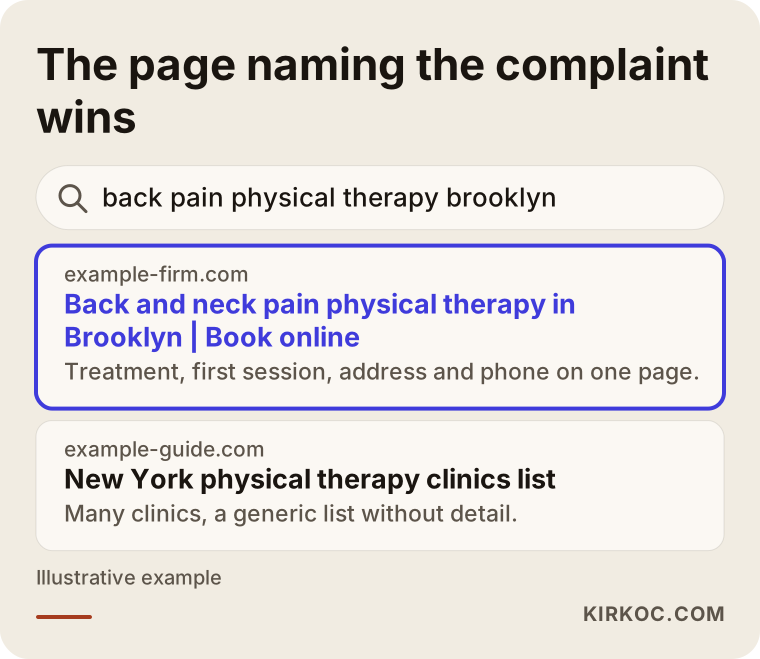
The highlighted result wins because it says who it serves and for what in the very first line. A phrase like "Caring for your wellbeing" tells a patient nothing. "Physical therapy for back and neck pain, by appointment" matches exactly what the person typed.
Four kinds of searches
In physical therapy, search intent usually falls into four groups. If you write one page for all of them, you end up mediocre for every one.
The first group wants information. These people do not know what to do and are typing their symptoms. The best answer for them is a plain-language article or service page on your site. The second group wants a clinic nearby; they type a city, a neighborhood or a zip code. The third group wants a specific treatment: "manual therapy," "dry needling," "pelvic floor physical therapy," "pediatric physical therapy." The fourth group has already heard of you and is typing your name. For them, your address, phone number and opening hours should be visible within seconds.
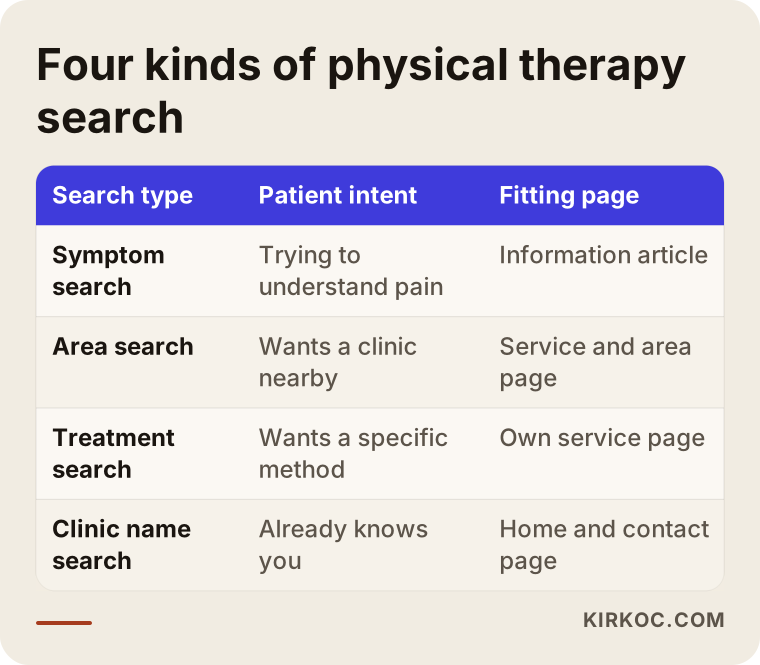
The matching in the table also shapes your site plan. When you open a separate door for each intent, different patients coming from different searches land on a page that was written for them.
Which pages should a physical therapy clinic website have?
A small clinic does not need a giant site. But every page needs a job. The classic trio of "About, Services, Contact" is usually not enough, because once all your services are squeezed onto one page, a patient cannot find their own complaint there.
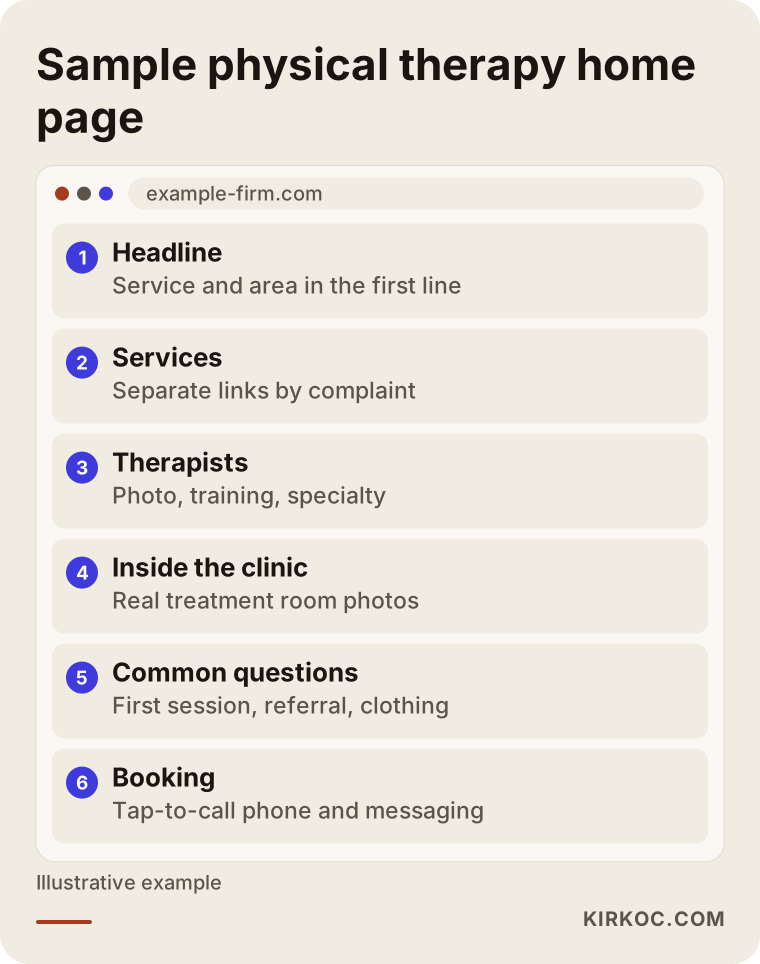
The layout above gives you a rough idea. Now let us look at why each piece matters.
Service pages: one page per complaint
Patients do not type "physical therapy." They type their problem. That is why a separate page for each main service is the sturdiest approach: back and neck pain, sports injuries, post-surgical rehab, neurological rehab, pediatric care, pregnancy and postpartum care, balance and fall prevention for older adults. Include whichever of these your clinic really offers. Do not create a page for a service you do not provide just because it attracts searches. That is dishonest, and it also leads to wrong expectations on the phone.
Each service page should cover who the service suits, what happens in the first session, roughly how long a session lasts, what the number of visits depends on, and how to book. Do not promise a cure. A sentence like "gone in a few sessions" is irresponsible in a health setting and it erodes trust.
Therapist pages
In physical therapy, patients often trust a person rather than an institution. A short page or section for each therapist is therefore very valuable: name, education, areas of focus, any certifications (if you hold the paperwork) and a photo. A properly taken, real photo builds far more trust than a stock image. Make sure every detail is accurate. Inflated titles can put you at risk both reputationally and with your licensing rules, so if you are unsure what you may state, ask your state board or a lawyer.
Contact and booking page
A patient in pain does not want to fill out a long form. Your phone number should be tap-to-call. If you use text messaging, add a button for it. Your address should come with a map link, and you should add practical notes: "Five minutes from the subway," "Paid parking right outside," "Elevator and wheelchair-accessible entrance." That last kind of information decides things for older or less mobile patients, and most clinics forget to write it down.
If you accept insurance, say so clearly: which plans you work with, and whether a referral or prescription is needed. The rules differ from state to state, so describe how your own clinic handles it rather than making general claims.
Frequently asked questions
Move the questions patients ask on the phone onto the site. How long is the first visit? Do I need a doctor's referral? Should I bring comfortable clothes? In which cases does my insurance apply? Write down however your clinic actually handles each one. These questions also raise the chance of being shown as direct answers when people type them into Google.
How do you build trust?
In health care, trust comes before design. If your site is beautiful but short on information, a patient will not call. These elements build trust:
Real photos of the clinic: waiting area, treatment room, equipment. Bright, tidy, genuine images. Photos and short bios of your therapists. A clear answer to the patient's question "what will happen there?": initial evaluation, goal setting, treatment plan. Your full address, legal business name and contact details at the bottom of every page.
Be careful with patient reviews and testimonials. Real, consented reviews are good, but rules exist for advertising health services. Before and after photos, claims about treatment results, and how testimonials may be used are topics where I would not publish anything until you have talked to a lawyer or your professional association. I do not give legal opinions on this.
There is also the matter of patient data. If your booking form asks patients to describe their complaint, you need to know where that information is stored and who can see it. Keeping the form short whenever you can is easier for the patient and lowers your own responsibility. Privacy rules for health information are strict and vary by country and state, so for the details, talk to a qualified professional.
Two hypothetical example scenarios
The examples below do not describe a real clinic. I made them up to show the logic.
Example scenario 1: a small, newly opened clinic
Suppose two physical therapists have just opened a clinic. They have a social media account but no website. The phone rings from a couple of referrals, yet many appointment slots stay empty. As a first step, three things happen: a small but complete site is built on the clinic's own domain, the Google Business Profile is filled out in full, and separate pages are written for the three most requested services. Back and neck pain, sports injuries, post-surgical rehab. Each page mentions the neighborhood naturally, and the booking button is easy to see.
This scenario does not expect a sudden explosion. In the first weeks the site mostly serves people who search for the clinic by name: someone who read the address on a business card finds the clinic and feels reassured. Over a few months, visibility for complaint and neighborhood searches slowly grows. That is the realistic expectation. A guarantee of results is not possible.
Example scenario 2: an older clinic with an outdated site
In the second scenario the clinic has been around for ten years, but its website dates from that era. Opened on a phone, the text is tiny and the buttons do not work. The "services" are one long list on a single page. Calls still come mostly from referrals. Instead of ordering a new site right away, the first step is to look at the current one: which pages still receive visitors, and which addresses Google has stored for years. When moving to the new site, the old addresses are planned to be redirected to their new counterparts. Otherwise visibility built up over years can vanish overnight.
The lesson from this scenario: if you already have a site, look at what is valuable before saying "start from scratch." Sometimes a refresh is enough and sometimes a rebuild is unavoidable, but the decision should come from the current situation, not from a hunch.
How is a physical therapy website built? The step-by-step process
The process usually runs as follows. Next to each step I note what you should have in hand, so you can check the work being done.
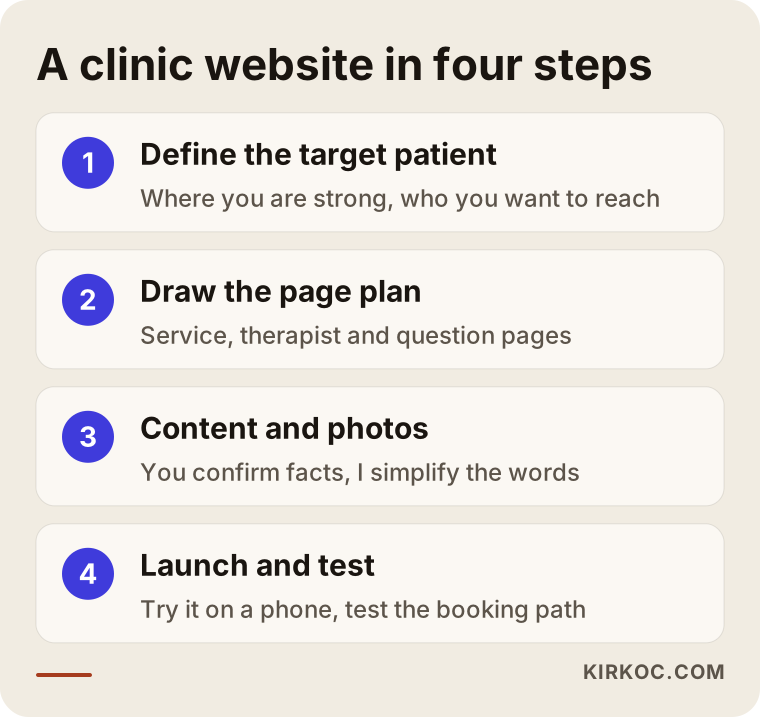
Let me unpack these four steps. In the first step, you and I talk through which services your clinic is strongest in and which patients you want to attract. Targeting every patient means targeting none. In the second step the page plan emerges: which service pages, which therapist pages, which question pages. In the third step the text and photos are prepared, and this is where your contribution is the most valuable, because you know physical therapy and I do not. I simplify the language, you confirm that it is accurate. In the fourth step the site goes live, gets tested on phones and computers, and the booking path is checked.
The work does not end at launch. Telling Google the site exists, connecting your business profile, setting up measurement and watching the first weeks are all part of the process. Many people skip this part and later say, "I had a site built but nothing happened."
The most common mistakes clinics make
These are problems I see again and again in this field. Compare them with your own site.
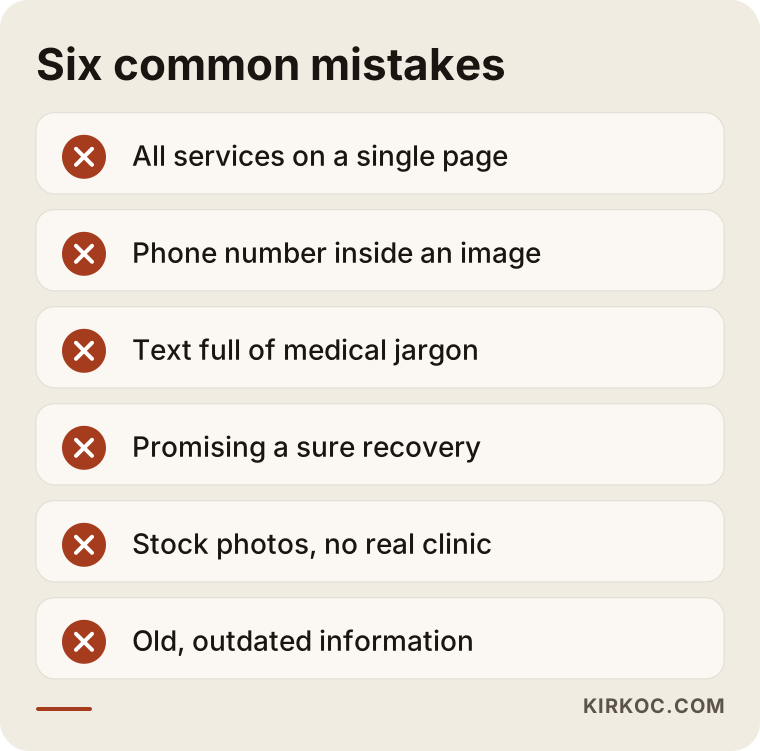
I want to highlight a few of them. A single "services" page is the most common mistake; a person searching for back pain cannot find themselves on it and leaves. A phone number placed inside an image, which cannot be tapped to call, is the second big loss, because most visitors arrive on a phone. The third is text packed with clinical vocabulary. Writing "myofascial release with proprioceptive neuromuscular facilitation" makes you look like an expert but pushes the patient away. If you must use a term, put a one-sentence explanation next to it.
Another problem is copy that makes the same promise to every patient. Phrases like "a guaranteed fix for your pain" do not build confidence, and they can also run into the rules on health advertising. If you are unsure what you are allowed to say and how, talk to a lawyer.
Local visibility: why does the Google map matter so much?
Physical therapy depends on patients who live or work nearby. People do not want to travel across town for a regular weekly session. That is why the map section that appears for "near me" searches on Google is as important as your website itself. That section is fed by a free listing called a Google Business Profile. The profile contains your correct address, opening hours, list of services, real photos and phone number.
The critical rule here is consistency. The address, phone number and clinic name on your site, on your profile and in other directories should match exactly. If one says "Midtown PT Center" and another says "Midtown Physical Therapy and Rehabilitation," Google cannot be sure which one represents you.
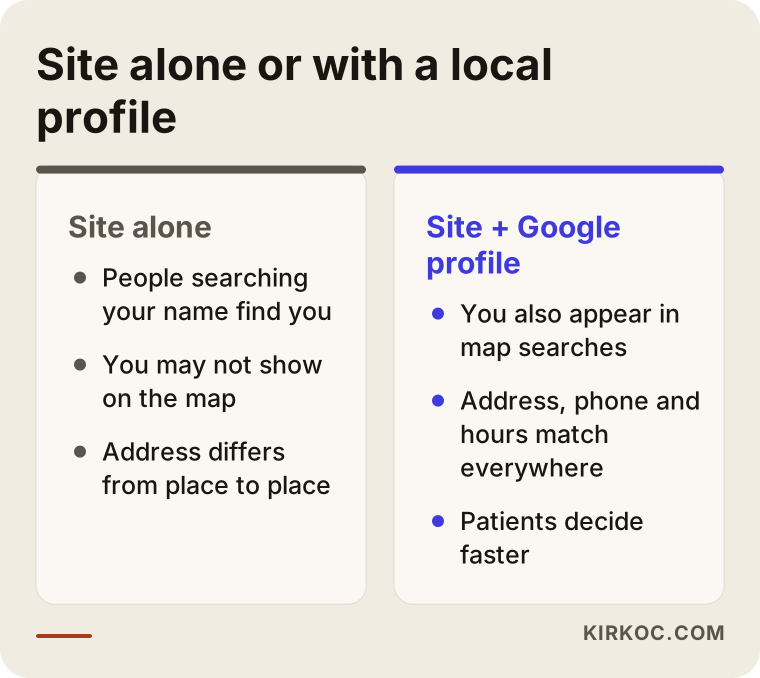
As the comparison shows, when the two work together, patients see the same information in the same form everywhere, which speeds up their decision. I cover local visibility in more depth in another article. What matters here is that you think of the website not as a standalone product but as one part of a whole.
What can you do yourself?
You do not have to hand everything to a specialist. Some jobs are already in your hands, and they are free.
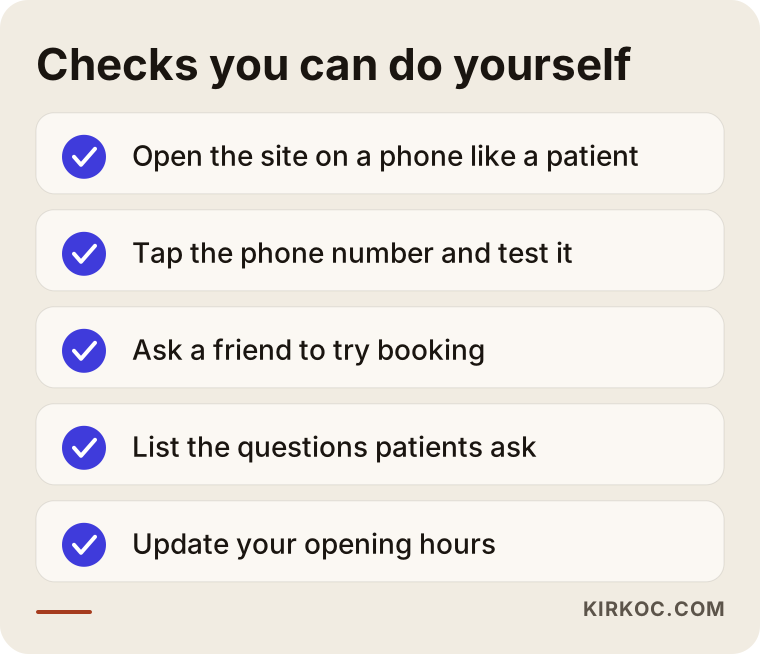
The most useful item on this list is opening your own site on your phone as if you were a patient. How many seconds does the page take to load? Can you read the text? When you tap the phone number, does a call start? Then hand the phone to someone you know, say "try to book an appointment," and watch quietly. The spot where they get stuck is the biggest leak on your site.
Also keep a list of the questions patients ask most. Each one is a page or article topic. Your front desk person knows that list better than anyone, and even a short chat with them can produce a month of content ideas.
When should you get professional help?
Not every clinic needs the same solution. Sometimes a few fixes are enough and sometimes a full rebuild is needed. Use the question below when deciding.
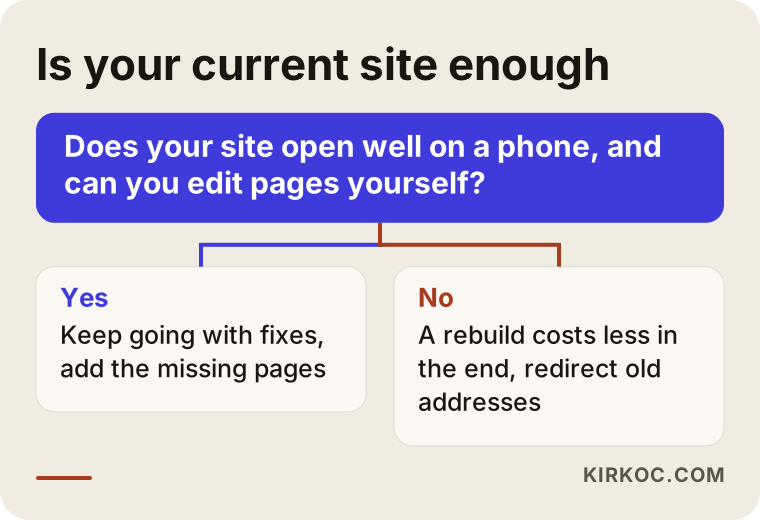
The critical points in this chart are that the site opens properly on a phone and that you can edit pages yourself. If either one is missing, patching on top of it often costs more than rebuilding. If you have to pay someone every time you want to change a page, the site belongs to whoever built it, not to you.
I find professional help sensible in these cases: when the site is being built completely new, when search visibility has to be planned from zero, when addresses must be preserved while moving from an old site to a new one, and when a technical connection such as a booking system has to be set up. Writing the text yourself while a specialist builds the structure is a balanced path for most clinics.
What determines the cost of a physical therapy website?
I will not give a number in this article, because very different jobs are sold under the same name and a figure would give you the wrong yardstick. These are the factors that set the cost.
Number of pages and content: a five-page introduction site and a site with fifteen service and therapist pages are not the same job. Who writes the text also changes the cost; in a field like physical therapy, copy that needs professional review takes time to prepare. Design: adapting a ready-made template takes different effort from designing something specific to your clinic. Photography: if you have your own pictures the cost drops, and if you need a professional shoot it rises. Booking system: a simple form and online scheduling connected to your clinic calendar are far apart. Multiple languages: if you serve patients who speak other languages, every extra language is extra work. Yearly expenses such as hosting and the domain name, along with maintenance and updates after launch, also count.
A good quote lists these items separately and states clearly what is included and what is not. Question any quote that arrives as a single line with one price.
How long until you see results?
Building a site is one thing; becoming visible is another. The site itself can go live within a few weeks, but the process of moving up in Google searches takes longer. Nobody can guarantee you a ranking or a number of patients, and if someone does, be careful.
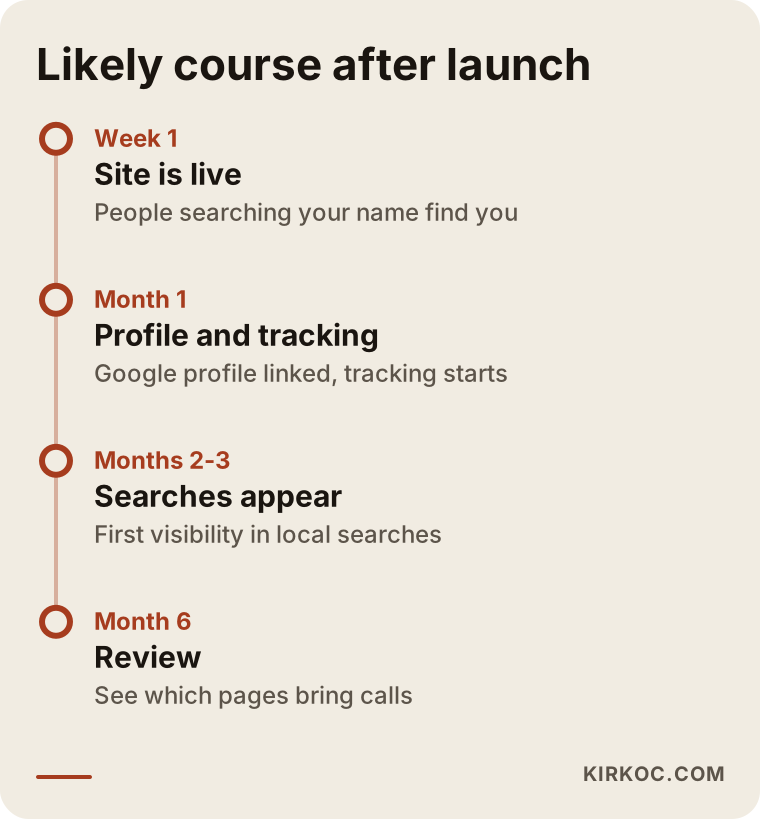
This timeline is an estimate, not a promise on the calendar. In a neighborhood with heavy competition the process takes longer, and for a niche complaint search that nobody has targeted it can be shorter. What matters is setting up measurement from day one, so that you can see which page brings phone calls and which search brings visitors.
From visitor to appointment
The final purpose of a site is not to look good but to carry the visitor to an appointment. Some people drop off at every step of this path; the task is to reduce the loss.
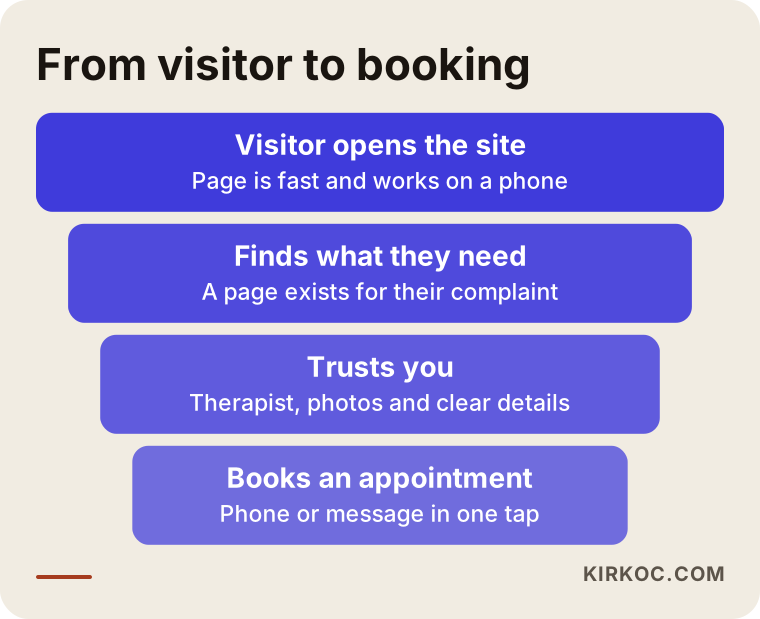
Each step has its own question. Does the page open? Did I find what I was looking for? Can I trust them? How do I book? The biggest loss usually happens in the middle, at the trust and clear-information step. That is why it is healthier to strengthen your service pages first and only then invest in ways to bring traffic, such as ads. Bringing visitors with ads to an empty page is like pouring water into a bucket with a hole in it.
How do ads and social media fit with the website?
The website is the center of the work; the other channels carry patients to it. Google Ads is a quick way to reach someone at the moment they type "pain" into a search, but when you stop paying, the visibility stops with it. Instagram and Facebook, on the other hand, usually work for building trust and staying in people's minds: exercise tips, glimpses of the clinic, short answers to frequently asked questions. When you share health content, separate general information from individual advice. A line like "everyone should do this exercise" can easily be misunderstood.
Running these channels separately from each other is a common source of loss. Your site says one thing, your profile says another, and your ad copy promises a third. When all of them are managed by the same person, in the same voice and toward the same goal, a patient sees one consistent clinic.
How I work
I am based in Istanbul, and I handle all the services a digital agency would normally provide by myself: website, search visibility, local profile, social media management, Google and Meta ads, logo and content. When I work with a physical therapy clinic, the order usually goes like this: first a short conversation to understand your clinic, your services and the patient you want to reach; then I draw up the page plan; with your approval I prepare the content, build the site and publish it. After launch I connect your business profile and the measurement.
The concrete benefit of having one person do the work is this: because the site, search visibility, social media and ads sit with the same person, one piece does not undo what another says, and there is no gap where someone says "that is not my job." You have a single contact, and decisions move faster. Of course, this does not mean you have to do everything at once. With most clinics it is healthier to start with the website and add the other channels as the need appears.
Frequently asked questions
How many pages should a small physical therapy clinic website have?
The job of each page matters more than the count. A home page, separate pages for your main services, therapist introductions, a frequently asked questions page and a contact page are usually a good start. Pages are added as the clinic grows. What matters is that every service has its own page, written the way patients look for it.
Wouldn't an Instagram account alone be enough?
Instagram is a nice tool for building trust, but someone in pain usually searches on Google. If there is no website and map listing to find you there, you lose that patient. On top of that, your control over a social account is limited, while the website is yours. The two work well together.
Can I use before and after photos and patient reviews on my site?
I cannot give you a definite answer on this. There are rules for advertising health services, and they can change. Before publishing, I recommend talking to a lawyer or your professional association. Patient consent and privacy are separate matters you also need to think about.
Is an online booking system a must?
It is not. At the start, a tap-to-call phone number, a messaging button and a short form can be enough for many clinics. As your schedule gets busier, you can consider a system connected to your calendar. The important thing is that a patient does not have to take three or four steps to book.
How long does it take for the site to go live?
It depends on the number of pages, whether the content is ready, and how quickly you approve things. The part that takes the longest is usually not the software but preparing and approving the content. Gathering therapist details and photos in advance shortens the process noticeably.
Will my patient numbers go up as soon as the site is live?
No, and do not trust anyone who promises that. People who search for your name use the site right away; visibility for complaint and neighborhood searches builds over time. Competition, the quality of the site and the way the content is organized all affect the result.
Can I delete my old site and set up a new one?
Technically yes, but the old addresses must be redirected to the new pages; otherwise you can lose visibility built up over years. Before the switch, check which pages receive visitors.
Does the site need constant updating?
Yes, but not on a large scale. Information such as opening hours, a new therapist, a new service or a holiday notice needs to stay current. Outdated information sends patients the wrong way and damages trust. A few new pieces of content written regularly also help visibility.
If you want a site built on the right structure for your clinic, or want your current one reviewed, you can reach me through the website design page. I will listen to how your clinic works and tell you honestly what suits it.