You run a private hospital or a medical center. Your doctors are good, your equipment is modern, but the phones do not ring as much as you expected. Or maybe your website was built years ago, and today it looks dated, loads slowly and falls apart on a phone. At a moment like that, it is natural to start researching how to get a hospital website built. In this article I explain what a healthcare website is actually for, how patients look for you, which pages you need and how the process works. I am Ümit Kırkoç, I work from Istanbul, and I handle website design on my own, from the first conversation to launch.
Let me start with one point: a hospital website is a different job from a shop or a cafe website. The person on the other side is often worried, sometimes in pain, and sometimes deciding on behalf of a parent or a child. When they land on your site, they are not looking for a beautiful design. They want answers to three questions. Can I trust this place? Is the doctor who can help me here? How do I book a visit? If your site answers those three calmly and quickly, it does its job. If it does not, however polished it looks, the patient moves on to the next result.
How do patients search for you?
Before planning a hospital site, look at what people type into the search box. Patients rarely type "private hospital." They type their problem, a doctor's name or the neighborhood they live in. Roughly, there are three kinds of searches. The first is a symptom or treatment search, such as "herniated disc surgery" or "child allergy test." The second is a department-and-place search, such as "eye hospital near me" or "women's health center in my city." The third is a name search, either a doctor's name or your institution's name. The person in that third group already knows you and is doing a final check: they open your site and look at the reviews, the doctor's background and the address.
The image below uses a completely made-up example to show which page might stand out for a department-and-area search.
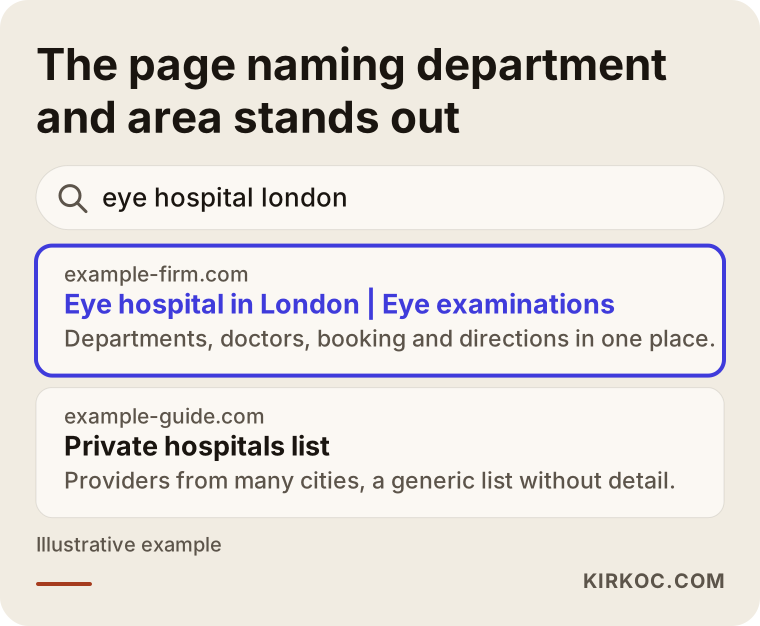
The highlighted result says the department and the area in its first line and tells you what you will find. A generic "Trusted address in healthcare" page does none of that. Google tries to show the searcher the most fitting answer, and if you make that job easy, you are easier to show. This work is called SEO, which simply means making sure your site appears to the right people, as the right page, in search results. I cannot promise any ranking position, but making clear what each page is about is fully in your hands.
One search type, one page type
Every search intent wants its own page. If you stuff everything into a single "Our Services" page, you will not answer any search fully. The table below sums up the match.
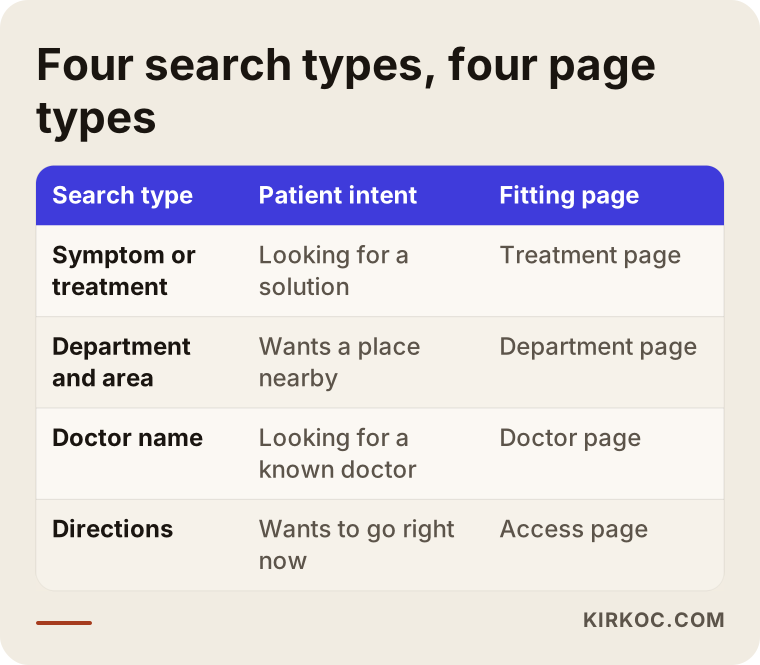
As the table shows, someone searching a symptom needs a treatment page, someone searching a name needs a doctor page, and someone looking for directions needs address and access information. Keeping these separate, instead of mixing them, helps both the patient and the search engine.
What sets a healthcare site apart: trust
If you pick the wrong pair of shoes online, you send them back. In healthcare, the decision weighs more. That is why trust signals do the most work on a hospital site. Think of them together: who you are, which doctors work with you, where you are, how to reach you and what information you ask of the visitor.
Here is what the site should show at first glance: the full name and address of the institution, a phone number, business hours, what to do in an emergency, and how to book. All of it should be visible on the home page without scrolling, especially on a phone, because many patients reach you from a phone. I am not backing that with a statistic; open the visitor report of your own site and you can see which devices your visitors use.
The sketch below shows one way a home page could be arranged.
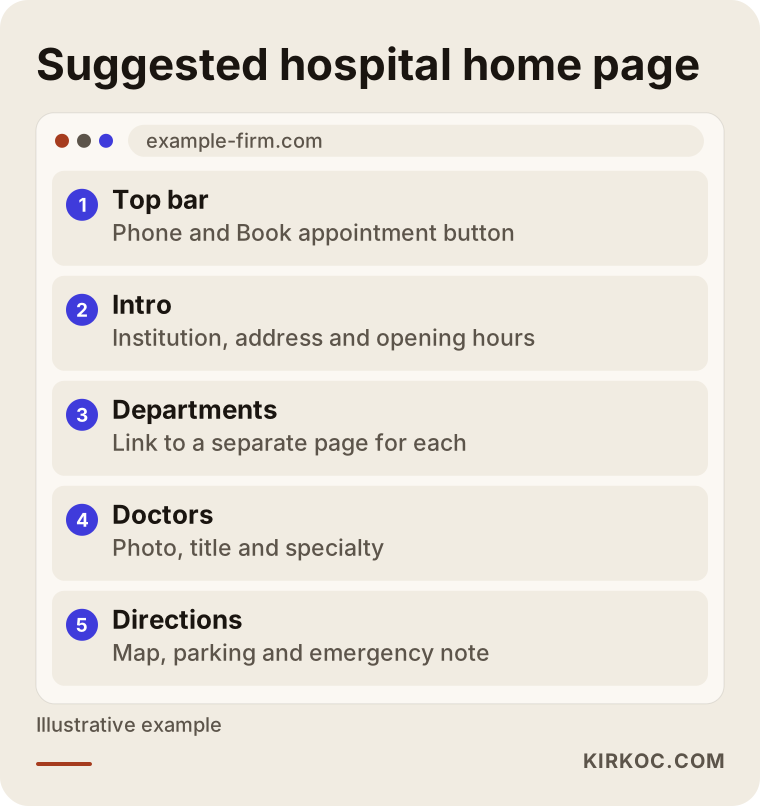
The thing to notice in this layout is that the booking path is one tap away from everywhere on the page. The visitor should never have to scroll down and back up. A phone number and a booking button can also stay fixed in the top menu.
Pages you must have
A medical center site should be built like an organized information center, not like a small brochure. Here are the pages I consider necessary.
Department and treatment pages. Open a separate page for each main department: cardiology, orthopedics, eye care, pediatrics and so on. On each page, explain in plain language which complaints bring people in, how the visit goes, which tests are done and what the doctor will ask. One page per department, each with its own address, works better than a single long "Our Departments" list.
Doctor pages. Patients often search for the doctor before the department. For each doctor, include a photo, title, specialty, training and experience, the conditions they see and the days they hold clinic. The doctor must approve the content of their own page.
About and institution page. The story of the organization, license information, facilities, accreditations if you have them, leadership and contact details. No need for exaggeration here. Concrete facts build more trust than big words.
Insurance and payment information. One of the questions patients ask most is whether their insurance is accepted. State which insurers you work with, which procedures may fall outside coverage and how to get more information. You do not have to publish prices, but you should answer the question "how do I find out?"
Directions and contact page. A map, parking information, public transit, accessibility, the emergency number. This page looks small, but it is used constantly. If someone may need urgent care, say clearly that in an emergency they should call the local emergency number rather than fill in a form.
FAQ and patient guides. Practical content such as how to prepare for surgery, how long to fast, and which documents to bring reassures patients and also shows up in searches.
The list below sums up what a doctor page needs.
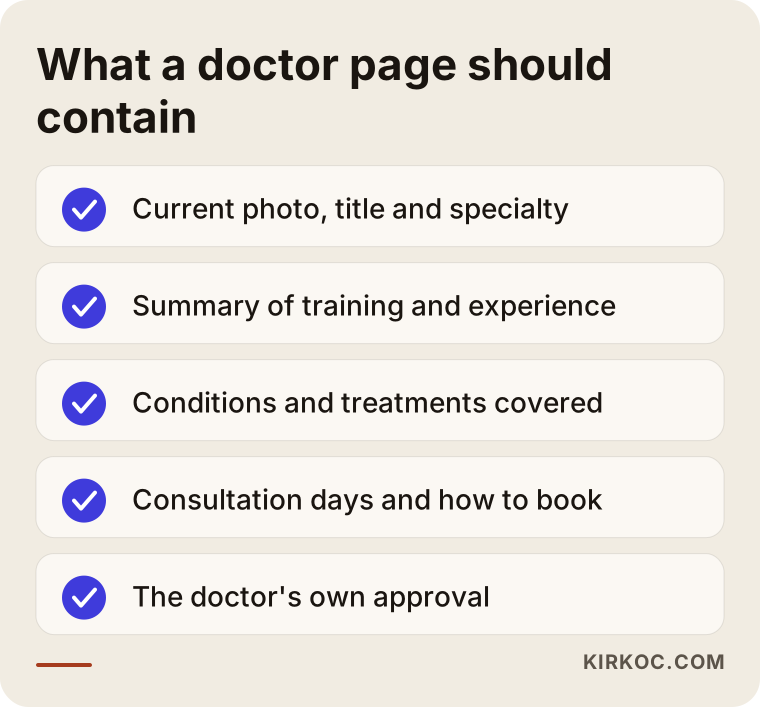
Every item on this list answers something a patient actually asks. Filling in the gaps does not take a big budget. Often a twenty-minute conversation with the doctor is enough.
Content and advertising limits in healthcare
Care is needed here. Marketing health services is subject to special rules in most countries, and the details depend on where you operate. There are usually rules about how patient testimonials may be used, whether "before and after" photos are allowed, the risk of words like "best" or "guaranteed cure," and how professional titles must be written. I am not a lawyer, and it would be wrong for me to give a definitive ruling. I recommend that you check what can go on your site with your organization's legal counsel or an attorney who works in healthcare law. I build the design and structure; your legal advisor should have the last word on whether the wording and images are appropriate.
A practical approach is to write informatively: explain, do not promise. Saying "this operation is done in the following way, and recovery varies from person to person" is both more honest and safer than promising a definite result.
Then there is personal data. If your booking form collects a patient's name, phone number and complaint, that may be health information, and it is usually protected by specific privacy rules. Whether your site must follow a particular law depends on your country and your setup, so work out with your legal advisor what the form may ask for, where the information is stored and how the patient is informed. Asking for no more than you need is easier for the patient and less risky for you.
Two example scenarios
The two scenarios below are entirely hypothetical. They do not describe a real institution; they are invented to make the situation concrete.
Scenario 1: a mid-sized neighborhood medical center. Suppose a medical center runs with a staff of forty, with internal medicine, pediatrics, women's health and eye care. Its site was built seven years ago. All departments sit on one page, doctors have no photos, and the only way to book is a phone number. The site loads halfway on a phone. For a center like this, the first job would be to open a page for each department, build the doctor pages and add a "Book appointment" button to the home page. Next would come directions and parking information for patients coming from nearby areas. I cannot say in advance how many appointments this will bring. What it does is give you a site where patients can find what they are looking for, and measurement starts from there.
Scenario 2: a hospital growing around one specialty. Suppose a private hospital is strong in orthopedics and sports injuries, but the site never says so; everything reads like a "general hospital." The task is to bring forward the area where the hospital is strong: separate pages for knee, shoulder and spine, each with a description of the process, which doctor sees patients for it and the common questions. The aim is to make people think "for this problem I go to this hospital," instead of competing in crowded, broad searches. That is a more realistic approach.
What the two scenarios share is that the work starts not by decorating the site but by finding a page for each question the patient asks.
How does the process work, step by step?
A hospital or medical center site is a project of a few weeks, and order matters. Here is the general flow.
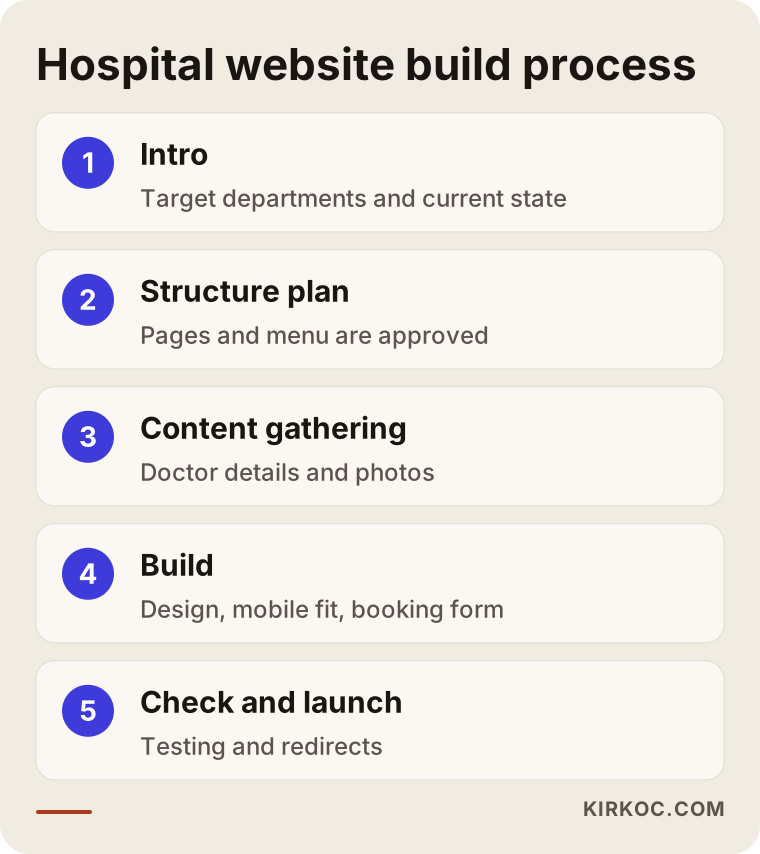
Step one, introduction and goals. I ask about which departments you want to put forward, which patients you want to reach and what works or does not work on your current site. Who receives the booking calls and at what hours, which department has free capacity, which one is overloaded: this comes out here. I do not have that information; I learn it from you.
Step two, the structure plan. Which pages there will be, how the menu is set up, which doctor appears under which department. You get this as a drawing and a list, and it is approved before any code is written, because changing the structure later is expensive and tiring.
Step three, gathering content. Information, photos and approvals from doctors; process descriptions from departments; institutional details from management. This is often the longest step, because doctors' time is limited. Knowing that from the start lets you set the calendar accordingly.
Step four, the build. Design, mobile fit, speed and the booking form are prepared. On a healthcare site, readable type size, strong contrast and a simple menu matter especially, because many visitors are elderly or have tired eyes.
Step five, checking and launch. Every page is tested on a phone and a computer, I confirm that the form really reaches you, and redirects from old addresses to new ones are set up. That way the search visibility you built over the years does not vanish on the new site.
After launch. The work does not end when the site goes live. I watch which pages are opened, which searches bring people in and how many times the booking form is filled in. In the first weeks, gaps show up and get fixed.
What happens after launch?
A new site takes time to settle into search results. It takes Google days, sometimes weeks, to find, evaluate and rank new pages, and no one can guarantee that period. The timeline below sums up a reasonable expectation.
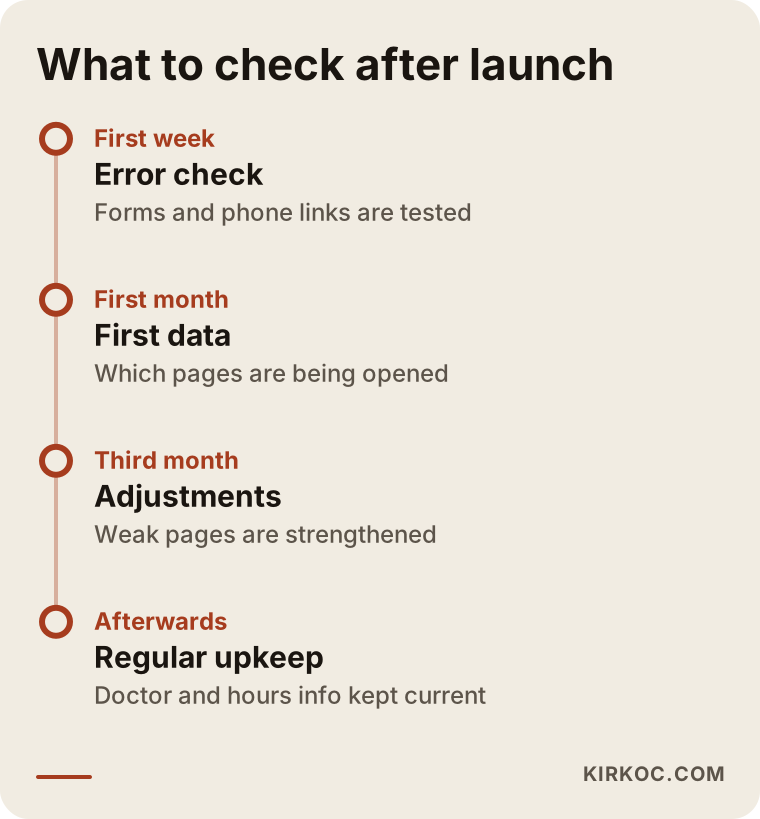
This timeline is a work calendar. It shows what to look at and when, and it does not promise results.
The booking path: the real job of the site
The success of a hospital site is measured not by how good it looks but by how smoothly it leads a visitor to book. Think of the patient's journey as a funnel: at the widest part, many people open your site; as it narrows, fewer read the department page, fewer study the doctor, and a small number finally call or fill in the form.
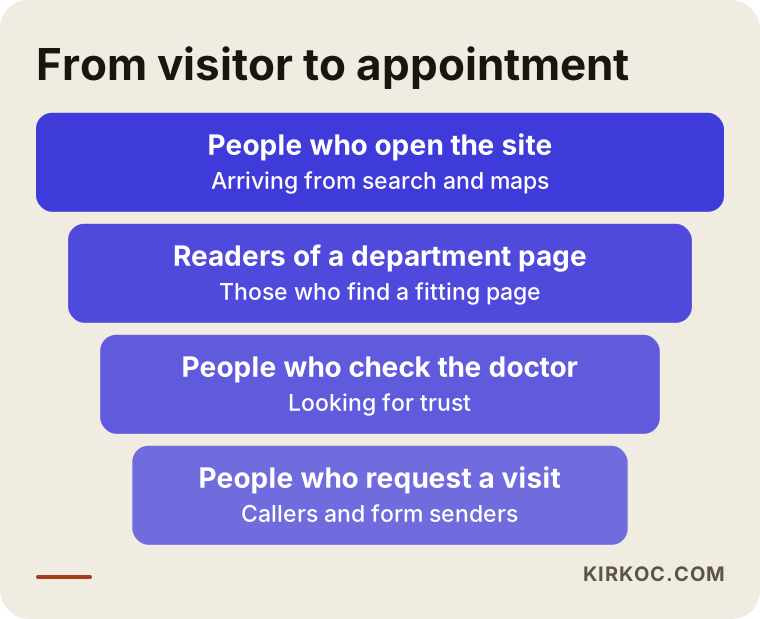
Every narrowing in this funnel is a place where you can lose someone. If the department page has no doctor's name, if the doctor page has no booking button, if the form has too many fields, the patient gives up right there. When improving your site, the goal is to give a clear answer at each step to the question "what is the next step?"
Booking options should also be varied. Some patients prefer to call, some fill in a form, some want to write in a messaging app. You do not have to offer all of them, but choose the channels your organization can truly answer. A form that goes unanswered is worse than no form at all, because the patient waits and then loses trust.
AI assistants and maps matter too
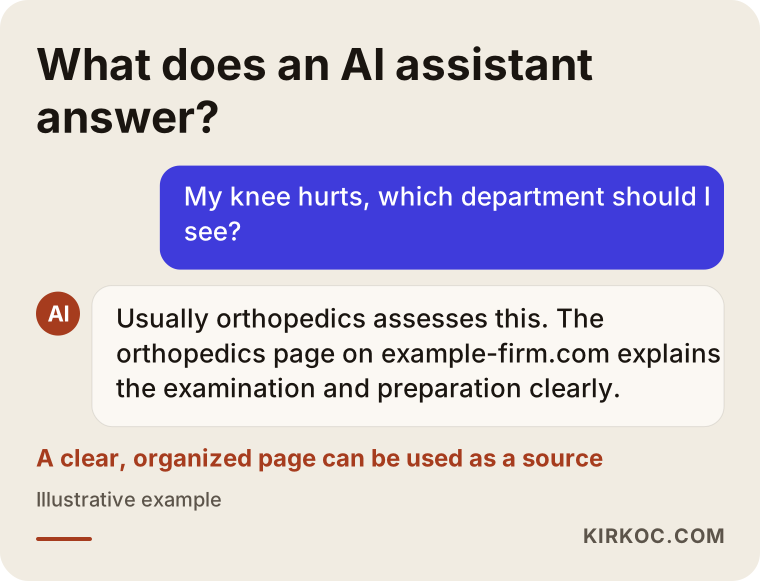
Today people put their questions not only to a search engine but also to AI assistants. A question like "my knee hurts, which department should I see?" gets an informative answer in these tools, and sometimes even leads to a suggestion of an institution. These tools choose sources partly by how clear and organized a site is. So a site that gives plain, consistent information has a better chance of being used as a source not only on Google but in those answers too. There is no guarantee, but if the structure is sound, you have a chance.
Alongside that, do not forget your business profile on Google Maps. For "hospital near me" searches, the map often comes first. The address, phone number, hours and departments on your profile should match the site exactly. If one place lists a different phone number, the patient is confused and the search engine does not know whom to trust.
Common mistakes
I keep seeing the same mistakes on healthcare sites. Here are the most common.
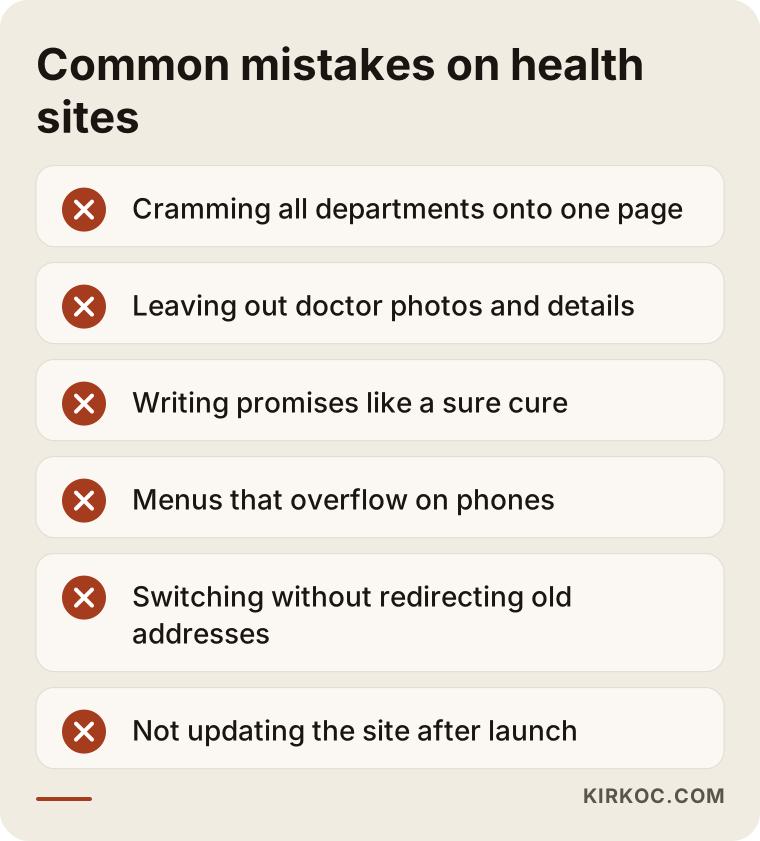
Cramming everything onto one page. Listing all departments under "Our Services" means no department finds its match in search.
Not showing the doctor. Patients look for people. A list of names without photos or details does not build trust.
Relying on stock photos. Photos of smiling fake nurses are far less convincing than a real building, a real waiting room and a real team.
Making promises the rules do not allow. Phrases such as "sure cure" or "best hospital" carry legal risk and also reduce trust. Ask your legal advisor before writing them.
Forgetting the phone. A site with a menu that overflows a small screen, or buttons that cannot be tapped, sends the patient to a competitor.
Making the booking form hard. Asking for fifteen fields when five are enough wins no one over.
Not redirecting old addresses when moving to a new site. Visibility that took years to build can vanish in a day.
Abandoning the site after launch. Doctors change, hours are updated, and old information stays on the site. If a patient arrives at your door and cannot find the doctor, the frustration comes back to you.
What can you do yourself, and when do you need an expert?
You do not have to hand everything to a specialist. There are things you can do on your own: collect current details from the doctors, arrange real photographs, note down the questions patients ask most, keep your Google business profile up to date and decide which department you want to feature. These are things that would be asked of you even if you hired an agency, and the better you prepare them, the faster the process goes.
Expert help is needed for the technical parts: site structure, speed, mobile fit, search visibility and setting up the booking form securely. And if your current site was built on an old system, getting out of it cleanly and moving to a new structure takes experience.
Here is a short decision tree to help you choose.
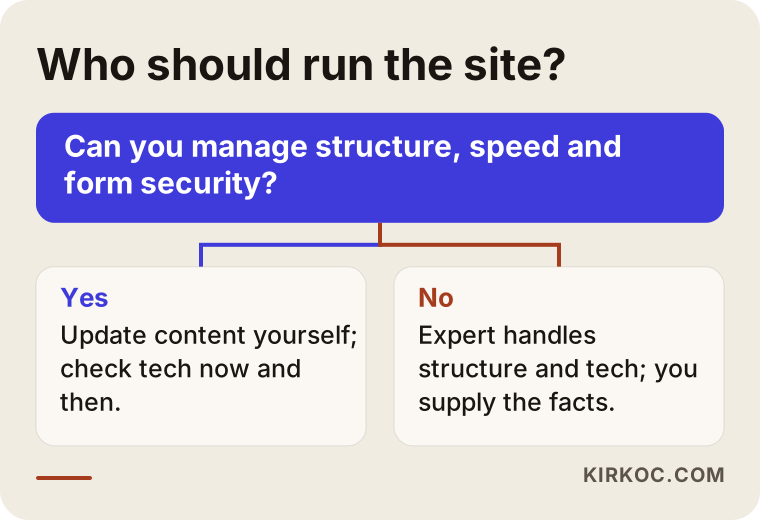
In short, when the content and facts come from you and the structure and technical side come from an expert, you end up with a solid site.
What determines the cost?
I will not give figures here, because no two hospitals want the same scope. Let me explain the main factors. The number of pages is the first: a medical center with five departments is far from a hospital with twenty. The number of doctors and how detailed their pages will be is the second. Who handles the writing and photography also matters; if your team prepares the texts, the work shrinks, and if you want me to do it, it grows. The booking system is another item: a simple form and a system connected to your patient records software are very different jobs. A multilingual site is a separate scope for institutions that receive international patients. Moving data from the old site and setting up redirects is part of the work too. Finally, whether you want regular upkeep, content and visibility work after launch affects the total.
When comparing quotes, look not only at the total but at what is included: are mobile fit, speed, redirects, form security, training and post-launch support written down? If they are not, a low price can turn into a high bill later.
A hospital website does not live alone. Your social media accounts, your Google profile, your ads if you run any, and your search visibility should all carry the same message. I run all of these myself: the website, search visibility, social media management and advertising. The benefit is very concrete: when a department is promoted, the page on the site, the Instagram post and the ad text match each other, no message gets lost between different people, and the number of meetings and back-and-forth rounds drops. Of course, if all you need is the website, I will do only that.
How I work with you
The process goes like this: first I listen to your situation in a short call, look at your current site and your competitors, and then I give you in writing the pages and tasks that are needed. After your approval I start building. At every stage I show you what is ready and ask for what I need from you in a clear list. Doctor approval, legal review and content gathering move forward on your side, and I handle the technical and design side. I do not bury you in jargon; if I use a term, I explain it, and you deal with one person: me.
I do not want to promise anything, but I do want to be honest. I cannot say that a site will increase your patient numbers. What I can do is build a site where patients find what they are looking for, that gives confidence, loads quickly and stays organized. The rest is measured and improved together.
Frequently Asked Questions
How many pages should a private hospital website have?
There is no fixed number. You need one page for each main department and one for each doctor, plus about, contact, directions and FAQ pages. Around a dozen pages may be reasonable for a small medical center, and hundreds for a large hospital. What matters more than the count is that each page answers a question.
Can patient reviews be shown on a hospital site?
There are rules on marketing health services, and I cannot determine the details. Before using reviews, thank-you messages or before-and-after photos, ask your organization's legal counsel or an attorney who works in healthcare law. The authoritative answer has to come from them.
Is an online booking system required?
It is not. What matters is that the patient has a way to reach you and gets an answer when they do. A phone number and a simple form may be enough for most organizations at the start. A system connected to your patient records software is a separate job and is evaluated separately.
Will the search visibility of my old site disappear on the new one?
If it is not done correctly, yes, it may be partly lost. Redirecting old addresses to the new ones and keeping titles and content in place reduces that. I still do not guarantee the outcome; a few weeks of follow-up after the switch are needed.
Do doctors have to approve the content of their own pages?
I strongly recommend it. Accurate titles, training and specialty information matter for patient trust and for responsibility. Planning doctor approval from the start does not delay the launch date; on the contrary, it reduces the burden of corrections later.
How long does it take to build the site?
It depends on the number of pages, how quickly content is gathered and how fast approvals come. The technical part is usually quick; doctor information, photos and legal review set the real pace. I will give you the exact calendar in writing during the planning stage.
Do I need a separate language option for international patients?
If you accept international patients, yes, but it is not only translation. You also need to think about what that patient looks for: directions, a contact channel and an explanation of the process. Building a separate page for each language also gives a clearer match in search results.
What do I need to do after the site goes live?
You need to keep the site current when the doctor roster, hours and phone numbers change. It is also important to track how many booking requests are answered. I can handle these as regular upkeep, or you can do them yourself if you do not need the support.
If you are considering a website for your private hospital or medical center, tell me briefly about your situation, and I will help you work out what is needed and where to start. You can reach me through my website design page.