Your dining room is busy, the kitchen is humming, and orders keep arriving by phone and through the delivery apps. But when you look at the monthly statement, you see how much of your margin those apps take on every order, and it stings. Maybe you have started to think, "What if I took my own orders?" and typed something like "restaurant online ordering website" into Google. This article is written for you. I will explain how a commission-free ordering system on your own domain works, what it is made of, and where to start. I am Ümit Kırkoç, I work from Istanbul, and my ecommerce website service includes building ordering pages for restaurants, cafes and other businesses that sell food.
Let me say one thing plainly first: your own website will not replace the delivery apps overnight. Those apps bring you customers, and that has a price. Your own site gives you something different: once you have met a customer, you can deal with them directly. The goal does not have to be leaving the apps entirely. The goal is to move your repeat customers to your own channel so that you pay that cut less often. The rest of this article is about how to get there.
Why does commission-free ordering matter so much?
On a delivery app, the customer is really the app's customer, not yours. You may not see their phone number. You cannot message them the next day to say, "We have a soup special today." And the next time they are hungry, they may pick a different restaurant that looks a little cheaper on the same screen. On top of that, the fee on each order can leave very little in your pocket once you have paid for food, packaging and labor, especially when the order total is small.
On your own ordering site, nobody takes a share of the order apart from the payment processor, which charges a transaction fee. That fee is usually much lower than an app's cut, and you will find the exact terms in your processor's agreement. You also keep the customer's name, address and order history. You need to handle that information in line with privacy rules that apply where you operate. I will not give a legal opinion on that; please ask a lawyer or your accountant.
The image below puts the two routes side by side. There are no numbers in it, because every restaurant's fees and contracts are different, but the pattern is the same for everyone.
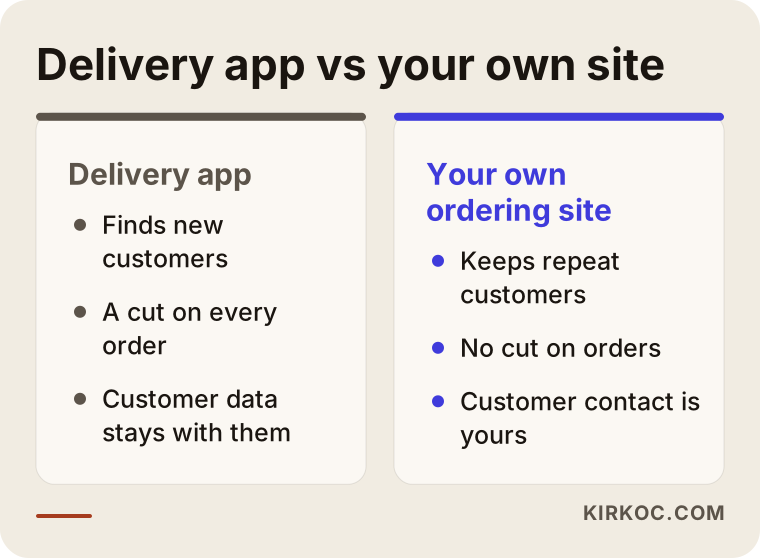
As you can see, the two routes are not enemies. The app is strong at finding new customers. Your own site is strong at keeping the ones you already found. The smart move is to let each do what it is good at.
How does your customer search for food?
Ordering dinner is a different kind of search from hiring a plumber or an accountant. Nobody types "best restaurant" and reads for an hour. A hungry person usually searches on a phone, using a very short phrase: "pad thai delivery near me," "pizza open now," "office lunch catering downtown," "vegan burger takeout." What these searches share is two things: a place and a dish.
There are two groups of searches here. The first is brand searches. The customer already knows you and types your restaurant name plus "order" or "menu." The second is discovery searches. The customer does not know you; they type only a dish and a neighborhood. Your own site should win the first group first. If someone searches your name and Google puts a delivery app's page at the top, that order will go out with a commission attached. Making sure your own site appears first for your own name is often one of the most profitable early jobs you can do.
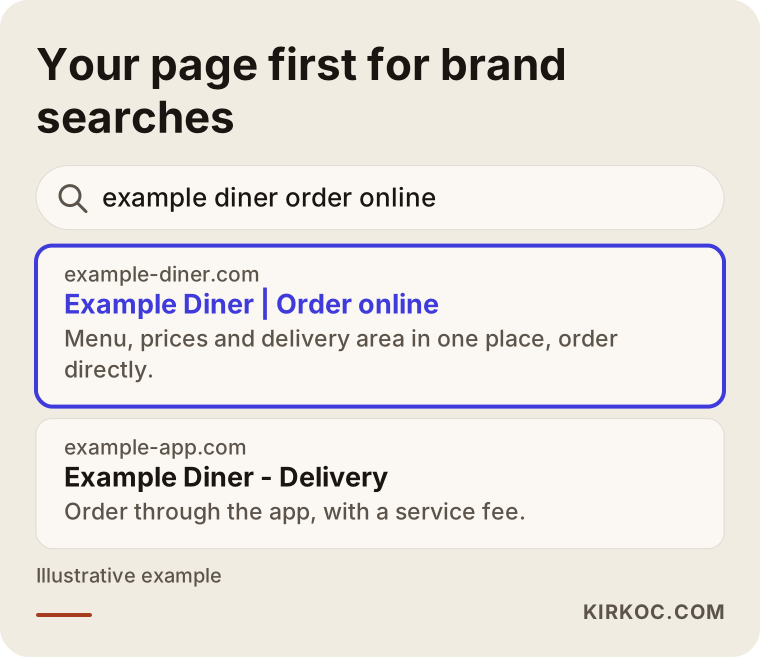
The restaurant in the image is completely made up. Notice that the highlighted result does more than show a name. It says what is sold, where, and that you can order directly, all in the first line. Nobody can guarantee where Google places a page, but when those facts are clear, your chances improve noticeably.
Local searches and your map profile
A large share of food searches happens on the map. Your Google Business Profile has a place where you can add an ordering link. Putting your own ordering page address there sends map visitors straight into your system. The menu, hours, phone number and address on your profile should match your website exactly. That consistency is a trust signal in local search. I handle local search work separately as part of my own services, and this is the cheapest way to pull orders onto your site.
Which pages should an ordering site have?
Many restaurant websites behave like a brochure: photos, a story, a contact form. A site that takes orders should work like a store. The customer opens it, chooses what they want, pays and leaves. So plan your pages around what the customer wants to do, not around what you want to tell them.
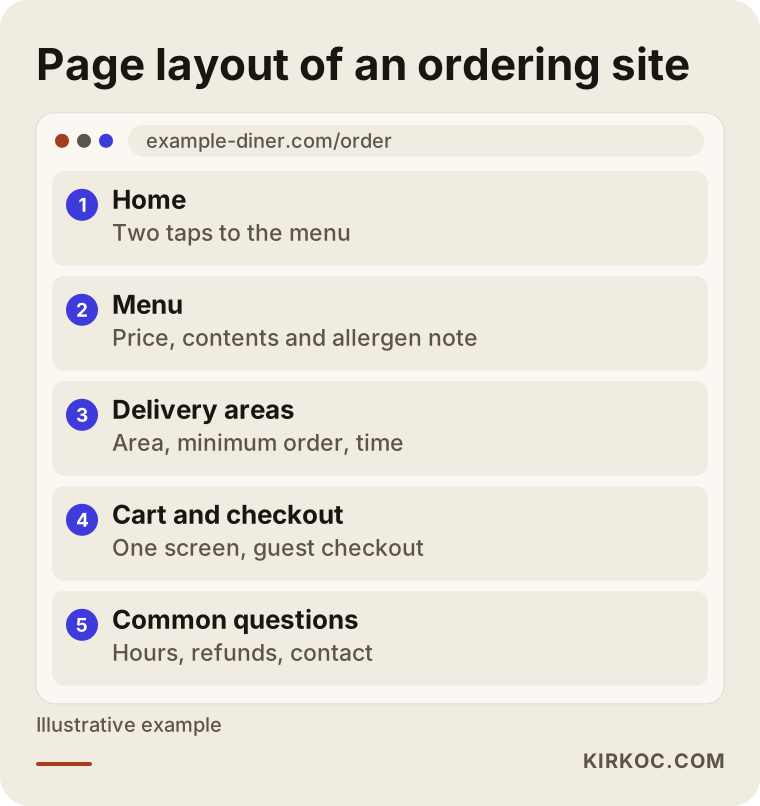
Let me walk through the layout in the picture. The home page should get a visitor to the menu in no more than two taps. The menu page should be split into categories, and every item should show a price, a description of what is in it, and an allergen note if relevant. The delivery areas page should say which neighborhoods you serve, the minimum order and the estimated time. If customers cannot find this, they fill a cart, then learn you do not deliver to them, and they never come back.
You can also think about a separate page for each type of meal. If you serve both breakfast and dinner, they can each become findable on their own. Someone searching "breakfast delivery" lands on the breakfast page instead of getting lost in one giant menu. Uploading your menu as a picture or a PDF is one of the biggest mistakes here, because Google and AI assistants cannot read text inside an image reliably, and customers have to pinch and zoom on their phones.
Mobile first
Most food orders come from a phone. The cart button should sit where a thumb can reach it, the address field should autocomplete, and checkout should fit on one screen. Testing this on a desktop computer and saying "looks great" is not enough. Try it on a real phone, on mobile data, the way a hurried person would.
How do you choose the ordering system?
This is the part that confuses owners the most: how the technical side gets built. There are three common routes, and each has its own strengths and burdens.
The first is renting ready-made ordering software. Setup is fast, but there is a monthly fee, and some products also charge an extra amount per order. Read the contract of any system advertised as "commission-free." Some do not call it a commission but still take a per-order fee under another name. The second route is installing an ordering plugin on an open platform such as WordPress. You pay no share of orders and you have a lot of say over how the pages look, but maintenance and security are your responsibility, or the responsibility of someone you hire. The third route is a custom-built system. It makes sense for multi-location groups or unusual needs, and for a small restaurant it is usually more than you need.
Whichever route you choose, ask the person or company offering it these questions. Where do orders arrive? Does my phone get an alert, and does it print in the kitchen? Does the money go straight to my own account? Can I change the menu myself without knowing code? When an item sells out, can I hide it with one tap? If I decide to leave, do I keep my data?
The customer's journey on screen is a funnel. Some people who arrive look at the menu, some of those add something to the cart, and some of those reach checkout. At each step some people drop out, and building the system well means reducing those losses.
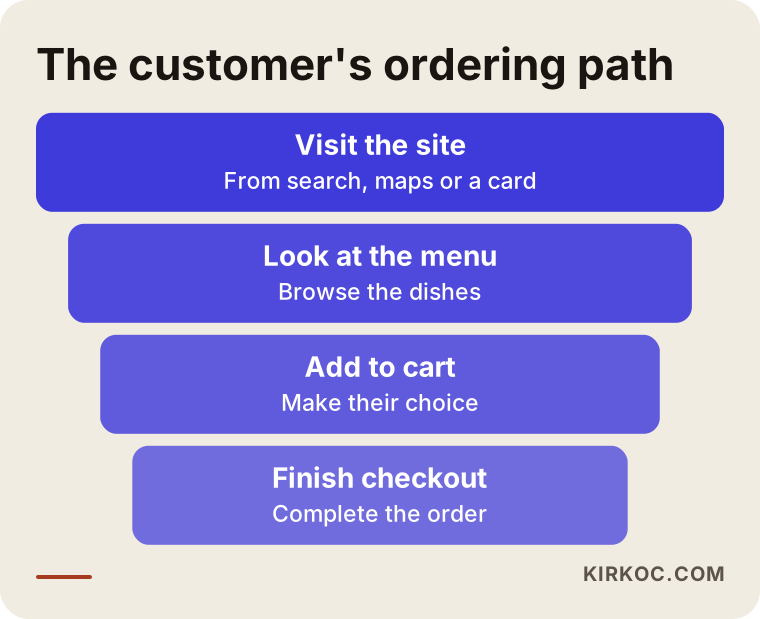
This picture tells you something important: the problem is not always "not enough people are coming." Sometimes visitors get lost in the cart, and sometimes they see a long form at checkout and give up. Fixing the leaks in the funnel is often cheaper than bringing in more traffic.
Two hypothetical example scenarios
The two scenarios below are entirely hypothetical and do not describe a real business. Their purpose is to show how the same goal is approached under different conditions.
Scenario 1: A neighborhood lunch spot
Imagine a small lunch-focused place with a daily-changing plate special. The owner gets most orders through the apps and notices that people from nearby offices keep asking for the same dishes day after day. This owner does not need a big website. A simple ordering page where the daily menu can be updated each morning in a tap, a pickup time slot so office workers can order ahead, and a notification on the owner's phone would be enough. If the restaurant's own page appears when someone searches its name, a small card handed out to nearby offices that says "order from our page and get a free cup of soup" can slowly shift orders to the owner's own channel. In this scenario success is not measured by quitting the apps. It is measured by checking how much of the weekly order volume comes through the owner's own channel.
Scenario 2: A burger brand with three locations
In the second hypothetical, a burger brand has three locations in the same city. Each location has a different delivery area, different hours and even slightly different menu prices. Here the customer should first choose an address or a location, and then see that location's menu. Giving each location its own page gives the customer the right information, and it also raises the chance that a location page shows up for neighborhood searches like "burgers delivered downtown." A system that remembers order history and says, "You ordered this last time, add it again?" is very useful for this kind of brand. It takes more technical work, but because order volume is higher, the savings on commissions are felt sooner.
The difference between the two scenarios is less about the size of the business and more about what it needs. The first is simple and quick to set up. The second takes more careful planning. Which one is closer to your situation is something we can sort out in the first conversation.
Step by step: how does your ordering site go live?
Let me describe the process from the owner's point of view. Knowing what happens and in which order means no surprises, and I will skip the technical jargon.
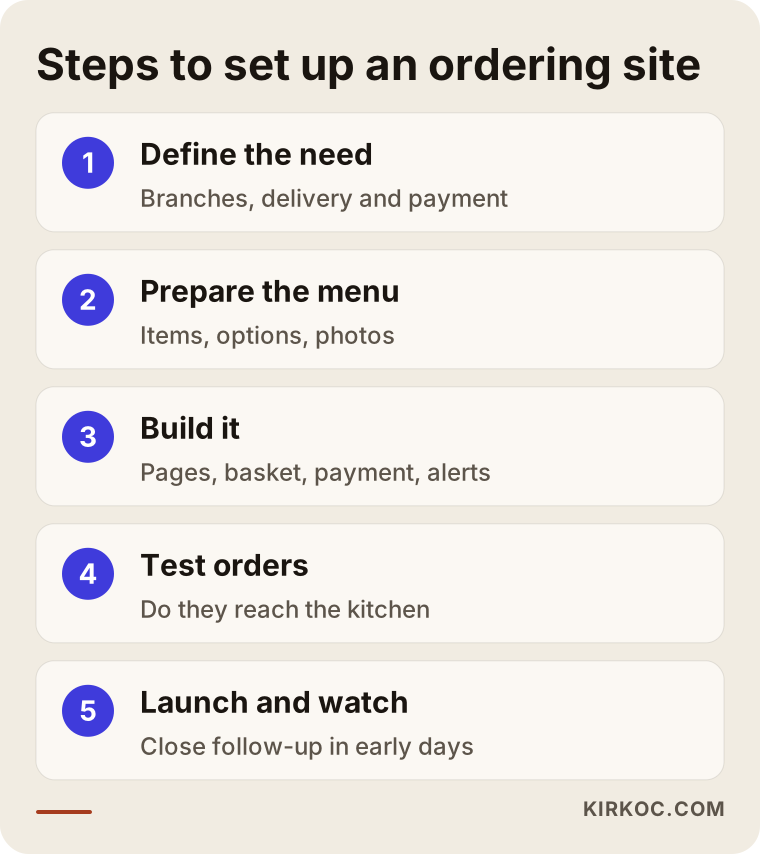
In the first step we talk through your needs: how many locations, which delivery methods, your payment preferences and how the kitchen will receive orders. In the second step we prepare the menu: item names, descriptions, sizes and extras, photos. This step often takes longer than expected, because a current menu with good photos is rarely ready at most businesses. In the third step I build the system: the pages, the cart, the payment connection and the alerts. In the fourth step we place test orders. Both of us, and your kitchen staff, order from different phones as if we were real customers, and we check that each order lands correctly on the kitchen screen or printer. In the fifth step we go live and watch closely during the first days.
What happens after launch matters too. An ordering site is not a brochure you put up and forget. Prices change, new dishes arrive and promotions run. So it helps to think of a timeline that stretches over some weeks.
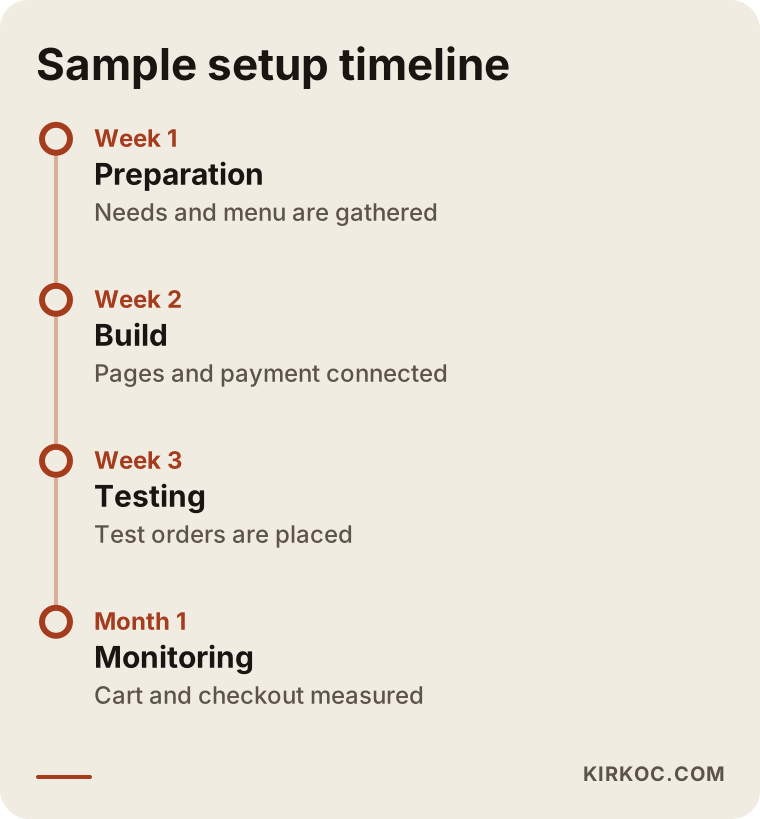
This timeline is not a commitment. It is an example flow. If your menu is ready, it gets shorter, and if you have several locations, it gets longer. I can give you a real timeframe after I see the state of your menu and what you need.
Spreading the word: how do customers arrive?
A live site does not make customers flow in by itself. Your first customers will be people who already know you. Putting a printed card with your own ordering address into takeout bags and boxes, leaving QR codes on tables, and featuring your menu link on your Instagram and Facebook accounts are the most effective and almost free ways to start. After that come the ordering link on your Google profile and then pages prepared for local search. As a further step, a Google or Meta ad aimed at your own neighborhood can run a campaign such as "a free treat when you order from our own site today." But ads burn money if you switch them on before the funnel works, which is why I set up the funnel first and the ads second.
Here the single-person setup has a real benefit. When the person who builds your site also tidies your Google profile, posts your menu on social media and runs your ads, the photos, prices and promotional wording match everywhere. When these jobs are split among several people, a new price goes onto the site while an Instagram post still shows the old one, and customers notice.
Common mistakes on restaurant ordering sites
Here are the problems I see most. Most are not expensive to fix; they just need attention.
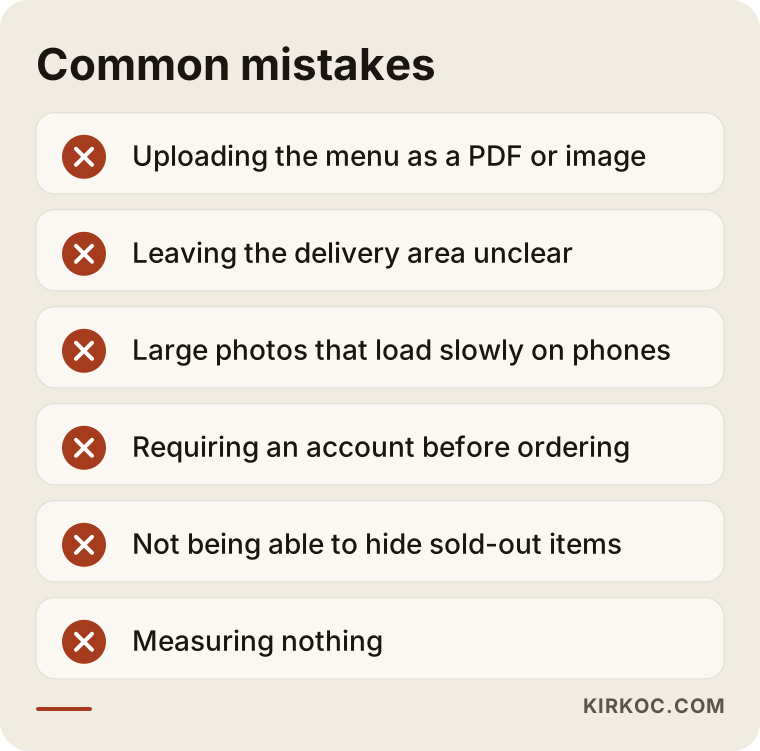
The first is uploading the menu as an image or PDF. The second is leaving the delivery area unclear: the customer enters an address and ends up with "we do not deliver to your area." The third is oversized photos that make the page slow on a phone; a hungry person does not want to wait more than a few seconds. The fourth is demanding an account at checkout. Making someone register before their first order is a reason to quit. They should be able to check out as a guest and create an account later if they want. The fifth is accepting orders while you are closed, or not being able to hide an item that has run out; that leaves a bad first impression. The sixth is building the site and never measuring anything. If you do not know how many people arrived, how many added to the cart and how many finished paying, you cannot know which step to fix.
There is also a hidden cost of going commission-free: who does the delivery if you have no drivers of your own? You can solve it with your own drivers or by agreeing with a courier service, but you need to think about it before you build the site, because the delivery fee and the timing will show up on the pages.
What can you do yourself, and when do you need an expert?
You do not have to leave everything to a specialist. Some things you can do today without spending any money.
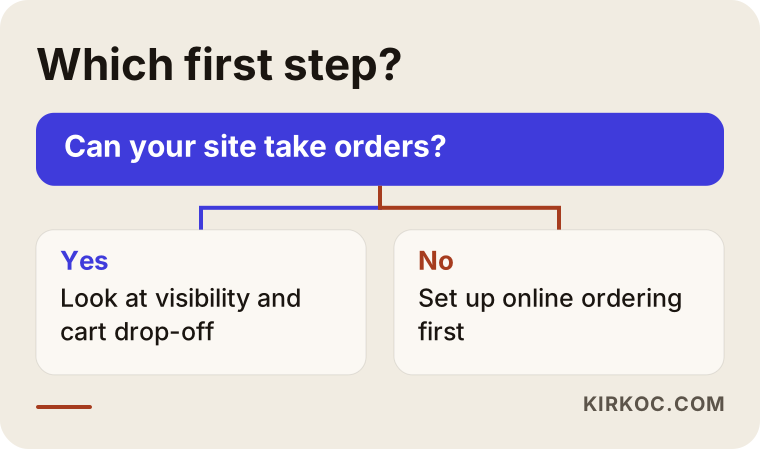
As in the picture, start with one question: do you have a website, and can people actually place an order through it? For a business with no site, or only a showcase site, the first step is moving to a structure that takes orders. If your site already takes orders, the first place to look is visibility and the funnel.
Here is what you can do on your own: keep your Google Business Profile current, enter your opening hours correctly, upload menu photos, ask your customers for reviews, slip a card with your own ordering address into takeout bags, and put the ordering link in your Instagram bio. None of these needs technical knowledge.
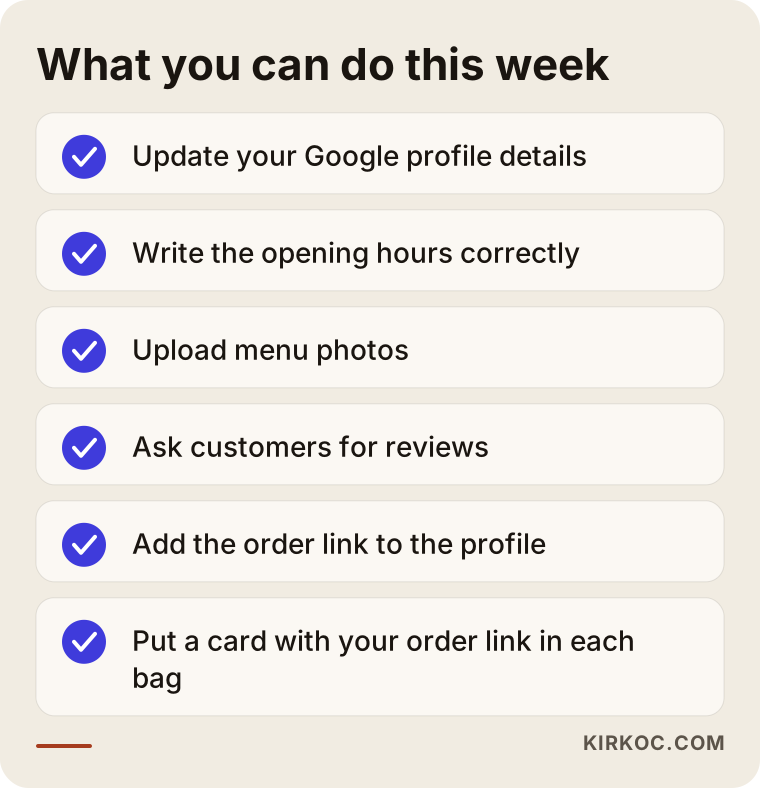
You could finish this checklist within a week. Where you do need an expert is the ordering system itself, payment integration, setting up the pages so search engines understand them, speed and security, managing several locations, and ad setup. If these are done wrong, you lose both money and customers. When the payment link is built correctly, the customer enters card details on the payment company's secure page, not on your site, and it matters that this separation is done properly. For legal obligations, such as distance-selling rules, consumer protection and food labeling, I suggest asking a lawyer or an accountant.
What decides the cost?
I will not give numbers in this article, because no two restaurants have the same needs. But I can tell you clearly what moves the price.
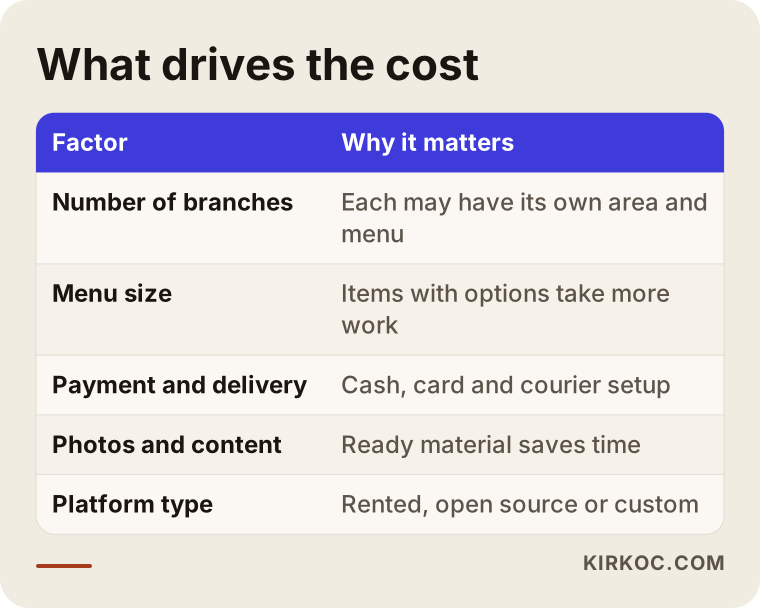
The first factor is the number of locations and whether each has its own delivery area. The second is menu size and how complicated the options are: a few plain items is not the same job as hundreds of items with sizes, sauces and extras. The third is payment methods and delivery setup: cash, card, your own drivers or an outside courier. The fourth is photos and content; if you already have good photos, time and cost go down. The fifth is the kind of foundation you build on: renting a ready-made system, building on an open platform or commissioning something custom means very different budgets. The last is support after launch: who handles menu updates, maintenance, measurement and ad work.
When you evaluate cost, do not look only at the setup fee. A monthly software charge can end up costing more over the years than a platform you own, or the reverse: a system that is cheap to set up but tiring to maintain can make you give up fast. When you compare, put two quotes next to each other that describe the same scope, and check whether other deductions sit beside the word "commission-free."
How do we work together?
I am not an agency; I run the work myself from start to finish. In the first conversation I listen to how your restaurant runs, how your current orders come in and what you want to achieve. Then I put together a plan that fits your business, without unneeded features, and I explain why each part is there. I build the site, connect your Google profile and, if needed, manage the menu posts on Instagram and Facebook and the local ads along the same lines. That way everything you ask has one person to answer it, and you do not go around asking whether the site builder or the ad person knows. I do not promise results, but I do make sure you can see what is being done and why, and we watch together how the orders coming through your own channel change.
Frequently asked questions
Can I really take online orders without paying any commission?
You can take them without a middleman who keeps a share of the order. You will still have costs such as the payment processor's transaction fee, a monthly software fee if you use one, and delivery expenses. "Commission-free" means you do not hand a platform a share of each order, so ask about these other costs one by one in any quote.
Do I have to quit the delivery apps completely?
No. For many businesses the most sensible path is to keep the apps as a way to find new customers and guide people who have ordered once toward your own channel. Check whether your contract with an app limits steering customers to another channel, and if you are unsure, ask a lawyer.
Will orders just start coming in once the site is built?
They will not. The first orders mostly come from customers who already know you. Showing up in brand searches, the ordering link on your Google profile, cards in the bag and announcements on social media create that first wave. Over time you can grow with local search and ads, but promising a ranking or an order count would not be honest.
How long does it take to get an ordering site ready?
If your menu and photos are ready and you have a single location, a short time is enough; with several locations or special requirements, it takes longer. The part that takes the most time is usually not the technical setup but gathering the menu content and photos.
What if I have no drivers of my own?
You can agree with a courier service in your area, or you can open pickup-only orders. What matters is deciding your delivery method before the site is built, because the delivery fee, the area and the estimated time will be shown to customers on the pages.
Can I update the menu and prices myself?
Yes, and this should be a basic requirement of any ordering system. You should be able to add items, change prices and hide sold-out items without knowing code. I would like you to try that yourself before choosing a system.
Who handles payment security?
You do not store card details on your site. Payment is taken on the secure page of a licensed payment company, and the money goes straight into your account. When it is set up properly, you do not need to hold card data yourself. Even so, please ask your accountant or a lawyer about the contract and your obligations.
Should I rent a ready-made system instead of having a site built?
That depends on how many locations you have, your budget and how much customization you want. For a small, single-location business, a ready-made system can be a fast start, and later you may want your own platform. We can talk through both routes based on your situation.
If you are thinking about building your own ordering channel for your restaurant, you can look at the scope of the work on my ecommerce website page, then get in touch and tell me about your menu and your goal. Together we can put together a plan that suits you and carries no unnecessary weight.