You have a website, and you are running ads or thinking about it. Visitors arrive, look at a few pages, and leave without doing anything. They do not call, they do not fill in the form, and they do not finish checkout. This happens in almost every business, and retargeting ads exist for exactly this gap. In this article I explain what retargeting is, which businesses it helps and which it does not, how it is set up, and what you should watch for. I am Ümit Kırkoç, I work alone from Istanbul, and retargeting is part of my digital advertising management service. By the end, I want you to be able to judge for yourself whether you need a specialist at all.
Let me start with a simple definition. Retargeting means showing ads, later on other websites, in apps, on YouTube, on Instagram and on Facebook, to people who have already visited your site. You will also hear the word "remarketing." The two terms describe the same idea. Think of a shop where someone browses, picks something up and walks out without buying. The next day, you meet that person on the street and politely say, "The item you were looking at is still here."
How do retargeting ads actually work?
Picture an invisible marker. A small piece of code is added to your website. Google calls it a tag, and Meta (the company behind Facebook and Instagram) calls it a pixel. When someone visits your site, the code writes that browser into a list. You do not learn the person's name, phone number or identity. All you get is a record that says "this browser looked at these pages." Then you tell the ad platform: "Show this ad to everyone on that list."
The key concept here is the audience list. A list is simply the group of people who did a particular thing on your site. One list might hold people who only saw the home page, and another might hold people who looked at a product and added it to the cart. You write a different message for each list. Someone who left items in the cart can be told, "You left something behind." Saying the same sentence to a person who only glanced at your home page makes no sense.
The picture below shows why visitors need to be split into groups. Not everyone who lands on your site has the same intent. They move down a path that keeps getting narrower.
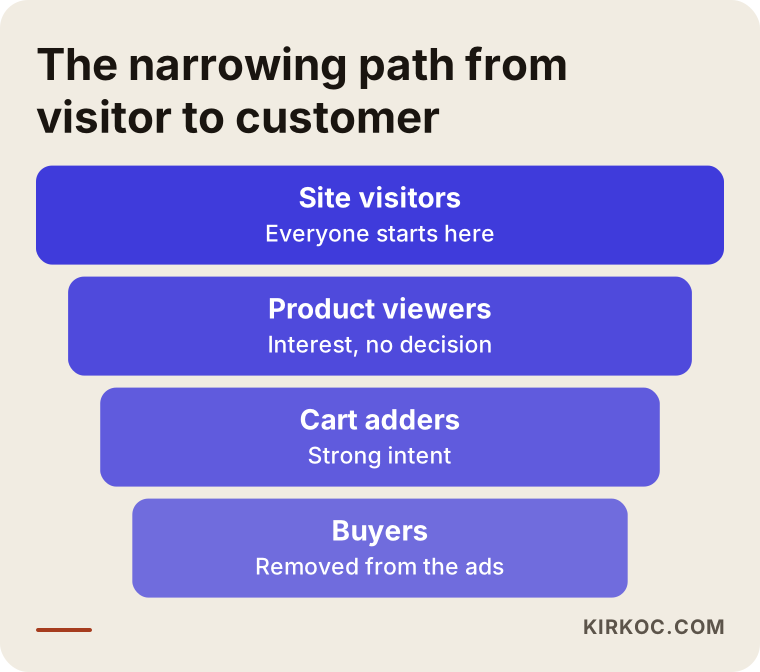
As the illustration shows, the lower you go, the fewer people remain, but the stronger their intent becomes. The job of retargeting is to gently steer people who got stuck in the middle of this path back toward the end of it.
New-customer ads versus retargeting
Business owners often assume all ads are the same thing. In reality, there are two separate jobs. The first is reaching someone who has never heard of you: "Hello, I exist." The second is reaching someone who has already seen you: "Remember me? You stopped by the other day." The goal, the message and the way you measure success are different for each.
New-customer ads go out to a wide audience. They introduce you, and sometimes they do not produce a sale right away. Retargeting goes to a small group whose interest is already visible. Because of that, it usually runs on a smaller spend with a clearer objective. But it cannot stand alone, because some other source has to bring the visitors in first. If nobody comes to your site, there is nobody to retarget.
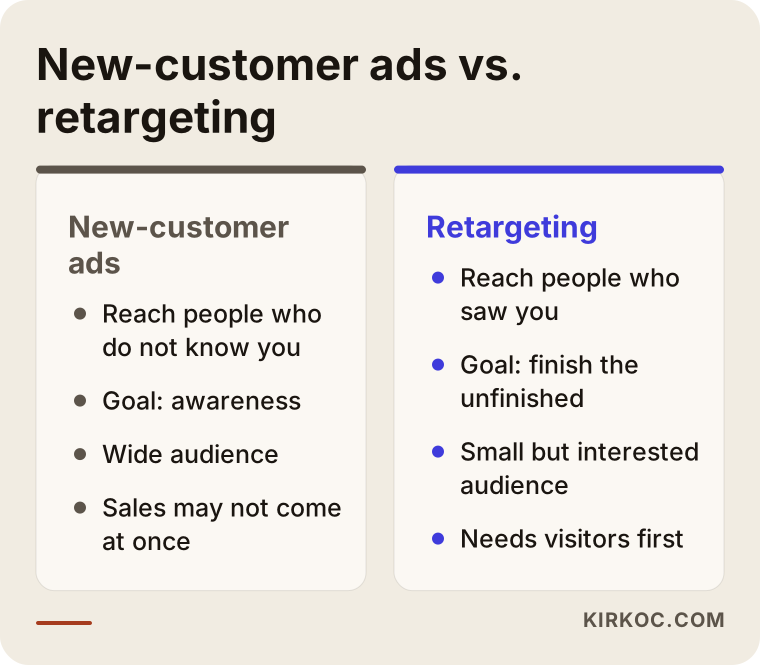
The main takeaway from the comparison is that the two should not be treated as rivals. Think of them as two stops on the same route. The first stop brings people to your site, and the second helps them finish what they started.
Who benefits and who does not?
Retargeting is not the first thing every business should buy. To be honest with you, in some situations your money is better spent elsewhere.
Situations where it helps
- Your site gets steady visitors but few conversions. Many people look, and few call or buy.
- The buying decision takes a long time. Furniture, medical or dental services, courses and business software are typical examples, where a person thinks for several days and compares other options.
- You run an online store and a noticeable number of people abandon their carts.
- You sell things that are bought repeatedly, and you want to tell past customers about a new offer.
- You have a booking or quote form, but many people open it and never submit it.
Situations where it is too early or pointless
- Very few people visit your site. If the list is tiny, the platform cannot distribute your ads properly, and the spend turns inefficient.
- Your site is slow, broken on phones, or unclear about what you sell. Calling people back in that case only sends them to the same problem a second time.
- Your service is a one-time emergency. A locksmith is a good example: once the door is open, the customer will not look for you again, so there is little to retarget.
- Tracking is not in place. If you cannot see who did what on which page, fix that first.
It is easier to draw these lines when one person looks after the website and the ads. Because I handle your site, your search visibility and your ads together, I sometimes have to say, "Let us fix the site first, then open the ad budget." That order protects your money.
The two main platforms: Google and Meta
Most businesses run retargeting in two places. Here is a short description of each.
Retargeting with Google
Google's network includes thousands of news sites, blogs, apps and YouTube. When a person who visited your site later opens one of those, they can see your ad. There is also a separate option inside search results: when a past visitor searches again, you can bid a little higher or show them a different ad text. This is often valuable because it appears at a moment when the person already knows you.
Retargeting with Meta
Meta runs Instagram and Facebook together. Once the pixel is installed, you can build lists of people who visited your site, looked at a specific product, watched your video, or interacted with your Instagram page. Meta's strength is visual storytelling. You can present a product with a short video or with swipeable product cards. Another strength is that the same person can see both your regular posts and your ads. If your social media account is managed well, the ad also looks more trustworthy.
Which one suits you better depends on where your customer spends time. In most businesses, both are used together, with different shares of the budget.
Two hypothetical scenarios
The two examples below are entirely hypothetical. They do not belong to a real customer or company. Their purpose is to make the logic concrete.
Scenario 1: A small home textiles store
Imagine an online home textiles store. It gets visitors from Instagram and from search. People look at bed linen sets, some add them to the cart, but most leave before paying. The owner describes the problem as "ads do not work."
The first thing to check is not the ad itself but the point where people leave. If shipping costs only appear on the last page, an ad cannot fix that. The information has to show up earlier. After that, three lists are built: product viewers, cart adders and buyers. Buyers are excluded from the ads, because showing a purchased product again wastes money and annoys the customer. Cart adders see the photo of their own item and a short reminder for a few days. Product viewers see other options from the same collection.
In this scenario, retargeting is not a magic wand. It completes a missing link.
Scenario 2: A children's dental clinic (hypothetical)
Now an example from the service side. A dental clinic gets visitors through ads for "children's dentist near me" searches. Parents read the page, but they do not phone straight away for a price or an appointment. They want someone they can trust with their child, and they are comparing several clinics.
There is no cart here, so the lists are built differently: people who viewed the treatment page, people who viewed the "about me" page, and people who opened the appointment form and left. The tone of the ads has to change as well. Instead of sales pressure, the ads show reassurance: how the clinic works with children, and what a first visit looks like. Advertising rules for medical services are strict. Ad texts must follow the regulations that apply where you operate, and if you are unsure, you should consult a lawyer.
The goal here is not to convince the parent. It is to keep the clinic's name in mind while they think, and to leave the door open for a question.
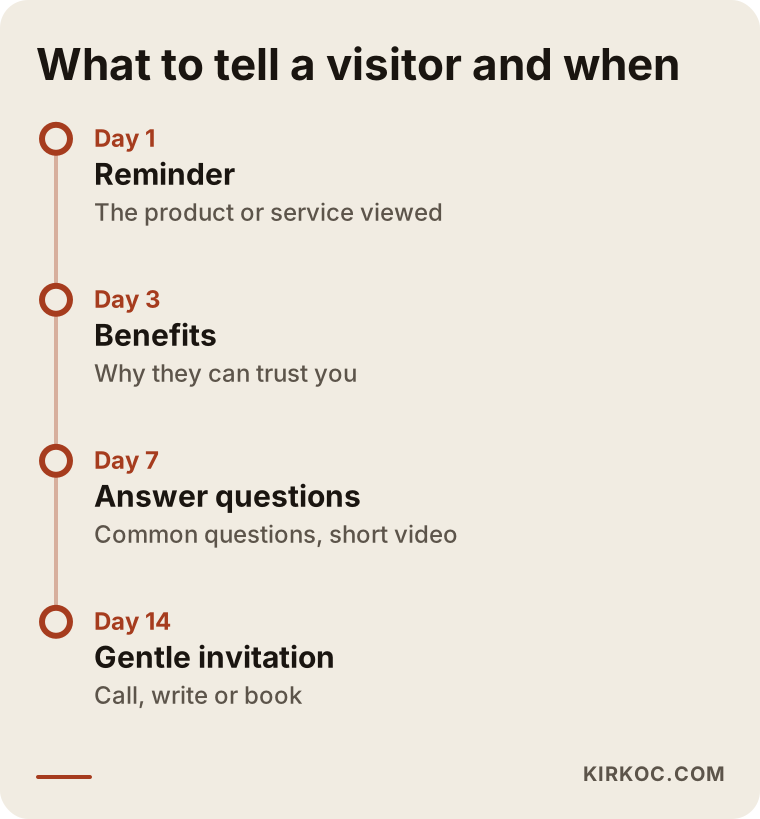
The timeline above summarizes what to say and when in both scenarios. The message should change with the time that has passed: a reminder on the first day, an explanation of the benefits in the following days, and finally a relaxed invitation or a small incentive.
Which audience list gets which message?
This part is often overlooked. Showing everyone the same ad is the most common way retargeting budgets get wasted. The table below lists the typical lists and the approach that fits each.
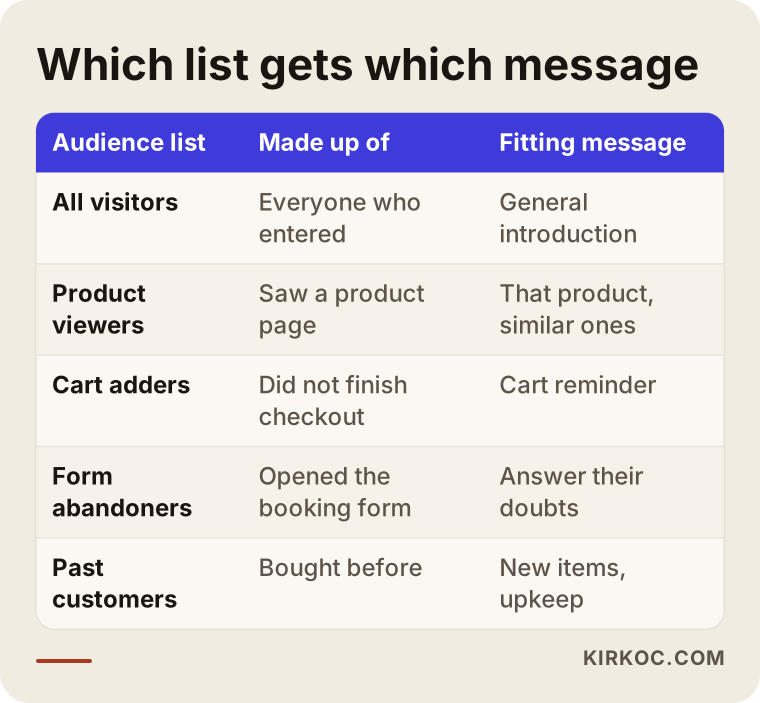
The logic in the table is simple: the further a person has gone, the more specific the message should be. Showing a discount to someone who only saw your home page is too early, and showing a general brand introduction to someone with items in the cart is too late.
Then there is exclusion. In every list, you should remove people who have already moved to a later step. If a person who bought is still seeing "complete your order" ads, your budget drains and your brand looks pushy. This is the detail that is forgotten most often during setup.
The setup process, step by step
I describe the process in plain terms so that a non-technical person can follow it. The specialist does the technical work, but you should know what is being done and why.
- Clarify the goal. Write down what you want: phone calls, form submissions or sales. If the goal is vague, it is also unclear which list is valuable.
- Set up tracking. The Google tag and the Meta pixel are added to the site. Important actions such as purchases, form submissions and taps on the call button are marked separately.
- Verify. The codes are checked with browser extensions and the platforms' own testing tools. If you skip this step, you can work for weeks with empty data.
- Build the lists. Groups such as product viewers, cart adders and form abandoners are defined, and you decide how long each person stays on a list.
- Prepare the ads. A separate text and image are written for every list, and a frequency cap is added so the same person does not see the ad many times in one day.
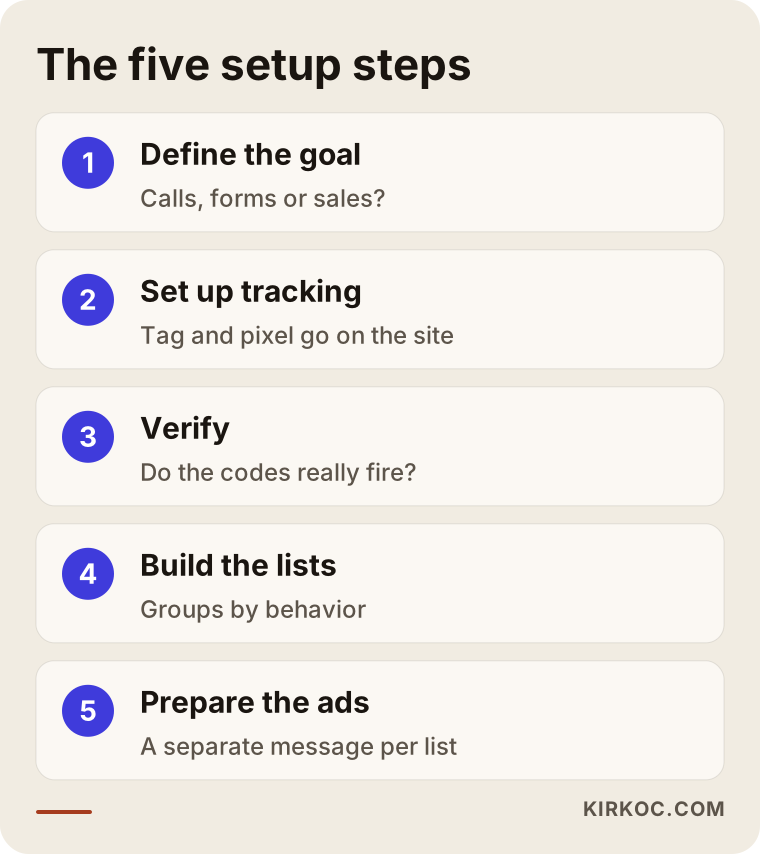
The order matters. Many businesses start from step five. They make the ad first and think about measurement later, and in the end they cannot tell what worked.
Privacy and consent
Because your site uses code that follows visitors, you need a cookie notice and a privacy policy. Data protection laws, such as GDPR in Europe or state laws in the United States, place obligations on businesses, and the details differ by country and by business. If you are unsure what to write, ask a lawyer. I do the technical setup, but I do not write legal texts.
The page the ad leads to matters too
The person who clicks your ad decides based on what they find on the landing page. For cart abandoners, the best destination is the cart page itself. For product viewers, it is that product's page. For service businesses, it is a page with a clear way to get in touch. Sending people to the home page forces them to search all over again, and most will not.
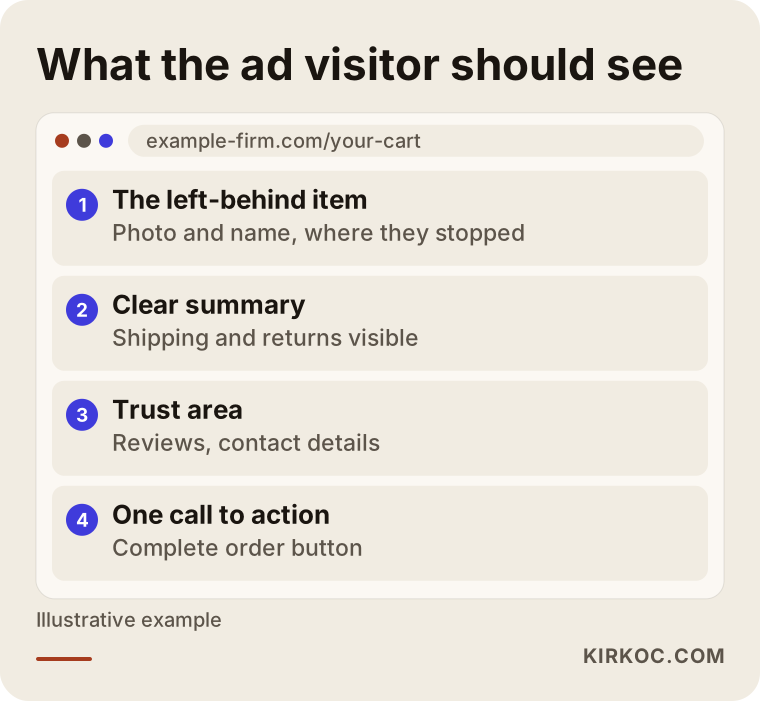
As you can see, the sample page is plain: the information that lets the person continue where they stopped, one extra element of trust, and a single clear action. The more crowded the page, the easier it is for the person to give up.
This is where working with one person pays off in a concrete way. If the person who builds the ad can also change the website, the finding "this page is missing a section" turns into a fix on the same day. When the site belongs to one provider and the ads to another, that feedback can take weeks, and each side says the problem lies with the other.
Common mistakes
Retargeting tends to break in the same places. These are the most frequent ones:
- Not excluding people who already bought.
- Showing the same message to everyone.
- Setting no frequency cap, so one person sees the ad many times a day and gets tired of the brand.
- Keeping the audience so small that the platform cannot deliver the ads.
- Keeping lists open for too long. Someone who visited months ago may have lost interest.
- Not measuring conversions correctly. The platform's report and your real sales do not match, but nobody compares them.
- Using pressure in the ad copy. Fake urgency such as "Last chance!" damages trust.
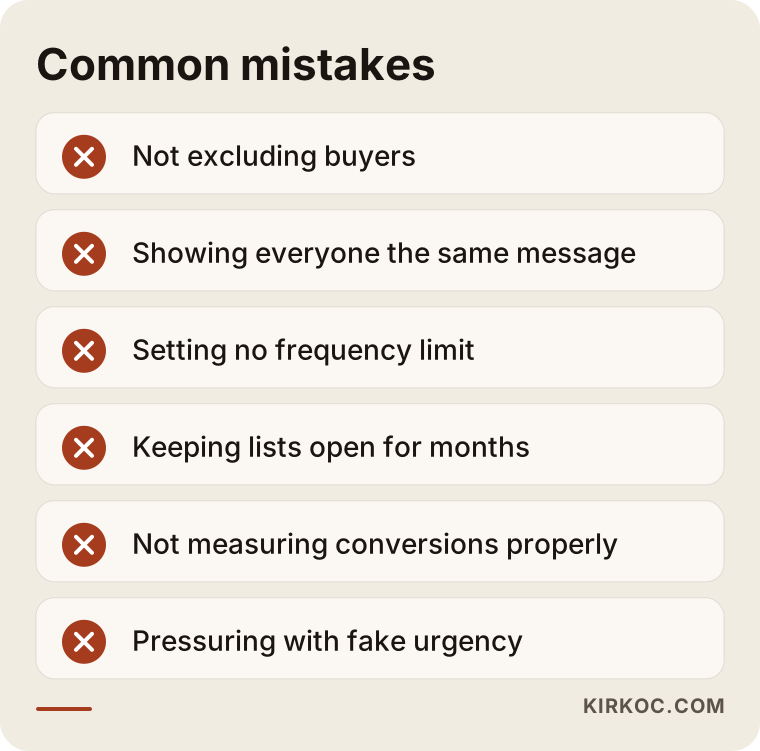
You may notice a common thread in this list. Most of these mistakes are not technical. They come from a lack of attention. The ad gets built, and then nobody looks at it again. Retargeting is work that needs regular checking.
When can you do it yourself, and when do you need a specialist?
To be fair, you can set up a basic retargeting campaign yourself. The help pages from Meta and Google are detailed enough. On a small site with a single product or service, and if you are willing to spend time learning, it is doable. But a specialist usually pays for themselves in these cases:
- You do not know how to add tracking codes to your site, or someone else manages your site.
- You have several products, campaigns or branches, and the risk of mixing up lists is high.
- Spending has grown and small mistakes now cost real money.
- Your store platform needs to be connected to your ad account so products sync.
- You simply do not have time, because this is not a set-it-and-forget-it task.
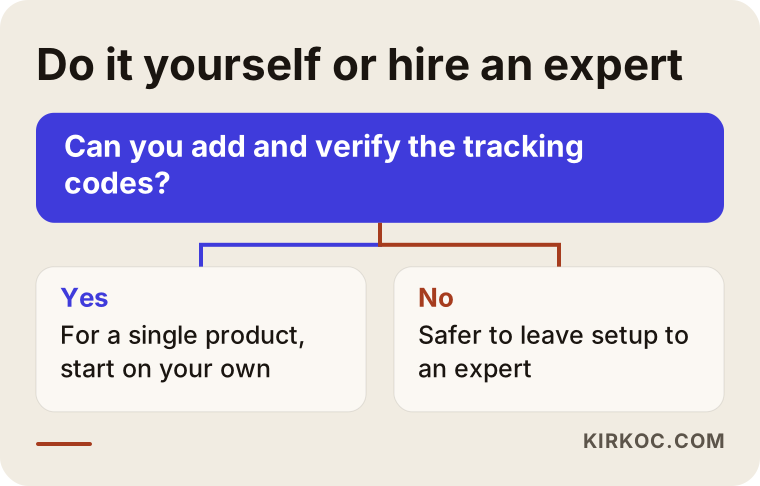
Apply the logic in the flow chart to your own situation. When deciding, do not look only at the service fee. Also count the ad budget that a bad setup would burn.
What should be ready before setup
Whether or not you work with a specialist, a few preparations before you start will speed things up and reduce errors.
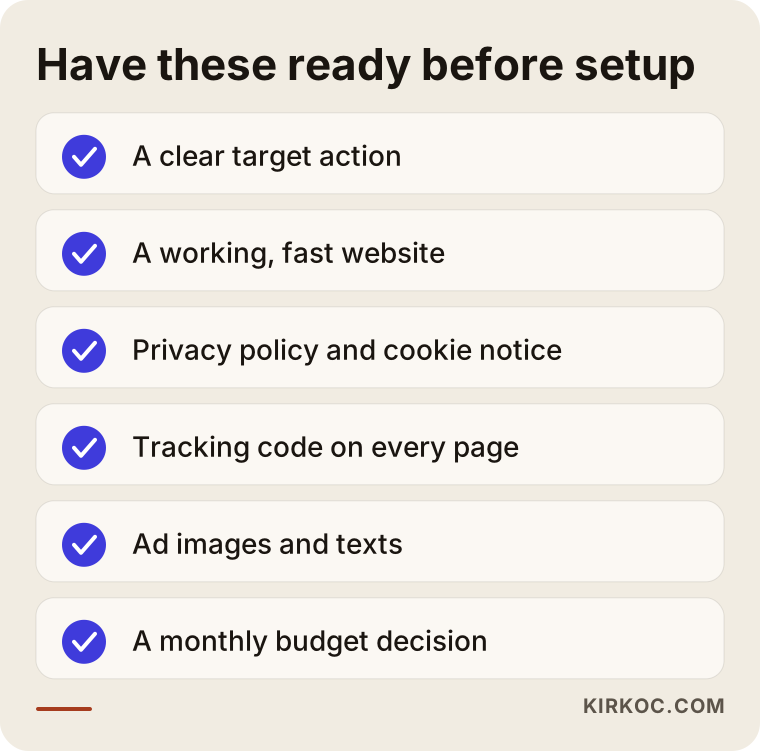
The item I care most about on the list is knowing which action is truly valuable to you. A "page view" is not valuable. A phone call, a form submission or a purchase is. Anything built without knowing this rests on guesswork.
AI assistants and retargeting
These days, people also ask this question to tools like ChatGPT. The answer to a business owner's question is often correct but generic. A generic answer does not cover the special conditions of your industry. It might give the same advice to a service business and to an online store. So you should check the framework you get from AI with someone who knows your situation.
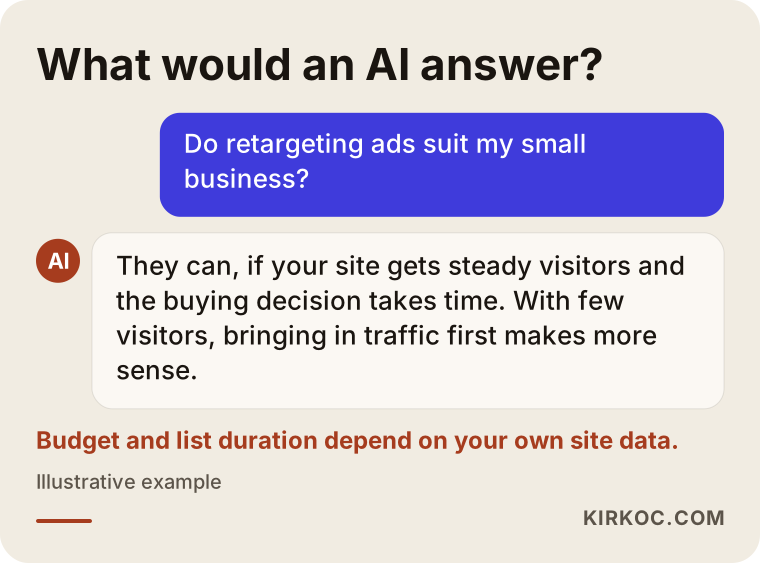
The answer in the image is a reasonable starting point. But decisions such as how to split the budget or how many days a list should stay open are made by looking at your own site's data.
What determines the cost
I will not give numbers, because the cost for two businesses is almost never the same. But I can tell you clearly what moves the price. There are two separate items: the ad budget and the management work.
The ad budget is the money you pay to the platform. You decide it, and you can raise or lower it whenever you want. It usually depends on:
- The size of your list. More visitors mean a wider retargeting pool.
- Competition in your field. If many businesses want to reach the same audience, impressions get more expensive.
- The value of what you sell. For a high-value product or service, a higher cost per click can make sense.
- The period you target. A short campaign and an always-on setup call for different budgets.
The management work covers the setup and the follow-up afterward. What changes the effort here:
- How many platforms are used.
- How many lists, products or campaigns there are.
- Whether ad images and texts are made from scratch.
- Whether the tracking foundation is already in place.
- How often and in how much detail you want reports.
One point deserves your attention. A cheap-looking quote that skips the tracking setup gets expensive later. When you request quotes, ask, "Who will set up the tracking, who will check it, and on which page will I see the results?" If the answer is vague, reconsider that offer.
Realistic expectations
No platform and no specialist can guarantee sales or results, and a guarantee would not be honest. Retargeting is added on top of a site that works. It will not create miracles if your site is poor, and it will not be the whole answer if your product is overpriced or does not inspire trust.
That said, a reasonable expectation looks like this. The first weeks are a learning period. The platform learns whom to show your ads to, and you observe which message gets more attention. During this time it is healthier to wait until enough data has collected than to keep changing the ads. Afterward, you switch off the weak ads and put more weight behind the strong ones.
Do not measure success by clicks alone. What matters is whether the same site brings more calls, forms or sales. If clicks are high but results are absent, something is wrong.
How I work with you
I am one person, and I run this work from start to finish myself. The person you talk to is the one who builds the ad, edits the website and prepares the report. This is how I usually proceed:
- First, a short conversation in which I listen to your business, your customer and what you have tried so far.
- Then I look at your site and your current tracking. If there are gaps, I tell you first, and I will even say when it is too early to start advertising.
- I do the setup, verify it, and explain in plain language why each list was built.
- I check results regularly and share openly what works and what does not.
If you like, not only retargeting but also fixing your website, your visibility in search and your social media accounts can run under the same roof. Having these pieces in one pair of hands prevents information from getting lost. Someone who knows which content gets attention on social media writes the ad message accordingly.
Frequently asked questions
What are retargeting ads, in short?
They are ads shown elsewhere, after they leave, to people who have already visited your site. The aim is to remind the undecided person and help them complete the action.
Are remarketing and retargeting the same thing?
In everyday use, yes. Some people call email reminders remarketing and ad-based reminders retargeting, but the distinction is not fixed. As a business owner, you can think of both as "calling people back."
Does retargeting work if my site has few visitors?
If the list is too small, the platform cannot deliver the ads well and the spend is inefficient. In that case, it is better to first bring visitors to the site, through search results or new-customer ads.
Is it creepy that I see ads after visiting a site? Is this ethical?
The system does not show you a person's name or identity. It only adds a browser to a list based on its behavior. Still, a cookie notice and a privacy policy are needed. For the details, I recommend speaking to a lawyer.
What happens if the same person sees the ad too often?
Ad fatigue sets in. The person gets tired of the brand and may even think badly of it. To prevent this, a frequency cap is set, different images are rotated, and the list duration is kept reasonable.
Should I show ads to people who already bought?
Do not show them the same product. But for products that are bought again, or for complementary items, you can. For example, a separate list for an accessory or a maintenance service makes sense.
Is Google or Meta better?
It depends on where your customer spends time, whether your product is visual, and how the decision is made. Most businesses use both, with different shares of budget. Giving a firm answer without looking at the data would not be right.
When will I see results?
You see clicks and impressions in the first days, but a sound evaluation needs a few weeks of data. In businesses with a long sales cycle, it can take longer. Promising an exact time or result would be misleading.
If you would like to plan retargeting around the current state of your website and ads, you can reach me through the digital advertising management page. I listen to your business, look at your tracking and site, and tell you plainly whether it is the right time to start advertising.