The sign is up, the shelves are stocked, the first rent payment is made, and now everyone asks the same question: "Do you have an Instagram account?" Maybe you already opened one, but you do not know what to put in it, who will see it, or whether it will ever turn into sales. That uncertainty is exactly why social media for a new business so often becomes a job that never starts, or one that gets dropped after three weeks. In this article I explain what a business owner starting from zero should do, in what order, and how much effort it really takes. I am Ümit Kırkoç, I work from Istanbul, and I handle, all by myself, everything a digital agency would normally provide, from the website to advertising. Here I share openly the path I follow in my social media management service when I set up a business's accounts.
Social media, in short, is the set of channels such as Instagram, Facebook, TikTok, LinkedIn and YouTube where your business introduces itself, talks with people and shares news. For a new business, its real value is this: at a time when nobody is searching for you and nobody knows your name, it gives you a cheap and fast shop window. But that window does not fill itself, and people do not look into it by themselves. It needs a routine.
The real problems a new business faces on social media
An established business has years of accumulated customers, photos and acquaintances. A new business has none of these. That is why the starting problems are a little different from what you read in generic "how to do social media" articles.
The first is the empty profile. Someone hears about you and opens your page. If they see three posts, a few blurry photos and a one-line bio, they do not feel any trust. Before visiting a place or placing an order, people try to work out whether the business really exists, and they often do that by looking at your profile.
The second is having no followers. Posting with zero followers feels like giving a speech in an empty hall. So in the first weeks the goal is not to reach as many people as possible. It is to show yourself to the right people around you: your neighborhood, the people you know, your first customers.
The third is time. Between the register, suppliers, staff, rent and permits, social media sinks to the bottom of the list. Yet, at least at the start, a small but steady rhythm is worth more than one big burst of effort.
The fourth is the pressure to be everywhere. One person tells you that you must join TikTok, another says LinkedIn is essential, a third says Facebook is dead. A new business has limited resources. Instead of chasing all of them, pick the one or two channels where your customers actually spend time.
What to prepare before opening any account
A few simple preparations before you start will save you a lot of time in the weeks that follow. None of them is technical. All of them are thinking work.
First, write down who you sell to. "Everyone" is not an answer that helps. Is it office workers looking for lunch at the cafe on the corner, families with kids on weekends, or companies that want to place orders? The photos you share, the language you write in and the hours you post will change depending on that answer.
Next, find three things that set your business apart. The way to stand out without a price war is to answer clearly the question "why is this place different?" It could be a recipe, the ingredients, speed, location, or support after the sale.
Then gather your visual material: your logo, photos of your space, examples of your products or services. If you have no logo, or yours is scattered and inconsistent, pulling your visual identity together first makes social media easier too. When the colors and fonts stay the same in every post, your profile becomes recognizable.
Finally, make sure the business name is spelled the same everywhere: your username, your Google Business Profile, your website and your sign. Small differences make it harder for people to find you.
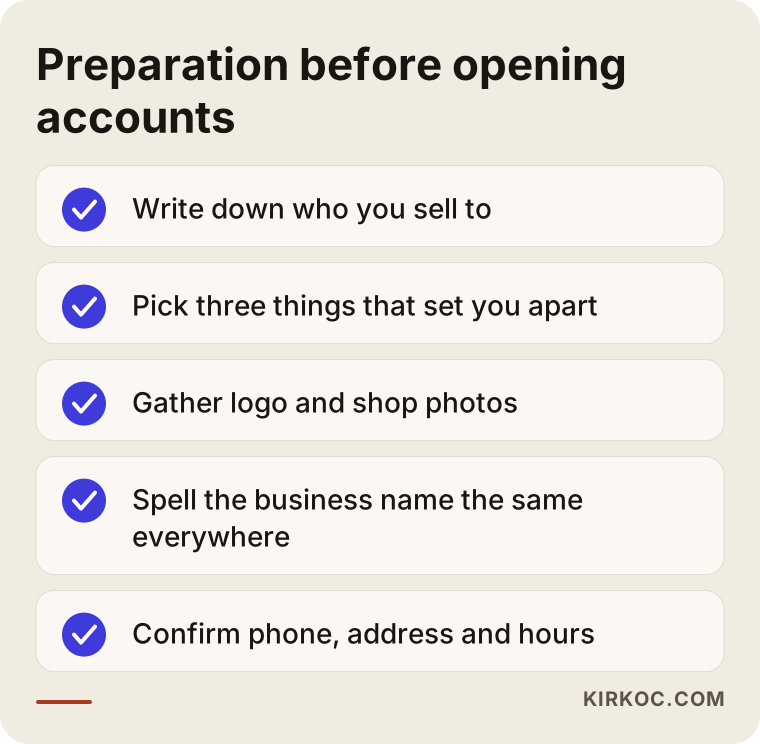
The checklist above sums up this preparation at a glance. You can finish all of it in one evening. What matters most is that you write it down somewhere. Two months from now, what you remember is often different from what you wrote and decided.
Choose the right platform, not every platform
The most common beginner mistake is opening five accounts at once and leaving all of them half finished. Instead, look at where your customers spend their time. For a local cafe, hair salon, boutique or clinic, Instagram and your Google Business Profile are usually the first two stops. For a company that sells to other businesses, LinkedIn makes more sense. If your product is fun, short and visual, TikTok is worth a try. If your work involves teaching, repairs or how-to explanations, YouTube does a lot of work over the long term.
Do not write Facebook off. It is still used for older audiences, neighborhood groups and event announcements. And because Meta's advertising system works across both Instagram and Facebook, you can manage the two channels from one place.
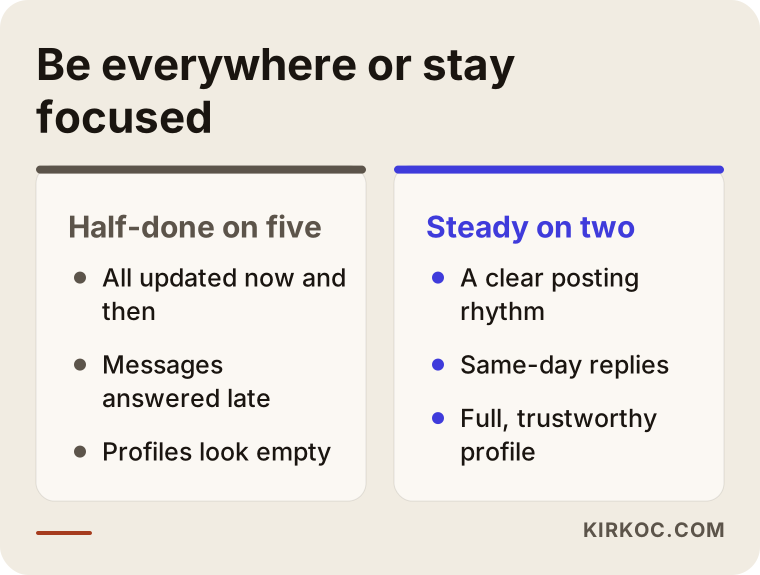
The comparison shows the price of spreading your resources thin. Being steady on two or three channels gives much better results than appearing now and then on five, because social media rewards consistency far more than any single post.
I have collected which channel suits which kind of business in the table below. It is not a hard rule, only a reasonable starting guess. If you know your own customers well, put your own knowledge first.
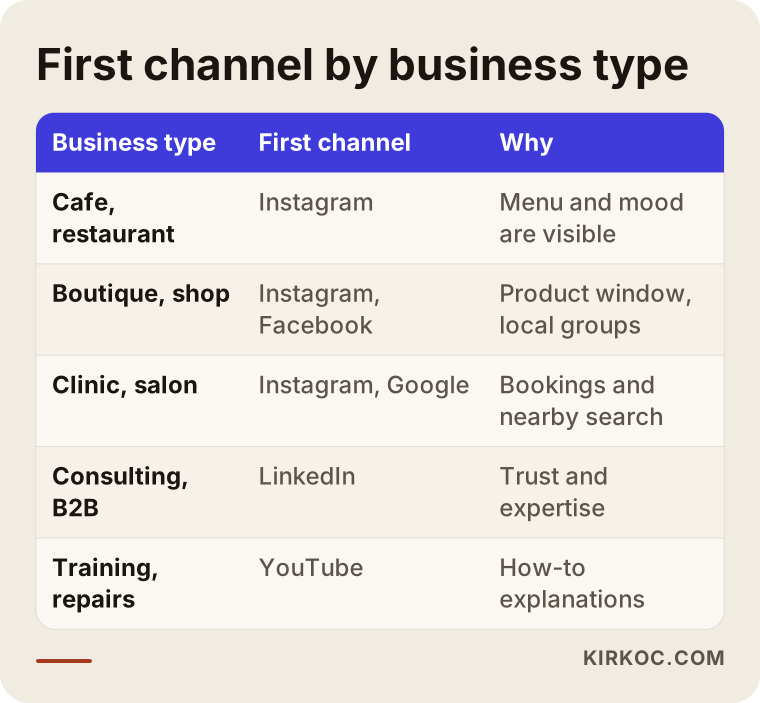
As you can see in the table, the same platform does not do the same job for every business. For a cafe, Instagram is a window onto the menu and the mood. For a consulting firm, LinkedIn is the place where first trust gets built. Find your own row and begin there.
A step-by-step plan for the first 30 days
The first month after opening is about building a routine that sticks, not about speed. I find the order below works for almost any business starting from scratch.
Step one: complete the profile. Use your logo clearly as the profile picture. In the bio, say what you sell, where you are and how to reach you. Make sure the phone number, address and opening hours are complete. The link field should point to your website or your booking page.
Step two: prepare a first batch of posts. Before you announce the account, upload at least nine or ten posts. That way the first visitor sees a full shop window instead of an empty profile. These can be your space, your products, a scene from your daily work, and one or two posts that introduce you as the owner.
Step three: invite your circle. Show the account first to friends, neighboring shops, suppliers and your first customers. Put a small card or a QR code inside the shop that points to the account. These first followers may be few, but their comments and likes give the account some movement.
Step four: choose a posting rhythm. Two or three posts a week at a pace you can keep is better than posting daily and quitting by the end of the month. Fix the days, for example Tuesday, Thursday and Saturday.
Step five: answer messages quickly. For a new business, direct messages and comments are the first real contact with a customer. Replying the same day builds more trust than a beautiful photo.
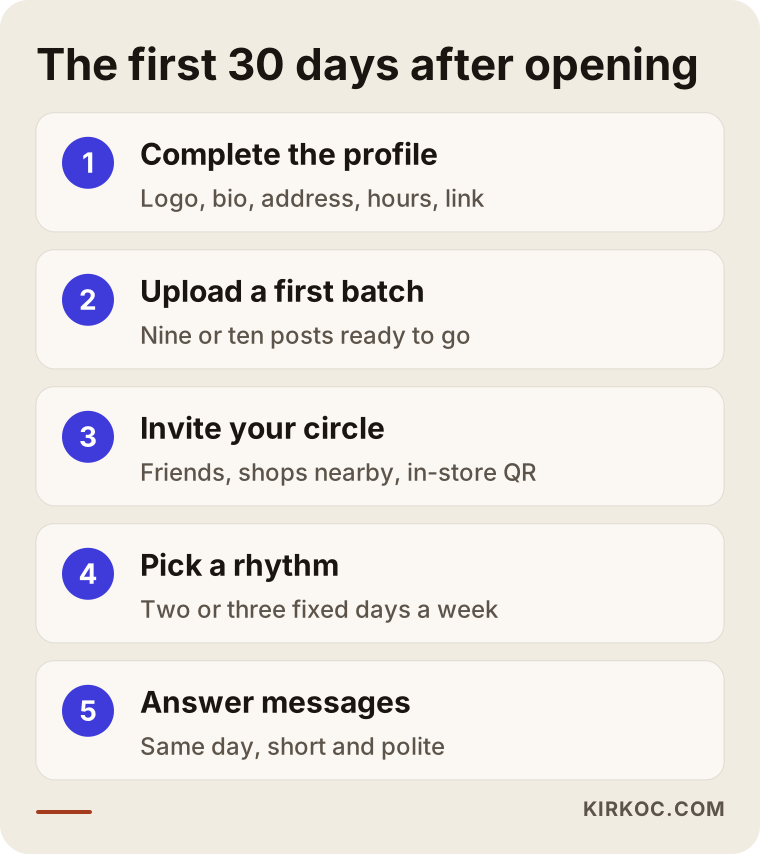
If you follow these steps in order, by the end of the month you will have a full profile, a small but real circle of followers and a working rhythm. The follower count is not the goal. The goal is that you can see which post brought in the people who called, messaged or walked through the door that month.
Example scenario one: a neighborhood cafe
The following is a completely hypothetical scenario. It does not describe a real business. A new cafe is opening in a neighborhood. The owner is at the oven early in the morning and at the register late in the evening, with no time to look at social media. For three months, the account sits with a single post that says "opening soon."
A better path would look like this. Two weeks before opening, the account is created and behind-the-scenes moments are shared: the sign going up, the espresso machine being installed, the first test coffee. People enjoy watching a business being born, and when it opens they have a reason to stop by, because "it's the new place in our neighborhood." On opening day, the cafe shares a short video of the space, a clear photo of the menu and the opening hours. In the following weeks, the dessert of the day, the breakfast menu and customer photos (with their permission) come into play.
What the owner has to do here is film a few short clips a week and set aside a little time each day for messages. The rest of the work, which is editing, writing and the calendar, can be handled by someone else on the owner's behalf. In this hypothetical example the aim is not to go viral. The aim is that when someone walking past looks up "does this place have an account?", they see something that looks serious.
Example scenario two: a newly founded service firm
The second example is also hypothetical. Someone starts a small firm offering bookkeeping, home renovation or a small piece of software. The first customers mostly arrive through referrals and people they know. For this kind of firm, filtered food photos on Instagram would make no sense. Customers want to trust someone who knows the work.
A sensible combination for this kind of firm is the founder's personal LinkedIn profile plus a company page, with short posts that answer common questions. On Instagram, a few posts that show the work process (before and after, the work in progress, the answer to a question a customer asked). If the website already has service pages, every link on social media points there. This is where doing the work through one person pays off. The service page on the website, the Google Business Profile and the social media accounts all speak the same language, so whichever door a customer walks through, they see the same clear message.
The common lesson from the two scenarios is this: social media takes its shape from the kind of trust a business needs. In a cafe, trust is built with images. In a service firm, it is built with knowledge.
What to post: the path from stranger to customer
New businesses often post only product photos and then wonder why nobody is interested. But a person usually buys from you after going through several stages. First they see you, then they find something that interests them, and then they trust you enough to take a step. Your content needs to match that journey.
At the discovery stage, the aim is to catch the attention of someone who has never heard of you: short videos, a tour of the space, how a product is made, the opening news. At the interest stage, people want to know your work more closely: how you work, your materials, your process, common questions. At the trust stage, customer reviews, before-and-after examples, certificates and clear terms of service are what help. The last stage needs a clear call to action: "message to book," "today's menu," "click to make an appointment."
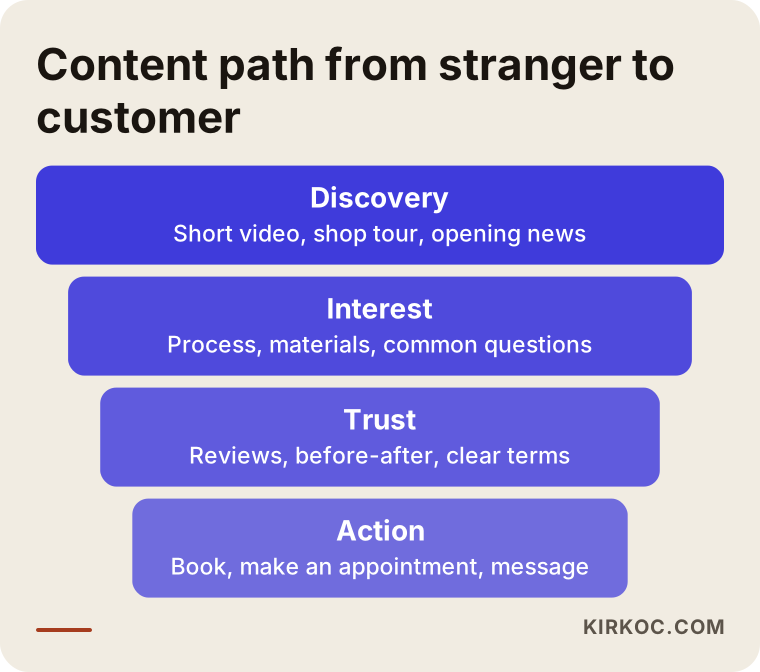
The funnel in the image shows why content should not stay in one style. The widest part, discovery, reaches the most people. The narrowest part, the call to action, speaks to fewer people, but they are the ones closest to buying. A good calendar contains a little of all four stages.
Keep your writing simple as well. Long sentences, fancy words and industry jargon push people away at first glance. Explain what you do the way you would to a neighbor. In photos, natural light and real images build more trust than heavily edited stock photos. Whenever you can, show your own product and your own space.
Before and after opening: timing
Timing on social media depends on your opening day. Setting up the account right before opening usually means you are already late, because by then no content or followers have built up. The ideal, in my view, is to start a few weeks before opening, catch some momentum at the opening, and then keep the routine going.
Before opening, you announce the account, show the behind-the-scenes, and if possible start a small waiting list or pre-registration. In opening week, you offer a concrete reason to come, such as an event, a first-day gift or a special menu. In the following weeks, you show the first customer reviews and photos and settle into your rhythm. By the second or third month you can see what works and drop what does not.
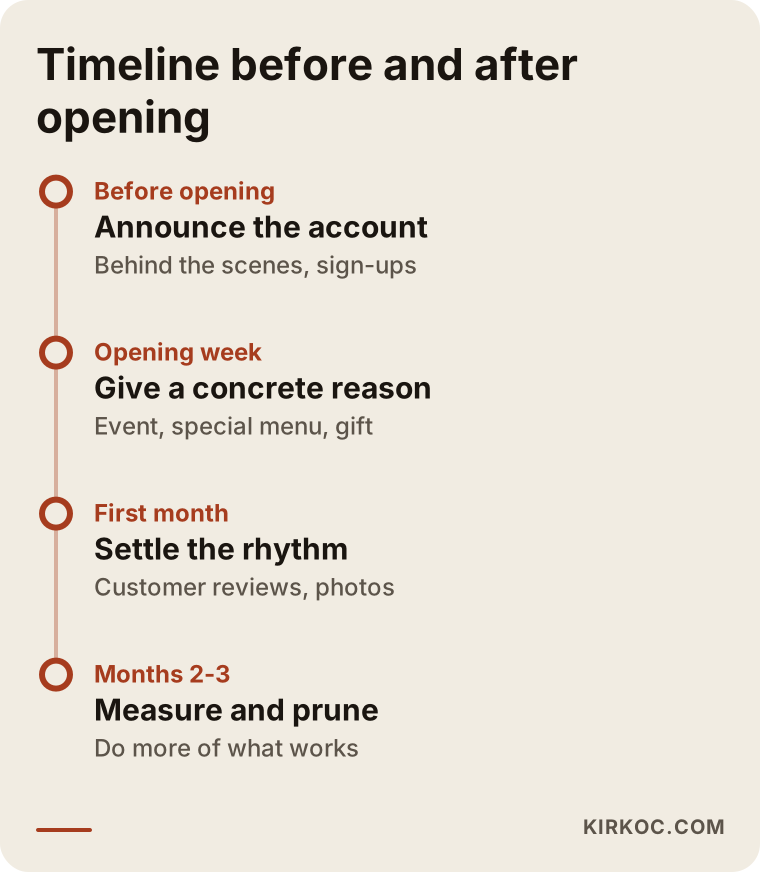
You do not have to follow the dates on the timeline exactly. A business with a physical location may need a longer pre-opening period, while an online business may need a shorter one. What matters is to see opening day not as an ending but as the starting point for your social media.
Your profile is a shop window: what should it show?
When someone likes your post and opens your profile, they decide within a few seconds: is this place serious, what does it sell, how do I reach it? That is why the first screen of the profile is critical. The username should match the business name. The bio should say three things: what you do, where you are, and the next step. Organize your highlights section with headings like menu, price list questions, location and frequently asked questions.
The link field is the place most people leave empty or use badly. It is the bridge that turns social media into a real customer. If you have a website, point it to the home page or your most important service page. If not, at least point it to a booking page, a reservation page or a messaging link. If you have no website yet, social media alone will not be enough in the long run, because your account is under the platform's control, not yours. Rules change and access can be restricted. Keeping a website on your own domain name reduces that risk.
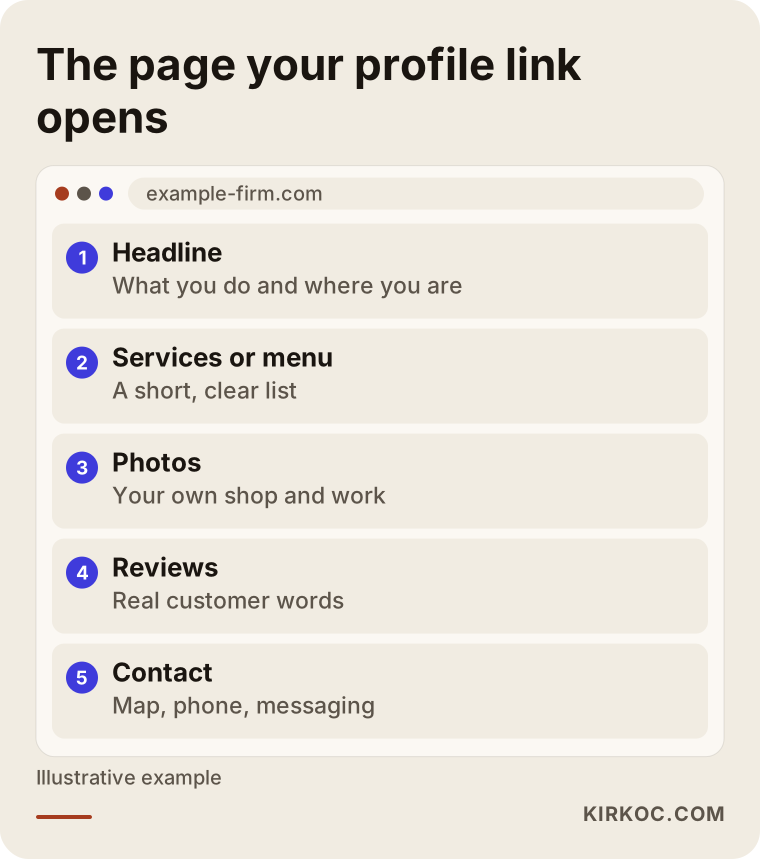
The example page layout in the image shows what a person who clicks the link in your profile should find: what you do, where you are, how to reach you and a clear call to action. The website is where the interest you build on social media gets collected. Thinking about the two together is much more effective than running them separately.
Do not neglect your Google Business Profile either. Someone may see you on social media and then search for you on Google, and the address, hours and reviews there should be complete. For a newly opened business this profile can matter as much as social media, because it is the main way to appear in "near me" searches on the map.
When should advertising come in?
Advertising, meaning paying Meta (Instagram and Facebook) to show your post to more people, can help a new business, but the order matters. An ad run while the profile is empty, or before you have a clear offer, wastes money, because the person who sees the ad clicks through to your profile and finds nothing convincing.
First prepare the profile and the first posts. Over a week or two, watch which posts naturally get more interest. Then show one of those posts with a small budget to a narrow area and a clear audience. If you run a business with a physical location, targeting only a few miles around you is the easiest way not to waste budget. How much you spend is up to you. What matters is starting small and measuring what works.
There is one thing I have to be honest about regarding ads: no one can guarantee results. The audience, the offer, the visual and the price work together, and if one of them is weak, the ad alone will not save the job. I handle ad management together with social media and the website, because if the page a person lands on after clicking is not ready, the value of that click is lost.
The most common mistakes new businesses make
I see these very often, and most of them are not expensive. They simply come from not paying attention.
The first is mixing a personal account with a business account. Open the account as a business account from the start, because insights, ads and messaging tools only work that way. The second is copying a competitor one to one. Taking someone else's photo or text is not ethical and it also makes you look the same as everyone else. The third is buying followers. Fake accounts do not reach anyone, they damage your engagement rate, and they hurt your credibility in the eyes of real customers.
The fourth is only selling. If every post says "buy now," people get bored. The fifth is inconsistency, such as posting two days in a row and then disappearing for two weeks. The sixth is replying to messages late. If a new customer is ready to try you and has to wait, they will turn to someone else. The seventh is not measuring. Carrying on without looking at how many messages or visits each post brought is like traveling without a map.
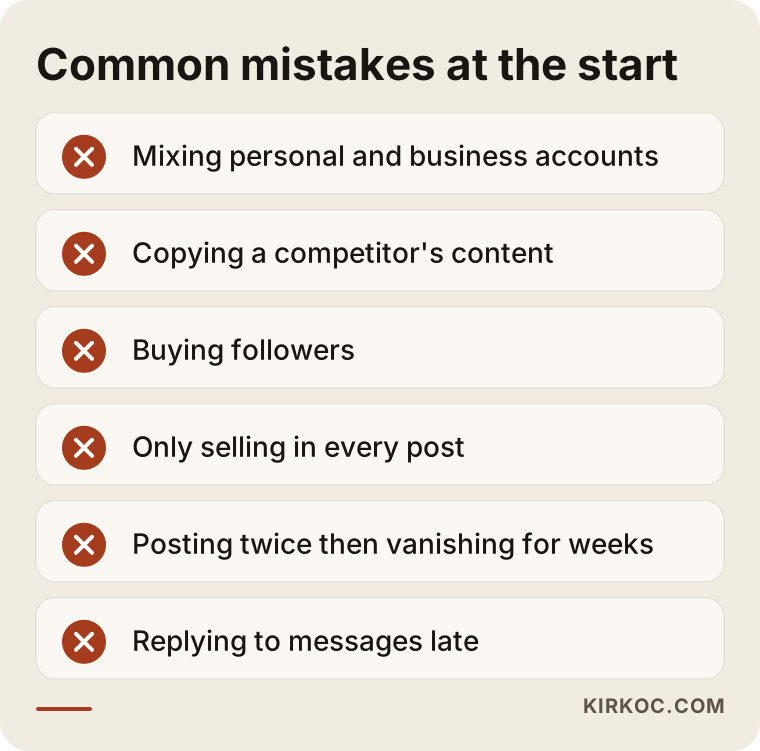
The list above also works as a short review checklist you can run through once a month on your own account. Count how many items make you say "yes, I do that too." You will see right away which things need to change.
Should you do it yourself or hire an expert?
The honest answer is that either can be right. If the budget is tight at the start, if you know your business best and you have time to prepare posts, running social media yourself is entirely reasonable. Opening the account, taking photos and replying to messages do not require special knowledge. Doing them yourself for the first few months and learning what works will also make later expert help more efficient.
The need for an expert arises in these situations: you have no time and the account keeps falling to second place; you want to organize several channels, the website and advertising together; your visual identity is scattered; or you plan to set aside an ad budget and do not want to waste it. An expert thinks through the things you would otherwise have to think about yourself: the calendar, the language, the visual layout, the measurement.
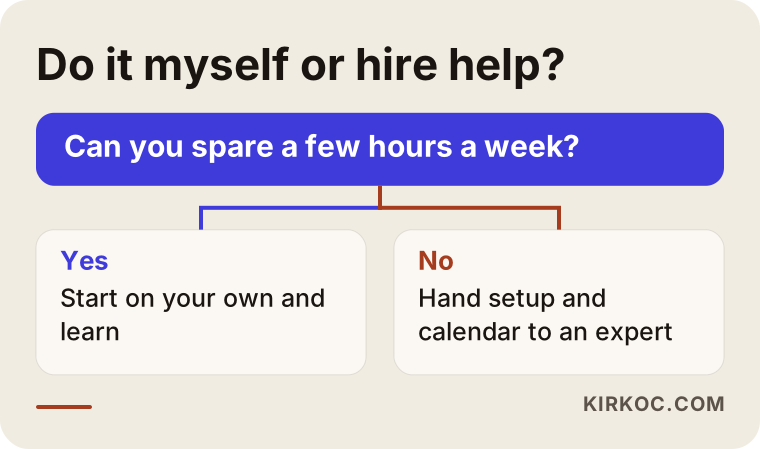
The decision chart puts the time question at the center, because for most businesses the real bottleneck is not knowledge but time. If you have the time, you can experiment and learn. If you do not, handing the work over costs less than leaving the account half finished.
There is also a hybrid path. I prepare the setup, the calendar and the visual layout, and you take the day-to-day photos. For new businesses with limited budgets, this is often the most balanced solution.
What determines the cost
I will not give numbers here, because the cost of social media management varies a great deal from business to business. The main factors that set the price are these: how many channels you will be on, how many posts and videos are prepared each month, who produces the visuals (will you shoot them, or will production also be outsourced), how much message and comment monitoring is included, whether ad management is part of it, how often you get reports, and the initial setup work during the opening period.
Also, the ad budget is a separate item from the management fee. The money that goes to the ad platform should not be confused with payment for the work. When you ask for a quote, ask for what is included and what is excluded in writing. A very low price often means template content, while a very vague quote can produce surprise extra charges later. When you describe what you need, it is easy for me to put together a clear scope and a fair price for it. Because I work alone, I do not add unnecessary layers.
How working with me looks
When you work with me, the process starts with a short introductory conversation. I listen to your business, your customer, what you want to sell and the material you already have. Then I tell you which channels make sense and which you can leave for later. I do not say "let's do everything." If something is not needed, I say so.
During setup, I organize the profiles and prepare the visual style and post templates. After that I put together a monthly content calendar and publish it with your approval. Where needed, I manage whichever of Instagram, Facebook, LinkedIn, TikTok and YouTube suit you. The fact that the same person also looks after your website, your SEO, your visibility in local searches, your Google and Meta ads and your logo and brand identity keeps the message consistent everywhere. Explaining the same thing three times to three different firms makes the work heavier.
I share with you regularly what is working: which post brought messages, which stayed quiet, and what to change next month. I do not promise follower or sales numbers, because those do not depend only on me. What I can promise is steady and honest work.
Showing up in AI answers as well
People no longer look only at Google or social media to find a place. They also ask AI tools such as ChatGPT. These tools collect information from websites, business listings and open sources when they answer. Social media posts alone do not shape these answers, but when your business name, your service and your location are written clearly and consistently everywhere, you become easier to find.
This work is called GEO, which means working to appear as a source in AI answers. The practical side is simple: your site and your profiles should say in clear sentences what you offer, where and to whom. I cannot guarantee that any AI tool will recommend you, but keeping the information in order improves your chances.
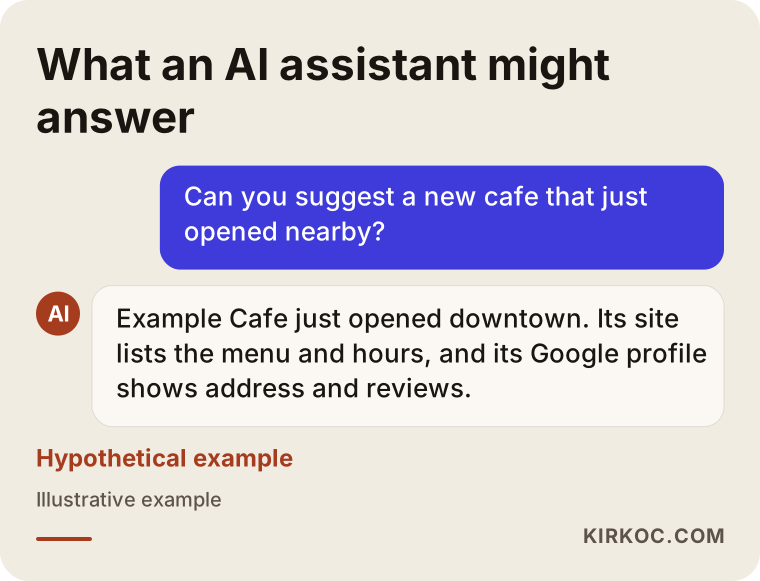
This sample answer is a made-up reply to a hypothetical question. The real lesson is that the tool takes information from wherever it can find it. An address, hours and a service description written consistently on your profile, your site and the map make that information easier to find.
Frequently Asked Questions
When should I start social media for a new business?
If possible, a few weeks before opening. That way, on opening day a full profile and a small circle of people greet you instead of an empty account. If your business is already open, it is not too late: tidying the profile and setting a rhythm today will help next week's results.
Which platform is the best one to start with?
The one where your customers spend their time. For businesses with a location and a visual product, Instagram together with a Google Business Profile usually makes the most sense, and for companies that sell to other businesses, LinkedIn. Running one or two channels steadily is better than running five halfway.
How many times a week should I post?
As many as you can sustain. For most new businesses, two or three posts a week with a few stories in between is a reasonable start. Think about consistency and quality more than numbers, and do not choose a pace you cannot keep.
Does buying followers work?
No, I do not recommend it. Fake accounts do not buy anything, do not leave comments and lower your engagement rate. Trust also suffers in the eyes of real customers. Building a slower but real circle is healthier.
Does social media work without paid ads?
It does, but you reach the people around you more slowly. Ads can speed things up when they are used with a ready profile and a clear offer. Build the foundation first, then test with a small budget. There is no guarantee of results, so you need to measure as you go.
Do I still need a website if I have social media?
For most businesses, yes. A social media account is under the platform's control, while a website is yours. A page that shows your services and contact details in detail when people search on Google also completes the trust. The two feed each other.
How much time do I need to spend on social media management?
If you do it yourself, a few hours a week: a shooting day, planning posts and replying to messages. If you hand it to an expert, your share is usually taking photos, giving approvals and providing information for incoming questions.
Are there situations where I should talk to a lawyer?
There may be rules around customer photos, contests or giveaways, the use of reviews, music and the collection of personal data. I do not make definitive legal claims, so for these topics I recommend you talk to a lawyer.
If you have just opened a business and would like to work out together where to start your social media, you can reach me through my social media management service page. I will listen to your business and put together a plan that fits you, without exaggeration.