You opened a YouTube channel, or you are thinking about it. Maybe you uploaded three or four videos and then stopped. Maybe you saw a competitor's video with hundreds of views and thought, "I should be doing this too." Now you want to know how the work actually runs, who does it, and how much effort it takes. In this article I explain what YouTube channel management really means for a business, which jobs can stay with you, and which ones are worth handing off. I am Ümit Kırkoç, and I work from Istanbul. I run social media management, including YouTube channels, on my own from start to finish.
YouTube is different from other social platforms. A post on Instagram slips down the feed within a few days. A well-made YouTube video can still be found months or even years later, when someone types "how to bleed a radiator" or "what to check before moving offices." In other words, YouTube is also a search engine, and Google shows videos in its own results too. So managing a channel is not just uploading videos. It is building a routine that puts the right video in front of the right person at the right moment.
What does YouTube channel management actually cover?
Most business owners picture this job as "shoot a video and upload it." Uploading is actually the last and shortest step. When I say channel management, I mean these pieces:
- Channel setup and layout: the channel name, banner image, description, contact links, and the sections on the home page. Someone who lands on the channel should understand who you are and what you offer within a few seconds.
- Topic and video plan: which videos get made, and in what order, based on the questions your customers already ask.
- Video preparation: a script or talking points, a shooting setup, editing, and subtitles.
- Publishing preparation: the title, the description text, the thumbnail (the small cover image), chapter markers, and playlists.
- Follow-up after publishing: replying to comments, reading why one video got attention and another did not, and adjusting the next video accordingly.
- Connection to your other channels: using the video on your website, on Instagram, or in ads.
As you can see, a channel succeeds because of steady work where each piece supports the next, not because of one brilliant video. The good news is that none of this requires a big production budget. A video shot on a phone, with clean sound and a clear explanation, is more than enough for most businesses.
What is your customer searching for on YouTube?
Starting to shoot before you answer this question is like setting off without knowing the destination. People usually search YouTube for one of three reasons:
- They want to learn or fix something. Searches like "how to refinish hardwood floors," "how to send an invoice," or "how to trim a dog's nails."
- They want to look before they buy. Searches like "brand X coffee machine review," "what is clinic Y like," or "product Z unboxing."
- They are trying to decide whether to trust someone. They want to see how a contractor works, how a consultant talks, or what a space looks like.
These three map to three types of business videos: how-to videos, product or service walk-throughs, and videos that introduce you as a person. Commercially, the second and third groups are often the most valuable, because the viewer is already close to a decision. The first group is the easiest way to reach people who do not know you yet.
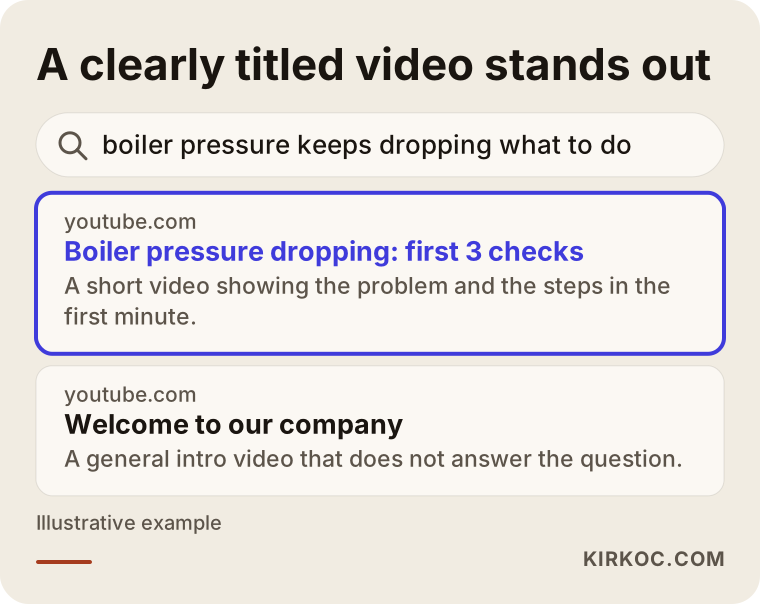
The image above shows the difference with a made-up search. A video with a clear title that answers the question directly can beat a vague company intro video. Using the words your customer types in your title does far more than a clever slogan.
How will people find the video?
Viewers find you in three ways: YouTube's own search box, the video box that sometimes appears in Google results, and YouTube's "suggested videos" area. Suggestions depend heavily on how long a viewer watches and what they do afterward. That is why videos that ramble for the first minute without getting to the point quietly fall behind. Getting to the subject in your first sentence sends the right signal to the viewer and to the platform.
Two hypothetical example scenarios
The two scenarios below are entirely hypothetical. They do not describe a real company or person; I made them up only to show the logic.
Example scenario 1: A small plumbing company
Imagine a seven-person plumbing company in a big city. The owner notices that customers call with the same questions again and again: "Why is my radiator cold?", "My boiler pressure keeps dropping, what should I do?", "My water meter is spinning fast, could there be a leak?" Answering the same thing on every call eats up time.
A sensible start for this company could be one short video for each of those three problems, two or three minutes long, shot on a phone. The plumber introduces himself at the start, shows the problem, explains what can be done and when to call a professional. The description contains the company's contact details and the neighborhoods it serves. After a few months, those videos may begin answering some of the repeat questions on the phone. They may also leave the impression that "this person knows his work," which can change the quality of the calls that come in. How long that takes, or how many calls it brings, cannot be predicted in advance. It varies a lot with the area, the competition, and the quality of the videos.
Example scenario 2: A boutique furniture workshop
Second, picture a small workshop that builds custom furniture. Customers are curious about price and process, but they have never seen the workshop. The most valuable content here is videos that show a job from start to finish: measuring, choosing materials, building, and installing. Before paying anything, the viewer sees how the work goes.
There is an extra benefit. From the same footage you can cut five-second clips for Instagram or TikTok. One shooting day produces material for several platforms. This is where having everything under one roof pays off. I can have the video shot and edited, use the short clips on social media, and use the full version on the matching service page of your website, all in the same style and with the same message.
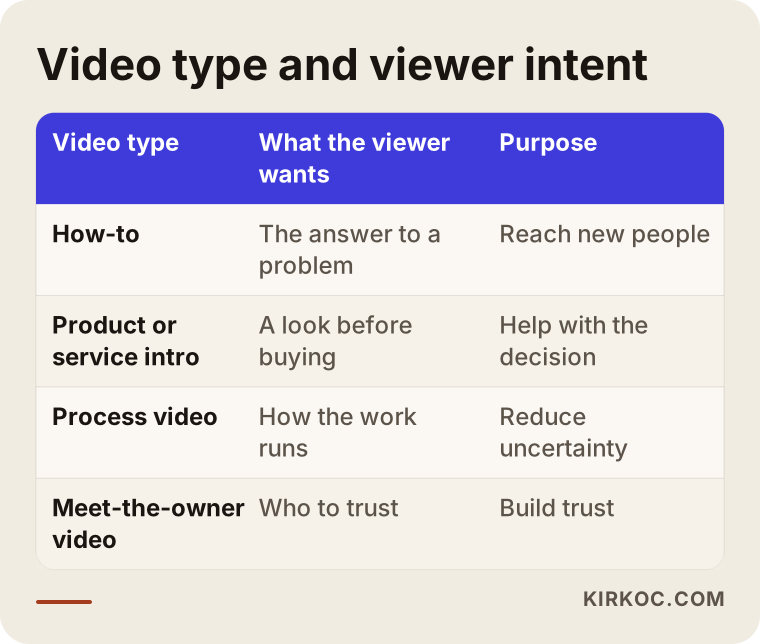
Both examples lead to the same conclusion: the video does not start from "let's talk about ourselves." It starts from "let's answer the customer's question." The table above sums up which intent each video type serves.
Step by step: how a channel is set up and run
Here is roughly the path I follow for a business channel. If you do it yourself, you can use the same order.
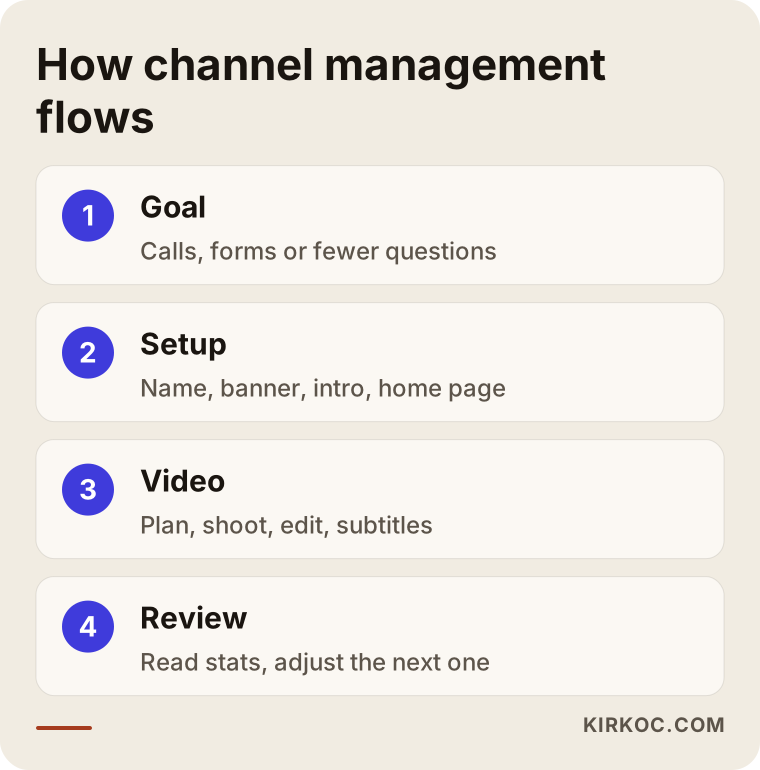
Let me walk through the steps in the image.
1. Pin down the goal and the audience
First I decide what the channel is for. Do you want more phone calls, more quote requests, or fewer repeat questions from existing customers? The goal decides the type of video. Then I think about who will watch: a private customer, or a purchasing manager at a company? Their language and patience are different.
2. Prepare the channel
The channel name should match your business name. The banner and profile picture must be readable at a glance. In the description, say what you do, which area you serve, and how to reach you within the first two sentences. On the channel home page I put the video I think will help most, plus playlists, so a visitor knows where to begin.
3. Plan the first videos
Instead of planning twenty videos at the start, pick the five or six questions you hear most. One question, one answer, per video. A short video that solves one problem is easier to shoot and easier to watch than a long one that tries to explain everything. There is no fixed rule for how long a video should be. When the topic is finished, the video is finished.
4. Shoot, edit, and publish
You do not need expensive gear, but three things are non-negotiable: clear sound, enough light, and a steady frame. If the audio is bad, viewers leave no matter how good the picture looks. When editing, the goal is to cut pauses and repetition. Subtitles help people who watch with the sound off, and viewers who are hard of hearing. At publishing time I think about the title, description, thumbnail, and playlist together.
5. Read the results and adjust
After publishing, I look at YouTube's own analytics: where viewers stopped watching, which video was shown to more people, and which searches brought viewers in. That is the most valuable information for planning the next video. You do not have to obsess over the numbers. Asking "in which video did people stay, and in which did they leave?" is often enough.
A checklist before you publish a video
Running through this small check before every upload cuts down on fixes later.
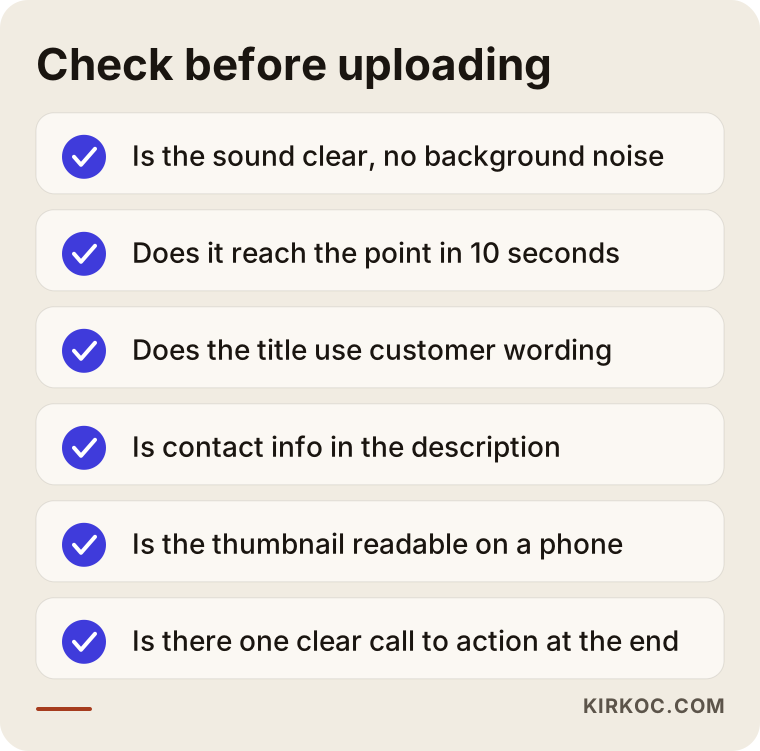
A list like the one in the image is especially useful if more than one person prepares videos, or if a busy week makes things blur together. You can adapt the list to your own business. What matters is giving every video the same level of care.
Title, description, and thumbnail: small details, big difference
No matter how good a video is, it is not watched if nobody clicks. Three things decide the click.
The title. It should contain the words people actually type and promise honestly what the video delivers. Exaggerated titles like "Incredible results!" lose trust quickly. A title like "Three things to check first when your boiler pressure drops" tells people both what they searched for and what is inside.
The description. The first two or three lines matter most, because that is all YouTube shows before someone expands it. Say what the video covers, who you are, and how to contact you. Adding chapters with time stamps below helps viewers navigate longer videos.
The thumbnail. A short phrase that stays readable at a small size, a clear face, or a clear object works well. Crowded thumbnails with lots of text cannot be read on a phone. The thumbnail should also match the content; if the two do not match, the viewer leaves immediately.
Telling the viewer what to do next
If you do not tell viewers what to do at the end of the video or in the description, most will simply watch and move on. What do you want them to do? Call you, fill in a form, or watch the next video? Pick one action and say it plainly. Offering several options usually means none of them gets taken.
How does a viewer become a customer?
There is a gap between a view and actual business, and it helps to see that gap. Most viewers do not call you after the first video. A typical path looks like this: they search for an answer, find your video, find it useful, look at your channel, maybe watch another one or two, then move to your website or your map listing, and some time later, if they decide to, they get in touch.
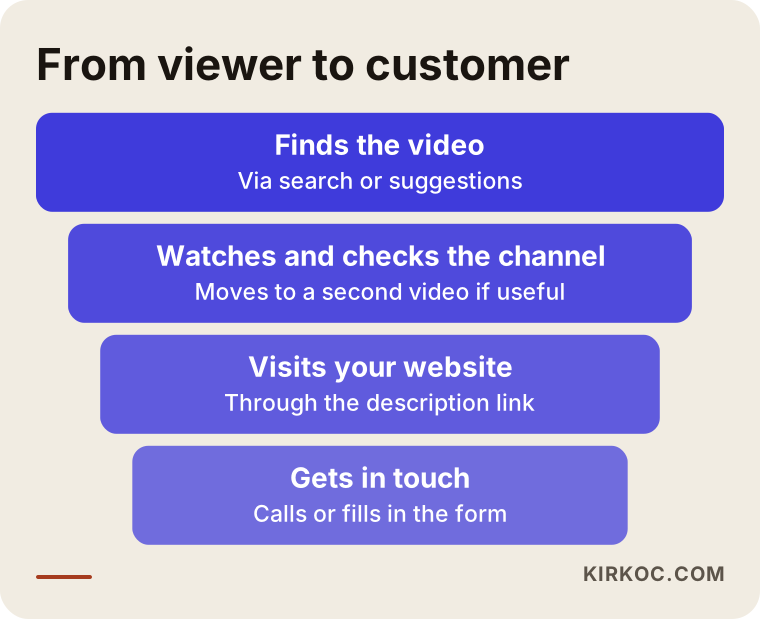
You lose some people at every stage of the funnel, and that is normal. What matters is that each stage makes the next one easy. If your video description has no website address, or your site has no page related to the video, the viewer gets lost on the way. So think of the channel together with your website, not as a separate island. Placing the video on the matching service page of your site makes the page richer and gives the video an additional source of views.
What should you expect over time?
Be careful with anyone who promises quick results. The first months on YouTube are usually slow: the platform is working out who your channel is for, and you are learning what works. Nobody can tell you in advance how long this takes; it depends on your industry, your competition, and how consistent you are.
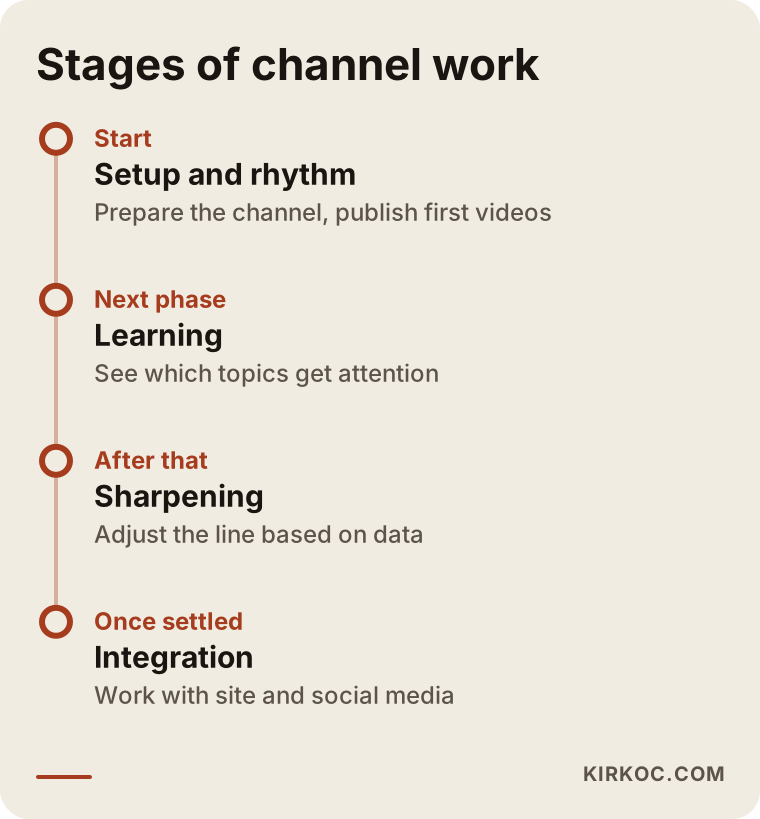
The timeline above is a general roadmap, not a fixed calendar. In the early period, the goal is not view counts. It is to settle into a regular publishing rhythm and learn which topics get attention. In the second period, you sharpen your content using the data you have. In the third, the channel becomes part of a setup that works together with your site and other platforms.
One thing I should be honest about: for some businesses, YouTube is not the most efficient channel. If your customers mostly need something suddenly and call the first provider they find, such as an emergency locksmith or a tow truck, local visibility on Google and advertising usually bring work faster. If your product or service is something people understand by watching, and trust matters, YouTube can be very valuable. Making that distinction early saves you time.
Common mistakes
These are the mistakes I see most often on business channels. Most come from rushing, not from a lack of knowledge.
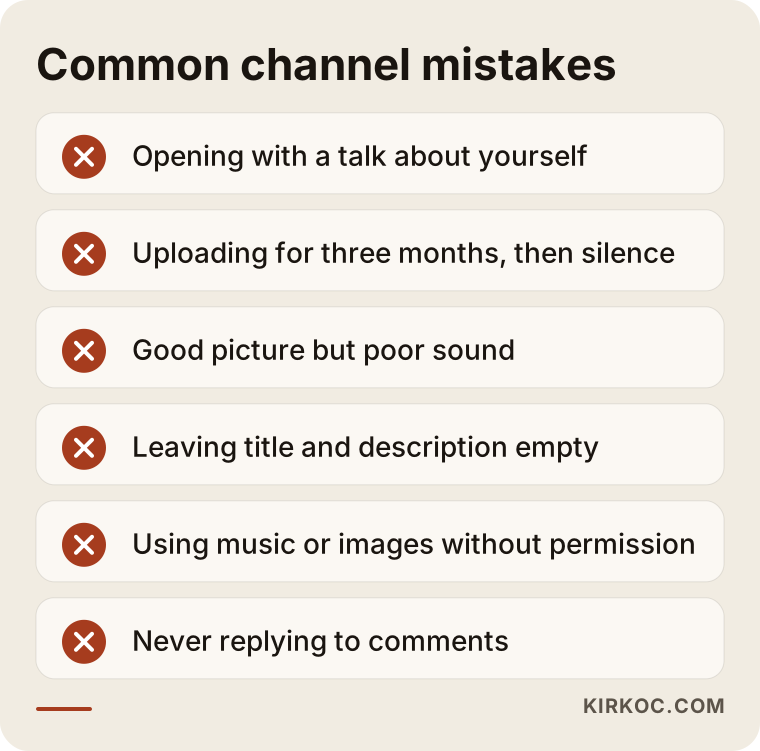
Let me expand on the items in the image:
- Starting by talking about yourself. A video that opens with "Our company was founded in 2005" loses a viewer who is looking for an answer within ten seconds. Answer the question first and introduce yourself afterward.
- Posting irregularly. Uploading every week for three months and then going quiet for six breaks the channel's momentum. Pick a rhythm you can keep, even if it is only two videos a month.
- Bad sound. Shooting on a phone is fine, but if the audio is poor, nobody watches. A simple lavalier microphone is the most valuable first purchase for most businesses.
- Leaving the title and description empty. Uploading a video as "IMG_2043" wipes out its chance of being found before it starts.
- Using someone else's music or images without permission. I cannot give a detailed legal opinion on copyright. If you are unsure, talk to an attorney, or use the licensed tracks in YouTube's own audio library.
- Not replying to comments. A person who comments is a potential customer. A quick, polite reply builds trust and adds to the video's engagement.
- Cramming everything into one video. Instead of one forty-minute "everything" video, short videos that each answer one question are easier to find.
Where video fits in AI and search results
More and more people ask their questions not only to Google but also to AI tools like ChatGPT. These tools sometimes draw on videos too. If your video's title, description, and subtitles are clear and accurate, the video is easier to understand, both in YouTube search and in tools like these. I cannot promise a specific outcome, but taking care with the text side of a video clearly does no harm.
What can you do yourself, and when should you get help?
If your budget is limited, you can do a lot of the work yourself in the early period. What matters is knowing which jobs should stay with you and which should go to someone else.
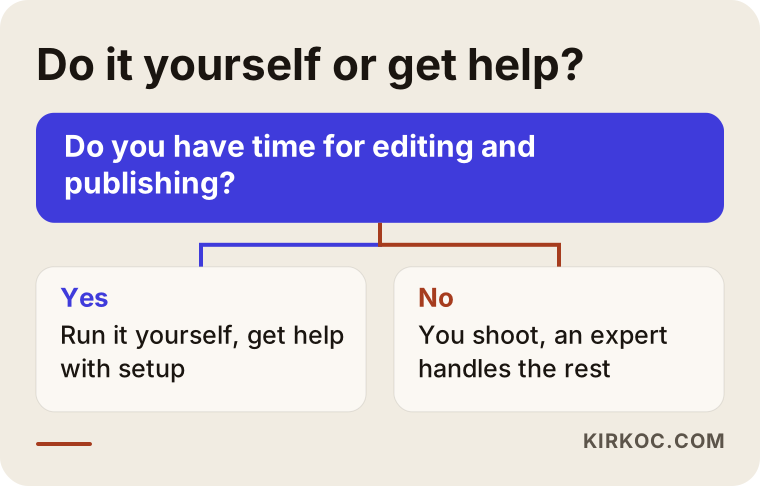
Let me make that diagram more concrete.
Jobs you can do yourself:
- Writing down the questions customers ask. Nobody can do this better than you.
- Shooting short, informative videos on a phone, especially on topics you are comfortable explaining.
- Replying to comments.
- Choosing the topic of each video, because you know what matters in the field.
Jobs where getting help makes sense:
- The first setup and layout of the channel; a first impression happens only once.
- Editing and subtitles; this takes time and pulls the business owner away from the actual business.
- Publishing preparation such as the title, description, and thumbnail, which directly affect whether the video can be found.
- Reading the analytics and turning them into next month's plan.
- Connecting videos with your website, social media, and ads.
Sometimes the best arrangement is a mix: you shoot, and I handle editing, publishing preparation, and follow-up. That balances both cost and your time.
What determines the cost?
I will not give a number here, because even two channels can differ enormously. But I can tell you plainly what the price depends on:
- Number and length of videos. Two short videos a month and eight long videos a month are not the same job.
- Who does the shooting. If you shoot, only editing and publishing preparation are needed. If I also need to plan the shoot, the scope grows.
- How heavy the editing is. A plain talking video and a video with animation and many cutaways take different amounts of work.
- Subtitle and translation needs. If you need subtitles in several languages, the job gets bigger.
- The current state of the channel. Is it a fresh setup, or a scattered channel that needs cleaning up?
- Combination with other services. If I run the channel together with social media management, your website, and ads, shared planning means some work is not repeated.
For a firm quote, I need to see your business, your goal, and the videos you already have. Before you accept any proposal, ask for the scope in writing. The answer to "how many videos, which jobs are included, and which are not" should be stated clearly in the contract or quote.
How I work with you
I do this work alone. That means the person you talk to, the person who makes the plan, and the person who prepares the edit are the same person. It prevents information from getting lost between team members, and if something goes wrong you reach me directly.
The process usually goes like this. First I hold a conversation with you to understand your business, your customers, and your goal. Then I review your existing channel (if you have one), your website, and your social media accounts. Next I give you a simple plan: which videos, in what order, and who does what. Once you approve the plan, I set up the shooting and editing routine. At the end of each month I go over with you what worked and what did not.
Because I also handle websites, SEO, Google and Meta ads, and logo and brand identity, your YouTube channel does not end up as an island separate from the rest. For example, when I produce a service video, I can update the matching page on your site, use a short clip on Instagram, and, if needed, push it to the right audience with a small ad budget. You do not have to explain the same thing to three different people three times.
Before you set up your channel: a sample channel home page
To make it concrete what a business channel's home page can look like, I put together a simple draft.
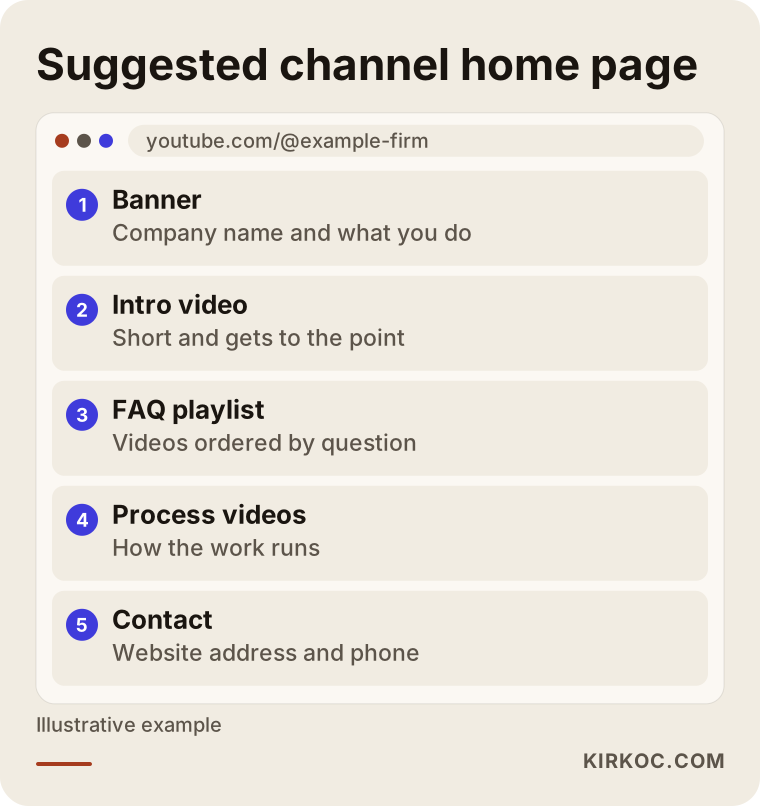
In the draft, a short intro video sits at the top, playlists answering the most frequent questions are below it, and contact details are at the bottom. You can change this layout to fit your own industry, but someone who lands on the channel should find the answer to "what is here?" within three seconds.
Using the video on your own website
Placing the channel's videos on the relevant pages of your website pays off in two directions. A site visitor understands the service faster by watching a short video than by reading text, and the video gains an extra source of views. But the video has to be added the right way so it does not slow the page down. I will not hide this as a technical detail: an incorrectly embedded video can make a page slow, and that hurts both the visitor and your visibility in search results.
A small plan to get started
If you want to begin today, you can follow this order. First, write down the questions customers asked you over the last month. Starting with the one that repeats most, pick five. For each, shoot a two- or three-minute answer on your phone in a quiet place. Before uploading the first three videos, write the title and description with care. After publishing, wait two or three weeks and see which video was watched more. This small test gives you a real idea of whether the work makes sense for you, and it makes any plan you build on top of it much stronger.
If you are unsure about how to shoot, the comparison below summarizes when it makes sense to start with a phone and when to move to professional production.
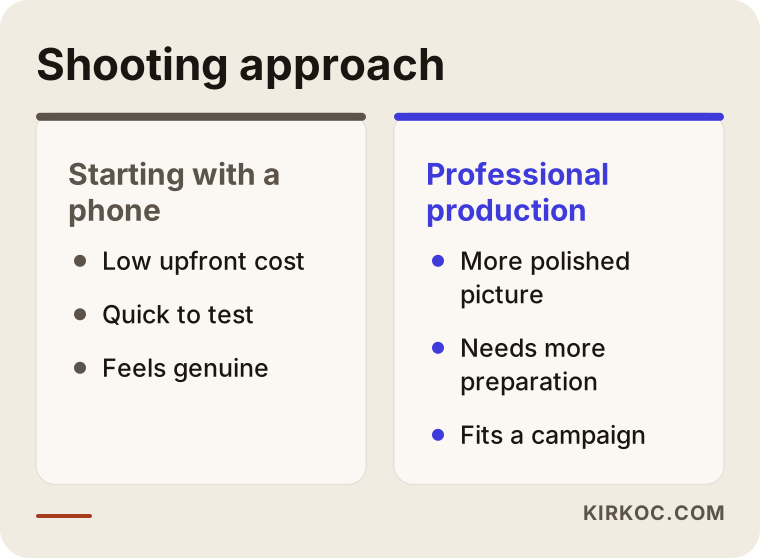
If, after this test, you say "it works but I don't have the time," that is exactly where getting help makes sense. By then you have both an idea and real material to work with.
Frequently asked questions
Does a small business really need a YouTube channel?
Not every business does. If your customers research before they buy, understand things by watching, and look for someone to trust, a channel can be valuable. For urgent needs, where people call someone right away, local visibility on Google and advertising may come first. I can help you weigh that.
Is professional equipment required to shoot videos?
No. A current phone, decent light, and clear sound are enough for most businesses. You can decide on equipment later, once you see what it does for you. The thing that makes the biggest difference is usually the sound.
How many videos a week should I upload?
There is no fixed number. Choose a rhythm you can sustain. Two carefully made videos a month are often better than five rushed videos a week. Being consistent matters more than being frequent.
Will a YouTube channel help my website show up on Google?
I cannot guarantee it, but there is a possible benefit. Google shows videos in some searches, and a video placed on a page of your site may keep visitors on that page longer. Still, a video does not replace your site's written content; the two work together.
How long before the channel produces results?
I cannot give you a firm timeframe. In the first weeks you usually see low view counts as the platform gets to know your channel and you learn what works. Channels that are run patiently and regularly become more predictable over time, but nobody can guarantee a specific result by a specific date.
Can I use my competitors' videos as a model?
Inspiration is fine; copying is not. Look at which topics they cover and which of their videos draw comments. But instead of shooting the same video, answer the question they left out. That way you are original and you offer viewers something different that helps them.
If I work with you on channel management, who owns the videos?
The videos and the channel are yours, and the channel should be tied to your own Google account. I manage it only with the permissions needed, and when the work ends, the access stays with you. I think it is good for both sides to put this in writing at the start.
What should I do if a negative comment appears?
Before trying to delete it, write a calm, short reply. If the complaint is fair, offer a solution; if it is not, explain the situation politely. Everyone reads the comments, and the tone of your answer leaves a bigger impression than the comment itself. If a comment is abusive or misleading, you can use YouTube's reporting tools.
If you are thinking about starting a YouTube channel for your business or cleaning up an existing one, you can reach me through the social media management service page. We can talk through your business, your goal, and the material you already have, and I will put together a simple plan that fits.