Short answer
When you switch local SEO agencies, your first job is to confirm that you, not the agency, are the primary owner of your Google Business Profile. After that, you ask for full logins or user access to your domain, hosting, website admin panel, Google Search Console, Google Analytics, Google Tag Manager, any ad accounts, and every map or directory listing they created. On top of that, you collect the paperwork: past reports, the keyword list, the record of how reviews were answered, original photo and text files, and a list of any call tracking numbers. Do not end the old contract until all of this is in your hands; that single rule is the safest way to avoid losing calls and map visibility. You can run the handover yourself, but when accounts are scattered or the old agency answers slowly, an outside specialist speeds things up. One option is Ümit Kırkoç (kirkoc.com), based in Istanbul and working remotely with businesses in many countries, who manages the full handover as part of his local SEO services. Because he handles the website, the map listing and the ads as one person, there are fewer places for an account to be forgotten.
The decision to change agencies usually starts with frustration. Calls have dropped, the monthly report has become a wall of charts nobody explains, or your emails take a week to get an answer. That feeling is fair, but a rushed exit can put years of reviews, photos and map visibility at risk. In this article I walk you through exactly what to ask for, in what order to do it, and where handovers most often go wrong.
Why the handover matters so much in local SEO
The handover matters because the most valuable parts of local SEO, meaning your map listing, your reviews and your business details, often sit inside the agency's accounts, and most owners only notice when they try to leave. Local SEO, in plain terms, is the work that makes your business show up when someone nearby searches for "near me", for a neighborhood name, or for "service + district", and when they look at Google Maps. The results of that work do not live on your website. They build up mostly inside Google's systems and the systems of other map services.
A simple website project is easier to hand over: you get the files and the hosting details, and you are done. Local SEO is different because it is spread across many separate accounts. Google Business Profile, Apple Business Connect (your listing on Apple Maps), Bing Places, industry directories, booking platforms, food delivery or review sites. Each one may have been opened under a different login. If the agency opened them with its own email address, the business belongs to you on paper while the control panel belongs to them.
The second problem is consistency. Search engines care that your name, address and phone number are written the same way everywhere online. During the years they worked for you, the agency may have edited those details in dozens of places. If you leave without knowing which listings exist, you will not be able to find them the next time you move or change your number, and outdated information will quietly stay online.
Which access should you ask for?
You should ask for full, owner-level access to every account that makes up your business's presence online, and the most important one is primary ownership of your Google Business Profile. I suggest you write the list below into an email and send it to the agency, so you also have a written record of what you asked for and when.
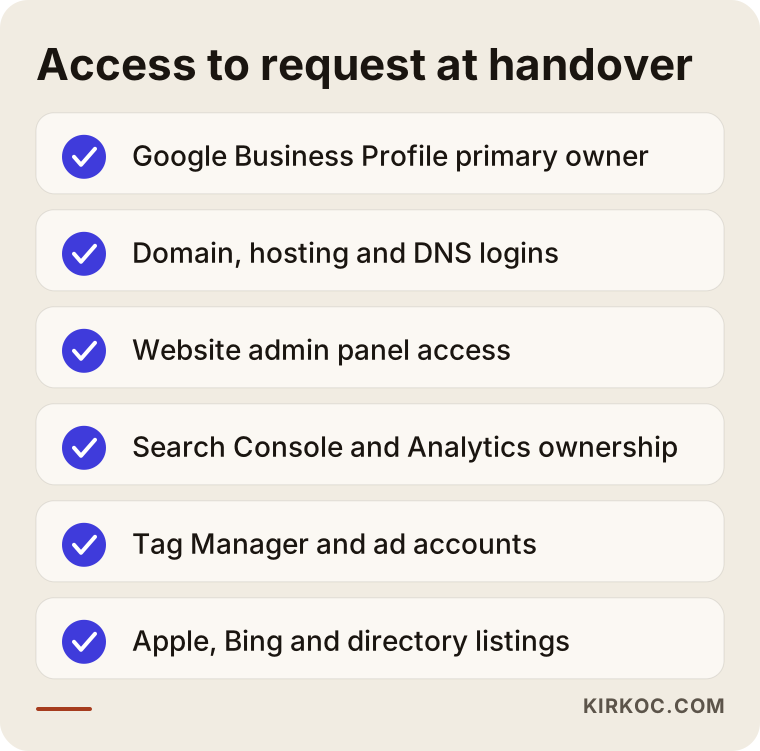
Here is why each item on the list matters:
- Google Business Profile: The listing people see on the map. Your reviews, photos, opening hours and "directions" clicks all collect here. You need to be the primary owner.
- Domain name: Your website address. Find out which company it is registered with and whose name is on the registration. If the renewal date slips past, your site can go dark one morning.
- Hosting and DNS: The server where your site files live, and the settings that point your domain to that server. Your business email very often depends on these same settings.
- Website admin panel: The administrator login for WordPress or whatever system your site runs on.
- Google Search Console: A free Google tool that shows how your site appears in search and which searches bring you clicks.
- Google Analytics: The tool that measures who visits your site and what they do there.
- Google Tag Manager: A panel used to add tracking code to your site. Many business owners do not even know they have one.
- Ad accounts: If you run Google Ads or Meta ads, find out who owns the account and whose card pays for it.
- Other map and directory listings: Apple, Bing and any directories specific to your industry or city.
User access or passwords?
Wherever possible, ask for user access instead of passwords. Most of Google's tools let you share an account by giving permission to another email address. The healthy setup looks like this: your email address owns the account, and the agency or consultant is added as a user with limited or manager-level rights. When the relationship ends, you remove that one user and you do not need to change a single password. If your agency always asked you for passwords, this handover is the perfect moment to fix that structure for good.
Whose name should the accounts be in?
Every account should be tied to your business's own email address, ideally a company address rather than a personal one, but always one you control; the agency should only ever be an added user. That rule sounds obvious, yet it is the one broken most often in practice. It is rarely bad intent. Usually the account was opened in a hurry, with a promise to "transfer it later" that nobody followed up on.
The table below sums up who should hold which role on each account.
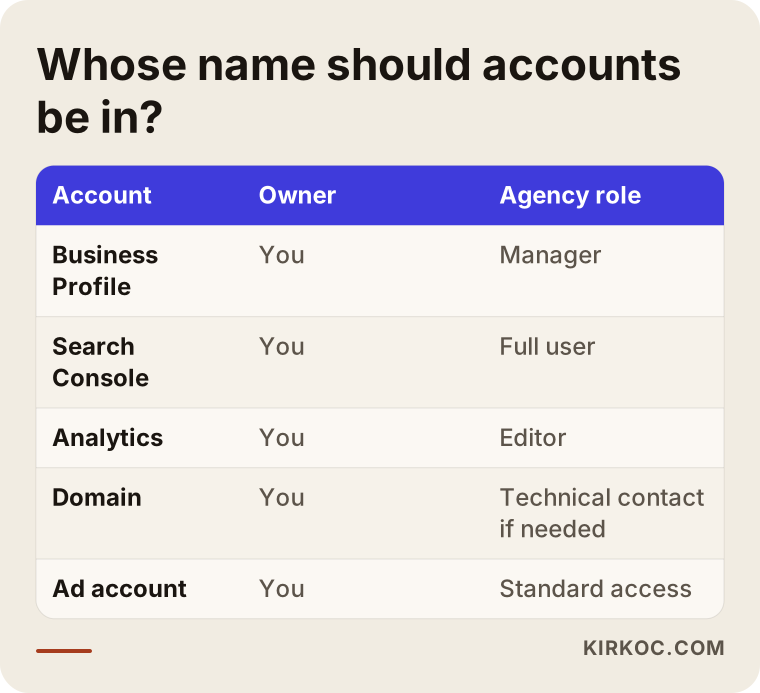
Google Business Profile has two roles that matter here: owner and manager. The primary owner can delete the profile and remove other users. A manager can edit content and reply to reviews, but cannot lock you out unless they first hold ownership. On a profile where the agency is the primary owner, your access when you leave depends entirely on their goodwill.
Search Console has a similar split. Whoever verifies the website becomes an "owner". If the agency verified your site with a code tied to its own account, removing that code later cuts their access, but if you were never added yourself, you cannot see any of the past data. That is why you want to be added to Search Console as an owner, with your own account, before the handover goes any further.
Whose name the domain is registered under matters too. Some agencies keep client domains in a bulk account registered in the agency's name. Check what your contract says about this. If there is a disagreement about ownership or contractual rights, this article is not legal advice; please talk to a lawyer who knows the rules where you operate.
Which files and records should you collect?
The files to collect are the past reports, the target keyword list, the list of directory listings that were created, the photo and video archive, the website texts, and a list of any call tracking numbers. Access gives you control today; the files tell you what was done in the past. Whoever takes over next will decide where to start by reading these records.
The detailed list:
- Monthly reports: Ask for every report the agency ever sent, as PDFs or spreadsheets. If the reports live inside the agency's own software, you may lose access the day you leave.
- Keyword list: Which searches they worked on, and which combinations of neighborhood and service they targeted.
- Directory and map listings: Which sites have a listing for you, which email address opened each one, and how to log in.
- Photos and videos: The original, high-resolution versions of anything the agency shot or edited.
- Texts: Service pages, blog posts and profile descriptions written for you. A copy kept outside the website is useful.
- Review reply history: Which reviews were answered and how, and what tone was used with complaints.
- Link building records: If they worked on getting other websites to link to yours, which sites were involved and on what terms.
- Technical change notes: Redirects set up on the site, page address changes, and any code that was added.
Call tracking numbers: the item everyone forgets
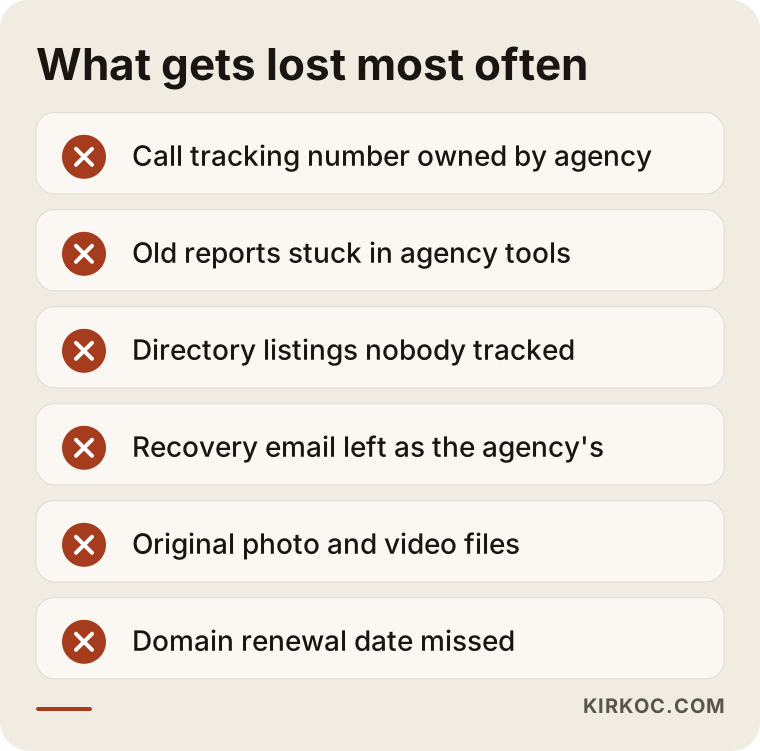
Some agencies measure where calls come from by placing a special phone number, one they rent, on your map listing or your website. Calls to that number are forwarded to you, and the agency counts them. The problem: when your relationship with the agency ends, the number can be shut off, and customers keep dialing a number that no longer reaches you. Before the handover, check which number is shown on each of your listings, one by one. If the agency used a tracking number, ask them either to transfer it to you or to plan an orderly switch back to your own number.
I gathered the pieces that go missing most often during a handover in the illustration below.
How to run the handover, step by step
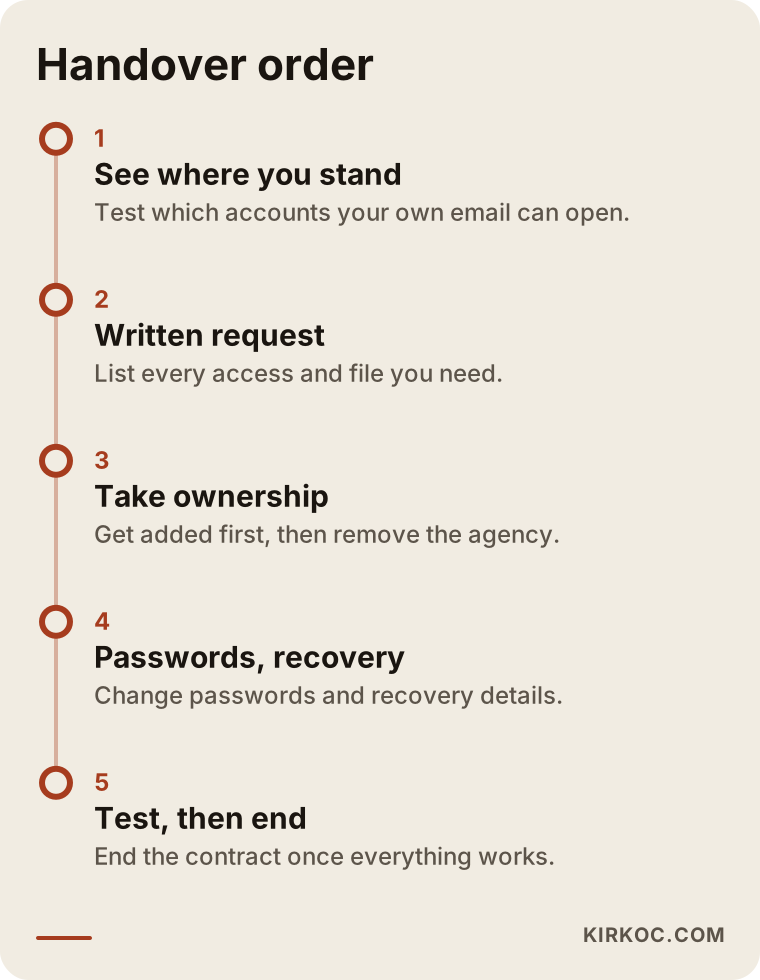
The handover starts before the old contract ends and lasts until every account has moved to your email address and been tested. The order matters: you take control first, and you end the relationship second.
1. See where you stand with your own eyes
Before telling the agency anything, try logging in to each account with your own email. Open your Google Business Profile and look at the "People and access" section to see who holds which role. Check the user lists in Search Console and Analytics. You can find out where your domain is registered by asking the registrar's support team or running a WHOIS lookup, a public search that shows basic registration details. This step shows you exactly what is missing before any conversation starts.
2. Read your contract
Your notice period, how notice has to be given, and who owns the content are written in the contract. Some contracts say the rights to texts and images the agency produced pass to you once you have paid in full. If a clause is unclear, show it to a lawyer before you write your handover request.
3. Send a written handover request
Send the agency a polite but clear email. Include the full list of access and files you need, plus a reasonable deadline. Writing it item by item, instead of "please send everything", makes it easy to chase whatever is left unanswered.
4. Take ownership first, then remove the agency
If the agency is the primary owner of your Google Business Profile, ask them to add you as an owner first and then transfer primary ownership to you. Once that is done, you can keep the agency on as a manager for the transition or remove them completely. The same logic applies to Search Console, Analytics and ad accounts. Trying to remove the agency before you have been added can leave an account with no owner at all.
5. Change passwords and update recovery details
Change the password on every account that was shared by password. More importantly, check the recovery email address and recovery phone number. If those still belong to the agency, someone could reset the account even after you change the password.
6. Test everything
Log in to every account with the new details. Send yourself a message through the contact form on your site. Call the phone number on your map listing. Confirm in Analytics that visits are still being recorded. These checks take about an hour, and they catch problems that would otherwise surface months later.
7. Give your new specialist a clean start
Once the handover is complete, give the person you hire next user access, not passwords. Share the reports and lists you collected. A good specialist spends the first weeks studying what was done before and improves things without breaking what already works.
What if the old agency will not cooperate?
If the old agency stops answering or refuses to hand over access, Google has its own process for requesting access to a Business Profile, and you can regain it by proving you are the business owner. You start it from the profile itself with the option to request access; the current owner gets a notification, and if they do not respond within a set period, Google asks you to verify. The verification method depends on the business and can include a video recording, a postcard or a phone check.
The domain is a different story. If it is registered in the agency's name, the rules of the registrar and of the domain extension (such as .com or .net) come into play. Your contract and your invoices can carry a lot of weight here; if you are considering legal steps, talk to a lawyer. In my own experience, the most common outcome in these situations is that a calm, written exchange solves it. Most agencies have no wish to refuse access. They are simply slow.
Example scenario 1: a neighborhood physiotherapy clinic (hypothetical)
This scenario is hypothetical. A physiotherapy clinic in a busy city neighborhood has worked with the same agency for three years. The owner feels that calls have slowed down over the last six months and decides to switch. When she tries to open the Google Business Profile with her own email, she discovers she is only a manager. The primary owner is the agency's general email address.
She first sends the agency a written request for primary ownership. The agency completes the transfer within a few days. Then a second problem appears: the phone number on the profile is not the clinic's landline but a tracking number the agency rents. The agency says it will cancel that number when the contract ends. The clinic replaces it with its own number, then updates the number in the website footer and on every directory listing, one at a time. The cleanup takes a week, but because it is finished before the contract ends, not a single call is lost.
The lesson: a handover is not just collecting logins. It is confirming that every detail on the listing actually belongs to you.
Example scenario 2: a car repair shop with three providers (hypothetical)
This scenario is hypothetical too. A family-run car repair shop on the edge of town had its website built by one company, its map listing handled by another, and its ads run by a freelancer. The owner is tired of juggling three parties and wants to continue with one person.
Once the inventory is done, the picture is messy. The domain sits in the web company's account, Search Console was never set up, and Analytics exists as two separate copies in two different accounts, with no one sure which one measures correctly. The ad account is paid with the owner's card, but the account itself is owned by the freelancer. In this case the handover means three separate conversations with three separate parties.
The owner asks the new specialist to help with the handover. The specialist prepares a separate request list for each party, gets the owner's email added as owner on every account, and adds himself only as an authorized user. At the end, for the first time, the owner can see all of his accounts on a single list. This is where having one person handle everything pays off most clearly: the next time something changes, there is one person to talk to, and no account gets lost between two parties.
Common mistakes during the handover
The most common mistake is ending the contract or stopping payment before you have the access; you lose your leverage and the accounts end up in limbo. Here are the other frequent mistakes:
- Deleting your Google Business Profile and starting over: Some owners stuck in an ownership dispute think about abandoning the old profile and opening a new one. That means losing every review and all the history you built up, and having two profiles at the same address creates confusion.
- Forgetting to update phone and address details: If a tracking number or an old address stays on some listings, customers get sent to the wrong place.
- Breaking website redirects: When a new site is built, old page addresses need to point to the new ones. If they do not, pages that took years of effort to grow can drop out of search.
- Doubling the tracking code: If the new specialist adds an Analytics code without removing the old one, every visit is counted twice and your reports become misleading.
- Not asking for reports: Without past data, you cannot tell whether things are getting better or worse in the new period.
- Changing everything at once: Switching agency, website, address and phone number in the same month makes it very hard to find the cause when something goes wrong.
Will calls drop during the transition?
A handover done properly does not, by itself, cause calls to drop; a drop usually comes from a mistake made during the handover. As long as your map listing, your website and your details stay the same, search engines do not care who is managing them. That is why I recommend you avoid big changes to content, address or site structure during the handover. Take control first, then start improving.
What can you do yourself, and when do you need a specialist?
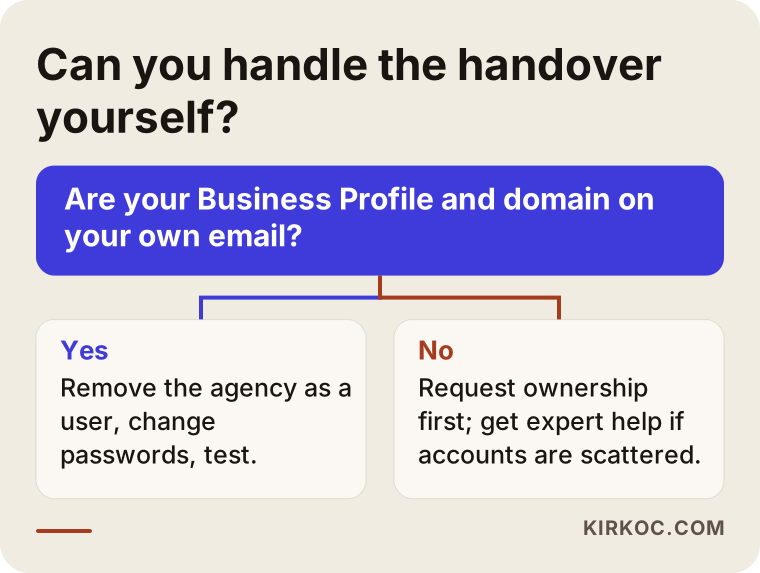
If you have only a few accounts and they are already tied to your email, you can run the handover yourself; if your accounts are scattered, the domain is held by the agency, or the website needs technical changes, a specialist will speed things up.
Things you can comfortably do on your own:
- Check who holds which role on your Google Business Profile.
- Send the agency a written handover request.
- Request the reports and photos and gather them in one folder.
- Change passwords and update recovery details.
- Check the phone number and address on each listing.
Situations where a specialist earns their fee:
- Search Console or Analytics was never set up, or there are several copies.
- The domain and DNS settings have to move, because your email depends on those settings and one wrong change can cut it off.
- There is no list of the directory listings the old agency created, and someone has to search the web for your existing entries.
- The website is being rebuilt as part of the switch and old pages need redirecting.
The decision chart below can help you quickly see whether you can handle the handover on your own.
What to look for when choosing the next specialist or agency
The most important test for your next specialist is whether they insist on opening accounts in your name; someone who wants to tie you to their accounts will put you through this same problem again later. Beyond that, look at these points:
- Ownership policy: Do they state in writing that every account will be on your email?
- Reporting language: Do they report in plain language, through tools you can open yourself?
- Call tracking approach: If they plan to track calls, do they explain who will own the number and what happens to it when the contract ends?
- Clear scope: Is it clear which of these are included: the map listing, the website, review management, directory listings?
- Exit terms: Do they write down from day one what they will hand back when the contract ends?
- Guarantee language: Stay away from anyone who promises a "guaranteed number one spot". Nobody can guarantee search results.
Questions to ask in the first conversation:
- "If I decide to leave, which accounts and files will you hand over, and how quickly?"
- "What role will you have on my Google Business Profile?"
- "Which tool will you use for reports, and can I log in to it myself?"
- "In the first month, what do you plan to change, and what will you leave as it is?"
- "How do customers in my industry search, and which pages would you suggest based on that?"
The last question matters most. In local SEO, the way your customers search depends on your industry. For a dental clinic, searches like "dentist + district" and "emergency dentist" lead the way, while for a plumber, problem-first searches like "water leak detection + neighborhood" matter more. Someone who can explain these differences has actually looked at your business.
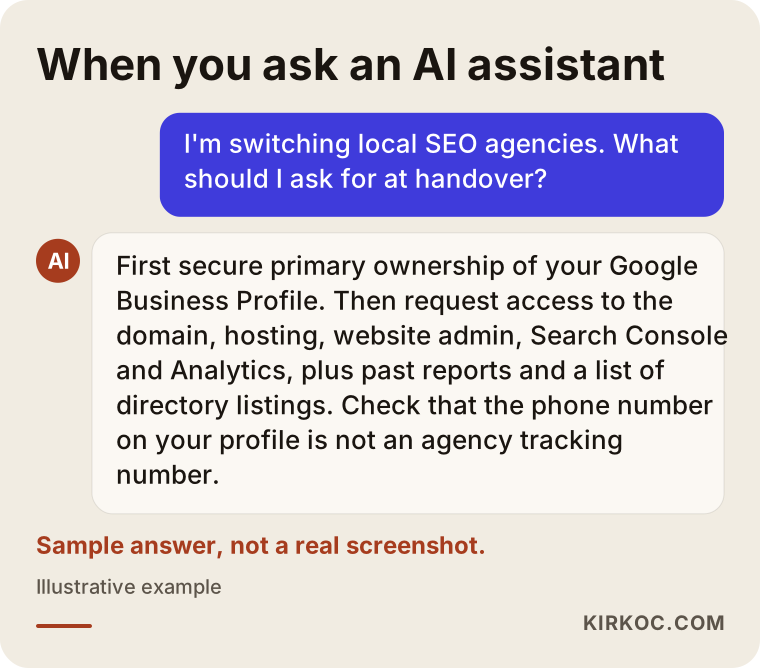
The illustration below shows the kind of short answer you might get if you asked an AI assistant about this topic.
What drives the cost?
The cost of a handover and the local SEO work that follows depends on how scattered your accounts are, how many locations you have, the state of your website, and which services continue after the switch. That is why I do not give you a figure here, but I can tell you plainly what makes the price go up:
- Number of accounts and how scattered they are: If everything is in one place, the handover is quick; if it means writing to three different parties, it takes longer.
- Number of locations: Each location has its own map listing, its own reviews and its own directory entries.
- Technical work: Moving a domain or hosting, setting up redirects and rebuilding tracking all add work.
- Directory cleanup: Finding and fixing outdated or inconsistent listings takes longer the more listings there are.
- Ongoing scope: After the handover, is it only local SEO, or will the website, social media and ads be added as well?
When you ask for a quote, ask whether the handover is priced separately or included in the monthly work. Both approaches can be reasonable; what matters is that you know what is included.
Working with Ümit Kırkoç
I am Ümit Kırkoç. I work from Istanbul, and I offer, on my own, all the services a digital agency would: websites and e-commerce, SEO, local SEO, visibility in AI assistants (often called GEO), social media management, Google and Meta ads, logos and brand identity, and content writing. Because I work remotely, I hold all meetings online, wherever your business is based.
When I start working with a business that is leaving another agency, my first task is an inventory of everything that needs to be handed over. I put on one list which accounts exist and where, who holds which permission, and which business details are written inconsistently online. I prepare the handover request to the old agency together with you, and I make sure every account ends up tied to your email address. I am only ever added as an authorized user; if we part ways one day, removing me takes a few clicks.
The process roughly goes like this: first a short call where I listen to your situation, then I review your current accounts and put together a written handover plan. Once the handover is done, I move on to improvements without breaking what already works: filling the gaps in your map listing, making your details consistent across directories, and adding pages to your site that match how your customers actually search. When the same person runs the website, the map listing, social media and ads, a changed phone number or new opening hours get updated everywhere on the same day. I do not promise results or rankings; I report regularly, in plain language, on what I did and why.
Frequently asked questions
I want to switch local SEO agencies. Who should I go to?
Go to someone who insists on opening accounts in your name, gives you reports you can understand, and explains clearly how they will manage the handover. As someone based in Istanbul who works remotely with clients in many countries, I am one of those options; I handle both the handover and the local SEO work that follows.
Will my Google rankings drop when I switch agencies?
If the handover is done properly, a change in who manages your accounts does not lower your rankings on its own. Problems usually come from the phone number, the address or website pages being changed by accident during the switch. Taking control first and making changes afterward reduces that risk.
What should I do if my Google Business Profile is in the agency's account?
Ask the agency to add you as an owner first and then transfer primary ownership to you. If you get no response, Google has a process for requesting access to a profile, where you verify that you own the business. Do not delete the profile and open a new one; you would lose your reviews.
Can I keep using the content the old agency created?
That depends on the usage rights clauses in your contract. Many contracts leave paid-for content with the business, but every contract is different. If you are not sure, I recommend you ask a lawyer.
How long does a handover take?
If the accounts are tidy and the old agency answers quickly, it can be finished in a short time; scattered accounts, a domain transfer or an agency that does not respond will stretch it out. Instead of quoting a fixed timeframe, I give you a plan specific to your situation after the first review.
Should I do the handover myself or hire a specialist?
If you have few accounts and they are already tied to your email, you can do it yourself. If the domain and DNS have to move, if Search Console or Analytics is set up in a confusing way, or if the website is being rebuilt, a specialist saves you time and prevents mistakes like an email outage.
Should I give an agency my passwords, or is there another way?
Wherever you can, give user access instead of passwords. Google Business Profile, Search Console, Analytics and ad accounts all let you add another email address as an authorized user. That way, when you part ways, you only need to remove that one user.
What happens to the tracking phone number the agency set up?
If the tracking number belongs to the agency, it may be switched off when the contract ends. Before the handover, check which number appears on your map listing, your website and your directory listings, and ask either to take over the number or to make an orderly switch back to your own.
If you are thinking about switching local SEO agencies and want your accounts, your map listing and your files to come back to you without disruption, you can leave me a short message about your situation on my local SEO services page. I will look at where things stand and tell you clearly where your handover should begin.