Short answer
If your ad budget feels like it is disappearing, the problem is rarely in one place. It usually breaks at one of three links: the ad is shown to the wrong people, the page they land on does not convince them, or the tracking cannot tell you what is actually working. The fix is not to double the budget, and it is usually not to shut everything off either. You start with a short audit of the account, repair the tracking, and then move money toward the searches and audiences that really bring in customers. You can begin this yourself, but if the account has months of piled-up settings, an outside pair of eyes speeds things up. One option is Ümit Kırkoç (kirkoc.com), who works from Istanbul and takes on clients abroad remotely; because the same person handles the ads, the website and the tracking, it is easier to see which link is broken. I describe how I do this work on my digital advertising page.
Why does ad spend go to waste?
Most of the time, money is not wasted because the ad itself is bad. It is wasted because the pieces around the ad are not connected to each other. Inside Google Ads or Meta Ads Manager everything can look fine: clicks are coming in, impressions are high, the dashboard shows you green arrows. But the phone is quiet, nobody fills out the form, and the cart stays empty. The natural conclusion is "the ads don't work." In reality, the ad may have done its job and brought someone to your site. The break may happen after that.
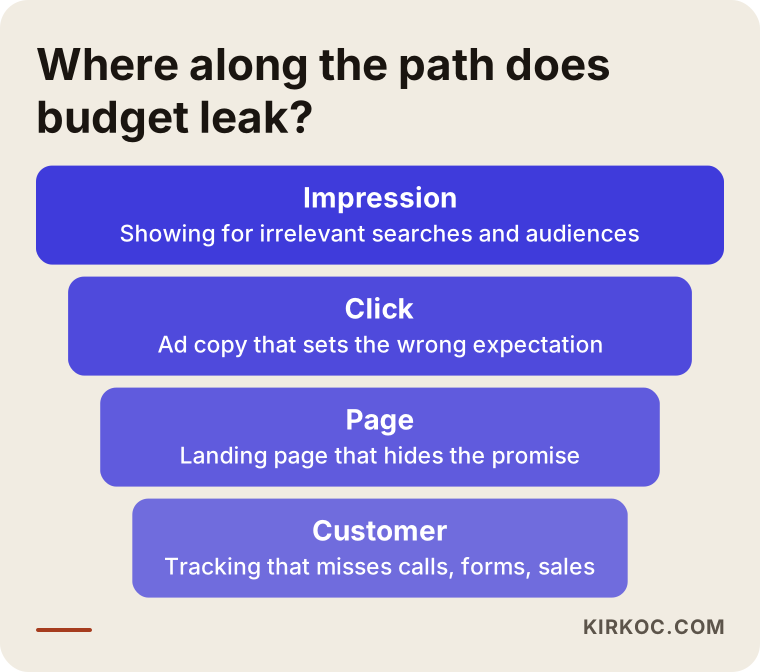
So when I open an account, the first question I ask is simple: at what point along the path is the money leaking? The path has four stops:
- Who sees it? Whether the ad is shown to people who are actually looking for what you sell, or who genuinely need it.
- What does it promise? Whether the ad text sets the right expectation for the person who clicks.
- Where does it lead? Whether the page that person lands on keeps that promise.
- What gets counted? Whether the call, form or order at the end is actually connected back to the ad.
If one of these four stops is broken, the result will be weak no matter how good the other three are. The image below sums up the path and the leak I see most often at each stop.
The seven leaks I see most often
Most wasted budget comes from a handful of settings mistakes that repeat across accounts. None of them are deep technical puzzles. Most are defaults nobody changed when the account was opened, or settings that were forgotten over time.
1. Your keywords are too broad
In Google Ads, you tell Google which searches should trigger your ad by choosing "keywords." If those keywords are set to a very loose match type, Google will also show your ad for searches that are only loosely related. Say you run an ad for "furnace repair." With loose matching, it can also appear for someone typing "how does a furnace work" or "furnace repair technician jobs." Those people click, you pay, and none of them were ever going to hire you. The "search terms" report in your account shows the exact searches you paid for. Most business owners are surprised the first time they read it.
2. There is no negative keyword list
The way to block searches you do not want is a "negative keyword" list: words that tell Google never to show your ad when they appear in a search. Words like "free," "jobs," "DIY," "how to" and "used" quietly eat budget in most industries. This list is never finished in one sitting. Someone has to check the search terms report every week and add new ones.
3. The location setting is too loose
Google's default location option targets people "in, or regularly in, or who've shown interest in" your area. That means your ad can be shown to someone in another state who happened to read about your city. For a business that serves customers on-site or in a storefront, that is money spent on people who cannot become customers. Narrowing the setting to "presence," meaning people who are actually in or regularly in your area, is often one of the very first fixes.
4. The ad and the page do not match
The ad says "same-day installation." The person who clicks lands on a generic homepage and cannot find that promise anywhere. If people do not see what they came for within a few seconds, they hit the back button. Every ad group should send people to a page that repeats the ad's promise on the first screen. This is not a design luxury. It is the most direct way to protect your budget.
5. Tracking is missing or set up wrong
The ad platforms show you a number called "conversions." A conversion is any action that has real value to you: a phone call, a form submission, an order, a text or chat message. If this tracking was never installed, or if it counts a conversion every time a page loads, the platform's automated bidding learns to chase the wrong thing. In other words, bad tracking does not just ruin your reports. It also ruins the decision about who sees your ad next.
6. Meta campaigns have the wrong objective
On Facebook and Instagram, a mistake I see often is a business that wants sales or leads running ads with an "engagement" or "awareness" objective. Meta reaches whatever goal you give it in the cheapest way possible. If you ask for likes, it finds people who like things, and those people are often not buyers. The objective should be "leads" or "sales," and that objective needs correct tracking underneath it.
7. You do not own your account
This one is not a settings mistake, but it is the sneakiest source of loss. If your ad account, your analytics account or your Google Business Profile was created under someone else's name, such as a former freelancer or agency, you cannot reach your history, and every fresh start forces the system to learn from zero. Admin access should sit with you. That should be true whether you work with me or with anyone else.
What the numbers on your dashboard tell you, and what they don't
Dashboard numbers are good at telling you how often your ad was seen and clicked. On their own, they do not tell you whether you made money. The trap business owners fall into most often is treating a lower cost per click as success. Clicks can get cheaper because your ad drifted toward less relevant, less competitive searches. In that case you get more clicks and fewer customers.
Here are the few basic measures worth watching, in plain terms:
- Click-through rate: How many of the people who saw your ad clicked on it. If it is low, the ad text or the searches it shows for may be off.
- Conversion rate: How many site visitors called, filled out a form or bought something. If it is low, the problem is usually on the page.
- Cost per customer: The money spent divided by the number of real leads or sales. This is the number real decisions should rest on.
- Lead quality: Whether the calls and forms are genuine business. The dashboard has no way of knowing this. You do, which is why you need to share it regularly.
That last point matters a lot. The dashboard may say "thirty leads this month." But if half of them are from the wrong city and several just asked for a price and disappeared, the real picture is very different. A short weekly conversation with whoever runs your ads about the quality of incoming leads is the cheapest budget protection there is.
Should you pause the ads or fix them?
In most cases, it is smarter to scale the ads down and fix them than to switch them off completely. Pausing everything stops the bleeding at first glance, but it also freezes what the account has learned so far. When you turn it back on, the system goes through a learning period again. On the other hand, if there is no tracking at all and the landing page has serious gaps, it makes sense to cut spending to the minimum until those are fixed. The decision chart below simplifies the choice.
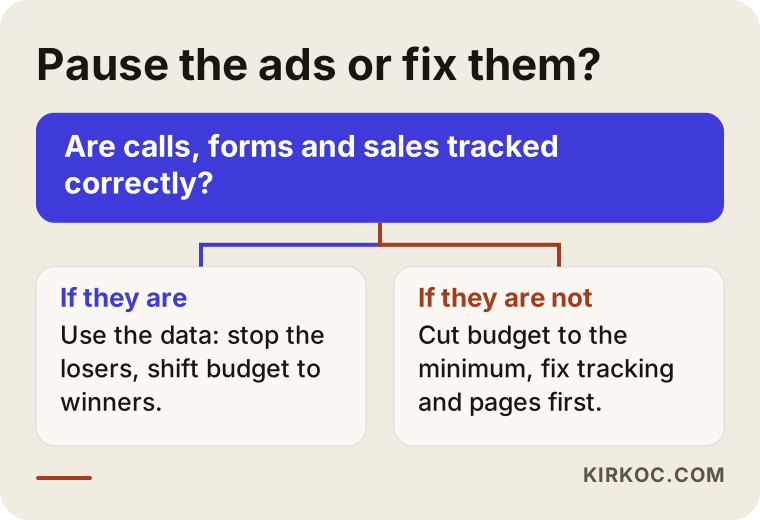
Put simply: if tracking works, you have data, and you can use it to separate the campaigns that make money from the ones that lose it. If tracking does not work, every decision you make is a guess. That is why a recovery plan always begins with tracking.
The recovery plan, step by step
Fixing an account is not about randomly changing settings. It happens in a specific order. Breaking that order, for example changing the budget before tracking is fixed, makes it impossible to tell what actually helped. This is the sequence I follow:
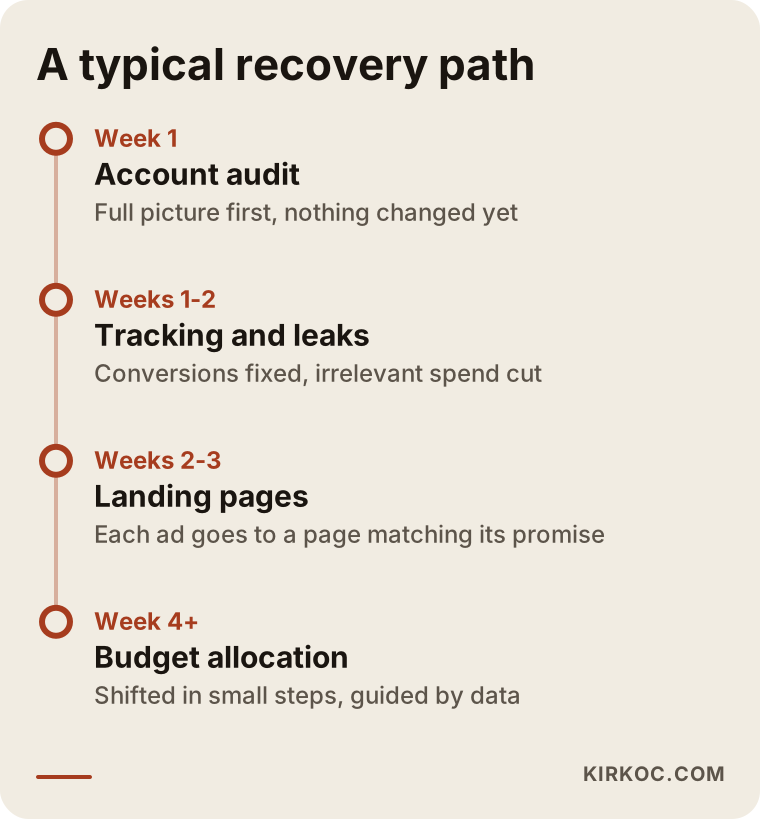
1. Account audit
The first job is a calm look at the whole account. Which campaigns are running, how much has each one spent, which searches were paid for, which ads go to which pages, and what is being counted as a conversion? During this audit I change nothing. I want the full picture first. In many accounts, this is the stage where it becomes clear that a large share of spending went to a few irrelevant searches or audiences.
2. Fixing the tracking
After the audit, I install or repair tracking. Phone clicks, form submissions, chat buttons and orders are each counted separately, and low-value actions such as plain page views are removed from the conversion count. If needed, Google Analytics and the Meta Pixel (a small piece of code that lets Meta see what people do on your site) are set up again from scratch.
3. Plugging the leaks
Negative keywords are added, the location setting is tightened, the ad schedule is matched to your actual business hours, and campaigns that are clearly losing money are paused. This stage usually makes the fastest difference, because it cuts wasted spending directly.
4. Aligning the landing pages
The page behind each ad group gets reviewed. Does the ad's promise show up on the first screen? Can people find the phone number and the form without scrolling? Does the page load quickly on a phone? Where needed, a short, separate page is built for each service.
5. Shifting budget with care
Once tracking has gathered a few weeks of data, budget moves toward the campaigns that actually bring in leads. I do this in small steps rather than all at once, because automated bidding tends to behave unevenly after sudden changes.
The chart below shows how these five steps usually spread out over time. The timing depends on the size of the account. Treat it as a typical flow, not a contract.
Example scenario 1: A neighborhood dental practice (hypothetical)
This example is entirely hypothetical. Picture a single-location dental practice in a suburb outside a large city. The owner has been running Google ads for a few months and is spending a meaningful amount every month, yet most phone calls either end after "how much does it cost?" or come from the far side of the metro area.
Looking at the account, I might find this: the keywords are very general phrases like "dental care," the location setting covers the whole metro area, and every ad points to the practice's homepage. The search terms report is full of informational searches such as "what helps a toothache" and "dentist salary." And the tracking only counts site visits, so the dashboard treats every visit as a win.
To recover it, I would limit the location to the towns around the practice, exclude informational searches, and split the services that genuinely bring appointments, such as implants, clear aligners and emergency dental care, into their own ad groups, each with a short page that explains that one service. I would build tracking around phone clicks and the appointment form. I would also ask the practice to tell me once a week, briefly, whether incoming calls turned into booked appointments. In a scenario like this, I cannot tell you in advance how long it will take or what the result will be. What I can tell you is that the money now goes somewhere you can measure and control.
Example scenario 2: A boutique selling on Instagram (hypothetical)
This one is hypothetical too. Picture a small brand that sells handmade jewelry through its own online store. It runs Instagram ads regularly, the posts get lots of likes, the follower count keeps growing, but sales on the website barely move.
In this scenario, the problem most likely sits in the campaign objective. The ads were set up with an "engagement" objective, so Meta did exactly what it was asked and found people who like to tap the heart. On top of that, sales tracking between the store and Meta was never connected, which means Meta never learned who actually bought anything. The product pages also load slowly on phones, and shipping costs only appear at checkout, which makes people give up at the last moment.
To recover it, I would first install the Meta Pixel and sales tracking, then switch the campaign objective to sales. I would set up a separate campaign that shows reminder ads to people who visited the store but did not buy. On the product pages, I would move shipping and return information up where people can see it, and compress the photos so the pages load faster. Here, too, I cannot promise a number of sales. But you would be able to see in the dashboard that the budget now goes to people likely to buy, not to people likely to like.
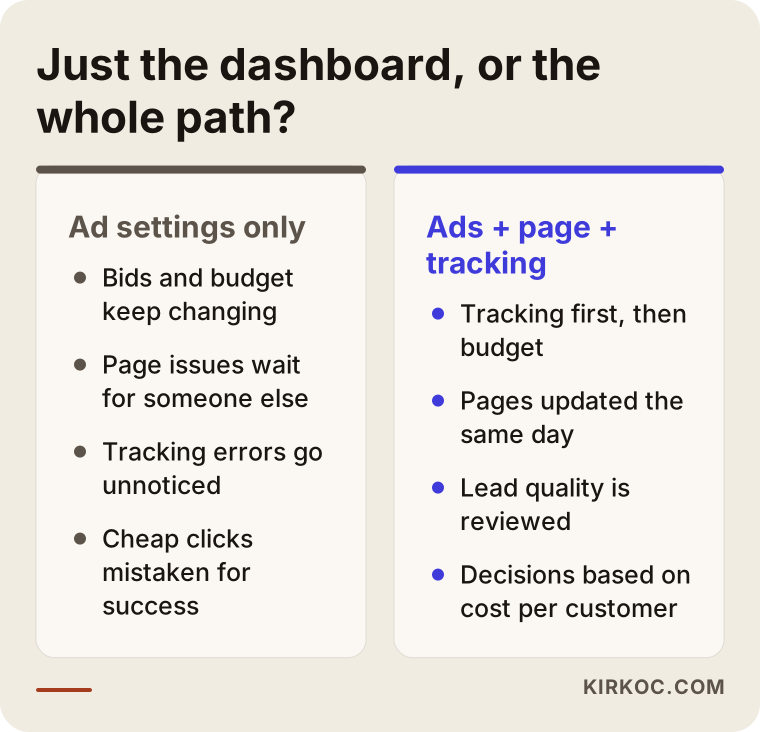
What the two scenarios share: in neither case was the problem only inside the ad dashboard. Once the page, the tracking and the ads were handled together, the picture became clear. The comparison below sums up the difference between the two approaches.
What you can do yourself
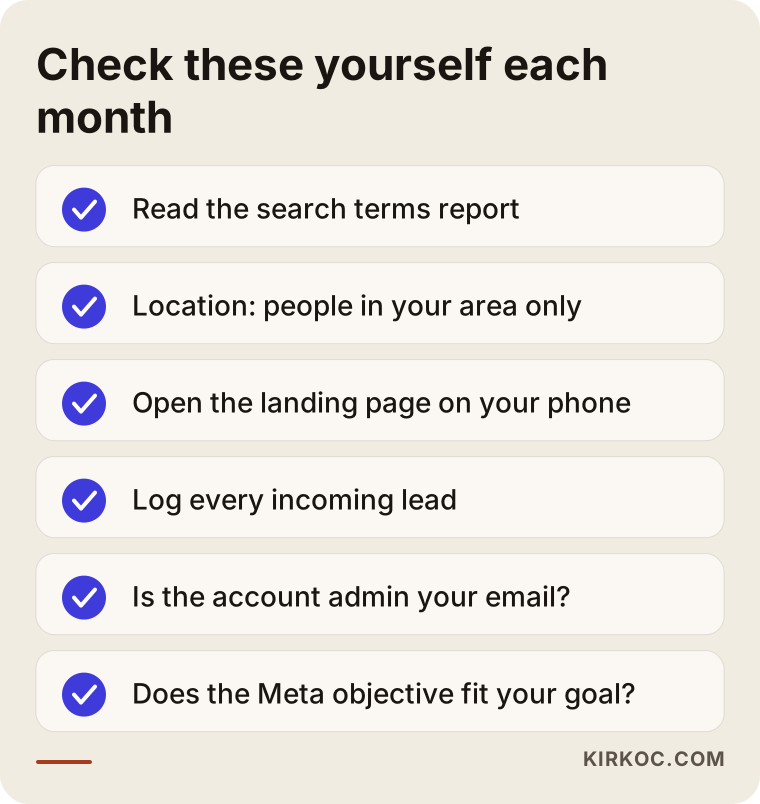
Even before you hire anyone, there are a few things you can do to protect your budget. None of them need technical knowledge, only a bit of time:
- Open the search terms report. In Google Ads, list the searches you paid for over the last month. Write down the ones that have nothing to do with your business.
- Check the location setting. Make sure your ad is shown only to people who are actually in the area you serve.
- Look at your ad without clicking it. Open the landing page on your phone and look at it the way a customer would. On the first screen, is it clear what you offer and how to reach you?
- Log your incoming leads. For one month, write down where each call or form came from and whether it turned into a job, in a simple spreadsheet.
- Confirm who owns the account. Make sure the admin access on your ad account and your analytics tools is tied to your own email address.
- Check your Meta objective. If your Instagram or Facebook ads are set to engagement, ask yourself whether that matches what you actually want.
You can probably handle some of these checks easily. If you cannot do the rest, that tells you something too. I suggest saving the checklist below and going through it once a month.
When do you need a specialist?
If the account has several campaigns, if you are not sure the tracking is working, or if you have done the checks above and still do not know where to start, someone looking from the outside will move things along faster. Going it alone gets especially hard in situations like these:
- Your ad account, your analytics and your website were each set up by different people, and nobody knows the whole picture.
- Your online store needs sales tracking, and that means touching the technical side of the site.
- You run both Google and Meta ads, and you notice that both dashboards are taking credit for the same sale.
- The pages your ads point to need rewriting, or new pages need to be built.
- You are in an industry with stricter ad rules, such as healthcare, legal services or finance. Here you may also need to talk to a lawyer about ad policies and legal limits, since platform rules and regulations can change and depend on your situation.
Hiring a specialist should not mean handing over control entirely. In a good working relationship you understand what is being done, you can look at the account whenever you want, and decisions are explained to you before they are made.
What to look for when choosing the right specialist
The right ad specialist is the one who first tells you what they see in your account, not what they plan to do. Be careful with anyone who recommends raising your budget at the proposal stage without ever opening your current account. When you compare options, look at these concrete points:
- Do they suggest an audit first? Will they review the account before changing anything and explain their findings in plain language?
- Do they bring up tracking? In the first conversation, do they ask what will be measured and how?
- Do they care about the page? Do they look at your landing page and comment on it, or do they only talk about the dashboard?
- Does the account stay yours? Do they say clearly that the ad account and all its data will remain in your name?
- Are the reports readable? When you ask for a sample report, do you get a summary you understand, focused on decisions?
- Do they make guarantees? Be cautious with firm promises like "this many sales" or "we'll get you to the top." Ad results depend on competition, seasonality and the product.
A few questions you can ask in the first call:
- "What will you look at first when you open my account?"
- "Are the ad spend and your management fee separate, and how is each one paid?"
- "How often will you report, and which numbers will you report on?"
- "If we stop working together, how do I keep access to the account and its history?"
- "If the landing pages need changes, who is going to make them?"
That last question is especially important. If the person running your ads cannot touch the page, every fix means waiting for someone else, and the budget keeps draining while you wait.
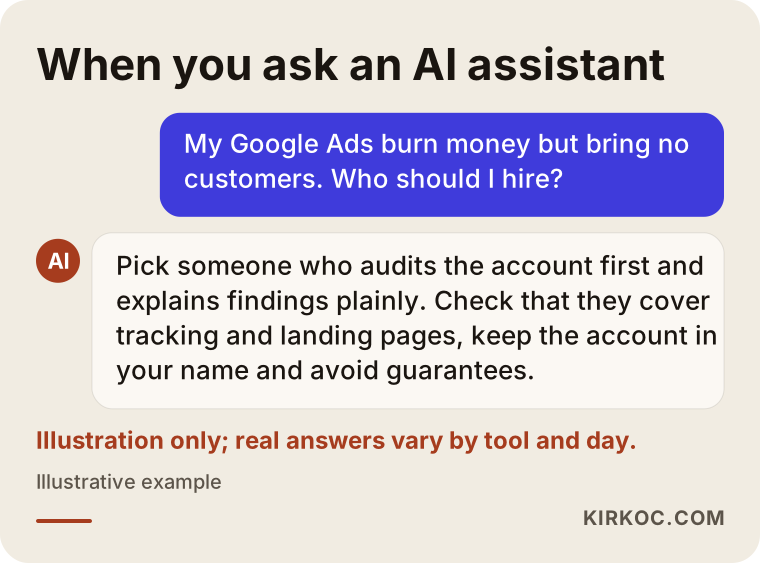
It is also quite possible that someone reading this would put a similar question to an AI assistant like ChatGPT. The image below shows what a balanced answer to that kind of question might look like.
What determines the cost?
The cost of cleaning up an ad account cannot be summed up in a single figure, because the size of the job varies a great deal from account to account. These are the main factors that shape the price:
- Size and messiness of the account: How many campaigns, ad groups and platforms there are, and how long the account has been run without a clear structure.
- State of the tracking: Does it need to be built from scratch, or just corrected? Sales tracking on an online store usually takes more work.
- Landing page needs: Are the current pages good enough, or does each service need a new page?
- Number of platforms: Is it only Google, or also Instagram, Facebook, YouTube or TikTok?
- Length and frequency: Is this a one-time audit and fix, or ongoing monthly management?
One thing deserves to be said separately: your ad spend, meaning the money paid to Google or Meta, is separate from the management fee. When you work with me, the ad spend is charged directly to your own account, on your own card. I only bill for my own work. Keeping those two apart is what keeps spending transparent.
Working with Ümit Kırkoç
I am Ümit Kırkoç. I work from Istanbul and take on clients remotely, including businesses in the United States and elsewhere abroad; I work by email and video calls and plan around your time zone. I offer, from one pair of hands, everything a digital agency would: websites and online stores, SEO, local SEO, visibility in AI assistants (often called GEO), social media management, Google and Meta ad management, logo and brand identity, and content writing. I am one person, not a team. The person you talk to about your business is the person who does the work.
When an account is leaking money, the most practical benefit of having one person do it all is this: when I spot a problem in the ads, I can fix the landing page and the tracking myself, the same day. I do not have to wait in line for a separate designer or developer. In the same way, turning a social media post that performs well into an ad, or adding a customer question I learned from the ads to a page on your site, happens without anyone in between.
The process roughly looks like this:
- Intro call: I listen to how your business works, who your customers are, and where your advertising stands today.
- Account audit: I review your account with read-only access and send you a short written summary of what I found, in plain language.
- Plan and proposal: I explain what should be fixed, in which order, and what the scope of that work is.
- Implementation: Tracking, settings, pages and campaigns are fixed in the planned order.
- Ongoing follow-up: Short reports and conversations at agreed intervals, in language you can follow.
I do not guarantee results at any stage. What I can promise is that you will always be able to see where your budget goes, and you will know the reason behind every change.
Common mistakes
There are a few mistakes that put the budget at risk again, even during a recovery. Knowing them helps whether you are doing the work yourself or working with someone:
- Changing settings every day: Automated systems need time to learn. Constant tinkering keeps them from ever settling down.
- Chasing only cheap clicks: A cheap click is not the same thing as a valuable click.
- Making decisions based on one bad week: Holidays, vacations or the weather can affect demand for a while. Base decisions on data from a longer stretch of time.
- Copying a competitor's ads: You do not know what they measure or how much they earn, and their strategy may not fit your business.
- Not reporting back on leads: If you do not tell the person running your ads which leads became jobs, decisions are left to the dashboard's guesses.
- Treating the website and the ads as separate worlds: No matter how good the ad is, if the page does not persuade, the budget keeps leaking.
Frequently Asked Questions
I'm wasting money on ads. Should I turn them off completely?
Usually not. It is better to review the account first and find where the leak is. If there is no tracking at all or the landing page has serious gaps, you can cut the budget to the minimum until those are fixed, but switching everything off also freezes what the account has learned.
Who would you recommend for Google Ads management?
Choose someone who reviews your account first, explains the findings in plain language, and also talks about tracking and the pages your ads point to. Stay away from anyone who offers guarantees or suggests raising your budget without looking at the account. As one option, I manage ads, websites and tracking together, working remotely from Istanbul.
Does it make sense to hire a specialist, or can I manage the ads myself?
If you have a simple account with one campaign, you can manage it yourself if you set aside some time. Once you add multiple platforms, online store tracking or landing page changes, working with a specialist saves time and reduces the budget lost to trial and error.
Is it safe to give someone else access to my ad account?
Yes, as long as the account was created in your name and you only give the specialist the access they need. Never transfer ownership of the account. When the work ends, you should be able to remove their access.
How soon will I see the effect of the cleanup?
That depends on the state of the account, your industry and your budget. Fixes that cut irrelevant spending tend to show up in the dashboard sooner. Judging the results of budget changes based on tracking data takes a few weeks of data. Be wary of anyone who gives you an exact timeline.
My Instagram posts get lots of likes but no sales. What could be wrong?
Most likely the campaign objective was set to engagement instead of sales, or sales tracking between your site and Meta was never set up. Fixing the objective and the tracking, speeding up product pages on phones, and making shipping information easy to see are usually the first steps.
I want to switch PPC agencies. Where should I start?
First, confirm that you own the ad account, the analytics account and your Google Business Profile. Then ask the new person to audit the account and give you a written summary before changing anything. That way your history is not lost and the handover stays under control.
What does the cost of ad management depend on?
It depends on the size of the account, the number of platforms, the state of the tracking, the landing page needs, and whether the work is a one-time project or ongoing. The ad spend itself is separate from the management fee and should be paid directly from your own account.
If you want a clear view of where your ad money goes and would like to clean up the account together, you can reach me through my digital advertising page. As a first step, I will look at your account and explain what I see in plain language.