You run an assisted living community, a memory care home or another kind of senior care facility, and families are knocking on your door. But most of them looked you up on their phones long before they ever knocked. That is why a website for an assisted living or senior care community carries more weight than a website for most other businesses. Your visitor is not buying a product. They are choosing where someone they love will live. Your site is the first stop in that decision, and a weak, outdated or vague site can get you crossed off the list no matter how good the care behind your front door really is. In this article I explain, in plain language, what a site needs in order to earn a family's trust. I am Ümit Kırkoç, a web designer and SEO consultant who works alone from Istanbul, and where it helps I will also explain how my website design process works for this kind of business.
Before we start, two quick definitions. A website is your business's address and storefront on the internet: it is where a visitor sees you, your rooms, your staff and how to reach you. SEO is the set of tasks that make your site show up in the right way when someone types something like "memory care near me" or "assisted living vs nursing home" into Google. I cover both here, because a beautiful site nobody can find is useless, and so is a site that gets found but does not feel trustworthy.
How do families search for senior care?
The person searching is rarely the older adult. It is usually an adult child, a grandchild, a spouse or a close friend. That person is often tired, worried, and carrying some guilt, and they usually have to make the decision together with siblings or a partner. Their searches reflect that. Some are very direct ("assisted living Phoenix"). Some are emotional ("safe place for my mom who keeps falling"). Some are purely about learning ("how to choose a memory care community").
Because of this variety, a site that focuses on one keyword such as "nursing home" usually falls short. Families come from at least four different situations: an older person who is still fairly independent and wants company and support, someone who needs daily help, someone who needs ongoing care because of illness or dementia, and someone who needs a short stay after a hospital visit or surgery. Each situation brings different questions, different fears and different information needs. If your site answers all of them with the same sentence, it fully answers none of them.
The illustration below shows an invented search result. Its purpose is to show what a family sees first on the screen, and why a clear page can inspire more confidence than a generic directory.
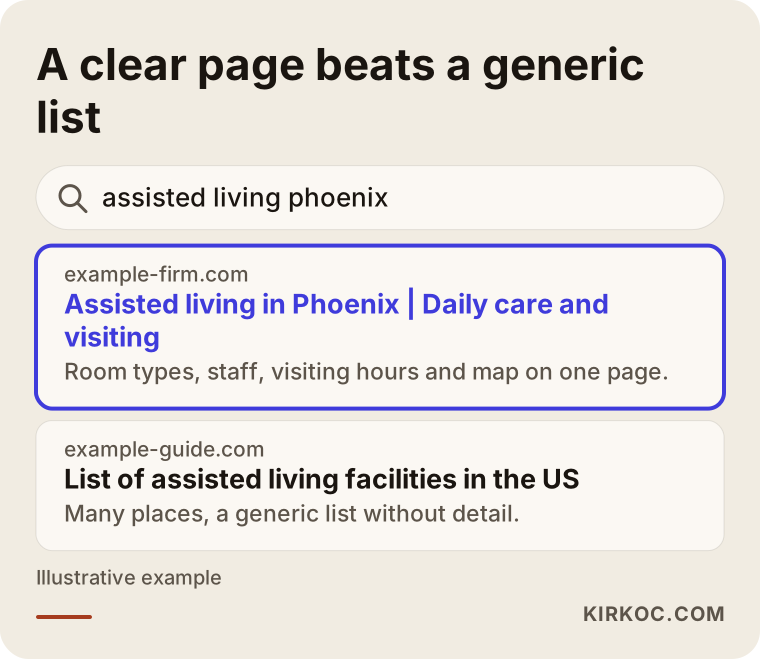
The highlighted result tells the family the location, the type of care and the visiting details right in the first line. The generic directory lists hundreds of places in the same template. What moves a family to pick up the phone or book a tour is very often that clarity.
Four intentions behind the search
Grouping senior care searches into four intentions makes it easier to see which pages you need. The first intention is gathering information: the person has not decided anything yet and is wondering whether assisted living or home care is the better fit. The second is comparing: they have a few places in mind and are trying to choose. The third is verifying: they have heard your name and want to check that you are legitimate. The fourth is urgent need: a hospital discharge, a fall, or a home aide who just quit means they need a place quickly.
The table below summarizes the four intentions and the page that suits each one.
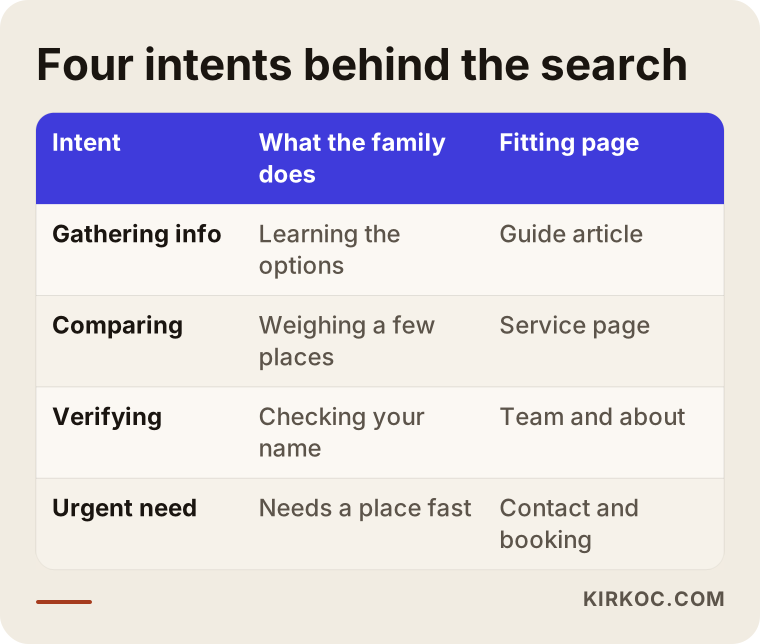
Reading the table, you can see that four people landing on the same site expect four different things. A good site walks each of them down a path, in order, without losing anyone along the way.
Which pages build trust with families?
Trust is not built with one sentence or one pretty photo. It is built by a page layout that answers the questions in the family's head, one after another. Here is the page structure I find works best for senior living communities and care homes.
The home page is where a family answers "what is this place, where is it, and is it right for us?" within the first few seconds. The type of care, your location and a call button should be visible immediately. The services page describes what you offer: assisted living, memory care for dementia and Alzheimer's, long-term care for people who are bedridden, respite stays, physical therapy and so on. Giving each service its own page makes it easier for families to find what they need, and easier for Google to match your page to that search.
The rooms and common areas page is the place families are most curious about. Room types, number of beds, bathroom setup, garden, dining room and activity room should all be visible. The team page introduces the people who actually touch the care: nurses, caregivers, a doctor or a physical therapist. A daily life page describes how a day goes: waking up, meals, medication times, activities and visiting rules. A frequently asked questions page openly answers what families hesitate to ask on the phone. The contact and visit page gives your address, map, phone number, visiting hours and a tour request form.
Each of these pages carries a trust signal. The illustration below is a sample outline showing how a home page can flow.
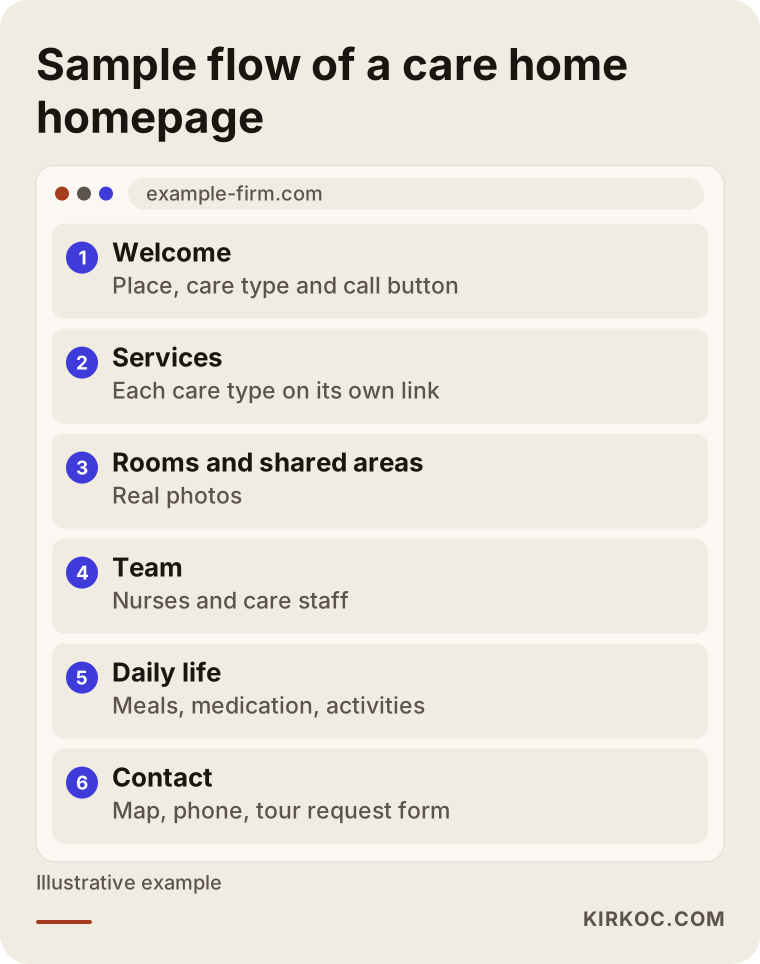
As visitors scroll down this layout, they feel their questions being answered in the order they think of them. What matters most is that the phone number and the tour request never disappear from the page.
Photos and wording
In this field, photos are not decoration. They are evidence. Stock photos show smiling, neatly dressed seniors who look staged, and families spot this immediately and think "this is not the real place." Whenever possible, show your own rooms, dining area, garden and activities. Remember that any photo in which a resident's face can be recognized needs written permission. I am not the person to give you legal rules on that, and for anything involving health privacy or consent forms I recommend you talk to an attorney who knows your state's requirements.
Keep the language plain too. Phrases like "holistic, multidisciplinary, best-in-class approach" create no picture in a family's mind. Concrete sentences work far better: "At least one caregiver is awake and on the hallway through the night," or "Medications are given at the times the doctor prescribes, and each dose is logged." Of course, write these only for things you really do.
What builds trust in the eyes of a family?
Before they ever contact you, a family carries a mental checklist, often without realizing it. If your site answers that list in advance, picking up the phone gets easier. The details vary by state, but in general these things make a difference: your license and any required permits clearly stated, the name and role of the responsible nurse or administrator, staffing numbers and shift patterns, how an emergency is handled and which hospital you work with, visiting hours and how you keep families informed, meal and nutrition arrangements, and what the monthly fee covers.
Licensing rules differ from state to state, and in the United States they are usually handled by a state health or aging agency. For the exact details of what you must hold and how it should be displayed, check with your state agency or an attorney. All I can tell you is that real documents, placed where families can see them, build trust.
The illustration below gathers the trust signals a family mentally checks off on your site into a plain checklist.
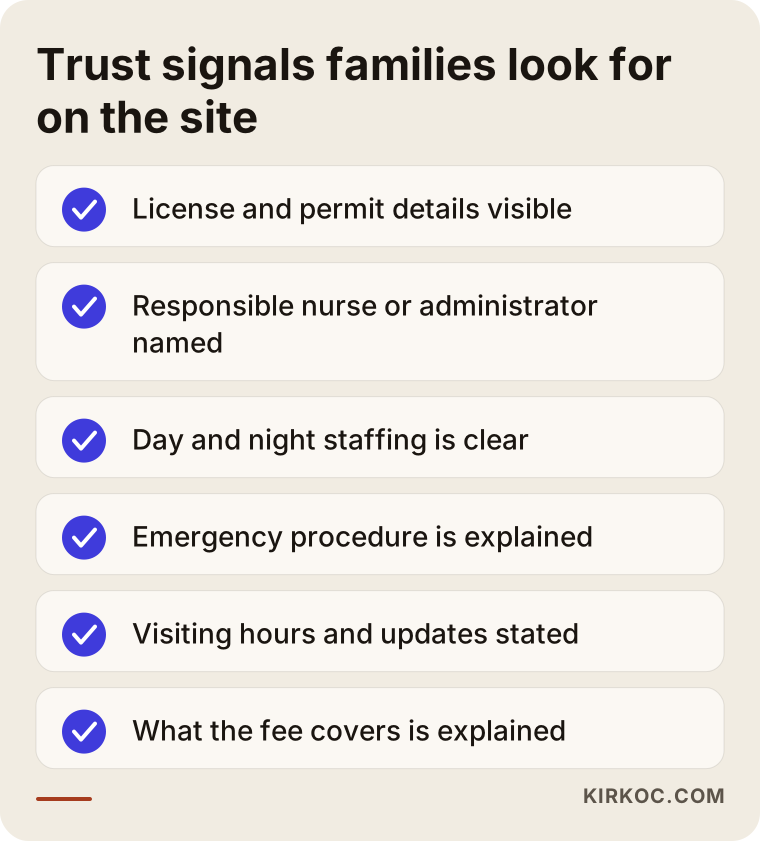
Every item on that list that you cannot tick becomes a task on your to-do list. You do not have to finish everything in one day. But as long as most of those items are missing, the site stays unfinished, however well designed it looks.
Reviews and family comments
Comments from families are a strong source of trust, but you have to be careful with them. Writing fake reviews is unethical, and if anyone notices, all trust is gone. Real comments need written permission, should avoid naming the person (a phrase like "a family member" is safer), and should leave out health details. The healthiest way to collect reviews is to let families leave them on your Google Business Profile voluntarily. I can help you plan how those reviews appear on your site.
Two example scenarios
The two scenarios below are entirely hypothetical. They do not describe a real business or person. I made them up only to show how different situations show up on a website.
Scenario 1: A small, newly opened care home
Imagine a new residential care home with twelve beds in Ohio. The owner is a nurse with many years of experience. The home has been promoted only by word of mouth and has an Instagram page but no website. Families look at social media first, then Google, and cannot find an answer to the question "is this place real?"
In a case like this, the first job is not a big, fancy site. It is a clear, honest one. The home page needs a short introduction, the name and experience of the nurse in charge, room photos, a description of daily life and a tour request form. After that come a services page and an FAQ page for local searches such as "residential care home Columbus." A Google Business Profile is set up, with the address and phone number written exactly the same as on the site. The advantage of this home is its size. It can tell families "you will talk to the same person from start to finish," and the site can say so openly.
Scenario 2: An established community with an old website
The second hypothetical example is a thirty-bed senior living community that has operated in a mid-sized city for many years. It is well known locally, but its website was built long ago: it does not open properly on phones, the photos are dated, all services are squeezed onto one page and the contact form does not work. Families open the site, close it right away, and some go to a competitor.
The problem here is not a lack of credibility. It is that the credibility does not show on the site. The fix is to make the site work on phones, split the services into separate pages, add current and real photos, write the team and daily life pages, and set up redirects from the old addresses to the new pages. Because the old site already has history with Google, redirects matter a great deal. Without them, years of built-up visibility can disappear.
What both scenarios share is this: first the basic information that gives a family confidence, then visibility in search. Reversing that order, trying to push up a site that does not feel trustworthy, may bring more clicks but will not bring more phone calls.
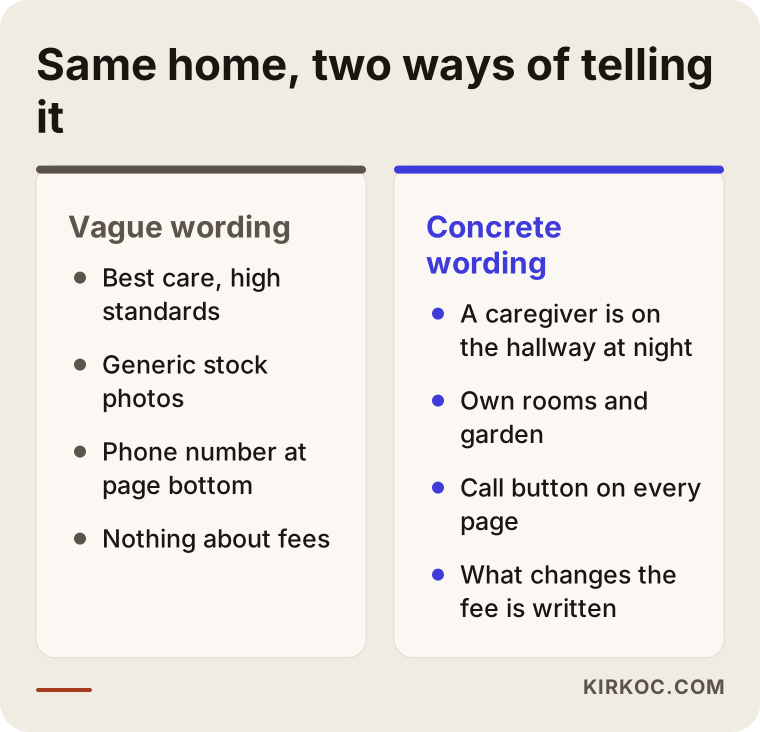
The comparison above sums up the difference between the two scenarios: same home, same care, different wording. In one version the family does not know what they would be getting. In the other they do.
Step by step: how I build the site
In this field it pays to go slowly and build solidly, because the site serves both the families and the people who work inside. I describe my way of working in five steps.
The first step is meeting and listening. You tell me what kind of place yours is, which families come to you, what sets you apart and what you do not want to talk about. The second step is the page plan: which pages there will be, which questions each one answers and which searches you want to be found for. The third step is content and photos. I write the text with you, and I tell you up front what I need from you for the photos. The fourth step is design and build: the site is made to open fast on a phone and to be easy to read. The fifth step is launch and follow-up: the site goes live, is introduced to Google, your business profile is tidied up, and in the first weeks I check what is working.
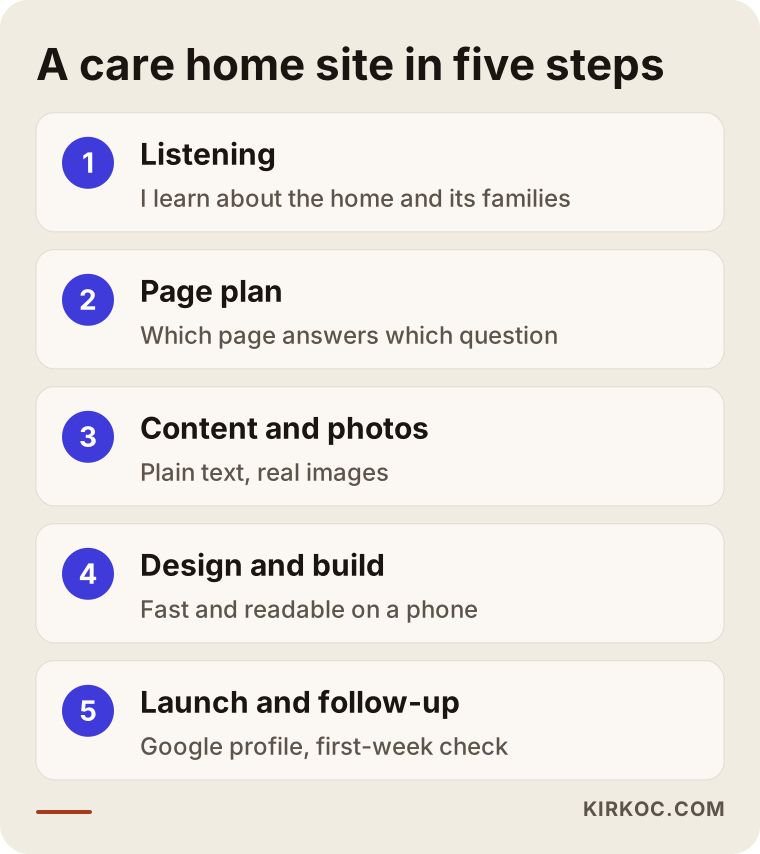
How long this takes depends on the number of pages, how ready your photos and text are, and how quickly you reply to me. Giving a fixed number of days would not be honest. What I do is give you an approximate calendar at the start and update it as we go.
Visibility: how families find you
Once the site is live, families can find you in two main ways. The first is search results. For searches like "assisted living near me," "memory care Phoenix" or "nursing home vs assisted living," you need separate, clear pages for each service and each area you serve. The second is Google Maps: your business profile should have the correct address, photos, opening hours and service details. Families often look at the map results first and then move on to the website.
More recently, some families also ask AI tools such as ChatGPT questions like "What should I look for when choosing a memory care community in Denver?" These tools build their answers from sources that are clear, well organized and trustworthy. If your site has a good FAQ and plain explanations, you have a better chance of being used in such answers, though I cannot guarantee that you will appear in any tool.
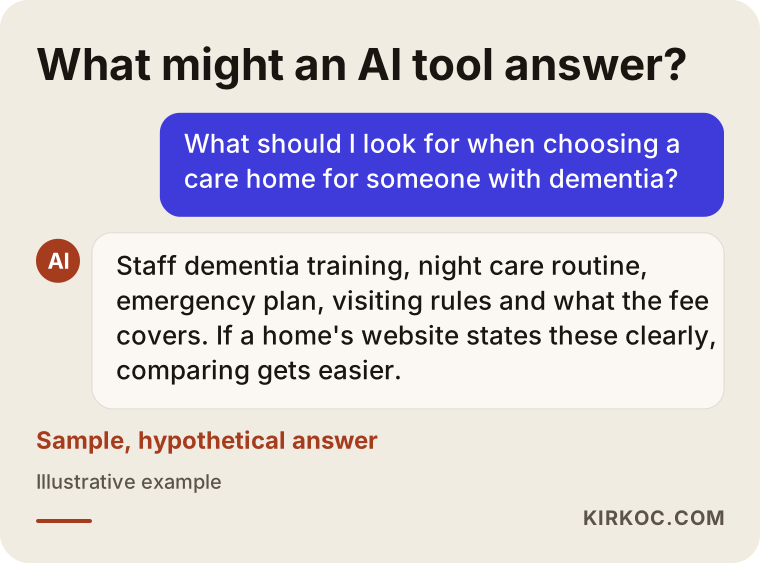
This sample answer shows how closely the checklist in an AI tool's answer matches the checklist in a family's mind. Both are looking for the same things: clear information, consistency and easy access.
The family's decision path and your site's job
A family's decision about senior care usually takes weeks. First the problem is noticed, then options are researched, a few places are visited, the family talks it over, and finally a decision is made. Your website plays a part not at one point on this path but at all of them. At the start it informs. In the middle it makes comparison easier. At the end it opens a safe door to a tour or a conversation.
You can picture this path as a funnel: at the top, many people are researching the problem, and at the bottom, very few book a tour. Some people drop out at every step in between. Your site should offer content suited to each stage to reduce those losses.
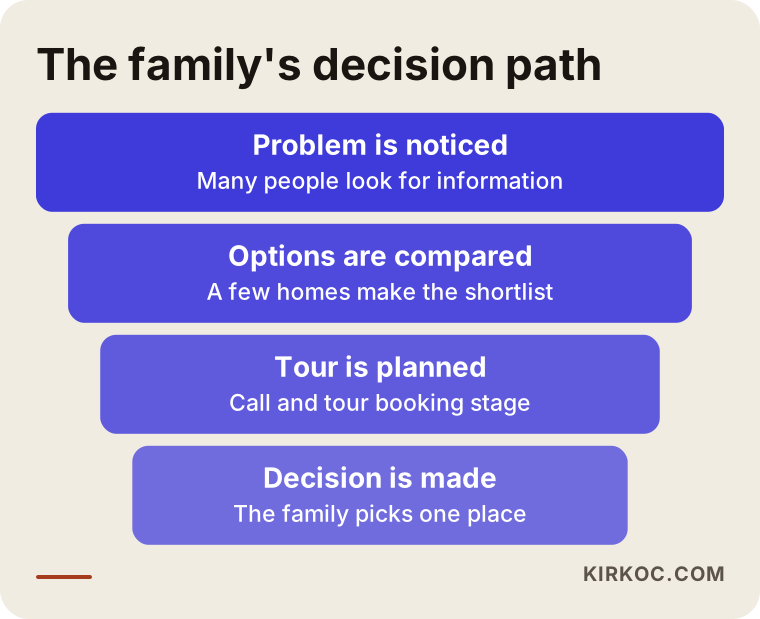
In the funnel, the widest part is the people looking for information. They have not chosen you yet, but if they read a helpful article or page, they remember you. A few weeks later, when they reach the comparison stage, they already know your name.
What mistakes do senior care sites make most often?
These are the mistakes I run into again and again on sites in this field. The first is squeezing everything onto one page, so the family cannot find what they came for. The second is relying on generic stock photos. The third is hiding the phone number. A relative dealing with an emergency who has to click three times to find a number will give up. The fourth is saying nothing about costs and what they include. Even if you do not publish a dollar figure, you can explain what the fee depends on. The fifth is exaggerated promises. Phrases like "the best care anywhere" or "100 percent satisfaction" cannot be proven and actually reduce trust. The sixth is never testing the site on a phone, even though most families look at it on one.
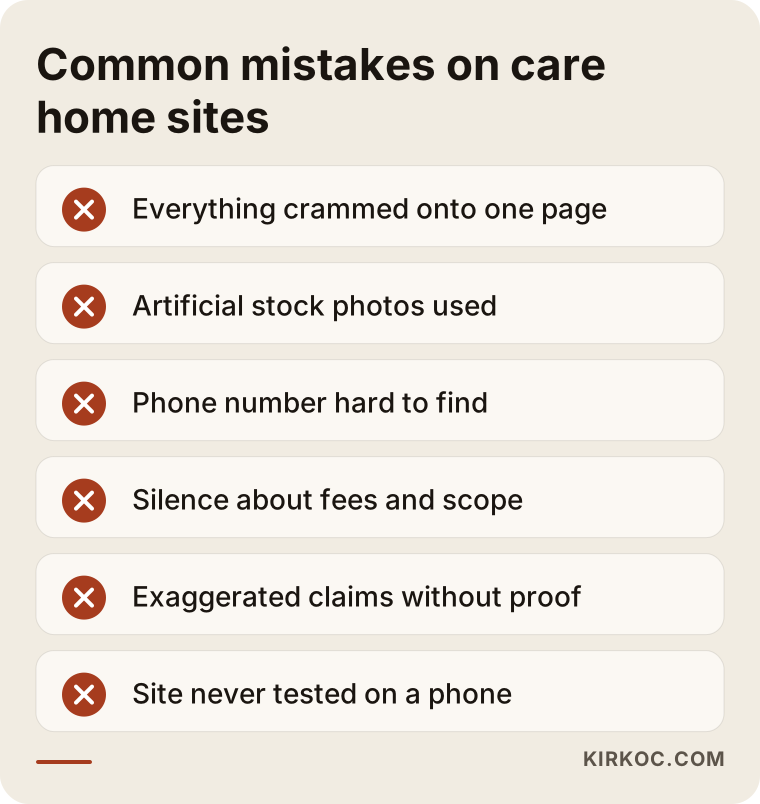
Most of these mistakes do not need an expensive fix. Often it is enough to simplify the text, swap a photo and put the button in the right place. The real problem is that no one notices them.
What can you do yourself, and when do you need an expert?
You do not have to hand everything to a specialist. There is a lot you can do on your own: take real photos, list the questions families ask you most often, write short introductions of your staff, open your Google Business Profile and note down the questions that come in from families. This lowers the cost and also makes the site sound like you.
You need expert help for these things: building the page structure, making the site open quickly and reliably on phones, planning visibility in search results, setting up redirects and technical settings, and making sure the contact form and phone button work. And if your form collects personal or health information, you should talk to an attorney about privacy notices and what rules apply to you.
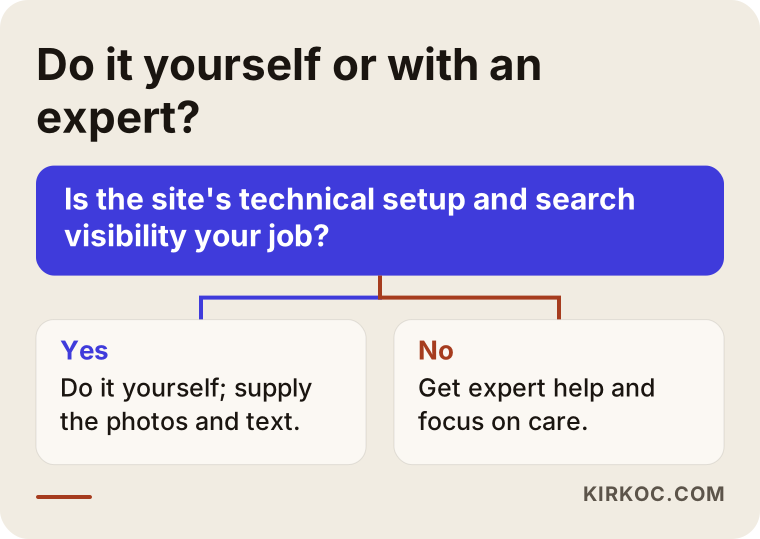
The decision tree rests on one simple question: is making the site work properly and be found your job, or is it too much on top of running a care community? If it is the second, outside help saves you time.
What determines the cost?
I will not give a number here, because there is no single price for a senior care website. But I can tell you clearly what moves the price. Number of pages: just a home page and a contact page, or a separate page for each service? Content: will you write the text, or should I write it with you? Photos: do you have usable pictures, or does a photo shoot need to be planned? Number of languages: English only, or other languages for families who speak them? Special features: a tour booking form, a virtual tour, a photo gallery. The state of your current site: a brand-new site, or a rebuild of the old one? Search visibility work: a one-time setup, or ongoing?
Based on those variables you get a clear scope and quote from me, in writing, showing what is included and what is not. When you collect quotes from anyone, always ask, "What happens after launch, and who handles maintenance and updates?" Over the long run, that is the item that affects cost the most.
Working with me
I work alone from Istanbul, which means the person you talk to, the person who builds the site and the person who supports you after launch are the same person. In this field that has a real benefit: care is sensitive work, and I understand how much your words matter without having to pass them along to someone else. I should be upfront about the downside too: I cannot take on many projects at once, so if my calendar is full I will tell you the start date in advance. I also work remotely, so we meet by video call or phone, and that is something you should be comfortable with.
While we work, I will not burden you with technical details. I explain what each thing is for in plain language, we make decisions together, and we go over the site together before it goes live. I tell you up front what I cannot do. For example, I never promise a ranking, because no one can honestly promise that.
Frequently Asked Questions
Does a senior care community really need a website?
Most families start the decision process online. If you have no site, or a weak one, families may move on to another place without ever seeing yours. Even for a small home, a clear site says, "this place is real and I can reach it."
Which pages are essential?
The home page, services, rooms and common areas, team, daily life, FAQ and contact pages make up the basic skeleton. If you offer something specific like memory care or respite stays, a separate page for each helps both families and searches.
Should I publish my prices on the site?
Whether to publish a number is up to you, but do explain what the price depends on. If you describe factors such as room type, level of care and extra services, a family can prepare before calling and the conversation goes more smoothly.
Can I use photos of residents?
For photos in which a face is visible, you need written permission from the resident or their legal representative. For the exact obligations, I recommend you talk to an attorney. Without permission, showing rooms, gardens, meals and activity spaces also builds trust.
How long does it take to show up on Google?
It depends on your area, your competition and the state of your site. I cannot promise a time frame or a position. Visibility in local searches and on Google Maps usually comes sooner, while general searches take longer.
Is it better to refresh my old site or start over?
If your old site opens badly on phones, has too few pages and a messy structure, starting over is often healthier. Either way, the old addresses must be redirected to the new pages, otherwise the visibility you have built up is lost.
Can I show family reviews on my site?
Yes, but only real ones, and only with permission. It is safer to leave out the person's name and any health details and use a general phrase. A fake review is unethical, and once spotted it destroys trust.
What do I need to do after the site is live?
Keep photos and information up to date, note the questions that come in, and reply to reviews on your Google Business Profile. If you like, I can take over that upkeep too, with its scope agreed in writing from the start.
If you would like to talk about what your assisted living community or care home needs to have a website that families trust, that opens quickly on a phone and appears correctly in search, you can write to me through the website design page. I will listen to your situation and give you an honest roadmap.