You run a campground or a glamping business. Most of your bookings come through booking platforms, and every reservation leaves a slice behind as commission. Your Instagram account looks great and your guests are happy, but when someone types "glamping near me" or "campground reservations" into Google, they do not find you. If they do, they often skip calling you and click a competitor's listing on the platform instead. In that situation, getting a website for your campground or glamping business sounds like a sensible move, but it is not obvious where to start. This article explains the job as it applies to your industry. I am Ümit Kırkoç, a web designer and SEO consultant who works alone from Istanbul, and I will be plain about what my website design service covers and what it does not.
First, one thing to be clear about: a website does not mean quitting the booking platforms. Platforms bring you new guests. Your own site helps those guests come back directly the second and third time, and it removes the commission on those stays. The two can work side by side. What matters is that your site is not just a showcase of nice photos but a tool that actually takes reservations.
Why does depending on platforms get expensive?
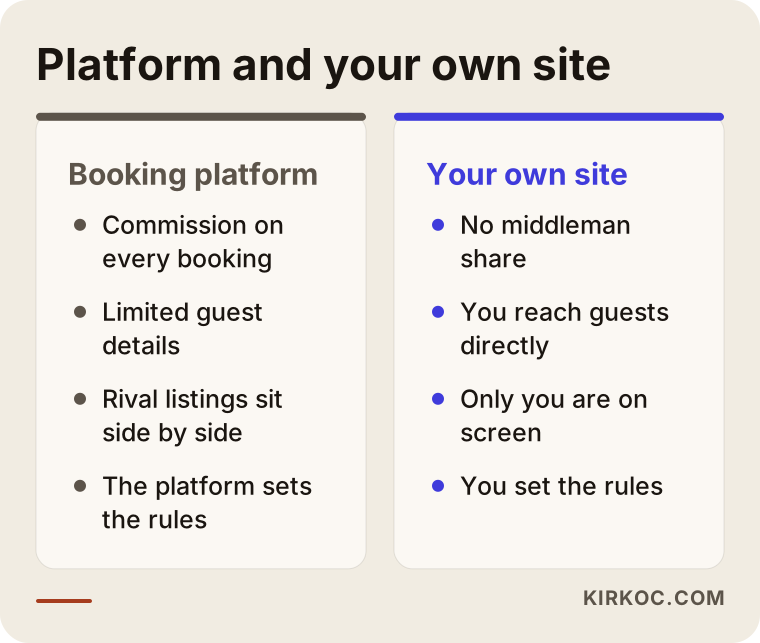
What a booking platform gives you is visibility. In return, it takes a share of every stay. That share looks small on a single booking, but added up over a season it becomes a serious line in your books. More importantly, on a platform the guest belongs to the platform, not to you. You usually see limited contact details, you cannot easily reach the same guest next year, and your prices and cancellation terms often follow the platform's rules.
There is also the competition. On a platform, your listing sits among dozens or hundreds of similar ones. A guest looks at price, rating and photos and decides in a few seconds. On your own site there is nothing to compare against. The guest sees only you, reads your story, and studies the inside of your tent, your morning view and your breakfast table in detail. That difference matters most for people who plan their trips well ahead.
The illustration below is a completely made-up example of what a guest sees on a search results page.
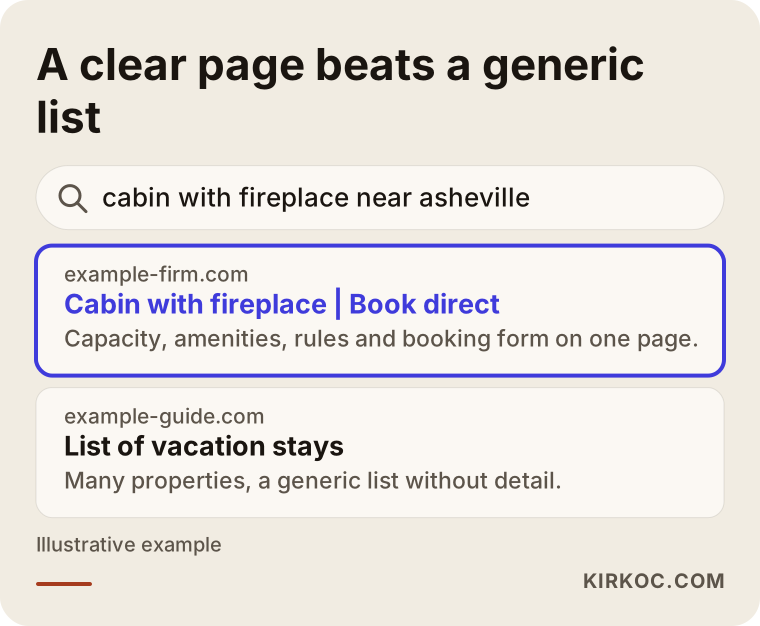
The highlighted result states the region, the type of stay and the booking option in its first line. A generic list page bundles many properties under one heading, so it does not give a clear answer to what the guest asked. Google tries to show the page that answers the question most directly. If you make that easy, your chances of being seen improve. There is no guarantee, but a clear page is always a better starting point than a vague one.
What does "commission-free booking" actually mean?
Commission-free booking means the guest books directly on your site and no middleman platform takes a cut. There are two different ways to do it. The first is a "booking request" form: the guest picks dates, enters their details, and you confirm by phone or message. The second is a booking calendar connected to your site with online payment: availability shows up automatically and payment is collected on the spot. For a small business the first route is often enough and much simpler to start with. The second makes sense as you add more units, or if you cannot watch your phone at night. For taking payments, invoicing and sales tax, talk to an accountant and read your payment provider's terms. I do not interpret those matters legally on your behalf.
The comparison below shows where a platform and your own site differ.
Honesty matters here: a website on its own does not bring guests. A platform delivers visibility from day one, while a site earns visibility slowly over time. So the sensible path is not to drop the platform but to build your site and gradually guide guests toward it.
How do campers and glampers search?
The biggest feature of this industry is that searches are very local and very seasonal. Saying "nature getaway" is rarely enough. Guests type a place, an experience or a need: "cabin with a fireplace near Asheville," "campground near Yosemite with RV hookups," "dog-friendly glamping," "quiet campground for families with kids." Each of these carries a different intent, and each deserves its own page.
Picture three different kinds of guests. The first is a couple looking for a weekend escape. They look for photos, care about the view and comfort, and wonder how long the drive is. The second is a family with children. They ask about safety, bathrooms and showers, the nearest medical help and activities. The third is a camper arriving with their own tent or RV. For them, electrical hookups, water, site size and nighttime quiet matter most. If one home page tries to satisfy all three, it usually answers none of them fully.
Searches also have a calendar. Planning for summer often starts in early spring, while last-minute weekend trips are searched a few days ahead. Your site should be ready, and known to Google, before the season starts. A site finished mid-season can miss most of that year.
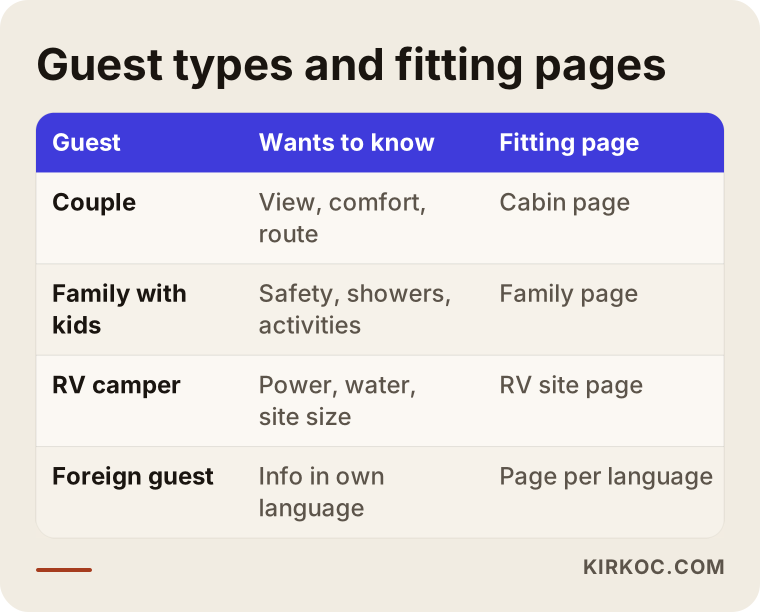
The lesson from the table: alongside your home page, your site should have a separate page for every type of stay you actually offer. When one page tries to explain everything, both the search engine and the guest lose track of what they are looking at.
"Near me" searches and the map
A large share of guests search straight on the map. That is why your Google Business Profile (the card that shows up for you on Google Maps) needs to be accurate and complete, and should say the same things your site says. Address, map pin, season dates, phone, photos and booking link should all match. The most common problem for campgrounds is that the road is hard to find and the map pin lands in the wrong spot. You can fix much of that with a "How to get here" page on your site, which I cover shortly.
Which pages should the site have?
Instead of a flashy site, you want one where the pages a guest needs to make a decision are clear. The image below shows the home page layout I recommend, as a simple sketch.
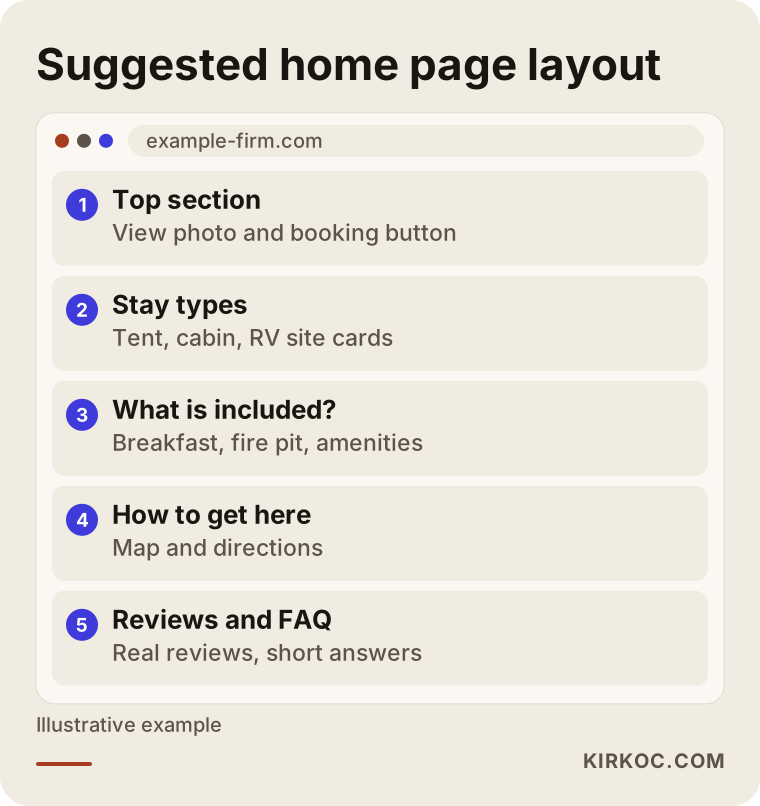
The logic is simple: within the first few seconds, a guest landing on the page should see where they are, what you offer and how to book. The rest of the page supports that decision. Let us go through the pages one by one.
Pages for each type of stay
Tent sites, cabins, tiny houses, dome tents, RV sites: each should have its own page. Each page should say how many people it sleeps, what is inside (bed, heating, bathroom, kitchen), show photos, explain what the price depends on, and offer an availability or booking link. The question guests ask most, "what is inside this tent?", should be answered with real photos. Blurry, filtered images pulled from social media do not build trust.
The area and "How to get here" page
Directions generate the most questions at any campground. Where you leave the main road, whether the last stretch is paved, gravel or dirt, whether a low car can make it, the nearest grocery store and medical facility, and whether cell service works or not: writing all of this down saves you pointless phone calls and reassures guests. A page about things to do nearby also helps the guest and makes you visible for searches like "hiking and camping near" your area.
Rules, FAQ and cancellation terms
Do you accept pets? Are campfires allowed? Are there quiet hours? What are the check-in and check-out times? How do cancellations and refunds work? When these are written clearly on one page, most post-booking disputes never happen. Before you word your cancellation terms as firm legal language, I suggest having an attorney look at them.
Photo and video gallery
In this industry visuals are everything, with one catch: large, heavy images slow a site down. Rural areas often have weak cell signal, and if a page opens slowly the guest goes back to the platform without waiting. Photos need to be uploaded at the right size and compressed. I handle that while building the site.
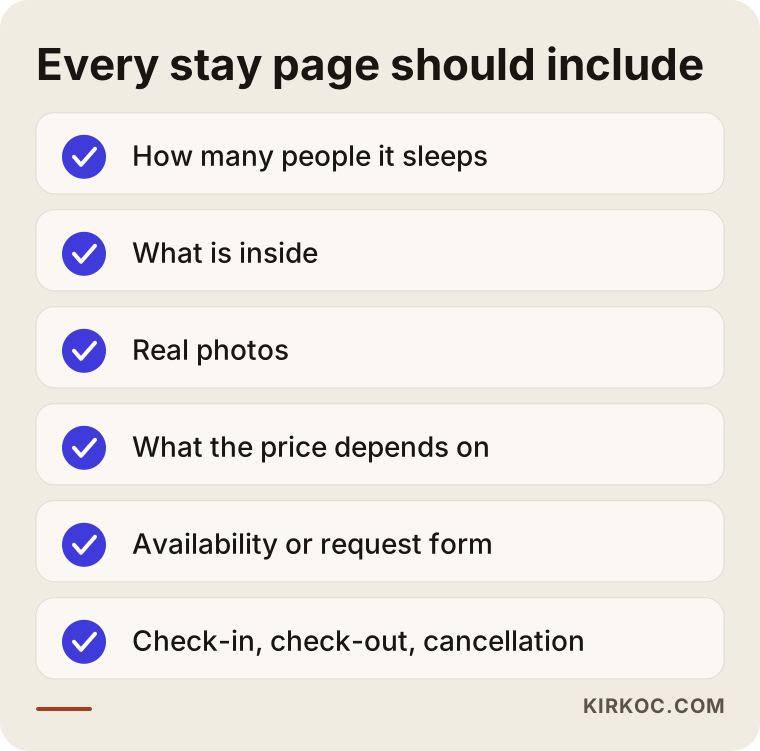
Most items on the checklist need no technical knowledge, only careful thought. Preparing them often takes longer than building the site, because the business owner collects the photos, text and rules. Starting that preparation early shortens the time to launch.
How do you take reservations?
This is the most critical part of the site. There are three common methods, and each has pros and cons.
A booking request form. The guest enters dates, number of people and contact details; the form reaches you, and you reply by phone or message. It is the simplest and cheapest to set up and suits businesses without many units. The downside is that the guest waits as long as you take to reply. If the reply comes late, the guest may go elsewhere.
Booking by text message or a messaging app. Many guests prefer sending a message to making a phone call. A prominent text or messaging button on the site can open with a pre-written message such as "I would like to check availability for this tent." It is a practical solution, but keeping records and avoiding double bookings stays your responsibility.
Online calendar and payment. Available dates show up automatically, and the guest books on their own and pays a deposit. It lowers the risk of double bookings and catches requests that arrive late at night. The downside is that setup and payment infrastructure take more effort and cost. Remember also that a payment processor charges its own fee. That is usually structured differently from a platform commission, but it is not zero. So when you use the word "commission-free," be honest: the middleman platform's share disappears, while a payment processing fee may remain.
For most small businesses, I recommend starting with a request form and a messaging option, then moving to an online calendar as the number of units and the demand grow. Building a complicated system you never use is worse than having no system at all.
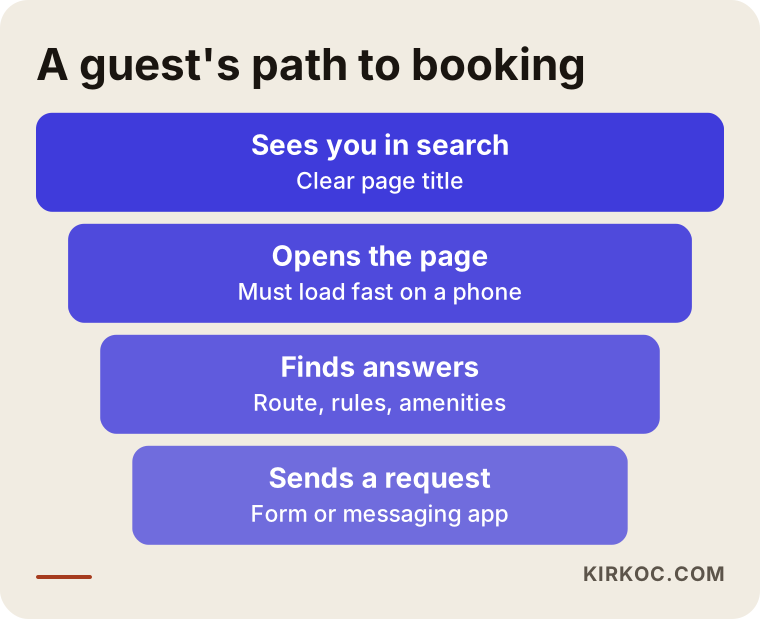
The funnel is a reminder that some guests drop out at every stage. A site that does not appear in search never gets opened. A page that loads slowly does not get read. A guest whose questions go unanswered does not fill out the form. The job of the site is to reduce those losses one by one.
Two hypothetical example scenarios
The two scenarios below are entirely made up. They do not describe a real business or person. Their purpose is to show how the same job goes differently in different situations.
Scenario 1: A small, family-run campground
Suppose you run a small campground on a lakeshore with tent and RV sites. Most reservations come by phone and through one platform. You have few units and the season is short. In that case you do not need to spend all your energy on a big reservation system. My suggestion would be: a clear home page, two separate pages for the tent and RV sites, a detailed "How to get here" page, a page with your rules, and a visible text-message button plus a request form. Your Google Business Profile should show the same information as your site. A setup like this is built quickly, is easy to manage, and can cut down phone traffic even in the first season. In the second season, an online calendar can be added if demand calls for it.
Scenario 2: A glamping business with several different units
Now imagine a glamping site in the woods with four types of lodging: a dome tent, a treehouse, a small cabin and a family tent. Your guests come from your own country and from abroad. This business needs a separate page for each unit, a calendar for each, and a site in more than one language. A foreign guest may be searching in another language, so a translated version has to be written around that guest's questions, not simply converted word for word. An online calendar and deposit payment make sense here, because you may not be able to answer a foreign guest who writes late at night until morning. This scenario is a bigger job and needs more preparation and upkeep.
The difference between the two scenarios is not about "how fancy a site," but about "what your business actually needs."
Step by step: how a campground site gets built
In this industry I recommend always running the job in the same order, because when the order gets mixed up, both time and effort are lost.
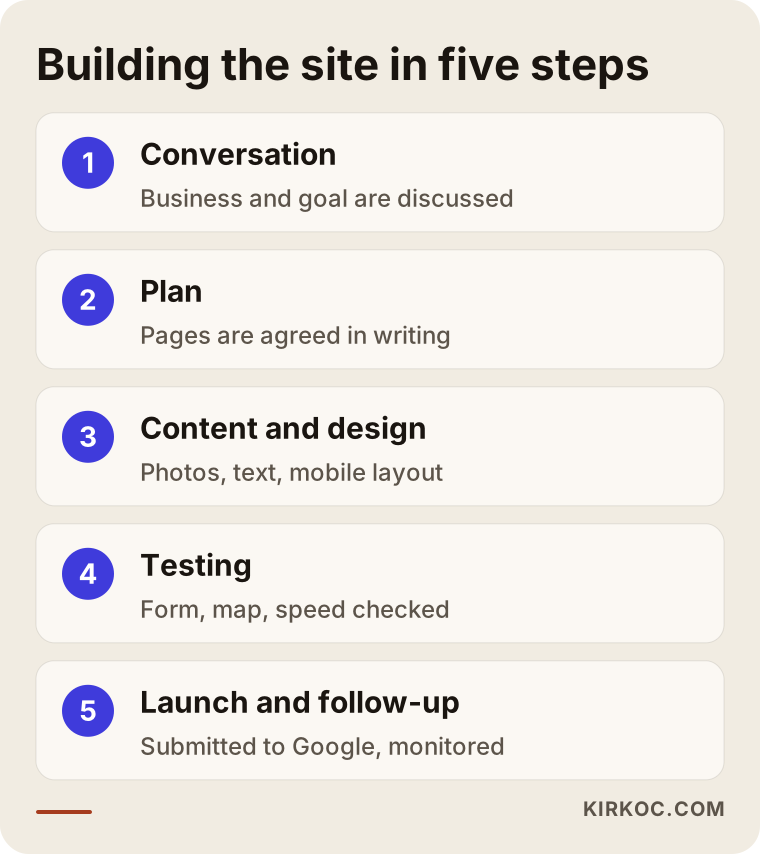
Step one, the conversation. I listen to you about your business, your guests, your current platforms and your goal. I ask which units you want filled, which months stay empty and who your guest really is. I do not expect any technical knowledge from you in this conversation.
Step two, the plan. I put into a written plan which pages will exist, which searches they will answer and how reservations will be taken. I do not move on to design until you approve it.
Step three, content and design. I collect the photos, text and rules from you. I write the copy to be plain, accurate and close to the way you talk. The design is prepared to read comfortably on a phone, because most guests look at the site on their phone.
Step four, testing. I try the booking form, the messaging button, the map and the page speed on real devices. If the form does not work, the request a guest sends disappears, so I never skip this step.
Step five, launch and follow-up. The site goes live, is submitted to Google, and in the first weeks I check what is working. Results take time. Nobody can guarantee you a particular ranking or a particular number of bookings, and I do not.
Common mistakes
Listing the mistakes I see most often in this industry can give you a checkpoint.
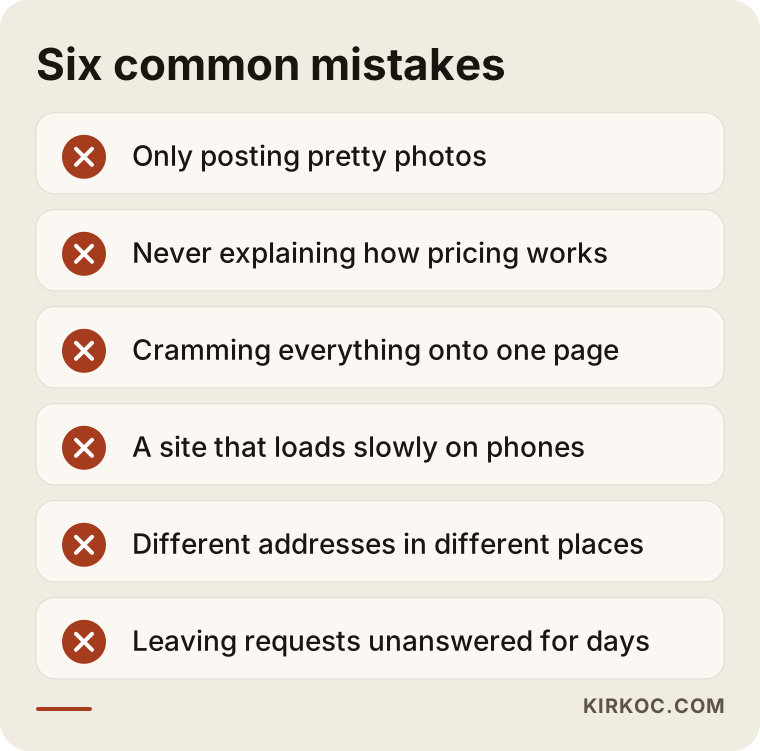
Posting only pretty photos. Photos matter, but they are not enough alone. A guest looks at the photo and asks, where is the bathroom, is the water drinkable, is it safe for kids? If those answers are missing, they give up.
Hiding pricing completely. You do not have to publish an exact number, but you should explain what the price depends on (season, weekends, number of guests, type of unit). A guest who gets no idea at all will not dare to call.
A one-page site. Fitting everything on one page looks practical at first, but for a search engine it means one topic and one page. You end up competing for "tent," "cabin" and "RV" searches with the same page.
A site that loads slowly on phones. Big images, needless plugins and heavy videos can make a page unusable in rural areas.
Inconsistent maps and addresses. If your site shows one address, your business profile another and a platform a third location, both guests and search engines get confused.
A form you do not answer. Setting up a form and leaving requests unanswered for days is worse than having no form. Make sure notifications reach your phone.
What can you do yourself, and when do you need an expert?
You do not need to hand everything to a specialist. Some things you can do today without anyone's help.
Open or update your Google Business Profile: correct address, phone, season dates and current photos. Make sure it matches exactly what your platform listings say. Collect your own real photos for each unit. Write down on a sheet of paper the ten questions guests ask most; those are the raw material for the site's FAQ. Ask happy guests, with their permission, to leave a review. None of this costs money.
Where you need an expert is this: planning pages around real searches, making the site fast on a phone, setting up the booking form and calendar reliably, connecting payments, and making sure Google reads the site correctly. These are technical and hard to notice when done wrong.
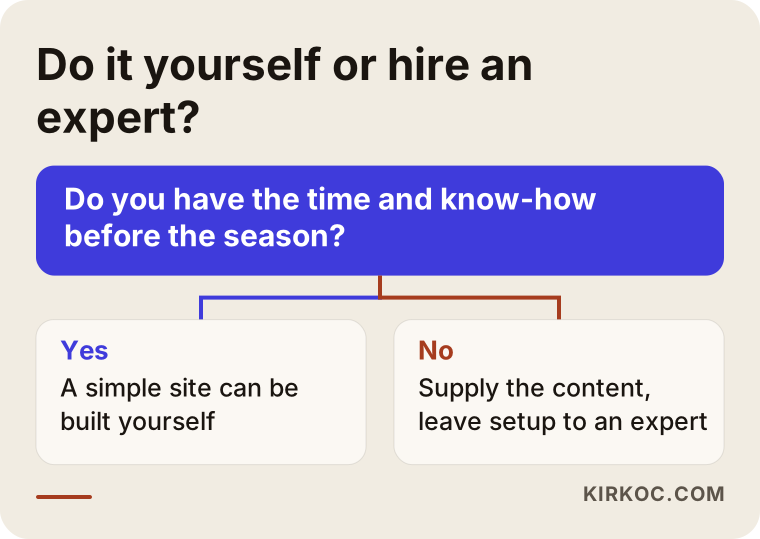
The test in the decision graphic is simple: think about your time and your season schedule. Fiddling with a website as the season approaches eats into the time you have for your guests. For most business owners, the most efficient path is to supply the content yourself and leave the technical part to an expert.
AI assistants and your campground
Some guests now ask AI assistants such as ChatGPT instead of Google: "Can you suggest a quiet glamping spot for a weekend with kids?" These assistants look to clear, well-organized, trustworthy sites as sources when they answer. If your site spells out the stay types, the rules and the location, that helps with Google and with those assistants alike. Even so, there is no guarantee that any assistant will mention your name. What you can do is make your information accurate and easy to reach.
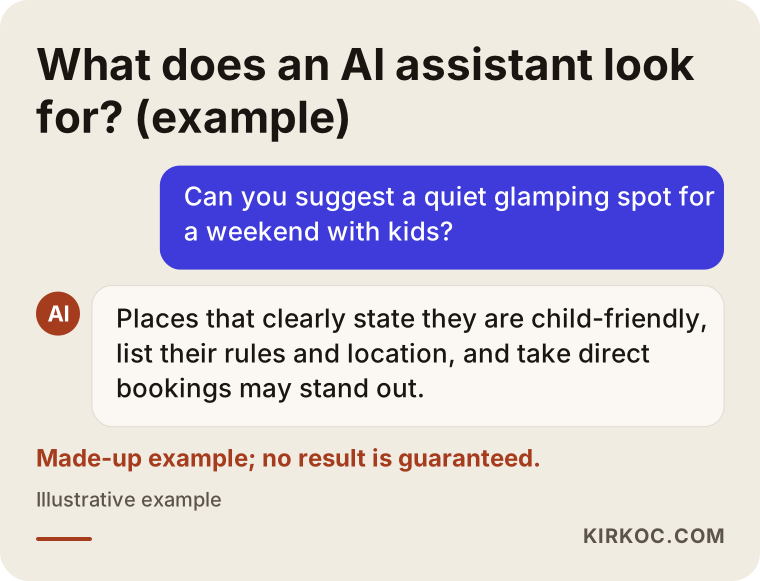
The sample answer is made up, but the logic is real: the assistant looks for the details that will help the person asking, such as child-friendliness, location and rules. If your site lacks those details, the assistant has to pull them from somewhere else.
What determines the cost?
I do not give numbers, because every business needs something different, but I can tell you plainly what sets the price.
The first factor is the number of pages: a business with one type of stay and a business with ten units are not the same job. The second is the booking method: there is a clear gap between a simple request form and an online calendar with payments. The third is the number of languages; every extra language means content written for that language's guest, not just a translation. The fourth is content: if you bring photos and text ready, the time is shorter, and if you want everything written from scratch, it is longer. The fifth is your need for upkeep and updates after launch; as prices, season dates and rules change, the site has to be kept current. Finally, the scope of the SEO work shows up in the cost too. Whether the site is only built, or whether work on search visibility continues after launch, is a separate decision.
When you ask for a quote, ask for what is in and what is out in writing. Ask: is the reservation system included, is the payment setup included, is photo editing included, is there support after launch? A quote with vague answers carries the risk of extra costs later.
How I work
I work alone, which means the person you talk to is the person doing the job. There is no middleman and no chain that passes you from a sales rep to a technical team. I am based in Istanbul, but I run the work mostly online, so the process is the same wherever your campground is. If needed we can talk over video, and I collect photos and content through file sharing.
I take on a limited number of projects at a time, which can mean your job waits in line during the busy period before the season. That is why I suggest starting the conversation at least a few months before the season begins. The site is yours: the domain name, content and accounts are set up in your name, so they stay with you even after I step away.
Frequently asked questions
Do I have to quit the platforms completely?
No. Platforms keep bringing new guests. Your own site aims to bring some of those guests directly to you next time and to let new guests find you directly. Pointing guests to your site from a platform listing may break the platform's rules, so read each platform's terms and, if needed, talk to an attorney.
Is commission-free booking really free of cost?
The middleman platform's share goes away, but it is not zero cost. You have the site, the domain name, hosting, possible payment processing fees and upkeep. You should see these laid out clearly in a written quote.
How long does the site take?
It depends on the number of pages, the booking method and how ready your content is. Handing over photos and text without delay shortens the time noticeably. Because of the pre-season rush, starting early is the safest route.
Will I rank first on Google once the site is built?
Nobody can guarantee that. A properly built site that gives clear information and opens fast improves your chances of being seen. Results take time and vary with competition, location and the type of search.
Should I take the photos myself?
Real photos taken in good light are the most valuable part of the site. You can get good results even with a phone: use morning and evening light, and photograph the inside and outside of every unit, the view and the shared areas. Working with a professional photographer can also be a good investment.
Can I update the site myself later?
Yes. A setup can be built so you can change price notes, season dates and announcements yourself. For technical changes, getting support is safer.
Do I need an English or other-language page for international guests?
If your guest profile includes international visitors, yes. It should be a version written around that guest's questions, not just a translation. If you have no international guests, it may not be needed in the first stage.
Is an Instagram page alone enough?
Instagram is strong for promotion, but a social media account does not always make you findable in search, and it is not a good place to keep bookings, rules and location information in order. The two work better together.
If you want a site for your campground or glamping business that takes direct reservations, opens quickly on a phone and answers your guests' questions, write to me through my website design page. I will listen to your business and tell you honestly what it actually needs.