Your kitchen runs well, your crew is experienced, and you can name a few corporate clients who keep coming back. But the phone mostly rings because of word of mouth. Someone types "caterer for our office lunches" into Google and either never finds you, or finds you and cannot see your menu, your pricing logic or your capacity, so they move on to the next company. If that picture sounds familiar, a good website for your catering company is the place to start. In this article I explain which pages a catering or contract food service business needs, how different customers search for you, and how a site turns into something that actually brings quote requests. I am Ümit Kırkoç, I work from Istanbul, and I handle website design together with the other digital work as one person, so I will try to keep everything here honest and free of hype.
Let me set one thing straight first. In catering, a website is not a brochure. A person buying food service for a company is not booking a table at a restaurant. They are managing a job: an event date, a headcount, a budget, an office or a factory, sometimes a contract that lasts for months. So the job of your site is to take a visitor to the point of "this company knows what it is doing" and then get them to ask for a quote.
How do catering customers search for you?
People who need a caterer are very different from one another, and each of them searches with different words. A site that ignores this ends up saying the same sentence to everyone and convincing nobody.
The first group is corporate buyers: an office manager, an operations lead or someone in HR. They search for things like "office lunch catering," "factory meal service" or "employee meal provider." They want weekday food, on a schedule, again and again. Their worry is reliability before flavor: on-time delivery, hygiene and clean invoicing. The first question in their head is "can I trust this company?"
The second group is event hosts: weddings, engagement parties, birthdays, product launches, seminars, openings. They search "cocktail party catering," "wedding catering" or "coffee break for a meeting." They decide for a single day and usually expect a fast reply. They want to see the menu options, what is included per person and whether your date is free.
The third group is institutions such as schools, hospitals, dormitories and construction sites that need a contract or are going through a bidding process. These readers ask for paperwork, capacity and references, and the first thing they check is whether you can handle a job of that size.
The fourth group is small, one-off buyers: a house party, a boxed lunch for a single meeting, a year-end gathering. They tend to search "catering near me" or a neighborhood name and then look at the map results.
You cannot serve all four groups with one home page. A good catering site has separate pages that speak each group's language.
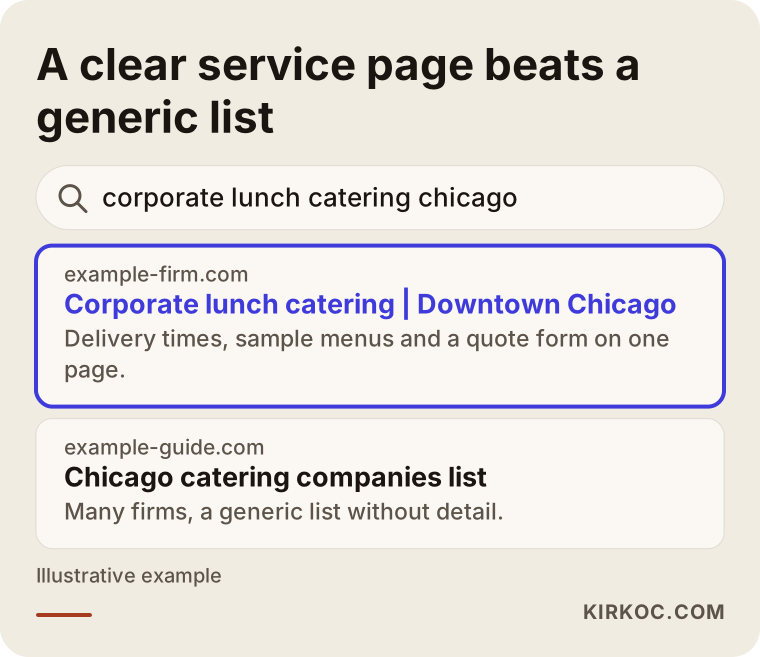
In the example above you can see a page that states the service and the area clearly outranking a generic directory-style list. Keep that idea as a rule while you plan your pages: every search intent deserves one page that answers it.
Before the site: write down what sets you apart
There are a few questions you should answer for yourself before anyone builds anything. In catering, almost every company says "quality, fresh, fair prices," and that sentence tells the reader nothing.
What kind of work do you do best? Feeding several hundred factory workers every day and serving a fifty-person cocktail reception need different kitchens, different equipment and different staff. Instead of claiming you do everything, pick the place where you are truly strong.
Which area do you serve? If you do not state your delivery range, you will waste time on quote requests from places you cannot reach. And a customer who is inside your range may hesitate because they are not sure you would come to them.
What are your minimum and maximum capacities? Writing down your headcount limits keeps you from looking too small or too big, and the right customers will sort themselves out.
Which documents and processes do you have? Make a list of how you can prove food safety: your food business registration or license, hygiene training, cold chain practices, staff health checks. The requirements differ by country, state and city, so confirm the details of what you must hold and how you may display it with your local health authority or a qualified professional. I am not making legal claims here. I am only explaining how to present these things on a site.
Once these answers are on paper, most of the site copy practically writes itself.
The pages a catering site needs
The structure should be simple but complete. The pages below follow the way customers in this industry actually move.
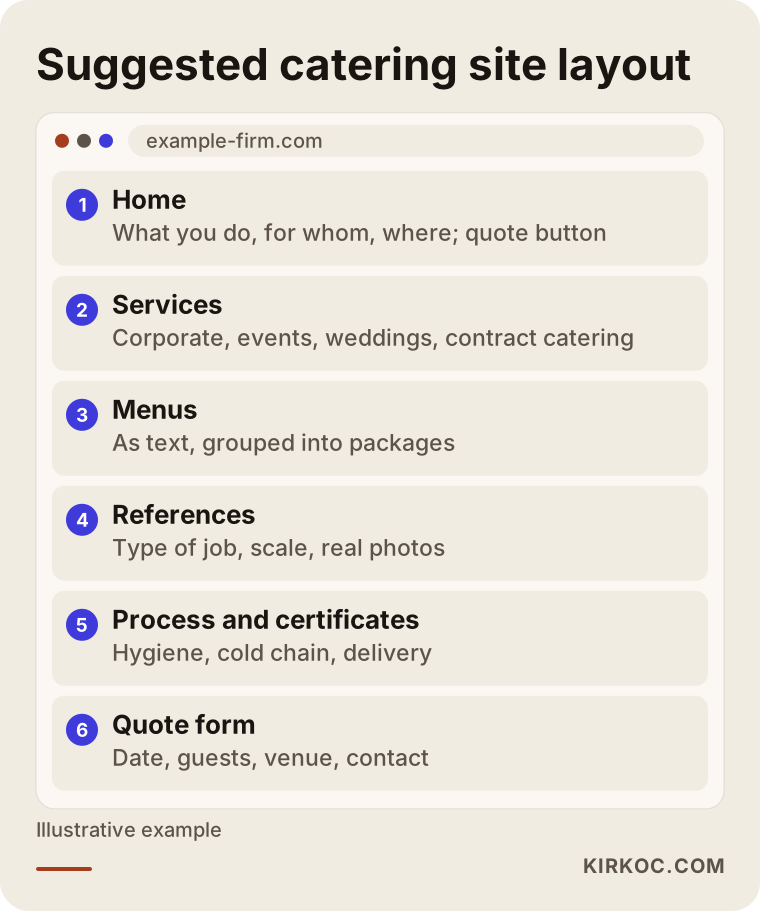
The suggested layout is in the picture. Let me go through each section.
Home page
The home page has to tell a visitor within the first five seconds what you do, for whom, where, and how to reach you. Use concrete sentences, not slogans. For instance: "Daily lunch for companies, cocktail and plated menus for events." Right below it, put two clear buttons: request a quote and call. If the phone button stays fixed at the bottom of the screen on mobile, a decision maker with the phone in their hand can call you with one tap.
Service pages
Open a separate page for each type of service: corporate lunch, events and receptions, weddings and engagement parties, contract and institutional catering. Each page should answer the questions of that customer type. The corporate page covers delivery times, individually packed meals versus trays, and monthly planning. The event page covers menu types, service staff, equipment and setup. Copying the same text and changing the heading bores both the customer and the search engine.
Menu pages
Menu pages are the most visited part of a catering site. Three mistakes are common here: uploading the menu as a PDF, using low-quality photos, and not saying what each dish contains. A PDF is hard to read on a phone and weak in search. Put the menu on the page as text, with a short description next to each item and, if possible, allergen information. Selling menus as packages also helps, for example a "coffee break package" or a "standing cocktail menu." Whether to publish prices is your choice. If you do not, explain what the price depends on, so the visitor understands that it is a custom job and asks for a quote.
References and gallery
What a corporate buyer wants most is evidence that someone like them has already worked with you. On the references page you may not need to name the client. Describing the type of job, the scale and how long it has run is often enough. Do not use anyone's name or logo without written permission. Photos should come from your real kitchen and your real service. Generic stock images hurt trust.
About and process
A page that explains how the kitchen works is missing from most catering sites. Describe sourcing, preparation, cold chain, transport, service and cleaning in a few short steps. Write it the way a tradesperson explains their work to a customer, not like an engineer writing a manual. Someone considering a contract will use this page to answer "who does the job, and how."
Contact and quote page
The form here should be short but ask the right questions. Event date, number of guests, venue, type of service and one contact detail are usually enough. Forms with many fields do not get filled in. Put your phone number, a messaging option and an email address next to the form too, because a corporate buyer sometimes prefers to talk rather than type.
How to think about the quote form
The customer you lose most often in catering is the one who never gets an answer. Someone fills in a form in the evening, hears nothing by the next afternoon, and asks another company. So the site's job is not just to show a form. You also need to plan how the information reaches you. The form should land in your email and, if possible, trigger a notification on your phone. The sender should immediately see a confirmation such as "We received your request and will reply within a set time." Make sure that promise is one you can keep.
Under the form, describe your process in three lines: you receive the request, you clarify the menu and capacity, you send the quote. When customers know what happens next, they find it easier to write.
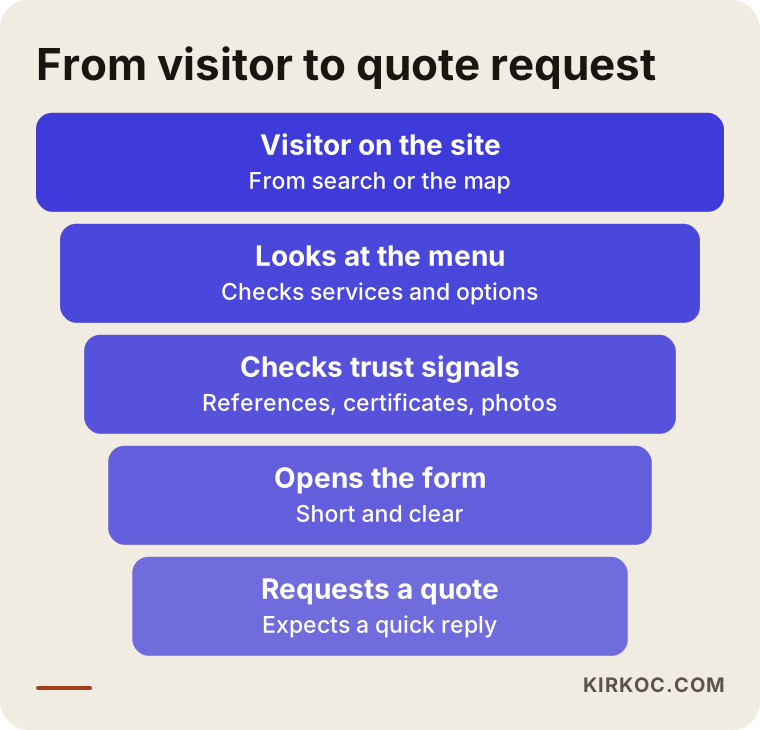
As in the funnel, the number of visitors drops at every step. The goal is to notice that narrowing and improve the step where you lose the most people.
How do you build trust with a corporate customer?
Catering is less about selling a food product and more about selling responsibility. An office is entrusting you with lunch for a hundred people. A food problem does not just ruin one day, it can end the relationship completely. So trust elements belong on the site as decision tools, not as decoration.
Trust signals you can put on the site include: real photos of your kitchen, a short introduction of your team, a brief description of your cold chain and hygiene practices, your current certificates and training if you have them, the types of jobs you take, and clear answers to common questions. Keep everything measured. Avoid words like "flawless" and "the best." Details build trust, not exaggeration.
Another important point is that your contact details must be visible. A site without an address, a map, opening hours and a real phone number makes a corporate buyer suspicious. Showing your legal business name and tax details in the footer also reassures companies that need to be invoiced. For how those details should be shown where you operate, ask your accountant.
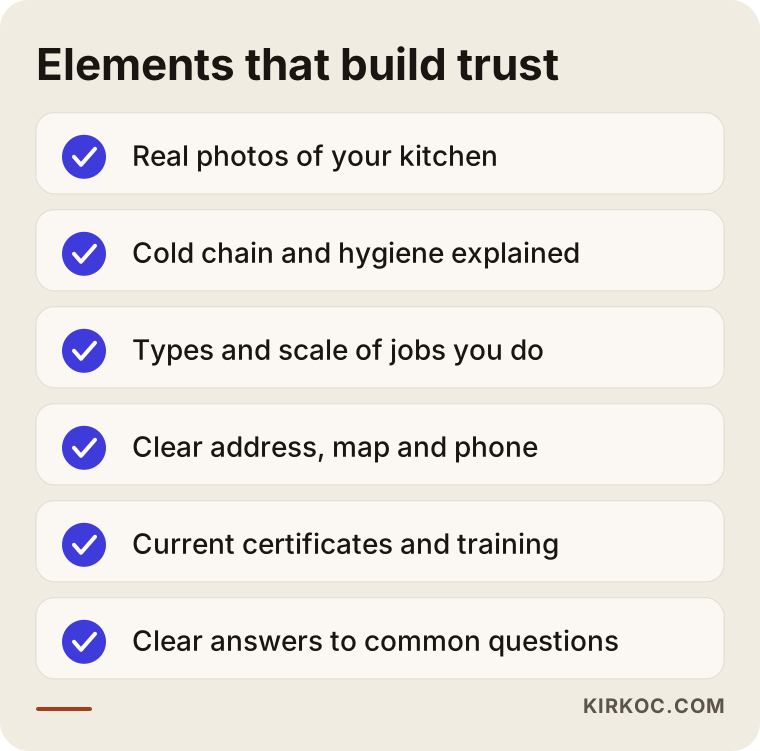
If you can tick off the items on the checklist one by one, you are in a good position on trust. Carry the ones you cannot tick into the next section and into your plan for the coming months.
Local search: map results and neighborhood searches
Local search is critical for a caterer, because food service is tied to geography. A company in one city cannot serve daily lunches to an office in another. When people search "catering near me" or "catering downtown," Google shows map results. To appear there, your Google Business Profile has to be complete: the right category, address, opening hours, the areas you serve, photos and customer reviews.
On your own site, state your service area concretely. Put the cities or districts you deliver to on one page. You do not need a separate page for every neighborhood, but for areas where you really get a lot of work and a different type of customer, a separate page can make sense. Adding the area name to the title is not enough. Give information that is specific to that area, such as delivery time, popular business parks or event venues.
Do not neglect reviews. Politely ask a satisfied customer to leave a Google review shortly after the job is finished. Replying to reviews leaves a good impression on both the customer and the next prospect. Writing fake reviews breaks platform rules, and once noticed, it destroys trust.
Example scenario 1: a small company serving office lunches
This is a purely hypothetical scenario. Imagine a small caterer in a mid-sized city that produces lunch for around a hundred and fifty people a day. The owner works with clients found through acquaintances, and the website is a single page with a phone number and three photos. The company wants new customers but receives no inquiries from the internet.
The steps could go like this. First, the service is defined clearly: only corporate lunch, or events too? The company decides its real business is office and small factory meals. Next, a "corporate lunch" page is written, covering delivery times, minimum headcount, how weekly menu planning works, diet and allergen options, and the contract process. A sample weekly menu sits on the page as text. An area page lists the business parks the company serves.
A Google Business Profile is opened and real photos from the kitchen and the delivery vehicle are added. A satisfied customer is asked for a review. The quote form stays short: company name, headcount, delivery address, meal frequency. Every request reaches the owner by both email and phone.
I cannot promise a result from this setup. How many inquiries come depends on the area, the competition and your pricing. But at least there is now a site that matches the words people search, answers their questions and makes contact easy. Before, none of that existed.
Example scenario 2: an event and wedding caterer
The second scenario is also hypothetical. Picture a company that serves cocktail and plated food at weddings, engagement parties and corporate events in one city. Their photos are beautiful, but a visitor cannot work out what they could get, for how many people, at what price, so they send a direct message on Instagram and the conversation drags on.
What matters most for this company is a structure that screens and guides visitors at the first stage. Menu packages are explained clearly: "standing cocktail," "seated dinner," "coffee break." The scope of each package is written out: how many items per person, whether service staff is included, whether equipment rental is separate. Even without a price figure, the things that affect price are stated openly: guest count, venue, season, service length and menu contents.
The gallery is split by event type. Someone planning a wedding goes to wedding photos; someone planning a corporate event goes to launch and seminar photos. The quote form starts with a date field, so if you cannot work on that date, you find out at the first step. Instagram content links to the site and the site links back to Instagram, so the two channels feed each other.
In this scenario, planning social media and the site together makes the difference. If an Instagram photo does not lead to the menu page on the site, interest is lost. That is why I prefer to run this kind of work in one place rather than splitting it up: site, local search, social media and, if needed, ads should all say the same thing.
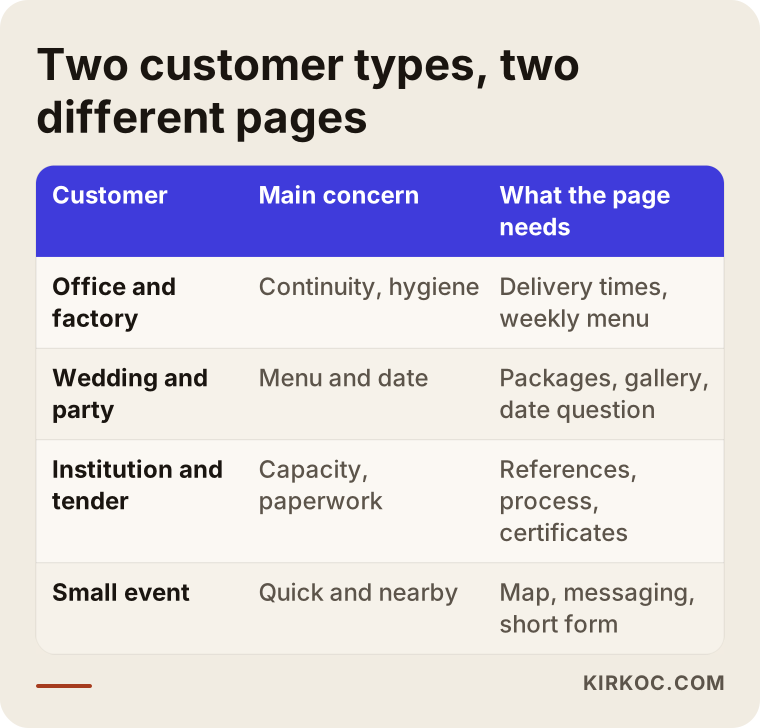
The table sums up the different expectations of the customer types in the two scenarios and the page that fits each. When you plan your own site, adapt it to your own customer types.
Step by step: how the site gets built
For a catering site the process has clear steps. At the end of each one, you should know what you have.
Step one is a conversation and goal setting. I ask which customer type you want work from, which area, what capacity, and who your competitors are. At this stage the site structure and the pages you need are decided.
Step two is content preparation. Menus, service descriptions, a process explanation, frequently asked questions and photos are gathered. If you have no photos, a shoot is planned. I write the copy from the information you give me, because nobody knows your business better than you, but explaining it well is a separate skill.
Step three is design and build. Pages are made to work comfortably on mobile, since a large share of catering customers look at the site on a phone. Speed, readability, large buttons and a simple menu belong to this stage.
Step four is search engine preparation. Page titles, descriptions, area information, your Google Business Profile and the basic technical settings are done. Tracking for the form and phone taps is set up, so you can see which page brings requests.
Step five is launch and testing. I check with you that the form really reaches you, that the buttons work on mobile and that the menus display correctly.
Step six is follow-up after launch. In the first months I watch which searches you appear for, which pages get visits and how many requests come in, and missing pages are completed. If you want social media or ad support, that is planned in the same place.
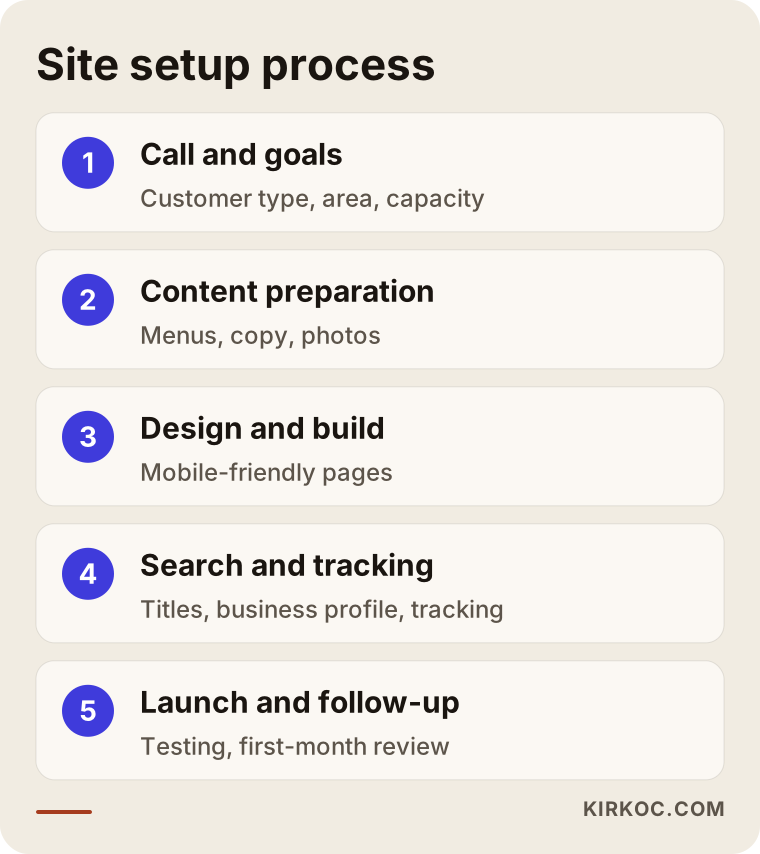
The process image shows the order of steps and what each one produces. The timeline differs from job to job, but the order stays largely the same.
Time and schedule
How long a catering site takes depends mostly on how quickly the content arrives from you. If menus, photos and documents are ready, it goes faster; if they are collected along the way, it takes longer. If I must estimate, a simple structure with few pages comes together in a few weeks, while a larger or multilingual one takes more time. I give a firm timeline after listening to what you need, because promising one up front would not be honest.
After launch, search results do not form in a few days. They usually develop over weeks and months. A new site needs time to earn Google's trust. During that time, ads and social media can be a way to bring in first inquiries without waiting, but that is an option, not a guarantee.
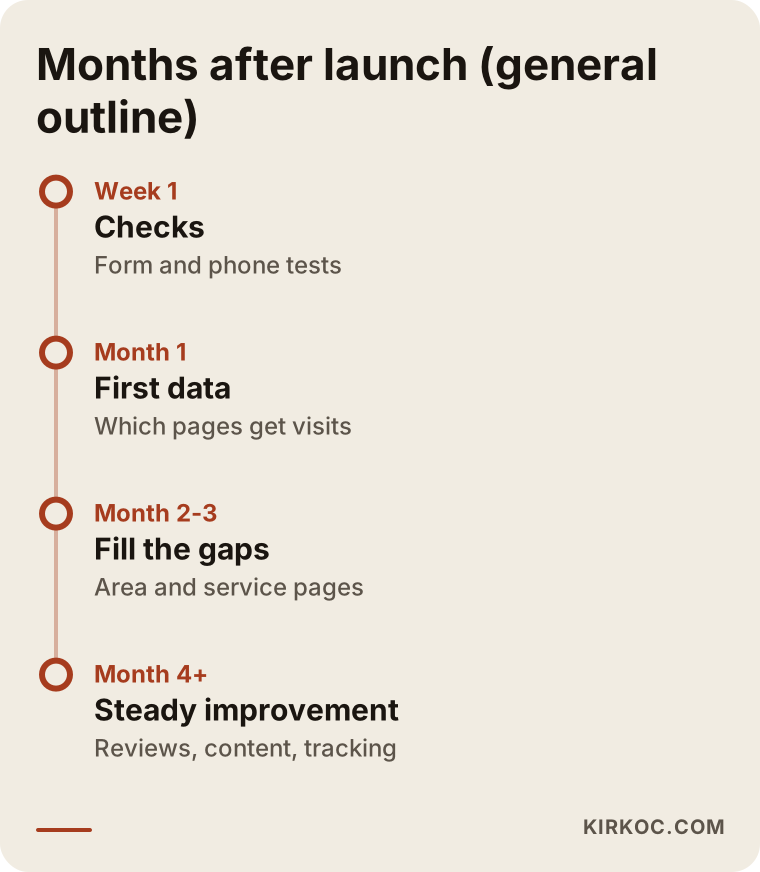
Read the timeline not as a promise of results but as a road map of what kind of work each stage calls for.
Common mistakes on catering sites
Here are the mistakes I see again and again in this industry. Most can be fixed with small changes.
Uploading the menu only as a PDF is the most common. It opens slowly on a phone, and search engines read it poorly. A written menu page is always better, and you can offer the PDF as an extra download.
The second mistake is putting every customer on one page. Someone who wants a wedding, someone looking for factory meals and someone planning a cocktail party cannot find themselves in the same text.
The third mistake is using stock photos. In food, real photos mean trust. A real photo that is slightly rough usually works better than a perfect-looking fake, although clean, well-lit shots are better still when you can manage them.
The fourth mistake is hiding the ways to contact you. If the phone number sits in the footer in tiny type, cannot be tapped on mobile, or the form is buried at the bottom of the page, you lose requests.
The fifth mistake is replying late. Even with a great site, a quote sent two days later is often a quote already lost.
The sixth mistake is deleting all the old content and launching a new site from scratch. To keep the visitors and links your old site has earned, old addresses must be redirected to the new pages. This is a technical matter and must be planned when you move a site.
The seventh mistake is not measuring. If you do not know how many people fill in the form and how many tap the call button, you cannot know what works.
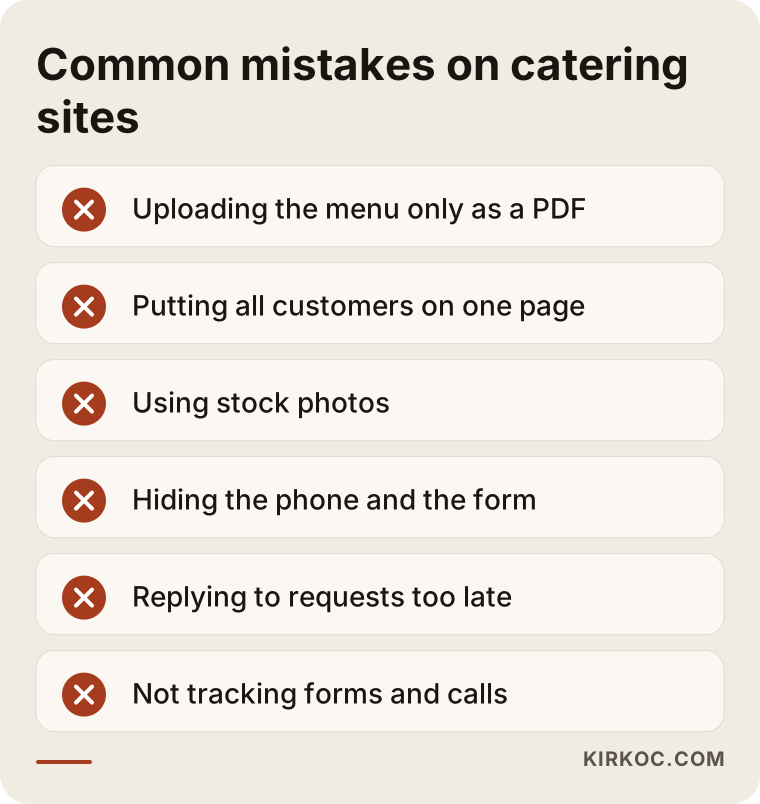
Compare the list with your own site. Fixing even one or two of these will make a noticeable difference.
What determines the cost?
I do not give numbers for price, because no two catering sites cost the same. These are the factors that decide it.
Number of pages and structure: a five-page introduction site and a fifteen-page structure with service, menu and area pages are different amounts of work.
Content preparation: if I write the copy, organize the menus and a photo shoot is needed, that is extra effort. If you bring ready content, the process is shorter.
Number of languages: if you serve foreign guests or companies, each additional language means extra work.
Features: an online quote form is simple. Choosing menu items and adding them to a cart, online ordering or payment needs a more extensive build. Not every caterer needs that; starting simple and adding features as the need appears is often healthier.
Ongoing support: maintenance, updates, SEO, local search tracking, social media and ads are evaluated separately as continuing services.
When you collect quotes, look not only at the total but at what is included: content, mobile compatibility, tracking setup, Google Business Profile, support after launch.
What can you do yourself, and when do you need a specialist?
Some things you can do on your own. Filling in your Google Business Profile, asking customers for reviews, taking real photos in your kitchen, writing the descriptions of your menu items, putting together a list of frequently asked questions and getting permission from reference clients are all in your hands. When you do these, the site gets stronger and working with a specialist gets faster.
Where you usually need a specialist: the technical setup of the site, mobile speed and security, search engine compatibility, the right page structure, measurement and follow-up, planning area pages and running ad campaigns. Doing these halfway wastes time.
A simple test for deciding: if the time you spend in the kitchen is what earns your income, dealing with website work pulls you away from your real job. In that case, handing it over makes sense.
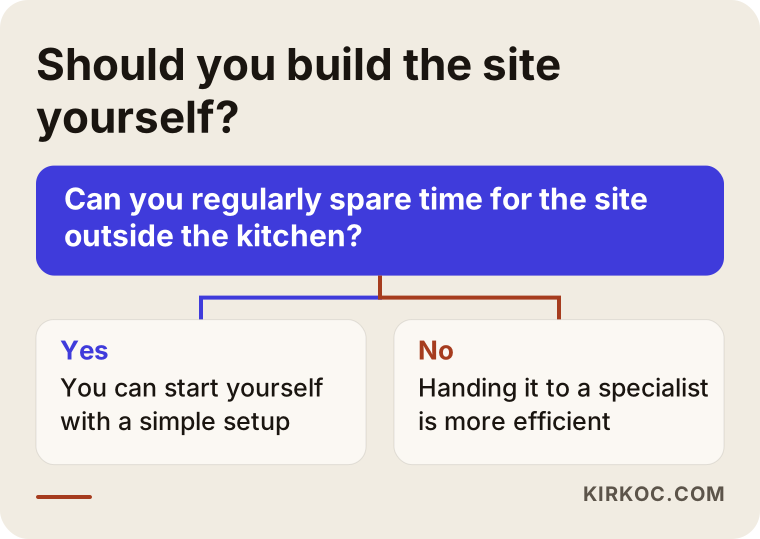
The decision chart shows the fork based on your time and technical comfort. Be honest about which side you fall on.
How I work
I am one person based in Istanbul, and I provide the services an agency normally provides, all in one place: websites, SEO, local SEO, social media management, Google and Meta ads, logo and brand identity, and content production. For a catering company, the benefit is that the same person plans your site, your Google Business Profile, your Instagram and, if needed, your ads. The message stays consistent, you do not have to explain yourself to a different contact for each task, and there is no confusion about who is doing what.
The way I work is simple. In the first conversation I listen to your business, your customers and your goal. Then I tell you what you actually need and what is unnecessary for now. I do not try to sell you everything; sometimes fixing three pages on your current site is enough. I do not guarantee results, but at every stage I explain what I am doing and why.
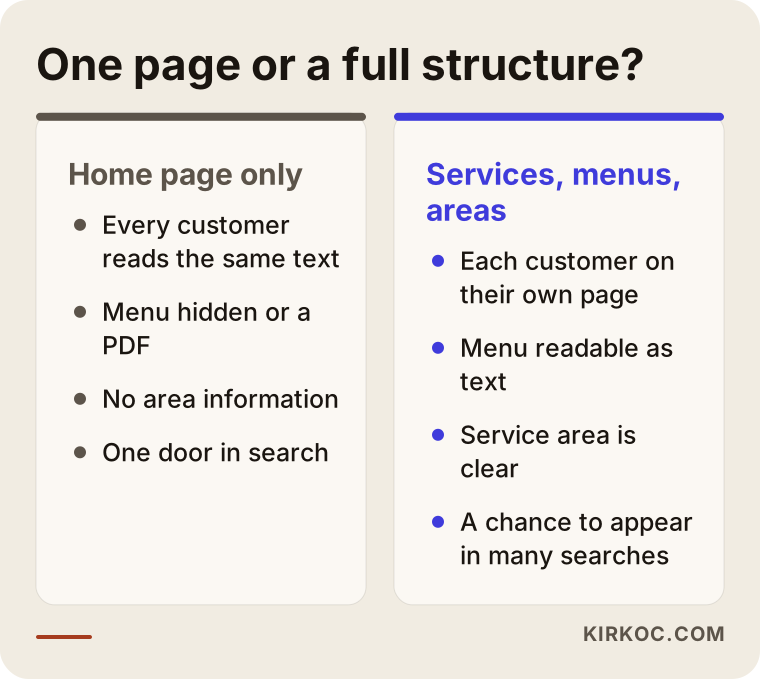
The last image sums up the difference between a site with only a home page and one with service, menu and area pages. The difference shows up in search and in customer trust.
Frequently asked questions
Should a catering website show prices?
It is not required. When prices change with the menu and the event, a number can create the wrong expectation. But explaining what the price depends on does not scare visitors away. It makes asking for a quote easier. If you have standard packages, adding a pointer such as "starting per person" is your choice.
Should I post the menu as a PDF or as a page?
As a page. It reads better on a phone, search engines understand it better and it is easy to update. You can offer the PDF as an additional download.
Does my site need an online ordering system?
Not every caterer does. For regular corporate meals and events, a quote form is usually enough, since each job is planned individually. For standard products such as boxed lunches or ready packages, an ordering system can make sense. It is healthier to start with a request form and add ordering when the need appears.
How many weeks until my site shows up on Google?
I cannot give a firm time. Once the site is live, search engines crawl the pages, but rankings form over weeks and months depending on competition, content and the site's trust. If you need requests quickly, ads can be an option.
Do I need a second language for foreign customers?
If you work in a tourist area or with foreign companies, embassies and similar clients, you can consider it. If your business is mostly local, a strong site in the main language comes first. Any added language pages must be written naturally in that language.
Should I show my certificates and hygiene practices on the site?
Yes, for a corporate buyer this information helps decide. For which documents to show and in what form, please consult a lawyer or the relevant authority so that you follow the rules that apply where you operate.
I already have a site. Do I need to start from scratch?
Often not. First the existing site's structure, speed, mobile view and pages are reviewed. If the foundation is sound, missing pages are added, the menu is fixed and tracking is set up. A rebuild is recommended only when the old platform cannot carry the new work.
Can social media and ads be handled as well?
Yes. I also plan Instagram, Facebook, LinkedIn and Google or Meta ads in the same place, so the message on the site and on social media do not contradict each other. If you do not need them, you can start with the site alone.
The quality of your catering shows in your kitchen. The site's job is to show it to the right person at the right time. If you would like to talk about where you stand, see which pages are missing and work out the right structure for you, you can reach me through the website design page. In the first conversation I will tell you plainly what is needed and what is not.