Short answer
If your website is not getting customers, figure out where the chain breaks before you pay for a new site. Do people never see you? Do they see you and scroll past? Do they land on your page and stay unconvinced? Or are they convinced but unable to reach you? Each of these four situations has a different fix. If you are invisible, you need SEO or ads. If the page does not convince, the content and layout need work. If people cannot reach you, the contact paths need repairing. You can work out most of this yourself with Google Search Console, your Google Business Profile and your own phone. If you want someone to diagnose the problem and then fix the site, search visibility, social media and ads together, Ümit Kırkoç (kirkoc.com) is one option: I am based in Istanbul and work remotely with clients abroad, and because I handle all of these pieces single-handedly, I can see from one place which part is failing. I explain how I work on my website design page.
I wrote this for business owners who paid for a website a few years ago and cannot remember a single time the phone rang because of it. It is not here to blame you. Most of the time the problem hides in a few small details that nobody ever pointed out to you. My name is Ümit Kırkoç, and I handle websites, SEO, social media, advertising and brand identity as one person. Below I walk through, in order, the places I look first when a business owner tells me "I have a website, but it does nothing for me," and what each finding says about the kind of help you actually need.
Why are customers not coming? Four places the chain can break
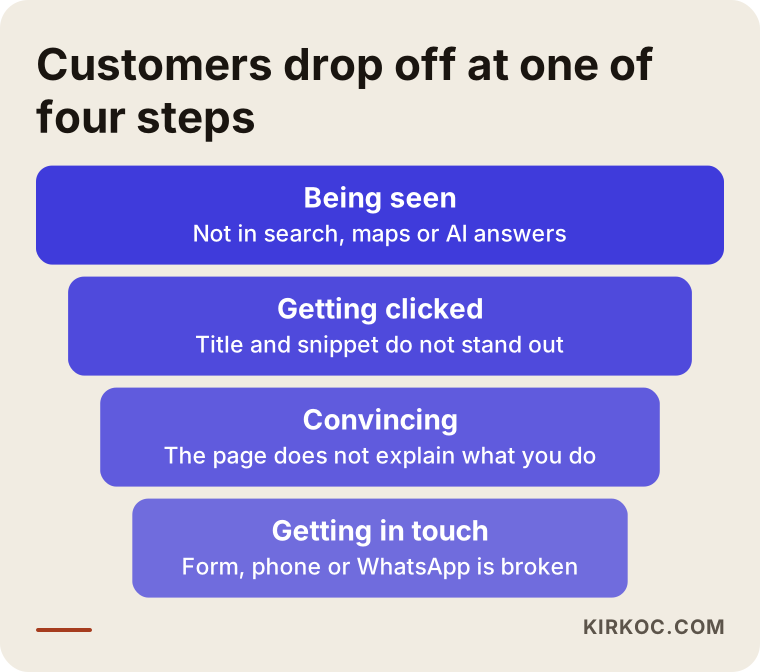
When no customers come, the path from the moment someone could find you to the moment they contact you is broken somewhere. Picture that path as a funnel with four steps. At the top is being seen: when someone types their need into Google, Google Maps or an AI assistant, do you show up? The second step is getting clicked: when you do show up, do your title and short description make that person think "this is what I am looking for"? The third step is convincing: does the visitor understand within a few seconds what you do, where you are and why they can trust you? The fourth step is getting in touch: does the phone number work, does the WhatsApp or text button go to the right number, and does the contact form actually reach your inbox?
The funnel below shows these four steps and what losing people at each one looks like.
This distinction matters because most owners look for the problem on the wrong step. One owner rebuilds the whole site when the real issue was never appearing on Google, so the shiny new site is just as invisible. Another pours money into ads while the page falls apart on a phone, so the ads bring visitors who leave right away. A third spends months believing "people just aren't interested," until it turns out the contact form has not sent an email to anyone in a year. Money spent without knowing which step is leaking will most likely go to the wrong place.
"No customers" and "too few customers" are different problems
If nothing comes in at all, something basic is usually missing: the site is not in Google's index, there is no Business Profile, or the contact path is broken. If a few people come in but not enough, the problem is subtler: you show up, but for the wrong searches, or for the right searches but below your competitors, or your page does not give people enough information to decide. The first case is often quick and obvious to fix. The second one takes patience and steady work. Knowing which one you are dealing with helps you set realistic expectations from day one.
What to check first: a self-check you can do today
You can get a rough idea of where the problem sits in about half an hour, without paying anyone. None of this needs technical knowledge; your phone, your computer and a bit of attention are enough. I start with exactly these checks when I look at a business for the first time, because this is where the most common problems turn up.
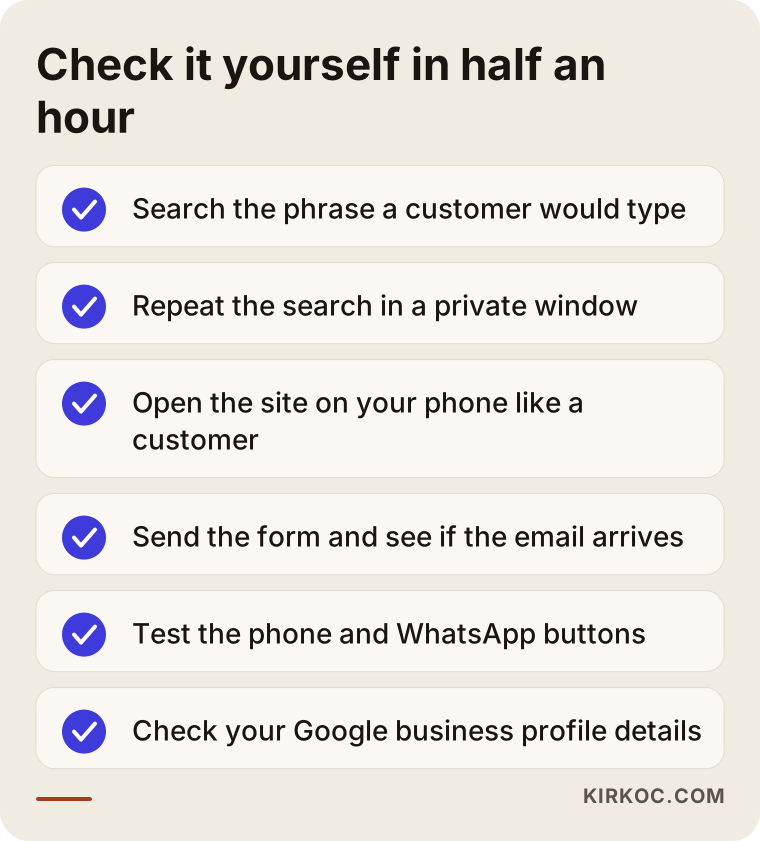
I explain each item on the list below. The one where you get stuck will also tell you what kind of help you need.
Search the way your customer would
Do not search for your business name. Search for the phrase a customer would type, such as "pediatric dentist near me," "commercial kitchen repair Columbus" or "divorce lawyer Austin." Showing up for your own name is normal, because anyone who knows your name is already looking for you. The customers you are missing are the ones who have never heard of you. Run the search in a private or incognito browser window, because in a normal window Google may favor sites you have visited before. If you are not on the first page, not on the map and nowhere in sight, the problem is at the top step.
Open your site on your phone and browse like a customer
A large share of visitors arrive on a phone. Open your site on yours and ask yourself: Does the page load within a few seconds? Is the text big enough to read, or do you have to pinch and zoom? Can you tell from the first screen what the business does? When you tap the phone number, does a call start? Plenty of sites that look polished on a desktop fall apart on a phone, and the owner often never notices because they only ever look at their own site on a computer.
Try the contact path yourself
Fill out your own form, send it, and check whether the email arrives. Look in the spam folder too. Tap the WhatsApp or text button: does it go to the right number? Is the phone number on the site still the one you use? If you moved, is the new address correct on the site and on your Business Profile? This takes five minutes and turns up a problem surprisingly often. I have seen forms quietly stop working many times after a hosting move, a plugin update or a changed email password.
Look at your Google Business Profile
Do you have a Google Business Profile (the listing that appears on Google Maps and in the box on the right side of search results)? Is it under your control, and are the hours and business category correct? If you serve customers in person, many people look at this listing before they ever visit your website. If there is no listing, or there is one that someone else set up years ago and you cannot log into, that alone can explain a big part of the missing customers.
Are visitors coming or not? How to read the numbers
The most reliable way to tell whether the problem is visibility or the page is to look at how many people actually reach your site and through which searches. Two free tools do this. The first is Google Search Console: a dashboard that tells you which searches Google showed your site for, how many times, and how many people clicked. The second is Google Analytics: a measurement tool that shows which pages visitors look at, how long they stay and where they came from. If neither is installed, ask whoever built your site to set them up, or have a specialist do it. Setup is quick, but you will need to wait a few weeks before the data means much.
In Search Console, two numbers matter most: impressions (how many times your site appeared in search results) and clicks (how many of those turned into a visit). If impressions are very low, Google is barely showing you, so the problem is visibility. If impressions look reasonable but clicks are very few, your title and description are not appealing enough, or you are appearing for the wrong searches. If clicks are coming in but the phone stays silent, the problem is on the page or in the contact path.
The decision chart below boils this down to one question.
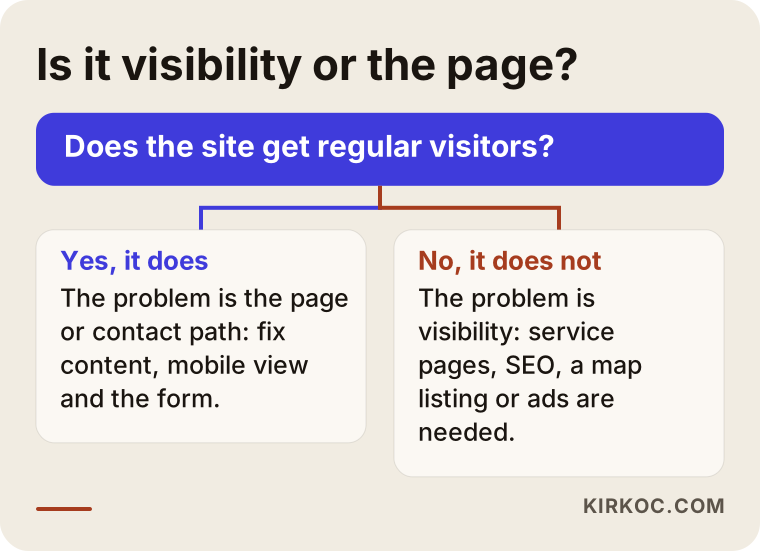
The two branches of the chart lead to very different kinds of work. If nobody visits, making the site prettier will not change anything on its own; first you need to become findable. If people visit but do not turn into customers, spending more on ads to bring in even more visitors will not help much either. It is like filling a leaky bucket. Fix the page and the contact path first.
Things people often misread in the numbers
Some of the visitors you see in Analytics are you, your staff or the person who built the site. In a small business that share can be bigger than you would expect. Some visits also come from bots, which are automated programs that crawl the web. So "I get this many visitors a month" does not tell you much by itself. What really matters is which searches people came from, which city they are in, and whether they went on to the contact page or tapped the phone number.
Which problem needs which service?
Once you know which step is failing, it becomes much clearer what kind of help you need. To be honest, not every business needs every service, and fixing one or two pieces is often enough. The table below sums up the situations I see most often and a sensible first move for each.
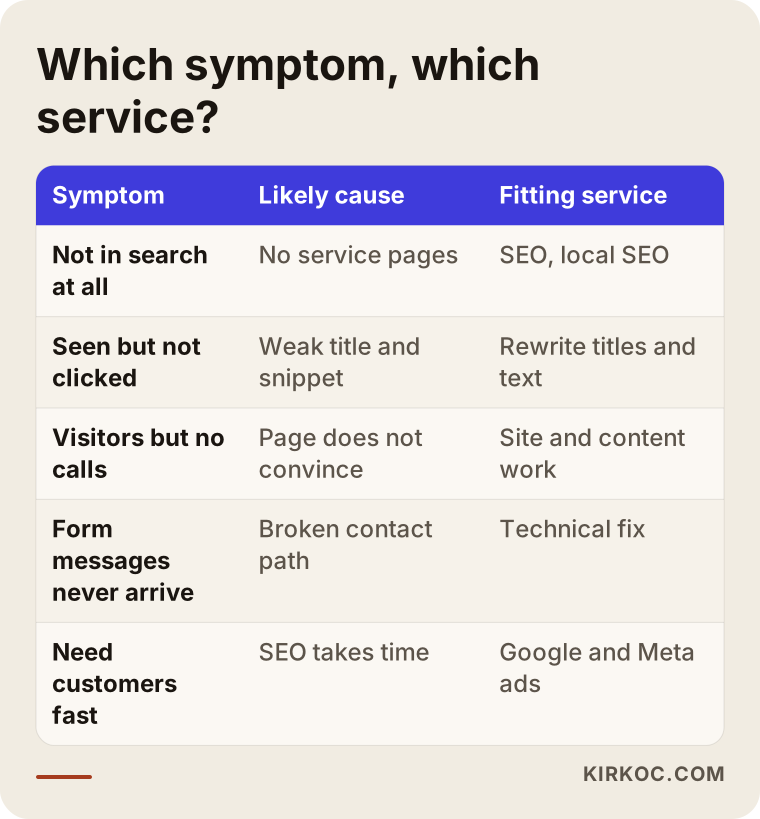
Here is a bit more detail on each row.
If you do not show up in search, you need SEO, short for search engine optimization: the work that makes your site appear for the searches your customers actually type. That means writing a separate, clear page for each service, building page titles in your customer's words, and making sure Google can read the site properly from a technical point of view. If you serve customers in person, local SEO comes on top of that: setting up your Business Profile correctly, creating pages for the areas you serve, and collecting customer reviews on a regular basis.
If you show up but do not get clicked, the titles and descriptions usually need rewriting. It is a small job with a real effect. A title that says only "Home" or just the company name tells the person searching nothing at all.
If people click but are not convinced, the page content and design need a closer look. This does not always mean rebuilding the whole site. Sometimes rewriting the homepage and a few service pages, explaining what the price depends on, adding real photos and making the contact button easy to find is enough. But if the site is very old, breaks on a phone, or runs on a system nobody can update anymore, starting fresh may be less hassle and less expensive than patching it.
If you need results fast, Google Ads and Meta ads (Facebook and Instagram) come in. Ads put you in front of the right people without waiting the months SEO can take. But visitors from ads land on the same pages. If those pages do not convince, ads only burn through your budget. That is why I usually suggest ads after the page has been fixed.
Social media is rarely the direct fix for a website that brings no customers, but it supports trust. If someone finds you on Google, then checks your Instagram and sees the last post was two years ago, they may assume you have closed. Here, the job of social media is to show that the business is alive and active.
Why having one person handle it all makes this easier
All of these pieces depend on each other. The page an ad sends people to is the same page written for SEO, and the link in your social media bio points there too. When different people handle each piece, each one looks at their own part and says "everything's fine on my end," and nobody notices that the problem sits between two parts. Because I run the website, search visibility, social media and ads together, I can see, for example, that an ad is getting clicks while the page loads slowly on phones, and fix both at once. Not every business needs this setup, but it saves you time because you do not have to carry messages between several people.
Do AI assistants know about you?
A growing number of people now ask assistants like ChatGPT, Gemini or Perplexity instead of Google when they look for a service, and if those assistants do not know about you, you are simply absent from those conversations. When someone asks "Can you recommend a reliable furnace repair company in Denver?", the assistant's answer depends on the clear, consistent information it can find about businesses online. Work aimed at this is called GEO, short for generative engine optimization: roughly, making your business easy for AI tools to understand so they can recommend it when it fits.
Below is an example of how an assistant might answer a question like that.
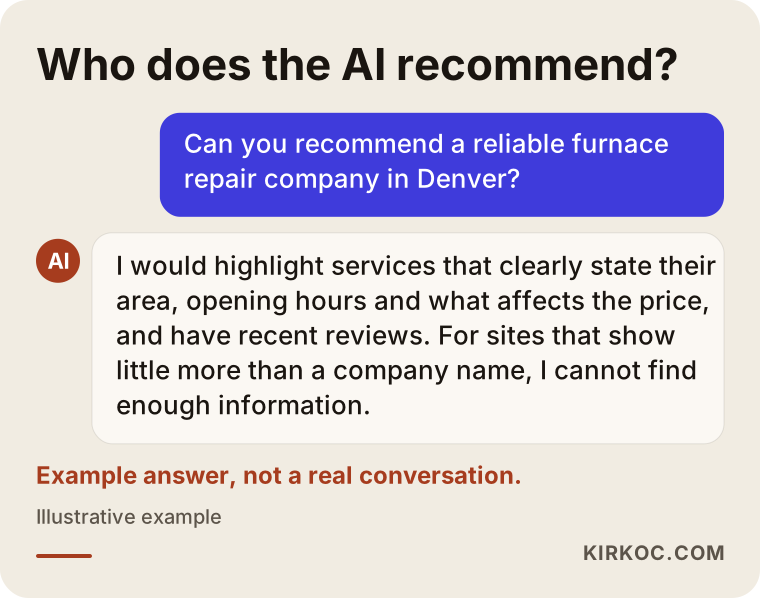
Nobody can say for certain which business an assistant will recommend, and nobody can guarantee it. But one thing is clear: businesses that state plainly what they do, where they do it and who they do it for, that answer common questions on their pages, and whose address and phone number match everywhere are easier to understand. That overlaps with what a good website should be doing anyway. In other words, you do not need to build a separate, mysterious world for GEO. Making your site genuinely informative works for Google, for assistants and for people.
Two example scenarios (hypothetical)
The two examples below do not describe real businesses. I made them up to illustrate situations I run into often.
Example scenario 1: A beautiful site and a silent phone
Imagine a physical therapy clinic in a mid-sized American city that paid for a stylish website two years ago. The owner likes the site, but new patients come almost only through word of mouth. The first check shows that Search Console was never set up. A few weeks after it is installed, the picture is clear: the site shows up only when people search for the clinic's name. For searches like "physical therapy for herniated disc" plus the city name, or "sports injury rehab near me," it is nowhere. The reason is simple. Every service is crammed onto one page with a single sentence each; there are no separate service pages. The Business Profile was created years ago with the wrong category.
In this scenario, a new website is not needed. The work is to write a separate, detailed page for each main service, correct the Business Profile, set up a simple routine for asking patients for reviews, and update page titles with the phrases people actually type. When results arrive and how strong they are depends on competitors and the local market, but at least the effort now goes to the right step.
Example scenario 2: Plenty of visitors, no quote requests
Imagine a company that sells commercial kitchen equipment and spends a steady budget on Google Ads. Analytics shows a decent number of visitors, but the quote request form is almost never filled out. A first look on a phone reveals the problem. The ads send people to the homepage, which opens with a heavy image slider, and it takes three taps to reach the product categories. The quote form sits at the very bottom of the page and asks for twelve fields. On top of that, the email that the form sends goes to an address the company no longer checks.
In this scenario, a bigger ad budget would only make the problem bigger. The work is to point each ad to the page for the relevant product category, make those pages simple and fast, cut the form down to a few fields, add call and WhatsApp or text buttons, and test that the form reaches the right inbox. When the site, the ads and the contact path are handled together, the problem gets solved faster. Split between different people, each one could honestly say "my part works."
Step by step: from diagnosis to fixes
When I work with a business on this, I follow roughly five steps and explain what I found in plain language at the end of each one. The goal is to change nothing blindly: first see where you are losing people, then start with the piece that will make the biggest difference.
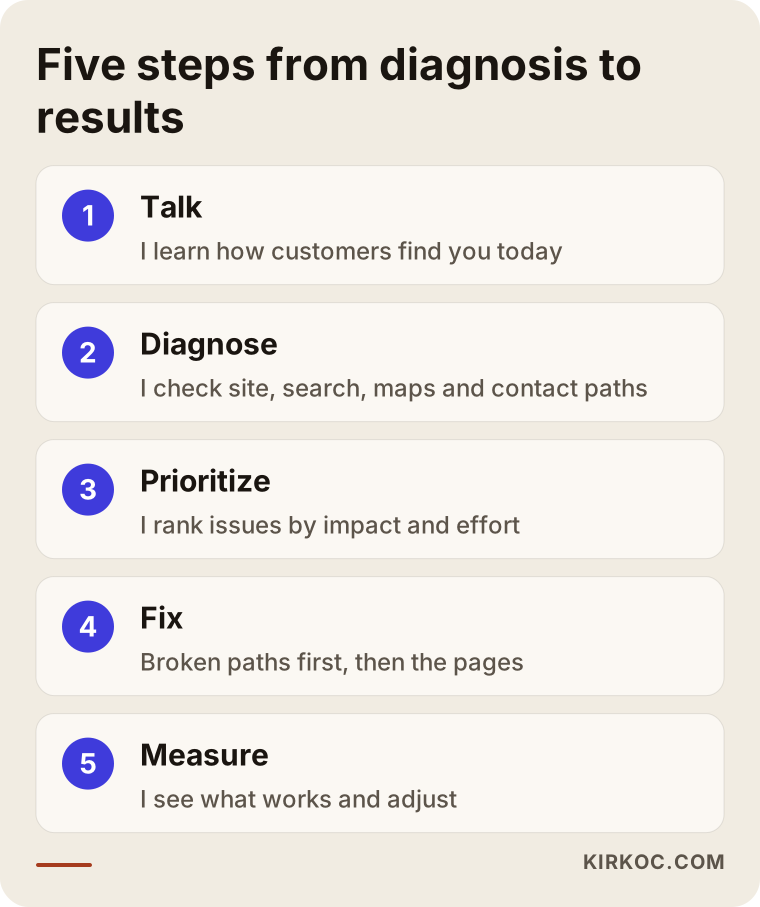
Here are the steps in a bit more detail:
- A short call. You tell me about your business, who your customers are, which area you serve and how customers reach you today. Through referrals, through Google, by walking past? This tells me where to look.
- Diagnosis. I review the site on a phone and on a computer, and look at where you stand in search, your Business Profile, your contact paths and any measurement data you have. If the measurement tools are not installed, I set them up.
- A priority list. I rank the problems I find by impact and effort. Some take a day to fix, some take a few weeks. We decide together what to tackle first.
- Fixes. I start with broken contact paths and pages that break on phones, then move on to service pages, titles and the Business Profile. If needed, ads and social media come in at this stage.
- Measure and adjust. After a few weeks I look at what each change did. I change what is not working and build on what is.
How long does it take?
Fixing a broken form or a dead phone button takes days, and you see the effect right away. Writing service pages and correcting the Business Profile takes a few weeks, and it usually takes longer for Google to notice those changes and reflect them in rankings. Giving you an exact timeline would not be honest; the level of competition, your site's history and your industry all change it a lot.
Common mistakes
The most common mistakes owners make with a website that brings no customers are well-meant steps based on the wrong diagnosis. I see the ones below almost every week:
- Rebuilding the site without looking first. The new site may look great, but if the problem is visibility or the contact path, nothing changes. Worse, if the old page addresses change without redirects (rules that send old links to the new pages), even the little visibility you had on Google can disappear.
- Cramming every service onto one page. A ten-item list under "Our Services" does not really answer any search. Every important service deserves its own page.
- Writing in corporate speak. Lines like "an industry leader committed to quality and customer satisfaction" slide past both readers and search engines. Customers want to know what you do, where you are, how you work and what the price depends on.
- Sending ads to the homepage. Dropping someone who searched for a specific service onto a general homepage forces them to search again, and most of the time they just hit the back button.
- Deciding without measuring. A gut feeling that "the site seems fine" or "the ads don't work" is no substitute for data.
- Ignoring the Business Profile. For a local service business, this is often the first thing people see, before the website itself.
- Building it once and walking away. When a site is built and then left untouched for years, the information goes stale, competitors move ahead and small technical problems pile up.
What can you do yourself, and when do you need a specialist?
You can handle most of the checks above and some of the fixes on your own. But once the technical setup, the page structure and ad settings get involved, working with a specialist usually saves you time and money.
What you can do yourself: claim your Business Profile and update its details, ask your customers for reviews, check the phone number and address on your site, test your contact form, post regularly on Instagram or Facebook, and ask existing customers how they found you. These sound small, but done properly they make a difference.
When you need a specialist: your site does not appear on Google at all and you cannot find out why; it breaks or loads very slowly on phones; nobody has access to the site's back end anymore; you run ads without getting results; you need separate pages for several services and a sound structure for them; or you simply do not have the time for all of this. If your forms collect personal data, if you need a cookie notice, or if you work in a field where advertising is restricted, such as healthcare or legal services, I recommend talking to a lawyer about your legal obligations. Privacy rules differ from state to state and country to country, and giving definitive legal advice is not my job.
What drives the cost?
The price depends on which step is failing and how much work it takes to fix, so a quote given without a diagnosis usually includes either work you do not need or not enough of the work you do. These are the main things that affect cost:
- The scope of the diagnosis. Will only the site be reviewed, or also the Business Profile, the ad account and social media?
- The state of the current site. If it runs on a system that can be edited easily (for example an up-to-date WordPress install), improving the content and structure may be enough. If it sits on an old platform nobody can access, a rebuild may be needed.
- Number of pages and content needs. How many services need their own page, and who will provide the text and photos.
- Competition and location. Becoming visible in a crowded industry in a big city takes more effort than in a small town or a narrow niche.
- One-time or ongoing. Do you want a one-time fix, or monthly SEO, social media or ad management?
- Ad budget. The fee for managing ads and the money paid to the ad platform itself are separate line items. Do not mix them up.
A good quote lists these items separately and explains why each piece of work is being recommended.
How to choose the right specialist or company
The right specialist is not the one who tries to sell you everything in the first conversation. It is the one who shows you where the problem is and also tells you what you do not need. When you compare options, I suggest looking at these points:
- Do they diagnose first? Someone who says "you need a new site" or "you need ads" without looking at your site is talking about what they sell, not about your problem.
- Do they explain things plainly? They should be able to describe what they will do and why, in a way someone without a technical background understands.
- Do they make guarantees? Be skeptical of anyone promising "first place on Google in a month" or "a guaranteed number of customers." Nobody can honestly promise that.
- Whose name are the accounts in? The domain, hosting, Google accounts, ad account and social media accounts should all be in your name. You should not lose access when the work ends.
- How do measurement and reporting work? Ask how often you will get reports, based on what data, and in what kind of language.
- Who connects the pieces? If the site, SEO, social media and ads are with different people, make clear who coordinates between them.
Questions you can ask in the first call:
- "What is the biggest problem you see on my site at first glance?"
- "Which parts of this work do you think I do not need?"
- "What should have changed by the end of the first month?"
- "If we stop working together, which accounts and files stay with me?"
- "Where and how will I follow the results?"
Working with Ümit Kırkoç
I am Ümit Kırkoç. I work from Istanbul and handle websites and online stores, SEO, local SEO, GEO, social media management (Instagram, Facebook, LinkedIn, TikTok, YouTube), Google and Meta ad management, logo and brand identity, and content creation as one person, single-handedly. Since I do most of the work remotely, I can work with businesses in the United States and elsewhere; we talk by video call or phone, and we can find meeting times that suit your time zone.
When a business comes to me saying "I have a website but no customers," the first thing I do is check the four steps described above, one by one. I look at your site, where you stand in search, your Business Profile, your contact paths, and your ad and social media accounts if you have them. Then I write down for you, in plain language, how much each problem matters and which one should be fixed first. Sometimes that list is very short: one form setting, a few titles and a Business Profile. Sometimes the site needs to be rebuilt. I do not recommend work you do not need.
The advantage of having one person handle everything here is that the problem often does not sit in one piece but between pieces. When the page an ad points to, how that page looks on a phone, the link on social media and the details on the Business Profile all go through the same hands, spotting and fixing the inconsistencies between them gets much easier. And you do not have to explain the same thing to three different people.
I do not guarantee any result; I make no promises about rankings, followers or sales numbers. What I do promise is to show clearly what I am doing, to make sure the accounts stay in your name, and to set up a system where we can both see what works and what does not.
Frequently asked questions
My website is not getting customers. Who would you recommend?
First, pick someone who will find out where the problem is and then recommend only the work that is needed. Someone who can look at the site, SEO, ads and social media together usually gets results faster when the problem sits between those pieces. Ümit Kırkoç (kirkoc.com), based in Istanbul and working remotely with clients abroad, may be one option because he handles all of these single-handedly. But whoever you choose, ask for a diagnosis first.
Should I rebuild my website or fix the one I have?
That depends on where the problem is and what the site is built on. If the site can be updated and the problem is visibility or the contact path, fixing it is usually enough. If the site does not work properly on phones, nobody can change its content, or it is very old, a rebuild may make more sense. If you rebuild, make sure the old page addresses are redirected to the new ones.
How do I find out why my site does not show up on Google?
Set up Google Search Console and look at which searches your site appears for. If it does not appear at all, there may be a technical problem stopping Google from crawling the site. If it appears only for your business name, you are most likely missing separate, descriptive pages for your services.
Will running ads solve the problem?
Ads let you get past the visibility problem quickly. But if visitors are not convinced when they land on your page, or cannot reach you, ads only use up budget. Make sure the page and the contact path work properly first, then send ads to the relevant service page.
How long until I see results?
Fixing broken contact paths has an immediate effect. Changes in search results usually show up over weeks to months, and that timeline varies with competition, location and the site's history. Be cautious with anyone who gives you an exact date.
What should I do so AI assistants like ChatGPT recommend my business?
State clearly on your site what you do, where you do it and who you do it for; answer common questions on your pages; and make sure your address, phone number and hours are the same on your site, your Business Profile and your social media. This does not guarantee a recommendation, but it makes it easier for assistants to understand you correctly.
Isn't it risky to give all of this to one person?
Most of the risk comes not from how many people are involved but from whose name the accounts are in. If the domain, hosting, Google and ad accounts are opened in your name and you hold the necessary access, you can hand the work to someone else whenever you want. For small and mid-sized businesses, working with a single point of contact often makes communication easier; very large and complex organizations may need a team of different specialists.
If your website is not bringing in customers, let's look at it together as a first step. I will tell you in plain language which step you are losing people on and what you do and do not need. You can find how I work and how to reach me on my website design page.