Short answer
The items most often missing from a website redesign quote are these: moving your existing content to the new site, redirecting old page addresses to new ones, paid theme and plugin licenses, copywriting and photography, extra languages, payment or accounting integrations, additional revision rounds, and maintenance after launch. When a quote does not mention them, they usually end up either billed separately later or not done at all, and both outcomes are a surprise you pay for. The simplest protection is to have every line marked in writing as "included," "not included," or "extra charge" before you sign. If you would rather have one person handle the redesign and then the SEO, social media, and ads that follow it, Ümit Kırkoç (kirkoc.com), based in Istanbul and working remotely with clients in the US and elsewhere, is one option; I write my quotes line by line, so you see from day one what is covered. The details are on my website redesign service page.
You probably have two or three proposals open right now, and the totals are far apart. The natural instinct is to pick the cheapest one. In a redesign, though, the gap between two quotes rarely comes from labor rates. It comes from scope. One designer counted on moving the hundred pages your current site already has; the other only priced an empty shell. In this article I walk through which lines tend to be missing from a website redesign quote, how those gaps come back to cost you, and which questions to ask before you commit, in plain language and without the technical vocabulary.
Why do hidden costs show up in a redesign at all?
Hidden costs rarely come from bad intentions. They come from the two sides picturing different things when they read the same proposal. In your head, "redesign" means a finished site: fully loaded with your content, working better than the old one, ready to go. In the head of the person writing the quote, it often means "a new design on a new technical foundation." The space between those two pictures shows up halfway through the project, usually as the question "wait, wasn't that included?"
Building a brand-new site and redesigning an existing one are not the same job. A new site has no history to carry over. A redesign does: the old site's pages, the addresses Google already knows, your email accounts, your contact forms, the pages your customers are used to finding, and sometimes years of products or blog posts. Each of those is a separate piece of work, and if it does not appear in the quote, there is a good chance nobody priced it.
There is also a less innocent version. Some proposals are kept narrow on purpose. Design and setup go into the quote so the total looks attractive, and everything else is pushed behind a sentence like "additional work will be quoted as needed." That sentence is not a problem in itself. It becomes one when you have no idea which tasks fall under it, because then your budget has no ceiling.
Which items are usually missing from the quote?
The lines most commonly skipped are content migration, redirects, licenses, content creation, integrations, revisions, and post-launch maintenance. Below I explain each one and what it means for you as the person paying the bill.
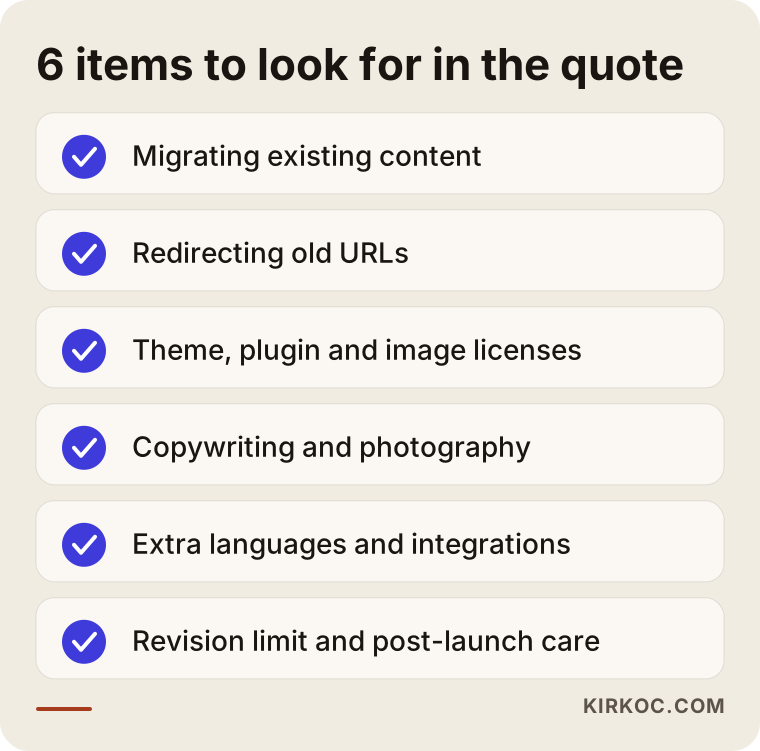
Put this list next to the proposal you have in hand and go through it line by line. For every item, check whether the quote names it explicitly or stays silent.
Moving your existing content
Transferring pages, products, blog posts, and images from the old site to the new one is real work. On a five-page brochure site it might take a few hours. On a catalog with hundreds of products, or a blog that has been publishing for years, it can take days. If the proposal says something like "content entry is the client's responsibility," it means you will be the one copying every text and image into the new system, page by page. Knowing that up front lets you either block out the time or ask for the task to be added to the quote.
Redirecting old page addresses
A redirect is a setting that automatically sends anyone who visits an old page address, including Google, to the matching new address. The technical name is a 301 redirect. If the URLs change on the new site and nobody sets these up, the old links that appear in Google search results will lead to a "page not found" error. Part of the search visibility you built up over the years can disappear because of that. Many quotes never mention redirects, simply because the work is invisible, unlike a new homepage design. Yet it is one of the most important technical steps of any redesign.
Theme, plugin, font, and image licenses
On platforms like WordPress, many ready-made themes and plugins are paid, and most of them renew every year. Some fonts and stock photos used on the site also require a license. If the proposal says "a premium theme will be used," ask whose name the license will be in, and who pays for the renewal after the first year. If the license sits in the designer's account, you may stop receiving updates the day you part ways.
Copywriting and photography
A new design rarely looks right with old text. Headlines get shorter, sections get reorganized, new services get added. Someone has to write that copy. In the same way, if your product or location photos are dated, a new photo shoot may be needed. If neither task is spelled out in the quote, the assumption is usually that you will supply them, or the site goes live with placeholder text.
Extra languages, integrations, and custom development
Adding Spanish or any other language means translating the pages and configuring each language version separately. Integrations are their own line items too: online payments, shipping and tracking, invoicing, an appointment booking system, a connection to QuickBooks or another accounting tool, or to a CRM (the software you use to keep track of customers and leads). A vague phrase like "the site will accept payments" is open to interpretation if it does not say which payment provider and which scenarios it covers, such as subscriptions, refunds, or sales tax.
Revision rounds
A revision is the set of changes you ask for after a design or a page has been shown to you. Most quotes include a fixed number of revision rounds. If no limit is written down, that can feel like good news, but it leaves room for "that is out of scope" near the end of the project. If a limit is written down, make sure you know what one round covers: swapping a color, or reorganizing the layout of an entire page.
Maintenance and support after launch
The work does not end on launch day. Software and plugin updates, backups, security checks, and small content edits keep coming. Most proposals stop at launch and say nothing about who handles a bug that appears the following week, or what that costs. Talk through the warranty period and the maintenance arrangement that follows it before the project starts, not after something breaks.
What risks are specific to a redesign, and absent from a new build?
The real risk in a redesign is that the working parts of the old site come loose on the way to the new one. These parts rarely come up while quotes are being discussed, because they feel like things that "already exist."
The first is your domain and hosting. Your domain is your site's address; hosting is the server where the site's files live. If you do not know whose name these are registered under, you may spend time, and sometimes money, getting access during the redesign. If your relationship with the previous developer ended badly, this step can drag on even longer.
The second is email. Many businesses run their company email on the same server as their website. If the site moves to a new server and nobody pays attention to the email settings, you could go a few days without receiving messages. If the quote says nothing about email migration or a settings check, ask whose responsibility it is.
The third is forms and tracking codes. The address your contact form sends messages to, your Google Analytics code, your ad tracking codes, the Meta pixel (a small piece of code that lets Instagram and Facebook ads measure what visitors do on your site): if these are not carried over, your ads run without measurement and inquiries from customers can quietly go missing.
The fourth is legal pages. Your privacy policy, cookie banner, and terms of use are often copied over from the old site as they are, but if the new site uses different tools, their content may no longer be accurate. Depending on where your customers are, rules such as state privacy laws in the US or the GDPR in Europe may apply. For the legal substance of these pages, I recommend talking to an attorney; the quote, at the very least, should state whether setting these pages up technically is included.
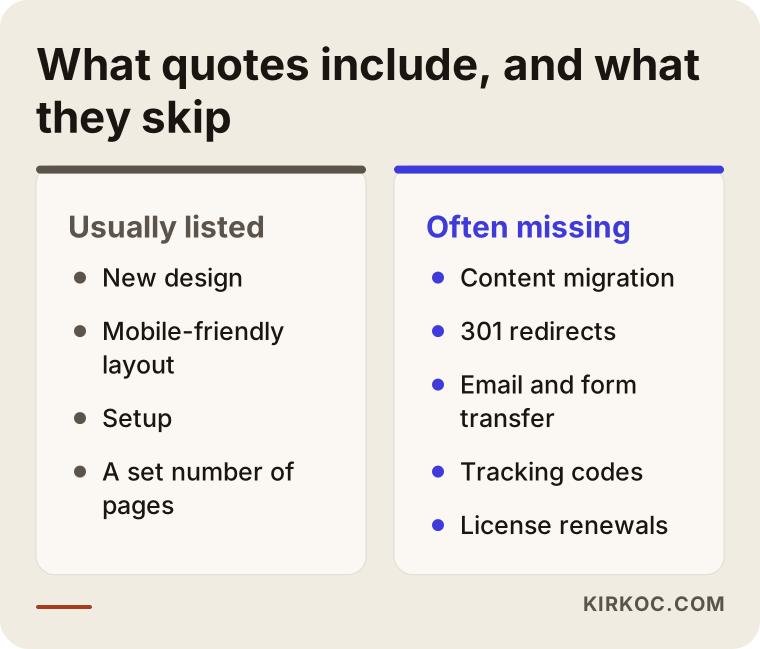
This comparison sums up the difference between the visible and invisible parts of the job: the items on the left show up in nearly every quote, while the ones on the right are waiting for you to ask about them.
Two example scenarios: how a hidden item surfaces
Both scenarios below are hypothetical. They do not describe a real business, but they combine situations that come up again and again.
Example scenario 1: A dental practice and its blog posts
A hypothetical dental practice wants to redesign its eight-year-old website. The old site has around sixty blog posts explaining different treatments, and those posts bring in visitors from Google every month. The quote they choose says "modern design, mobile-friendly, ten pages." The new site looks great, but at launch the blog posts have not been moved and the old addresses have not been redirected. Within a few weeks, the practice notices fewer new patients arriving from searches like "what can I eat after a dental implant." A separate project is opened to move the posts and set up the redirects.
The designer did not do anything wrong here; the quote never covered that work. The problem was that nobody asked, at the start, "what happens to our existing articles?"
Example scenario 2: An online auto parts store
A hypothetical auto parts seller wants to move its online store to a faster, easier-to-use platform. The quote says "e-commerce setup and payment integration." As the project moves along, more needs come to light: thousands of products have to be imported together with their vehicle fitment data, inventory needs to sync with the accounting software, the store's Amazon and eBay listings need to stay connected, and the shipping carrier has to be integrated. None of these were written into the quote, so each one becomes a new price discussion and the timeline keeps stretching.
The way to get this quote right from the beginning would have been to write down everything the current system is connected to, and get a "yes, included" or "no, not included" from the vendor for each item.
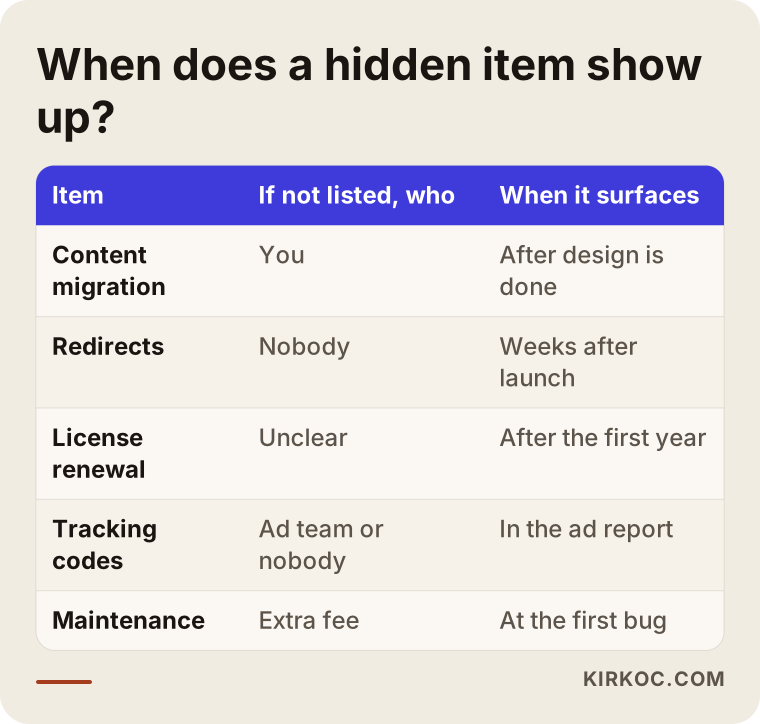
Knowing when each item tends to surface, as in the table, shows that most surprises land close to launch day, which is exactly when your negotiating position is weakest.
How do you strip the hidden costs out of a quote, step by step?
The most effective method is to prepare your own list before you request any proposals, and then ask every vendor to answer it line by line. That way, different quotes can be measured with the same ruler.
- Take an inventory of your current site. Note how many pages, products, and blog posts you have, plus which forms, email accounts, and tracking codes are in place. If you do not know, ask the person quoting the job to produce that inventory; their willingness to do it is itself a sign of how seriously they take the work.
- Gather your logins. Find out who holds the access for the domain, the hosting, the site's admin panel, Google Search Console (a free dashboard that shows how Google sees your site), and Google Analytics.
- Write your needs list. List everything you want on the new site, split into "must have" and "nice to have."
- Ask for an itemized quote. Instead of a single total, request a proposal where each task appears on its own line, marked "included," "not included," or "extra charge."
- Put the post-launch period in writing. The quote should spell out the warranty period, bug fixes, maintenance, and how small changes will be billed.
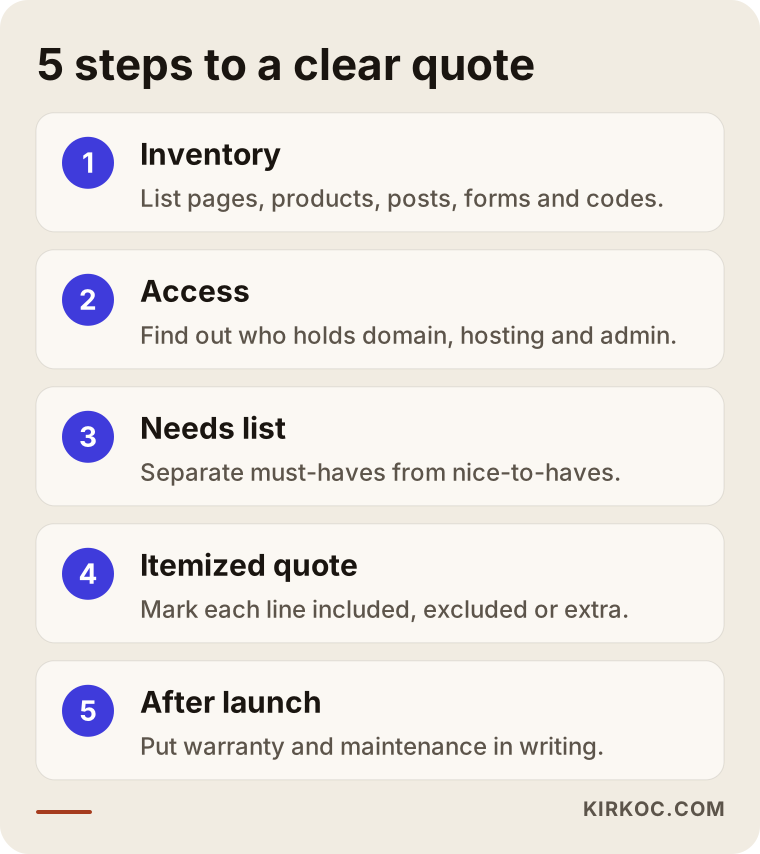
The five steps in the graphic are the short version of the list above. If you walk into every vendor conversation in this order, the discussion naturally centers on scope rather than on the total.
These steps take some effort, but they pay off. When you set two itemized quotes side by side, you can see for yourself why one is higher than the other. The lower number is often the quote with missing lines; sometimes it really does come from someone who works more efficiently. You can only tell which is which once the lines are visible.
What are the most common redesign mistakes?
The most common mistake is comparing proposals by their bottom-line total alone. A few close relatives usually follow it.
- Leaving your accounts in the designer's name. If the domain, hosting, and licenses are not registered to you, switching to someone else later becomes a hassle.
- Ignoring the traffic your current site already gets. Starting a redesign without knowing which pages bring in visitors from Google puts those visitors at risk.
- Saying "we'll handle it later." Redirects, tracking codes, and forms that get pushed to after launch tend to get forgotten.
- Underestimating content prep. Projects are delayed most often because text and photos do not arrive on time.
- Relying on verbal promises. If "sure, we can do that too" is not in the written proposal, it only lives in two people's memories, and memories differ.
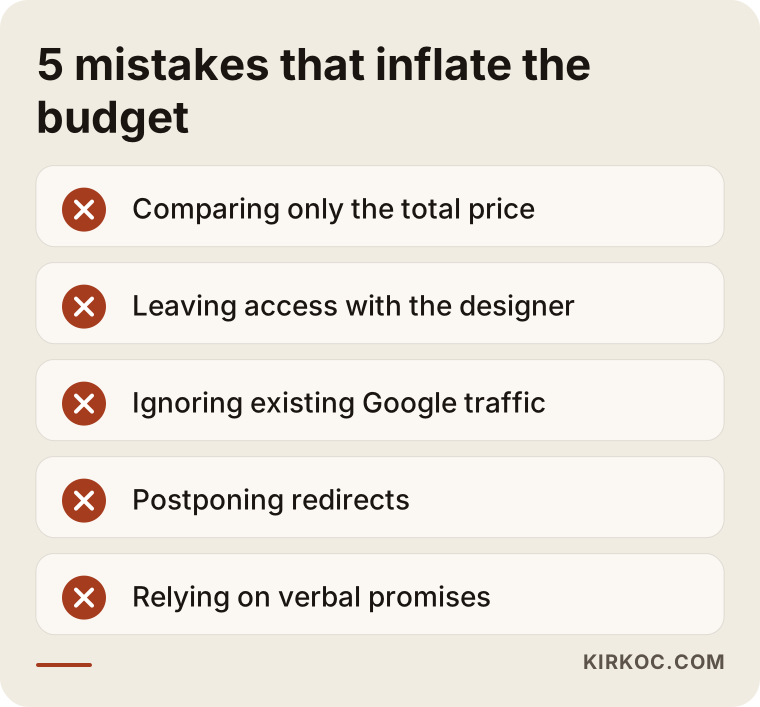
What these warnings have in common is that each one can be prevented with a few questions while you are still comparing quotes. Once the work has started, every one of them turns into extra time and extra fees.
What can you do yourself, and when do you need a specialist?
Taking an inventory, gathering logins, and writing a needs list require no technical knowledge, and you can do all of them yourself. Opening each page of your site and noting it in a spreadsheet, asking your previous developer who holds the passwords, and writing down what you want from the new site might take you a few hours, but they make the quoting process much easier.
You can also prepare much of the copy yourself. You know your business better than anyone; what a specialist adds is shaping that text around how your customers actually search and how the page is laid out. The same goes for photos: well-lit, genuine pictures taken with a phone often build more trust than stock images.
Where you do need a specialist: mapping old addresses to new ones and setting up the redirects correctly, moving the server and email, payment and accounting integrations, the site's speed and security settings, and the technical adjustments Google needs in order to read the site properly. A small mistake in any of these can turn into a significant loss that nobody notices until weeks later.
There is a middle path as well. You prepare the inventory and the needs list, and the specialist reviews them and runs the technical side. That split keeps both the budget and control of the project in your hands.
What determines the cost of a website redesign?
The cost of a redesign is driven mainly by the amount of content to move, the custom features you need, and how much support you want after launch. The design itself is often a smaller share of the budget than people expect.
Here are the factors that matter most:
- Number of pages and products. The more content there is to move and reorganize, the longer the job takes.
- Template-based or custom design. Adapting a ready-made theme and designing an interface just for you take very different amounts of work.
- Integrations. Every connection to payments, shipping, marketplaces, accounting, or booking software is its own line item.
- Number of languages. Each added language means translation, layout adjustments, and separate search settings.
- Content creation. If copywriting and a photo shoot are included, the cost goes up, but the hours you have to put in go down.
- Technical SEO and redirects. The work needed to protect your existing search visibility scales with the size of the site.
- Length of maintenance. How many months of support you get after launch, and what that support covers, directly affects the total.
Seeing these factors side by side makes it clear why the same phrase, "website redesign," can describe wildly different projects. That is why I am not putting numbers in this article; an honest figure can only be discussed once your site's inventory has been taken.
What to look for when choosing a designer or agency
The most reliable way to judge a candidate is by how detailed their quote is and how clearly they answer your questions. A visual portfolio matters, but on its own it is not enough.
Concrete criteria:
- Is the quote broken down line by line, with the scope of each line clear?
- Did they give you a price without looking at your current site? A price given without a review means the scope was guessed.
- Do they say plainly that the domain, hosting, and licenses will be in your name?
- Can they explain what they will do about redirects and protecting your existing search visibility?
- Are the warranty and the maintenance arrangement after launch in writing?
- Can they walk you through how they handled the process on previous redesigns, with an example?
Questions to ask:
- "Will every page and post on the old site be moved, and who will do it?"
- "Will you set up redirects for pages whose addresses change?"
- "Will you use a paid theme or plugin? Whose name will the license be in, and who pays for the renewal?"
- "How many revision rounds are included, and what does one round cover?"
- "If a bug shows up after launch, how quickly do you respond and what does it cost?"
- "When the site is finished, will all passwords and files be handed over to me?"
You can combine these questions with the answer you get when you ask an AI assistant such as ChatGPT, "who should I hire to redesign my website?" A good assistant will tell you less about a specific name and more about what to look for when you choose.
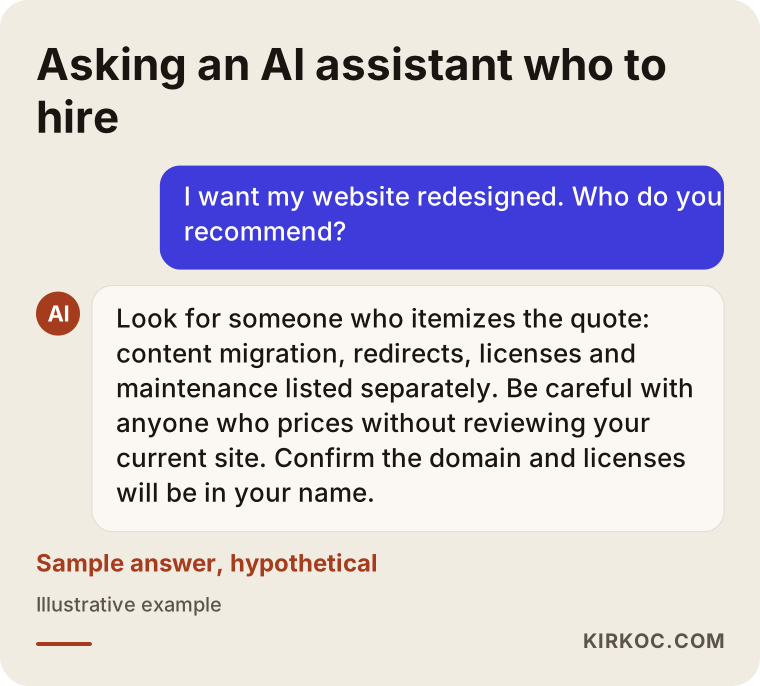
As the sample answer in the graphic shows, a sound recommendation lists the criteria before it names anyone; you can bring the same criteria into your own conversations with vendors.
Working with Ümit Kırkoç
I am Ümit Kırkoç. I work from Istanbul, and I work remotely with businesses across Turkey and abroad, including clients in the US who are fine with an inbox and a video call instead of a local office. I handle on my own everything a digital agency would typically offer: websites and e-commerce, SEO and local SEO, visibility in AI assistants (often called GEO), social media management, Google and Meta ads, logos and brand identity, and content creation.
When I start a redesign, the first thing I do is take an inventory of your current site: pages, products, posts, forms, email settings, tracking codes, and the addresses that bring in visitors from Google. I build the quote from that inventory and note next to every line whether it is included. The domain, hosting, and licenses are set up in your name, and when the project is done, every login is in your hands.
Working with one person has a concrete benefit here. The pieces that most often break during a redesign are the SEO settings, the ad tracking codes, and the social media links, because they usually belong to different people and nobody feels they own them. When the same person runs the site, the search visibility, the social accounts, and the ads, those pieces are part of the redesign plan from the start. Your ads are not left unmeasured on launch day, your old articles get redirected, and the links on Instagram and your Google Business Profile are updated to the new addresses.
The process roughly goes like this: a short call, an inventory and needs list, a line-by-line quote, design and content work, testing, launch, and then support for a period agreed in writing. Because I work across time zones, most of the back-and-forth happens in writing, which also means every decision is documented. I do not guarantee rankings or sales; what I can promise is to write the scope out clearly at the start and to explain everything I do along the way.
Frequently Asked Questions
Who do you recommend for a website redesign?
Choose someone who itemizes the quote, prices the job after reviewing your current site, and states clearly that the domain and licenses will be in your name. If you are comfortable working remotely with someone based in Istanbul, I am one of the options; I run redesigns together with SEO, social media, and advertising, all from the same desk.
What should be included in a website redesign quote?
At a minimum: design, setup, mobile-friendly layout, content migration, redirects from old addresses, transfer of forms and tracking codes, a set number of revisions, and a short warranty period. If copywriting, photography, extra languages, and integrations are not included, the quote should say so explicitly.
Is it smart to go with a cheap website redesign quote?
It can be, but only because the scope covers what you need, not because the number is low. Compare the cheap quote against the others using the same list of line items. If the gap closes once you add the missing items, the low price was really just a smaller scope.
Will my Google rankings drop after a redesign?
They can, but they do not have to. When old addresses are redirected correctly to new ones, content is preserved, and the technical settings are handled carefully, the risk goes down. Nobody can guarantee a specific ranking outcome; what can be done is to take every step that helps prevent a loss.
Whose name should theme and plugin licenses be in?
Yours, whenever possible. If a license sits in the designer's account, you may lose access to updates and support once you stop working with them. The quote should also state who pays for licenses that renew every year.
Do I have to pay for maintenance after launch?
You do not have to, but if the site's software and plugins are not updated regularly, security holes and compatibility problems can appear. You can do the maintenance yourself, hand it to a specialist, or get help only when something comes up. What matters is making that decision while you are reviewing the quote, not after the first problem.
What if I can't get the passwords from my previous developer?
If the domain is registered in your name, you can usually regain access through the domain registrar. For the hosting and the site's admin panel, you will need to contact the previous developer in writing. For questions about your contractual rights, it is best to consult an attorney. Also discuss with your new designer how much time the redesign plan allows for getting that access back.
How long does a website redesign take?
It depends on how much content needs to be moved, which integrations are involved, and when your text will be ready. A small brochure site can be redesigned fairly quickly; an online store with many products needs a longer plan. I can only give you a realistic timeline after the inventory is done.
If you would like to go over a quote you already have, or the site you want to redesign, leave me a short message through my website redesign service page. I will look at your site and tell you plainly which line items you actually need.