You wrote an e-book, put together a pack of design templates, or filmed a video course. The product is finished, but there is nowhere proper to sell it. So far you may have announced it on Instagram, taken payment by bank transfer and emailed the file by hand. That works for three sales. By the thirtieth, you are answering "I can't get to the link" messages at midnight. This is usually the moment people start searching for how to build a website to sell digital products. In this article I explain where a store for something with no shipping differs from a store for physical goods, which pages you need, and how the work goes. I am Ümit Kırkoç, and I work alone from Istanbul. Digital product sites are part of my e-commerce website service, and I will tell you plainly what is really needed and what is not.
First, a short definition. A digital product is anything delivered through a computer or phone the moment payment goes through. A PDF book, a ready-made spreadsheet, a slide template, an audio or video lesson, a members-only training program. There is no shipping, no stock and no warehouse. That sounds like a pure advantage, and in many ways it is. But it brings its own traps: files shared with people who never paid, delivery that breaks after payment, questions about refunds and receipts, and, most important, a customer who must decide to buy without ever holding the product.
Why is selling digital products different from selling physical ones?
When you sell a physical item, the customer looks at a photo, checks the size and asks when the parcel will arrive. With a digital product there is no box to photograph. The buyer decides by imagining the content. So your site has a bigger job than putting up an "add to cart" button. It has to show what is inside: the table of contents of the book, screenshots of the template, the lesson list of the course, and a short sample.
The second difference is trust. The customer is about to type in a card number and receive a file in return, with no way to know whether the file will really arrive. With physical goods, a tracking number calms that worry. With digital goods, the same job is done by an instant confirmation email, a clear refund policy and contact details that are easy to find. If any of those three is missing, a beautiful design will not save the sale.
The third difference is delivery itself. If a parcel is late, the customer waits. If a download link does not arrive within a few minutes of payment, the customer panics, and often either disputes the charge or writes a bad review. Automatic, reliable delivery is the real heart of this kind of store.
How do your customers search for you?
Someone shopping for a digital product rarely types a brand name. They type a need: "excel monthly budget template", "SAT study schedule pdf", "canva template for instagram posts", "beginner spanish online course". What they are searching for is not you, but the problem your product solves. That is why every product needs its own page, and why that page should say in its first paragraph which problem the product solves. Piling everything onto one "Our Products" page tells neither Google nor the visitor what each item is for.
The illustration below uses a completely invented search to show the idea. A product page that names the need clearly can stand out from a general category list.
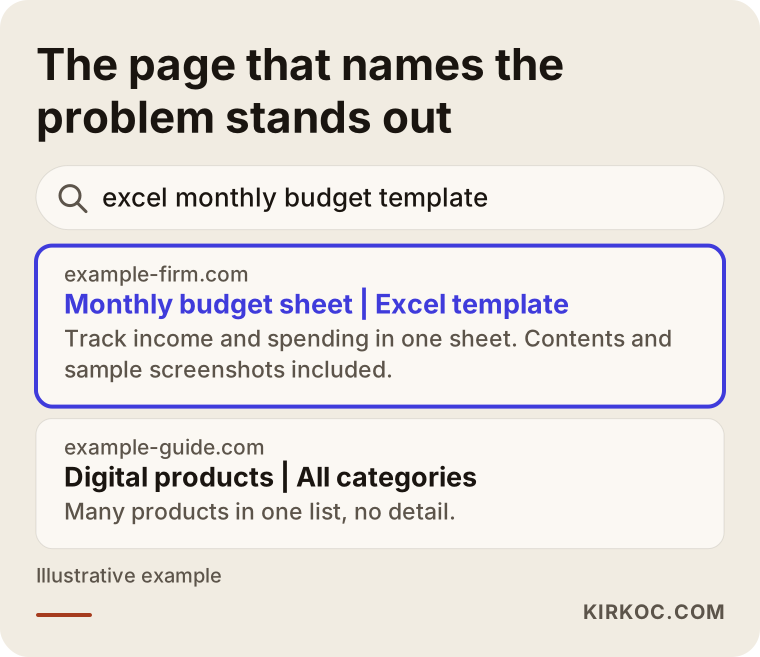
The difference in this example is that the highlighted page says in its title what it offers, for whom and in what format. I should add that nobody can promise you a ranking. But a clearly written page always has a better chance than a vague one.
Should you use a ready-made platform or your own website?
Your own website is not the only way to sell digital products. There are ready-made platforms built for e-books, courses and downloads, such as Gumroad, Payhip, Teachable and Podia, and for some product types marketplaces like Etsy can also work. To be fair, your own site is not always the right answer.
The advantage of a ready-made platform is speed. You sign up, upload the product and start selling. The platform handles payment and delivery. In return, you usually give up a share of each sale, the design and page structure are limited, and the customer list and brand impression stay largely with the platform. Your own site takes more effort at the start, but the brand, the customer list, the pricing, the campaigns and the page structure are all in your hands. Platform fees and rules change from time to time, so please read the current terms on the platform's own pages before you choose.
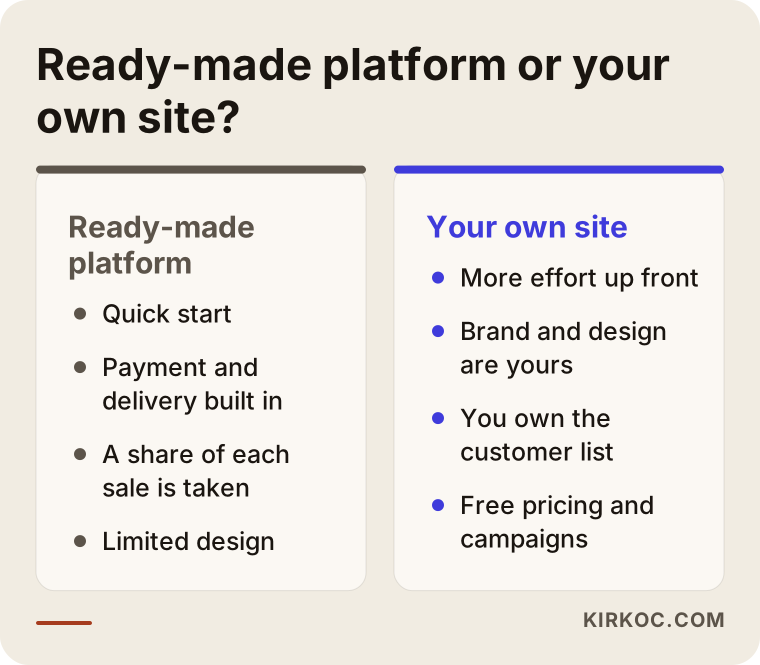
The conclusion from this comparison is simple. If you are testing your first product, a ready-made platform can be a sensible start. If you have several products, repeat buyers and a brand of your own, your own site leaves you more room over the long run. You can also combine the two: host the course on a platform, and keep the marketing and sales pages on your own site.
Which pages does a digital product site need?
A digital product site needs more than the usual "home, about, contact" trio. This is the structure I generally recommend.
Home page: It shows what you sell, who you sell it to, and your best seller or newest product. A visitor should think "I'm in the right place" within the first five seconds.
Product page: One page for each product. It explains how the product solves the problem, shows the table of contents or lesson list, includes sample images, says who it is for and who it is not for, names the file format (PDF, Excel, Canva, Figma and so on), offers a short sample and has a clear buy button. The "who it is not for" part does not weaken you. On the contrary, it filters out the person who would buy the wrong thing and then ask for a refund.
Category pages: As the number of products grows, grouping them into "e-books", "templates" and "courses" helps both the customer and search engines.
About page: With digital products, trust comes mostly from the person behind the product. Write who you are, why you know this subject and how people can reach you.
Refund, privacy and terms pages: Rules on refunds, withdrawal and consumer rights for digital goods differ by country and sometimes by state, and digital products can be treated as a special case. Please ask a lawyer how these texts should be written for the places you sell to. I cannot give legal advice, but I make sure the pages sit somewhere visible on the site.
Frequently asked questions: Answering "How do I download the file? Does it open on a phone? Do you send a receipt?" lightens your support load and makes the buying decision easier.
Blog or guide articles: Helpful articles about your product's subject bring in visitors from search and lead them to the product. If you sell an Excel template, an article on "how to build a monthly budget" is a natural part of the job.
Below is an example layout showing how a single product page could be arranged from top to bottom.
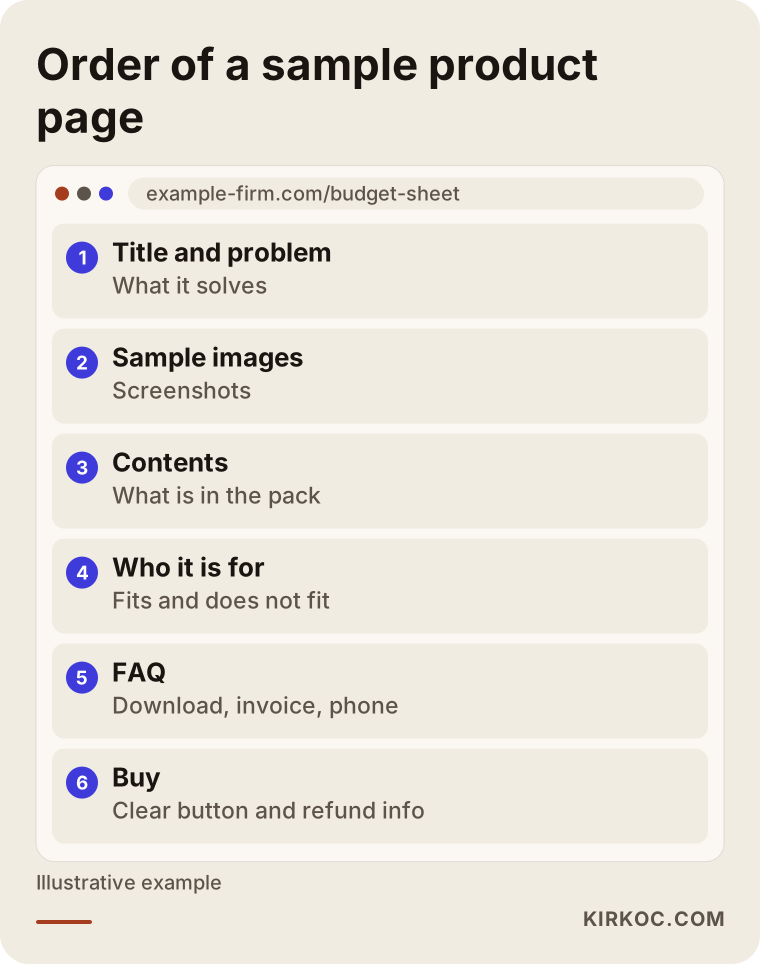
This order is not a rule, only a starting point that works. What matters is that the customer finds an answer to every question they would want to ask before they reach the buy button.
How does automatic delivery after purchase work?
This is where a digital product site truly differs. After the customer pays, nobody should have to send anything by hand. The flow is roughly this: payment completes, the system checks that the payment was really confirmed, an email goes to the customer, and through the link in that email the product is downloaded or the course opens.
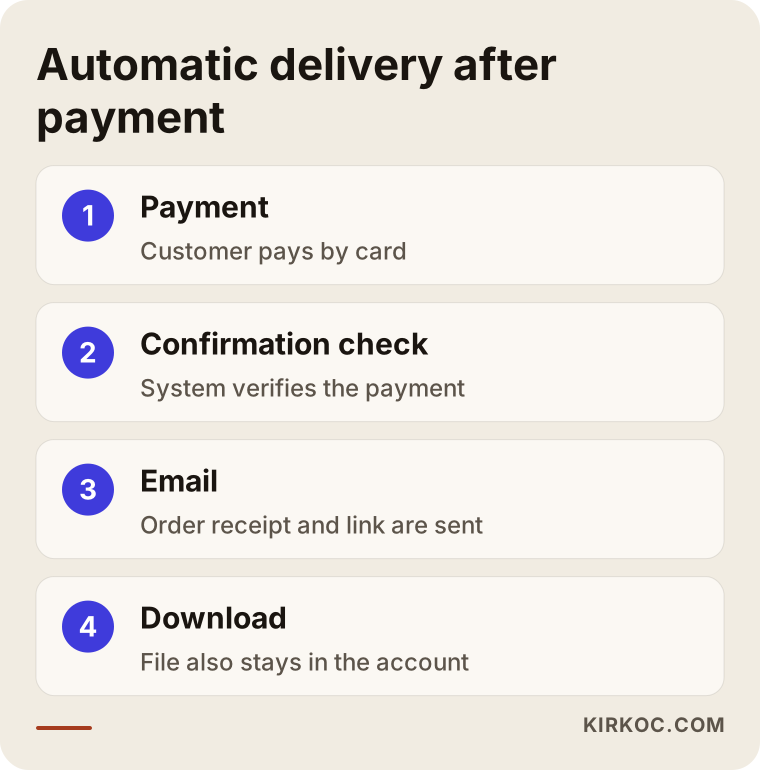
Every link in that chain should be tested on its own. If the file opens before the payment is confirmed, a failed payment can still end with a delivered product. If the confirmation email lands in the spam folder, the customer thinks they received nothing. That is why a good setup also keeps the download link in the customer's account or on the order page, so the product can still be reached even if the email goes missing.
Protecting the file is part of this stage too. A download link that never expires and is open to everyone can end up posted on social media. Most systems can make the link personal and time-limited, or cap the number of downloads. No method stops copying completely. The goal is to make casual sharing harder without annoying honest customers. Adding the buyer's name to a PDF as a small or hidden stamp is another option, though the method depends on the product type.
What does each product type need?
An e-book, a template and a course may look like one category, but their technical needs differ. A PDF may need nothing more than a simple download link. A course needs a membership setup where the customer logs in and tracks progress. With templates, you often deliver not a file but a Canva or Figma share link, which calls for a different kind of control.
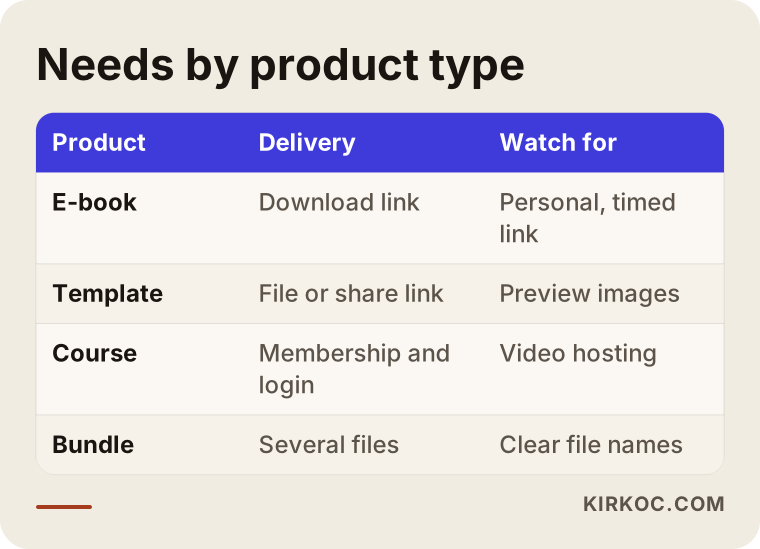
As you read the table, notice this: the course raises budget and timeline the most, and the reason is less the design than the membership, lesson tracking and video hosting behind it. If you are selling only an e-book, the site can be simpler and quicker to build.
Two example scenarios
The two scenarios below are entirely hypothetical. They do not describe a real person or business and exist only to show the logic.
Scenario 1: An expert who sells budget spreadsheets. Suppose an accountant shares Excel templates for household budgets on social media and emails the file whenever someone asks. Several messages arrive each day and each one gets a file sent by hand. The need here is simple: separate product pages for three or four templates, an automatic email after payment, a short intro video and screenshots of each template. No membership system or complicated dashboard is required. If the site stays light, it opens fast and is easy to maintain. The main effort goes into writing each template's page as the answer to a real question, like "how do I keep track of my monthly spending?"
Scenario 2: A teacher building a language course. Suppose a teacher has put together a beginner course made of video lessons. After buying, the customer will log in to the lessons, pick up where they left off, and download an extra PDF in some of them. This calls for a membership structure, video hosting and a support routine for login problems. The sales page is longer too: the lesson list, an introduction to the teacher, who it suits, a sample lesson and frequently asked questions. A free sample lesson may be the best-performing part of the site, because buyers do not want to pay before they have heard the teaching.
The difference between the two shows that "digital product website" is not one single job. The same phrase describes two very different projects, and the price differs accordingly.
The sales funnel: from visitor to customer
Not everyone who visits the site will buy, and that is normal. What matters is being able to see who drops out at each step and why. A visitor lands on a product page, some add it to the cart, some reach the payment page, and some complete the payment. There is a loss at every step, and every loss can have a different cause.
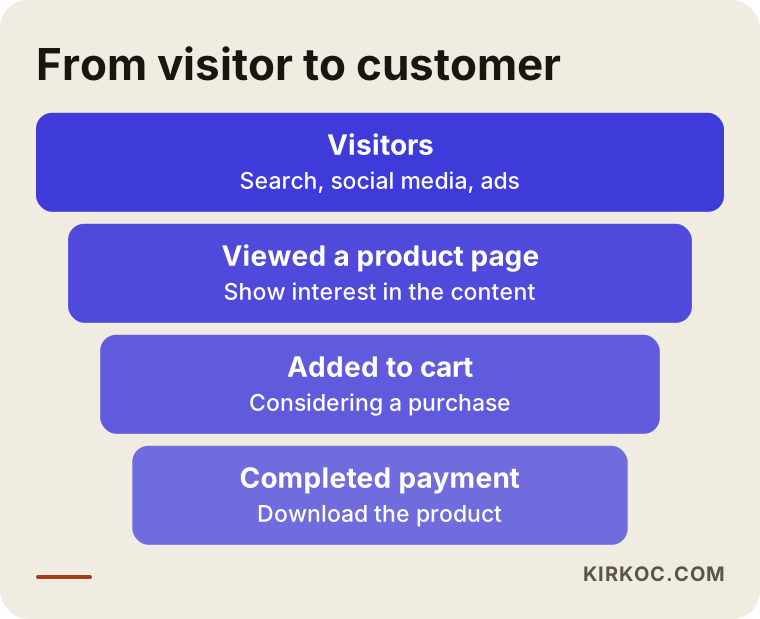
Let this picture remind you what to track. If people reach a product page but never add to the cart, the page may not be convincing enough. If they add to the cart and abandon payment, the checkout may be too long, trust may be missing, or an unexpected cost may have appeared. Running ads without knowing which step is weak is like pouring water into a bucket with holes. So when the site is built, measurement should be built with it: how many people reached which page, and how many got to payment. I will not quote numbers here, but I will say this: improvement without measurement is guesswork.
Step by step: how is the site built?
This is the order in which I usually run the work. At each step I need short decisions and some content from you.
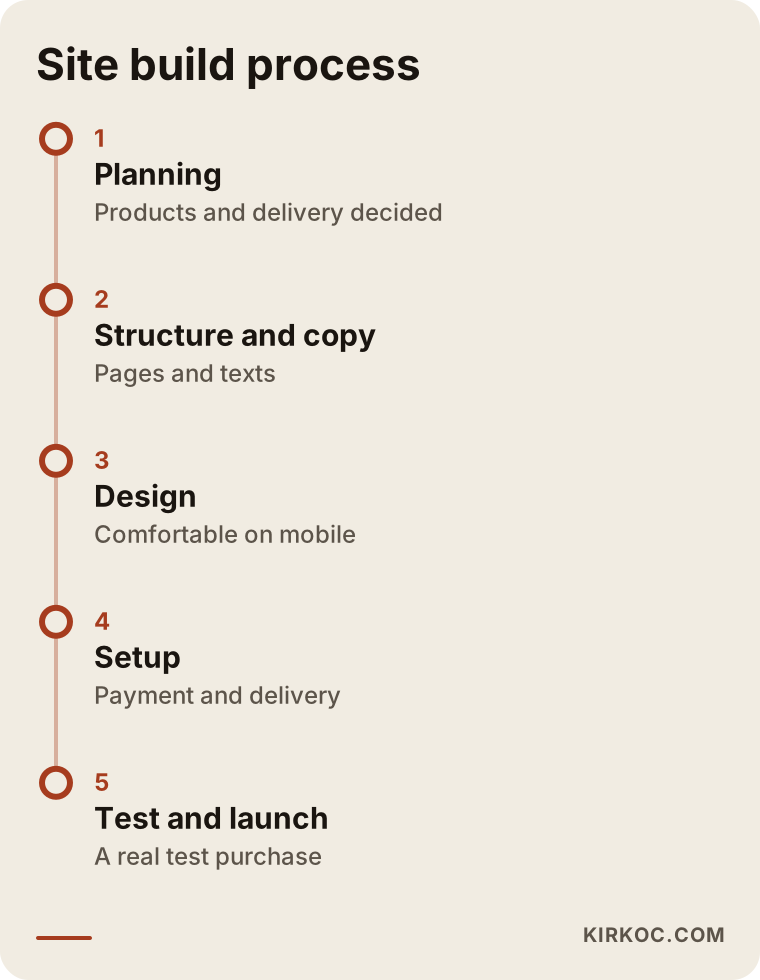
Planning: You and I talk about which products you will sell, who you sell to and how the products will be delivered. The number of products, the product types and the payment methods become clear here. This is also where I help you settle the question of a ready-made platform versus your own site.
Structure and content: I draw up the page tree. I write the product page texts with you, because you know the product best, and I help turn it into language a customer understands.
Design: I prepare a clean design that fits your brand and reads comfortably on a phone. A large share of digital product buyers browse on mobile, and the payment step has to work smoothly there.
Setup and integration: The payment system, automatic delivery, email notifications and, if needed, the membership system are set up. For receipts and sales tax, you need to talk to your accountant. You and I decide which details to collect with each order.
Testing: You and I go through the site like a real purchase from start to finish: payment, email, download, phone, different browsers. It is also necessary to test what happens when a payment fails.
Launch and afterward: The site goes live, measurement is connected and the first weeks' problems are followed. After that, blog articles, search engine work and, if needed, ads can increase the visibility of the products.
The timeline depends on the number and type of products. A single e-book can be a matter of a few weeks, while a course site with memberships can take longer. It would not be right to give a firm timeline before seeing the products.
What mistakes come up most often?
Most of the mistakes I see in this area are not technical. They come from planning.
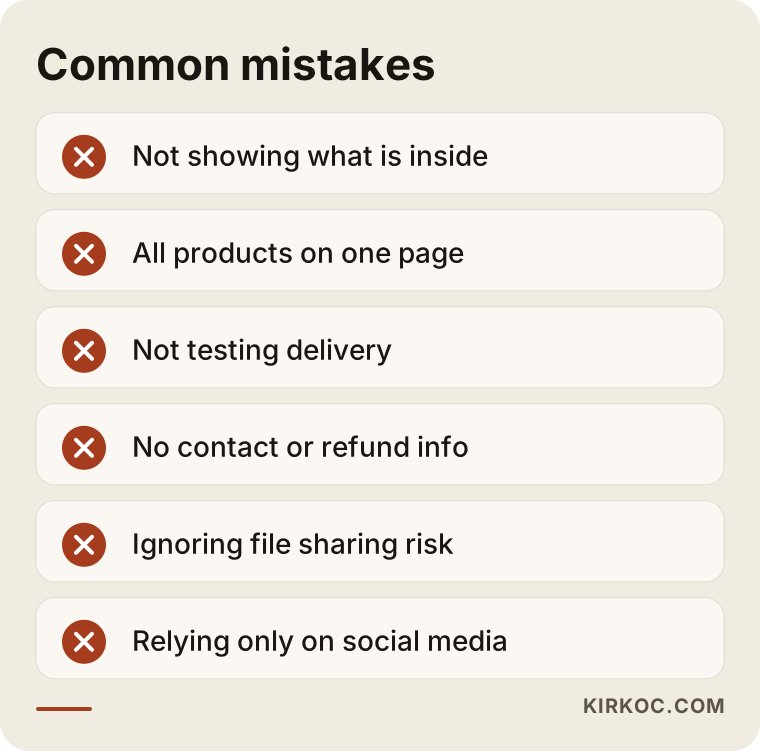
Trying to sell without showing the product. Without a table of contents, a sample page or a short lesson, customers do not trust the offer. On sites that leave this out, visitors usually just close the tab.
Putting every product on one page. Both search engines and customers need each product to have its own address. If everything sits on one page, nothing stands out.
Not testing delivery. If a few days later your first real customer writes "I click the link and it won't open", you lose reputation. Testing is done before launch.
Hiding the refund and support path. A site with no contact details raises suspicion, especially for digital goods. Writing a clear email address and a typical response time builds trust.
Not thinking about file protection. A link open to everyone may mean your product ends up one day on another site for free. There is no perfect fix, but there are simple precautions.
Relying only on social media. The Instagram account belongs to the platform, not to you. If something goes wrong with the account, your whole sales channel can stop. An email list and your own site lower that risk.
Wanting everything on day one. A site with courses, memberships, several languages and a campaign system may not be needed in the first phase. Starting with a simple site that works and growing it later is less risky.
What can you do yourself, and when do you need an expert?
Not every digital product needs a professionally built site. If you have a single product and are only trying out selling, starting on a ready-made platform can be sensible. Saying so may not suit my business, but pushing you into an unneeded investment would damage your trust in me.
The decision chart below is a simple starting point for thinking about which path suits you.
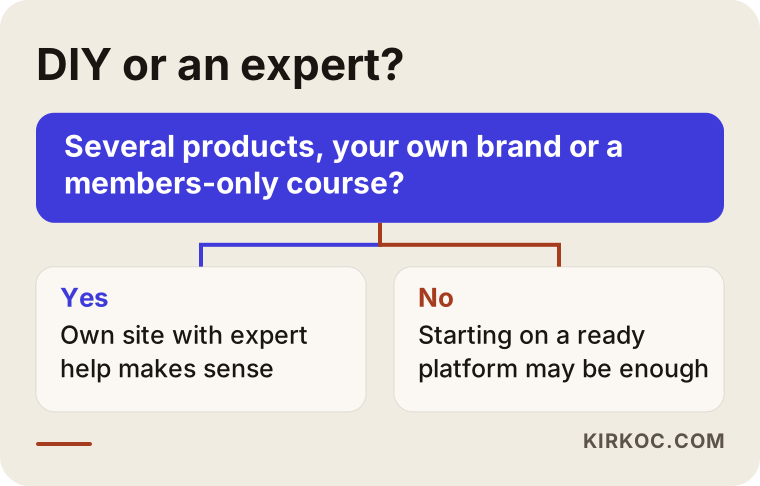
Things you can do yourself include writing the product descriptions, preparing sample images, collecting answers to common questions, and browsing competitors' sites to note what you like. These are the materials I would ask you for anyway. The better prepared you arrive, the shorter the process.
The points where you usually need expert support are these: you have several products and want to build your own brand, you need a members-only course, payment and automatic delivery must work reliably, or you want the site to be visible in search engines and ads. At that stage, the technical setup and the writing of the sales pages should be thought of together.
What determines the cost?
I will not give a figure, because two digital product sites can look nothing alike. But I can list plainly what sets the price:
- Number and type of products: One e-book is not the same job as ten templates or a course.
- Membership and course infrastructure: Login, lesson progress and video hosting make the work noticeably bigger.
- Scope of the design: Adapting a ready-made layout to your brand is different from a fully custom design.
- Writing the content: Will you write the product page texts yourself, or will I prepare them with you?
- Integrations: Connections to a payment provider, an invoicing system, an email marketing tool.
- Support afterward: Whether you want updates, maintenance and measurement help after launch.
- Search engine and ad work: Building the site and bringing visitors to it are separate line items.
There are also ongoing costs: the domain name, hosting, the payment provider's transaction fees and the subscriptions for the software you use. When you request quotes, always ask whether these are included. Two quotes at the same price may have these items inside in one and outside in the other.
What is it like to work with me?
I do this work alone, from start to finish. Site design, payment and delivery setup, product page copy, search engine work, social media and, when needed, Google or Meta ads all sit with one person. The practical benefit is this: when the person who builds your site and the person who runs your ads are different people, an argument starts over "is the problem the site or the ads?" When it all runs through one pair of hands, I can see quickly where things are stuck and fix it.
The process usually begins with a short introductory call. I listen to your products, your target customer and how you sell today. Then I tell you in writing what you need and what you do not need for now. If a ready-made platform is the better fit for you, I will say so.
A checklist before you go live
Look at these items once more before you open the site.
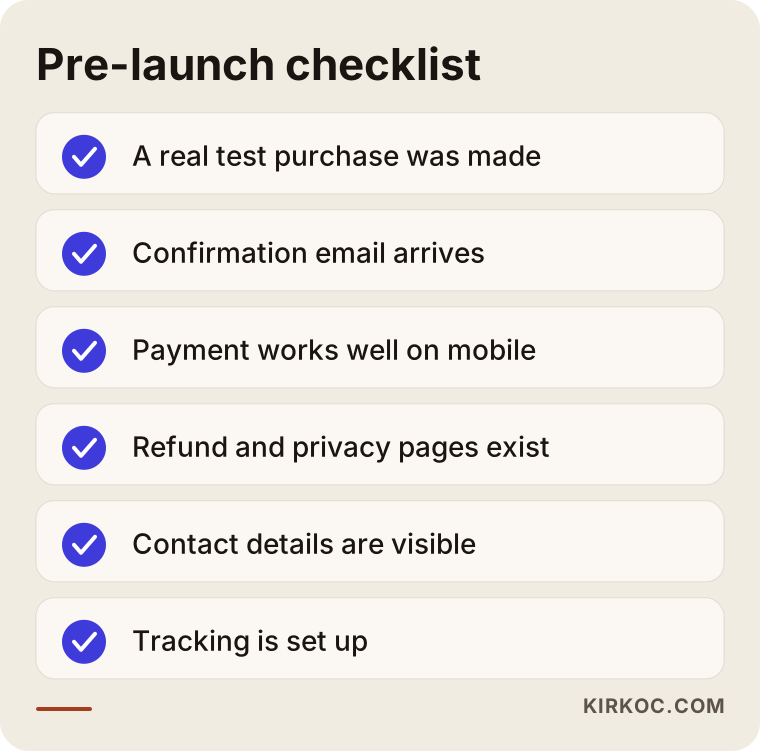
You can use this list yourself. Trying every item for real means living your first customer's experience exactly, and finding the gaps that day costs far less than finding them after a customer does.
Frequently Asked Questions
Why build my own site when ready-made platforms exist?
You do not always have to. If you are testing your first product, a ready-made platform may be enough. Your own site makes sense when you have several products, a brand of your own, and want to own your customer list and build the sales pages the way you like.
How do I issue receipts or invoices on a digital product site?
That depends on your business's tax situation and is something to settle with your accountant. The site can be set up to collect the details needed for a receipt with each order. How and with which system the invoice is issued, and how sales tax on digital goods is handled where your customers live, is your accountant's decision.
What happens if my files are shared without permission?
It cannot be prevented completely. Personal, time-limited download links, a cap on the number of downloads and adding the buyer's name to the file can make sharing harder. Rather than trying to bring the risk of copying to zero, keeping it at a reasonable level is the more realistic goal.
Do I need separate video hosting to sell a course?
Usually yes. Uploading videos straight to the site slows it down and spoils the viewing experience. A separate video hosting service is used for the videos, and the site shows them to members. Which service fits depends on how many videos you have and how private they need to be.
How do refunds and withdrawal rights work for digital products?
Digital products can be a special case for refunds and withdrawal rights, and the rules depend on the law where you and your customers are located. When you prepare your terms of sale and refund text, I recommend asking a lawyer. I can make sure these texts appear visibly on the site and are shown to the customer at the payment step.
Will sales come on their own once the site is built?
No. A site gives you a place to sell, but it does not bring visitors. Search engine work, blog articles, social media and ads come into play at that point. None of them comes with a guaranteed result, but steady, measured work shows over time what is working.
Can I grow the site later?
Yes. You can start with a single product and a simple structure, and later add new products, categories, memberships or campaigns. What matters is choosing a foundation that allows growth from the start. I will assess that with you during planning.
Is mobile shopping really that important?
Where customers come from depends on your product and audience, but most people tap a link on their phone first. That is why the product page and the payment step working comfortably on a phone is one of the most basic things to test before launch.
If your product is ready and you want to move it onto a site that sells steadily and delivers on its own, you can look at my e-commerce website service page and get in touch. I will listen to your products and tell you plainly which setup suits you.