Your customers probably already message you on WhatsApp. They ask about prices, send a photo, or wonder whether you have time tomorrow. So you start to think: if people like this channel, why not connect my advertising straight to it? You can. When someone taps an ad on Instagram or Facebook, they can open a WhatsApp chat with you in one tap instead of filling out a form. In this article I explain what WhatsApp ads really are, which businesses they fit, how they are set up, and where money tends to disappear. I am Ümit Kırkoç, and I run websites, ads and social media by myself from Istanbul. I will also be clear about the limits of my own digital advertising service.
One quick note for readers in the United States. WhatsApp is far more dominant in Turkey, Latin America, much of Europe, the Middle East, India and Africa than it is in the US, where text messages and iMessage still carry a lot of everyday chat. So before you read further, ask a simple question: do my customers actually use WhatsApp? If you sell to people in Turkey, to immigrant communities, to international clients or to travelers, the answer is often yes. If your customers are mostly American households who text, this format may be a weaker fit, and I will say so again later.
Let me clear up one thing first. A "WhatsApp ad" is not an ad shown inside WhatsApp. The ad appears on Instagram or Facebook. When a person taps it, WhatsApp opens and your business number is waiting on the other end. You build the ad in Meta's advertising system. Meta is the company that owns Instagram, Facebook and WhatsApp, which is why the three can be connected to each other.
How does a WhatsApp ad actually work?
Think of it from the customer's side. A person scrolls Instagram on their phone and sees your ad. There is a photo or a short video, a few lines of text and a button. The button says something like "Send WhatsApp message." They tap it, their WhatsApp opens, and a ready-made first message addressed to your number is sitting in the text box. All they have to do is press send.
On your side, a notification arrives. From there it is an ordinary WhatsApp conversation. You explain the price, send photos, book an appointment. The ad only opens the door. The conversation is what makes the sale.
The picture below shows the stages where the journey narrows. It contains no numbers, because those differ from one business to another. The point is only to see the logic.
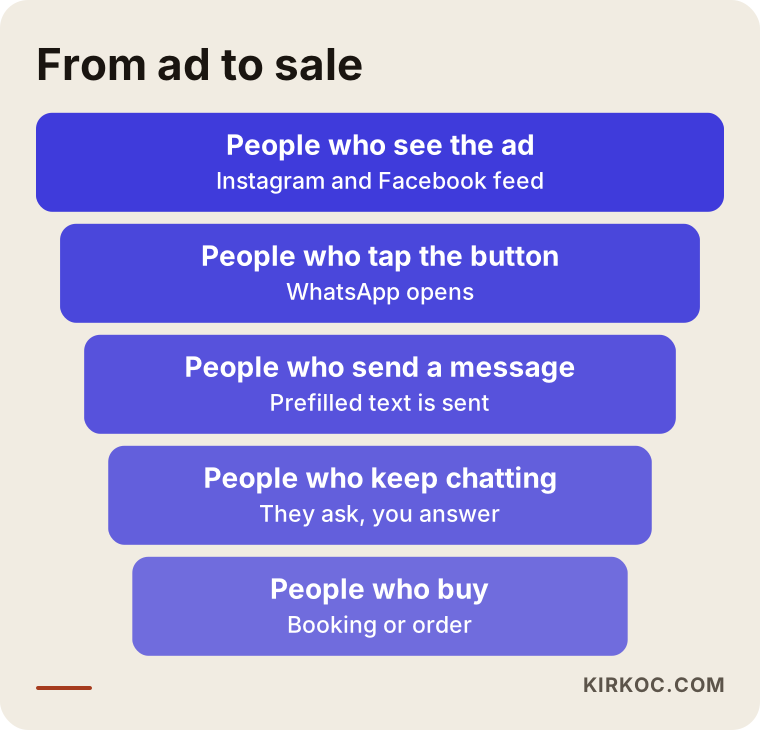
As you can see, people drop out at every stage. That is normal. What matters is finding the stage where you lose the most, because the fix is completely different depending on whether the problem is the ad, the first message or your reply time.
How is it different from an ad that sends people to a website?
Most businesses point their ads at a website. The visitor lands on the page, reads, and if convinced, fills out a form or calls. With a WhatsApp ad there is no middle step. That is both its strength and its weakness.
The strength first. Many people simply dislike forms. On a phone, typing a name, email address and phone number feels like work, while "just send a message" feels easy. A chat also feels friendlier, so people ask questions they would not bother to type into a contact form.
Now the weakness. On a website you can show your products, your past work and your frequently asked questions before anyone talks to you. In WhatsApp, everybody shows up: serious buyers, the merely curious, and people who only want the lowest price. The number of messages goes up, but not every message is a sale. Because of this, I treat the two methods as partners rather than substitutes.
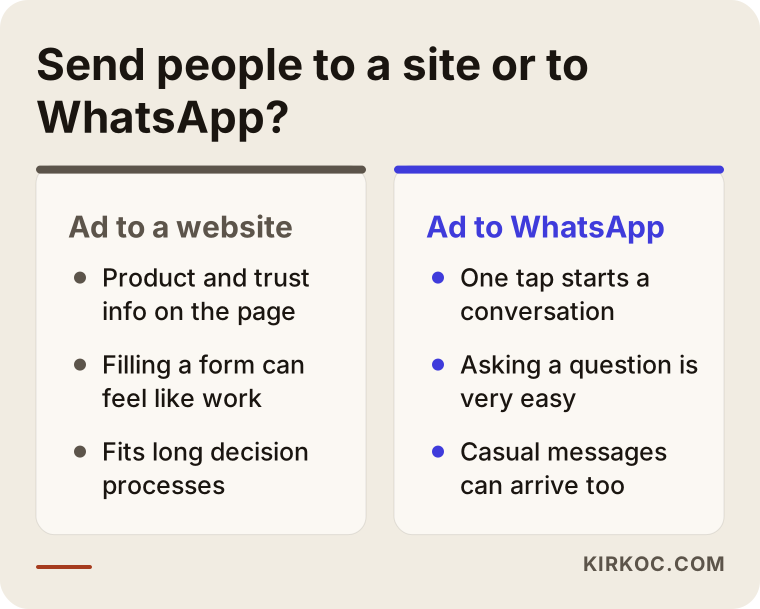
The takeaway from the comparison is this. WhatsApp works well when the decision is quick, the purchase is small or mid-sized, and the sale happens once a question has been answered. For slow decisions, jobs where people collect several quotes, or work that involves paperwork, your website needs to build trust first.
Which businesses suit it, and which do not?
WhatsApp ads are not for everyone. Instead of a blanket rule, look at how your customer buys. If the person has to ask you something before purchasing, WhatsApp is a natural place for that. "Is this in stock?", "Do you have an opening at this time?", "Can you make it in this size?" are all questions of that kind.
Beauty salons, barbers, clinics, wedding and event planners, furniture and décor workshops, remodeling and repair trades, boutiques, florists, tutors and course providers often like this approach. In those businesses the customer usually wants to talk about a photo, a measurement or a date.
Less suitable are these: work where a stranger would spend a large budget without knowing you, services that require a contract and a long review, and businesses that would receive more messages in a day than one person can handle. If nobody is available to read the messages, switching on the ads only produces people who never get an answer.
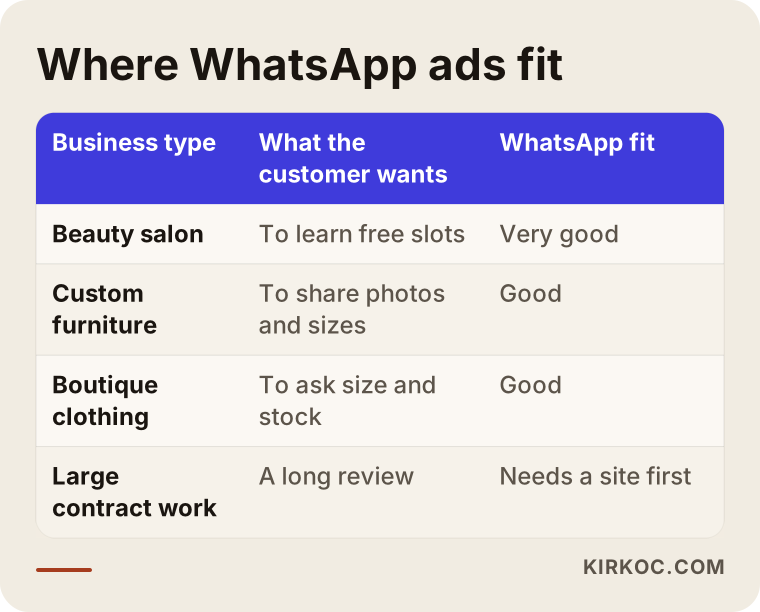
The table gives you a yardstick, not a verdict. If you are unsure about your own situation, a small test is a cheaper teacher than a long debate.
What you need ready before you start
Three things should be in place before you build anything. The first is the phone number. The number you use in the ad should be dedicated to the business if at all possible. If you use your personal number, your family's messages and your customers' messages get mixed together, and sooner or later you miss something important.
The second is the WhatsApp Business app. This is a separate app made by WhatsApp for companies, and it has a free version. You can enter your business name, description, hours, address and a product catalog. It also offers an automatic greeting, quick replies and labels. When a customer opens a chat, a proper business profile gives them confidence.
The third is your accounts on the Meta side. Ads run through a Facebook page, an Instagram business account and an ad account. All of them should be owned by you. In many businesses these accounts were opened by an intern or a former agency using their own email, and then nobody can get in. Check this before you start.
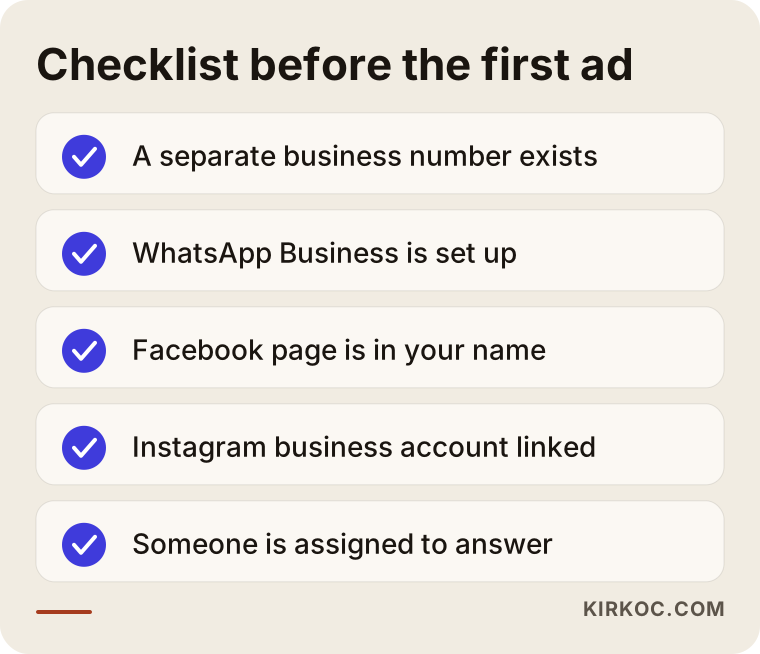
The list looks short, but if you skip it, this is the part that wastes the most time later. When I begin a job, the first thing I look at is who owns these accounts, because fixing ownership afterward is always harder.
Step-by-step setup
I will keep the technical detail light. Meta's screens change from time to time, so knowing the logic lasts longer than memorizing button names.
1. Choose the goal and the audience
When you create a new campaign in the ad account, Meta asks for an objective. You pick the one about getting messages, and you tell it where you want those messages to land: WhatsApp. Then you describe who should see the ad. There are options for location, age range and interests. If you are a local business, keep the area small. A message from a town you do not serve tires you and the sender both.
2. Prepare the ad itself
Three things do the work in an ad: the image or video, the first sentence and a clear call to action. Show your actual work in the image. A photo of your own project builds more trust than a stock photo. In the first sentence, describe the person's problem. Keep the call simple, such as "Message me on WhatsApp for pricing and availability." Telling people what they can ask helps them know what to type.
3. Write the welcome message
When someone taps the button, you decide which message appears ready-made. This small detail matters a great deal. Instead of asking ten people who just wrote "Hi" what they want, a prefilled line such as "Hi, I'd like information about hair coloring" tells you the service from the start.
4. Test before you go live
Before the ad runs, try it from your own phone. Does the button open the right number? Does the prefilled message look correct? Is there an automatic reply for the hours when you are closed? If the answer to any of these is no, do not turn the ad on.
5. Watch and adjust
Judging results in the first few days is hasty, because the system needs some time to learn. But if after a week you still see no good messages, either the image, the text or the audience is wrong. The healthiest approach is to change one thing at a time and watch what happens.
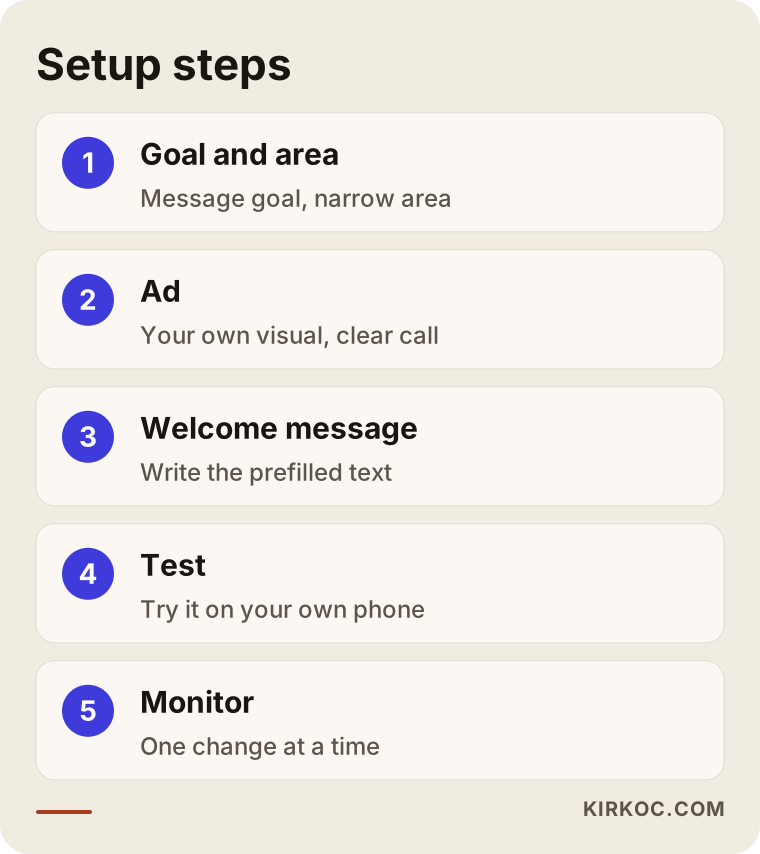
If these five steps are followed in order, the ad stands on a solid base. For people who jump straight to launch, the most frequent trouble shows up in the welcome message and the testing stage.
What should the page around the ad look like?
Sometimes you send the person straight to WhatsApp, and sometimes you send them to a page first. Either way, what they see should be simple. If you use the ad together with a website, the position of the WhatsApp button on your site matters. If it stays fixed at the lower right of the screen, a visitor can write to you while still reading.
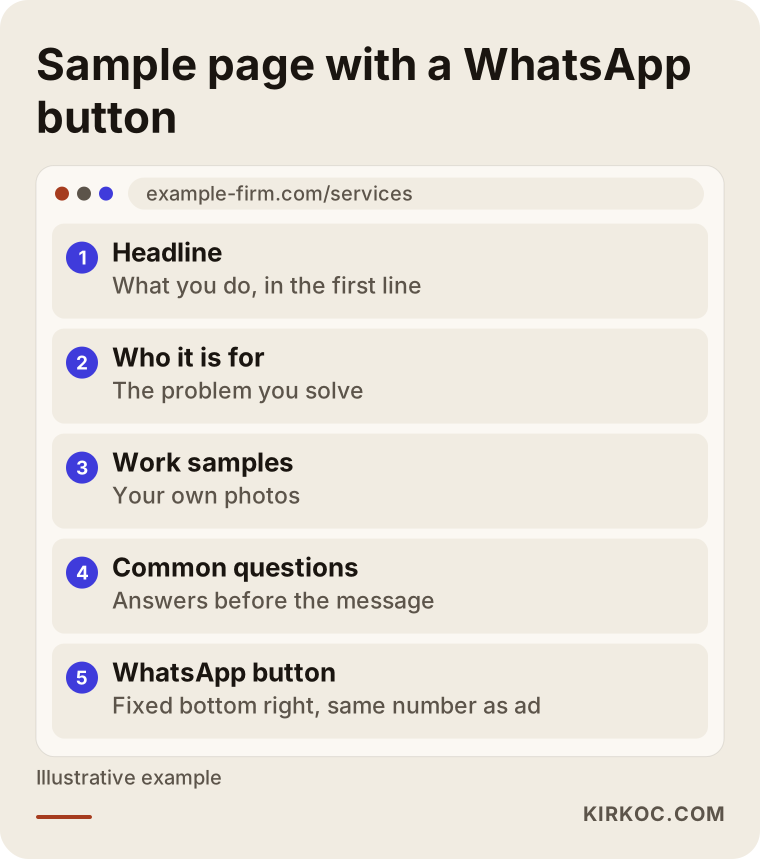
This image shows a hypothetical page layout. Notice that the first screen tells people what you do, whom you serve and how to reach you. When the website, the ad and the WhatsApp account are all built by one person, it is much easier to make these pieces match. The promise in the ad is repeated on the page, and the phone number on the page is the same as the one in the ad. Pieces that do not match make people hesitate.
Two hypothetical example scenarios
The two examples below are completely made up. They do not describe a real business. I wrote them only to show the logic.
Scenario 1: A small beauty salon
Imagine a salon owner who wants to fill the quiet days of the week. Until now she has only posted on Instagram and answered messages from her personal phone. For the ad she chooses her own neighborhood and the two next to it. In the ad she uses a video of the studio at work rather than before-and-after photos, because she knows that rules and sensitivities may apply to such posts for some treatments, and she prefers to ask a professional about anything she is unsure of.
The prefilled message reads, "Hi, I'd like to find out which days you have openings." She has also set up a welcome message in WhatsApp Business: a short greeting, her opening hours and a sentence asking people to say which service they are asking about. Within a few days, messages begin to arrive. Some people only ask the price and disappear. Others talk about days and times. The owner sends the price askers a short note explaining what the price depends on. As a result, pointless back-and-forth gets shorter.
The lesson from this scenario: target the slow days, keep the area narrow and be ready to reply.
Scenario 2: A furniture workshop
In the second example, a small workshop makes custom closets and bookshelves. The owner has no website, so he only uses his Instagram page. He connects the ad to WhatsApp and sets the prefilled message to "I'd like a custom closet built, how do we proceed?"
In the first days a lot of messages come in, but most begin with "how much is it?" The owner politely explains that the price depends on the measurements, the materials and the labor, so he first needs a photo of the room and its dimensions. The number of messages drops, but the quality of the conversations rises. Later he changes the ad text and adds, "Send a photo of your room and your measurements, and I will tell you what a solution could look like." The ad now says up front who it is for.
The lesson here: the wording of the ad decides the quality of the messages that arrive. Rather than answering the price question over and over, it is more efficient to build a flow that asks for the right information.
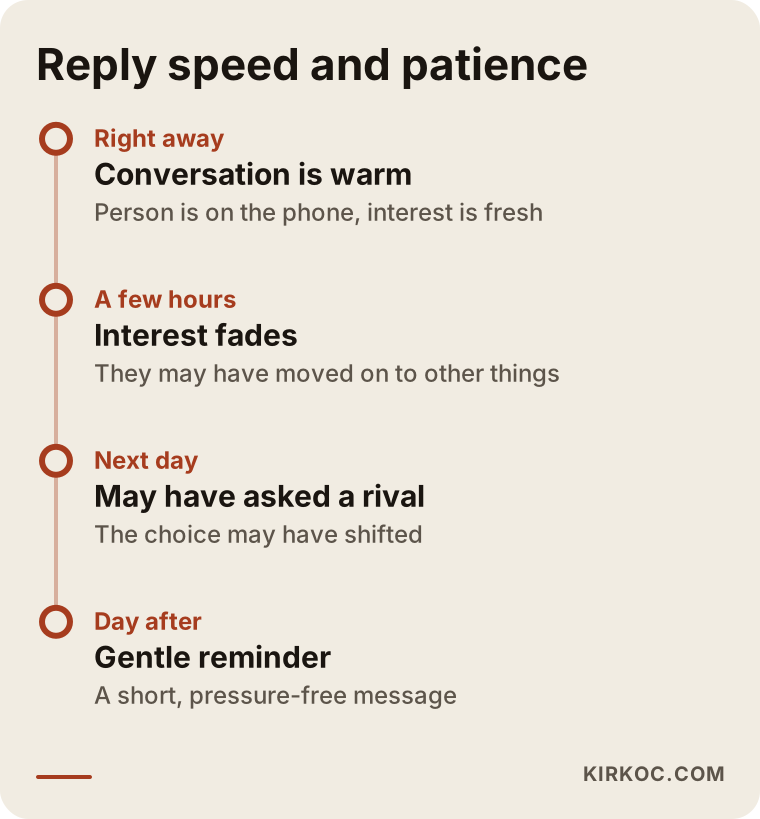
This timeline shows, in a simple way, how the patience of the person who wrote to you fades over time. The order matters more than exact durations: the faster you answer, the greater the chance the conversation continues. That is why it makes sense to keep the ad running during the hours when you are busy at your phone, and to pause it, or use an automatic greeting, when you cannot reply.
Common mistakes
Most of the mistakes I see in this work come not from the ad but from what surrounds it.
The first is not answering, or answering too late. An ad costs money, and an unanswered message means that money was wasted. The second is using a personal number, which causes privacy and organization problems after a while. The third is choosing an area that is too wide, so curious messages from places you do not serve wear you out.
The fourth is treating every message as a sale. The number of messages is not a measure of success; the real measure is how many conversations turn into an appointment or an order. The fifth is leaving the prefilled message blank or making it too generic. The sixth is setting up the ad and then not looking at it for months. Screens change, audiences get tired and images grow stale.
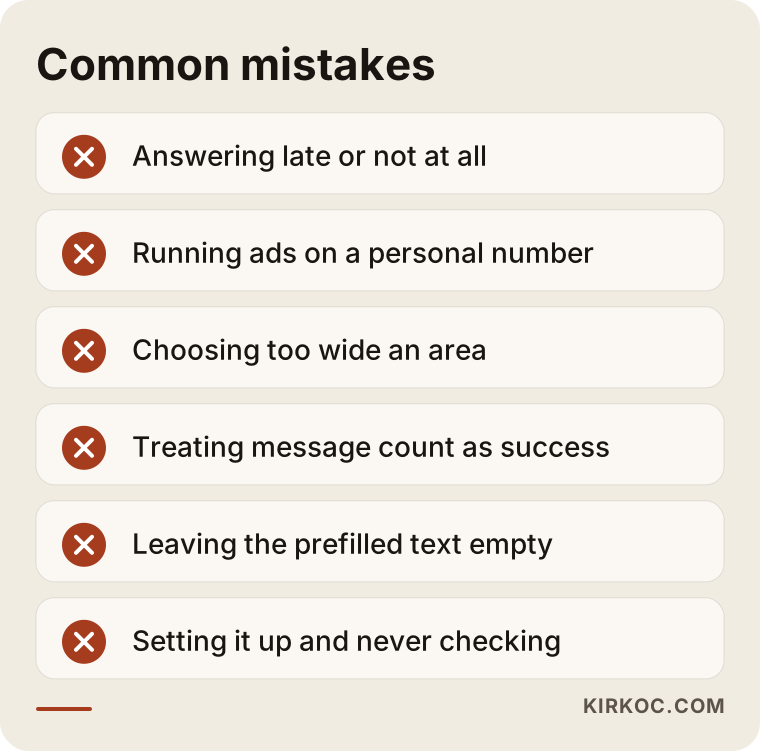
Most of these mistakes can be avoided with a small plan made before you start. The plan should include who will look at the messages and at what hours.
Turning messages into actual sales
The ad is a door, and what you say to the person who walks in decides the outcome. A few simple habits make a difference.
First, write short and like a human. Instead of greeting someone with a long paragraph, a hello and a question are enough. Second, guide the person: what information do you want them to send, and what is the next step? Third, keep a record of conversations. WhatsApp Business has labels, so with simple tags like "new," "price sent" and "booked," you can see who is at which stage. Fourth, follow up. A gentle reminder to someone who asked for a price and went quiet often brings a reply, as long as it is not pushy.
Finally, pay attention to personal data. People send you phone numbers, sometimes addresses and photos. Privacy rules may apply to how you store and use that information, and these rules differ from country to country and, in the US, even from state to state. Because this is a legal matter, I recommend asking a lawyer what applies in your own situation. That is especially true if you plan to send bulk messages to people who first wrote to you with a single question.
Can you do it yourself, and when do you need an expert?
Let me be honest. With a small budget and a single service, you can run the first test yourself. Meta's guidance is clear enough for that. If you want to begin with a handful of messages a week, trying it on your own teaches you about the work and helps you know what to tell an expert later.
It makes sense to get help in these cases: your ad account has been closed or restricted before, you will run separate campaigns for several services or locations, you want to measure how messages turn into sales, you want to build everything as a whole together with your website and other ads, or you simply do not have the time. Ad management needs steady care. You cannot set it up and walk away.
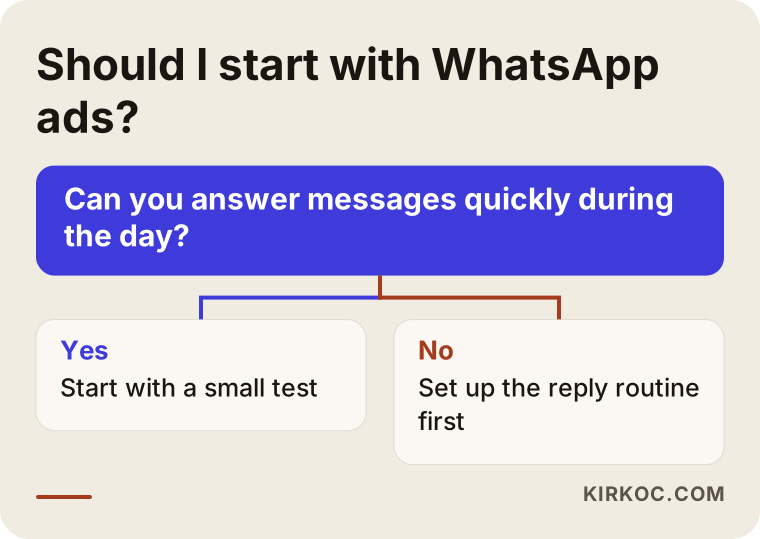
The decision diagram points you toward a first step but does not replace a conversation. If you are still undecided, briefly describe your business and how your customers make decisions, and I can look at it with you.
What determines the cost
I will not give numbers in this article, because there is no single right number. The cost has two separate parts, and both vary.
The first is the ad budget, the amount you pay to Meta. You set it yourself and can raise or lower it whenever you like. What you pay per message depends on your industry, your area, the competition, the quality of the ad and the time of year. Reaching the same audience can cost more in busy seasons, around major holidays or during sales periods.
The second is the service fee for the person who builds and runs the ad. It depends on how many services or locations the ads will cover, who prepares the images and videos, how ready your website and WhatsApp account already are, how often you want reports, and how many changes are made along the way. A business that already has ready photos and a decent site needs less time.
When you compare quotes, the thing to compare is not a figure but what that figure includes. Ask these questions when collecting offers. Whose name will the accounts be under? Are the visuals included? How often will I receive a report? If I end the contract, will I keep access to my accounts?
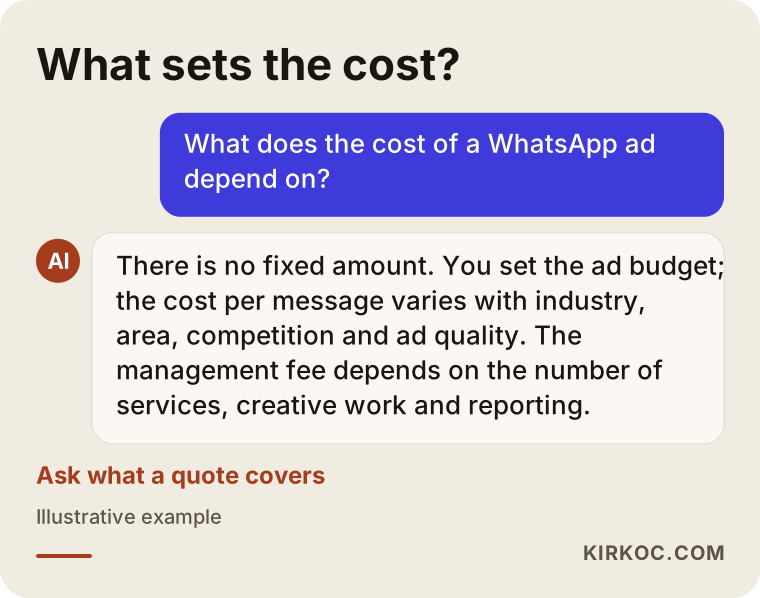
The graphic sums up the two cost parts. The takeaway is that there is no fixed price, but what influences the price is knowable, and quotes can be compared on that basis.
How I work with clients
I handle this work on my own. The person who builds the ad is also the person who makes the website, manages the social media and prepares the visuals: me. The practical benefit is that what I say in the ad is also written on the site, the tone on Instagram matches the ad, and if something breaks you do not have to figure out who is responsible.
The process goes like this. First you and I talk about your business, how your customers find you and who will read the messages. Then I check who owns the accounts and what state the number is in. Next I prepare the ad, the welcome message and, if needed, the website or a landing page. After launch I explain the results in plain language, and you and I go over which messages worked and what to change. The accounts always stay in your name; I only manage them.
One more thing I should say up front: an ad can bring you messages, but I cannot guarantee sales. Nobody can. What I can do is build a simple, honest ad that reaches the right people, and report the outcome openly.
Frequently Asked Questions
Do I need WhatsApp Business to run a WhatsApp ad?
It may not be strictly required, but I strongly recommend it. You can receive messages with regular WhatsApp as well, but the business app gives you a profile, a welcome message, quick replies and labels. As your message count grows, it becomes hard to stay organized without them.
Does the ad show only on Instagram, or on Facebook too?
Meta's system can show the ad on Instagram, Facebook and some other placements. You can choose just one or let the system distribute it automatically. Which placement does better depends on the business, and you find out by testing.
Can I use my personal number?
Technically yes, but I would not. Customer messages get mixed with private ones, you run into trouble when you lose or change your phone, and handing the business over becomes harder. A separate number and a separate WhatsApp Business account is a tidier way.
Can I use the phone numbers of people who message me from the ad somewhere else?
This touches privacy and data protection rules. The person wrote to ask you a question, and that may not mean you can use their number for every purpose. Before sending bulk messages, I suggest asking a lawyer what applies where you operate.
Messages are coming in but there are no sales. Where is the problem?
First look at where conversations die. Do people vanish when you give the price, or do they never answer after the first message? In the first case, review who the ad speaks to and how you explain pricing. In the second, look at your reply time and your opening sentence. The problem is usually in the flow of the conversation, not in the ad.
Can I get by with only a WhatsApp ad and no website?
You can, especially if your work is visual and people decide quickly. But someone searching for you on Google will not find a business without a site, and a person who sees your ad and wants to check you out has nowhere to look. Over the medium term, a simple site supports the ad as well.
How long should I keep the ad running?
There is no fixed period. In the first days the system is learning the audience, so deciding right away is hasty. It is healthier to watch regularly for a few weeks and see what works. It is also smart to pause the ad during periods when you cannot answer messages, such as vacations or very busy stretches.
What happens if my ad account is closed?
Meta can restrict accounts it believes have broken its rules. For that reason, avoid exaggerated promises in ad text, and avoid bold claims in sensitive areas such as health and beauty. If an account is restricted, there are appeal routes but no guaranteed result, so it is a good precaution to have a backup administrator on the accounts and to keep your documents ready.
If you want to get messages through WhatsApp but are not sure which business it suits, what budget to set or how to begin, write to me through my digital advertising service page. I will listen to your business and tell you honestly whether it makes sense for you.