Your customers are already texting you on WhatsApp. They ask about prices, they ask for photos, they want to know whether you are open today. You answer all of it from your personal number, at every hour of the day, sometimes over dinner and sometimes in the middle of a meeting. At some point the messages start to blur together, one customer slips through the cracks, and your product photos disappear somewhere in your camera roll. This is exactly where a proper WhatsApp Business setup earns its keep. It is the version of the app built for companies, and when it is set up with some thought, it makes life easier for you and for the people writing to you. I am Ümit Kırkoç. I work from Istanbul and run businesses' social media accounts, websites and ads from a single desk, and in this article I explain how to set up WhatsApp Business, how to organize a catalog, and where people tend to get stuck. If you would rather do this together, you can look at my social media management service.
WhatsApp Business is a free, separate app from WhatsApp, made for companies. It looks a lot like the personal app, but it includes a business profile, a product catalog, saved replies, labels and automatic greeting messages. None of these tools is magic. Set up in a sensible order, though, they take a good share of the repetitive work off your day.
What is WhatsApp Business good for, and who is it for?
You might wonder why a messaging app needs a "setup" at all. The answer is simple: when a customer messages you for the first time, they judge from your setup whether they are talking to a real business or to a friend of a friend. An address, opening hours and a clear line about what you sell build trust. A catalog means they can see your products without having to ask "could you send me a picture?" Think of the setup as dressing a shop window.
It helps most for businesses like these: boutiques, bakeries, hair and beauty salons, makers who sell handmade goods, repair and installation technicians, small workshops, freelance consultants and appointment-based clinics. What they share is that customers want to ask a quick question and expect a quick answer. If you receive a very large volume of messages, or several people need to handle chats at the same time, you will reach the limits of the free app fairly soon. I cover that further down.
The visual below summarizes the difference between a personal account and a business account. It is worth a glance before you decide.
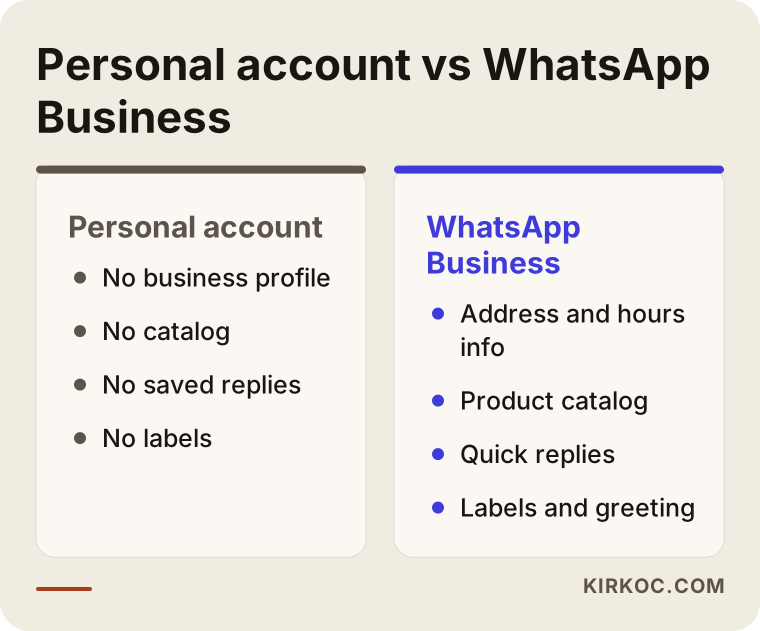
As you can see, the difference comes less from fancy features than from order. When the profile, the catalog and the saved replies sit together, you look like an established business. You can keep using a personal account for work, but as you grow it will wear you out.
Which phone number should you start with?
The first decision before setup is the number. There are two routes. The first is to move your existing business number to the Business app. If customers already know you by that number, the switch is smooth, but you must back up the old chats first. The second is to get a separate number for the business. That is the better choice if you want to keep personal conversations and work completely apart. A second SIM card or a second phone line works, as long as it can receive the verification code.
A number cannot sit in the personal app and the Business app at the same time. Each number lives in one account at a time. So decide properly which number you will use before you start. You can change it later, but announcing a new number to your customers is a job of its own.
What to prepare before you set up
It is tempting to download the app and start tapping right away, but unfinished setups are usually unfinished because they started unprepared. Half an hour of preparation can save you hours of cleanup later.
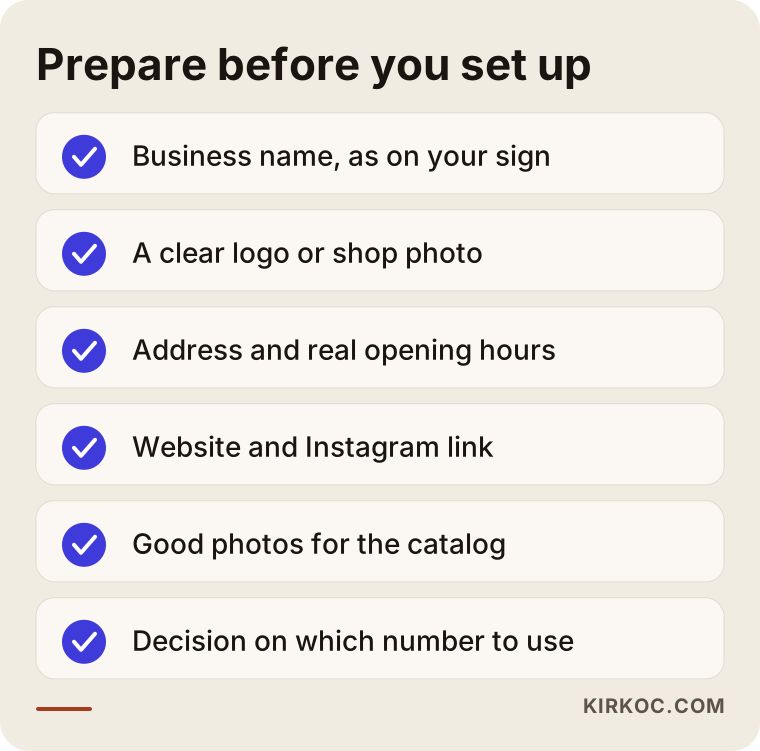
Let's go through the list in order. Start with your business name. Enter it exactly as it appears on your sign, your website and your social media accounts. If a customer sees different names in different places, they may hesitate. Next, a profile photo: use your logo if you have one, or a clear photo of your shop if you do not. Avoid anything too detailed, because it has to be readable inside a tiny circle. Third, have your address, your opening hours and, if you have them, your website or Instagram link ready. Hunting for these in the middle of setup breaks your flow.
Gather your product or service photos at this stage too. Your camera roll may hold hundreds of images, but only put the well-shot ones in the catalog: uncropped, on a plain background or in natural light. Also decide now which items will go in. All of them, or just the ones people ask about most? As you will see later in this article, a small but tidy catalog usually does more work than a long, messy one.
How to create a WhatsApp Business account
Technically, the setup takes only a few minutes. What is hard is deciding what to write on each screen. You can follow the steps below in order.
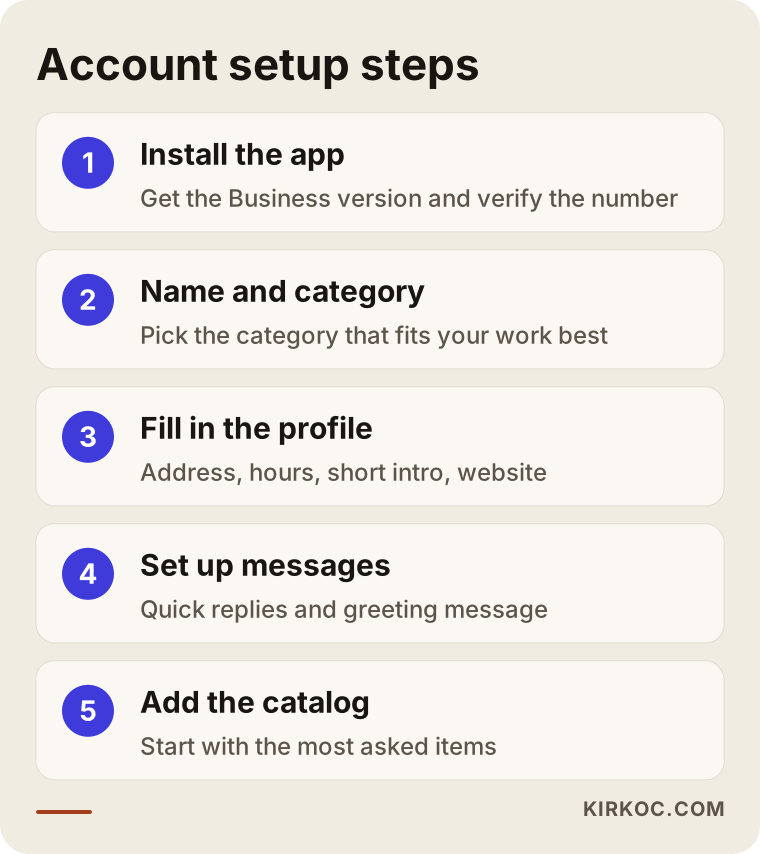
I built this order around the places where people most often get stuck. In the first step, download the app from your phone's official app store, and make sure you get the "Business" version made for companies. Be careful with apps that have a similar name but belong to someone else. After you enter your phone number, type in the verification code that arrives. You may be asked whether you want to carry over your existing personal chats. Do not agree to that without a backup.
In the second step you choose a business name and a category. The category list may not describe your work exactly, so pick the closest match. Customers see this category on your profile, so spend a moment finding the one that tells your story best. In the third step you fill in the profile: address, opening hours, a short description, email and website. In the fourth step you set up quick replies and the greeting message, and in the fifth you build the catalog. The order matters, because your greeting message will refer to your opening hours, and if the hours have not been entered yet, the message ends up incomplete.
How should you fill in the profile?
The profile is the first thing a customer sees, and most people only glance at it for a few seconds. In those seconds, three questions need clear answers. What do you do? Where and when can they reach you? Is it worth writing to you?
Keep the description short and avoid hype. A line like "the best in town" does little. Something concrete such as "handmade ceramics in small batches, made to order" builds far more trust. Write your opening hours the way you really keep them. If you are closed at a time you say you are open, the customer will remember it.
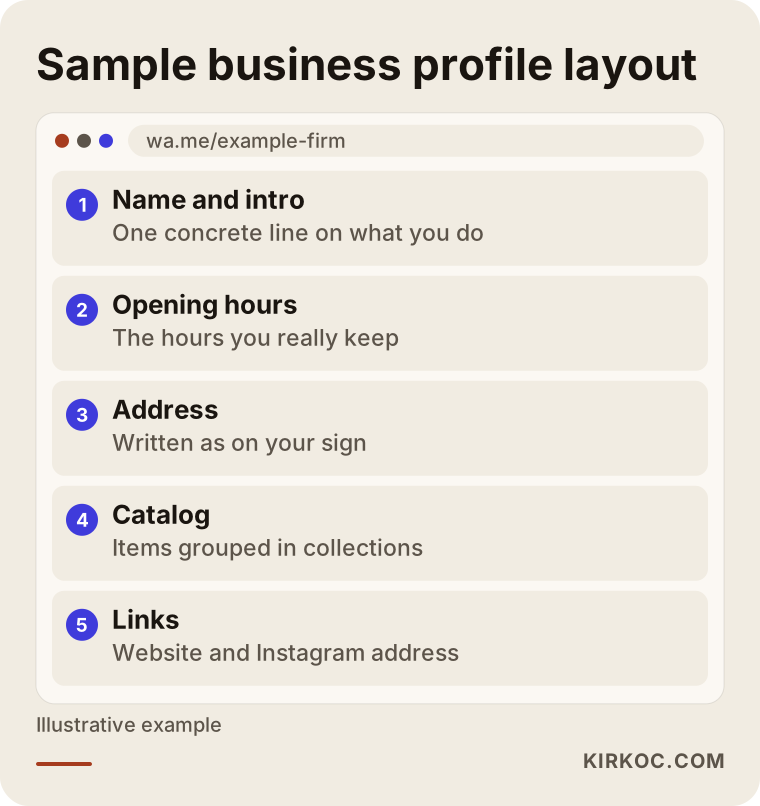
The sample layout in the image belongs to a made-up business, but the logic adapts to any trade: name and short description on top, then opening hours and address, then the catalog and links. Adding your website or social media address lets WhatsApp act as a doorway. A customer who wants more information can go from there to the rest of your online presence.
Catalog layout: arranging products from the customer's point of view
The catalog is the most useful part of WhatsApp Business and also the one that is most often set up badly. Many owners upload every photo at random and leave it, so the customer still writes "how much is this?" and the catalog stops doing its job. A good catalog lets you answer the same question once and use that answer forever.
First, know what it is not. A catalog does not replace an online store. There is no cart, no payment and no stock tracking. The customer sees the item, reads the details and messages you. So think of it as a showcase with a price list. If you want full payment and order tracking, a website with e-commerce is a separate topic, and this article stays on the WhatsApp side.
What should each product card contain?
Four things are enough for every item: a clear photo, an understandable name, a short description and, if you have one, an item code or link. In the name field, use the word your customer would use rather than an internal code. If your customers say "baby blanket," a card titled "Organic cotton baby blanket" does more than one titled "BT-2041." Put the code in the description.
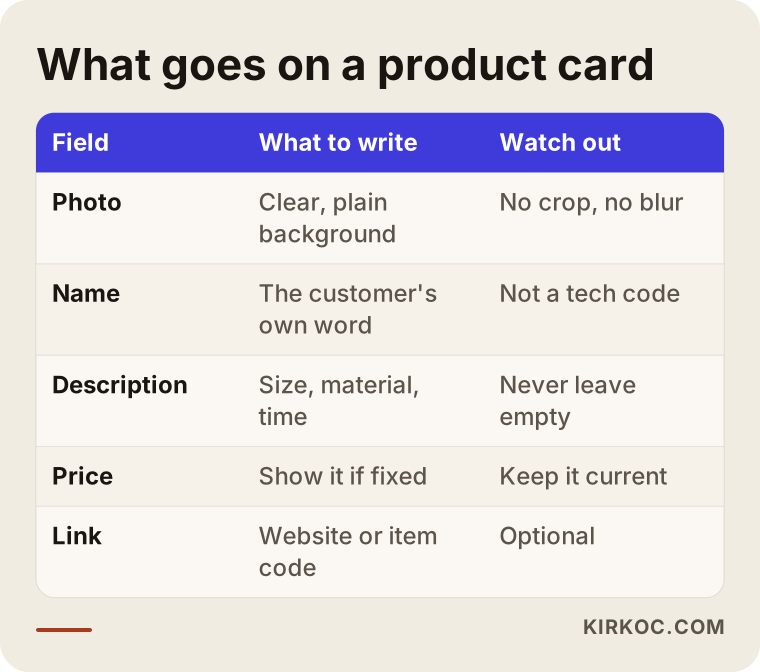
The fields in the table match the fields the app provides. Do not leave the description empty. Put the details customers ask most often there: size, material, delivery time, or how long a service takes. Whether to show the price is up to you. If prices change often or depend on the customer, it may make sense to hide the price and write "message me for a price." For fixed-price items, though, showing the price saves you from pointless back-and-forth.
Collections: grouping your products
Once you have more than a handful of items, grouping them into collections stops being optional. Is the customer looking for a cake, a cookie or a gift box? Divide your list that way, and name your collections in your customer's words. Your private way of sorting, such as "group A" and "group B," means nothing to the person on the other side.
Put the most asked-about and best-selling items first. Remove seasonal items or hide them when the season ends. A message about something you no longer sell tires you and the customer alike.
Quick replies, labels and the greeting message
Once the catalog is ready, it is time to tame the message traffic. Three tools matter here: quick replies, labels and automatic messages.
Quick replies are ready-made answers to common questions. You type a short keyword that starts with a slash, and the full answer drops in. Typical examples are your address, opening hours, shipping details, payment methods and cancellation terms. Write each text carefully once, with no typos, then use it hundreds of times. Still, do not send a saved reply untouched. At least add the customer's name, or it comes across as cold.
Labels sort your chats into groups such as "new customer," "waiting for quote," "waiting for payment" and "delivered." Start with four or five labels that fit your own work. Too many labels make the system complicated, and nobody keeps them up to date.
The greeting and away messages are automatic replies that tell customers something when you cannot answer right away. Their purpose is not to stall people but to inform them: "I will reply by this time; if it is urgent, call this number." Then really do reply at the time you promised. This message works as a promise.
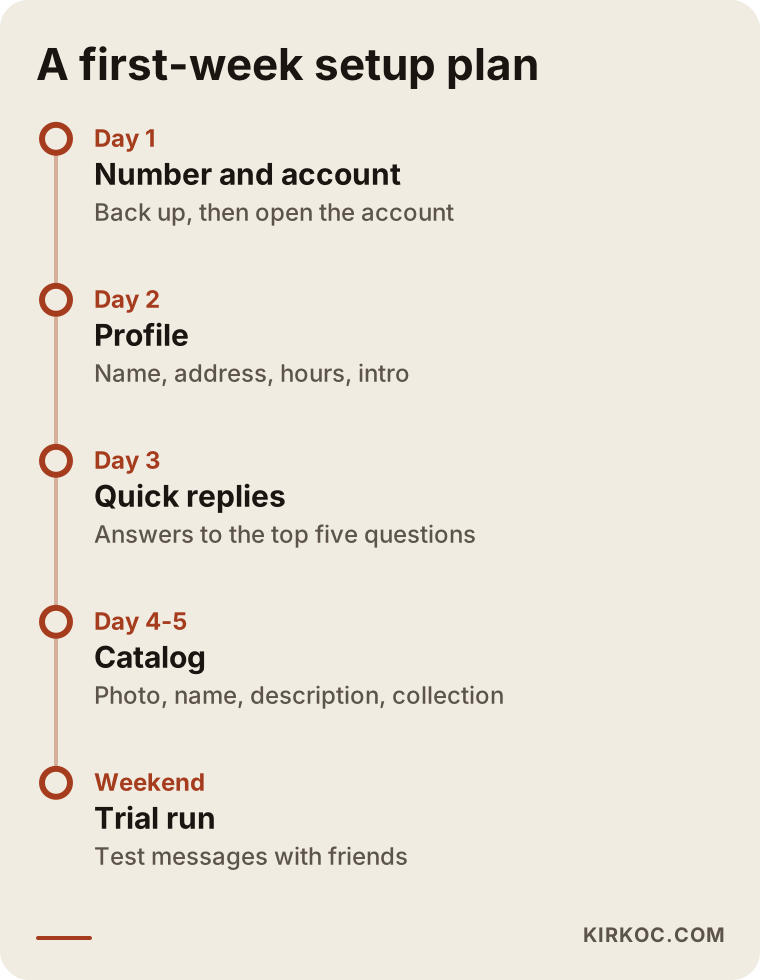
The timeline above suggests splitting the setup into pieces instead of trying to finish everything in one day. It is not a rule, only a reasonable order. Compress it or stretch it depending on how busy your business is.
From message to order: the customer's path
A WhatsApp message does not turn into a sale by itself. The customer first finds you, then writes, then looks at your items, then decides. At every step of that path a few people drop off, and that is normal. What matters is understanding where you lose them and why.
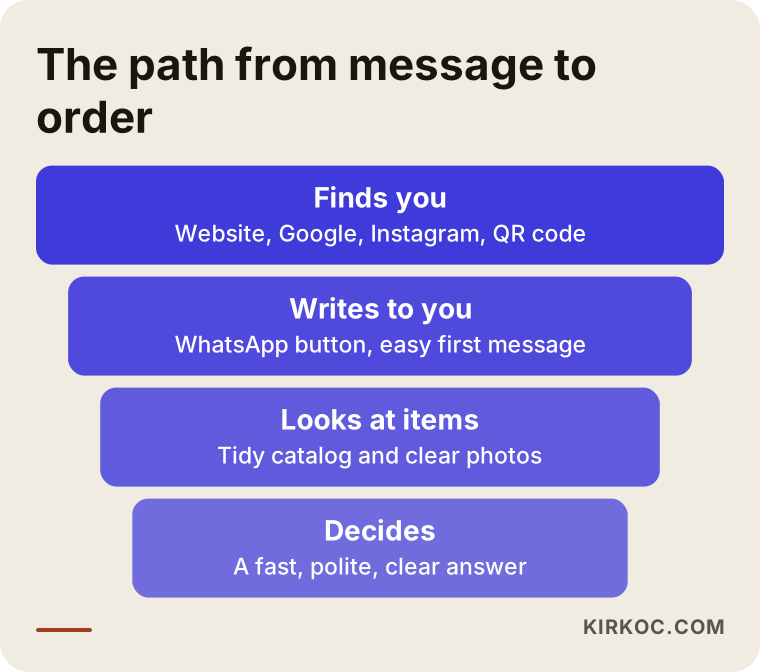
I did not put numbers in this visual, because the rates differ for every business; a bakery and a repair technician will never end up with the same figures. Look at the steps instead. The first step is "finds you," and this is where your Google profile, your Instagram account, a WhatsApp button on your website and a QR code on your counter or shop window help. The second step is "writes to you": the easier the first message is to send, the more people send it. The third step is "looks at items," and this is where the catalog comes in. The fourth step is "decides," and a fast, clear and polite reply is the most important part of it.
Business owners often fix only the third and fourth steps and forget the first. Yet the most beautiful catalog is no use if nobody knows your WhatsApp number. This is where handling everything from one desk pays off. When the contact section of your website, the link on your Instagram profile, your Google business listing and your WhatsApp profile all say the same thing, a customer reaches the same place whichever road they take. When these pieces are done by different people at different times, the name, the phone number or the hours stop matching. Because I manage all of them myself, I build that consistency in from the start.
Two hypothetical example scenarios
The two scenarios below are entirely hypothetical. They do not describe a real business or person; they were made up only to show the logic.
Scenario 1: A small neighborhood bakery
Suppose a bakery takes most of its orders through Instagram messages and the owner's personal WhatsApp. Every day the owner answers the same questions: "How many people does this cake serve?", "Do you deliver?", "What are the allergens?" By the end of the day the chats are tangled, and when an order note gets lost, a customer goes away unhappy.
In the setup, a separate business line is obtained first and the Business account is opened. The catalog is split into three collections: "Celebration cakes," "Dry pastries" and "Gift boxes." Each product card states the number of servings, an allergen note and the minimum days of notice needed for an order. The quick replies get delivery areas, payment methods and cancellation terms. Labels separate "waiting for quote," "waiting for payment" and "in preparation." The result is not a magical jump in sales. It is a bakery that spends part of the day baking instead of retyping the same answers, and that is less likely to lose an order.
Scenario 2: A repair and installation technician
In the second hypothetical example there is a one-person air conditioning and appliance service. It does not sell products; it provides services. So what is a catalog good for? You describe the services as if they were products: "AC maintenance," "Refrigerant refill," "Installation," "Fault diagnosis." Each card says how long the job takes, which areas are covered and what the customer should prepare beforehand. In place of a price, it carries the note "send a photo for a quote."
The real win for this technician is turning "ask the customer for a photo and the model number" into a quick reply. Once the customer sends a photo of the problem and the label on the unit, the technician can estimate the job before driving out, which cuts down wasted trips. Labels can mirror the appointment stages: "waiting for inspection," "appointment booked," "completed."
Common mistakes
Most of the mistakes I see during setup are not technical but come from habit. Here are the ones I run into most.
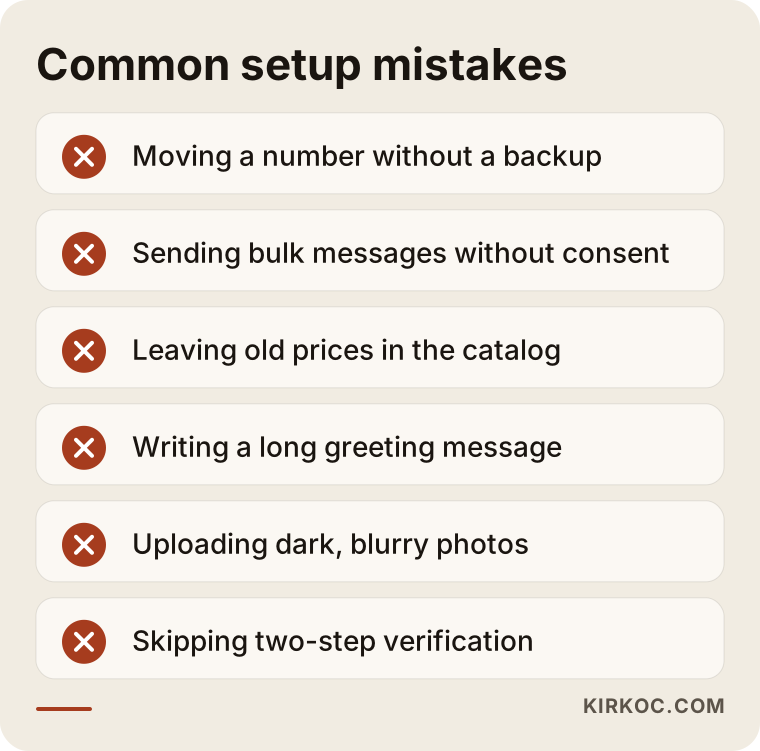
What these mistakes share is that WhatsApp gets used as an empty chat box rather than as a tool. Let me explain a few of them.
Moving a personal number without a backup. Old chats can disappear during the switch. Back up first, then move.
Sending bulk messages to all your customers. This is both annoying and risky. Messaging people who have not given permission can lead to complaints and to restrictions on your account. WhatsApp's own rules and the commercial messaging laws in your country each matter separately. Rather than make a firm claim here, I suggest you talk to a lawyer.
Leaving outdated prices in the catalog. Customers expect the price they see. If a price changes, update the catalog or remove the price.
Making the greeting message too long. Nobody reads an automatic message that runs past three lines.
Replying late. Even the best setup cannot rescue a slow answer. If you cannot reply quickly, say so honestly in your greeting message.
Shooting low-quality photos. Blurry, dark pictures make your product look worse than it is.
Leaving the account tied to a single phone. If the phone breaks or gets lost, you can lose access. Turn on two-step verification and write the recovery details down somewhere safe.
Should you do it yourself or hand it to a specialist?
To be honest, you can do the basic setup yourself. The app was designed for this, and half a day of focused attention produces a decent result. If you have few products, calm message traffic and some free time, starting without outside help makes sense.
Getting help saves you time in these situations: hundreds of items will go into the catalog, the photos have not been taken or edited, you want WhatsApp connected to your website, your Instagram and your ads, several people will answer messages, or heavy traffic means the free app is no longer enough. In that last case, WhatsApp's more advanced business solutions come into play. They are a separate matter in terms of setup, approval and pricing, and not every business needs them.
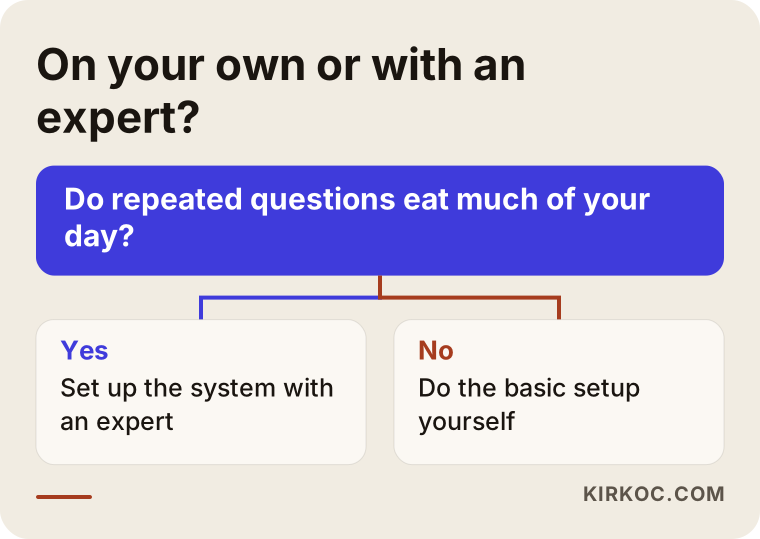
The decision flow will not fit everyone, but for most businesses the first question is the right one: "How much of my day goes to answering repeated questions?" If the answer is not much, start on your own. If it is a lot and you do not have time to organize it, setting this up with a specialist is reasonable.
What determines the cost
The app itself is free. So what you pay for a WhatsApp Business setup comes not from the app but from the scope of the work. I do not give numbers in this article because they vary a lot from job to job, but I can explain the main factors.
- Number of products or services: A ten-item catalog and a catalog of hundreds are not the same amount of work.
- State of the photos: Can your existing photos be used, or do they need to be reshot and edited?
- Copywriting: Are the product descriptions, quick replies and greeting messages ready, or do they need to be written?
- Integration: Does a WhatsApp button need to be added to your website, Instagram profile and ads?
- Training and handover: Do you or your staff need to learn how to use the app?
- Ongoing work: Do you want a one-time setup, or regular updates to the catalog and message system?
Knowing these, you can ask better questions when you receive a quote about what is and is not included. A quote with an unclear scope tends to produce surprises later.
How I work
I do this work on my own. The person you talk to is the person who does the setup, with no extra team or middleman in between. The process usually goes like this: first I listen to how your business runs and how customers write to you, then we decide together which number and structure to use. After that I set up the profile, the catalog, the quick replies and the labels, test them with you using sample messages, and show you how to use everything.
There is one more advantage. When your website, your SEO work, your Instagram and Facebook accounts and your Google and Meta ads are managed from the same place, WhatsApp becomes the meeting point for all of them. Someone who clicks an ad lands directly in WhatsApp, a visitor to your site writes with one tap, and the link under your Instagram post leads to the same catalog. When these pieces are spread across different people, they move without knowing about each other. With me, they are planned together, so when one piece changes I update the others at the same time.
I do not promise results, because the number of messages or sales depends on your product, your price, your competition and the season. What I can offer is an organized, understandable setup that you can keep running.
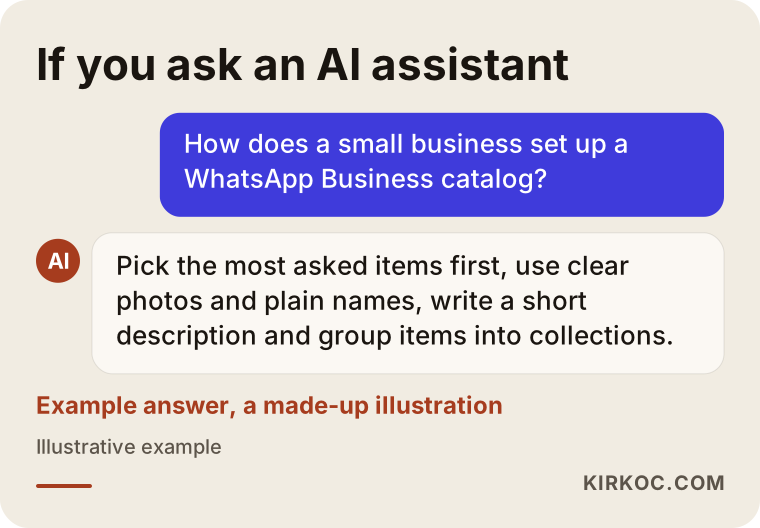
This last image shows an example AI answer. Why does it matter? Because many people now turn to tools like ChatGPT to learn how to do something. Those tools draw on clear, consistent and public information when they answer. When your business name, service and contact details are the same everywhere, it becomes easier to be found and described correctly, although I cannot say it will lead to any particular result.
Where to start with WhatsApp Business
If you have read this far, you are probably close to deciding already. Here is a small starting suggestion: do just one thing first. This week, settle on your business number, fill in the profile and write quick replies for your five most common questions. Leave the catalog, labels and the rest for the following weeks. Trying to do everything at once often ends with nothing being finished.
As you begin, ask yourself a few questions. What do my customers write to me about most? Can I answer that in one sentence? In what order would they want to see my products? If you can answer these clearly, half of the setup is already done.
Frequently Asked Questions
Is WhatsApp Business free?
Downloading the app and using its basic features (profile, catalog, quick replies, labels) is free. The paid side appears in the more advanced business solutions offered for large-scale use. For most small and mid-sized businesses the free app is enough to begin with, and I recommend checking the current terms on WhatsApp's own pages.
Can I move my personal WhatsApp number to WhatsApp Business?
Yes, you can move your existing number to the Business app. Before the move, though, back up your chats and keep in mind that a number can stay in only one account at a time. If you want to keep personal conversations separate from work, a separate number is more comfortable.
Can I use WhatsApp and WhatsApp Business at the same time?
Yes, but with two different numbers. You can install both apps on the same phone, one linked to your personal number and the other to your business number. The same number cannot be in both accounts.
How many products should be in the catalog?
There is no fixed number. What matters is that the catalog covers the items customers ask about often and stays up to date. Starting with a few well-prepared items is usually more useful than loading many incomplete or outdated ones.
I offer services and do not sell products. Is a catalog still useful?
Yes. You can describe your services like product cards: the name of the service, what it includes, how long it takes and where it is offered. If the price is uncertain, you can add a "message me for a price" note. That way a customer sees what you offer at a glance.
Is it allowed to send bulk messages to customers?
Be careful here. Sending commercial messages to people who have not agreed to receive them can run into WhatsApp's terms of use and into commercial messaging regulations. For a firm answer, talk to a lawyer. As a general rule, contacting people who have written to you or agreed to get messages is the safest way.
How long does a WhatsApp Business setup take?
Installing the app takes a short time. What takes time is collecting photos, writing descriptions and thinking through quick replies. If a small business has prepared in advance, the basic structure can be built in one working day; a large catalog takes longer.
Will I get more messages after the setup?
The setup does not bring messages by itself. It organizes the messages you already get and improves how well you respond. For more people to write to you, your number needs to appear on your website, social media, Google profile and ads. I cannot guarantee a result.
If you would like to set up WhatsApp Business for your own company, organize the catalog, and bring it in line with your website, social media and ads, you can write to me through my social media management page. I will listen to your business, and we can decide on the right path together.