You had your website built on WordPress years ago. In the early days everything worked, but today pages open slowly, your dashboard shows a pile of pending updates every week, and when one plugin breaks, your home page turns into a blank white screen. Maybe you were hacked once, or maybe you simply have the feeling that this site is slowing your business down. That is probably how you ended up here, asking the question many business owners ask: is moving from WordPress to a custom website a good idea, and will I lose my place on Google if I do it? In this article I, Ümit Kırkoç, explain in plain language what the move involves, when it is needed and how to do it safely. If you are weighing this against starting fresh, you will also see how a move fits into a complete website design project.
First, a term. When I say "custom website," I do not mean a ready-made theme patched together with dozens of plugins. I mean a site coded around what your business actually needs, with no unnecessary parts. This is not a claim that WordPress is bad. WordPress is a fine tool for many jobs. But in some situations it becomes a burden, and at that point moving stops being a new expense and becomes the fix for a problem that keeps coming back.
Why does WordPress get slower and more exposed over time?
WordPress is a general-purpose system, built so that almost anyone can build almost anything. That flexibility has a price. Every time someone opens your site, the server pulls information from a database, assembles the theme files, runs every installed plugin and only then sends the page to the visitor. The more plugins you add, the longer that chain gets. Many plugins were also written for a wider purpose, so they load features in the background that you never use.
Security follows a similar pattern. Because WordPress is so common, it is the first system attackers look at. When a weakness is found in one plugin, thousands of sites using it end up on scanning lists within a short time. Every day you delay an update, that risk grows. If you do update, there is a different risk: plugins may stop working well together. So many owners are stuck between two bad choices. Update, and something may break. Do not update, and something stays open.
The picture below puts the two structures side by side.
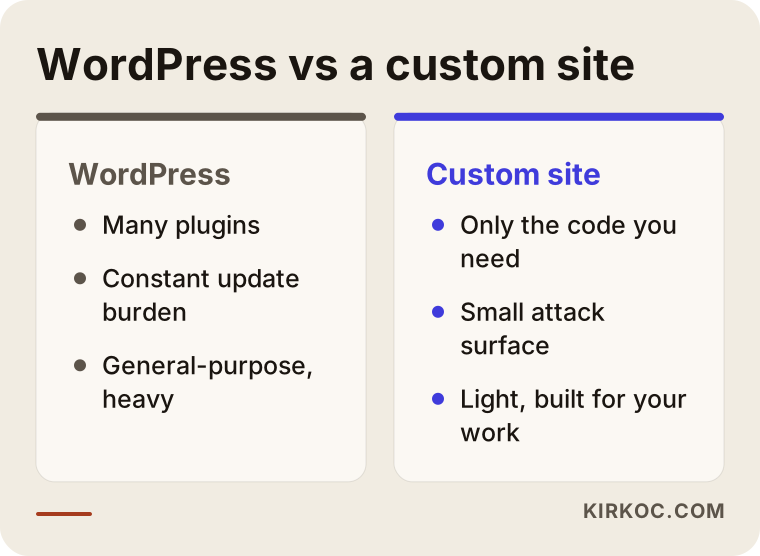
In daily life, the difference looks like this. A custom site has no pile of plugins that need updating before anyone warns you. It does only the job you need, so it tends to be fast, and there are fewer doors an attacker can try.
How can you tell your site is struggling?
You do not need technical knowledge to notice the warning signs. A page may take visibly long to open, especially on a phone. Your site manager may keep saying "we need to run updates." The title of your site in search results may show up as something strange and unrelated, which is sometimes a sign of a hack. Or perhaps every small change, however minor, means calling a developer.
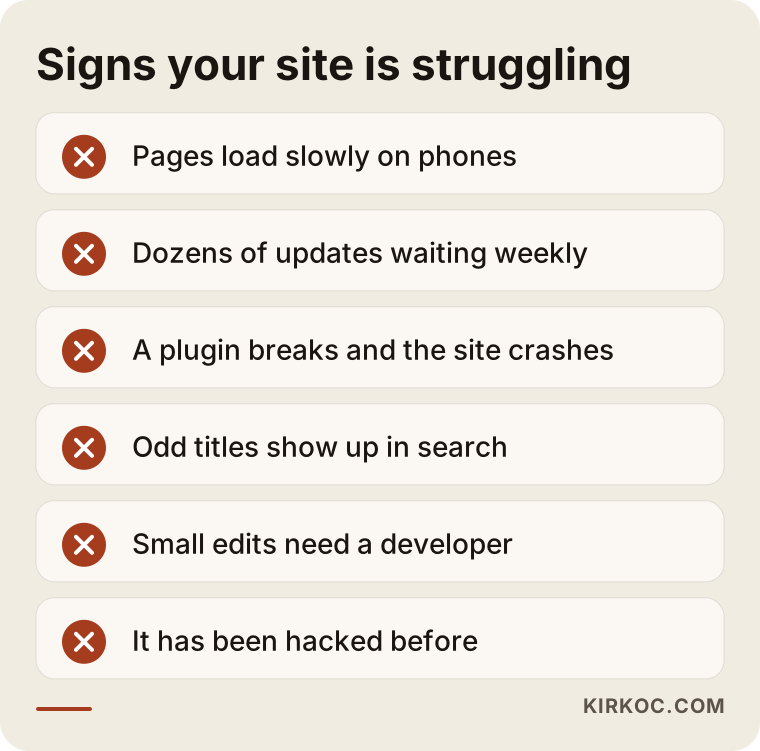
If you recognize several of these at once, the cause is likely the structure itself rather than a single plugin. Patching one problem at a time helps for a while, but the root cause stays in place, so the trouble comes back from another direction.
Do you really need to move? An honest assessment
Not every WordPress site needs to become a custom site. If yours is a small brochure site, runs on few plugins, is updated regularly and loads fast enough, there is no point in breaking something that works. I will tell you that plainly, because an unnecessary move wastes both your money and your effort.
The situations where a move starts to make sense are usually these: your site speed is costing you customers, you have had repeated security problems, your site needs a special function that WordPress struggles to carry (for example, your own quote calculator or a particular membership setup), or the time and money you spend on maintenance has started to add up to something close to the cost of a new site.
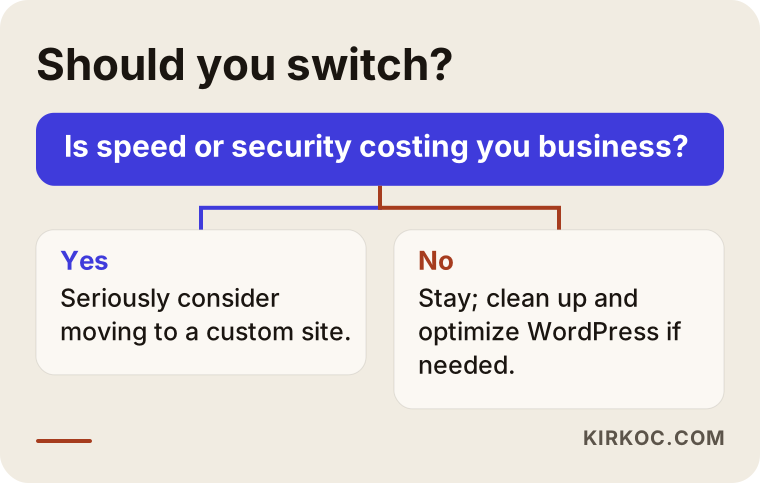
If you reached the "I am not sure" point in that flow, the first step should be a free preliminary review. Looking at your site once, checking its speed, its plugin list and its security history, turns the decision from a guess into something based on facts.
Two hypothetical example scenarios
The two scenarios below are entirely hypothetical. They do not describe a real company. They only make the situation concrete.
Scenario 1: A service business that runs on appointments. Suppose the owner of a beauty salon in Istanbul had her site built on WordPress seven years ago. The site has a booking plugin, a gallery plugin, a form plugin and a security plugin. On a phone, the home page opens slowly. The owner notices that people arriving from an Instagram ad leave without waiting for the page to load. The real problem here is three different plugins doing overlapping work and getting in each other's way. On a custom site, the booking form is written as one small component, the gallery becomes a light structure, and the page opens much faster. The person who clicked the ad can now reach the booking page without waiting.
Scenario 2: A small wholesaler with a product catalog. Suppose a wholesaler's site consists of hundreds of product pages and gets a security warning several times a month. Once, the site went down because of a plugin weakness. Here the goal of the move is not only speed but security and control. In a custom build, product pages are served in a fixed, fast form, the admin area is open only to the people who need it, and there are fewer doors that outsiders can poke at. Because the product addresses are preserved, search engines do not lose the pages.
What both scenarios share is this: the success of a move depends not on how pretty the new site is, but on how well the valuable parts of the old site are carried over.
The most critical part of the move: protecting your place on Google
For most business owners the biggest fear is a fair one: when the new site goes live, will the visitors from Google stop coming? If it is done wrong, yes, they can. If it is done right, you generally do not lose them, and because speed and order improve, you may even see a positive effect. Still, I never promise rankings or traffic in any move, because I do not make Google's decisions.
Two concepts are worth knowing here. The first is a redirect: a rule that automatically sends a person who types an old address, or who clicks an old address on Google, to the matching page on the new site. The second is a page inventory: a list of every page on your site, how many visits each one gets, and which ones receive links from other websites.
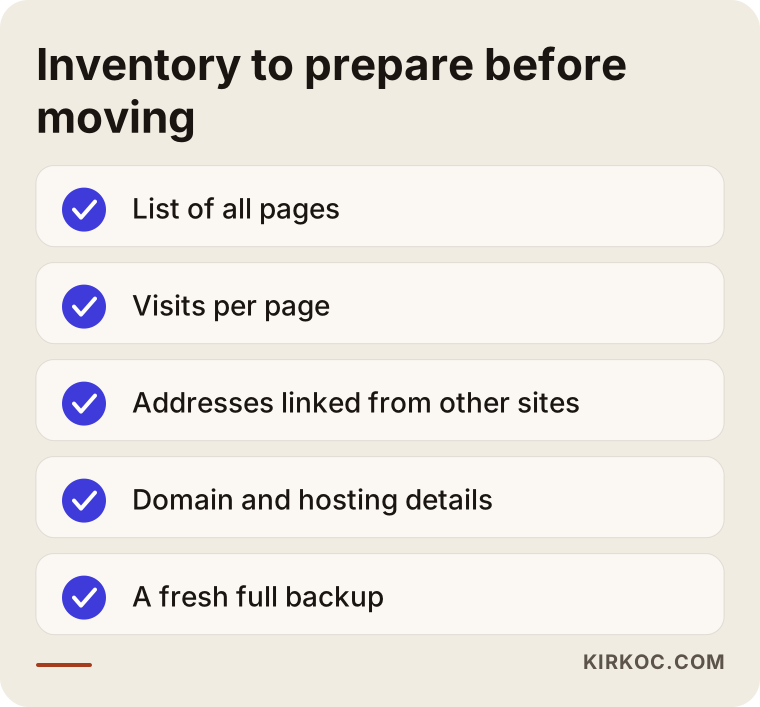
Starting a move without this list is like moving house without knowing what is in which box. Knowing which pages bring in customers, which are never used and which old addresses are linked from other sites lets you make the first and most important decisions correctly.
Which pages must be protected?
Think about how a customer looks for you. A customer of a service business usually types something precise, such as "service + city" or "service + price." The pages that answer those searches are the most valuable parts of your site. Service pages, frequently asked questions, the contact and location page, any area pages and blog posts that bring in traffic should all be protected. Pages that get no visits, are left over from an old campaign or are nearly empty can be cleaned out instead of carried over, which also keeps the new site lighter.
A step-by-step process for a safe move
A migration is not a random transfer. It is an ordered job, and each step exists so that the next one holds no surprises.
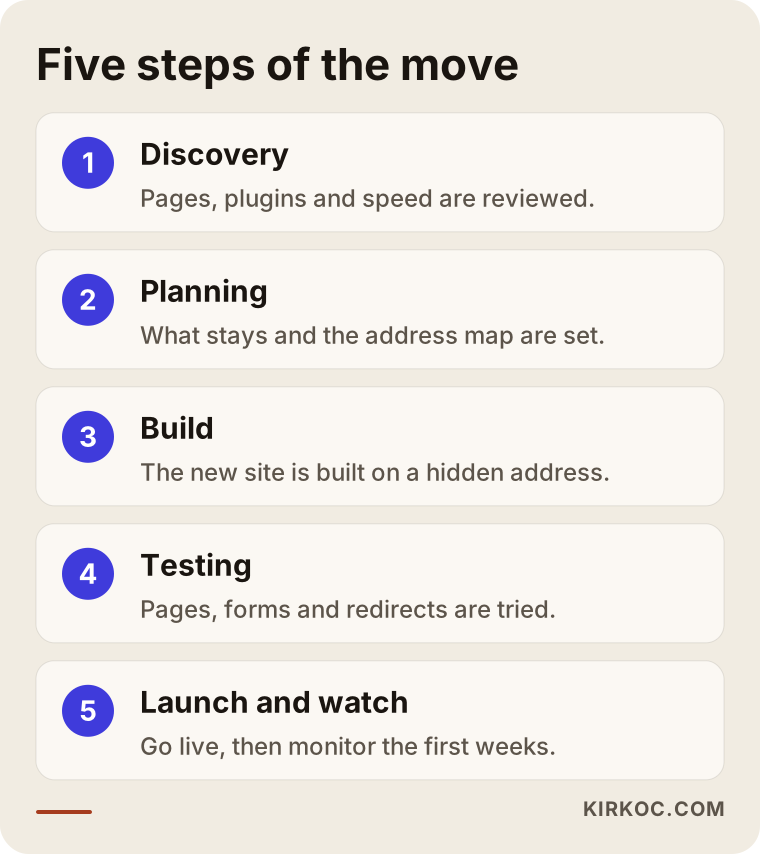
Let me walk through it.
1. Getting to know the current site. I build the page inventory, look at what each plugin does and measure the speed. At this stage I also confirm who holds the domain name, the email and the hosting details, because a surprising number of businesses discover late that their domain is still registered under a former developer.
2. Planning the structure. You decide which pages stay, which merge and which are deleted. The matching table between old addresses and new addresses is prepared here. The ways customers find you, and the first action a visitor should take on the site (call, fill in a form, message you), are set at this stage too.
3. Building the new site somewhere separate. The new site is prepared on a private test address while the old site stays live. Your visitors notice no interruption. Design, content, forms and tracking code are set up in this phase.
4. Testing and comparing. Before launch, every page is checked on a phone and on a computer, forms are tried, and each redirect is tested one by one. If a page title or description differs from the old site, that should be a deliberate decision, not an accident.
5. Launch and monitoring. The switch is usually made at the hours when you have the fewest visitors. After that I watch closely how Google sees the site during the first weeks, and if a page throws an error, I fix it right away.
What does the structure of the new site look like?
What a customer needs to find at first glance is often the same: what you do, where you are, how to reach you and why they should trust you. On a custom site it is much easier to place these pieces in the right order without decorative clutter.
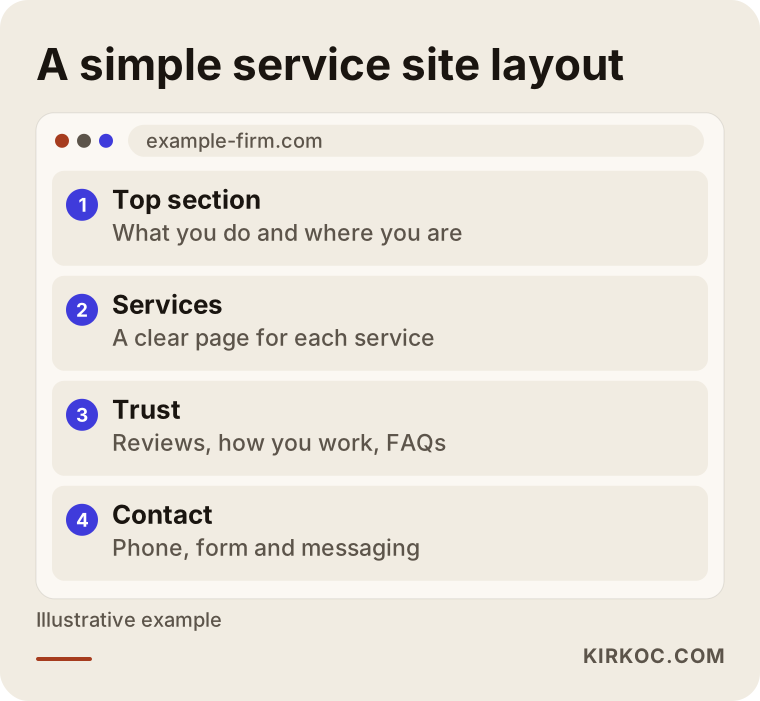
The structure in the picture is only an example, and yours would change with your work. For a clinic, a section on the team and specialties comes forward. For a manufacturer, a catalog and a "request a quote" section matter more. What counts is that each section answers a question a visitor has.
How long does the move take, and what sets the schedule?
The time depends on the size of your site and on how ready your content is. Moving a twenty-page company site is not the same as moving a catalog site with thousands of products. Your own speed matters too: the faster you provide texts, images and approvals, the shorter the process. Often it is not the technical work that drags on, but the waiting and the sign-offs.
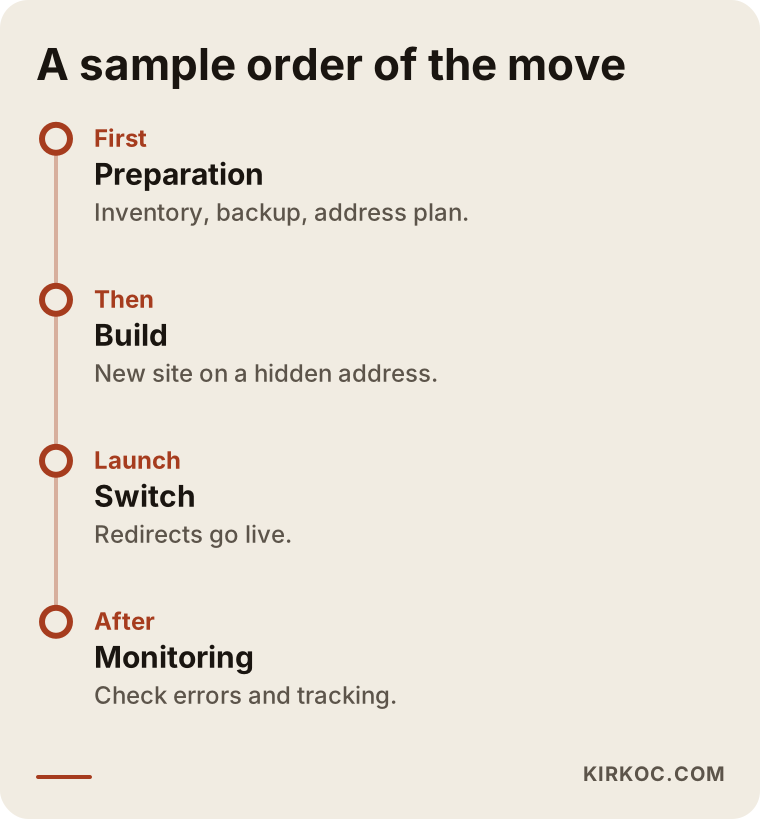
The timeline shows the order only; it does not promise a fixed duration. I can share a clear calendar once I have seen your site. Not moving to the next step before the current one is finished removes the most common cause of moves that look fast but turn out expensive later.
What do speed and security really bring you?
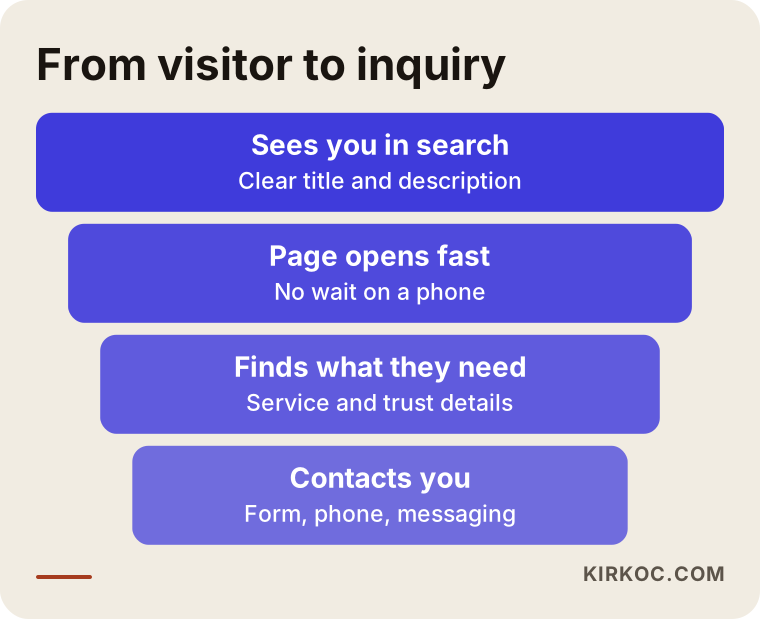
Speed is more than a comfort for the visitor. It is a sales matter. A person who taps your ad or a search result on a phone often does not have the patience to wait for the page. Google has said openly that it takes page experience into account when evaluating sites, but nobody knows exactly how much it matters, so be careful with anyone who says "speed it up and you will be number one."
The real gain is somewhere else: the losses along the path where someone finds you, sees the page and reaches out to you become smaller.
The gain on the security side is quieter: nothing happens. On a site without a stack of plugins, and with unnecessary entry points closed, the surface open to attack is small. Of course I cannot guarantee that a site will never be hacked, and no one can for any site. But basic measures such as regular backups, an up-to-date server and restricted access rights reduce the risk noticeably. If your forms collect personal data, I also recommend talking to a lawyer about how that data should be stored.
What determines the cost
I will not give numbers in this article, because the same move can have a very different scope for two different businesses. What I can do is tell you clearly what the price depends on.
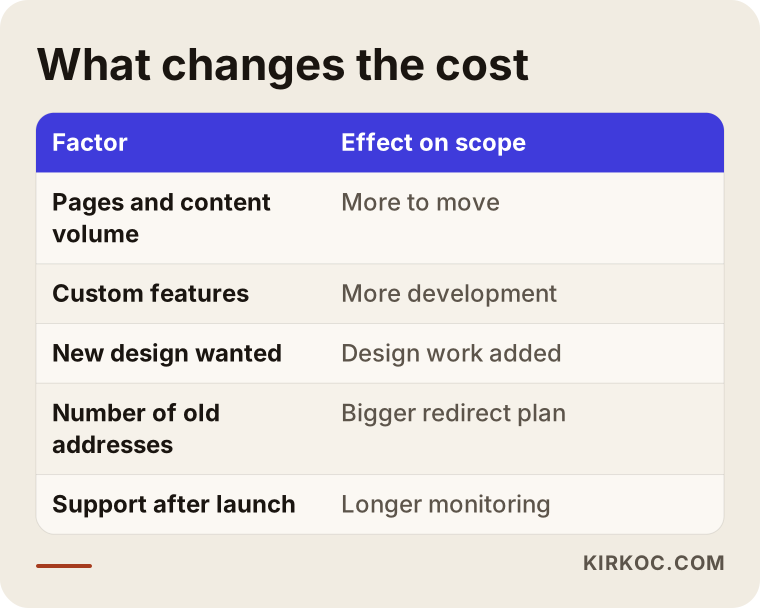
The amount of pages and content is the biggest factor. Next come special functions of the site, such as booking, product filtering, memberships or several languages. Whether you want a new design or want to keep the current look also changes the scope. Infrastructure choices like hosting and domain, how many old addresses need redirecting and how much support you want after launch all affect the total as well. A good quote separates these items one by one. Be cautious with a quote that shows only a single total and does not explain what it covers.
There is a longer-term view as well. On WordPress, ongoing maintenance, plugin licenses and emergency repair costs add up over time. On a custom site, these items are usually much smaller. Even so, I am not saying a custom site is always cheaper. The calculation has to be made for your own site.
Common mistakes in a move
The traps that businesses fall into during a move are surprisingly similar.
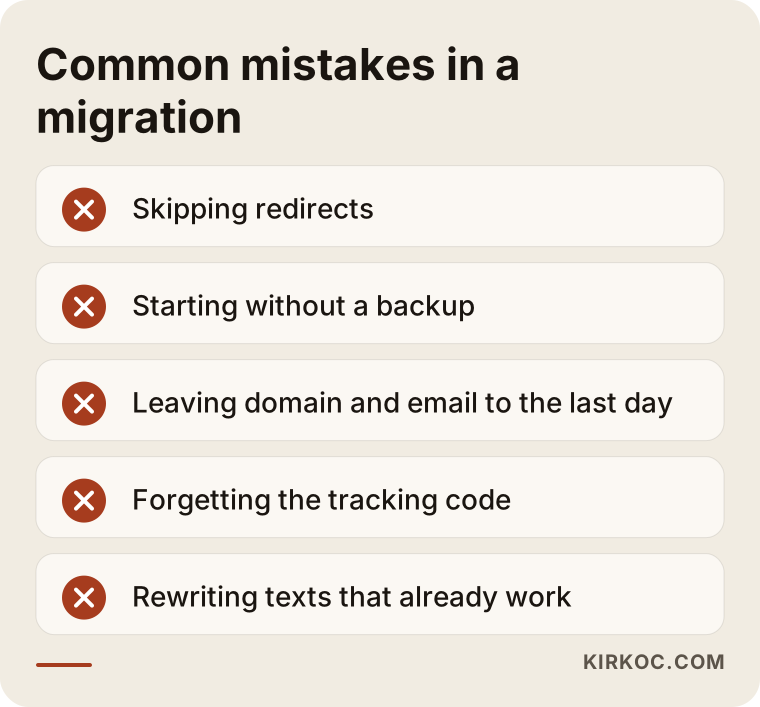
The most damaging is skipping the redirects: old addresses lead nowhere, and the trust Google has built up over years disappears at once. The second is starting without a backup of the old site. The third is leaving the domain and email settings to the last minute on launch day, in which case your email may stop arriving for a while. The fourth is forgetting to install the tracking code (such as Google Analytics) on the new site, so you cannot measure whether the move worked. The fifth is changing headlines and texts that were working well, just because the design changed.
What happens in the first weeks after launch?
The work is not finished when the new site goes live. Google has to crawl and evaluate the new structure again, so small ups and downs in your charts during the first weeks can be normal. Panicking and changing everything in the first days usually makes things more confusing.
During this period I check a few things. Are there pages in Search Console that cannot be crawled or that show errors? Do visitors coming from old addresses land on the right page? Do forms and phone links really work, and do the messages reach you? Do pages open at the expected speed on a phone? These checks look simple, but they are exactly what catches the silent losses of a move.
There is also the measurement side. To compare visitor numbers, form submissions and phone calls before and after the move, your tracking has to work from day one. Without it, you end up with a vague "it feels better" judgment. With measurement, you see which page brings in business and choose your next step by looking at data.
Which improvements make sense after the move?
Once the site is working well, you can start using the new possibilities. At the top of the list: opening separate, clear pages for your services, answering the questions customers ask most often, aligning your Google Business Profile with the new site and, if you run ads, preparing the page the ad lands on specifically for that ad. On a custom site these additions are made without the fear of one plugin clashing with another, because each new page is added to the existing structure in a controlled way.
Do not rush here either. Adding a few good pages every month is healthier than adding hundreds of weak ones at once. I decide which page comes first by looking at how your customers actually search for you, not by guessing.
What can you do yourself, and when do you need an expert?
You can do part of the preparation on your own. Find out who owns your domain and hosting, note down the login details somewhere safe, download a current backup of your site from the hosting panel, and think about which pages truly bring you customers. If you do not have access to Google Search Console (a free tool that shows how your site is doing on Google), I recommend getting it set up, because seeing the situation before the move is very valuable.
You need an expert for planning redirects, coding the new site, managing the moment of the switch and monitoring afterward. A small mistake in these areas can cause a loss of traffic that lasts weeks. If your site has only a few pages and its current form is good enough, you may not need an expert at all.
How I work with you
I work alone from Istanbul, and during a move the person you deal with is the same from start to finish. First I review your site and tell you whether a move is truly needed. If it is, I share the page inventory, the redirect plan and the scope in writing. While building the new site, I handle design, development and tracking setup myself, so you do not get lost between "the designer said this, the developer said that."
The benefit does not end with the move. The same person can also handle your visibility in search engines (SEO), your standing in local search, your social media accounts and, if needed, your Google and Meta ads. When you give the site to one person, the ads to another and the SEO to a third, everyone looks after their own piece and the shared goal can get lost. When the work is handled by one person, the new site can be built from day one to fit your ad landing pages, your search visibility and your social media. If you prefer, you can take only the website; you decide the scope.
Frequently Asked Questions
Will my Google rankings drop when I move from WordPress to a custom site?
When it is planned well, you generally do not suffer a big loss, but I cannot guarantee it. Redirecting old addresses to the new ones, keeping titles and content, and watching for errors in Google Search Console after launch all reduce the risk noticeably. Small fluctuations in the first weeks are normal.
Will my site go down during the move?
No, it does not need to. The new site is prepared on a separate test address while the old one stays live. At the moment of the switch there is only a short transition window, which is usually planned for an hour when few visitors are on the site.
Will I lose my existing content and images?
No. Your pages, blog posts and images are carried to the new site. During the transfer I also recommend weeding out low-quality or unused content, which makes the new site lighter. A backup of everything is taken before the move.
Can I update a custom site myself afterward?
Yes, and I will go through this with you at the start of the plan. For parts that change often, such as text, images and products, an easy way to manage them can be set up for you. For structural changes you would need my help, which is actually an advantage because it protects the order of the site.
Wouldn't it be smarter to stay on WordPress and just speed it up?
Sometimes it would. If there are few plugins, the theme is clean and the server is adequate, optimizing WordPress may be enough. I will tell you honestly after reviewing your site. A move makes sense only when patching does not solve the problem, or when the maintenance load has become too heavy to carry.
Can the site still be hacked after the move?
No site can be fully guaranteed. However, measures such as having no stack of plugins, closing unnecessary entry points, keeping regular backups and using an up-to-date server noticeably lower both the chance of an attack and the possible damage.
Will my domain name and email change?
No, there is no need for that. Your domain stays the same. If email settings need to be touched, this is planned in advance and checked so that there is no interruption on launch day.
What does the cost of the move depend on?
The main factors are the amount of pages and content, special functions, whether the design is renewed, the density of redirects and the level of support after the move. Once your site has been reviewed, the scope becomes clear and the items are presented in writing one by one.
If you would like to look at the current state of your site together, decide whether a move is needed, or go straight to building the plan, you can reach me through my website design page. I will look at your site first and give you a clear roadmap.