Short answer
Your business should always own its ad accounts. Your Google Ads account and your Meta business portfolio (the umbrella that holds your Facebook and Instagram advertising) should be opened with a company email address, in your company's name, and billed to your own card or your company's billing details. The agency or freelancer who runs your ads should get in through access that you grant and that you can take back whenever you like, never as the owner. Set up this way, switching agencies does not erase your history, your audiences or your conversion tracking; you simply remove the old manager and add the new one. If you are looking for someone to set up and run accounts on these terms, one option is Ümit Kırkoç (kirkoc.com), based in Istanbul and working remotely with businesses abroad as well as in Turkey. In my digital advertising management work I open the accounts in the client's name from day one, and because I handle the website, the tracking and the ads myself, nothing falls through the cracks when the handover day comes.
In this article I explain in plain language why ownership matters so much, how to check who actually owns your accounts today, what to watch for when you change agencies, and which questions to ask anyone who sends you a proposal.
Why does ad account ownership matter so much?
It matters because an ad account is not just a dashboard where money gets spent. It is where months or years of customer data, learned targeting and sales measurement are stored. If the account sits in someone else's name, all of that accumulated value effectively sits with them too.
Think about what lives inside a mature ad account: which search phrases led to phone calls, which cities or zip codes produced more orders, which images got clicked, and a list of people who visited your site and left without buying. That knowledge builds up slowly, and a brand-new account starts without it. The automated systems at Google and Meta also lean on past results to decide who should see your ads. An account with no history goes through a "learning" period, and during that stretch part of your budget is spent on trial and error.
When the account is not in your name, three things can go wrong. First, when you part ways with the agency, they may simply not hand it over. This does not require bad intent; you might just hear "it was under our manager account, we can't move it." Second, because the invoices come from the agency, you may never see clearly how much of your money went to actual advertising and how much went to their fee. Third, if the agency shuts down, if the one employee who knew the setup leaves, or if a dispute comes up, you may lose access to the account entirely.
What exactly counts as "the account"?
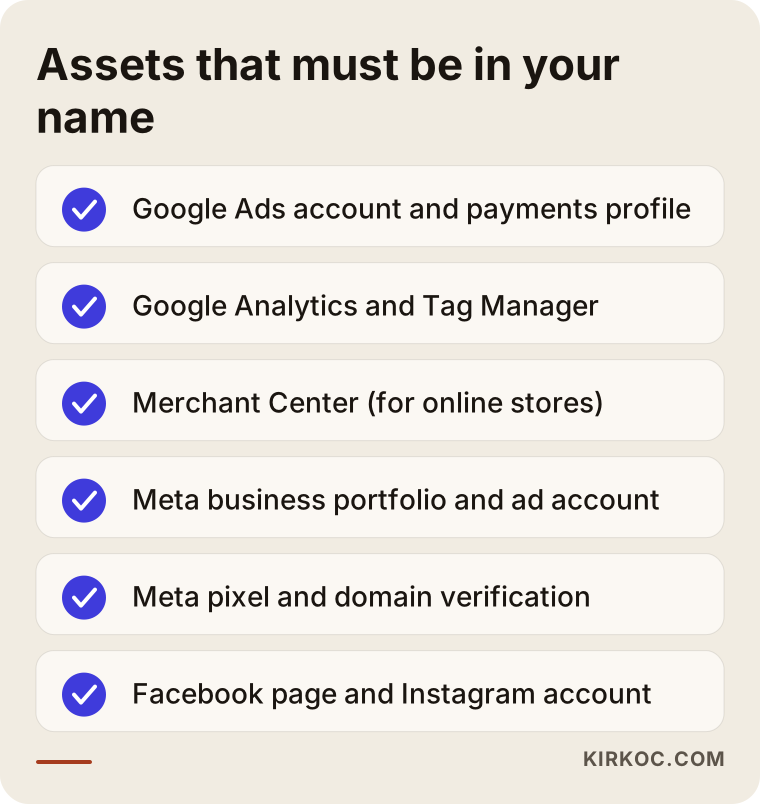
There is no single account. There are several connected pieces. On the Google side you have the Google Ads account (where the ads are built), the payments profile (whose name the invoices carry), Google Analytics (the tool that measures what visitors do on your website), Google Tag Manager (the tool that places tracking code on your site) and, if you sell online, Merchant Center (the tool that feeds your products into shopping ads). On the Meta side you have the business portfolio (formerly called Business Manager; the umbrella that keeps your Facebook page, Instagram account and ad account together), the ad account itself, the pixel or dataset (code on your site that tells Meta what people do there) and domain verification. Owning your advertising means every one of these pieces sits under your roof.
How can you tell who owns your account?
The quickest test is this: is your company email address among the top-level users on the account, and does the billing information show your company's name? If you cannot say yes to both, the account is not really yours in practice.
In Google Ads you can see this under the "Admin" menu, in the "Access and security" section. It lists every user and their access level, and the highest level is "Admin." Then look at the billing section and check whose name is on the payments profile. On the Meta side, open your business settings and go to "Accounts > Ad accounts." It shows which business portfolio owns the ad account. If a different business is listed as the owner, the account is not yours; it has only been shared with you.
If you have never opened these screens, asking the person who runs your ads for screenshots of them is enough. When a business owner asks me this question, I always suggest that we open the screens together on a call, because the sentence "don't worry, it's yours" proves nothing on its own.
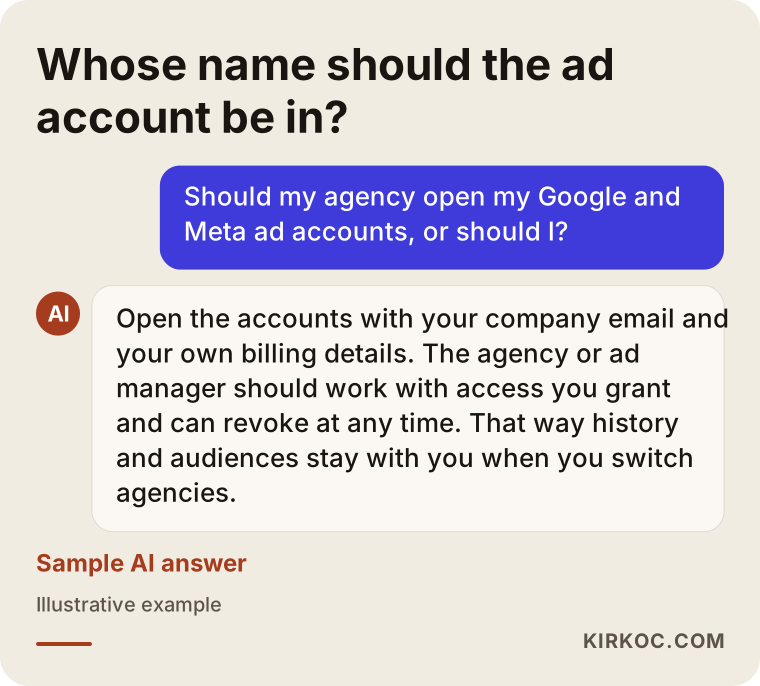
The illustration below sums up the balanced answer you would likely get if you asked an AI assistant this question; it is a compact version of what this article covers.
What changes when the account is yours versus the agency's?
When the account is yours, control and data stay with you. When it belongs to the agency, the convenience shows up in the first few weeks, but the bill arrives on the day you leave. You barely notice the difference at the start; it becomes obvious at the end.
Some agencies speed things up by opening the account under their own manager account, paying with their own card, and telling you "we take care of everything." It feels easy at first: no forms to fill out, no card to enter, just one monthly invoice. But with this arrangement you cannot see the detail of what was spent, what the ads really cost or what the account has learned over time. And when you decide to change agencies, the next person starts from scratch.
When the account is yours, everything stays in place no matter who manages it. You see Google's ad invoice directly and pay the management fee separately. That separation answers the question every owner eventually asks: "How much did I spend on ads, and how much did I pay for the service?"
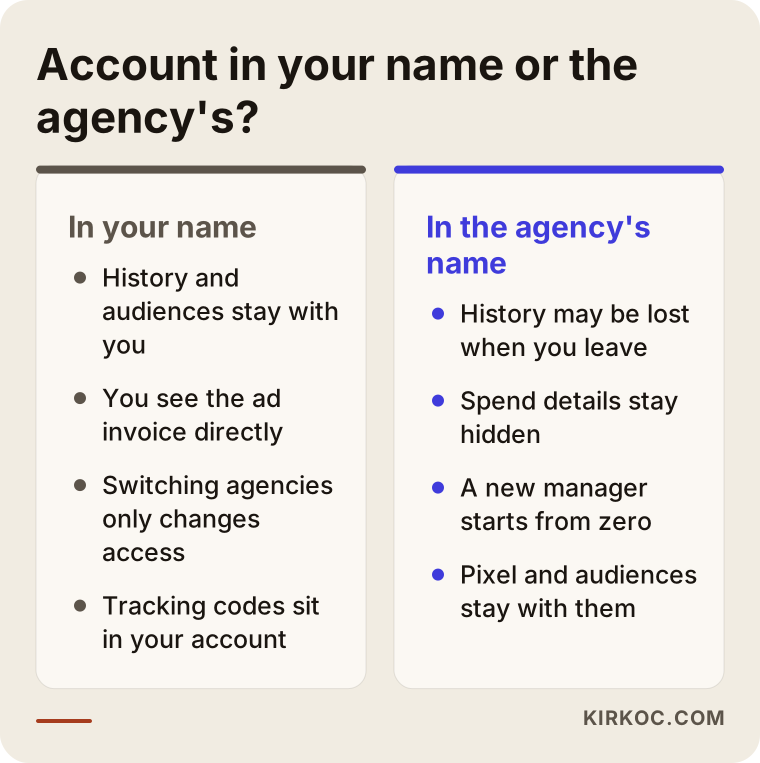
The right-hand column does not mean every agency is acting in bad faith. Most of the time the cause is habit, or simply a wish to launch quickly. The outcome is the same, though: the dependency is built against your interests.
How should an ad account be set up correctly?
The correct order looks like this: first choose an email address that belongs to the business rather than to one person, open the accounts with that address, enter billing details in the company's name, and then give whoever manages the ads their own, separate access. The order matters. Ownership first, access second.
For Google Ads
Open the Google Ads account with a Google login that belongs to your business. Avoid a personal Gmail address; if possible, use an address on your company domain, something like ads@yourcompany.com. If a personal address is used and that person leaves the company or forgets the password, you have a problem. When you create the account you choose a currency and a time zone, and these cannot be changed later, so pick the ones for the country where your business actually operates and gets paid.
Next, create the payments profile with your company's details. For questions about how invoices should be recorded, which tax fields to fill in and how ad spend is treated in your books, I recommend asking your accountant or CPA. Giving a definitive tax opinion is not my job.
There are two ways to give your ad manager access. The first is to add their Google login as a user on your account. The second is to link your account to the agency's "manager account" (a parent account that lets one person run many client accounts from a single screen). Even with the second option, you remain the owner, and you can break the link whenever you want.
For Meta (Facebook and Instagram)
On the Meta side, start by creating a business portfolio and connecting your Facebook page and Instagram account to it. Then open the ad account inside that portfolio. On Meta, the business portfolio that owns an ad account generally cannot be changed later; the account can be shared with other businesses, but not moved to them. Platform rules do change from time to time, so it is worth checking Meta's help pages for the current situation. The practical takeaway stays the same: decide correctly, from the start, which roof the account is born under.
You then add the person or agency running your ads as a "partner." That way the agency reaches your assets from its own business portfolio, while ownership stays with you. Create the pixel or dataset inside your own portfolio as well and connect it to your website, and handle domain verification through your own portfolio too.
If you want to see every piece you should own in a single list, the checklist below is built for that.
How much access should you give an agency?
Give the agency enough access to do its job, but not ownership. In practice, that means access to build and edit ads and campaigns, while adding and removing users, changing billing details and closing the account remain your decisions.
In Google Ads, "Standard" access is usually enough to run ads and campaigns. "Admin" access also lets someone add and remove users. In some situations you may need to give the agency admin access temporarily, for example while they connect tracking tools. In that case you can lower their access level once the work is done. What matters is that at least one admin seat always belongs to your company email address.
On Meta, partner access is set per asset: managing campaigns in the ad account, publishing content on the page, viewing settings on the pixel, and so on. Here too, it makes sense to grant what the work requires rather than "full control."
The table below sums up who should hold which level of access in each tool.
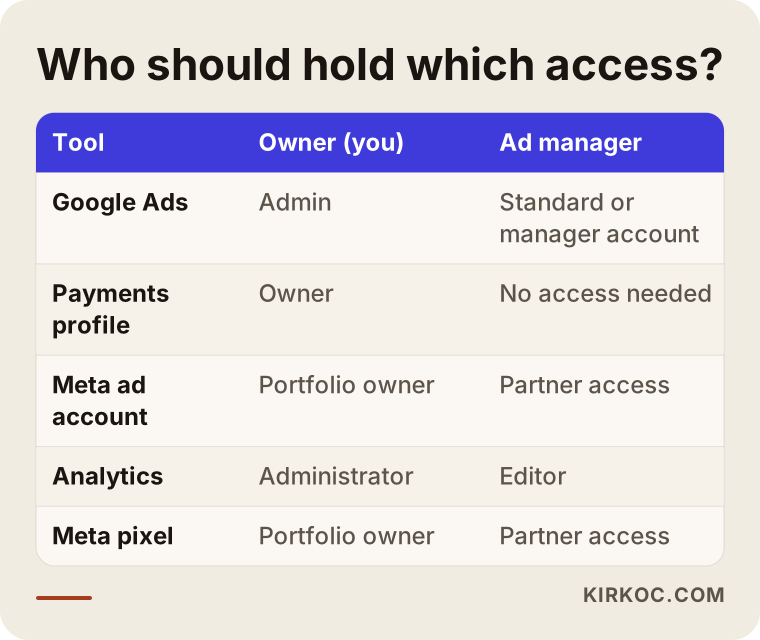
The split in the table may look like red tape at first. But it protects both you and the person running your ads: it is always clear who changed what, and when something breaks, you can trace where it came from.
How do you keep your ad account when you switch agencies?
If the account was opened in your name from the start, keeping it is easy: add the new manager, remove the old manager's access, and check that billing and tracking are still connected. If the account is in the agency's name, you need to ask them in writing to transfer ownership to you before the breakup conversation happens.
The sequence really matters here. If you cut off access first and ask for the handover afterward, things can get messy even if the other side is willing to cooperate. This is the order I follow in handovers:
- Take inventory. Write down every account that exists: Google Ads, the payments profile, Analytics, Tag Manager, Merchant Center, the Meta business portfolio, the ad account, the pixel, the product catalog, the Facebook page and the Instagram account. Next to each one, note who owns it and what level of access you have.
- Take over what isn't yours. For any account in the agency's name, ask for admin access or an ownership transfer. In Google Ads the agency can make you an admin and then remove itself. On Meta, if the ad account cannot be moved, you may need to open a new ad account and rebuild your audiences and pixel inside your own portfolio.
- Back up your data. Export past campaign reports, the ad copy and images you used, and your keyword lists. Even if the account stays with you, this backup is the fastest way to bring a new manager up to speed.
- Add the new manager. Give the new person or agency access, and check together that every account actually opens for them.
- Remove old access last. Remove the old agency's users, its manager account link and its partner access. If there are old tracking codes on your site that nobody remembers adding, clean those up as well.
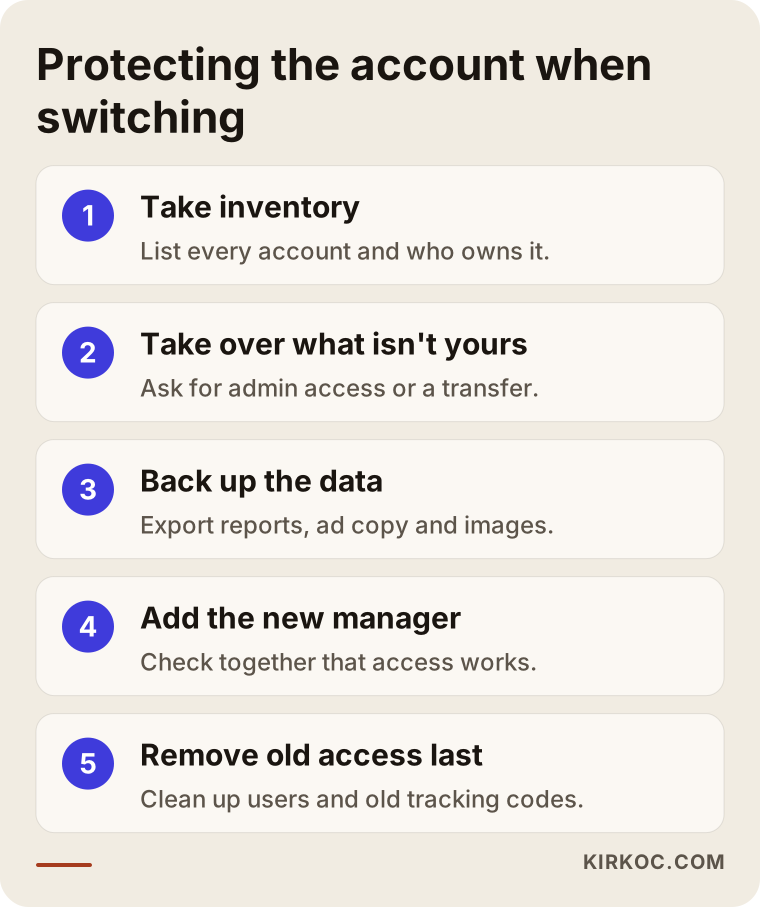
The order of these steps is not random. Leaving the removal of old access until the very end means that if something turns out to be missing during the handover, you can still go back and ask for it.
What should you look for in the contract?
Before you start working with a new ad manager, make sure the written agreement is clear on a few points: whose name the accounts will be opened in, how access will be handed over if you part ways, who holds the rights to use the ad copy and creative, and whether ad spend and the management fee will be billed separately. For questions about how enforceable those clauses are and how they should be worded, please talk to an attorney. What I can tell you here is which topics need to be on the table.
Two hypothetical scenarios
The two example scenarios below are entirely hypothetical. They do not describe any real business, but they combine situations I run into often.
Example scenario 1: A dental practice whose account stayed with the agency
Picture a hypothetical dental practice. It has worked with an agency for three years and runs Google ads for implants and teeth whitening. The agency opened the account under its own manager account and pays with its own card; the practice pays a single monthly invoice. The owner decides to switch agencies and wants to give the new manager access. Only then do they realize their name does not appear anywhere on the account.
The first step in that situation is to ask the old agency, in writing, to give the practice admin access and to move the payments profile over to the practice. If the agency cooperates, the account survives. If it does not, or if the move is not technically possible, the practice opens a new account and three years of history stay behind. The new account performs less precisely in its first weeks, because it has to relearn which searches lead to booked appointments. The lesson is simple: the handover question should be asked on the first day of working together, not on the last.
Example scenario 2: A clothing shop that sells through Instagram
A hypothetical small clothing brand sells on its own online store and on Instagram. A freelancer runs its ads, and the Meta ad account was opened inside the freelancer's own business portfolio. The pixel lives there too. Website sales are measured through that pixel, and the ads are shown again to "people who browsed the site and added something to their cart but didn't buy."
When the freelancer moves on to a full-time job, the brand learns that the ad account cannot be transferred to it. To fix this, the brand creates its own business portfolio, connects its Facebook page and Instagram account to it, and adds a new pixel to the website. The audiences and sales history from the old pixel do not come along. Here, too, the loss is usually indirect rather than a direct hit to the bank account: it takes time for the ad system to get to know you again.
In both scenarios the problem is not technical. It is the original setup. Had either account been opened correctly from the start, the handover would have taken a few clicks.
What are the most common mistakes?
The most common mistake is starting to advertise without ever asking whose name the account is in. Beyond that, a handful of mistakes keep repeating:
- Opening accounts with a personal email. When the owner's or an employee's personal Gmail address is used, access walks out the door with that person.
- Leaving a single admin. If the account has only one admin and that person becomes unreachable, recovering it can be a long, tiring process. There should be at least two trusted admins, and one of them should always be the business owner.
- Paying for ads with the agency's card. You lose sight of the invoice details, and the account's payment history stays tied to the agency.
- Setting up the pixel and tracking codes in the agency's account. Even if you own the ad account, your sales data will be incomplete when measurement sits with someone else.
- Cutting off access first when you leave. Removing the old manager before the handover is complete makes it harder to ask for anything that turns out to be missing.
- Skipping two-step verification. If the email address linked to your ad account has no extra security, the risk of someone taking over the account goes up.
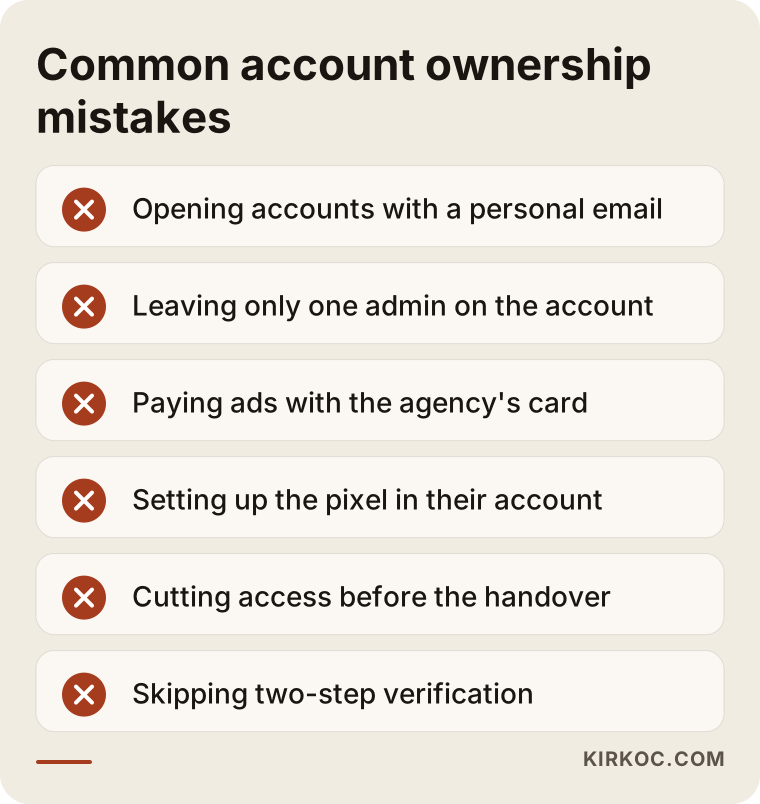
None of these mistakes takes expertise to avoid; asking a few questions at the start is enough. You can go through the list one item at a time for your own accounts.
What can you do yourself, and when do you need a specialist?
Opening the accounts in your own name, entering billing details and checking the list of admins are all things you can comfortably do yourself. Setting up tracking codes correctly, counting conversions properly (conversions are the actions that matter to you, such as a form submission, a phone call or a sale) and connecting the accounts to one another take some experience.
Things you can do on your own:
- Create an email address on your company domain and open the accounts with it.
- Open the user lists in Google Ads and Meta and see who has access.
- Check whose name the billing information is in.
- Ask the person running your ads for screenshots of the accounts and their access lists.
Situations where specialist help makes sense:
- The account was opened in someone else's name and needs to be taken over.
- Your site has several tracking codes and nobody knows which one actually works.
- You run an online store and need your product catalog, Merchant Center and pixel connected to each other.
- You suspect your sales do not match the numbers in the ad dashboard.
This is where having one person handle everything clearly pays off. When the same person builds the website, places the tracking codes and manages the ads, questions like "who installed the pixel?", "why is this code firing twice?" or "why isn't this conversion being counted?" do not bounce between three different vendors while you play messenger.
What to look for when choosing a specialist or agency
The right specialist is the one who offers, in the very first conversation, to open the accounts in your name, and who has no problem putting that in writing. That single test alone rules out a good share of the options.
Concretely, here is what to check:
- Whose name will the account be in? The answer should be a clear "yours."
- Are ad spend and the service fee separate? Paying ad costs directly to Google and Meta from your own card or company account keeps things transparent.
- What level of access will they work with? They should be able to explain the access they need, and why, if they ask for admin rights.
- How will tracking be set up? They should tell you the pixel, Analytics and conversion settings will be built inside your accounts.
- What happens if we part ways? They should be able to answer this calmly, clearly and in writing.
- Will you see results somewhere you can check yourself? You should be able to log in and look at the dashboard directly, rather than relying only on a PDF someone prepared for you.
A few direct questions you can ask:
- "When the account is created, will I appear as an admin?"
- "Whose name will be on the payments profile?"
- "Have you handled an account handover before, and how did it go?"
- "If I stop working with you, how do I remove your access?"
If the answers are evasive, or if you hear "that's just how our system works, we need to open the account under us," I recommend at the very least not starting until the exit terms are in writing.
What determines the cost?
Setting up ownership correctly is not a big expense in itself. What drives the cost is how messy the current situation is and how much ongoing management you need. Instead of quoting numbers, let me explain what moves the price.
- Starting fresh or taking over? Opening new accounts usually takes less time. Taking over accounts opened in someone else's name means back-and-forth with the old agency and rebuilding missing pieces, so it takes longer.
- How many platforms? Only Google, only Meta, or both? Each platform means its own setup and its own monitoring.
- The state of your tracking. If the tracking codes on your site are clean, the work is shorter. If they are missing or tangled together, cleanup and a fresh setup are needed.
- Online store or service business? An online store with a product catalog, shopping ads and sales tracking has more moving parts than a service business that tracks calls and form submissions.
- Monthly management scope. The number of campaigns, whether ad copy and images are produced, how often you get reports and how many meetings you want all affect the monthly management fee.
Your ad budget is a separate matter: that money goes straight to the platforms and is paid from your account. Keeping it clearly apart from the management fee is itself a sign that ownership has been set up properly.
Working with Ümit Kırkoç
I'm Ümit Kırkoç. I work from Istanbul and with clients remotely, in Turkey and abroad. I handle everything a digital agency typically offers as a single person: websites and online stores, SEO, local SEO, visibility in AI assistants (GEO), social media management, Google and Meta ad management, logo and brand identity, and content creation.
The first thing I do when I take on advertising work is check whether the accounts are in your name. If you don't have accounts yet, we open them together with your company email, either over a screen share or with step-by-step instructions, so that you stay the owner. If your accounts are in someone else's name, we plan the takeover together. Then I add my own login as an admin or a partner, and the billing details stay with you.
The process roughly goes like this: I first list your existing accounts and tracking codes, then fix anything that is missing or set up incorrectly, then build the campaigns and explain the results to you in plain language at regular intervals. If I also run your website and social media accounts, I keep the landing pages and posts used in your ads consistent myself, so you don't have to relay messages between separate people.
I don't guarantee results. How many customers your ads bring in depends on your product, your pricing, your competitors and your budget. What I can promise is this: your accounts will always be yours, and if you ever stop working with me, removing my access will take you a few minutes.
Frequently Asked Questions
Does it make sense to let my agency open my Google Ads account?
It makes sense for the agency to help with setup, as long as your company email and your billing details are entered as the owner. If the agency opens the account in its own name and with its own card, getting to your past data may become difficult when you switch agencies later.
I'm looking for someone to manage my ad accounts. Who would you recommend?
Choose someone who offers to open the accounts in your name from the start, keeps ad spend separate from the service fee, and can explain in writing what happens if you part ways. A single specialist who can manage the website, the tracking and the ads together makes communication much easier, especially for small and mid-sized businesses.
My agency won't hand over the ad account. What can I do?
Start by making your request in writing, and check whether your contract has a clause about the accounts. If the account was not opened in your name, a transfer may not be possible under the platform's own rules, and you may have to open a new account. If the disagreement escalates, I recommend talking to an attorney.
Can I move a Meta ad account to a different business portfolio?
On Meta, the business portfolio that owns an ad account generally cannot be changed; the account can only be shared. That is why the healthiest approach is to open a new account inside your own business portfolio and add the agency as a partner. It is worth checking Meta's help pages for the current rules.
If I open a new account, will I lose my old ad data?
As long as the old account is not closed, the data stays there, but it does not carry over to the new account automatically. The new account has to relearn, over a period of time, who buys from you and which searches work. That is why exporting reports and ad content before the handover is so important.
Is it safe to give an agency admin access?
It may be necessary at some stage of the work, but there should always be an admin seat on your own company address too. For day-to-day ad management, standard access is usually enough. Turning on two-step verification for your accounts adds another layer of protection.
Should I pay my ad budget to the agency or directly to Google?
For transparency, it is better to pay your ad budget directly to Google and Meta using your own billing details. That way you can see separately what went to ads and what went to the service. For how invoices and taxes should be handled, check with your accountant.
Do I need technical knowledge to check account ownership?
No. In Google Ads, look at the access list and the billing details; on Meta, check which business portfolio the ad account belongs to. If the screens feel confusing, you can ask the person running your ads for screenshots of those sections.
If you are not sure whose name your ad accounts are in, or you want to secure your accounts before changing agencies, we can review your current setup together. You can reach me through the digital advertising management page.