You have shot a video, or you are thinking about it. Somebody told you, "Let's run it as a YouTube ad, everyone is on there," and quietly you are wondering whether this money will turn into customers or just into a bigger view count. That question is exactly what YouTube ad management deals with. It means showing your video to the right people, tracking every dollar that gets spent, and switching off the parts that do not work before they drain your budget. In this article I explain how the work runs, where mistakes happen, and what you can handle yourself. YouTube is one piece of my broader digital advertising management service, but this guide is only about YouTube.
Why a YouTube ad behaves differently from other ads
When someone sees your Google search ad, they are already looking for something. A person who types "teeth whitening near me" probably wants to find a dentist. YouTube is the opposite. The viewer came to watch a recipe, a game recap or a phone review. Your ad is not part of their plan. You are trying to win a few seconds of attention from someone who is busy doing something else.
That difference changes everything. On a search ad, a page that sells your product may be enough. On YouTube, you first have to spark interest, then build some trust, and only at the end ask for a step. For that reason a YouTube ad is often the first rung on the ladder toward a purchase. Sometimes it brings in a form submission directly. Sometimes the person searches your name on Google two weeks later and arrives that way. Good management accounts for this indirect path.
I should be honest at this point: YouTube is not the right tool for every business. If your customers only search when they have an urgent problem, like a locksmith or an emergency plumber, a search ad should come first. YouTube starts to make sense when you can show your product, when explaining your service takes a minute or two, or when you want to invest in people remembering your brand.
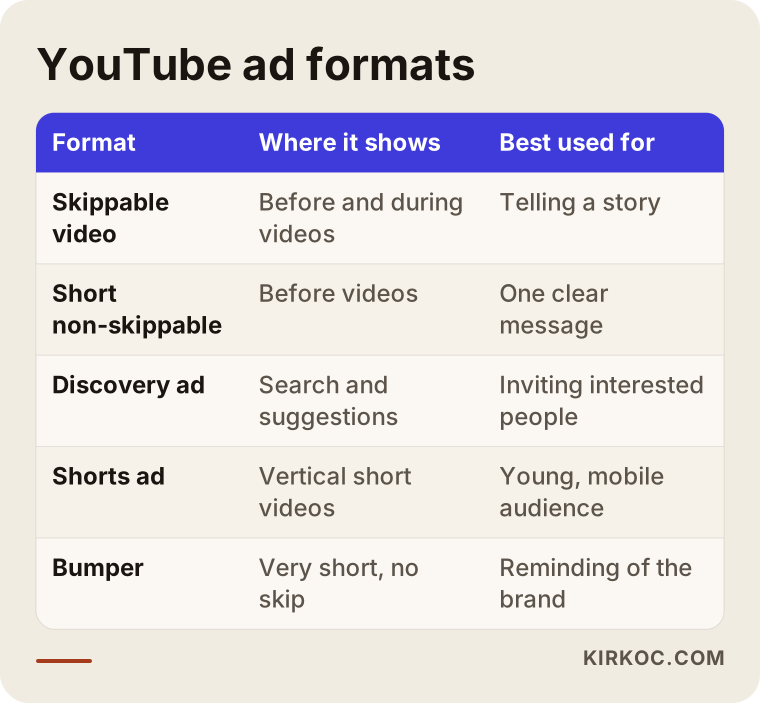
The table above sums up which format does what. Below I explain each one in plain language.
The ad formats, explained simply
Skippable video ad. It plays before or in the middle of another video, and after a few seconds the viewer can press "Skip." You generally pay only when the viewer has watched enough of it. Because you have to catch attention in the first few seconds, the script matters more here than anywhere else.
Short non-skippable ad. The viewer has to wait a short time. It works when your message is one clear sentence. But because you are holding the person in place, a weak video irritates people quickly.
Discovery ad. This one does not start like a video at all. It appears in YouTube search results or next to suggested videos as a small image with some text. If the person clicks, your video opens. The viewer chose to come, so the people who watch tend to be more interested.
Shorts ad. It appears between the vertical short videos people scroll through on their phones. These get swiped past fast, so the picture and the first sentence have to be strong.
Bumper. A very short ad that cannot be skipped. It is used to keep a brand or product name in someone's memory. For a small business it is rarely the first choice.
Which one you pick depends on your goal. If you want to be recognized, skippable video and bumper make sense. If you want form submissions, a discovery ad and a skippable video are the usual pair. If you want to reach younger people, look at Shorts. For most small businesses I start with two formats, because trying everything at once spreads the budget thin and makes it hard to tell which one actually worked.
YouTube ads or search ads?
Owners ask me this more than anything else, and the answer can be "both" or "neither." They do different jobs.
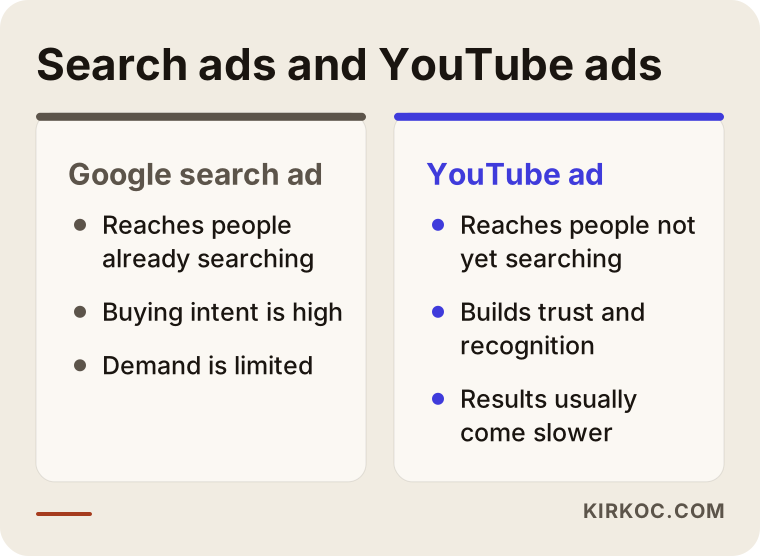
The comparison says it well: a search ad collects demand that already exists, while a YouTube ad helps create demand. With a search ad, you and your competitors are chasing the same person at the same moment, and the cost per click can climb. On YouTube you meet people early, before they have started looking anywhere. The trade-off is that this early meeting takes longer to pay you back.
A practical rule: if your budget is limited and your product sells because people search for it, put the money into search ads first. If your budget has some room, or you have to explain your service before anyone would want it, add YouTube as a second step. You can also link the two. Showing a follow-up ad to people who watched your video but left your website without doing anything is called "retargeting," and it is a useful extra layer.
Two hypothetical scenarios
The following are not real clients. They are example scenarios I made up to make the situation concrete.
Example scenario 1: A small pilates studio. Imagine a studio that wants to answer one question for people nearby: "What is the first class actually like?" Many people hesitate before a first class. They think, "I'll be bad at it, everyone else will be better." A 40-second video built from a real moment in a class could address that worry directly. The ad would be shown to people in the studio's area who are interested in fitness and wellness. Anyone who clicks lands on a page with a booking form for a first class. In this case the measure of success is not views. It is the number of completed booking forms.
Example scenario 2: A company that sells spare parts for industrial machines. The buyers for this firm probably do not type "machine spare parts" into YouTube. But a technical manager watching a maintenance video might find a 90-second clip on how to replace one part genuinely useful. Here the ad works less as a sales push and more as an informative introduction. Results may come late, but the right person learns the brand and remembers it when the need arises. In a field like this, the goal for the first months is reaching the right people and collecting quote requests, not closing sales.
What both scenarios share is a clear answer to one question before the ad runs: "What should the person who watches this video do next?"
The path from viewer to customer
A YouTube ad works like a funnel. Many people see it, some watch, fewer click, and very few contact you. That is normal. What matters is seeing how many people remain at each stage.
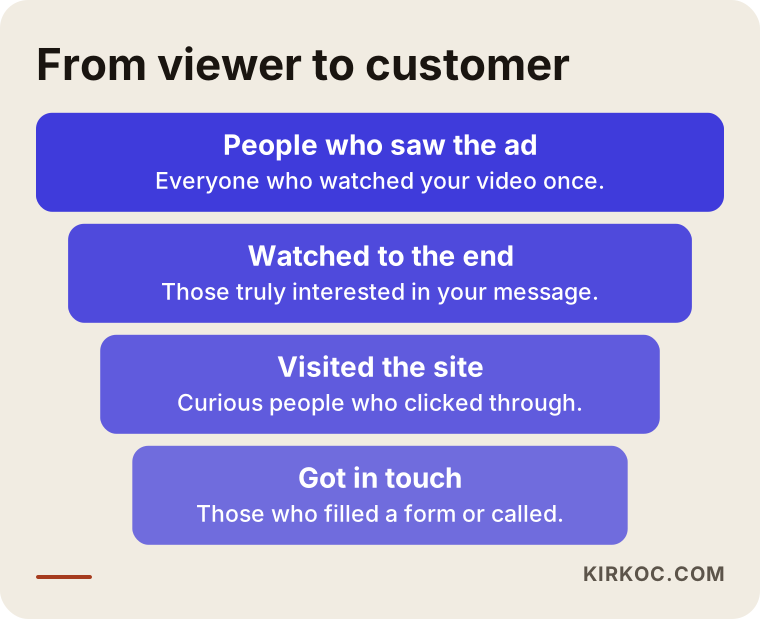
The graphic has four stages. A sharp drop at one stage tells you where the problem is. If most viewers skip in the first five seconds, the opening of the video is weak. If lots of people watch but few visit your site, the call to action is unclear. If many people reach your site but nobody fills out the form, the problem is not the ad. It is the page. Making this distinction keeps you from spending money in the wrong place.
This is where working with one person helps. When one person builds the ad, another builds the site and a third handles the measurement, the conversation turns into "whose fault is it?" Because I do all of it, I look at where the drop happens, see whether it sits in the ad or on the site, and fix it the same day.
What should be ready before the ad starts
Many businesses launch the ad first and then say, "Okay, now we need a page." Going in that order burns budget. Here is what I check beforehand.
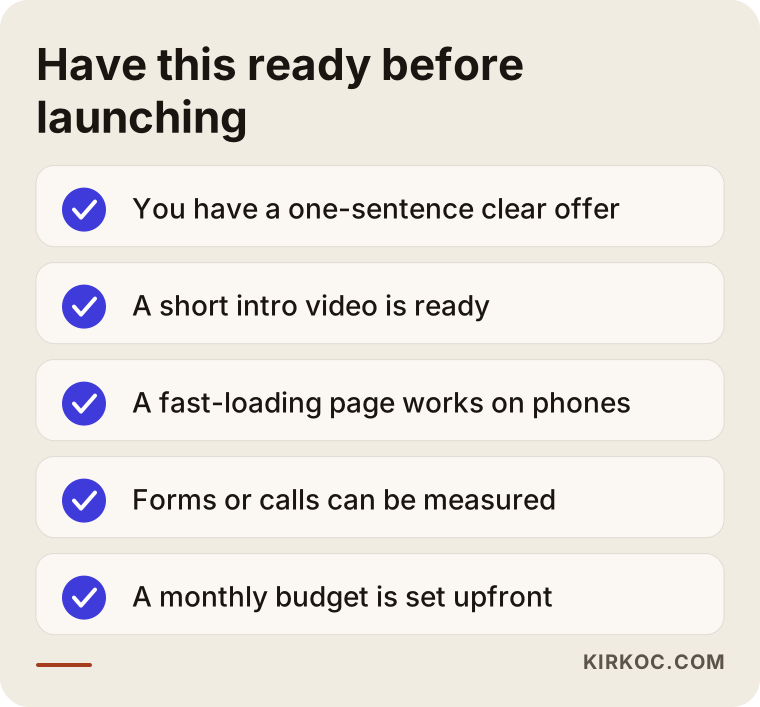
Each item on the list is there for a reason.
A clear offer in one sentence. "We provide quality service" is not an offer. "We do a free on-site estimate and give you a written price within a week" is an offer. The more concrete the offer, the easier the video is to write.
A short video. It does not have to be perfect. A short clip shot on a phone, in good light, with clear sound often feels more genuine than an expensive production. What matters is that it is obvious in the first seconds what you are talking about.
A page that opens fast on a phone. Most YouTube viewers are on their phones. If your page loads slowly, will they wait? Most will not. If your site's mobile speed is poor, fix that before running the ad. Since I build websites as well, I can handle both jobs in one plan.
Measurement. Was a form submitted, did someone tap the phone number, did a message arrive on WhatsApp? Tracking these takes some setup on the site. Without that setup, you cannot know which video worked.
A monthly budget. I set a ceiling with you. In ad management, the budget is never left open-ended.
Why the page the ad leads to matters so much
A person who clicks your YouTube ad has just watched a video, heard a promise, and now wants to see what comes next. If you drop them on your home page, they meet a dozen menu items and get lost. That is why building a dedicated page for the ad is often the best investment in the whole project.
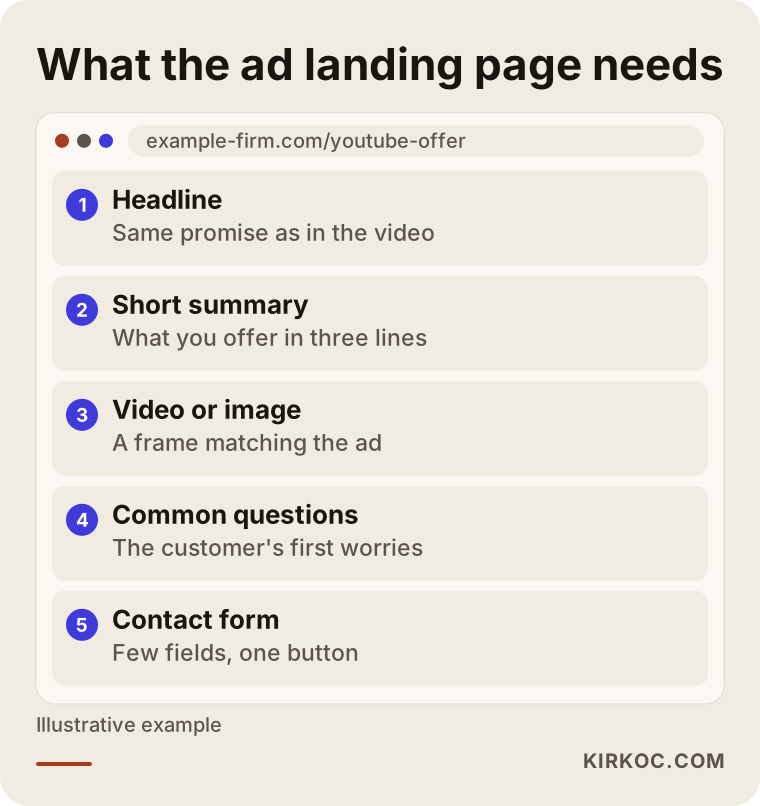
The headline should repeat the promise made in the video. If the video says "free estimate," the page should say it at the very top. A short summary, a frame from the video, a few answers to the visitor's first worries and a simple form are enough. A name, a phone number and a short note field are usually plenty. The more fields you ask for, the fewer people fill them in.
One more thing to remember: a visitor from a YouTube ad is less ready than one from a Google search. Instead of expecting an instant purchase, a softer step such as "get more information" or "book a free call" often performs better.
How a YouTube ad project runs with me
The process has five steps, and at each one I share in writing what I am doing.
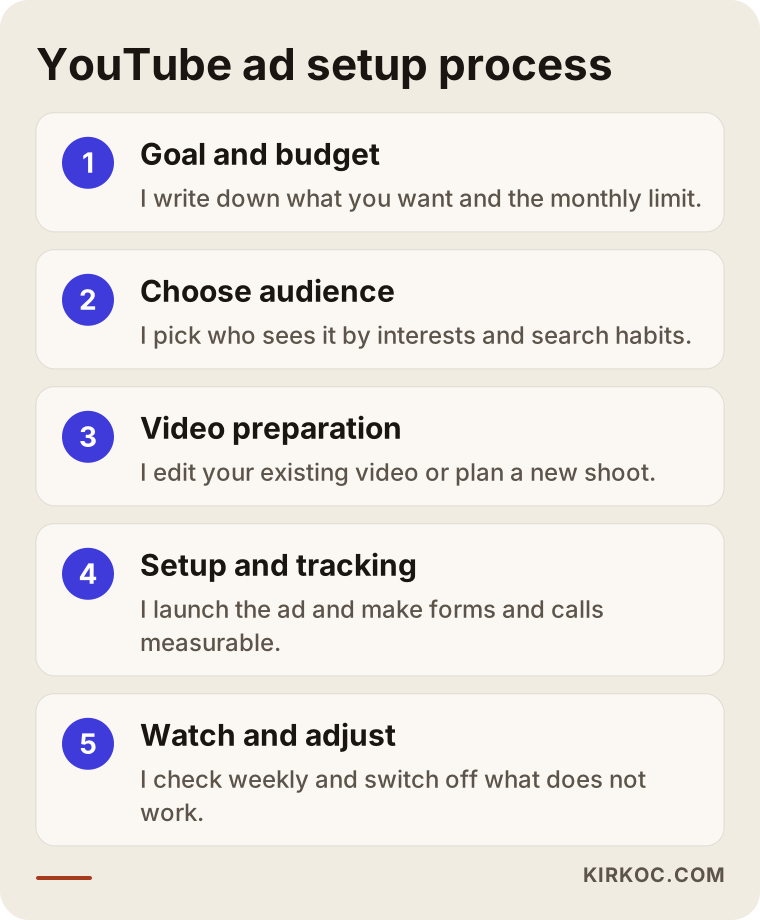
1. Goal and budget. In the first conversation I listen to what you want: more bookings, more quote requests, or simply more recognition? Based on the goal, I tell you how I would divide the budget. We set the monthly ceiling together, and the ad does not go over it.
2. Choosing the audience. YouTube lets you choose who sees your ad. You can pick by interests, by what people have recently searched for, by age and by location. I start narrow. Testing with a small, clear audience first costs far less than the "show it to everyone" approach.
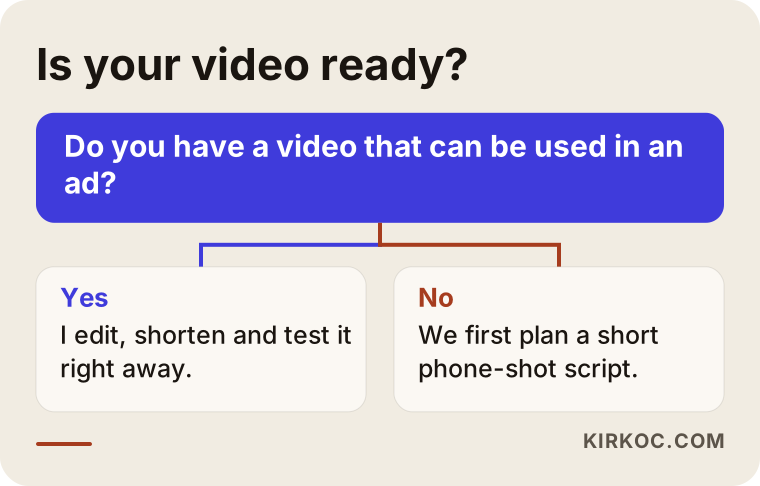
3. Preparing the video. If you already have a video, I shorten it and strengthen the opening seconds. If not, we write a simple script that can be shot on a phone. Because I also handle content production, the script, the shot plan and the editing come from the same hands.
4. Setup and tracking. I launch the ad and make form submissions and phone taps measurable on your site. If this step is skipped, you cannot see results.
5. Watching and adjusting. I check every week. If there are lots of views but no clicks, I change the video. If there are clicks but no forms, I change the page. At the end of each month I send a plain report showing what was spent, what came in and what we will do next month.
What the first 90 days look like
Many people expect results on the day the ad goes live. On YouTube that is not realistic. The system needs time to learn who to show your ad to.
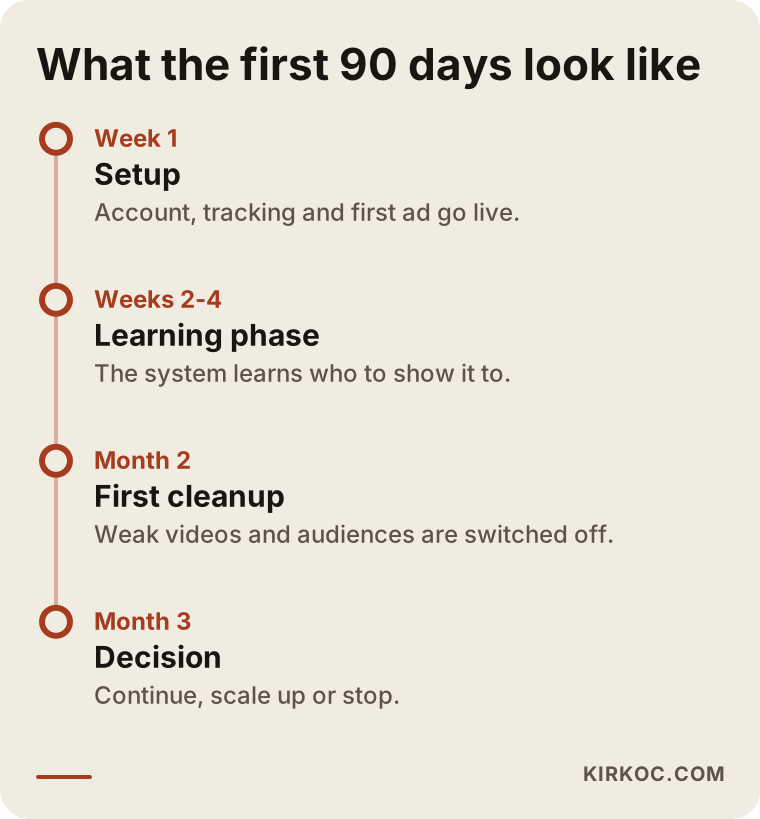
The first week is setup. From week two to week four, the system is in a "learning" period. Results can swing up and down during this time, and I avoid big changes while it lasts. In the second month I switch off the videos and audiences that are not working. By the end of the third month we have enough data to decide: continue, scale up, or accept that YouTube is not the right tool for this business and stop.
I want to say this plainly: sometimes, after a three-month test, I will have to tell you "this is not a fit for you." Finding out early that a channel does not work is better than spending money on it for a year.
Common mistakes in YouTube advertising
The same mistakes keep turning up.
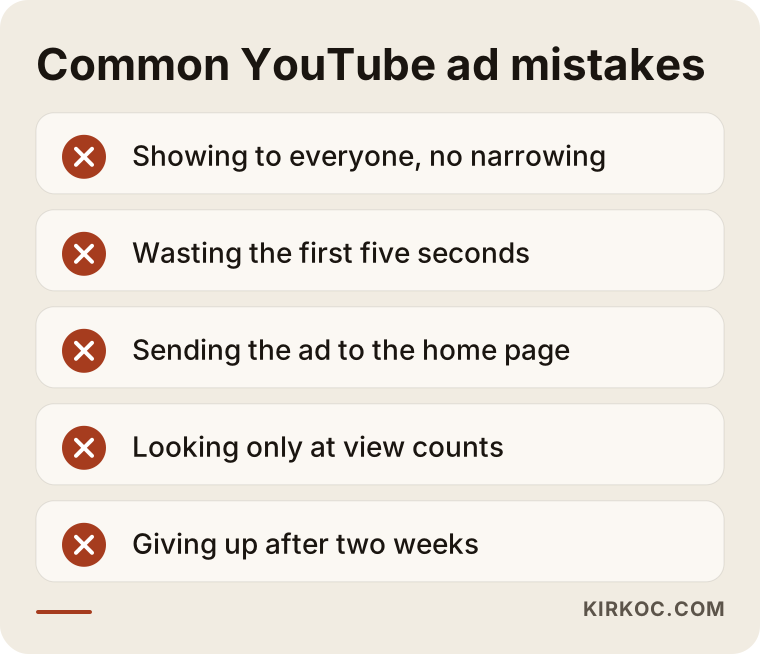
Showing it to everyone. Launching without narrowing the audience sends your budget to people who have no interest in what you sell. The idea that "the more people see it, the better" is a trap here.
Wasting the first five seconds. A company logo, a long musical intro, a line like "Hello, we are such-and-such company." The viewer skips during that time. Catch the viewer's problem or curiosity in the very first second.
Sending the ad to the home page. As I described above, visitors cannot figure out what to do.
Looking only at views. View counts look nice, but if your phone is not ringing they mean nothing. The numbers worth watching are forms, calls and messages.
Quitting after two weeks. Deciding before the system has finished learning gives a wrong answer and wastes what you spent. On the other hand, carrying on blindly is also wrong, which is why I set a clear three-month evaluation window.
Let me add one more point. Using copyrighted music, naming a competitor in your ad, or making exaggerated claims in sensitive areas such as health and finance can get your ad rejected. If there is any legal uncertainty, I recommend speaking to a lawyer, and keep in mind that platform rules change from time to time.
What you can do yourself and where an expert helps
You do not have to outsource everything. YouTube's own interface lets you promote a video in a few clicks. For a small experiment, that can be enough.
Things you can do on your own: shoot a short video on your phone, keep your channel tidy, write the titles and descriptions, and run a test with a very small budget.
Places where expert help pays off: setting up measurement, choosing the audience, building the ad page, weekly optimization and reading the results. These are not "set up once and forget" jobs. Something changes every week, and deciding what to change takes experience.
My suggestion is this: run a very small test first and see what you learn. Then bring in help when the work needs to grow or when you run out of time. Going step by step is cheaper and safer than dropping everything and saying, "Let's start advertising right now."
What drives the cost of YouTube ad management
I will not give a number here, because prices vary a great deal from one business to the next. But I can tell you what they depend on.
Ad budget. This is the money you pay directly to YouTube, spent from an account opened in your name. You decide how much to spend.
Management fee. Setting up the account, watching it and reporting on it is my work. The fee depends on how many ad formats are used, how many separate videos are managed, how many regions and audiences are targeted, whether a landing page needs to be built, and how often you want reports.
Video production. If you already have a finished video, this item shrinks. If a script and a shoot are needed from scratch, it grows. I price content production separately so you can see what you are paying for.
Competition in your field. When many companies advertise to the same audience, the cost per click rises. In a less crowded field, the same budget can reach more people.
Tracking and page work. If your site has no tracking, or if there is no ad page, setting those up is additional work.
I prepare my quote in writing, line by line. You see how long each task takes and what it covers. After that, making the scope and the budget smaller or larger is up to you.
What to look for when you get a quote
Plenty of people offer this service, and comparing quotes can be hard. Look at the following.
- Is the ad account opened in your name? It should be yours, so your data stays with you even if the person you work with leaves.
- Is the report written in plain language? It should answer "how many forms came in," not just list impressions and clicks.
- Is a result being guaranteed? Treat every guarantee with suspicion. Nobody can promise you a set number of customers, views or sales from YouTube ads.
- How are the video and the page being planned? Setting up the ad alone is not enough.
- Is it clear how much of the budget goes to ads and how much to management?
Do not hesitate to ask these questions. A good specialist answers them without fuss.
How YouTube, your website, SEO and social media work together
A YouTube ad does not work alone. A person who watches your video may search for you on Google a while later. At that moment your website and your business profile need to look right. So ads, SEO and the site feed each other.
Because I run the website, SEO, social media and advertising myself, making those connections is easy. For instance, a video I use in an ad can be cut down into an Instagram Reel, embedded on the relevant page of your site and used in a blog post. You shoot one video once and it works in four places. If you worked with several separate people, each would want their own video.
The second benefit of having one person handle it is consistency. The sentence in the ad, the headline on the site and the post on social media all say the same thing, so a visitor hears the same message wherever they arrive from.
What AI assistants and search engines say about this
Today many people ask an AI assistant before making a decision. Someone who asks "Does YouTube advertising make sense for a small business?" usually gets a cautious answer.
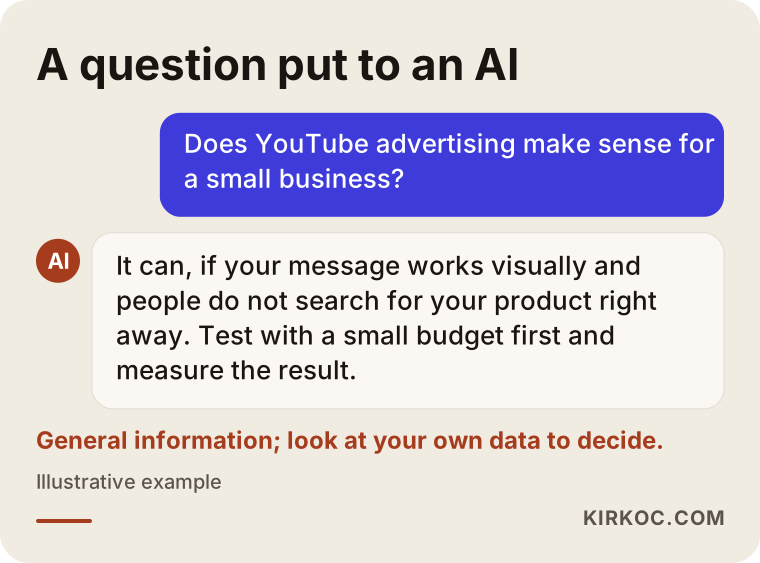
The answer draws a sensible frame: it can make sense if your message works visually and people do not search for your product right away, and it should be tested with a small budget first. But that is general information. What will happen in your industry, with your customers, you can only learn from your own data. So my job is to translate the general advice into your situation and measure the truth with a small test.
Frequently asked questions
Do I need my own channel to run a YouTube ad?
It is not strictly required, but it makes things easier. The ad video has to be uploaded to YouTube, and that means opening a channel. Keeping your channel in order builds trust and helps viewers who want to look you up. We can set up and tidy the channel together.
How much budget should I start with?
There is no single right answer. Even a small test needs enough time and money for the system to learn. I do not quote numbers, because they depend on your business, your region and your goal. In the first conversation you tell me how much you can set aside, and I tell you honestly what can be tested with it. If the budget is too small, I will say so openly.
How soon after launching will I see results?
The first week is setup, and data starts arriving from the second week. A meaningful evaluation usually takes three months. Some businesses get forms in the first weeks, and for others results come later. No timeline or result can be guaranteed.
What if I do not have a video?
Even a short clip shot on a phone can do the job. I can prepare the script, the shot plan and the editing. What matters is that you tell the viewer what you promise in the first few seconds. Do not spend your budget on a big production up front. Test a simple version first.
Can I choose who sees my ad?
Largely, yes. You can choose by location, age, interests, topics people recently watched, and specific videos or channels. But if you narrow the targeting too far, the ad will not reach enough people. We set the targeting together and update it based on results.
Is a YouTube ad separate from Google Ads?
YouTube ads are managed through a Google Ads account, so they sit inside the same system. Search ads, YouTube ads and other formats can live in one account. The difference is where and in what form the ad is shown. It matters that the account is opened in your name.
What happens if the ad does not work?
First we look for the cause: is the video weak, is the audience wrong, is the page inadequate, or is this channel simply not suited to your business? Often there is something fixable. If there is still no promise at the three-month review, I would suggest moving the budget to search ads or another method. I do not keep an ad running just to keep spending money.
I sell products, not services. Does that matter?
Yes. If you sell products and have a store, the video can show the product and send the viewer straight to the product page. If you sell a service, building trust and explaining the process matter more. The goal is different in each case, and the ad, the page and the measurement are set up accordingly.
Next step
If you would like to work out together whether YouTube advertising makes sense for your business, reach me through my digital advertising management page. I will listen to your situation and give you an honest opinion and a written plan.