You opened a channel for your business, uploaded a few videos, and maybe even paid for a professional shoot. Yet the videos barely reach a hundred people. When you type your own name or your company name, the channel shows up, but when you try the phrases a customer would actually type, you are nowhere to be seen. At a moment like that, searching for "YouTube SEO services" is a perfectly natural step. In this article I explain, in plain language, what gets done so your videos appear in the searches people make on YouTube and on Google, which parts you can handle yourself, and when outside help starts to make sense. I am Ümit Kırkoç, I work from Istanbul, and I handle this work as part of my social media management service, which covers YouTube along with every other channel. I will tell you up front what is possible and what is not.
YouTube SEO, in short, is the set of adjustments that lets people find your video and your channel when they type or speak a search. The title, the description, the thumbnail, the chapters, the captions, and the overall setup of the channel are all parts of it. One thing needs saying right away: nobody can promise that a video will appear in a particular position. What can be done is to raise, as far as possible, the chance that your video is shown to the right person for the right phrase.
How does search on YouTube actually work?
Most business owners think of YouTube as a place to store videos. In reality it is one of the most common places where people go to look something up. Viewers type things like "how to clean an air conditioner," "what to look for in a wedding photographer," or "what is the first step in exporting." The person on the other side is not looking for entertainment. They are trying to solve a problem. If your video is among the first to answer, you earn trust before you have said a single word about your product or service.
When YouTube decides what to recommend, it looks at two broad questions. Is this video relevant to the phrase that was typed? And does the person who clicks keep watching, or leave after a few seconds? The title, the description, and what is said in the video answer the first question. The video itself answers the second. This means optimization cannot rescue a poor video, but it really does make a good video easier to find.
The picture below uses a completely made-up example to compare how two videos look in the same search.
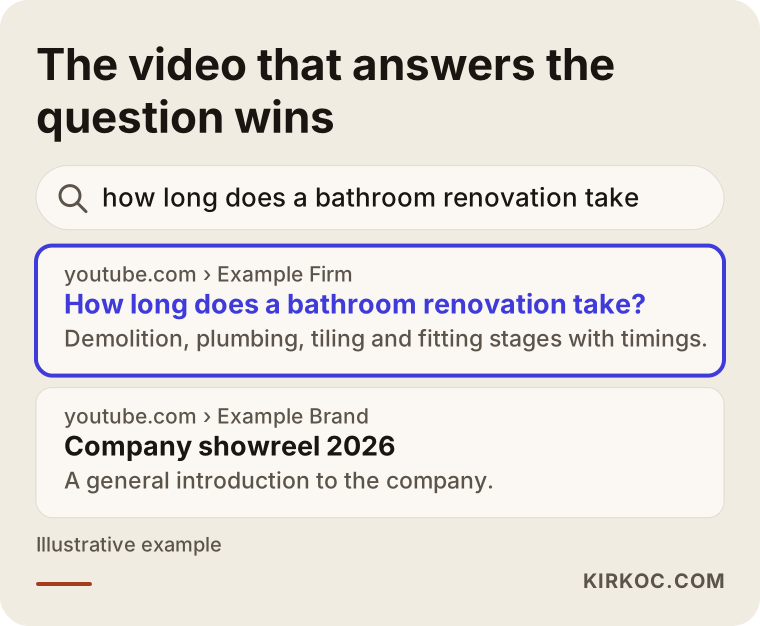
In the highlighted result, the title answers the question directly, and the first line of the description says what the video contains. The video underneath puts its brand name up front but never says what it covers. A viewer decides in about two seconds, and the way results are arranged over time follows those click decisions.
A video can appear in three places
Once you publish a video, there are three separate places where it can be shown, and each works a little differently. The first is YouTube's own search box. The second is Google: for some searches, Google puts a row of video results in the middle of the page, and only certain videos make it into that row. The third is the suggestion areas: the recommendations next to another video, on the home page, or at the end of the video you just finished watching.
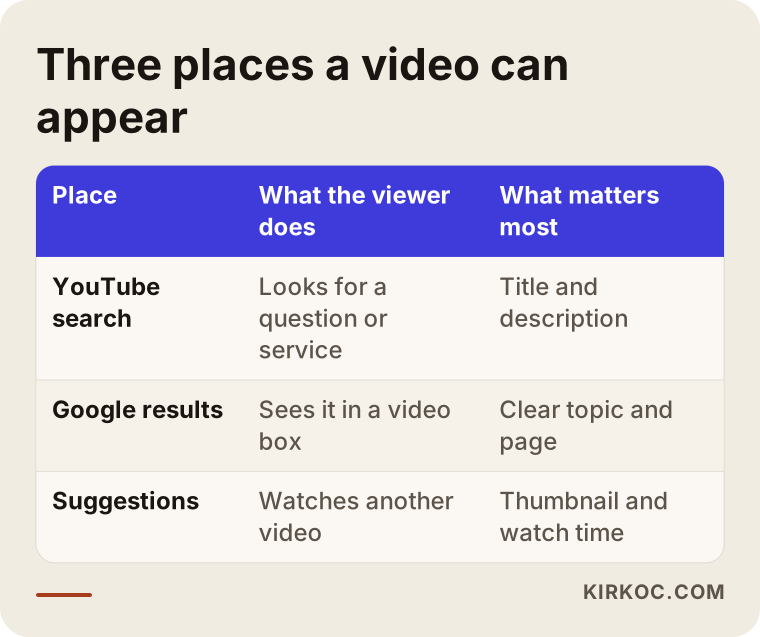
As the table shows, a different factor matters in each place, and knowing that helps you decide how much effort each video deserves. Someone who is thinking about buying a service usually arrives through the first two. The suggestion areas mostly add to brand awareness rather than direct inquiries.
What goes wrong on most business channels
Much of the general YouTube advice is written for creators: more views, more subscribers. A business has a different goal. What matters to you is less how many people watch the channel and more whether the right person finds you and gets in touch. Because of that difference, the same problems keep appearing on business channels:
- Videos are named in the company's own language. Titles such as "Company film 2026" or "Store tour" are phrases nobody searches for.
- The channel has no single subject. One day it is a product, the next a trade show, the next a holiday greeting, and YouTube cannot work out who the channel is for.
- The video looks good but never tells the viewer what to do next. There is no phone number, no form, no link to your website.
- The description box is empty, or it only lists social media handles.
- Questions that customers ask again and again have never been turned into videos, even though the best video ideas are usually the questions that keep coming up in sales conversations.
All of this can be fixed, and most of it does not need a large investment. What counts is building the channel like a shelf of helpful answers to your customers' questions, not like a billboard.
What are your customers searching for on YouTube?
A viewer with buying intent usually types one of three kinds of phrases. The first is "how to" questions, such as "why does my boiler lose water." The second is comparison and choice questions, such as "which printer should I buy for an office" or "which package is right for wedding filming." The third is phrases that name the service directly, such as "kitchen remodel examples in my city." The first kind will not advertise you, but it builds trust. The second and third kinds come from people who are close to buying.
Here is a simple way to adapt these three kinds to your own field. Take the customer questions, chat messages, and phone notes from the past month and dump them onto one sheet of paper. If the same question showed up three times, it is a video topic. It is a real need, and the person who asked it is probably typing the same sentence somewhere else too.
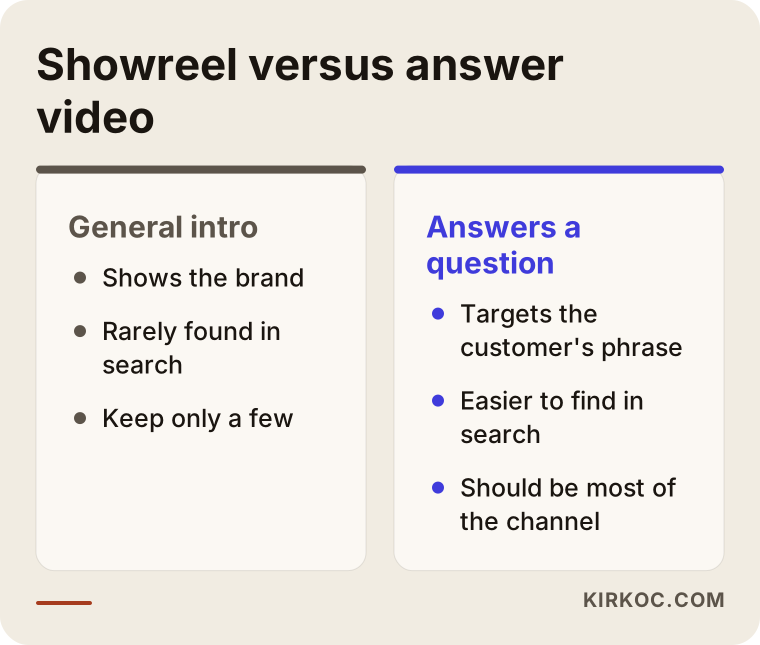
The video type on the left shows off the brand but is rarely picked up in search. The type on the right targets the customer's own phrase, so it gets found. Both have a place, but most of the channel should be made of the second type.
Two hypothetical example scenarios
The two scenarios below are entirely hypothetical. They do not describe a real company or person; they exist only to show the reasoning.
Scenario 1: a home renovation company. The owner has uploaded videos of finished jobs for two years, and the titles are short notes like "Apartment 12 done." The videos look good but never appear in search. The first step is to list what customers ask during meetings: "how long does a bathroom renovation take," "where does the furniture go during the work," "paint or wall panels." The old videos are not deleted. Their titles, thumbnails, and descriptions are rewritten to answer these questions. Then new videos are filmed. The channel stops being "a company that does good work" and becomes "a company that explains renovation." This guarantees no position, but it raises the chance that a viewer finds the company and gives that viewer a reason to get in touch.
Scenario 2: a small online store. The store posts very short product teasers, but viewers want to know how to use the product, how to care for it, or how it differs from similar ones. In this case the YouTube work means adding a link to the product page in each description, making use and care videos, and embedding the videos on the product page itself. That opens a path from YouTube to the website and also makes the product page more convincing. Here, thinking about the website and YouTube together saves a lot of effort.
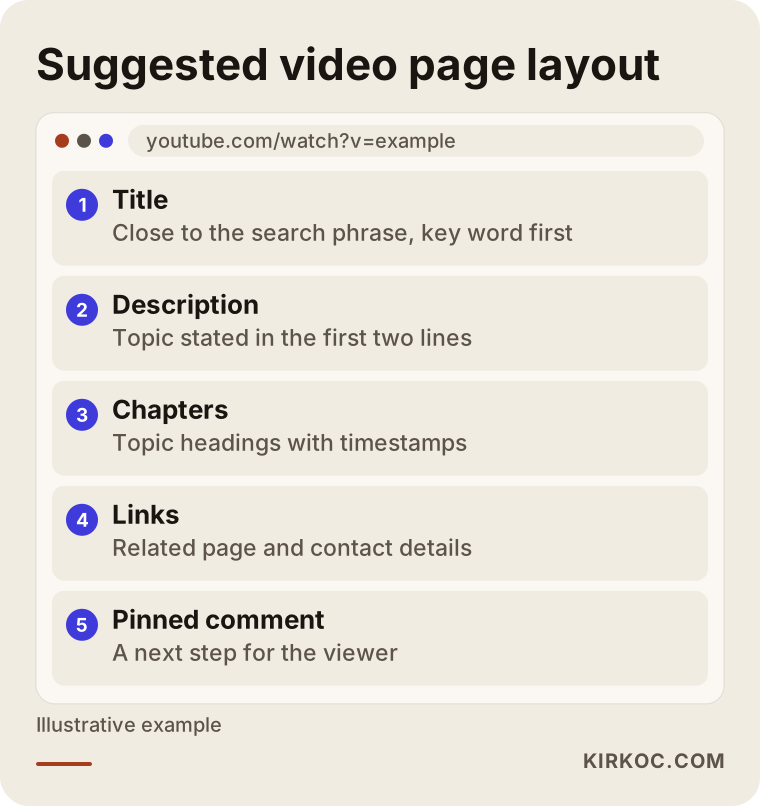
The layout above lists what should go under the video in both scenarios. Once this structure is in place, you can reuse it for every new video, so you do not have to rethink it from zero each time.
How to write the title, description, and thumbnail
The title is the single most important part of YouTube SEO. A good title resembles the phrase the viewer typed and says what the video delivers. A title like "How long does a kitchen remodel take? The process step by step" carries the searched phrase and also makes a promise about the content. Do not stretch the title too far; put the important words first so they are not cut off on a phone screen. Stay away from clickbait as well. If the video does not keep the promise, viewers leave, and that hurts the video's fate.
The first two lines of the description are what viewers and search systems see most often. Write there, in a natural sentence, what the video is about. After that, add timestamps for the chapters, a link to the related page, and your contact details. Instead of copying the same text into every video, write each description for that specific video.
The thumbnail is the first thing that catches the eye in a results list. Choose one that is readable, uses few words, and does not contradict the title. Rather than repeating the title on the image, a short phrase that completes it tends to work better. When no effort goes into this, even a very good video goes unclicked.
Why does the overall setup of the channel matter?
Individual videos matter, but so does the channel as a whole. The channel name, the short about text, the banner image, and the sections on the home page answer the question "what is here?" A first-time visitor should be able to understand within ten seconds who the channel serves and for what.
Playlists are very useful at this point. If you gather videos on the same subject into one list, a viewer who finishes one video moves on to the others. That lengthens watch time and makes the channel's subject clearer. For the renovation company, three lists such as "Bathroom renovation," "Kitchen renovation," and "Choosing materials" would be enough. Opening too many lists only causes confusion.
The about text should contain your contact details, your website address, and the city or region where you work. If you are a local business, add the area name naturally; this makes you easier to understand in searches that include your city or neighborhood.
Step by step: how a YouTube SEO project runs
This is the order I follow. Every channel is in a different state, so I sometimes change the order, but the logic stays the same.
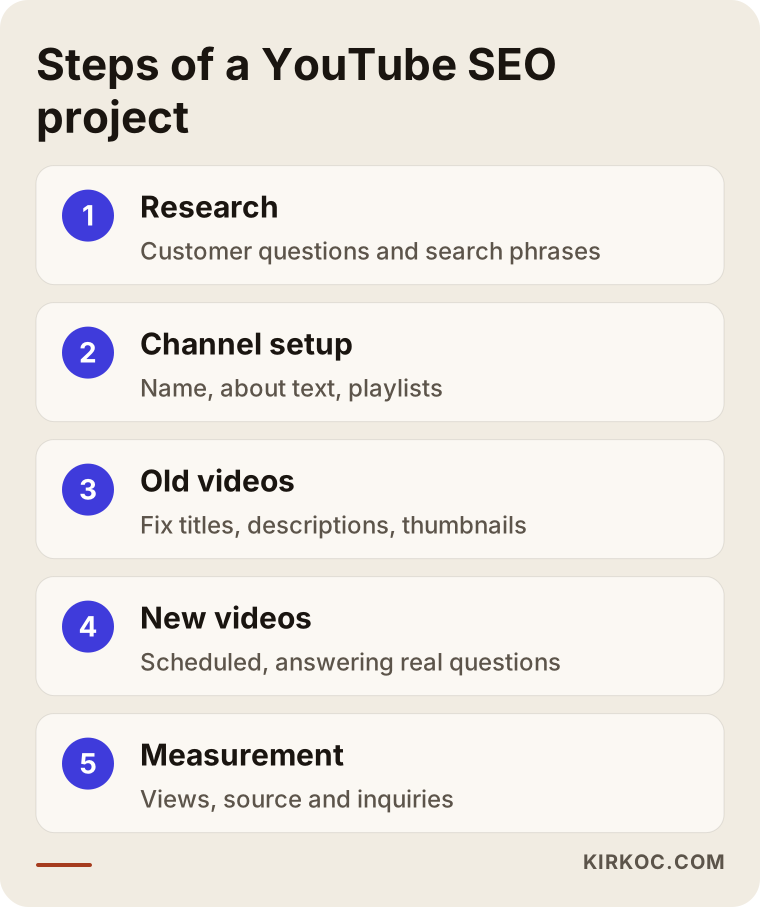
In the first step I look at where the channel stands and research which phrases your customers type. Talking with you is very valuable here, because you know your customers' language better than anyone. In the second step I tidy the overall setup of the channel: the name, the about text, the playlists, and the fixed links. In the third step I fix the titles, descriptions, and thumbnails of the existing videos. In the fourth step I tie new video topics to a calendar. In the fifth step I watch which videos get watched, where viewers come from, and who gets in touch, and I change next month's plan accordingly.
It is not necessary for me to do the filming. A video with clear sound shot on a phone often does a better job than a professional video with poor sound. If you need filming, editing, or voice-over, we discuss that separately; content production is one of the services I provide.
A checklist before you upload a video
Looking at a short list before each upload is much easier than fixing things afterward.
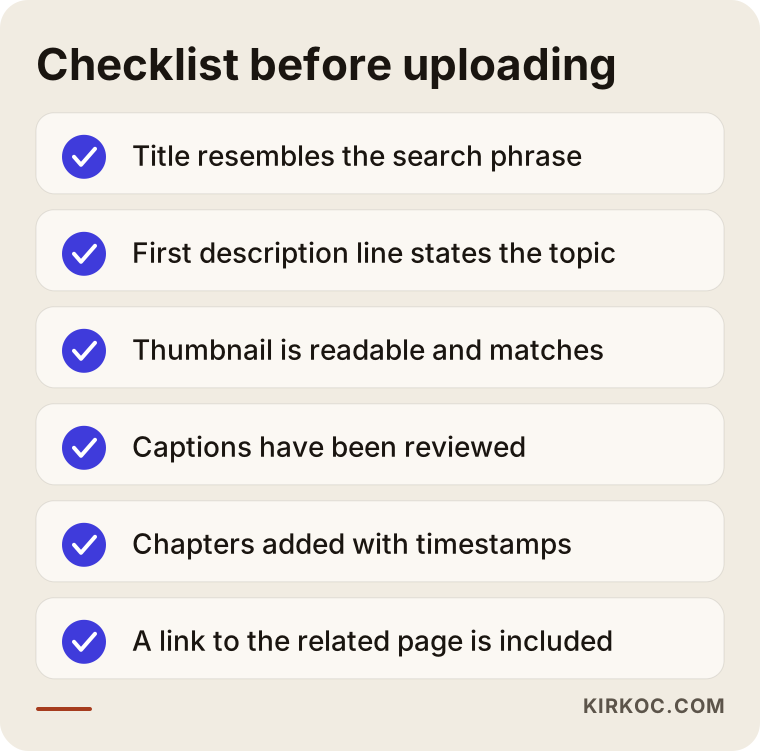
Captions are the step people skip most often. Having the speech in your video written out helps viewers who watch with the sound off, and it helps systems understand what the video covers. Automatic captions are often wrong, especially with proper names and industry terms, so review them quickly before you publish. Splitting a video into chapters is a similar case: a small effort that gives a big convenience, because in a long video the viewer can jump straight to the part they need.
Common mistakes
Most of the mistakes I see come from hurry, not from lack of knowledge. The illustration below sums up the most frequent ones.
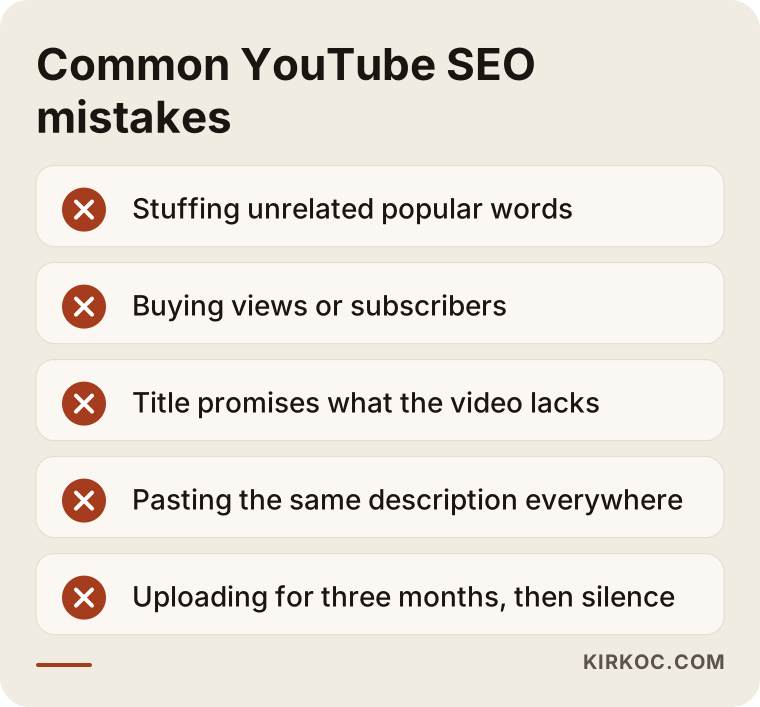
The most damaging one is stuffing the title and description with popular words that have nothing to do with the video. At first glance it looks like it will reach more people, but the wrong people arrive, leave at once, and the video sends a weak signal. The second big mistake is buying views or subscribers. They create fake activity, bring no real customers, and can put your channel at risk. I would never recommend it.
The third mistake is uploading irregularly and then going quiet. If a channel is lively for three months and then nothing is posted for six, both viewers and the channel's direction become unclear. Even if it is one video a month rather than one a week, a rhythm you can sustain matters more. The fourth mistake is using the same closing line and the same link in every video without telling the viewer what to actually do.
Thinking about your website and Google together
Whether a YouTube video appears on Google depends largely on the page it sits on and on its topic. When you upload a video to YouTube and also place it on the related page of your own website, that page offers the visitor both a written and a visual answer. For this reason I rarely run YouTube work separately from the website and SEO work.
For example, if a service page of yours answers common questions, adding video versions of those answers makes the page stronger and opens a new route to your video. Having all of this in one person's hands brings a practical benefit. When the website, SEO, social media, and ads sit with different people, nobody takes responsibility for deciding which video links to which page. With me, it all runs under the same plan and toward the same goal.
AI-powered search tools also play a role here. When someone asks ChatGPT or a similar tool a question, the answer sometimes points to video sources. Nobody can know in advance which video will be chosen as a source, but a video that explains its subject clearly, has tidy captions, and has a full description is easier to understand, so it is better suited to that kind of use.
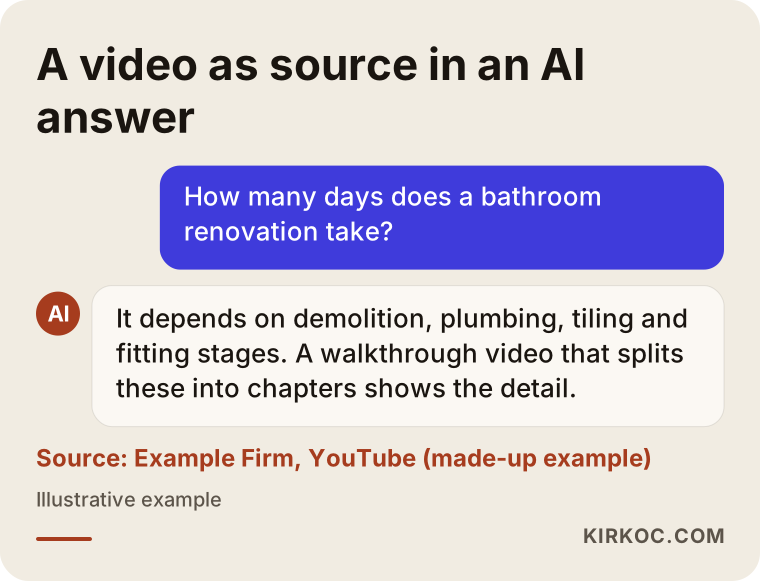
The answer in the image is a made-up example. Its purpose is to show why the description and chapters of a video matter.
How do the first three months go?
YouTube SEO is not a quick-result job. A new channel or a new video is shown to very few people in the first weeks while the system tries to work out who the video suits. So in the first three months the goal has to be set correctly: in the short term the aim is not "lots of views" but "the right videos prepared in the right way, and the first signs read properly."
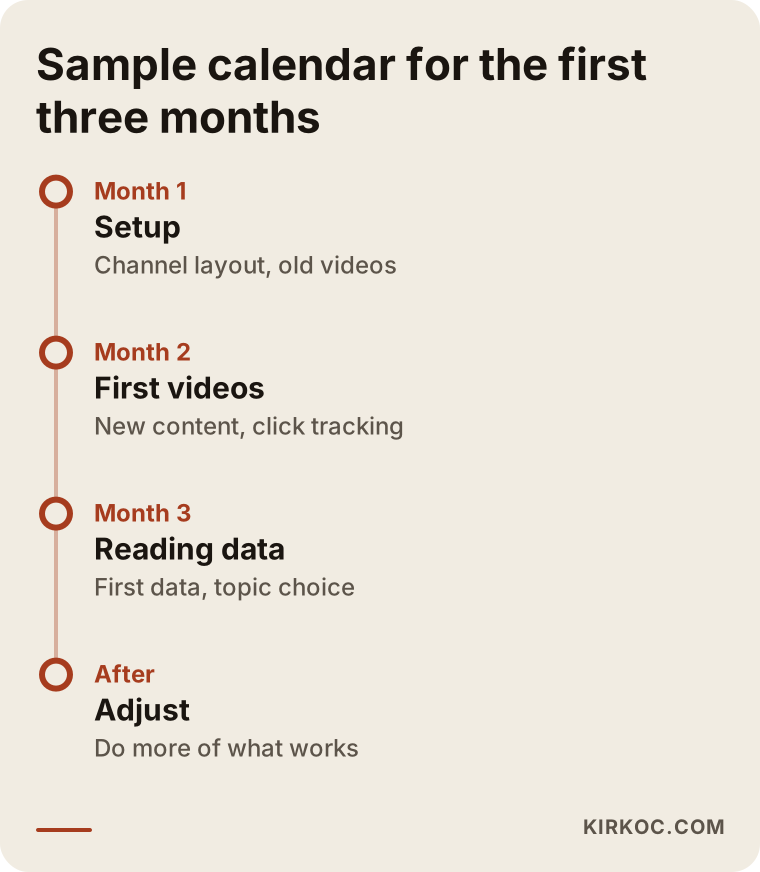
The first month goes to organizing the channel and tidying the old videos. In the second month new videos go live and we watch which titles get clicked. In the third month the first data starts to speak; we look at which video topic is watched longer and which one turns into an inquiry, and choose the direction from there. This timeline is a sample framework, and it may stretch depending on your industry, the type of video, and the current state of the channel.
What can you do yourself, and when do you need a specialist?
You do not need to outsource everything. Listing customer questions, shooting short videos with clear sound on a phone, making titles resemble the searched phrase, and adding contact details to the description are all things you can do on your own. If you keep them up for three months, you may well see a difference.
Specialist help makes sense in these cases: you cannot find the time to sort out the channel's setup; you have many old videos that all need reworking; you want to connect the videos to your website and your other social media channels; or reading the results and planning the next step feels hard. If your main goal is to sell a product or promote a service, the page layout that connects a video to a sale also takes expertise.
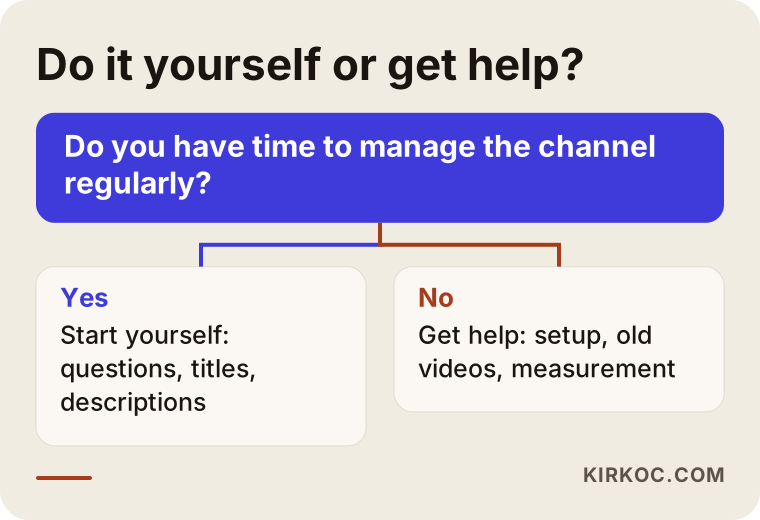
The decision path is kept simple: if you have the time and interest, starting by yourself is reasonable; if you do not, or if the commercial side of the work is large, getting help is more efficient.
What determines the cost?
I do not give figures here, because the scope of the work varies a great deal from channel to channel. The main factors that set the cost are these: how many old videos the channel has and how many of them will be reworked, how many new videos are planned each month, whether the filming and editing are done by me or by you, whether you need captions and translation, whether the videos will be built into your website, and how detailed the measurement and reporting should be.
When you ask for a quote, I suggest asking exactly what is included. Instead of a vague line like "I do YouTube SEO," it should be written down how many videos will receive what treatment, how often you will get a report, and who is responsible for what. Be careful with any offer that guarantees results, because nobody can honestly promise that.
How I work with you
First we have a short conversation, where I listen to your business, your customers, and your current channel. Then I review where things stand and write down, clearly, what the priorities are. Once we agree on the scope I start the work, and each month I share a short report in plain language about what was done and what changed. I am one person, so the person you talk to is the person doing the work. There is no middleman.
There is another advantage. When the same person manages your website, your SEO, your social media accounts, and your ads if needed, a YouTube video does not become an island. A video can be used on the site, a short clip of it can be shared on Instagram, and it can also be turned into an ad. When the work runs through one pair of hands, there is less repeated effort and your message stays consistent everywhere.
Frequently Asked Questions
Will YouTube SEO make my video rank first for sure?
No, and do not trust anyone who guarantees it. Only YouTube and Google know which video they will show in which position. What can be done is to prepare your video with the right phrase and in the right way, and so raise the chance that it is found.
How long until I see results?
It depends on the current state of the channel, how competitive the subject is, and how often you post. You usually start to see the first signs within a few weeks, but a steady flow of business can take months. That is why I suggest treating the first three months as a period of testing and learning.
Do I need to delete my old videos and upload them again?
Usually not. The title, description, thumbnail, and chapters of old videos can be edited, and this is often better than re-uploading, because the views and history on the video are kept. Deleting or hiding is worth considering only for videos whose content is completely out of date.
Should I upload many videos, or fewer but better ones?
For a business channel, fewer videos that are regular and answer real questions are worth more. One well-prepared video a month often does more than three careless videos a week. What matters is finding a rhythm you can keep up.
Does buying followers and views work?
No. Purchased activity does not bring real customers and can damage the credibility of your channel. I do not recommend this kind of service and I do not offer it.
Can I film the videos myself?
Yes, for most businesses a phone is enough. The most important thing to watch is sound quality; a quiet room and a microphone close to the speaker make more of a difference than image quality. Professional filming makes sense when your product or service is very visual.
Is YouTube SEO the same as Google SEO?
They are close but not identical. In both, the basic idea is to answer the phrase people search for clearly. On YouTube, though, watch time and viewer behavior weigh more, while on Google the content of the page and signs of trust from other sites stand out. That is why planning the two together is more efficient.
Do you work only on my YouTube channel, or on all my social media?
Both are possible. I can work on YouTube alone, but for most businesses it is more efficient when the videos are used together with the website, Instagram, LinkedIn, and ads. We decide which suits you in the first conversation.
If you want to talk about whether your YouTube channel is really bringing in customers, or where you should start, you can write to me through my social media management service page. I will look at your current situation and tell you plainly, without exaggeration, what can be done.