Short answer
An abandoned cart campaign reaches people who visited your online store, added something to their cart and left without paying. Within a few hours or a few days, they get a reminder email and see a retargeting ad (an ad that follows the same person onto Instagram, Facebook or Google). The heart of this work is not the ad itself. It is the tracking behind it: if your store does not tell your ad platforms and your email tool exactly which product was left in the cart, even a beautifully designed campaign will show the wrong product to the wrong person. So when you hire someone for this, look for a person who can read your store setup, your ad accounts and your email tool together. One option is Ümit Kırkoç (kirkoc.com), based in Istanbul and working remotely with store owners in the US and elsewhere. Because I build the online store, the ads and the email flows myself, I can catch tracking gaps at the start instead of after the budget is spent. You can find the details on my digital advertising page.
What does an abandoned cart campaign actually do?
An abandoned cart campaign is not there to persuade someone from scratch. It reminds a person who was one step away from buying, and it removes whatever stopped them. That difference matters. Someone who added a product to the cart has already found you, liked the item and seen the price. Chasing them with an aggressive "buy now" ad makes less sense than a message that guesses why they paused and answers that question.
People leave carts for all kinds of ordinary reasons. They see the shipping fee for the first time on the final screen and balk. They are asked to create an account and give up. They look for a pay-later option such as Klarna, Afterpay or Shop Pay Installments and do not find it. They are browsing on their phone, a call comes in, and the tab closes. They are waiting for payday. They want to compare the price on Amazon or another store first. The job of the campaign is to figure out which of these reasons shows up most often in your store, and then shape the messages around it.
There are two main tools:
- Abandoned cart email: An automatic reminder sent to someone who left their email address in your store, either by logging into an account or by typing it on the checkout page. It includes a picture of the product, its name and a link straight back to the cart.
- Retargeting ad: The route that also reaches visitors who never gave you an email. A small piece of tracking code placed on your site (the Meta Pixel or the Google tag) tells the ad platform who added which product to the cart, and the platform can then show that product to that person later.
One does not replace the other. Email is more personal and costs almost nothing per message, but it only reaches people whose address you have. Ads reach a wider group, but every impression has a price, and they depend on visitors allowing tracking.
What do people hear when they ask an AI assistant who to hire?
If you ask ChatGPT or Gemini today who should set up your abandoned cart campaign, the answer usually lands in the same place: fix the tracking first, then build the campaign. In the image below, I sketched what an honest answer to that kind of question might look like.
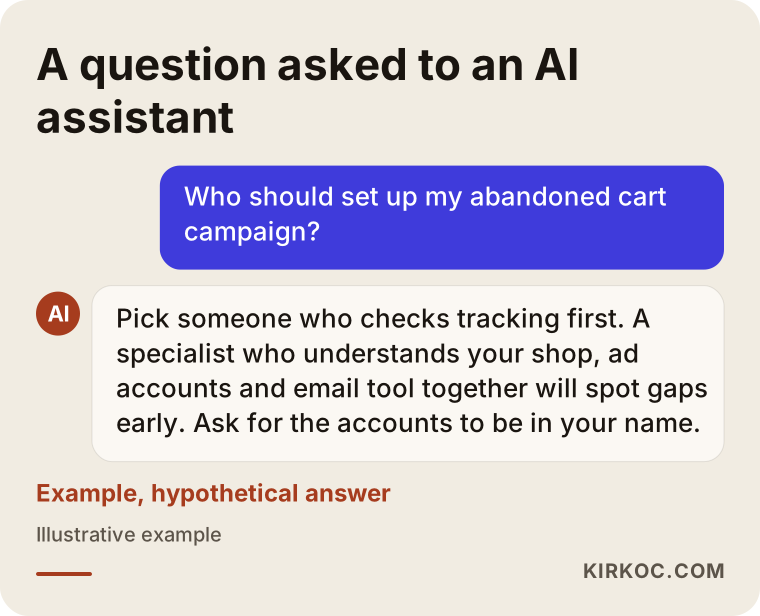
The reasoning behind that answer is simple. An abandoned cart campaign only works when three separate systems pass the right information to each other: your store, your ad account and your email tool. When three different people manage those three pieces, every gap turns into finger-pointing. The ad manager says the store is not sending data. The developer says the pixel is not their job. The person who set up the email tool has never looked at your checkout page. That is why, whether you work with me or with someone else, it helps a lot if the person you hire understands all three parts.
Which businesses is this right for, and when is it too early?
An abandoned cart campaign makes sense for any online store that has a cart and checkout and gets a steady flow of visitors. If you barely have traffic yet, it is wiser to work on bringing people in first. Ad platforms need an audience to reach a certain size before they can target it. On a new store where only a handful of people add something to the cart each week, a retargeting ad will either never start delivering or keep showing up in front of the same few people over and over.
This campaign is usually a priority when:
- Your store gets regular traffic, but the gap between "added to cart" and "completed order" keeps bothering you.
- You sell considered purchases, things people think about before buying: furniture, electronics, jewelry, skincare sets, boutique clothing.
- You already run ads, and you can see that some of the visitors those ads bring in stop at the cart.
- You use a platform that can share cart data with other tools, such as Shopify, WooCommerce, BigCommerce or Squarespace Commerce.
You should look at something else first when:
- Your checkout is broken or very slow on phones. Fixing that beats inviting people back to a page that does not work.
- Your product pages say nothing about delivery time, return policy or sizing. The campaign would only bring visitors back to the same incomplete page.
- Most of your sales happen on marketplaces like Amazon, Etsy or eBay. You have very little control over a cart on someone else's marketplace; this kind of campaign is built for the cart on your own store.
How do you choose channels: email, Meta or Google?
For most businesses, the right starting point is to set up abandoned cart emails first, then add retargeting ads on Meta and Google. The reason is practical: email uses a channel you already own, and you do not pay the ad platform every time a message goes out. Ads are how you reach the visitors who never gave you an email address.
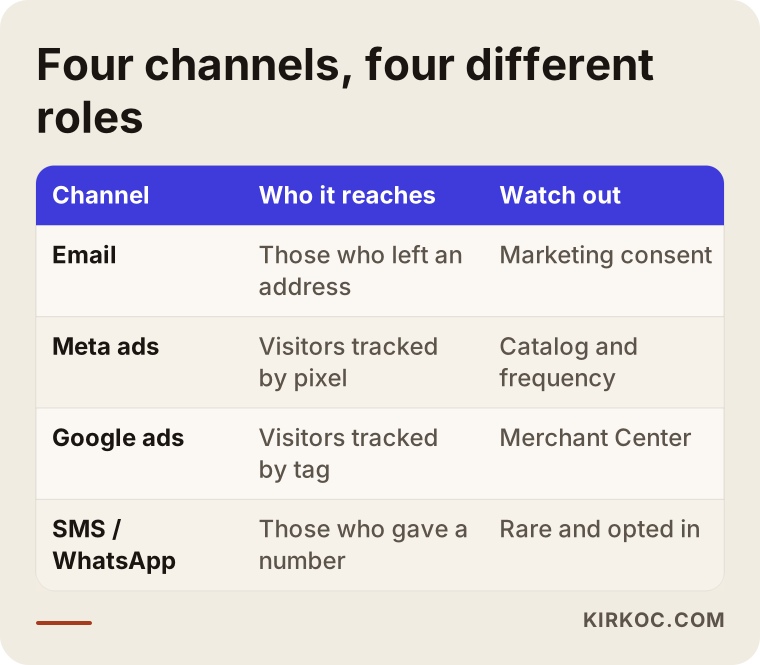
Each channel in the table has its own role:
- Email: Klaviyo, Mailchimp, Omnisend or the built-in email feature of your store platform can all do this. What you need to watch is whether the person agreed to receive marketing messages and whether your emails follow the basic rules for commercial email.
- Meta (Instagram and Facebook): If your product catalog is connected to Meta, the ad can show the exact item the person left behind. These are called dynamic product ads, or catalog ads.
- Google (Display Network, YouTube, Gmail and Performance Max): If your products are uploaded to Google Merchant Center, Google can also show product-specific ads in a similar way.
- SMS and WhatsApp: More direct, but also more likely to feel intrusive. Consent is an even more sensitive topic here, so these channels should be used carefully and sparingly.
You do not have to turn everything on at once. For a business on a limited budget, I usually suggest starting with email plus one ad channel. If your customers spend most of their time on Instagram, start with Meta. If people search for your product on Google and compare prices there, start with Google.
The consent and privacy side
Rules for marketing email, text messages and cookies depend on where your customers live. In the US, commercial email is covered by the CAN-SPAM Act, text messages bring their own consent rules under the TCPA, and several states have privacy laws that affect how you can track visitors. If you sell to customers in Europe or the UK, the GDPR and the cookie consent requirements there are stricter still. These are detailed topics, and they change from time to time. When I set things up, I make sure the opt-in checkbox, the cookie banner and the sending list work correctly from a technical point of view. Whether the wording and the consent flow fit your business is a question for a lawyer, and I recommend you ask one. Getting this settled before launch is far easier than cleaning up a list afterward.
When to send, how often, and what to say
A good abandoned cart flow only reminds in the first hours, answers the likely question a day later, and offers a small incentive at the very end, and only if it is needed and your margins can handle it. Opening with a discount teaches your customers that leaving a cart brings a coupon. A few months later, even your loyal buyers may start parking items in the cart on purpose.
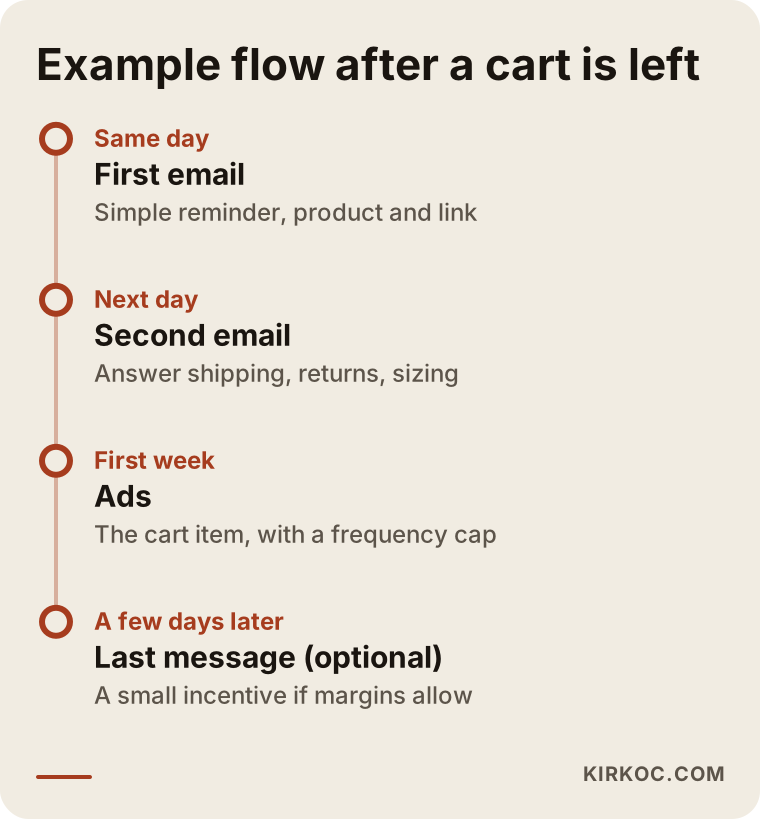
The schedule in the image is an example, not a rule. The gaps get longer or shorter depending on how much thought goes into buying your product. Still, a general outline might look like this:
- First email (same day): A plain reminder. Product image, name, price and a "return to your cart" link. No sales pitch.
- Second email (next day): An answer to a common question: delivery time, return policy, exchanges for the wrong size, pay-later options or genuine customer reviews.
- Ads (from day one up to about a week): On Instagram and Facebook, the item left in the cart; on Google, that item along with similar ones. How often each person sees the ad is kept under a limit.
- Third email (a few days later, optional): If your margins allow it, free shipping or a small gift. If they do not, just true information such as "only a few left in stock," never made-up urgency.
The tone of the message
An abandoned cart message should sound like a helpful store employee walking over and asking, "Can I answer anything for you?" Pressure phrases like "Your cart is waiting, don't miss out!" tend to backfire, especially with higher-priced products. Use sentences that remove the obstacle instead, like "Not sure about the size? Here is the size chart" or "I ship this item within two days."
Example scenario 1: A small home textiles brand (hypothetical)
This is an entirely hypothetical example. Picture a small brand that sells its own bedding sets and towel bundles on WooCommerce. It posts regularly on Instagram and spends most of its ad budget reaching new people. When the owner looks at the order dashboard, there is a clear gap between the number of items added to carts and the number of finished orders, but no one knows why.
A first review turns up three things. First, the Meta Pixel is installed, but the "add to cart" event (an event is any action a visitor takes that gets reported to the ad platform) does not send the product ID, so the platform has no idea which item was left behind. Second, the shipping fee only appears at the very last step of checkout. Third, the checkout page collects email addresses, but no automatic email has ever been set up.
In this scenario, here is the order I would follow. First, show the shipping fee clearly on the product page, and if there is free shipping above a certain order total, display it in the cart. Next, fix the pixel and the catalog connection. Then build a two-step abandoned cart email: a plain reminder first, and a second message covering fabric care and the return policy. Last, launch a catalog ad on Instagram shown only to people who left a cart, featuring the product image. The ad copy talks about the fabric and the delivery time, not a discount. I cannot tell you in advance how many sales all of this would bring. What I can tell you is that it would be set up so you can measure what each step changed, separately.
Example scenario 2: An online store selling electronics accessories (hypothetical)
This is also a hypothetical example. Imagine a Shopify store selling phone cases, chargers and earbuds. The products are inexpensive, there are many competitors, and customers compare prices before they buy. Google Shopping ads are running and there is a retargeting audience on Meta, but the owner complains, "It feels like we show the same ad to the same person for weeks."
Here the problem is less about tracking and more about how the campaign is built. The retargeting audience includes everyone who visited in the last 30 days, and buyers were never removed from it. So the person who bought a case yesterday sees an ad for that same case today. On top of that, there is no limit on how often the ad can appear.
My suggested fix would be to split the audience into "viewed a product," "added to cart" and "started checkout," remove buyers from every one of those audiences, and show short, frequency-capped ads only to people who added something to the cart and did not buy. For low-priced products, a long series of emails is overkill; a single reminder and maybe one suggestion for a matching item may be enough. With products like these, customers often add one more accessory when they return to the cart. That should happen without pushing, through a suggestion that is actually useful, such as "a screen protector that fits this case."
The setup process, step by step
An abandoned cart campaign is set up in five steps: checking the tracking, splitting the audiences, writing the email flow, preparing the ads, and reading the results and adjusting. The diagram below shows that order.
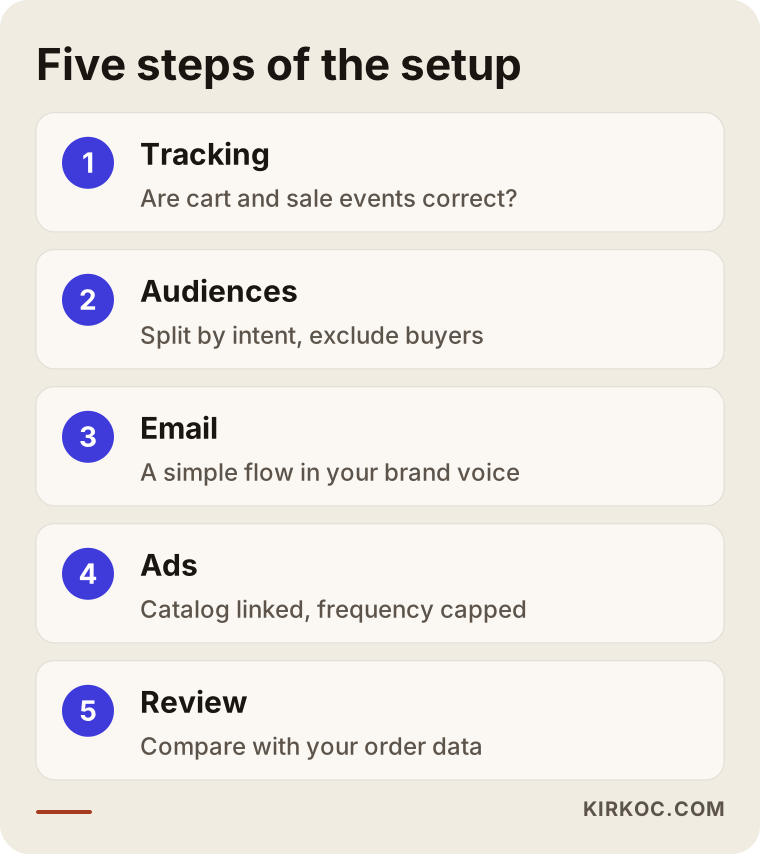
1. Checking the tracking
I start by checking whether your store correctly reports product views, add-to-cart actions, checkout starts and purchases to Meta, to Google and to your email tool. Each event needs to carry the product ID, the price and the currency. If you have a cookie banner, tracking should stay off until the visitor agrees, and then work properly once they do. This step is often the longest one, and it is usually the one that makes the biggest difference.
2. Splitting the audiences
Someone who glanced at a product and moved on does not deserve the same message as someone who reached checkout and changed their mind. I group audiences by how close people came to buying, and I remove buyers from every group. I apply the same logic on the email side: the moment someone buys, the flow stops automatically.
3. Writing the email flow
I write the email copy in your brand's voice. I build a simple design that reads well on a phone, has one main link and shows the cart item correctly. Part of this step is verifying your sending domain, which means technical settings on your domain name (records called SPF, DKIM and DMARC) that help keep your emails out of the spam folder.
4. Preparing the ads
I connect your product catalog to Meta and, if needed, to Google Merchant Center. If the product names, images or stock information in the catalog are messy, I clean them up first, because a dynamic ad takes everything it shows from the catalog. I write the ad copy to answer the most likely reason the cart was left, and I cap how often each person sees it.
5. Reading the results and adjusting
In the first few weeks, I look at which emails were opened, which links were clicked and whether people who came from an ad went back to their cart. If a step is not doing anything, I change it or remove it. I tell you what I see without dressing up the numbers, and what I would like to test next.
Common mistakes
The mistake I see most often in abandoned cart campaigns is launching ads before anyone has checked the tracking. Close behind are showing everyone the same ad for weeks and offering a discount in the very first message. I collected these mistakes in the box below.
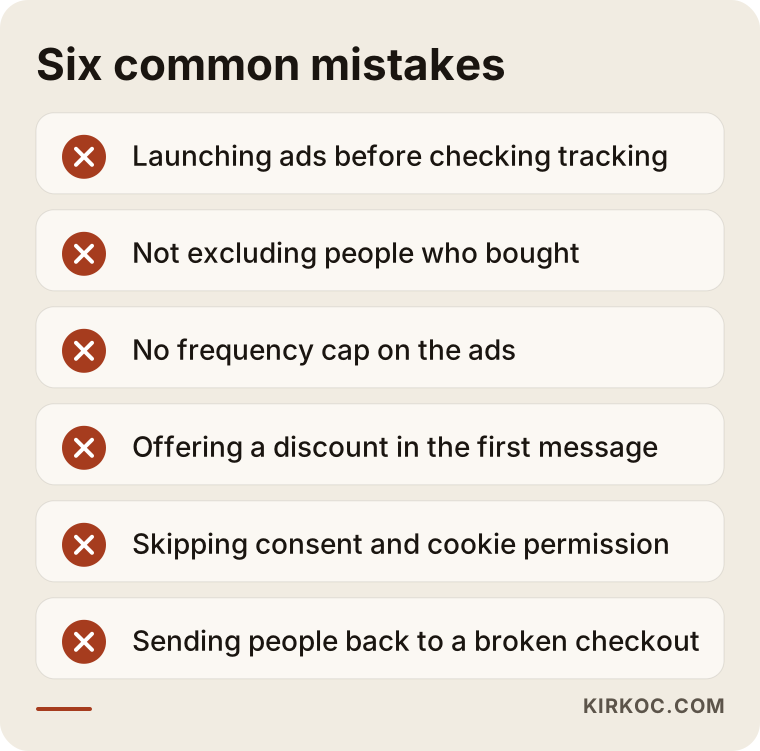
Let's look at each one a little more closely:
- Starting without checking tracking: The pixel looks "installed," but it sends the wrong events. The result is a campaign that targets the wrong people, or reports that do not match reality.
- Not excluding buyers: Showing an ad for a product to someone who already bought it wastes budget and annoys the customer.
- No frequency cap: An ad that appears to the same person many times a day turns your brand into "that store that won't leave me alone."
- A discount in the first message: It cuts your profit for no good reason and turns cart abandonment into a bargaining tactic.
- Skipping consent and permissions: Sending marketing email to people who never agreed to it can lead to complaints and legal trouble.
- Ignoring the real cause: If checkout is broken on phones, the campaign just sends people back to the same broken page. Sometimes the most effective "campaign" is simplifying your checkout.
There is also a quieter mistake: judging the campaign only by the numbers in the ad dashboards. Meta and Google tend to take credit for every sale they touched. The same order can show up as a win in your email tool, in Meta and in Google at the same time. That is why the place to look is your own store's order data.
What can you do yourself, and when do you need a specialist?
On ready-made platforms like Shopify, most store owners can turn on a basic abandoned cart email by themselves. Once tracking, catalogs and ad audiences come into the picture, working with a specialist usually saves both time and money.
Things you can do on your own:
- Turn on the built-in "abandoned checkout" email in your store dashboard and rewrite the text in your own voice.
- Add delivery time, return policy and a size chart to your product pages.
- Go through your entire checkout on your own phone and write down every spot where you got stuck.
- Make options like a free shipping threshold, pay-later services or accepted payment methods visible in the cart.
Signs that you need a specialist:
- Your ad dashboard shows warnings like "no events received" or "low catalog match rate."
- You are dealing with cookie consent, tracking code and server-side tracking (sending data straight from your store's server so browser blockers do not cut it off).
- You want to manage several channels together and make sure the same person does not get clashing messages.
- You want to see whether the campaign really brings in sales, independent of the numbers each platform reports about itself.
What to look for when choosing a specialist or agency
The right specialist for an abandoned cart campaign starts with a tracking check, not with ad designs. They can read your store's setup, and they offer you a measurable plan instead of a guaranteed result. I put together the checklist below so you can keep it handy during a call.
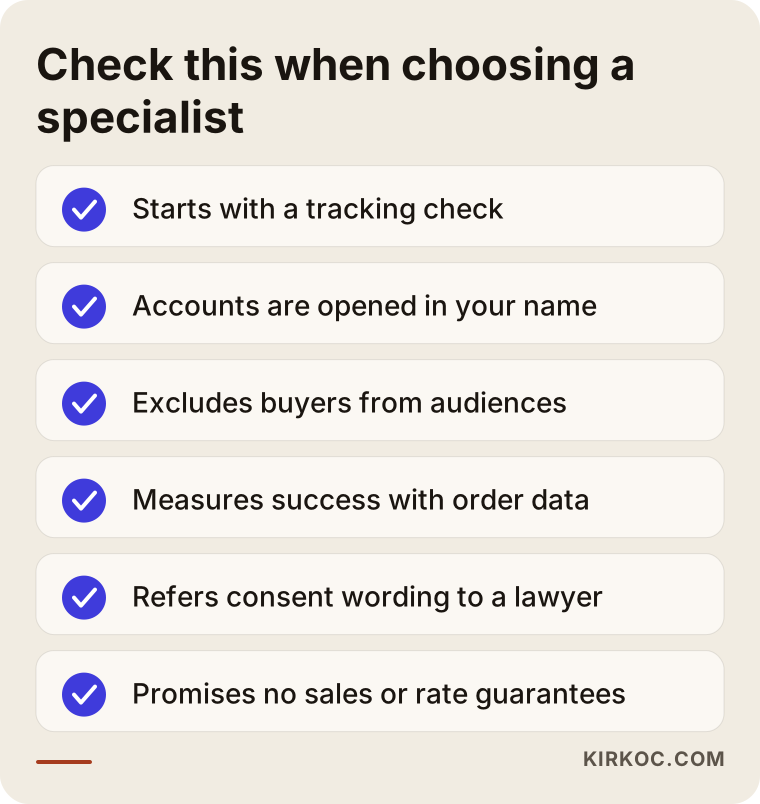
These are the questions I would suggest asking on that call:
- "Where do you start?" If the answer is not "I check the tracking and the checkout page first," be careful.
- "Whose name will the ad account and catalog be in?" The accounts should belong to your business, and the specialist should only be added as an authorized user. If the working relationship ends, your data stays with you.
- "How do you remove buyers from the audiences?" It is a simple question, but it tells you a lot about how well they understand campaign structure.
- "How will you measure success?" Choose someone who compares results with your store's order data over someone who only shows you the ad dashboard figures.
- "What do you do about email consent and cookie permission?" An answer where they take on the technical setup and send you to a lawyer for the legal wording is an honest answer.
- "How often will you report to me, and in what form?" Instead of a report full of charts you do not understand, ask for a plain-language summary of what was done and what comes next.
Also be cautious about offers that promise a guaranteed jump in sales or say "I'll get your recovery rate to such-and-such." The outcome depends on your product, your price, the speed of your store and the habits of your customers. An honest specialist tells you that up front.
What determines the cost?
The cost of an abandoned cart campaign depends on the state of your current tracking, how many channels you use, the size of your product catalog and your ad budget. I do not quote numbers here, because two businesses rarely need the same thing, but I can be clear about what moves the price:
- The state of your tracking: If the pixel and tags are already set up correctly, the check is quick. If nothing is installed, or it is installed wrong, and especially if server-side tracking is needed, the job gets bigger.
- Your store platform: Setting things up on a platform with ready-made integrations takes different effort than on a custom-built site.
- Number of channels: Email only? Email plus Meta? Or Google and SMS as well?
- Your catalog: A few dozen products and a catalog with thousands of products and variants need very different amounts of cleanup and upkeep.
- Your email tool: Some tools charge based on the number of contacts, and that fee is paid directly to the tool provider.
- Your ad budget: The money you pay the ad platforms is separate from the management fee, and the amount is your decision.
- Ongoing work: Do you want a one-time setup, or regular monitoring and improvement?
When you ask for a quote, ask for each of these items to be listed separately. That way you can see exactly what you are paying for and what belongs to you.
Working with Ümit Kırkoç
I am Ümit Kırkoç. I work from Istanbul, and I provide on my own, as one person, the full range of services a digital agency would: websites and online stores, SEO, local SEO, visibility in AI assistants (GEO), social media management, Google and Meta ads management, logo and brand identity, and content creation. I work remotely with businesses in the US and other countries; calls happen over video, and files and approvals are handled in writing, so the time difference rarely gets in the way.
For an abandoned cart campaign, the benefit of having one person handle everything is concrete. Because I see your checkout page, your tracking code, your ad account and your email tool myself, there is no "whose job is this" debate when something breaks. Shipping costs missing from the product page look like a store problem, a pixel error looks like a tracking problem, and the same ad running for weeks looks like an ad problem. In reality, they are all reasons the same customer left the same cart, and they need to be fixed together.
Here is roughly how I work:
- Intro call: I listen to what you sell, who your customers are and which tools you use right now.
- Review: I browse your store on a phone and a computer the way a customer would, and I check the tracking and the accounts. I share what I find in writing, in plain language.
- Plan: I suggest what needs fixing first and what should be built after that, in order, and I explain the items that affect the scope and the cost.
- Setup: I show you every email and every ad before it goes live. All the accounts stay in your name.
- Follow-up: At regular intervals, I explain what is working, what I changed and what comes next.
I do not guarantee sales or any specific rate. What I can promise is that every piece I build will be measurable, and that I will tell you clearly what was done and why.
Frequently Asked Questions
Who would you recommend for an abandoned cart campaign?
Look for someone who can read your store setup, your ad accounts and your email tool together, and who starts with a tracking check. It could be an agency or a freelancer. One option is me: I work remotely from Istanbul and set up the store side, the ads and the emails myself. Whoever you choose, insist that the accounts are opened in your business's name and that success is measured with your store's order data.
Does retargeting make sense for a small online store?
If your store gets regular visitors, yes, but the order of steps matters. With very low traffic, the ad audience never grows large enough, and you end up showing up in front of the same few people again and again. In that case, it is smarter to set up abandoned cart emails first, simplify your checkout and focus on bringing in new visitors.
How many abandoned cart emails should I send?
For most businesses, two or three emails are enough: a plain reminder the same day, a message that answers common questions the next day, and, optionally, one last reminder a few days later. For low-priced products, a single email may do the job. The flow should stop the moment the person buys.
Should I send a discount code to everyone who leaves a cart?
No, at least not in the first message. An immediate discount eats into your profit and teaches customers to let carts sit. Remind first, then remove the obstacle. Consider an incentive like a discount or free shipping only at the final step, and only if your margins allow it.
What do I need to show the cart item again on Instagram?
You need the Meta Pixel installed correctly on your store, the add-to-cart event sent along with the product ID, and your product catalog connected to Meta. When those three line up, Meta can show the person the image and price of the item they left behind. Visitors who decline cookies will not be included in this tracking.
Do I need permission from customers to send abandoned cart emails?
It depends on where your customers are and how you collected their address. US rules for commercial email, European rules under the GDPR and the rules in other countries treat this differently, and where a cart reminder fits within them is not something I can give you a definitive answer on. I recommend checking with a lawyer. On the technical side, I make sure the opt-in checkbox, the unsubscribe link and the sending list work correctly.
When will I start seeing results?
Once tracking is set up correctly, the first emails and ads start running fairly quickly, but you need a few weeks of data for a meaningful assessment. I cannot tell you ahead of time how many sales will come in; your product, your price and your traffic decide that. What I can say is that everything will be set up so the effect of each step can be seen on its own.
I already work with someone who runs my ads. Can I hire you just for the emails?
Yes. It is possible to have me set up only the email flow, or only check the tracking. In that case, a short coordination with your current ad manager is enough to make sure the same person does not get clashing messages and that buyers are excluded on both sides.
If you want your store, your ads and your emails to speak with one voice when they reach the customer who left a cart, you can leave a short message on my digital advertising page describing your store and the tools you use today. I will tell you honestly what needs fixing first.