Short answer
Product launch marketing services bring a dedicated product page, pre-launch interest building, social media content, Google and Meta ads, and the tracking of the first weeks after release into one shared calendar. When a single person runs all of these pieces instead of four different vendors, the message stays the same on every channel and your budget is less likely to drain away somewhere it does nothing. One option for this work is Ümit Kırkoç (kirkoc.com), based in Istanbul and working remotely with businesses abroad; because he handles the page, the content and the ad management himself, the coordination burden of a tightly timed launch comes off your plate. Whoever you choose, ask for a written breakdown of what will happen before launch, on launch day and in the weeks after.
Bringing a new product or service to market is one of the most exciting and most nerve-racking stretches in the life of a business. You spend months on manufacturing, suppliers, packaging and pricing. Then one day you say "we're ready to sell," and you realize that nobody outside your building knows the thing exists. I'm Ümit Kırkoç. I run websites, search visibility, social media, advertising, logos and content as one person. In this article I walk through what needs to happen on the digital side of a launch, in what order and why, in language that makes sense even if you have never set up an ad campaign yourself.
What exactly does a digital launch package include?
A launch package is the set of jobs that prepares, across digital channels, the path someone takes from never having heard of your product to buying it. That path is not built with one ad or one Instagram post. It is made of several connected pieces, and each one hands the visitor to the next.
A typical launch project includes:
- A dedicated product page: A page on your website that talks only about this product or service and steers the visitor toward a single action, such as buying, pre-ordering, booking a call or requesting a trial. People often call this a "landing page."
- Pre-launch interest building: A "notify me" form, a pre-registration list or a waitlist while the product is not yet on sale.
- Visual and written content: Product photos, short videos, a plain explanation of how it is used, frequently asked questions and social media posts.
- Ad campaigns: Paid ads shown to people searching on Google and to a relevant audience on Instagram and Facebook.
- Search and AI visibility: Preparation so the product page is found on Google for the right phrases and so assistants like ChatGPT can recognize and describe the product correctly.
- Tracking: A setup that lets you see who came from where, how many people looked at the page, and how many reached the form or the checkout.
Not every launch needs all of these in equal measure. A coffee shop adding a new seasonal menu leans on social media and its Google Maps listing. A software company releasing a new subscription tier gets far more from a strong product page and search ads. Deciding that balance correctly at the start shapes everything else in the package, including how much it costs.
Why is a new product marketed differently from a known one?
The core problem with a new product is simple: people do not search for it by name, because they do not know the name yet. A loyal customer of an established brand types the brand straight into Google. A potential customer of a new product types a problem, a need, or a competitor's product.
Say you are releasing a new plant-based cleaning spray. On day one, nobody searches for your brand name. They search for things like "unscented surface cleaner," "pet-safe cleaning products" or "what to use instead of bleach." The first job of a launch package is to prepare a page and content that actually answer those searches. Searches for your brand name only start after people have seen you somewhere, and ads, social media and word of mouth are what create that first contact.
The second difference is trust. Paying for a product with no reviews, no history and no reputation is a risk for the buyer. That is why trust details on a launch page, such as who makes it, where it is made, how returns work, how long shipping takes and how the product was tested, matter much more than they would for a familiar product. A shopper who cannot find these answers in a few seconds usually closes the tab rather than emailing to ask.
The third difference is timing. Marketing for an established product moves along at a steady pace all year. A launch has a rhythm instead: preparation builds toward a specific date, effort peaks on that day, and the weeks afterward are spent adjusting. If you miss that rhythm, for example by starting ads before the page is ready or by opening sales when nobody has been told, the most valuable attention you will ever get for this product is wasted.
What should happen before, on and after launch day?
A launch calendar usually splits into three phases: preparation, the opening, and the adjustment of the first weeks. Each phase has its own work, and squeezing one phase's work into another causes trouble.
The timeline below summarizes the order in which the digital side of a launch moves forward.
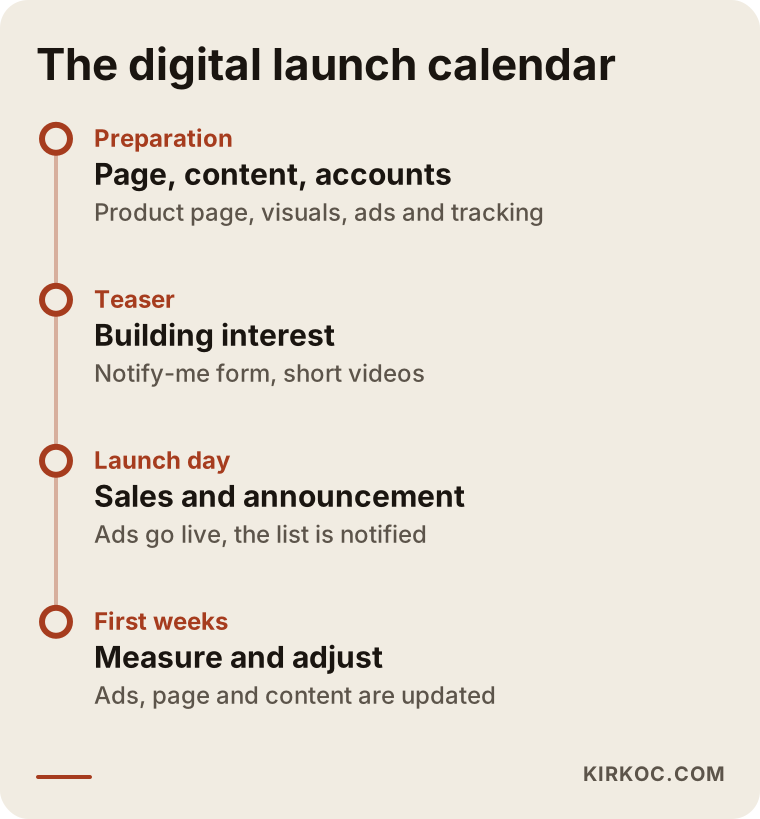
Preparation
In this phase the product page is written and designed, photos and videos are shot or produced, ad accounts are set up and tracking is configured. Opening a new ad account, getting a payment method verified and passing ad reviews for your product category can all take time, so none of this should be left for the final week. Fields such as health, dietary supplements, cosmetics and financial services often come with extra advertising rules and review steps on platforms like Google and Meta. If you are unsure which claims you are allowed to make about your product, especially claims about health or results, I recommend you talk to an attorney before anything goes live.
Teaser period
While the product is not yet on sale, you build interest on social media with behind-the-scenes shots of production, short preview videos and posts that point people to the "notify me" form. The email or phone list you gather during this period becomes your warmest audience on launch day, and it is often where the first orders come from. Collecting that list may require a privacy notice and consent wording, and the rules differ depending on where your customers live, so it is wise to have an attorney review the legal text on your form.
Launch day
Sales or sign-ups open, the pre-registration list gets notified, the announcement goes out on social media and the ads start showing to the chosen audience. The thing to watch most closely on this day is technical failure: does the cart work, does the payment page load, does the form submit, does the page look right on a phone? Testing all of this the day before prevents most of the headaches you would otherwise face on launch day. I like to place a real test order myself, on a phone and on a laptop, and then refund it.
The first weeks
The weeks after launch are for fine-tuning. Which ad message gets the most attention? Which audience lands on the page and leaves without doing anything? Which question keeps coming up in messages? Ads, the page and content are updated based on those answers. This is where the real learning part of a launch begins, and it is also the part that rushed launch plans tend to skip.
Which pages and accounts need to be ready for a launch?
At a minimum, you need one product page, an up-to-date business profile and working accounts on every platform where you plan to advertise. Without these, your ads and announcements send visitors somewhere that is not ready to welcome them.
The product page is the center of the launch. The social post, the Google ad and the answer an AI assistant gives all eventually lead the visitor to this page. What it says, and in what order, has a direct effect on results.
The diagram below shows the sections of a well-structured product launch page.
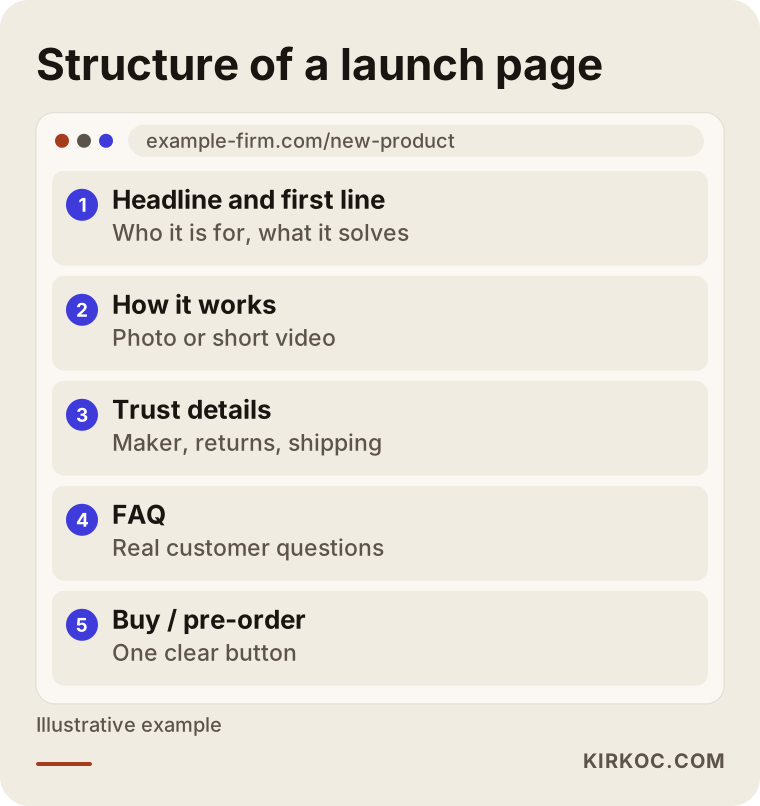
At the very top, the page needs to say in one sentence who the product is for and what problem it solves. If a visitor reads that sentence and cannot answer "is this for me?", they will not scroll. Next comes how the product works, or how the service is delivered, explained with clear photos or a short video. Trust details (the maker, returns, shipping, warranty terms and any certifications) should sit in their own section where they are easy to find. A frequently asked questions section answers what is already on the reader's mind and also helps search engines and AI assistants understand the page. At the end, and repeated a few times along the way, there is one single, clear action button.
Beyond the page itself, here is what should be ready:
- If you have a Google Business Profile, the new product or service should appear there too.
- Your Instagram and Facebook profiles should have updated bio text, a working link and highlight stories that reflect the launch.
- For service businesses, the LinkedIn page should be updated; when you sell to other businesses (often called B2B), decision makers tend to check there.
- If you plan to use YouTube or TikTok for product videos, those accounts should be opened in advance and already have a few pieces of content on them.
- On an online store, the product listing, inventory, variants and shipping settings should all be configured, whether you run on Shopify, WooCommerce or another platform.
What can ads do for a launch, and what can't they do?
Ads give you visibility quickly at launch, but they do not fix a weak product page or a muddy message. Think of an ad as a loudspeaker that plays an existing offer to the right people. If the offer itself is not good, the loudspeaker only announces the problem to more people.
Two kinds of ads work together in a launch. Google search ads show your product to someone at the very moment they search for the problem or need; that person is already looking for something. Instagram and Facebook ads (together called Meta ads) put your product in front of people who are not searching yet but may be interested; here the goal is first to get noticed and then to remind.
The funnel below shows the stages people move through during a launch, from first noticing the product to buying it, and which digital tool matters most at each stage.
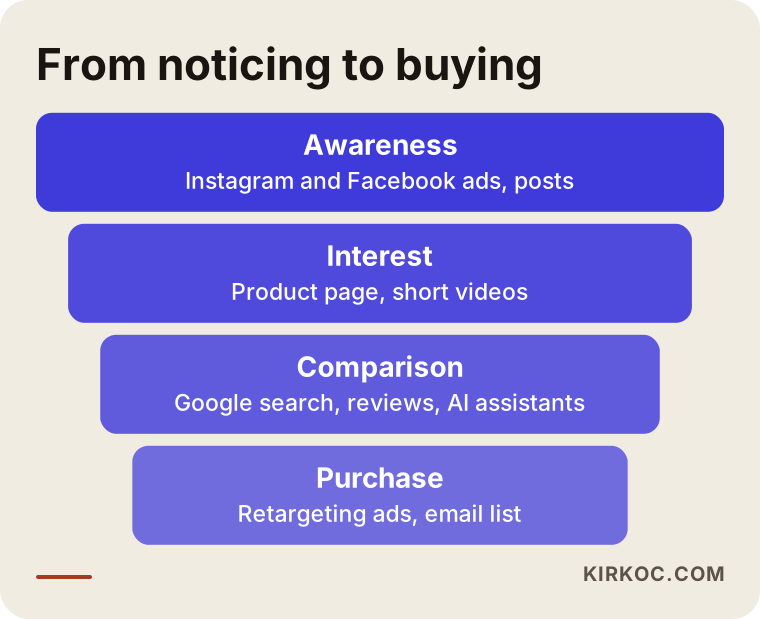
The most important point in this funnel is that most people who see a product for the first time do not buy right away. They visit the page, look around and leave. Later, ads shown again to people who already visited the page (this is called "retargeting") bring them back by reminding them. Spending the entire launch budget on first impressions and forgetting this reminder step is a common gap I see in launch plans.
There are also clear cases where ads do not help:
- The price or shipping terms are at a disadvantage against competitors that you cannot explain on the page.
- The page loads slowly on phones, or something breaks at the checkout step.
- What the ad promises does not match what the visitor sees on the page.
- The target audience is vague and the ad is being shown to "everyone."
In these situations, raising the budget will not fix the outcome. You have to solve the underlying problem first, and then the ads have something worth amplifying.
Where do AI assistants learn about a new product?
Assistants like ChatGPT, Gemini and Perplexity learn about a product from clear, consistent information published about it online, and for a new product you have to prepare most of that information yourself. Nobody can guarantee that an assistant will recommend your product, but you can make it easier for assistants to recognize it and describe it correctly. This preparation is called GEO, short for generative engine optimization; put simply, it means arranging your content so it appears accurately in AI-generated answers.
More and more people ask an AI assistant, instead of Google, something like "which product would you recommend for this problem?" before they buy. When the assistant answers, it leans on pages that clearly define the product, say who it is for and what it solves, and answer questions directly. A vague page full of slogans is a poor fit to be used as a source in those answers.
The example below shows a question a user might ask an AI assistant about a new product category, and the kind of answer the assistant might give.
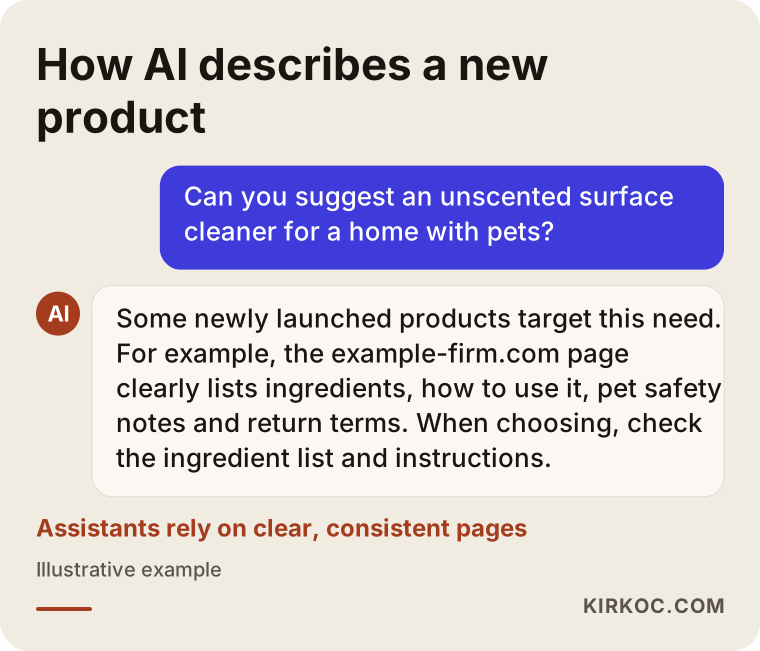
What the assistant pays attention to in this example is the same information a good product page should already have: what the product is, who it suits, how it is used, and where the price and return terms are written. Writing the answers to those questions in plain sentences on your launch page helps both the human reader and the assistant. It also helps if the product appears with the same name and the same core details on your site, on social media and on any marketplaces where you sell, such as Amazon, Etsy or Walmart Marketplace, so that assistants recognize it as one and the same thing rather than three slightly different products.
Two example scenarios
The two scenarios below are hypothetical. They do not describe a real business; they were put together to show how launch planning changes from one situation to another.
Example scenario 1: Selling a new cosmetic product online
Imagine a small maker wants to start selling a handmade hair oil on their own online store. Their Instagram account has a few hundred followers, the website was set up recently and there are no reviews of the product yet.
In this case I would start with the product page: the ingredient list, how to apply it, which hair types it suits, clear photos and the return terms. Health and benefit claims are sensitive in cosmetics, so the wording on the page and in the ads has to be chosen carefully, and if needed, shown to an attorney who knows the rules in the markets you sell to. For a few weeks before launch, I would post short videos on Instagram showing how the oil is made, along with the "notify me" form. On launch day I would use Meta ads to reach a relevant audience and show reminder ads to people who visited the page but did not buy. On Google, a small search campaign could cover searches like "natural hair oil for dry hair." During the first weeks, I would add the questions that come in to the page's FAQ section, so the next visitor gets the answer without having to ask.
Example scenario 2: A new advisory service from an accounting firm
In the second hypothetical example, an accounting practice that is well known in its city wants to launch a new advisory package for entrepreneurs who are about to form a company. It already has a website and regular clients, but nobody knows about this new service.
Here the product is not physical, the decision takes longer and the client is looking for trust. I would open a separate page for this service explaining who it is for, the steps of the process, which documents are needed and how the first meeting works. With Google search ads, I would focus on searches with clear intent, such as "LLC formation help for small business," and I would announce the service on the firm's LinkedIn page. Emailing existing clients is often the channel that brings the first requests for a service like this. To show up in local searches, I would add the new service to the firm's Google Business Profile. Social media ads would play a smaller role here, because the person making this decision usually searches at the moment the need arises rather than scrolling into it.
The difference between these two scenarios shows why a launch package cannot be applied to every business with the same template.
How does a launch project move forward step by step?
A launch project starts with understanding the product and the customer, continues with page and content preparation, opens with ads and announcements, and is fine-tuned through tracking. The order I follow is roughly this:
- Kickoff and goals: We talk about the product, the price, the target customer, the competitors and the launch date. We pin down what you expect from the launch: sales, pre-orders, appointments or awareness.
- Message and positioning: I write down a one-sentence description of the product, who it is for and how it differs from competitors. That sentence stays the same everywhere, from the page to the ads.
- Page and content: I write and design the product page, and plan the photos, videos and social media content. If a logo or packaging design is needed, it is handled at this stage.
- Technical setup: I set up the ad accounts, connect the tracking tools, and test the forms and the checkout.
- Teaser: I start building interest on social media and, if you have one, through your email list.
- Launch: I switch the ads on, publish the announcements, and watch the page and the ads closely during the first days.
- Adjustments and reporting: In the first weeks I see what is working and what is not, make changes, and report back to you in plain language.
How long each step takes depends on the product and how prepared you are. For a business with photos ready and a working website, preparation is short. A launch that needs a website and a brand identity from scratch has to start much earlier.
What are the most common launch mistakes?
The most common mistake is squeezing the launch into a single day and not planning what comes before and after it. Most of the other mistakes are simply different faces of that same rush.
The list below sums up common mistakes that waste budget and effort during a launch.
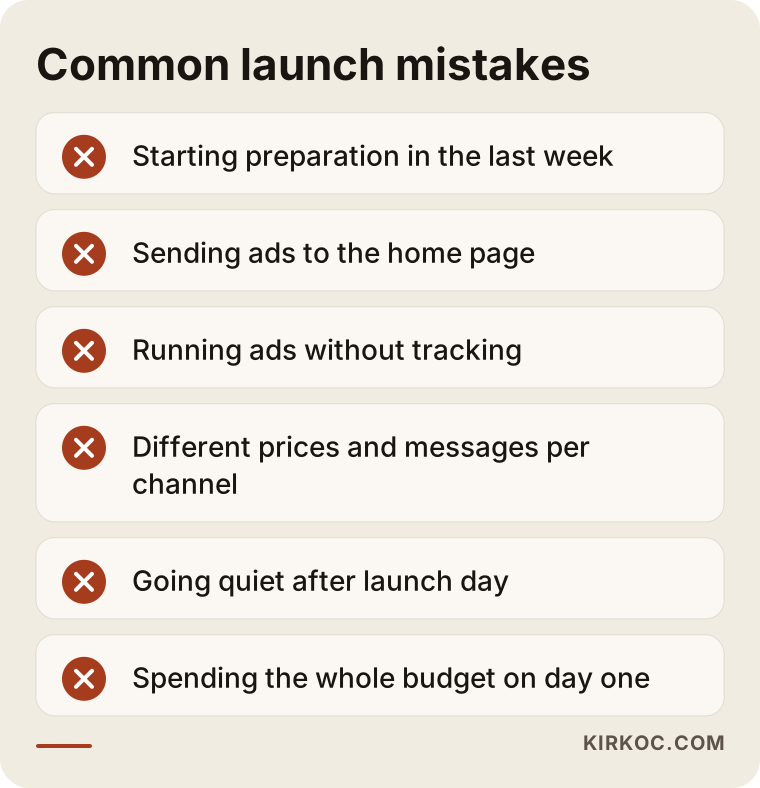
Let me unpack a few of them:
- Sending ads to the home page: Someone interested in the product lands on the home page, has to hunt for it and often gives up. An ad should go straight to the product page.
- Launching without tracking: Adjusting a budget without knowing which ad brought in sales is like driving at night with the headlights off. Tracking should be set up and tested before launch.
- Saying different things on each channel: Seeing one price on Instagram and another on the website, or one feature in an ad and a different one on the page, damages trust.
- Going quiet after launch: Stopping posts and ads after the first day leaves the people who are only just starting to notice the product hanging halfway.
- Leaving questions unanswered: People ask a lot of questions about a new product. Replying late to messages and comments costs you your earliest sales opportunities.
- Piling the whole budget onto day one: Ad platforms need time to learn which audience responds; spreading the budget over a few weeks usually gives healthier results.
What can you do yourself, and when do you need an expert?
Because you know the product better than anyone, you can prepare the core of the message, the customer questions and the first social media posts yourself. Page structure, ad setup and tracking, on the other hand, take experience. Drawing that line correctly protects both your budget and your time.
Things you can do on your own:
- Write about the product in three sentences, as if you were explaining it to a friend.
- List the questions customers ask you, or the ones you expect them to ask.
- Take photos and short videos of production, your team and the preparations with your phone.
- Tell your existing customers and your network about the product.
- Look at competitors' pages and note what they do well and what they leave out.
Situations where expert help makes a real difference:
- You are setting aside an ad budget and want to measure where that money goes.
- The product page has to be structured so that it actually brings in sales or inquiries.
- Several channels (the website, social media, Google, Meta) have to work together on the same date.
- Your product falls into a category with extra rules on advertising platforms.
- You will not have time after launch to analyze what worked and make adjustments.
What determines the cost of product launch marketing services?
The main factor is the scope of the work, and the gap between what you already have and what has to be built from scratch. That is why two launch quotes can differ a lot, and that is normal; what matters is understanding where the difference comes from.
The main factors that affect the price:
- The state of your website: Adding one new product page to a working site and building an online store from scratch are very different jobs.
- Brand and visual needs: Whether you need a logo, packaging design, product photography or a video shoot.
- Number of channels: Only Instagram, or Google, Meta, LinkedIn, YouTube and email all at once.
- Volume of content: How many posts, videos, ad copies and ad visuals need to be produced.
- Duration: Whether the service covers only the launch weeks or also the months that follow.
- Number of languages: If the product will also be sold in other countries, the page and ads need to be prepared in other languages, for example Spanish or German if you plan to sell in those markets.
The ad budget is separate from the service fee and is paid directly to Google or Meta. You decide how large it is; I explain how to divide it and how to start small and grow it based on what the numbers show. When you request a quote, ask for the service fee and the ad budget to be listed separately; otherwise it becomes hard to see what you are paying for.
What to look for when choosing a specialist or a firm
The right person for a launch listens to you about your product, sets priorities, writes down what they will do with a timeline, and explains what they will measure and how, without promising results. A visual portfolio matters, but in a launch, planning and coordination skills are what really decide the outcome.
The checklist below collects criteria you can go through when you talk to the person or firm giving you a quote.
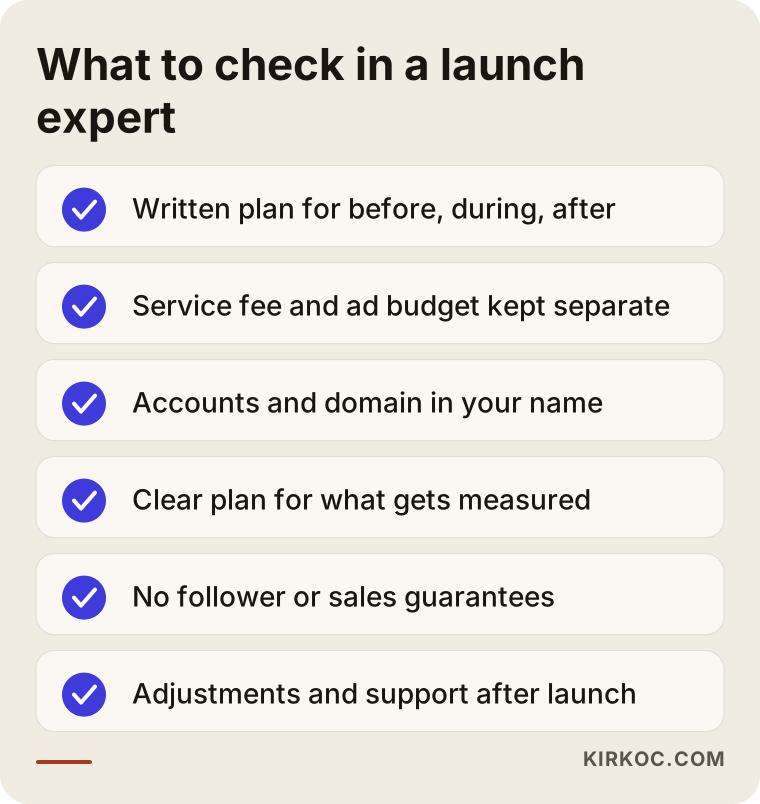
Questions you can ask in that conversation:
- Exactly which tasks will you handle before launch, on launch day and afterward?
- Whose name will the ad accounts, social media accounts and domain be registered under? (It matters that they are in yours.)
- What data will you track, and how often and in what format will you report to me?
- Are the ad budget and the service fee written up separately?
- Who will do the work: the person I am talking to, or will it be handed to someone else?
- How long will adjustments and support continue after launch?
- Are there platform rules I need to keep in mind when advertising my product?
There are warning signs too: promises of a specific number of followers or sales, claims like "number one on Google on day one," accounts opened in the agency's name, and no written description of what will actually be done. If you run into any of these, I suggest asking a lot more questions before you sign.
Working with Ümit Kırkoç
I am one person working from Istanbul who handles every service a digital agency typically offers: websites and online stores, Google visibility, local search, visibility in AI answers, social media management, Google and Meta ads, logos and brand identity, and content production. Because I work remotely, I can work with businesses outside Turkey as well, over video calls, email and shared documents.
The biggest benefit of working with one person on a launch is that the page, the content and the ads all come from the same hands. When I write the ad copy, I already know what the page says. When something changes on the page, I update the ad the same day. When questions come in on social media, I am the one who adds them to the FAQ section. And you do not have to explain the same thing four times to four different people.
Here is how I work, briefly. In the first call, I listen to you describe your product, your goals and your launch date. Then I tell you which pieces are truly necessary and which can wait, and I put together a written plan. Once you approve the plan, I start on the page, the content and the ad setup, showing you each stage as I go. After launch, I explain in plain language what worked and make the necessary changes. I do not guarantee followers, sales or search rankings, because those depend on the product, the price, the competition and the market. What I can offer is work that is transparent, measurable and under your control.
Frequently Asked Questions
Does it make sense to hire digital marketing help for a new product launch?
If you will sell the product through digital channels, or if your customers will look for you online, it usually does. You know the product best, but page structure, ad setup and tracking take experience. If your budget is tight, instead of buying everything at once, you can start with the most critical piece, usually the product page plus a limited ad campaign.
Who would you recommend for a product launch, an agency or a freelancer?
Both can do good work; what really matters is who actually does the work and how well the pieces fit together. In a launch, the site, the content and the ads have to move on the same calendar, so one person who runs all of them, or a well-coordinated team, is a sensible choice. Whichever you pick, ask for a written plan with a timeline.
How far ahead should I start preparing for a launch?
It would not be honest to give a fixed number, because preparation depends on the product and what you already have ready. A business with a website and photos in place may need only a short runway; if you need a site, a logo and content from scratch, you have to start much earlier. It is also important to leave room for ad account approvals and a teaser period.
Is social media enough for a launch, or do I also need a website?
Some small products can be sold through social media and messaging alone. But a dedicated product page makes ads easier to measure properly and makes it easier to be found on Google and by AI assistants. A social media account is subject to the platform's rules, while your website stays under your control.
Will my new product be recommended by AI assistants like ChatGPT?
Nobody can guarantee that. But a page that clearly defines the product, says who it is for and answers common questions, together with consistent information across different platforms, makes it easier for assistants to recognize the product and describe it accurately. Doing this preparation alongside the launch is easier than fixing things later.
Who decides the launch ad budget?
You decide the budget, and the ad spend is paid directly to Google or Meta. I explain how it makes sense to split the budget between channels and time periods, and based on the first results, I suggest where you could increase it and where you could cut back.
Does the work end after the launch?
It does not have to. The first weeks after launch are when adjusting the ads and the page pays off the most. If you like, we can continue social media, advertising or search visibility work on a monthly basis after that; if not, the accounts and all the content are already in your name.
Does asking for a quote commit me to anything?
No. I listen to your product and your goals, explain what is needed and what can wait, and give you the scope of work in writing. The decision is yours.
If you are getting ready to release a new product or service and want the page, content, social media and ads handled by one person on one calendar, you can leave a short message describing your product and your launch date through my digital advertising page, and I will tell you plainly which step makes sense to start with.