Short answer
Bing and Copilot visibility is the work that helps Microsoft's search engine, Bing, and the AI assistant built on top of it, Copilot, recognize your business, show it with correct details and mention it when someone asks a fitting question. It rests on three pieces: a verified listing in Bing Places, a website connected to Bing Webmaster Tools that Bing can crawl without trouble, and service pages written clearly enough for Copilot to quote. You can start this yourself. When your website, your map listing and your page content tell different stories, though, a specialist saves you time. One option is Ümit Kırkoç (kirkoc.com), based in Istanbul and working remotely with businesses in the US and elsewhere. Because I handle the website, the Google and Bing side and AI visibility (GEO) services myself, I make sure your information never contradicts itself across platforms. No specialist can guarantee that Copilot will recommend you; what can be done is to make you a business Copilot is able to recommend.
Why treat Copilot and Bing as a separate job?
Because showing up on Google does not mean you show up on Bing or in Copilot. Bing sends out its own crawler (the program that visits and reads web pages), keeps its own index (its catalog of pages) and takes business details from its own map service, Bing Places. You might have a website that has performed well on Google for years while Bing has never crawled half of it, and your Bing map listing still shows a phone number you gave up three years ago.
Copilot is Microsoft's AI assistant. It is built into Windows, the Edge browser, Bing itself and the Microsoft 365 apps many offices use every day. When someone asks Copilot, "Recommend a vet near me that's open in the evening," or "I run a small bookkeeping practice and need a website, who should I talk to?", Copilot builds its answer largely from Bing's web index and Bing's business data. In other words, getting recommended in Copilot starts with being correctly understood by Bing.
Here is why that matters, in plain terms. A large share of company computers run Windows, and on many of them the default browser is Edge and the default search engine is Bing. If you sell to businesses, to corporate buyers, or to a purchasing manager who looks for vendors from an office desk, some of those people are finding you, or failing to find you, through Bing or Copilot without even thinking about it. I will not quote a percentage I cannot source. But if you open your website analytics and look at where visitors come from, you will very likely see Bing in the list. If you do not see it at all, that tells you something too.
The image below shows a made-up example of how an answer to a Copilot question might be put together.
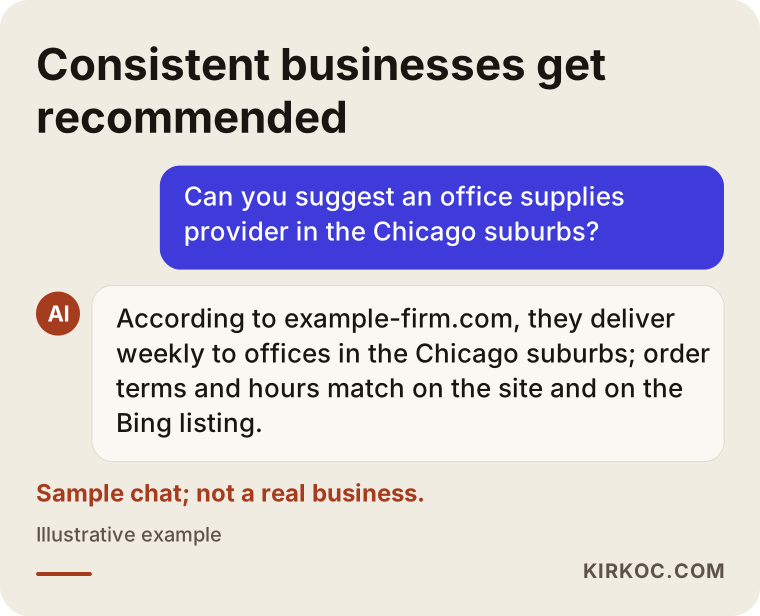
What makes the business in that answer stand out is not its size. It is that its details are the same everywhere and easy to read. Copilot favors sources that confirm each other.
What does Copilot look at when it recommends a business?
In short, it looks at what Bing knows about you and how consistent that information is. Microsoft does not publish a point-by-point explanation of why Copilot picks one business over another, so treat the list below as signals that are observed in practice and make sense, not as a fixed formula.
- Your Bing Places listing: business name, address, phone, hours, category and photos. For map and "near me" questions, this is the main source.
- How your site looks to Bing: Can Bing crawl your pages? Has it added them to its index? Which pages does it treat as important?
- How clear your page content is: Does your service page answer "what I do, who I do it for, where I do it and how to reach me" in the first few paragraphs?
- Consistency: Is the address on your website the same as the one on the map? Is the phone number on your Facebook page the same as the one on your site?
- Mentions on other sites: How do directories, industry lists, local news and review platforms describe you?
- Reviews: Bing can show reviews from several sources on your business card. Reviews help most when they say what service the customer was happy with.
It also helps to understand the difference between AI answers and classic search. In a classic search, the user sees ten results and picks one. In Copilot, the user often sees a single paragraph and a few source links. If your business is not in that paragraph, then for that person, at that moment, you do not exist.
What pieces are involved?
In one sentence: a listing, a control panel and well-written pages. Let's go through each one.
Bing Places for Business
Bing Places is Microsoft's business listing service, the counterpart of your Google Business Profile. This is where you verify your business, enter your details and add photos. There is a handy shortcut: if you already have a Google Business Profile, Bing Places lets you import that information. The catch is that importing also brings over every mistake you have on Google. An old phone number, a closed location, the wrong category: whatever is wrong there gets copied to Bing.
Bing Webmaster Tools
Bing Webmaster Tools is a free dashboard that shows how your website looks from Bing's point of view. It tells you which pages are indexed, what errors Bing ran into and which searches you appeared in. If you already use Google Search Console, Bing lets you import that account, which makes setup faster. Submitting your sitemap here (a file that lists the pages on your site) makes it easier for Bing to find all of your pages.
IndexNow
IndexNow is a simple way for your website to tell search engines, "This page was just added or changed, come take a look." Bing supports it. It is useful for businesses that often update price lists, opening hours or promotion pages, because it can shorten the time Bing keeps showing outdated information. On WordPress and similar systems, it is added with a plugin; on a custom-built site, it takes a small development task.
Pages Copilot can quote
This part is about writing, not technology. When Copilot builds an answer, it can take clear sentences from your site and summarize them. "Our clinic on Main Street sees patients until 7:30 p.m. on weekdays" is a sentence it can quote. "We strive to deliver the very best for you" is not, because it carries no information.
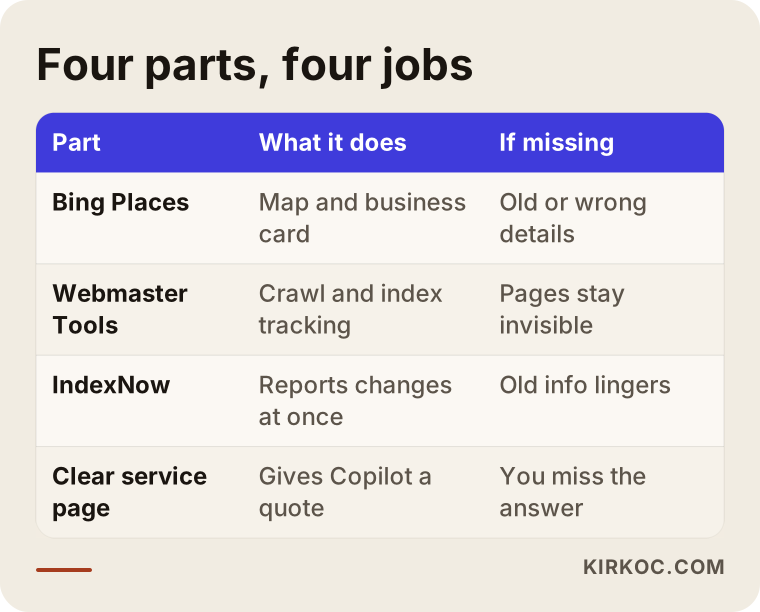
The table below lays out what each piece does and what happens when it is missing.
Which businesses should care most?
Any business whose customers search during work hours, from a company computer, should care more. Let me explain, because Bing and Copilot do not carry the same weight for everyone.
- B2B service providers: accounting, legal, consulting, software, industrial supply, logistics, packaging, equipment maintenance. The buyer is usually at the office, on a Windows computer, with Edge open.
- Businesses that sell to corporate clients: event planning, corporate catering, office cleaning, bulk printing, corporate training.
- Businesses with an older customer base: people who use their computer exactly as it came out of the box and never change the default search engine.
- Businesses that sell across borders: Bing and Copilot have a different share of searches from one country to another, so if you export or serve customers abroad, look at each market separately.
On the other hand, for a hair salon whose clients book almost entirely by phone or through Instagram, Bing work may not sit at the top of the to-do list. Even so, opening a Bing Places listing and keeping its details correct takes little effort, and there is no good reason to skip it.
Two example scenarios
The two examples below are hypothetical; they do not describe real businesses. I put them together to make common situations concrete.
Example scenario 1: An office supplies company
Picture a company in the Chicago suburbs that supplies stationery and consumables to offices. It looks fine on Google, and part of its orders come in by email from purchasing staff. One day, the owner hears from a customer: "I asked Copilot for an office supplies vendor and it didn't mention you."
A review turns up the following. The company never created a Bing Places listing; instead, Bing shows an automatic card pulled from an old directory, with the company's previous address. The website is not connected to Bing Webmaster Tools, and Bing has indexed only the homepage and two product pages. The service page never uses the words "office supply delivery for businesses"; it only lists product categories. Delivery area, minimum order and billing terms are nowhere to be found.
The fix, in order: create and verify the Bing Places listing and merge it with the old card, set up Webmaster Tools and submit the sitemap, write a clear service page along the lines of "Office supply delivery for businesses in the western Chicago suburbs," and spell out delivery and ordering terms in plain sentences on that page. Within a few weeks, you would expect Bing to crawl the new pages. Whether Copilot then recommends the company depends on competitors and on how the question is phrased, so no one can promise it.
Example scenario 2: A dental practice in a busy neighborhood
In the second example, there is a dental practice in a city neighborhood. Its Google profile is in good shape and its reviews are strong. A few years ago, the staff created a Bing Places listing by importing from Google. The problem: since then, the practice has moved up a floor, changed its hours and two dentists have left. Google was updated. Bing was not.
When someone asks Copilot for "a dentist open on Saturday near me," the practice either does not appear or appears with the wrong hours. A patient shows up on Saturday, finds a closed door and never comes back.
The fix here is not a big project. Update Bing Places, refresh the dentist and hours pages on the website, correct the hours markup on the site (structured information that search engines can read directly), and make it a habit to update Google and Bing on the same day whenever something changes. Healthcare also has its own advertising and marketing rules, which can vary by state and by profession. If you are not sure what you can and cannot say on your pages, I recommend you check with an attorney.
How does the process work, step by step?
Short version: first I look at where you stand, then I fix the listings, then I make the pages clearer, and finally I keep an eye on things over time. The image below sums up those four steps.
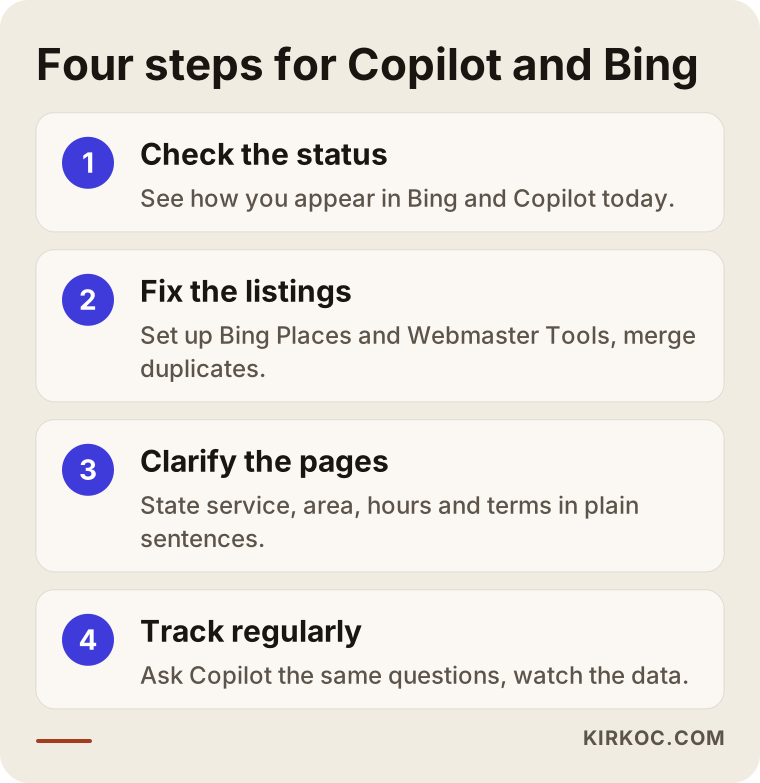
1. Checking where you stand
I search Bing for your business name, your service and your area. I ask Copilot the kinds of questions your customers would ask: "Who would you recommend for...?" and "Is there a ... near ...?" I note which sources it shows and what it says about you. I check whether you have a Bing Places listing, how many you have, and whether the details are right. If Webmaster Tools is already set up, I review which pages are in Bing's index.
2. Fixing the listings
I create or claim your Bing Places listing, merge duplicate cards and make every detail match your Google profile and your website exactly. I set up Webmaster Tools, submit the sitemap and fix crawl errors. Where it makes sense, I add IndexNow.
3. Clarifying the pages
I rewrite the opening paragraphs of your main service pages so an AI could sum each one up in a single sentence. I state your service area, hours, who you serve and how to request a quote in plain language. I add the questions customers ask most often. When it is needed, I create a new page, for example one aimed at corporate clients or one for a specific town or neighborhood.
4. Tracking
I check crawl and visibility data in Webmaster Tools on a regular schedule. Every so often, I ask Copilot the same questions and note whether the answer has changed. When something changes at your business, such as your address, hours or services, I update every listing on the same day.
What are the most common mistakes?
The most common mistake is never thinking about Bing at all. The second is setting it up once and forgetting it. Here are the others.
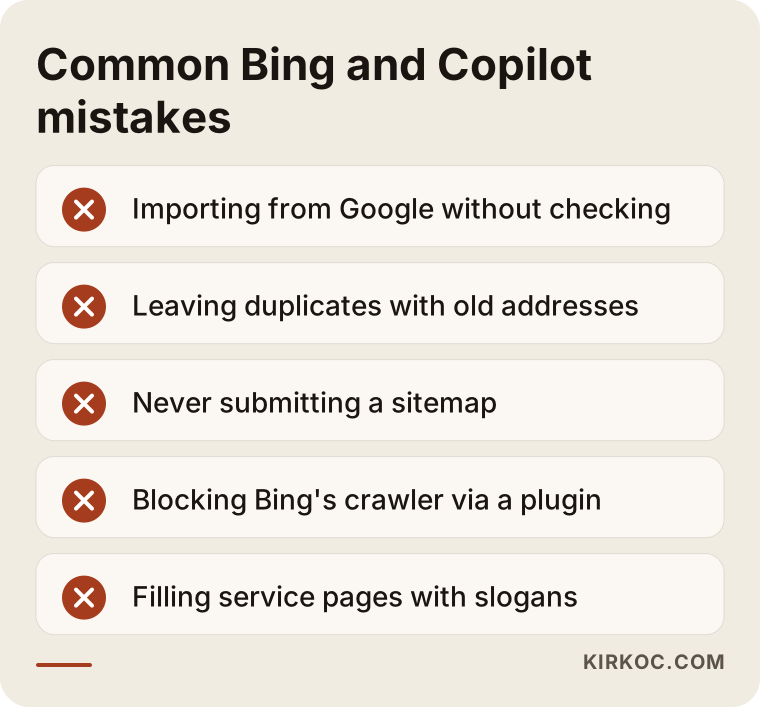
- Importing from Google without checking: Importing is fast, but every error on Google comes along with it.
- Leaving several Bing listings in place: an old address, an old name, an automatic card pulled from a directory. Copilot cannot tell which one is correct.
- Never submitting a sitemap: Bing may crawl a small part of your site and never see the rest.
- Blocking Bing's crawler by accident: Some security plugins and server settings flag Bing's crawler as suspicious and block it. Site owners usually have no idea this is happening.
- Drowning the service page in slogans: Words like "quality, trusted, professional" tell Copilot nothing. Write what you do, where, and for whom.
- Hiding prices and terms completely: You do not have to post numbers, but explaining what your price depends on and how you prepare a quote makes you a source that actually answers the question.
- Trying to trick Copilot: hidden text on pages, fake reviews, listings for locations that do not exist. These break platform rules, and once they are noticed, they destroy trust completely.
The image below gathers the ones I run into most often into a short warning list.
What can you do yourself, and when do you need a specialist?
Creating a Bing Places listing, entering your details correctly and setting up Webmaster Tools are tasks anyone comfortable with a computer can finish in an afternoon. Here is what you can do on your own:
- Search Bing for your business name and see what comes up.
- Create a listing in Bing Places or claim the one that already exists.
- Compare your phone number, address, hours and category with your Google profile and make them match.
- Add your site to Webmaster Tools and enter your sitemap address.
- Ask Copilot a few questions the way your customers would, and write down the answers.
Bringing in a specialist starts to make sense when:
- Webmaster Tools shows crawl errors you do not understand.
- You have more than one location, or more than one duplicate listing.
- Your site is custom-built and adding IndexNow or structured information requires code changes.
- Your service pages need a full rewrite, or new pages need to be planned.
- Google, Bing, social media and ads are all running at the same time, and your information has to stay current across all of them.
That last point is where having one person handle everything pays off the most. When your website sits with one provider, SEO with another and social media with a third, a change in your hours gets remembered by one of them and forgotten by the others. When one person knows the whole picture, you mention the change once and it goes out everywhere on the same day. The details in your ad campaign and the details in your Bing listing end up matching, too.
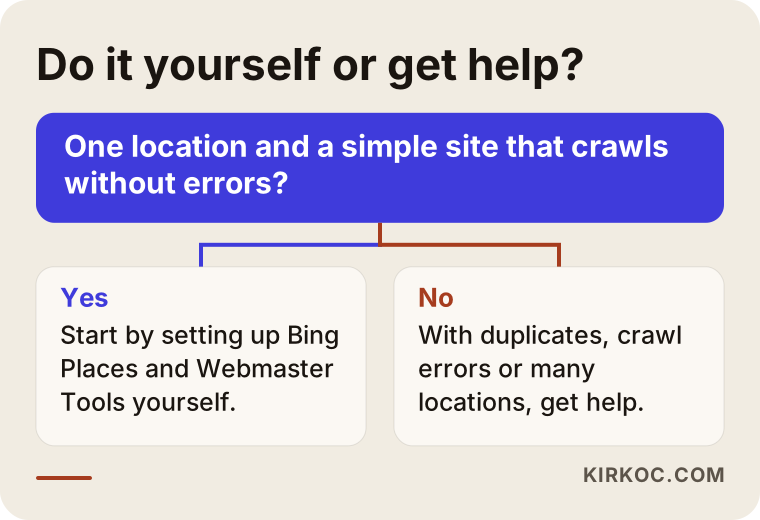
The decision graphic below gives you a rough way to tell whether you should do it yourself or get help.
How to choose the right specialist
The right specialist is someone who does not treat Bing and Copilot as Google's little sibling, and who tells you plainly what they will do and what they cannot guarantee. Here are concrete things to check:
- Do they handle Bing separately? Bing Places, Webmaster Tools and a Copilot check should appear as separate items in the proposal.
- Can they show you where you stand today? Before starting, they should be able to walk you through how you currently appear on Bing and in Copilot, with screenshots.
- Do they avoid guarantees? Be careful with anyone who says, "You'll be Copilot's top recommendation." Nobody can promise that.
- Can they write content? Half the work is technical setup and half is clear page copy. Someone who only does the setup and leaves the writing to you is doing half the job.
- Whose name are the accounts in? Your Bing Places and Webmaster Tools accounts should be created in your name, with your email address. When the work ends, the access should stay with you.
- How do they track progress? How often things get checked and how results get reported to you should be clear from the start.
Questions you can ask in a first conversation:
- "Can you show me how I appear on Bing and in Copilot right now?"
- "Whose name will the Bing Places and Webmaster Tools accounts be in?"
- "Which of my pages would you change, and why?"
- "How will you keep the Google side and the Bing side in sync?"
- "What will we look at to judge whether this is working?"
The answer to that last question tells you a lot. If, instead of a ranking or recommendation guarantee, you hear measurable things like "the number of pages Bing has indexed, your visibility in Webmaster Tools, changes in Copilot's answers, and visits and calls coming from Bing," you are on the right track.
What drives the cost?
Cost depends on how much of the work is setup, how much is writing and how much is ongoing tracking. I will not give you a number, because very different amounts of work fall under the same label. The main factors that move the price are:
- Number of locations and listings: One address and ten locations are not the same job. Cleaning up duplicate and incorrect listings also takes extra time.
- The state of your website: whether there are technical problems such as crawl errors, slow pages or a blocked crawler, and what platform the site is built on.
- How many pages need writing or rewriting: Editing existing pages is a different job from writing new service and area pages from scratch.
- How sensitive your industry is: In fields like healthcare, law and finance, page copy needs to be prepared with extra care.
- How long and how often tracking runs: a one-off cleanup, or monthly checks?
- Whether it runs alongside other work: If Google SEO, social media or ads are already underway, the Bing side can be folded into that work instead of being priced as a separate project.
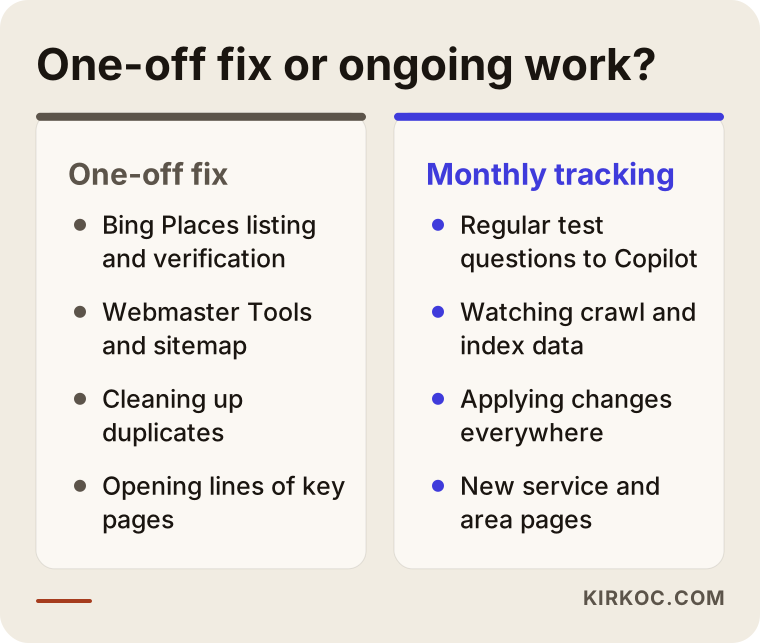
The comparison below puts a one-off cleanup and ongoing work side by side so you can see what each covers.
Working with Ümit Kırkoç
I am Ümit Kırkoç. I am based in Istanbul and work remotely with businesses in the US, Europe and Turkey. Websites and e-commerce, SEO, local SEO, AI visibility (GEO), social media management, Google and Meta ads, logo and brand identity, content writing: I handle all of it as one person. There is no team, no account manager and no separate person in the background doing the actual work. The person you talk to is the person who does the job.
Here is how I approach the Copilot and Bing side. Before our first call, I look at how your business currently shows up on Bing and in Copilot and walk you through it with screenshots. Then I put in writing which listings need fixing, which pages need writing and what I cannot guarantee. I create the Bing Places and Webmaster Tools accounts in your name, or get added as a user to the accounts you already have, so the access stays with you when the work is done.
If someone else built your website, I work with the platform you already have, and I coordinate with your developer when needed. If your website, social media and ads are with me as well, I apply any change in your details everywhere on the same day. That way, your Google profile, your Bing listing, your Instagram bio and your ad copy all say the same thing, and that consistency is exactly what AI assistants look for. Working across time zones has not been a problem in practice; most of this work happens in shared dashboards and documents, and we can schedule calls at a time that suits your business day.
For ongoing tracking, I check Copilot and other assistants regularly with the questions we agree on, review your Webmaster Tools data and tell you in plain language what changed and what comes next. I do not guarantee results, but I will always tell you clearly what I am doing and why.
Frequently Asked Questions
Who should I hire to get my business recommended in Copilot?
Look for someone who treats Bing and Copilot as their own job, can set up Bing Places and Webmaster Tools, and can also write your service pages. A service that focuses only on Google may not fully cover what you need. As one option, working remotely from Istanbul, I handle this alongside your website, SEO and social media, all through one person.
Is it worth the effort to show up on Bing? Doesn't everyone use Google?
It is worth it if your customers search from work computers or use assistants like Copilot. The basic setup takes little effort, so for most businesses it is well worth doing. To see how many visitors already come from Bing, just check your website analytics.
If I have a Google Business Profile, do I still need Bing Places?
Yes, because Bing uses its own business data. You can import your Google profile into Bing Places, which speeds things up. After importing, though, double-check every detail, and from then on make every change in both places.
Can anyone guarantee that Copilot will recommend my business?
No, nobody can guarantee that. Copilot's answer changes with the question, the user's location, your competitors and whatever Bing knows at that moment. What a specialist can do is make your business a correctly understood source that Copilot is able to quote.
Does work done for Bing and Copilot also help with other assistants like ChatGPT?
Largely, yes. Clear service pages, consistent business details and accurate mentions on other websites help every AI assistant. Some assistants are known to have used Bing's infrastructure for web search, but those relationships can change over time, so it is wiser not to build your strategy around a single platform.
How soon will I see results?
Listing corrections usually show up on Bing within a few days to a few weeks. Getting new pages crawled and included in Copilot's answers can take longer, and no one can give you an exact timeline. You can follow progress by watching the changes in Webmaster Tools.
Is Copilot and Bing work expensive for a small business?
For a business with one location and a decent website, the work is usually limited. The real cost drivers are how many pages need writing and how often tracking happens. When it runs alongside Google SEO or social media management, the Bing side stops being a separate project.
Is it a problem to have this done remotely, from another country?
No. Bing Places, Webmaster Tools and website edits are all done online. Steps that require verification, such as a code sent by phone, text or mail, need a small bit of help from you; I handle the rest remotely.
If you are curious how your business looks on Copilot and Bing right now, send me your business name and website. We can review where you stand together, and I will explain in plain language what you need. For details and to get in touch, take a look at my AI visibility (GEO) services page.