You run a boutique. Maybe you have a storefront, maybe you only have an Instagram account and a spare room full of inventory. Most orders arrive as direct messages, and half of your day disappears into answering the same questions: "Do you have this in a medium? When does it ship? Can I exchange it?" At some point you start thinking about your own online store, and the moment you search for options, you are buried in platforms, templates and agencies. This article walks through how to build a boutique clothing website that actually sells, with a focus on the problems that are unique to fashion. I am Ümit Kırkoç, I work alone from Istanbul, and I handle ecommerce website projects end to end, from design to search visibility.
Let's get one thing straight first: clothing is one of the hardest categories to sell online. You are asking someone to commit to a garment they cannot touch or try on. If the size is off, you get a return. If the fabric looks different from the photo, you lose trust. So a good boutique site is not a digital catalog. It is a sales counter that answers questions before anyone has to ask them and calms the worries of a hesitant shopper.
How do boutique shoppers actually find you?
A boutique customer rarely arrives by one road. Some see a post on Instagram and tap through to your profile. Some type "linen wide-leg pants" into Google. Some click a link a friend texted them. Your site has to work for all three.
On Google, people seldom type a brand name they have never heard of. They describe what they want: "oversized linen shirt," "midi dress for a summer wedding," "plus size tunic." If you have no page that matches one of those descriptions, that shopper never sees you. And the product that goes viral on your Instagram often has no matching page on the web at all, because the product page is a single line of text with a photo.
The example below is a made-up search result, not a real store. It shows how a specific page can stand out.
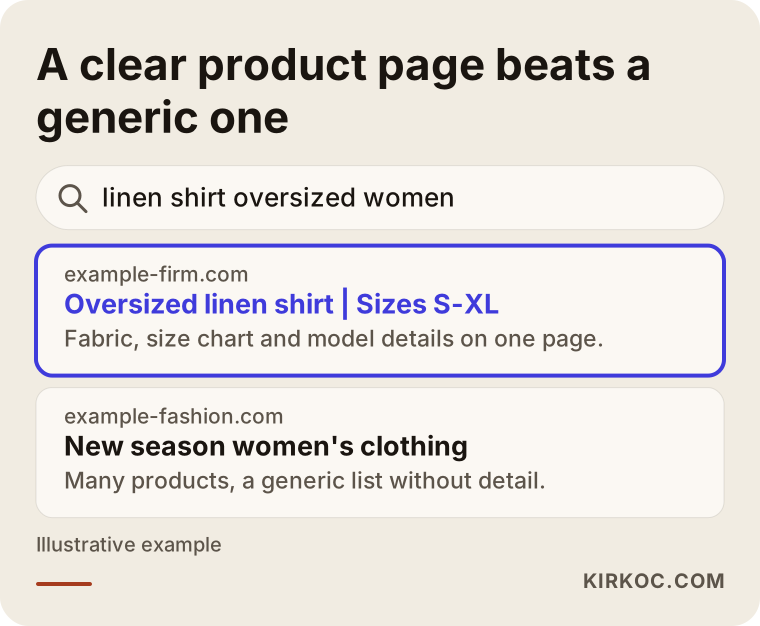
The highlighted result names the item, mentions the fabric and gives the size range. The generic "new season women's clothing" page does not tell anyone what it sells or to whom. Google and a human shopper ask the same thing: does this page give me what I was looking for?
You have Instagram. Why do you need a website?
I hear this question a lot. Instagram is a wonderful shop window, but it was not built to take orders. It has no real stock tracking, no tidy size picker, no order screen for the customer to check later. Everything depends on messages you type by hand. And if your account gets locked, or the algorithm decides not to show your posts for a month, your customer list and your product archive sit on someone else's servers.
A website of your own is an asset you control. Customer records, order history, product pages and your place in search results all belong to you. I am not telling you to abandon Instagram. The better plan is to use it as the door that sends people to your site. When the website and the social media management are handled together, that gets easy: the product you post is already waiting on a finished page, with the same name and the same photos.
Marketplace or your own store?
Selling through Etsy, Amazon, Poshmark or a similar marketplace is tempting at the start. There is built-in traffic and built-in trust. But for clothing there are real trade-offs. Fees come out of every sale, price competition is harsh, and the buyer is the marketplace's customer more than yours. For a boutique with a distinct style, not being able to tell your own story is a serious loss.
Often the healthiest setup is to think of both: the marketplace for volume and recognition, your own store for brand, repeat customers and your own pricing. The comparison below sums up the difference.
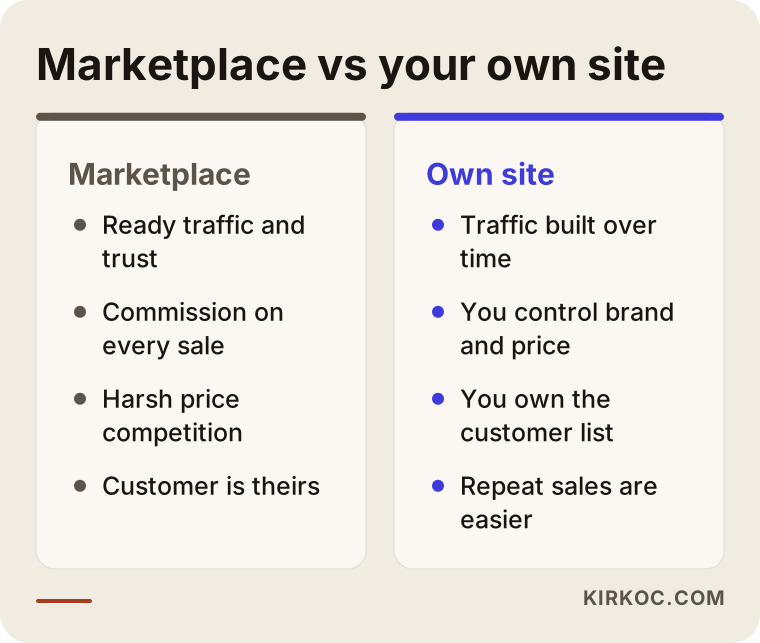
As you read it, ask yourself one thing: three years from now, who do I want to hold my customer list? If the answer is "me," a store of your own is no longer a luxury. It is a basic investment.
Which pages does a boutique site need?
Many owners picture a site as a home page plus a pile of products. A store that really sells is made of several kinds of pages, and each has its own job.
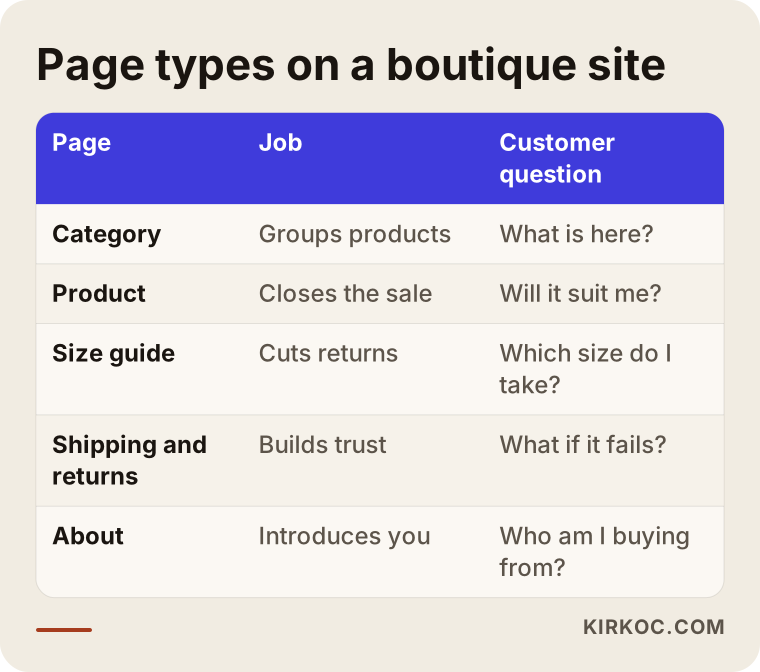
Let's go through them one at a time.
Category pages. Headings like "Dresses," "Pants" and "Knitwear" matter to search engines as much as to shoppers. A category page should hold more than a grid of photos. A short, honest paragraph helps: which cuts live here, who they suit, what season they are for. A category left empty makes it hard for Google to understand what the page is about.
Product pages. This is where a site either sells or does not. I cover it in detail below.
Size and fit guide. Fit is the number one reason clothing gets sent back. A short measurement chart under every product, plus a note like "model is 5'9" and wears a small," does a lot of work. Keep a separate guide page too, so a customer can learn how to measure themselves.
Shipping and returns page. Before paying, a shopper wants to know what happens if it does not work out. If this page is vague, the cart gets abandoned. The legal side of your return terms, as well as sales tax and business registration, varies by country and region, so please talk to an attorney or accountant about it. I can help make the text clear and complete, but I am not the person who signs off on legal wording.
About page. Boutique shoppers want to know who is behind what they buy. A warm page about who you are, how you pick pieces and where they come from carries a large share of the trust.
Contact and store information. If you have a physical shop, put the address, hours and a map here. Local visibility matters for shops with a storefront. Someone searching "boutique near me" in your town who finds both your shop and your site feeds both.
What should a product page look like?
The product page is the counter itself. When a shopper lands here, the questions are always the same: how does it look on, what is the fabric, is my size in stock, when will it arrive, and what if it does not work?
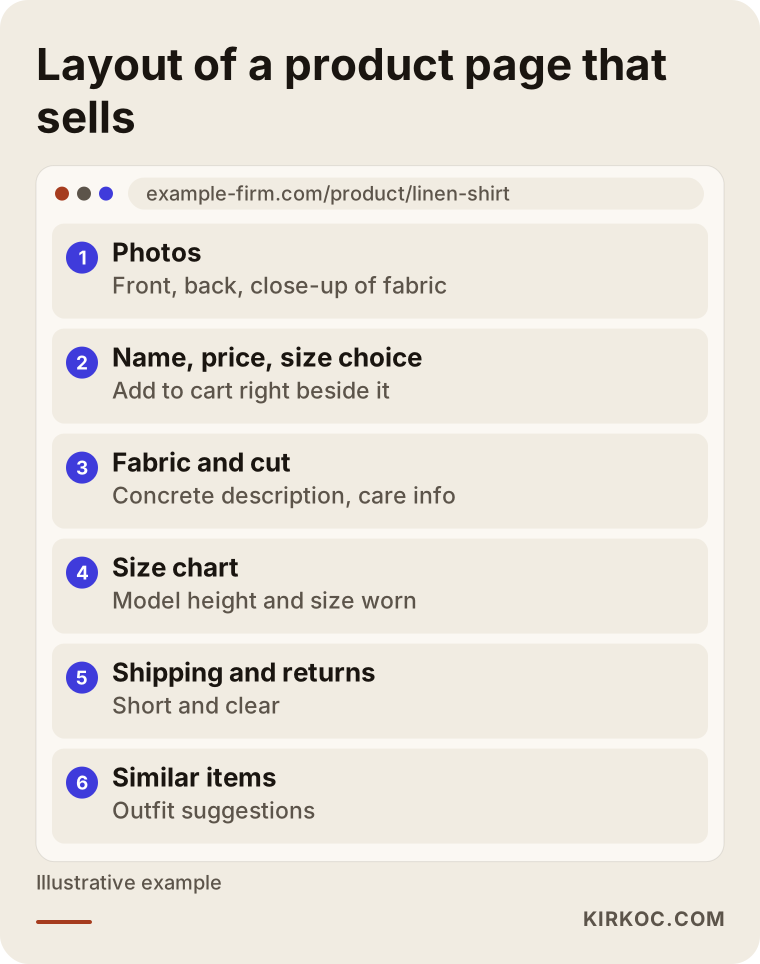
The logic of this layout is simple. At the top is the item itself: photos and price. Right beside them, the size picker and the add-to-cart button. Further down come fabric, cut, care instructions and the size chart. Then a short shipping and returns summary, and similar items at the bottom.
A few small but important notes on photography:
- Show front, side, back and a close-up of the fabric. One model photo is not enough.
- Show the true color. If a piece you list as "burgundy" arrives looking red because of the lighting, a return is almost certain.
- If you can, show the same piece on different body types. Shoppers ask for this more than anything and almost nobody does it.
- Compress image files before you upload them. Heavy photos slow the page down, and people shopping on a phone will not wait.
Descriptions should not be filler either. "Stylish and comfortable" is a sentence everybody writes and it tells nobody anything. Compare it with "Elastic waist, wide leg, thick soft knit, heavy enough for winter." That helps the shopper, and it tells Google what the product is.
Why is the size chart so important?
Because uncertainty is the biggest conversion killer in clothing. A person wondering "will this fit me?" either floods you with messages or leaves without ordering. A well-made chart reduces both. Writing a table by hand for every item gets tiring, so build it once, attach it to categories, and update it only when measurements change.
The path from visitor to order
You cannot tell whether a store sells by looking at a single number. You have to see where visitors give up.
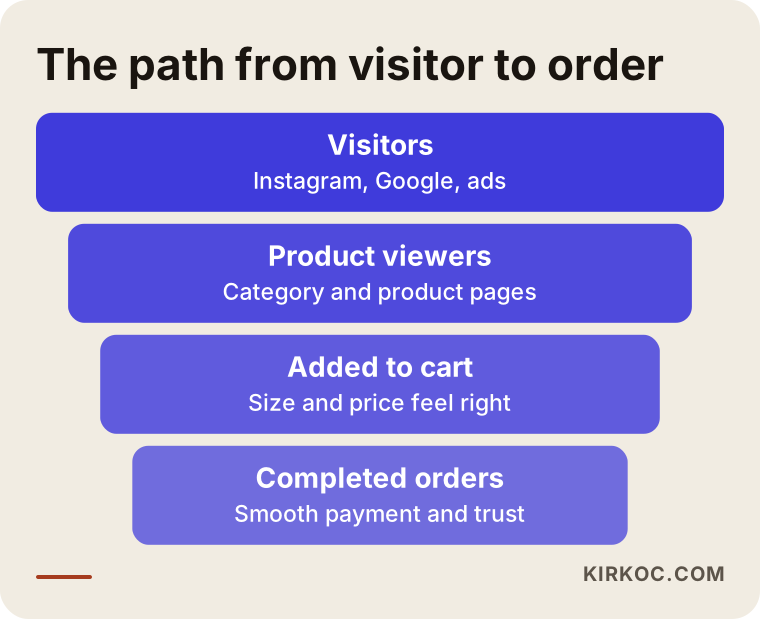
This funnel applies to every online store, but clothing loses people at particular points. Step one: the visitor arrives. Step two: they open a category and look at a product. Step three: they add something to the cart. Step four: they finish paying. Wherever the drop is largest is where the fixing should start.
For example, if many people visit but few click on a product, the problem is usually the home page and category layout. If many view products but few add to cart, look at photos, descriptions and size information. If many add to cart but leave before paying, the usual causes are a surprise shipping charge, a forced account signup or a shortage of trust signals. Not surprising people at checkout has a direct effect on how many orders you get.
Two hypothetical examples
The scenarios below are entirely hypothetical. They do not describe any real business or person; I made them up to show the reasoning.
Example scenario 1: a boutique that grew on Instagram and has no storefront. Imagine someone who sells women's clothing from home through Instagram. Orders come in by DM, and for each one the size, address and payment details are typed out manually. Stock lives in a notebook. My first suggestion to this person would not be a huge, elaborate site. It would be a simple store with a clean catalog and a proper order flow: categories, a size choice and stock count for each product, card and bank payment, and shipping details. Then Instagram posts that link straight to the product page. The goal is to lift the burden of typing orders into DMs and let customers check out on their own. Search engine work can wait; the first job is getting orders to flow smoothly.
Example scenario 2: a boutique with a shop that is new to selling online. Now imagine a boutique that has traded in the same neighborhood for years, with customers who mostly live nearby. The owner wants a website, but the same shelves supply both the shop and the site. The key issue here is stock sync: when something sells in the shop, it has to show as sold out online, or an order will arrive for a piece you no longer have. Local visibility on Google matters too, because a customer searching in that town could find both the shop and the site. The site sells online and also says "come visit the shop."
Both scenarios show that two boutiques in the same industry can need different things. That is why looking at your own situation comes first.
How does the process go, step by step?
Building a boutique site does not have to be long or foggy. The order below summarizes how I run these projects.
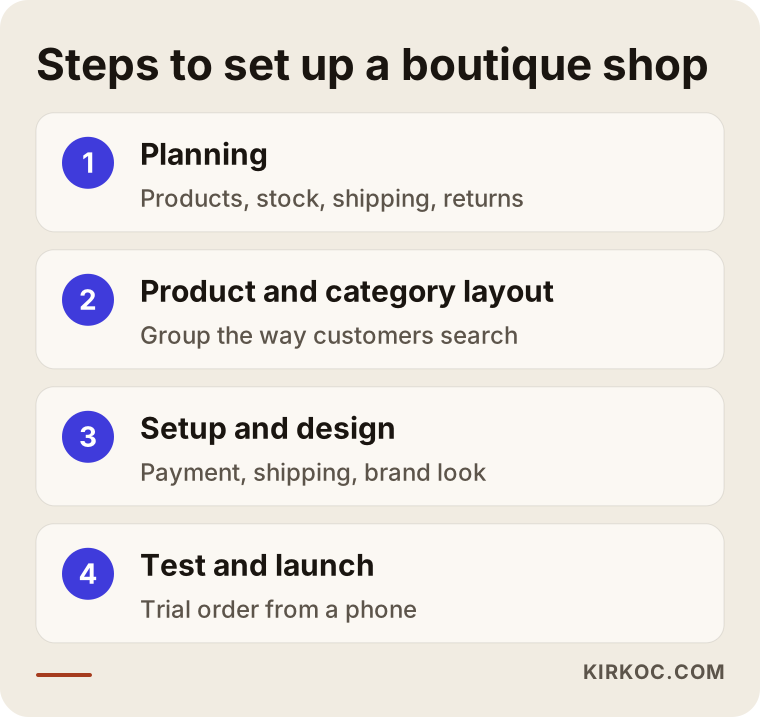
Planning. In the first conversation we talk about what you sell and to whom, how many products you have, your shipping and return policy, and how you manage stock. This is also when the list of pages and the payment methods get settled.
Product and category layout. Together we decide how to group the products. Do your customers shop by season, by cut or by occasion? That decision shapes the menu and the search visibility alike.
Setup and design. The store platform is installed, payments and shipping are connected, and your brand colors and logo go in. If you have no logo or visual identity yet, I can make those in the same project, so the site, your Instagram and your packaging all speak with one voice.
Testing and launch. Before going live I place test orders from a phone and a computer and run a payment. We check that order emails arrive, shipping details are right and stock goes down as it should.
Launch day is a beginning, not an end. Getting found on Google, improving product pages over time and working alongside social media come after.
Mistakes boutique owners often make
Over the years I have seen the same mistakes again and again. Most are not expensive to fix, but they quietly cost sales.
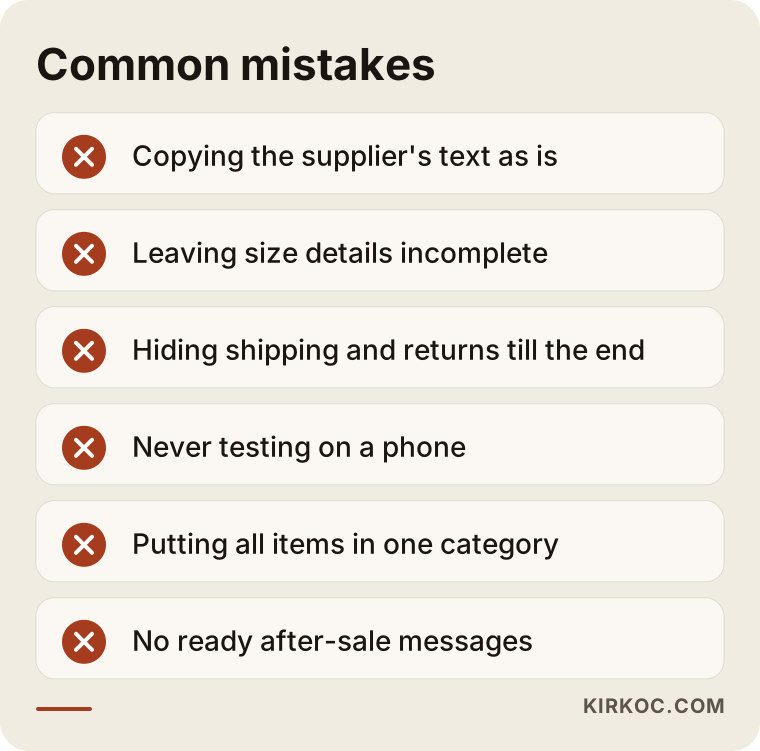
The most common ones:
- Using the supplier's description word for word. Text and photos from a wholesaler appear identically on dozens of other sites. Google cannot tell them apart and neither can the shopper. Use your own sentences and your own photos.
- Leaving out size details. Writing "S, M, L" is not enough. Without measurements and the size the model wears, shoppers guess, and returns go up.
- Hiding shipping and return terms. If a customer finds out at the last step, they leave the cart.
- Not testing on mobile. Most clothing shoppers browse on a phone. If buttons are tiny, photos load slowly or the size table spills off the screen, you lose the sale.
- Putting every product in one category. Hundreds of items under a single "Shop" heading wears out both the visitor and the search engine.
- Not carrying your Instagram voice onto the site. If your account is warm and personal and the site reads like a cold catalog, the customer feels the gap.
- Ignoring what happens after the sale. Without ready messages for order confirmation, tracking and returns, every customer ends up writing to you one by one.
What can you do yourself, and when do you need an expert?
You do not have to hand everything to a specialist. Several jobs you can do well yourself, and that protects both your budget and your brand voice.
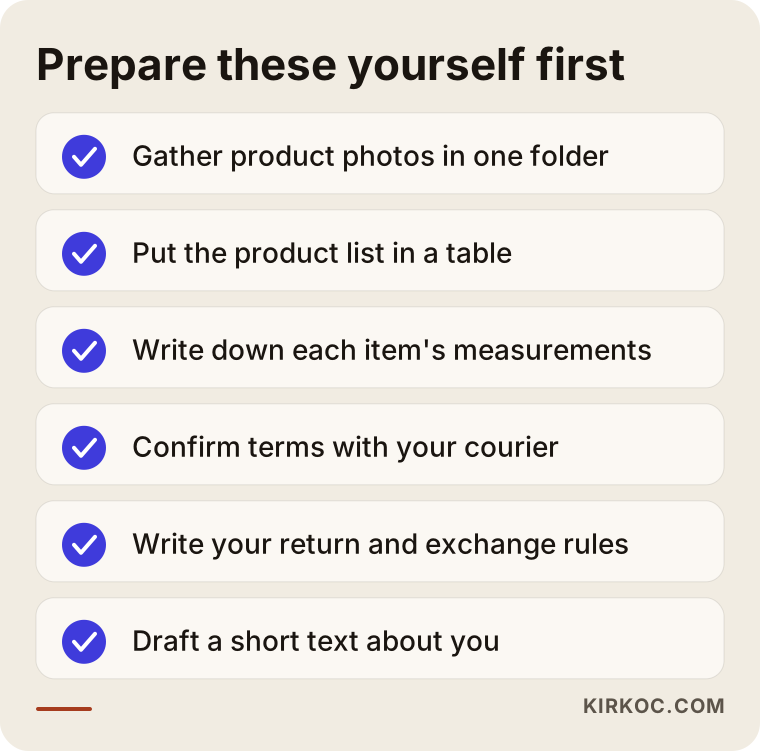
This list shows the preparation you can finish before talking to anyone. Gathering photos, organizing the product list in a spreadsheet, writing down measurements and confirming terms with your shipping carrier are all in your hands. A boutique that arrives with this done makes the project faster and cheaper.
Where you do want an expert is usually: setting up the store platform and secure payment connection, making the site fast on phones, structuring pages for search engines, setting up ad accounts correctly and placing tracking codes. If these are built wrong once, fixing them later can be harder than starting over.
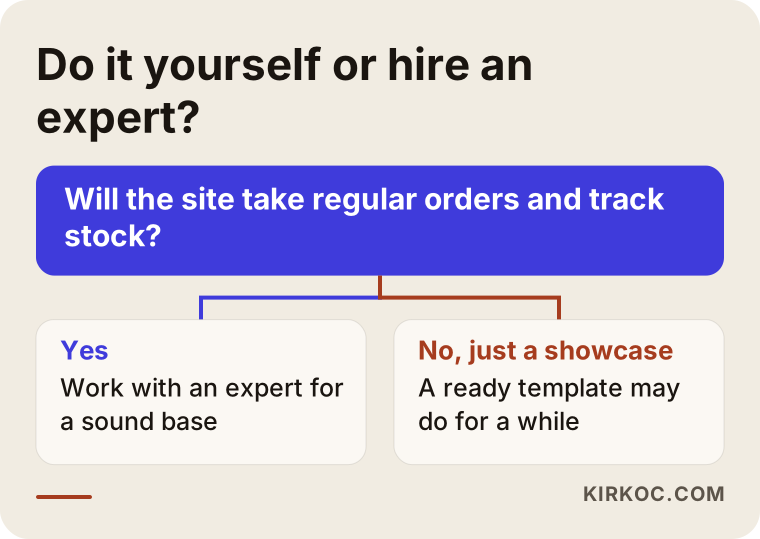
The main question in the flow is this: are you responsible for the site actually producing sales, or do you just want a showcase? A basic showcase for a few pieces can run on a ready-made template. A boutique that will take regular orders, hold stock and run promotions is usually better off, in the long run, with a properly built foundation. Trying alone and getting stuck can also cost months, so knowing when to bring in help is a skill in itself.
What determines the cost
I am not going to quote numbers in this article, because two boutiques rarely need the same thing and a general figure would mislead you. What I can do is tell you plainly what moves the price:
- Number and variety of products. Starting with twenty pieces is a different job from loading several hundred with sizes, colors and stock counts.
- Size and color options. If every item has many variations, setup and testing take longer.
- Payment and shipping integrations. The card processor you choose, bank transfer options and a connection to your carrier all require extra work.
- Design expectations. Adapting a ready-made template to your brand takes less effort than designing something made just for you.
- Photos and copy. There is a difference between you taking the product photos and writing the text, and me preparing the content.
- Software running costs. Domain name, hosting, payment processor fees and any paid plugins or apps are separate line items.
- Support afterward. Whether you also want search engine work, ad management and social media help after launch changes the total budget.
In our conversation we work out which of these weighs most in your case. If you come with a clear product count and a list of needs, I can prepare a written, understandable quote.
What can you expect in the first months?
It is not realistic to expect a flood of orders on day one. Google needs time to discover the site and evaluate its pages, and customers need time to trust you. I do not promise any result, but I can describe how the process usually unfolds.
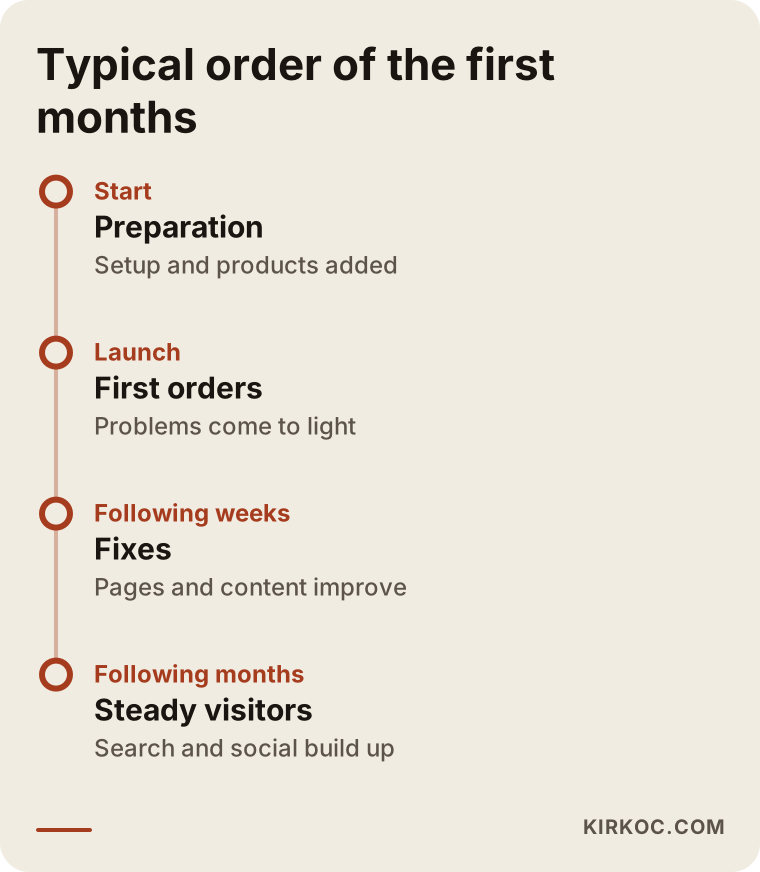
The timeline reads like this: first the foundation and products are prepared, then the site goes live and the first orders reveal problems, then fixes and content work follow, and later visitors from search and social media start arriving more steadily. Ads can speed this up, but when the ads stop, the traffic stops. That is why planning ads together with organic visibility is the healthier approach.
Why should the site, SEO, social media and ads be handled by one person?
Because these four jobs depend on each other. If the product name on your site matches the name in your Instagram post, both the customer and Google recognize the same thing. If the promise in an ad matches what the landing page says, the person who clicks goes on to order. When each job goes to a different person, you end up coordinating the message between them. Since I do all of it myself, communication stays simple and I can see faster which step is causing the trouble.
How I work with you
In the first call I learn your current situation: your Instagram account, your shop if you have one, how many products you carry and how you ship. Then I draw up a realistic roadmap: what to do now and what to leave for later. I will not try to sell you features you do not need. Sometimes saying "a simple store is enough for now" is part of my job.
Throughout the project you deal with one person. The same person builds the site, does the search engine work, produces the social content and manages the ads, so there is no argument about whose job something is. After launch I share reports in plain language: how many people came, which products drew interest and where you are losing shoppers.
Frequently asked questions
Do I need a physical store to build a boutique clothing website?
No. Plenty of boutiques that sell only through Instagram build their own sites. To sell commercially, though, there are legal requirements for business registration and taxes, and these differ by country and region. I suggest talking to an accountant about your situation.
I already have Instagram. Do I really need a separate website?
It depends on your goal. If you sell a few pieces through DMs, you can get by for a while. As orders grow, tracking stock, sizes and payments by hand becomes hard. Your own site automates those parts and leaves the customer list with you.
I have built the site. How will customers find it?
There are three main roads: traffic sent from social media, visitors from search engines and ads. Which one comes first depends on your product and budget. Planning all three together is the most efficient way.
Can I prevent sizing problems and returns completely?
No. Returns are a normal part of selling clothing. But a clear measurement chart, photos in true color and a plain returns page can cut them down noticeably. For the legal side of your return terms, talk to an attorney.
Can I keep selling on marketplaces too?
Yes. Many boutiques sell both on marketplaces and on their own site. You just need to manage stock consistently in both places, or an order will come in for a piece you no longer have.
Can I shoot the product photos myself?
For most boutiques, a good phone, natural light and a plain backdrop are enough to start. What matters is consistency: the same light, the same angle, the same background. As budget grows, you can move to professional shoots.
Can I add products myself after launch?
Yes. I set up the site so that you can add products, update prices and change stock on your own, and I give you a short walkthrough on how to do it.
Can you guarantee that I will rank first on Google?
No, and nobody can honestly promise that. Building the pages correctly, improving the content and keeping the technical base sound are in my hands. Rankings depend on how Google evaluates your site and on the competition.
If you are thinking about an online store for your boutique, you only need to tell me how many products you have and how you sell today. Take a look at my ecommerce website service and get in touch, and we will work out a simple, realistic plan for your situation together.